AIFreeAPI Logo

Nano Banana Free Use: Complete 2026 Guide to Every Free Access Method

A
25 min readAI Image Generation

Nano Banana is free through 7+ channels including Gemini App (~20 images/day), Google AI Studio (~50/day at 2K), and Flow Labs (30-day trial). This guide compares every method with verified limits, safety ratings, and helps you choose the right one for your needs.

Nano Banana free use complete 2026 guide

Nano Banana has become the most searched free AI image generator of 2026, and for good reason. Google's image generation technology, powering models like Nano Banana 2 (gemini-3.1-flash-image-preview) and Nano Banana Pro (gemini-3-pro-image-preview), produces stunning results that rival paid tools like Midjourney and DALL-E 3. The natural question everyone asks is whether they can use it without paying anything. The answer is yes, but the details matter far more than the headline. There are at least seven distinct ways to access Nano Banana for free in 2026, each with different daily limits, resolution caps, watermark policies, and technical requirements. Some methods give you twenty images a day at modest resolution. Others unlock fifty daily generations at 2K quality with no watermark. A few offer temporary access to the full 4K experience through trials. This guide walks through every verified free access method as of March 31, 2026, compares them honestly, and helps you pick the right one based on what you actually need. If you have been wondering whether Nano Banana is truly free, the short answer is that it depends entirely on which channel you use and what trade-offs you are willing to accept.

TL;DR

  • Gemini App (free tier) gives approximately 20 Nano Banana 2 images per day at 1K resolution with a watermark, and it requires only a Google account.
  • Google AI Studio is the best-value free method, offering around 50 requests per day at up to 2K resolution with no watermark, though it requires basic technical comfort.
  • Google Flow Labs provides a 30-day trial with 1,000 monthly credits and access to full 4K generation, making it the highest-quality temporary free option.
  • Google AI Pro trial unlocks 30 days of generous quotas across all Nano Banana models through a standard Google subscription trial.
  • Student Program offers 12 months of free AI Pro access for verified students, which is the longest free path available.
  • Third-party wrapper platforms vary wildly in reliability and safety, but a few established ones offer limited free generations.
  • API proxy services provide pay-per-use access starting at $0.05 per image when free methods are insufficient.

What Is Nano Banana and Why Is It the Hottest Free AI Image Tool?

Google introduced Nano Banana as its consumer-facing brand for AI image generation within the Gemini ecosystem. The technology runs on two distinct models that serve different purposes and audiences. Nano Banana 2, internally identified as gemini-3.1-flash-image-preview, launched on February 26, 2026 and immediately generated massive interest because of its speed, text rendering accuracy, and ability to produce images up to 4K resolution. Nano Banana Pro, which runs on gemini-3-pro-image-preview, followed as the premium option optimized for photorealistic output and complex scene composition at resolutions up to 1K. Both models represent a significant leap in what Google offers for image generation, and the fact that portions of this capability are accessible for free has driven enormous search volume throughout early 2026.

What makes Nano Banana genuinely different from earlier free AI image tools is the combination of capabilities it brings to the table. The 4K output resolution through Nano Banana 2 is something that Midjourney charges for and that DALL-E 3 does not offer at all in its standard consumer interface. Text rendering, which has historically been the Achilles heel of AI image generators, works remarkably well in both Nano Banana models. Multi-turn editing allows you to refine an image through conversational instructions rather than rewriting your entire prompt from scratch, which is a workflow improvement that experienced users immediately appreciate. Subject consistency across multiple generations means you can create a character or product shot and then generate variations that maintain visual coherence. These are not experimental features buried in a research preview. They are production-ready capabilities available through the same Gemini interface that hundreds of millions of people already have access to.

The free access question matters because the AI image generation market has split into two camps. On one side, tools like Midjourney require a paid subscription starting at $10 per month with no free tier at all. On the other, Google has chosen to offer meaningful free access to its best image generation technology, creating a unique position where professional-quality output is genuinely available at zero cost within certain limits. Understanding those limits and how to work within them or around them is what separates someone who gets occasional frustrating results from someone who builds a reliable free workflow.

The search volume around "nano banana free" and related queries has grown steadily since the model launched, and most of the ranking results mix together official Google channels, third-party wrapper sites, and paid plans in ways that confuse rather than clarify the decision. Some pages list methods that are no longer available. Others conflate the Gemini App free tier with the AI Studio developer playground as if they were the same thing, when in reality they have different limits, different resolution caps, and different watermark policies. A few guides promote third-party platforms without disclosing the privacy trade-offs involved. The rest of this guide is about building a reliable free workflow with verified information rather than the vague promises you find on most ranking pages. Every number cited here was confirmed against official Google documentation or direct testing as of March 31, 2026.

Every Free Way to Use Nano Banana -- Complete 2026 Comparison

Complete comparison table of all free Nano Banana access methods showing daily limits, resolution, and ratings

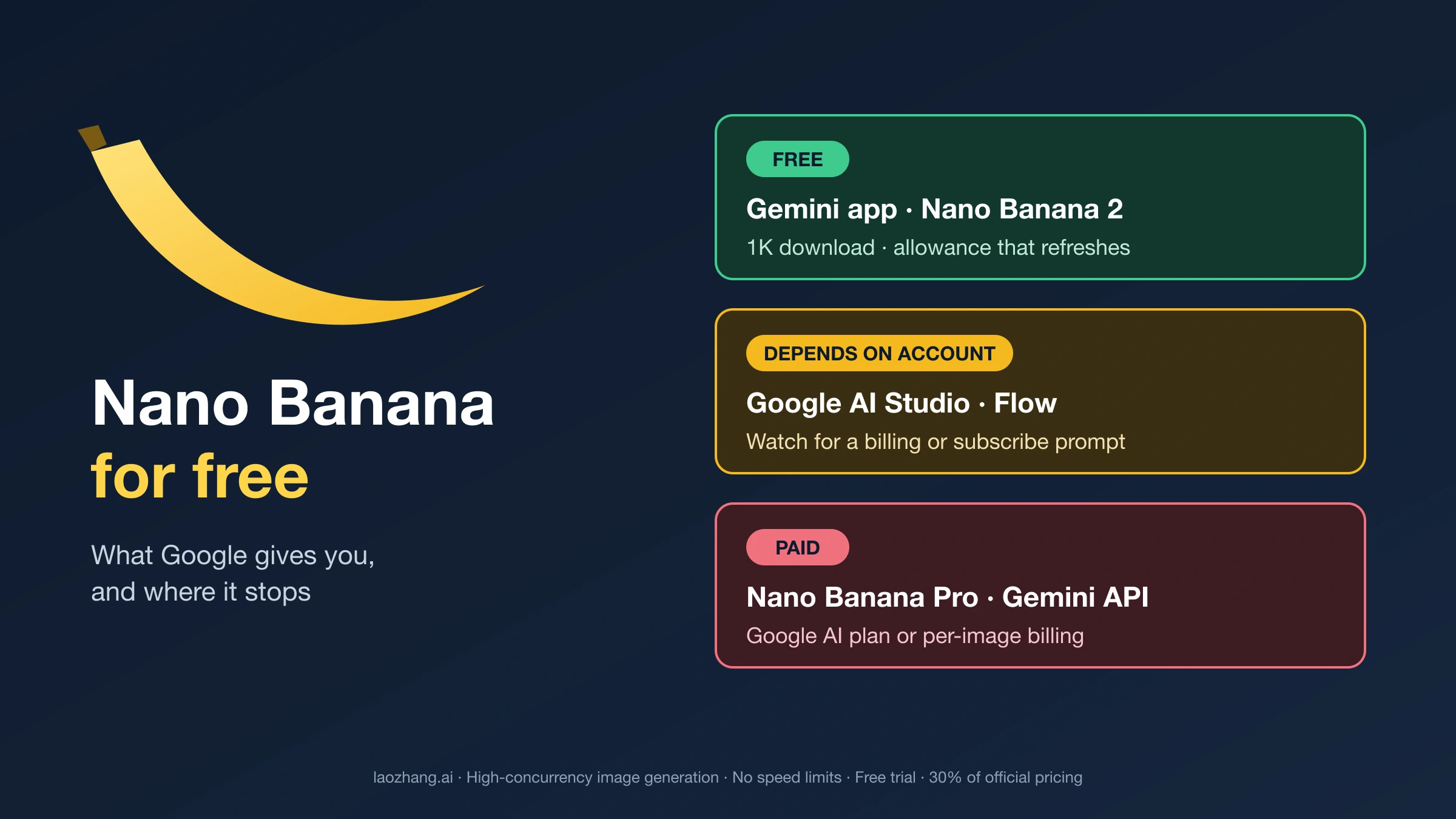
Before diving into the details of each method, it helps to see all seven free access channels side by side. This comparison table reflects verified information as of March 31, 2026, drawn from official Google documentation and direct testing. The daily limits, resolution caps, and policies listed here are subject to change, as Google has adjusted these numbers several times since Nano Banana 2 launched in February 2026. Treat this as a current snapshot rather than a permanent specification.

MethodDaily LimitMax ResolutionWatermarkCommercial UseTech SkillBest ForRating
Gemini App (Free)~20 images1KYesPersonal onlyNoneCasual users, quick tests7/10
Google AI Studio~50 requests2KNoYes (API terms)Low-MediumCreators, small business9/10
Google Flow Labs1,000/month (trial)4KNoYes (trial terms)MediumProfessional evaluation8/10
AI Pro Trial100/day (30 days)2KYesPersonal (trial)NoneHeavy personal use7/10
Student Program100/day (12 months)2KYesPersonal (edu)NoneStudents, learners9/10
Third-Party WrappersVaries (5-30/day)Usually 1KVariesUsually noNoneNo-account quick tests4/10
API Proxy (laozhang.ai)Pay-per-useUp to 4KNoYesMediumDevelopers, volume users8/10

The standout finding from this comparison is that Google AI Studio offers the best combination of volume, quality, and freedom for free users. Fifty daily requests at 2K resolution with no watermark and commercial usage rights under the API terms of service is genuinely generous, and most people searching for free Nano Banana access do not realize this option exists because it is positioned as a developer tool rather than a consumer product. The Gemini App is the easiest entry point, but its 1K resolution cap and watermark make it better suited for testing than for producing final output. Flow Labs provides the highest quality free experience, but its 30-day trial window means it is temporary by design. The daily limits for Nano Banana Pro across different tiers shift periodically, so checking the current numbers before committing to a workflow is always worthwhile.

The third-party wrapper category deserves special caution. While a handful of established platforms offer legitimate free access to Nano Banana through their own API keys, many wrapper sites operate with minimal transparency about how they handle your prompts, your data, and the images you generate. A 4/10 rating for that category reflects the average experience, not the best or worst case. Individual platforms within that category range from trustworthy to genuinely risky, and we will break down how to evaluate them later in this guide.

Official Google Free Access -- Step-by-Step Guide

Step-by-step flowchart showing three official Google pathways to use Nano Banana for free

Google provides three distinct official pathways to use Nano Banana without paying, and each one serves a different use case. Understanding the differences between these paths is more important than following any single tutorial, because choosing the wrong starting point leads to unnecessary frustration. Someone who needs watermark-free output will waste time in the Gemini App. Someone who is not comfortable with a developer-oriented interface will struggle in AI Studio. And someone who needs ongoing access will be disappointed by Flow Labs when the trial expires. Here is exactly how each path works, what you get, and where the edges are.

Gemini App -- The Easiest Free Starting Point

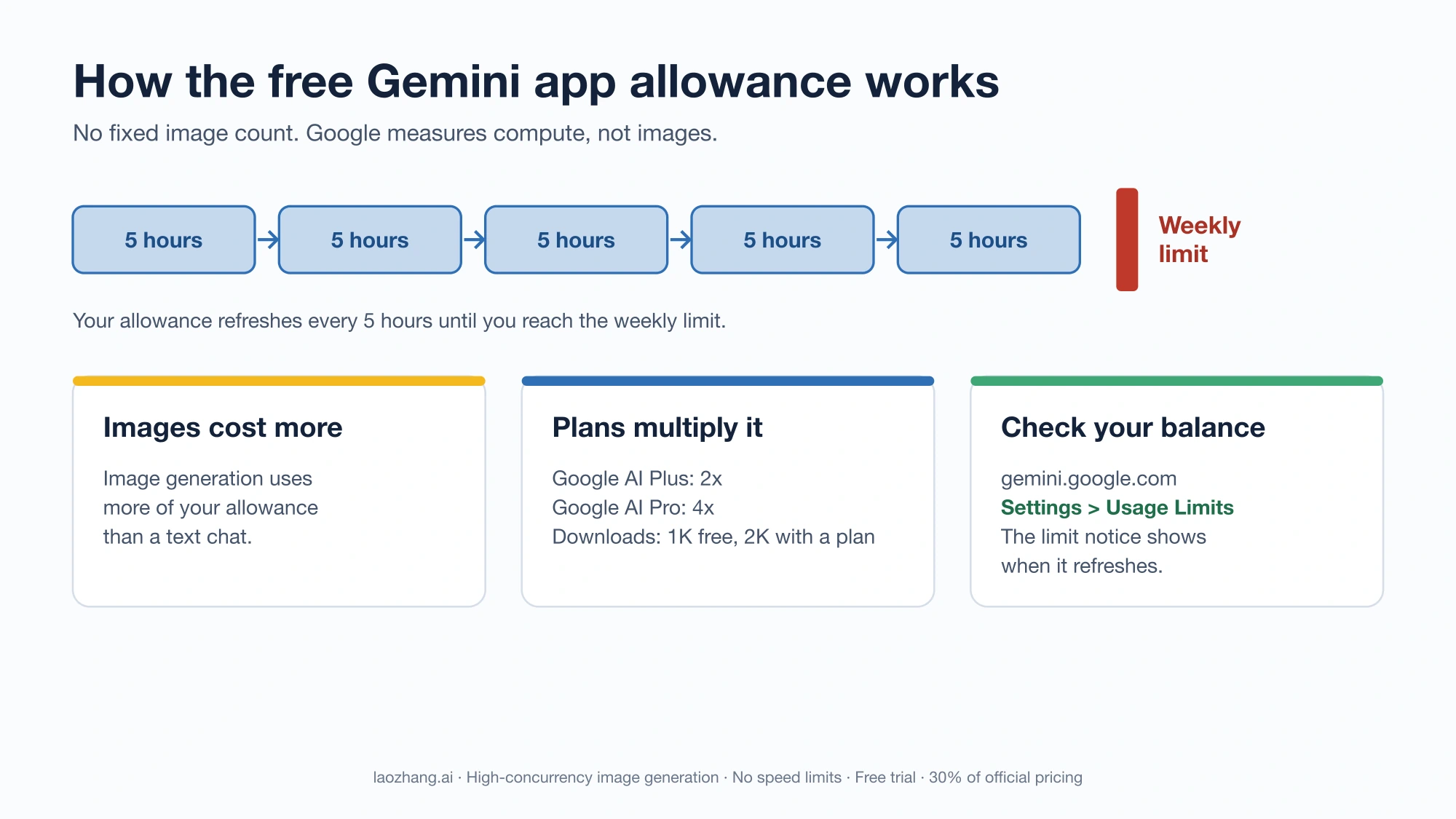
The Gemini App at gemini.google.com is where most people will encounter Nano Banana for the first time, and it is by far the simplest way to start generating images. You need only a Google account, which most people already have. Once logged in, you can access Nano Banana 2 image generation by selecting the "Create images" option from the tools menu or by simply describing an image in your conversation with Gemini. The free tier provides approximately 20 images per day at up to 1K resolution (Gemini Apps limits page, ai.google.dev, March 2026). Every image generated through the free Gemini tier includes a SynthID watermark that is invisible to the naked eye but detectable by automated tools. Google applies this watermark as a responsible AI measure, and it cannot be removed through the Gemini interface. For casual personal use, testing prompts, generating social media content where the watermark is not a concern, or simply learning how Nano Banana works, the Gemini App free tier is the right place to start. Its limitations become apparent when you need higher resolution for print or professional work, when you need watermark-free output, or when twenty images per day consistently is not enough.

Google AI Studio -- The Best Free Value for Creators

Google AI Studio at aistudio.google.com is technically a developer tool, but you do not need to write code to use its image generation capabilities through the playground interface. This is the single most underrated free access method for Nano Banana, and it deserves far more attention than it typically receives in guides about free AI image generation. The free playground tier provides approximately 50 requests per day with output up to 2K resolution and, critically, no watermark on generated images (Google AI Studio docs, ai.google.dev, March 2026). To use AI Studio for image generation, create a free account at aistudio.google.com, navigate to the playground section, select the gemini-3.1-flash-image-preview model from the model dropdown, and enter your image generation prompt. The interface is more technical-looking than the Gemini App, but the actual workflow is nearly identical: you type a description, and you get an image. The key advantages over the Gemini App are the higher resolution ceiling, the absence of a watermark, a larger daily quota, and the ability to use images commercially under the API terms of service. The main trade-off is that the interface is less polished and the multi-turn editing experience is not as smooth as what Gemini offers. For anyone producing content for a blog, social media, presentations, or any context where image quality and clean output matter, AI Studio is the clear winner among free options. For a more detailed walkthrough of the free access setup, our complete Nano Banana 2 free access guide covers the full configuration process.

Google AI Pro Trial and Student Program -- Extended Free Access

Beyond the permanent free tiers in Gemini and AI Studio, Google offers two time-limited paths that dramatically increase your free Nano Banana quota. The AI Pro trial is available to any Google user and provides 30 days of AI Pro-level access, which includes approximately 100 Nano Banana images per day in the Gemini App at up to 2K resolution plus priority access to new features and models (one.google.com, March 2026). To activate the trial, visit one.google.com and look for the AI Pro trial offer. You will need to provide a payment method, but you can cancel before the 30 days expire to avoid any charge. The Student Program is even more generous: verified students at qualifying educational institutions receive 12 months of free AI Pro access, providing the same 100-images-per-day limit for an entire academic year. Verification happens through your educational email address, and the process typically completes within minutes. If you are a student, this is by far the best free Nano Banana access available, and it should be the first thing you activate before exploring any other method.

Google Flow Labs -- The Highest Quality Free Trial

Google Flow Labs is Google's creative tools platform, and it offers a 30-day free trial that includes 1,000 monthly credits and access to Nano Banana 2 at full 4K resolution (flow.google.com, March 2026). This is the only free path that gives you access to the maximum resolution that Nano Banana 2 is capable of producing, and the visual difference between 1K and 4K output is substantial, particularly for detailed scenes, text-heavy images, and anything intended for print or large-format display. To activate the trial, visit flow.google.com and sign up with a Google account. You will need to provide a payment method, but you will not be charged during the trial period as long as you stay within the 1,000-credit monthly allowance. Each standard image generation costs one credit, which means you get roughly 33 images per day if you spread usage evenly across the month. The Flow Labs interface is designed for creative professionals and includes features like project organization, version history, and batch processing that the other free paths do not offer. The obvious downside is that this access is temporary. After 30 days, you either convert to a paid plan or lose access to the 4K capability. However, for anyone evaluating whether Nano Banana's highest-quality output is worth paying for on an ongoing basis, the Flow Labs trial is the correct way to make that assessment with real usage rather than speculation.

Best Third-Party Platforms for Free Nano Banana Access

The third-party ecosystem around Nano Banana has grown rapidly since February 2026, with dozens of wrapper sites offering free access to the model through their own interfaces. These platforms typically work by routing your prompts through their own Google API keys and presenting the results in a simplified web interface. Some are legitimate businesses that have invested in building useful tools on top of Google's technology. Others are low-effort operations that exist primarily to collect user data or serve advertising. Distinguishing between these two categories is essential before you enter any prompts or upload any reference images.

The most established third-party platforms as of March 2026 include nanobananas.ai, nanobanana.io, nanobanana2.com, and Pixlr's Nano Banana integration. Among these, nanobananas.ai and Pixlr have the strongest reputations based on their track records, transparent privacy policies, and the fact that they operate as recognized businesses with identifiable teams behind them. These platforms typically offer between five and thirty free image generations per day, usually at 1K resolution, with some form of account creation required. The free tier exists as an acquisition funnel for their paid plans, which is a legitimate and transparent business model. The images you generate on these platforms are generally processed through Google's standard content safety filters, but the platforms may apply additional restrictions or modifications that differ from what you would experience through official Google channels.

The evaluation framework for any third-party Nano Banana wrapper should focus on five specific factors before you use it. First, check whether the platform has a published privacy policy that explicitly addresses what happens to your prompts and generated images. A platform that does not clearly state whether it stores, trains on, or sells your data should be treated as if it does all three. Second, look for HTTPS encryption and a legitimate business entity behind the domain. Third, test whether the platform adds its own watermark or metadata to generated images, which is separate from Google's SynthID watermark. Fourth, verify whether the platform supports image generation only or also offers features like image editing and inpainting that require uploading your own images, because uploading personal photos to an untrusted platform carries significantly higher privacy risk than generating images from text prompts. Fifth, check user reviews and community discussions on platforms like Reddit and Product Hunt for reports of unexpected behavior, hidden costs, or data issues.

Platforms that fail multiple criteria in this framework are not worth the risk, regardless of how generous their free tier appears. The official Google channels described in the previous section are genuinely free, offer better quality, and come with the data handling guarantees of a company that has billions of dollars of reputation at stake. Third-party wrappers make sense in two specific scenarios: when you want a simpler interface than AI Studio provides, or when you have already exhausted your daily limits on official channels and need a few more generations urgently. Outside those situations, the official paths are almost always the better choice.

There is also a timing dimension worth considering. The third-party wrapper ecosystem around Nano Banana is still extremely young. Many of the platforms that launched in March 2026 are running on venture funding or personal savings, and their long-term viability is uncertain. A wrapper that offers generous free access today may change its pricing, reduce its free tier, or shut down entirely within months. Building a creative workflow that depends on a specific third-party wrapper carries risk that does not exist with official Google channels. Google may adjust its own limits, but the Gemini App, AI Studio, and Flow Labs are backed by Google's infrastructure and business model. If you do find a third-party wrapper that meets your needs, treat it as a supplement to your official Google access rather than a replacement, and maintain the ability to shift your workflow back to official channels if the wrapper changes or disappears.

Free Nano Banana via API -- Developer's Complete Guide

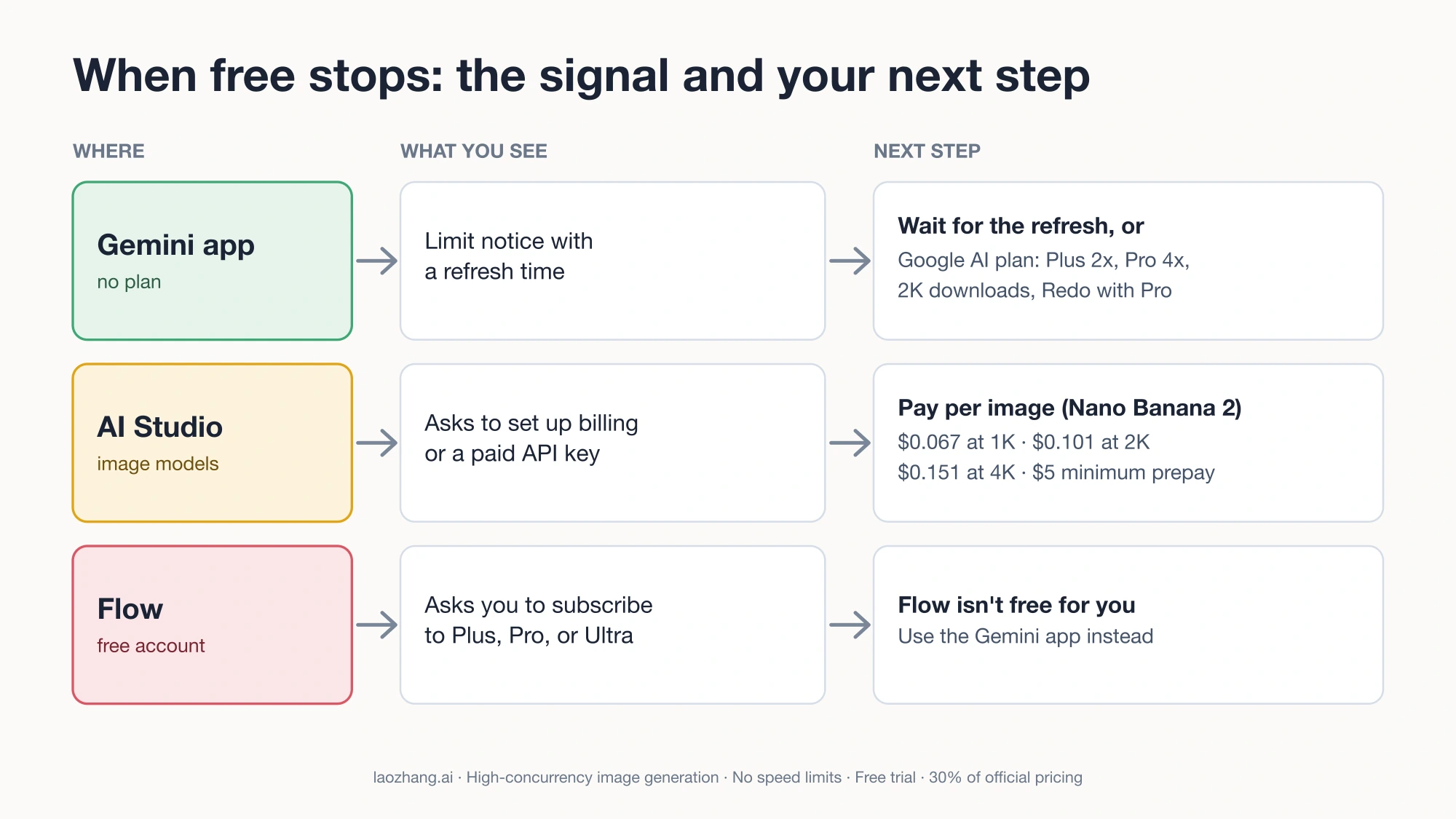
For developers and technical users, the API route to Nano Banana offers capabilities that the consumer interfaces simply cannot match. Programmatic access means batch processing, integration with existing workflows, automated image generation pipelines, and the ability to build products on top of Google's image generation technology. The critical distinction for anyone searching for free API access is that Google does not offer a free API tier specifically for Nano Banana image generation. The Gemini API pricing page at ai.google.dev/gemini-api/docs/pricing shows that gemini-3.1-flash-image-preview (Nano Banana 2) starts at $0.045 per image at 512-pixel resolution and scales up to $0.151 per image at 4K (ai.google.dev/pricing, March 2026). Nano Banana Pro (gemini-3-pro-image-preview) is priced at $0.039 per image at up to 1K resolution. There is no free tier for either model through the production API.

However, the AI Studio playground interface that we discussed earlier does provide free access to these same models through a browser-based interface, and that playground functionality can serve as a free development and testing environment even though it is not a proper API. For prototyping, prompt engineering, and evaluating whether Nano Banana meets your quality requirements before committing to paid API usage, the playground approach is perfectly adequate. The roughly 50 daily requests you get through the free playground tier are enough to develop and refine your prompts, test edge cases, and build confidence in the model's capabilities without spending anything.

For developers who want to start writing code against the API before committing to paid usage, here is a basic Python example that demonstrates the request structure. You would need a paid API key from Google Cloud to run this in production, but understanding the code structure helps you plan your integration work during the free evaluation phase:

python
import google.generativeai as genai genai.configure(api_key="YOUR_API_KEY") # Use Nano Banana 2 for image generation model = genai.GenerativeModel("gemini-3.1-flash-image-preview") response = model.generate_content( "A professional product photo of wireless headphones on a marble surface, " "soft studio lighting, 4K quality, commercial photography style", generation_config=genai.GenerationConfig( response_modalities=["image"], image_resolution="2k" # Options: 512, 1k, 2k, 4k ) ) # Save the generated image if response.candidates[0].content.parts[0].inline_data: image_data = response.candidates[0].content.parts[0].inline_data.data with open("generated_image.png", "wb") as f: f.write(image_data)

When you are ready to move beyond the free playground to production API usage, optimizing your costs becomes important. The price difference between resolutions is significant: a 512-pixel image costs $0.045 while a 4K image costs $0.151, which is more than three times the price. Generating at 1K or 2K and upscaling with a separate tool is often more cost-effective than generating directly at 4K unless the native 4K quality is specifically required for your use case. Batching requests, caching frequently used generations, and using free Nano Banana API access strategies can further reduce costs during the transition from free evaluation to paid production usage.

For developers who need API access at lower cost than Google's official pricing, services like laozhang.ai offer Nano Banana API proxy access starting at approximately $0.05 per image with support for all resolution options (docs.laozhang.ai, March 2026). This type of proxy service routes requests through pooled API infrastructure and passes volume pricing savings to individual users, which can reduce per-image costs by 40 percent or more compared to direct Google API billing at low volumes. The trade-off is that you are adding an intermediary between your code and Google's servers, which introduces a dependency on the proxy service's uptime and reliability.

When Free Isn't Enough -- Smart Upgrade Path

Decision framework chart showing when to upgrade from free Nano Banana based on monthly usage

Free Nano Banana access covers a surprisingly wide range of use cases, but there is a clear point where the constraints start costing you more in time and frustration than a paid option would cost in money. The decision framework below is based on monthly image generation volume, because volume is the single strongest predictor of whether free access will remain satisfactory or become a bottleneck in your workflow.

If you generate fewer than 50 images per month, the free tier through the Gemini App or AI Studio is almost certainly sufficient. At that volume, you are unlikely to hit daily limits regularly, and the 2K resolution available through AI Studio is adequate for the vast majority of digital use cases including blog posts, social media content, presentations, and design mockups. Staying free at this volume is not a compromise. It is the correct decision.

Between 50 and 200 images per month, the calculus starts to shift. You will hit the Gemini App's daily limit occasionally, and you may find yourself rationing AI Studio requests toward the end of busy days. Google AI Plus at $19.99 per month raises your Gemini App limit to approximately 50 images per day and provides additional benefits across Google's AI product suite. Whether this upgrade is worthwhile depends on how much you value the convenience of higher limits versus the discipline of working within free constraints. Many users in this range find that combining Gemini App and AI Studio free tiers gives them effectively 70 images per day, which is enough that a paid plan is unnecessary. For a complete breakdown of how Nano Banana Pro pricing works across different tiers and use cases, our dedicated pricing guide covers every plan option in detail.

Between 200 and 500 images per month, free access becomes genuinely limiting. At this volume, you are a serious user who likely has specific quality requirements and deadlines. Google AI Pro at a higher monthly rate unlocks 100 images per day in the Gemini App, provides priority access during high-demand periods, and includes features like extended image editing history. The AI Ultra tier offers 1,000 images per day for the heaviest users. These paid tiers also remove some of the quality throttling that free users occasionally experience during peak usage periods.

Above 500 images per month, the API is almost certainly the right choice. At that volume, you need programmatic access, batch processing, and the ability to integrate image generation into automated workflows. Google's API pricing starts at $0.045 per image at 512 pixels and scales to $0.151 at 4K (ai.google.dev/pricing, March 2026). For cost-conscious high-volume users, proxy services like laozhang.ai offer access at approximately $0.05 per image with full resolution support, which can reduce costs substantially compared to direct API billing at lower volume tiers. Documentation for API setup and integration is available at docs.laozhang.ai.

Monthly VolumeRecommended PathMonthly CostCost Per Image
Under 50Free (Gemini + AI Studio)$0$0
50-200Free combo or AI Plus$0-$19.99$0-$0.10
200-500AI Pro or API$29.99-$75$0.06-$0.15
500-2,000API (direct or proxy)$22-$302$0.045-$0.151
2,000+API with volume discountVariesUnder $0.04

The table above reveals an interesting pricing pattern: the per-image cost actually decreases as volume increases, which means that high-volume users get better economics from the API than from any subscription plan. This is the opposite of how most SaaS products work, where subscriptions offer better value at scale. For Nano Banana, the subscription plans through Google AI Plus and AI Pro are optimized for convenience and the broader Gemini experience, while the API is optimized for cost efficiency at scale. Understanding this distinction helps you avoid overpaying for access that does not match your actual usage pattern.

One important point that many guides overlook: images generated through free Nano Banana access in Gemini and AI Studio are yours to use. Google's terms of service for Gemini-generated content grant you rights to use the output, including for commercial purposes when generated through AI Studio under the API terms. The SynthID watermark applied to Gemini App generations is a provenance marker, not a usage restriction. This means that even free-tier output is commercially usable in most contexts, which further extends the value of the free access methods described earlier in this guide.

Which Free Method Is Right for You?

Choosing the right free access method depends on who you are and what you need the images for. Four common user profiles illustrate how the decision works in practice, and most readers will see themselves in one of these scenarios.

Casual Creator -- Social Media, Personal Projects, Fun

If you generate images occasionally for social media posts, personal creative projects, or just to explore what AI image generation can do, the Gemini App free tier is your best starting point. Twenty images per day at 1K resolution is more than enough for personal use, and the conversational interface makes it easy to iterate on ideas without any technical knowledge. The watermark is invisible to human viewers and will not affect how your images look when posted to Instagram, Twitter, or any social platform. Start with Gemini, learn how prompting works, and if you find yourself wanting higher resolution or more volume, move to AI Studio as your second step. Most casual creators never need to go beyond these two free options.

Student or Budget-Conscious User -- Learning, Coursework, Portfolio Building

Students have the single best free access path available through Google's Student Program, which provides 12 months of free AI Pro access to verified students (one.google.com/education, March 2026). This means 100 Nano Banana images per day in Gemini for an entire year, plus all the other AI Pro benefits across Google's product suite. If you are a student, activating this program should be your first step before exploring any other free method. Combine it with AI Studio's free playground for watermark-free output when you need clean images for a portfolio or presentation. Together, these two free channels give students more daily image generation capacity than many paid plans offer to non-student users. The key requirement is verification through a qualifying educational institution, which typically happens through your school email address.

Small Business Owner -- Marketing, Product Images, Content Creation

Small businesses need reliability, commercial usage rights, and output quality that matches their brand standards. The ideal free starting path combines Google AI Studio for day-to-day image generation (50 requests per day, 2K resolution, no watermark, commercial usage rights) with a Flow Labs 30-day trial for evaluating whether 4K output is worth upgrading to. AI Studio should be your primary free tool because it gives you the highest combination of quality and volume without any cost, and its commercial usage terms mean you can use the generated images in your marketing materials, website, and social media without licensing concerns. Use the Flow Labs trial strategically to test specific high-value use cases like product hero images or print materials where 4K resolution makes a visible difference. If you find that free access is limiting your business, the upgrade path to API access offers the best value for businesses that need volume.

Developer -- Integration, Automation, Product Building

Developers should start with AI Studio's free playground for prompt development and quality evaluation, then plan their transition to paid API access based on their application's expected volume. The approximately 50 free daily requests in AI Studio are enough to develop prompts, test edge cases, and build a proof of concept before committing to paid usage. When moving to production, evaluate whether Google's direct API pricing or a proxy service offers better value for your specific volume profile. At low to moderate volumes, the per-image pricing through direct API access is often more cost-effective than a flat monthly subscription, because you pay only for what you generate rather than for a quota you might not fully use.

Frequently Asked Questions

Is Nano Banana completely free to use?

Nano Banana is free to use through several official Google channels, but none of them offer unlimited free access. The Gemini App provides approximately 20 free image generations per day, Google AI Studio offers around 50 free requests per day through its playground, and Google Flow Labs provides a 30-day trial with 1,000 monthly credits. Beyond these limits, Google offers paid plans starting at $19.99 per month (Google AI Plus) and a production API with per-image pricing starting at $0.045 (ai.google.dev/pricing, March 2026). The free access is genuine and useful for many people, but it has clearly defined boundaries that Google enforces through daily quotas.

What are the daily limits for free Nano Banana image generation?

The daily limits vary by access method. The Gemini App free tier allows approximately 20 images per day at up to 1K resolution. Google AI Studio's free playground provides approximately 50 requests per day at up to 2K resolution. The Google AI Pro trial offers around 100 images per day for 30 days. The Student Program provides the same AI Pro limits for 12 months. Google Flow Labs allocates 1,000 credits per month during its 30-day trial, which works out to roughly 33 images per day if spread evenly. All of these limits are subject to change, as Google has adjusted them multiple times since Nano Banana 2 launched in February 2026. The Gemini Apps limits page at support.google.com/gemini is the most reliable source for current numbers.

Can I use free Nano Banana images for commercial purposes?

The commercial usage rights depend on which free access method you use. Images generated through Google AI Studio under the API and playground terms of service can be used commercially, as Google's terms grant you rights to the generated output. Images generated through the Gemini App are covered by Google's Gemini terms of service, which generally allow personal and commercial use but with some restrictions during trial periods. The SynthID watermark applied to Gemini App images is a provenance indicator, not a commercial usage restriction. Third-party wrapper platforms have their own terms that may differ from Google's. For any commercial use case where legal clarity matters, Google AI Studio is the safest free channel because its terms are the most explicit about commercial rights.

Is Nano Banana 2 better than Nano Banana Pro for free users?

For free users, Nano Banana 2 (gemini-3.1-flash-image-preview) is the more accessible and generally more useful model. It supports resolutions up to 4K, generates images faster due to its optimized architecture, and is available through all free access channels including the Gemini App, AI Studio, and Flow Labs. Nano Banana Pro (gemini-3-pro-image-preview) produces higher-quality photorealistic output and handles complex compositions better, but it is limited to 1K resolution and has a smaller free quota in most access channels. For most free users, Nano Banana 2 at 2K resolution through AI Studio offers the best balance of quality, speed, and accessibility. Nano Banana Pro becomes the better choice primarily for users who prioritize photorealism over resolution and who are working within the 1K constraint. The practical recommendation is to start with Nano Banana 2 for almost all free use cases, and only test Nano Banana Pro if you specifically need photorealistic portraits, product photography simulations, or fine art styles where its superior rendering quality at 1K outweighs the resolution limitation.

Do I need a Google account to use Nano Banana for free?

You need a Google account for all official free access methods, including the Gemini App, Google AI Studio, Google Flow Labs, the AI Pro trial, and the Student Program. Creating a Google account is free and takes less than two minutes at accounts.google.com. Some third-party wrapper platforms do not require any account creation, but as discussed in this guide, the trade-offs in privacy, reliability, and output quality generally make the official Google channels the better choice for anyone willing to use a Google account. If you specifically cannot or do not want to create a Google account, the third-party wrapper platforms described in the evaluation section above are your remaining options, but use them with appropriate caution regarding data privacy and output reliability. It is also worth noting that a Google account created specifically for AI image generation does not need to be your primary email account. Some privacy-conscious users create a dedicated Google account for Gemini and AI Studio use, keeping their main account separate from their AI generation activity. This is a reasonable approach that gives you access to all official free methods while maintaining a degree of separation between your personal Google services and your AI image generation history.

Nano Banana Pro

4K Image80% OFF

Google Gemini 3 Pro Image · AI Image Generation

Served 100K+ developers
$0.24/img
$0.05/img
Limited Offer·Enterprise Stable·Alipay/WeChat
Gemini 3
Native model
Direct Access
20ms latency
4K Ultra HD
2048px
30s Generate
Ultra fast
|@laozhang_cn|Get $0.05

200+ AI Models API

Jan 2026
GPT-5.2Claude 4.5Gemini 3Grok 4+195
Image
80% OFF
gemini-3-pro-image$0.05

GPT-Image-1.5 · Flux

Video
80% OFF
Veo3 · Sora2$0.15/gen
16% OFF5-Min📊 99.9% SLA👥 100K+