AIFreeAPI Logo

Nano Banana 2 vs Nano Banana Pro: Complete Comparison Guide (2026)

A
20 min readAI Models

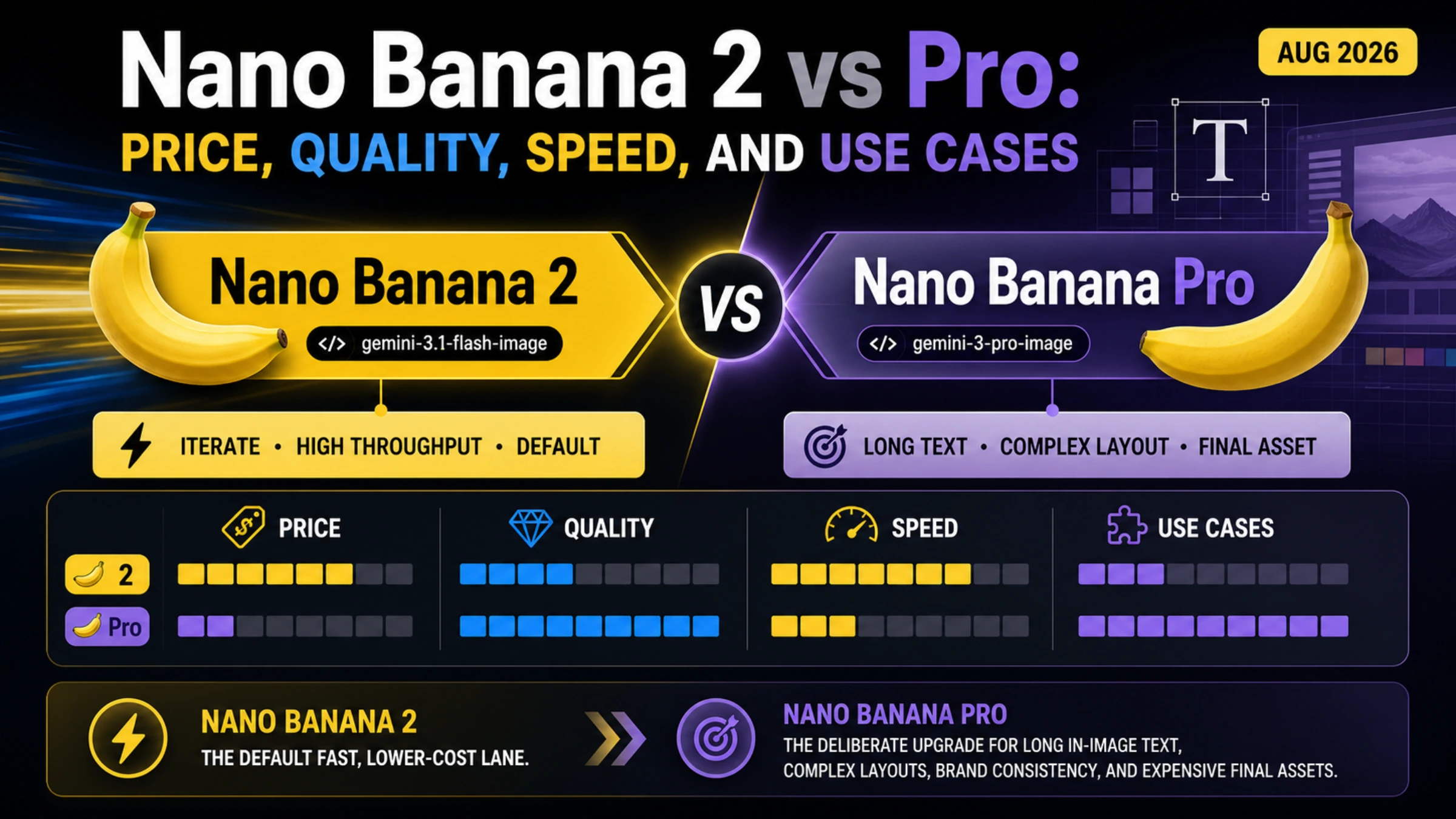
Nano Banana 2 generates images 3-5x faster than Nano Banana Pro at roughly half the cost. Built on Gemini 3.1 Flash, NB2 achieves ~95% of Pro's quality while starting at just $0.067 per 1K image. This guide covers real pricing, API code, and a clear decision framework.

Nano Banana 2 vs Nano Banana Pro complete comparison guide

Nano Banana 2, launched on February 26, 2026, generates images three to five times faster than Nano Banana Pro at roughly half the cost per image. Built on Google's Gemini 3.1 Flash foundation rather than the Gemini 3 Pro architecture that powers Nano Banana Pro, NB2 achieves approximately 95% of Pro's image quality while starting at just $0.067 per 1K image compared to Pro's $0.134 (Google AI pricing page, verified February 28, 2026). For most developers and content creators, Nano Banana 2 is the better choice for everyday image generation—but Pro still holds a meaningful edge for brand-critical work that demands maximum character consistency and text rendering accuracy.

TL;DR

The difference between Nano Banana 2 and Nano Banana Pro comes down to a straightforward trade-off between speed and cost on one side, and maximum fidelity on the other. Nano Banana 2 is the newer, faster, and cheaper model that handles the vast majority of image generation tasks with results that are nearly indistinguishable from Pro. Nano Banana Pro remains the premium option for situations where absolute quality is non-negotiable—think brand identity work, images with significant text content, or professional photography-level output where even a small quality gap matters.

FeatureNano Banana 2Nano Banana Pro
FoundationGemini 3.1 FlashGemini 3 Pro
Speed4-6 seconds10-20 seconds
Quality~95% of Pro100% (baseline)
Price (1K)$0.067/image$0.134/image
Resolutions512px, 1K, 2K, 4K1K, 2K, 4K
Batch Price (1K)$0.034/image$0.067/image
Best ForVolume, speed, costBrand work, text, fidelity
Model IDgemini-3.1-flash-image-previewgemini-3-pro-image-preview

The bottom line is simple: start with Nano Banana 2 as your default, and only switch to Pro when you have a specific reason to need maximum fidelity. This approach saves you money, delivers faster results, and produces output that satisfies the quality bar for the overwhelming majority of use cases including social media content, blog illustrations, product mockups, and application UI assets.

What Makes Nano Banana 2 Different from Nano Banana Pro?

Understanding why these two models produce different results requires looking at their architectural foundations, because the differences in speed, quality, and pricing all stem from the same root cause: the base model each one is built upon. Nano Banana Pro was Google's first premium image generation model, launched in November 2025 and built on the Gemini 3 Pro architecture. This foundation gives Pro access to the full reasoning capabilities of the Pro model family, which means it can "think through" each generation request more thoroughly—considering spatial relationships, text rendering rules, and stylistic consistency at a deeper level. The trade-off is that this deeper processing takes significantly more time and computational resources, which directly translates to slower generation and higher API costs.

Nano Banana 2, released on February 26, 2026, takes a fundamentally different approach by building on the Gemini 3.1 Flash architecture. Flash models are designed from the ground up for speed and efficiency, using optimized inference paths that sacrifice a small amount of maximum capability in exchange for dramatically faster processing. What makes NB2 particularly impressive is that Google has managed to close the quality gap to roughly 5%—meaning the efficiency gains of Flash don't come at the steep quality cost you might expect. The engineering achievement here is significant: by fine-tuning the Flash architecture specifically for image generation and incorporating learnings from the Pro model's training, Google created a model that captures almost all of Pro's capabilities at a fraction of the computational cost.

The practical difference between the two architectures shows up most clearly in how each model handles edge cases. Nano Banana Pro, with its deeper reasoning pipeline, excels at tasks that require complex spatial understanding—like generating an image of a specific character in a particular pose with accurate text on their clothing, where every detail needs to be precisely right. Nano Banana 2 handles most of these scenarios well, but in the most demanding cases, you might notice slightly less consistent character features or occasional text rendering imperfections. For everyday image generation tasks—landscapes, abstract concepts, product imagery, social media graphics—the difference is virtually imperceptible to human viewers, which is why NB2 makes sense as the default choice for most workflows.

It's also worth noting that both models share the same content safety framework and SynthID digital watermarking system, which embeds invisible provenance metadata into every generated image. This means you get identical content moderation protections and transparency standards regardless of which model you choose. From a compliance and governance perspective, the two models are interchangeable—the only difference is the performance and quality trade-off, not the safety or attribution characteristics of the output. For organizations that need to demonstrate responsible AI usage in their image generation pipelines, either model meets the same bar for content provenance and safety filtering.

Speed vs Quality: The Real Numbers

Speed and quality comparison between Nano Banana 2 and Nano Banana Pro showing generation time and fidelity benchmarks

The speed advantage of Nano Banana 2 is not a marginal improvement—it represents a transformative change in how teams can approach AI image generation workflows. When we look at real-world generation times, Nano Banana Pro typically takes between 10 and 20 seconds to produce a single image, depending on the complexity of the prompt and the requested resolution. Nano Banana 2, by contrast, consistently delivers results in 4 to 6 seconds under the same conditions. That three-to-five-times speed improvement means that a task that previously took over five minutes with Pro—generating a batch of 20 concept variations—now completes in under two minutes with NB2. For teams that iterate rapidly on visual concepts, this difference fundamentally changes the creative process, allowing designers to explore far more variations before committing to a direction.

The quality comparison tells an equally clear story, though one that requires more nuance to understand fully. When industry benchmarks and independent testing measure image quality across hundreds of generation tasks, Nano Banana 2 consistently scores within approximately 95% of Nano Banana Pro's output quality. That remaining 5% gap is not uniformly distributed across all image types, however. For photorealistic images, the gap is even smaller—often just 2-3%. For images containing significant text elements, character consistency across multiple generations, or highly detailed technical illustrations, the gap can widen to 8-10%. This means that the quality difference you actually experience depends heavily on what you're generating, and for the categories that make up the bulk of commercial image generation workloads, the practical difference is negligible.

To put this in concrete numbers, consider what happens when you generate a batch of 1,000 images—a typical monthly volume for a mid-sized content operation. With Nano Banana Pro at 15 seconds average per image, that batch takes approximately 4 hours and 10 minutes of sequential generation time (or less with concurrent requests, but the API cost remains the same). With Nano Banana 2 at 5 seconds average, the same batch completes in about 1 hour and 23 minutes—saving nearly 3 hours of wall-clock time. That's not just a convenience improvement; it means your content pipeline can publish three to five times more visual content within the same production window, or your development team can iterate on AI-generated assets much more rapidly during sprint cycles.

The implications for production workflows are worth spelling out explicitly. If you're running an e-commerce platform that generates product lifestyle images, switching from Pro to NB2 means you can generate the same volume of images in one-third to one-fifth of the time, at half the cost, with quality that your customers will not notice any difference in. A content marketing team producing social media visuals can now generate and iterate on twice as many creative concepts within the same time window. And for application developers who integrate image generation into their products, NB2's speed means lower latency for end users and the ability to serve more concurrent requests without scaling infrastructure. The only workflows where Pro's quality advantage justifies its speed and cost premium are those involving brand identity assets, typography-heavy designs, or any context where a client or stakeholder has explicitly demanded maximum fidelity output.

Complete Pricing Breakdown (February 2026)

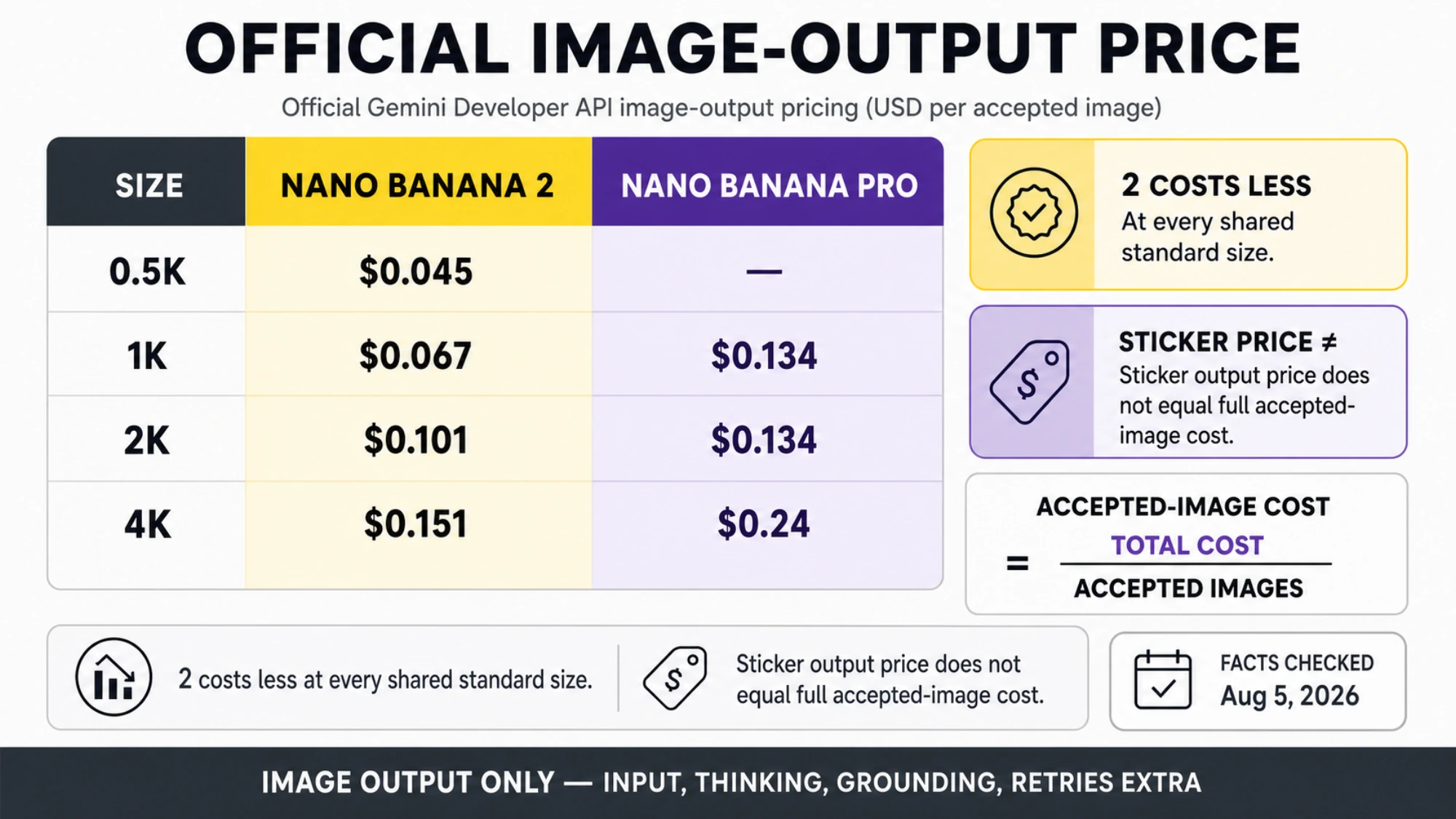
Complete pricing comparison chart showing per-image costs for Nano Banana 2 and Nano Banana Pro at all resolutions

The pricing structure for both models follows Google's token-based billing system, but translating token costs into per-image costs is where most comparison articles fall short. Here is the complete pricing picture, verified directly from the Google AI pricing page on February 28, 2026. For input tokens (the text prompt you send), Nano Banana 2 charges $0.25 per million tokens while Nano Banana Pro charges $2.00 per million tokens—making NB2 87.5% cheaper on input alone. For output image tokens, NB2 charges $60.00 per million tokens compared to Pro's $120.00 per million tokens, resulting in a 50% cost reduction. When you convert these token prices into actual per-image costs at each available resolution, the savings become concrete and actionable for budget planning.

At 1K resolution (1024 pixels), which is the most common resolution for web and social media content, Nano Banana 2 costs $0.067 per image while Nano Banana Pro costs $0.134 per image—exactly a 50% savings. Moving up to 2K resolution (2048 pixels), suitable for high-quality blog content and presentations, NB2 costs $0.101 per image versus Pro's $0.134, representing a 24.6% savings. At the premium 4K resolution (4096 pixels), used for print-quality output and large-format displays, NB2 costs $0.151 per image compared to Pro's $0.240, saving you 37.1%. Additionally, Nano Banana 2 offers a 512-pixel resolution option at just $0.045 per image—a resolution tier that Nano Banana Pro simply does not support, making it ideal for thumbnail generation, preview images, and other use cases where smaller dimensions are perfectly adequate. For a comprehensive breakdown of Pro's pricing across all tiers, see our detailed Nano Banana Pro pricing guide.

Batch mode pricing is where the savings become even more dramatic. Both models support batch processing—an asynchronous mode where you submit requests in bulk and receive results later—at a 50% discount off standard pricing. For Nano Banana 2 at 1K resolution, batch mode brings the cost down to just $0.034 per image, compared to $0.067 for Pro at the same resolution in batch mode. This means that using NB2 in batch mode costs 75% less than using Pro at standard pricing. For high-volume operations generating thousands of images per month, the cost difference is substantial: generating 10,000 images at 1K resolution costs $670 with NB2 standard pricing versus $1,340 with Pro standard pricing. Switch NB2 to batch mode, and that cost drops to $340—saving you $1,000 per month compared to Pro standard pricing. Third-party API providers like laozhang.ai can offer additional cost savings by aggregating demand and providing competitive per-image rates for both models.

Feature-by-Feature Comparison

Beyond speed, quality, and pricing, the two models differ in several technical capabilities that may influence your choice depending on your specific use case. Both models share a common set of core features—they both support Google Web and Image Search integration for grounding generated images in real-world references, both offer thinking modes (minimal and high) for controlling the depth of the generation process, and both apply SynthID watermarking to all generated images for content provenance tracking. Neither model is available in the free tier of Google AI Studio, so API access requires a paid plan regardless of which model you choose.

The differences emerge in the details of what each model can handle. Nano Banana 2 supports four resolution options (512px, 1024px, 2048px, and 4096px), giving you more flexibility to match output resolution to your actual needs, while Nano Banana Pro only offers three options (1024px, 2048px, and 4096px). In terms of reference images for style and subject guidance, NB2 supports up to 10 object references and 4 character references per request, compared to Pro's 6 object references and 5 character references. This means NB2 gives you more flexibility for object-based styling, while Pro offers a slight edge in character reference capacity—which aligns with Pro's strength in character consistency. Both models are accessible through the same Gemini API endpoint, using different model ID strings, which makes switching between them as simple as changing a single parameter in your API call.

FeatureNano Banana 2Nano Banana Pro
Resolution Options512px, 1K, 2K, 4K1K, 2K, 4K
Object ReferencesUp to 10Up to 6
Character ReferencesUp to 4Up to 5
Thinking ModesMinimal / HighMinimal / High
Search IntegrationGoogle Web + ImageGoogle Web + Image
SynthID WatermarkYesYes
Free TierNot availableNot available
Model IDgemini-3.1-flash-image-previewgemini-3-pro-image-preview

The subscription plans that include image generation access are worth understanding if you plan to use these models through Google's consumer-facing Gemini app rather than the API. The free tier offers limited generation with basic models. Google AI Pro at $19.99 per month provides higher quotas and priority processing, while Google AI Ultra at $49.99 per month unlocks the maximum generation limits and 4K resolution support. For API users, these subscription tiers are less relevant since billing is purely usage-based, but they're important context for casual users evaluating their options.

One feature comparison that deserves additional attention is how each model handles image editing and transformation tasks beyond pure text-to-image generation. Both Nano Banana 2 and Nano Banana Pro support image-to-image workflows where you provide an existing image as input along with a text prompt describing the desired modifications. This enables use cases like style transfer, background replacement, object addition or removal, and image upscaling with AI enhancement. In these editing scenarios, the quality gap between the two models tends to be even smaller than in pure generation tasks, because the input image already provides substantial structural guidance that reduces the burden on the model's reasoning pipeline. This makes NB2 an especially strong choice for image editing workflows, where its speed advantage truly shines—iterating through multiple edits at 4-6 seconds per attempt versus 10-20 seconds with Pro means you can explore editing directions three to five times faster, which translates to a significantly more productive creative workflow for designers and content creators who rely on AI-assisted image manipulation in their daily work.

How to Use Both Models via API

One of the most practical advantages of Google's approach is that both models share the same API endpoint and request format, making it trivially easy to switch between them or even build logic that routes requests to different models based on the requirements of each task. The API endpoint for both models is the Gemini generateContent endpoint, and the only difference between calling NB2 versus Pro is the model ID string you specify in the URL. Here is a complete working example in Python that demonstrates how to generate images with each model, which you can copy directly into your project and start using immediately. If you need a more detailed walkthrough of the Pro model's API setup, including authentication and error handling, check out our complete Nano Banana Pro API setup guide.

python
import google.generativeai as genai import base64 genai.configure(api_key="YOUR_API_KEY") # --- Nano Banana 2 (Fast + Affordable) --- nb2_model = genai.GenerativeModel("gemini-3.1-flash-image-preview") nb2_response = nb2_model.generate_content( "Generate a photorealistic image of a modern coffee shop interior " "with warm lighting and plants", generation_config=genai.GenerationConfig( response_modalities=["IMAGE", "TEXT"], ) ) # Save the NB2 image for part in nb2_response.candidates[0].content.parts: if part.inline_data: with open("nb2_output.png", "wb") as f: f.write(base64.b64decode(part.inline_data.data)) # --- Nano Banana Pro (Maximum Quality) --- pro_model = genai.GenerativeModel("gemini-3-pro-image-preview") pro_response = pro_model.generate_content( "Generate a photorealistic image of a modern coffee shop interior " "with warm lighting and plants", generation_config=genai.GenerationConfig( response_modalities=["IMAGE", "TEXT"], ) ) # Save the Pro image for part in pro_response.candidates[0].content.parts: if part.inline_data: with open("pro_output.png", "wb") as f: f.write(base64.b64decode(part.inline_data.data))

Both models also support advanced parameters for controlling the generation process. The thinkingMode parameter lets you choose between "MINIMAL" (faster, lower quality) and "HIGH" (slower, higher quality) processing depth, giving you additional control over the speed-quality trade-off within each model. For Nano Banana 2 with thinkingMode set to "HIGH", you get generation quality that approaches Pro's standard output while still benefiting from Flash-based speed advantages—typically completing in 6-8 seconds rather than NB2's usual 4-6 seconds, but still significantly faster than Pro's 10-20 second baseline.

Migrating existing code from Nano Banana Pro to Nano Banana 2 is genuinely a one-line change in most implementations. If you're currently using gemini-3-pro-image-preview as your model ID, simply replace it with gemini-3.1-flash-image-preview and your existing prompts, resolution settings, and output handling code will work identically. The response format is the same, the image data encoding is the same, and the content safety filters operate under the same policies. This makes A/B testing between the two models straightforward—you can run the same prompt through both models to compare results for your specific use case before making a full migration decision. For more advanced use cases like resolution selection and reference images, you can pass additional parameters in the generation config, but the core API structure remains identical.

bash
# Quick test with curl curl -X POST \ "https://generativelanguage.googleapis.com/v1beta/models/gemini-3.1-flash-image-preview:generateContent?key=YOUR_API_KEY" \ -H "Content-Type: application/json" \ -d '{ "contents": [{ "parts": [{"text": "A serene mountain landscape at sunset"}] }], "generationConfig": { "responseModalities": ["IMAGE", "TEXT"] } }'

5 Ways to Save Money on AI Image Generation

The cost of AI image generation adds up quickly at scale, and understanding all the levers available to you can mean the difference between a sustainable operation and one that eats through your budget. Beyond simply choosing the cheaper model, there are several strategies that can compound your savings significantly. These optimization techniques apply whether you're generating hundreds or hundreds of thousands of images per month, and implementing even two or three of them can reduce your effective per-image cost by 60-80% compared to the naive approach of using Pro at standard pricing with maximum resolution.

Use Batch Mode for Non-Urgent Requests. The single most impactful cost optimization is batch processing, which cuts your per-image cost in half regardless of which model you use. Batch mode works by submitting requests asynchronously—you send your generation requests in bulk and receive results at a later time rather than in real-time. For any workflow where you don't need immediate results—such as generating product imagery overnight, creating content calendars in advance, or building asset libraries—batch mode should be your default. With Nano Banana 2 in batch mode at 1K resolution, you pay just $0.034 per image, which is 75% cheaper than Pro at standard pricing. For detailed pricing across all batch configurations, see our guide on batch processing pricing details.

Match Resolution to Actual Display Size. Many teams default to the highest available resolution without considering where the image will actually be displayed. A social media thumbnail displayed at 400 pixels wide does not need to be generated at 4K resolution. By choosing 512px ($0.045) or 1K ($0.067) with NB2 instead of 4K ($0.151), you can reduce per-image costs by 56-70% while delivering output that looks identical at the display size. The rule of thumb is simple: generate at 1.5-2x the display resolution, not at the maximum available. This approach alone can cut your monthly costs by 30-50% if you've been over-specifying resolution.

Leverage Third-Party API Providers. Services like laozhang.ai aggregate demand across many users to offer lower per-image pricing than going directly through Google's API. These providers handle API key management, request routing, and billing consolidation, often providing access to both NB2 and Pro at discounted rates. For teams that want to explore the cheapest Nano Banana 2 API options, third-party providers are worth evaluating, especially if you're generating at high volumes where even small per-image savings add up to significant monthly differences. You can test image generation capabilities at images.laozhang.ai before committing to a provider.

Route Requests to the Right Model. Instead of using a single model for all requests, build routing logic that sends each request to the most cost-effective model for that specific task. Use NB2 for the 90% of requests where speed and cost matter most (social media, blogs, thumbnails, prototypes), and only route to Pro for the 10% where maximum quality is genuinely required (brand assets, text-heavy images, client deliverables with strict quality requirements). This hybrid approach captures almost all of Pro's quality benefits while keeping your average per-image cost close to NB2's pricing. A simple implementation is to add a "quality tier" parameter to your internal API that selects the model automatically based on the intended use case.

Negotiate Volume Pricing. If you're generating more than 50,000 images per month, you likely qualify for Google's volume pricing tiers, which can offer additional discounts beyond the standard published rates. Contact Google Cloud sales to discuss committed use discounts (CUDs) for AI services, which typically provide 20-40% additional savings in exchange for a minimum monthly spend commitment. Combined with batch mode and resolution optimization, volume pricing can bring your effective per-image cost below $0.02 for NB2—making AI image generation cheaper than stock photography subscriptions for many use cases.

To illustrate how these strategies compound, consider a real-world scenario: a marketing agency generating 10,000 social media images per month. Using Nano Banana Pro at standard 1K pricing, the monthly cost would be $1,340. By switching to NB2 at 1K standard pricing, it drops to $670—already a 50% savings. Add batch mode for the 80% of images that don't need real-time delivery, and the blended cost falls to approximately $402 (80% at $0.034 batch + 20% at $0.067 standard). Now factor in that half those images only need 512px resolution for social media thumbnails, and the cost drops further to roughly $330 per month. That represents a 75% cost reduction from the original Pro pricing, while delivering images that are visually indistinguishable to social media audiences. The key takeaway is that no single optimization is transformative on its own, but stacking multiple strategies together produces dramatic cumulative savings that can fundamentally change the economics of AI-powered content creation at scale.

Which One Should You Choose? A Decision Framework

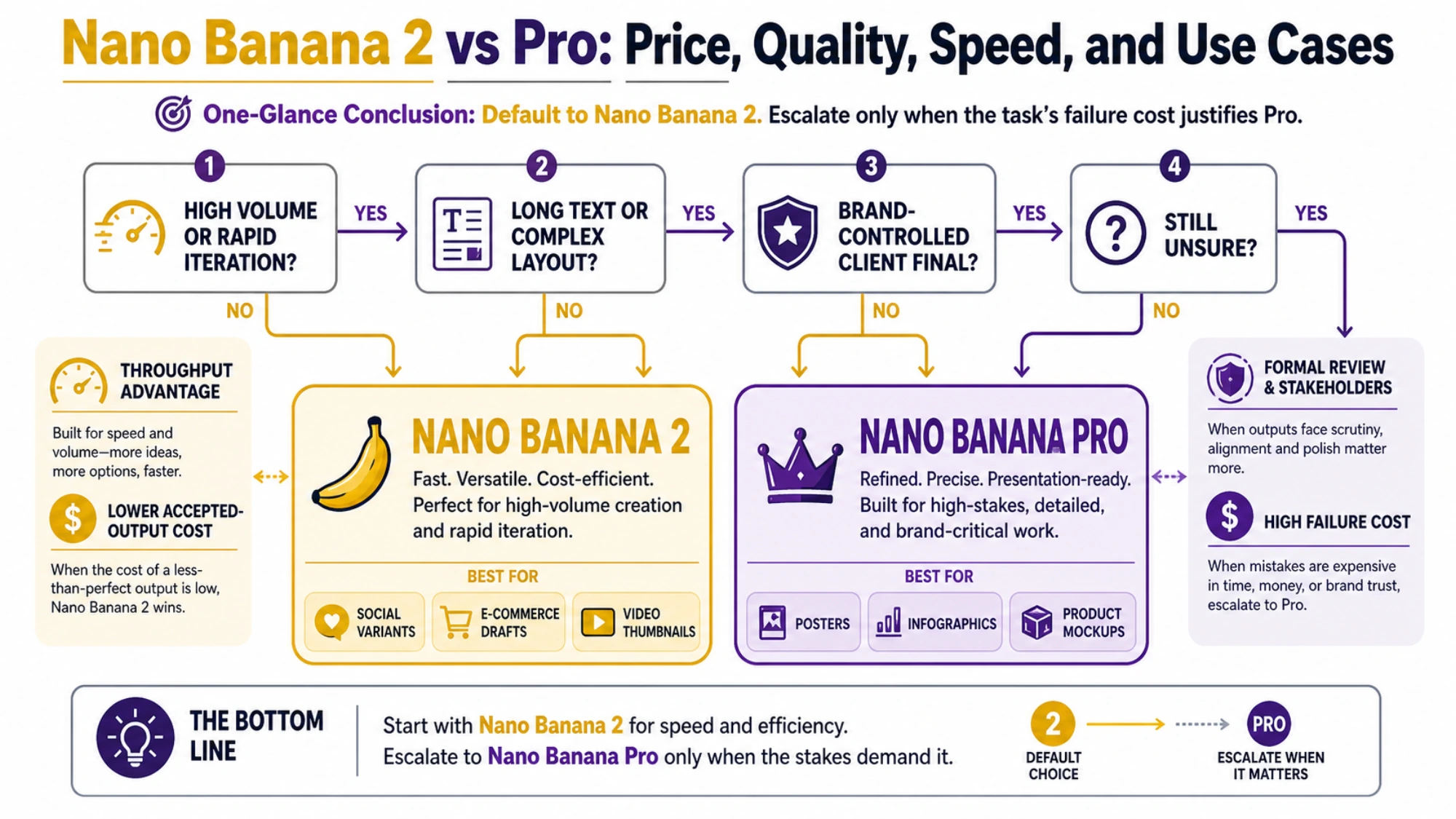
Decision framework flowchart showing when to choose Nano Banana 2 versus Nano Banana Pro based on your use case

The decision between Nano Banana 2 and Nano Banana Pro should not be complicated, and the answer for most users is clear: start with Nano Banana 2 as your default model, and only switch to Pro when you have a specific, justified reason. This is not a "both models have their strengths, you should evaluate carefully" kind of recommendation—it's a concrete default with well-defined exceptions. Nano Banana 2 is cheaper, faster, and produces results that are visually indistinguishable from Pro for the overwhelming majority of common image generation tasks. The 5% quality gap is measurable in benchmarks but rarely perceptible in real-world output, especially at web display resolutions.

The specific scenarios where Nano Banana Pro remains the better choice are narrow but meaningful. If you're generating images that contain significant text elements—restaurant menus, event posters, signage, infographics with readable text—Pro's superior text rendering engine produces noticeably more accurate results. If you're creating a series of images featuring the same character (such as a brand mascot or a recurring figure in a comic series) and need strict consistency in facial features, body proportions, and clothing details across dozens of generations, Pro's deeper reasoning pipeline handles this more reliably. And if you're producing final deliverables for clients or stakeholders who have explicitly specified "maximum quality" as a requirement, Pro provides the peace of mind that you're using the most capable option available, even if the practical difference is small.

For enterprise teams evaluating these models for production deployment, the decision framework extends to include operational considerations beyond pure image quality. NB2's faster generation time means lower p95 latency for user-facing applications, which directly impacts user experience metrics. Its lower cost per image means more predictable and lower infrastructure spend, which matters for financial planning and margin analysis. And its higher throughput means fewer API capacity constraints during peak demand periods. These operational advantages compound with the cost savings, making NB2 the clear choice for any application that serves end users at scale—whether that's an e-commerce platform generating product images, a design tool offering AI-assisted creation, or a marketing automation system producing personalized visual content.

A practical implementation pattern that many production teams adopt is what we call the "tiered generation" approach. In this architecture, you maintain a routing layer in front of both models that classifies incoming generation requests based on their quality requirements and assigns them to the appropriate model automatically. For example, you might tag requests from your social media automation pipeline as "standard quality" and route them exclusively to NB2, while requests from your brand design team go to a review queue where the designer can choose between NB2 (for fast exploration) and Pro (for final output). This approach eliminates the binary "which model should I choose" decision entirely—you use both models strategically, letting each one handle the workload it's best suited for. Teams that implement tiered generation typically report 40-60% cost savings compared to using Pro exclusively, while maintaining maximum quality output for the subset of tasks that truly require it. The key insight is that the decision is not about which model is better overall, but about matching each generation task to the model that offers the best value for that specific use case.

Frequently Asked Questions

Is Nano Banana 2 better than Nano Banana Pro?

For most use cases, yes. Nano Banana 2 delivers approximately 95% of Pro's image quality while being 3-5x faster and 50% cheaper per image. The practical difference in output quality is imperceptible for common tasks like social media content, blog illustrations, product mockups, and application UI assets. Pro remains the better choice specifically for brand-critical work requiring maximum text accuracy, strict character consistency across multiple generations, or situations where a client has mandated maximum fidelity output. The general recommendation is to use NB2 as your default and switch to Pro only when you have a specific quality requirement that NB2 cannot meet.

Can I still use Nano Banana Pro after NB2 launched?

Yes, Nano Banana Pro remains fully available and supported. While Nano Banana 2 is replacing Pro as the default image generation model in the consumer-facing Gemini app (across Free, Pro, and Ultra subscription tiers), Pro continues to be available through the API using the model ID gemini-3-pro-image-preview. Google AI Pro ($19.99/month) and Ultra ($49.99/month) subscribers also retain access to Pro for professional-grade tasks. Google has not announced any deprecation timeline for Nano Banana Pro, so you can continue using it for production workloads with confidence. Many teams are adopting a hybrid approach—using NB2 for the majority of their generation tasks while keeping Pro available for quality-critical workflows that justify the premium pricing.

What is the pricing difference between NB2 and Pro?

At 1K resolution, NB2 costs $0.067 per image versus Pro's $0.134—a 50% savings. At 2K resolution, NB2 is $0.101 versus Pro's $0.134 (25% savings). At 4K, NB2 is $0.151 versus Pro's $0.240 (37% savings). NB2 also offers a unique 512px option at $0.045 per image that Pro doesn't support. Both models offer batch mode processing at 50% off standard pricing, meaning NB2 batch at 1K costs just $0.034 per image—75% cheaper than Pro's standard pricing. All pricing verified from Google AI pricing page on February 28, 2026.

How do I switch from Pro to NB2 in my code?

Switching is a single-line code change. Replace the model ID string gemini-3-pro-image-preview with gemini-3.1-flash-image-preview in your API call. The API endpoint, request format, response structure, and content safety policies are identical between the two models, so no other code changes are needed. Your existing prompts, resolution settings, and output handling will work without modification, making it easy to A/B test both models with the same prompt before fully committing to the migration.

Which model should I use for text in images?

Nano Banana Pro is the better choice when your images contain significant text that needs to be accurately rendered—such as signs, labels, menus, or any text that viewers will read closely. Pro's deeper reasoning pipeline handles character formation, spacing, and alignment more consistently, resulting in fewer text rendering artifacts. For images where text is decorative, background, or not a primary element, Nano Banana 2 produces acceptable text quality at lower cost and faster speed. If text accuracy is critical to your use case, test both models with your specific prompts before making a decision, as the gap varies depending on the font style, text length, and image complexity.

Nano Banana Pro

4K Image80% OFF

Google Gemini 3 Pro Image · AI Image Generation

Served 100K+ developers
$0.24/img
$0.05/img
Limited Offer·Enterprise Stable·Alipay/WeChat
Gemini 3
Native model
Direct Access
20ms latency
4K Ultra HD
2048px
30s Generate
Ultra fast
|@laozhang_cn|Get $0.05

200+ AI Models API

Jan 2026
GPT-5.2Claude 4.5Gemini 3Grok 4+195
Image
80% OFF
gemini-3-pro-image$0.05

GPT-Image-1.5 · Flux

Video
80% OFF
Veo3 · Sora2$0.15/gen
16% OFF5-Min📊 99.9% SLA👥 100K+