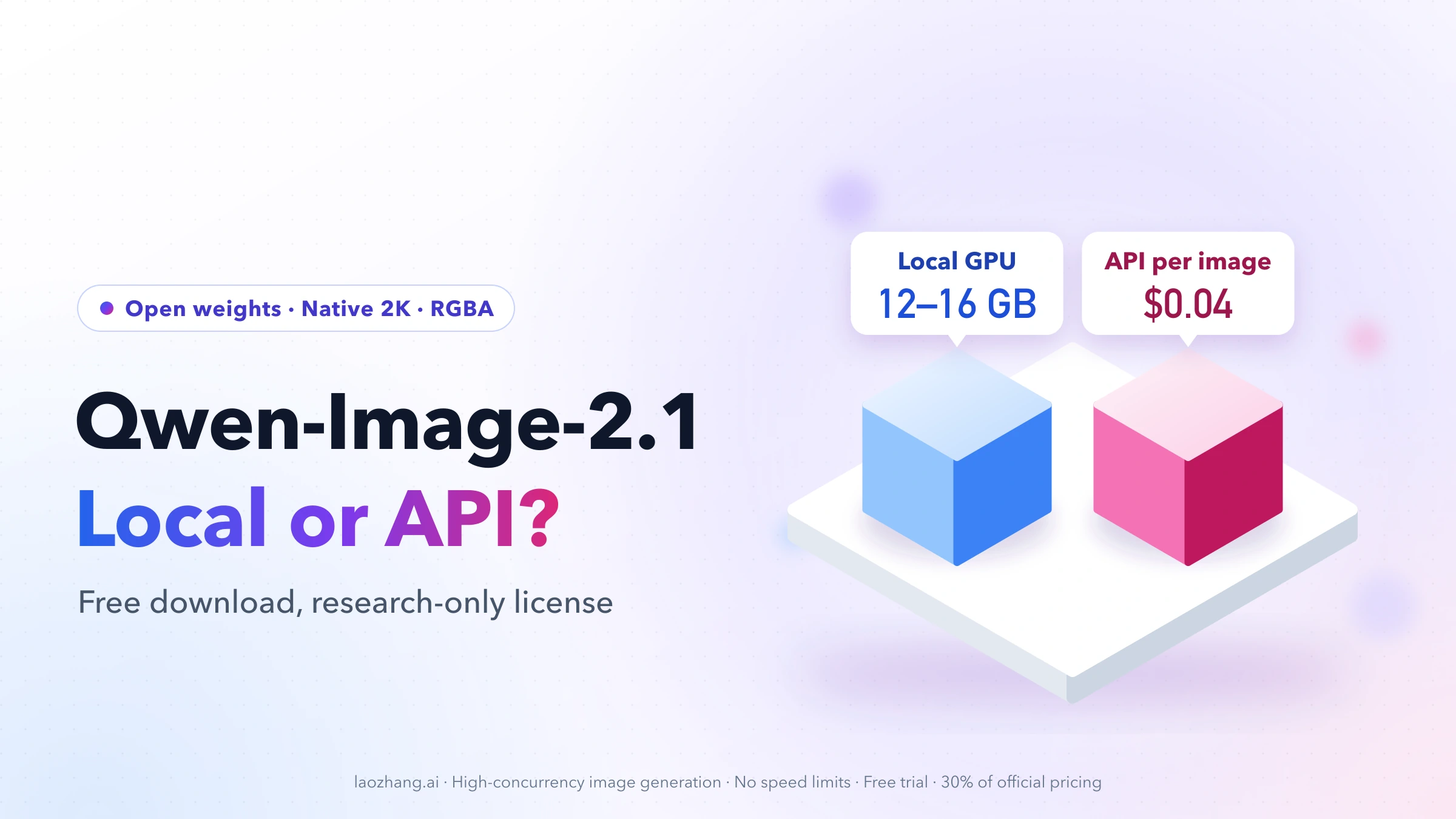
Qwen-Image-2.1 is Alibaba Qwen's open-weight image model, released on September 20, 2026. One set of weights does text-to-image and image editing, outputs native 2K, can generate transparent PNGs, and accepts up to 10 reference images. The weights are free to download, but the Qwen Research License allows research or evaluation only. Commercial use needs a separate license from Qwen.
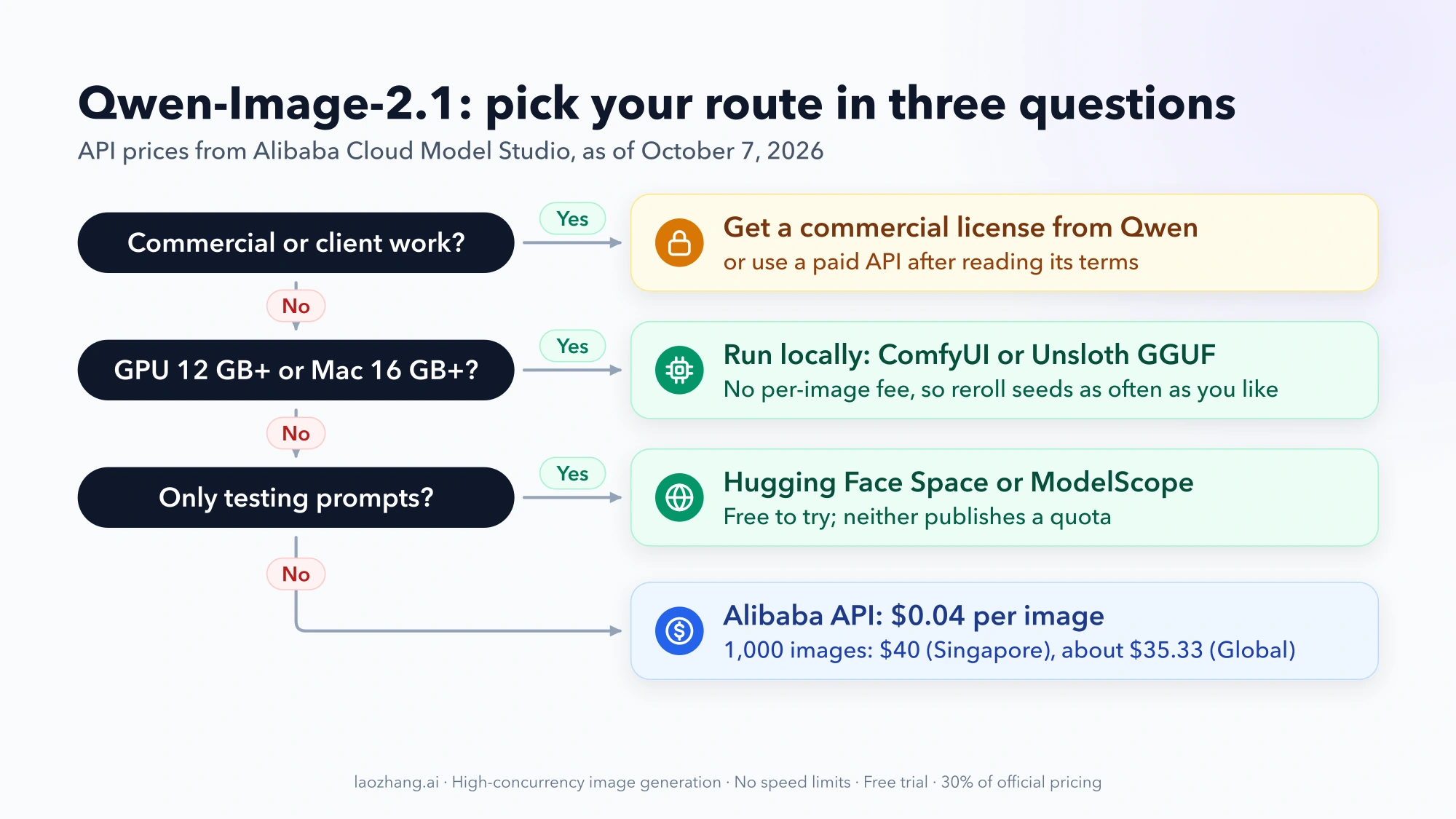
That license, your GPU memory and your monthly image count decide the route:
- Just trying it: use the official Hugging Face Space or ModelScope. Both are free, and neither publishes a daily quota.
- Running it yourself for personal, research or evaluation work: ComfyUI has native templates. Unsloth's estimates put a GGUF Q4_K_M quant at 1024×1024 within reach of a 12–16 GB GPU, and a Mac with 16 GB or more of unified memory can run GGUF too.
- Building an app or a pipeline without your own GPU: Alibaba Cloud Model Studio sells
qwen-image-2.1-proat $0.04 per image in Singapore or $0.035333 in its Global regions, so 1,000 images cost $40 or about $35.33. - Client or commercial work: request a commercial license at model-business@notice.qwencloud.com, or use a paid API only after reading that provider's terms. The model license, not image ownership, is what blocks commercial use of the open weights.
Prices, quotas and rankings below are as of October 7, 2026.
Qwen-Image-2.1 at a glance: 7B open weights, native 2K, RGBA output
According to the official GitHub repository, Qwen-Image-2.1 pairs a 7B-parameter image generator (32 single-stream DiT layers) with a Qwen3-VL 8B text encoder that reads both your instructions and your reference images. Its VAE has 64 channels with an alpha channel, which is why the model can output transparency directly instead of cutting out a background afterwards.
| Item | Qwen-Image-2.1 |
|---|---|
| Release | September 20, 2026, weights on Hugging Face and ModelScope |
| License | Qwen Research License: non-commercial means "research or evaluation purposes only" |
| Tasks | Text-to-image and instruction-based editing in the same weights |
| Native size | 2K; 1:1 preset is 2048×2048, 16:9 is 2752×1536, 9:16 is 1536×2752 |
| Transparency | Generates and edits RGBA images; extracts subjects from photos |
| Reference images | Up to 10 for multi-subject composition |
| Local edits | Marked by circles, painted annotations or a separate mask |
| Default steps | 40 in the Diffusers pipeline; 25 in the ComfyUI templates |
How 2.1 relates to Qwen-Image 2.0 and 3.0
The first Qwen-Image (August 2025) shipped under Apache 2.0. Qwen-Image 2.0 (February 2026) and 3.0 (July 2026) were closed, available only through Alibaba's API. Version 2.1 brings back downloadable weights, but under a research license rather than Apache 2.0, so old assumptions about Qwen-Image being free for any use no longer hold.
A higher version number doesn't make 3.0 the better model. Qwen-Image 3.0 launched without published benchmarks, and no public test compares 3.0 with 2.1 directly. If you only want an API and don't care about local weights, test both on your own prompts.
Is Qwen-Image-2.1 any good?
On Artificial Analysis's leaderboards it leads the open-weight field but not the field overall. In an X post around October 2, 2026, Artificial Analysis ranked Qwen-Image-2.1 #18 on both its text-to-image and image-editing boards and #1 among open-weight models on both, up from #72 and #58 for Qwen Image 2.0. Qwen's own chart places 2.1 ahead of Nano Banana 2.0 and GPT-Image-1.5. That is a vendor claim, and leaderboard positions move.
In hands-on use, GIGAZINE's ComfyUI test found people very realistic, but it missed the newspaper text on the first seed and got it right after a seed change. Its multi-image edit needed many attempts before one came out right. Expect to reroll seeds, which is cheap locally and billed per image on an API.
Which Qwen-Image-2.1 route to pick: free trial, local GPU or paid API
Commercial use overrides everything else in this table. For non-commercial work, your hardware decides between local and the API, and your volume decides what the API costs.
| Your situation | Route | What it costs | What changes the choice |
|---|---|---|---|
| You want to see results before installing anything | Hugging Face Space or ModelScope | Free; quota not published | Long queues or missing settings: move to local or the API |
| Personal, research or evaluation work, NVIDIA GPU with 12 GB+ VRAM | Local: ComfyUI templates or Unsloth GGUF | Your hardware and power; no per-image fee | Output becomes client or commercial work: get a commercial license |
| Same, but an Apple Silicon Mac with 12–16 GB+ unified memory, or a CPU-only PC with 12–16 GB RAM | Local GGUF (Unsloth) | Free, slower | Generation too slow for your volume: the API |
| An app or batch job, no suitable GPU | Alibaba qwen-image-2.1-pro API | $0.04 per image (Singapore), $0.035333 (Global regions) | You need the open weights, LoRAs or offline use: local |
| Client work, ads, products you sell | Commercial license from Qwen, or a paid API after reading its terms | License price not published; API per image | The provider's terms don't cover commercial output: ask before using it |
On cost, the API scales linearly: images × price per image. At $0.04 that's $4 for 100 images, $40 for 1,000 and $400 for 10,000, before taxes and any rerolls for quality. Alibaba doesn't bill failed generations. A local GPU has no per-image fee, so heavy experimentation such as seed sweeps and LoRA tests favors local. Whether local beats the API overall depends on the hardware you'd have to buy and your electricity rate, so run that math with your own numbers.
If you are weighing a closed model for commercial work instead, the Nano Banana 2.1 access and API pricing guide covers Google's option. For other no-cost generators, see the best free AI image generator roundup.
Can you use Qwen-Image-2.1 commercially? Only with a separate license
Not under the default license. The Qwen Research License Agreement grants use "FOR NON-COMMERCIAL PURPOSES ONLY" and defines non-commercial as "research or evaluation purposes only". Section 2b says commercial use requires a separate license, requested at model-business@notice.qwencloud.com. The same terms apply to quantized copies such as GGUF, FP8 or INT8 files, because those are derivative works of the same materials.
Other clauses that matter in practice:
- Redistribution: if you share the weights or a modified version, include the license and a Notice file, and mark changed files.
- Training other models: if you use Qwen-Image-2.1 or its outputs to train or improve a model you distribute, show "Built with Qwen" or "Improved using Qwen" in its documentation.
- Naming: you can describe a model as "fine-tuned from Qwen Image", but "Qwen" can't be its main name.
- Jurisdiction: Chinese law, with disputes going to courts in Hangzhou.
Who owns the images you generate?
You do, according to Qwen. On September 21, 2026, Qwen's official X account replied that "Outputs are not part of the licensed Materials. Users retain the rights to images and other content they generate using the model." That reply is a social media post, not license text. Owning an image also doesn't settle whether running the model to produce paid work counts as commercial use of the model, which the license forbids without a separate agreement. For client work, get the commercial license or written confirmation from Qwen first. This is not legal advice.
Does the paid API come with commercial rights?
Alibaba's public pages don't say so. Its Model Studio service terms say that content generated in the console's model trials may be used only to evaluate the model, not for any commercial purpose, and that AI-generated labels added by the trial must stay. The pricing and model pages say nothing about output rights for paid API calls. Those calls fall under Alibaba Cloud's general service agreements, so read them before you ship client work.
Third-party API sellers are less clear still. Kie.ai's Qwen Image 2.1 page carries a "Commercial use" label, but it doesn't say whether Kie holds a commercial license from Alibaba.
How much VRAM Qwen-Image-2.1 needs: Unsloth's starting points
About 12–16 GB of VRAM for a 1024×1024 image with a 4-bit GGUF quant, according to Unsloth's run-locally guide. Unsloth labels every figure as an estimate, not a tested minimum. Resolution and offloading change memory use, so generate one image at the listed size before you go bigger.
| Your hardware | Unsloth's starting configuration | Notes |
|---|---|---|
| 6 GB VRAM | FP8 with CPU offloading | Under 2× slower, per Unsloth; needs spare system RAM |
| 12–16 GB VRAM | GGUF Q4_K_M, 1024×1024, batch 1 | Unsloth's intro mentions 11 GB with GGUF |
| 24 GB VRAM | INT8/FP8 at 512×512, or GGUF Q4_K_M at 1024×1024 | Unsloth recommends FP8 for 24 GB and up |
| CPU only, 12–16 GB RAM | GGUF Q4_K_M with the Q4_K_XL text encoder | Works without a GPU; Unsloth gives no speed figure |
| Apple Silicon, 12–16 GB+ unified memory | GGUF with a compatible native backend | Use GGUF rather than FP8 on Macs |
Pick INT8 over FP8 when both fit. In Unsloth's quantization test, INT8 (7.26 GB file) had a mean LPIPS error of 0.064 against 0.112 for FP8 (7.12 GB), nearly the same size with less quality loss, so Unsloth defaults to INT8. Keep sizes divisible by 32. Unsloth's setup caps each side at 2048 pixels.
Two real-world speed points, both from other people's machines:
- GIGAZINE, Intel Arc Pro B70 (32 GB) with a Ryzen 5 7600X, ComfyUI, 1024×1024, 25 steps: about 45 seconds for the first image and about 30 seconds after that.
- ComfyUI's documentation, RTX 5090: about 0.3 seconds per step for a roughly 1-megapixel edit, against about 6 seconds per step when the edit canvas is 12 megapixels.
The optional prompt-rewriting model is a separate 9B checkpoint, so turning it on adds memory on top of these figures. If you're new to GGUF sizing, the guide to running Qwen3.8-Flash-Next locally with Unsloth walks through the same quant and offload trade-offs for a language model.
Run Qwen-Image-2.1 in ComfyUI: files, 25 steps and cfg 1
ComfyUI supports Qwen-Image-2.1 natively and ships three templates: text-to-image, image edit and background removal. The settings below come from the ComfyUI Qwen-Image-2.1 documentation.
Step 1: Update ComfyUI and open the template
Update ComfyUI first. If the Template Library has no "Qwen-Image-2.1" entry, or nodes are missing when a workflow loads, your build is too old. ComfyUI's docs note that brand-new core nodes can reach the nightly build before the stable release. Open Qwen Image 2.1: Text to Image. ComfyUI then reports missing models and offers to download them.
Step 2: Put the model files in place
The templates load the INT8 "convrot" files, which use less memory. The bf16 files give full precision and need more memory. All are on Comfy-Org/Qwen-Image-2.1.
Folder under ComfyUI/models/ | Template file (lower memory) | Full-precision alternative |
|---|---|---|
diffusion_models/ | qwen_image_2.1_int8_convrot.safetensors | qwen_image_2.1_bf16.safetensors |
text_encoders/ | qwen3vl_8b_int8_convrot.safetensors | qwen3vl_8b_bf16.safetensors |
vae/ | qwen_image_2.1_vae_bf16.safetensors | (same file) |
text_encoders/ (optional) | qwen3.5_9b_qwen_image_2.1_pe_t2i.int8_convrot.safetensors and ..._pe_i2i... | Only used when refine_prompt is on |
Restart or refresh ComfyUI after the downloads finish.
Step 3: Keep the sampler settings for the first run
| Setting | Template value | When to change it |
|---|---|---|
| steps | 25 | 30 settles hands and fingers; 40 reduces fizzle in detail. Simple local edits hold at 4–8 |
| cfg | 1 | 2 follows dense text and numbers more closely but over-sharpens edges. Avoid 5 (degrades badly) and 0.5 (breaks the image) |
| sampler / scheduler | euler / simple | Leave as is |
| Negative prompt | Ignored at cfg 1 | Only takes effect if you raise cfg |
| Resolution | Resolution Selector, 1.0 MP ≈ 1024×1024 | Set about 4.0 MP for a 2048×2048 square |
Change one value at a time and compare with a fixed seed. Your first image is correct when it follows the main subject and layout of your prompt. If text in the image is wrong, try another seed before touching cfg. That's the fix that worked in GIGAZINE's test.
refine_prompt is off by default. Turning it on lets the 9B rewriting model expand a short prompt into a long one. A Preview Any node shows the rewritten prompt so you can decide whether to keep it.
If you use ComfyUI for other models, the ComfyUI image-to-image guide covers general img2img node patterns. The Qwen-Image-2.1 edit template works differently, as the next sections show.
Make a transparent PNG with Qwen-Image-2.1
Use Qwen's recommended prompt wrapper from the official README:
This is an RGBA image with transparency. A cute cartoon dragon sticker. The image has alpha channel and the background is transparent.Replace the middle sentence with your subject. GIGAZINE also got a fully transparent background in ComfyUI just by starting its prompt with "Transparent PNG" and ending with "The background is transparent", but that was one test. The official wording is the safer default.
Check the result in an image editor such as GIMP or Photoshop, not in a chat app or a web preview. Those can flatten the alpha channel onto white or black, which looks like a failed generation when it isn't. In Python, image.mode should print RGBA.
To cut out a subject from an existing photo instead, open the Remove Background: Qwen Image 2.1 template. It runs the edit model with the prompt Remove the background, and output a PNG image.
Edit with up to 10 reference images and the <image1> syntax
Qwen supports up to 10 reference images. ComfyUI's Text Encode Qwen Image 2.1 node shows 16 slots (image_1 to image_16), but its edit templates wire only the first 10. Treat 10 as the supported limit and the extra slots as untested.
How the edit template reads your inputs:
image_1is the image being edited. The others supply content such as a garment, a product or a face.- Address each image by index in the prompt. ComfyUI's own example:
Keep the character and pose in <image1> unchanged, put this light blue denim shirt from <image2> on the character, preserve the original facial features, hair, body shape and pose - Point at a region by painting on it. Right-click the LoadImage node for
image_1, choose Open in Mask Editor, paint over the area with the Paint Pen, save, then name the color in your prompt: "change the jacket in the red area". Keep the mark inside the area you want changed.
Why an edit is slow, or shifts
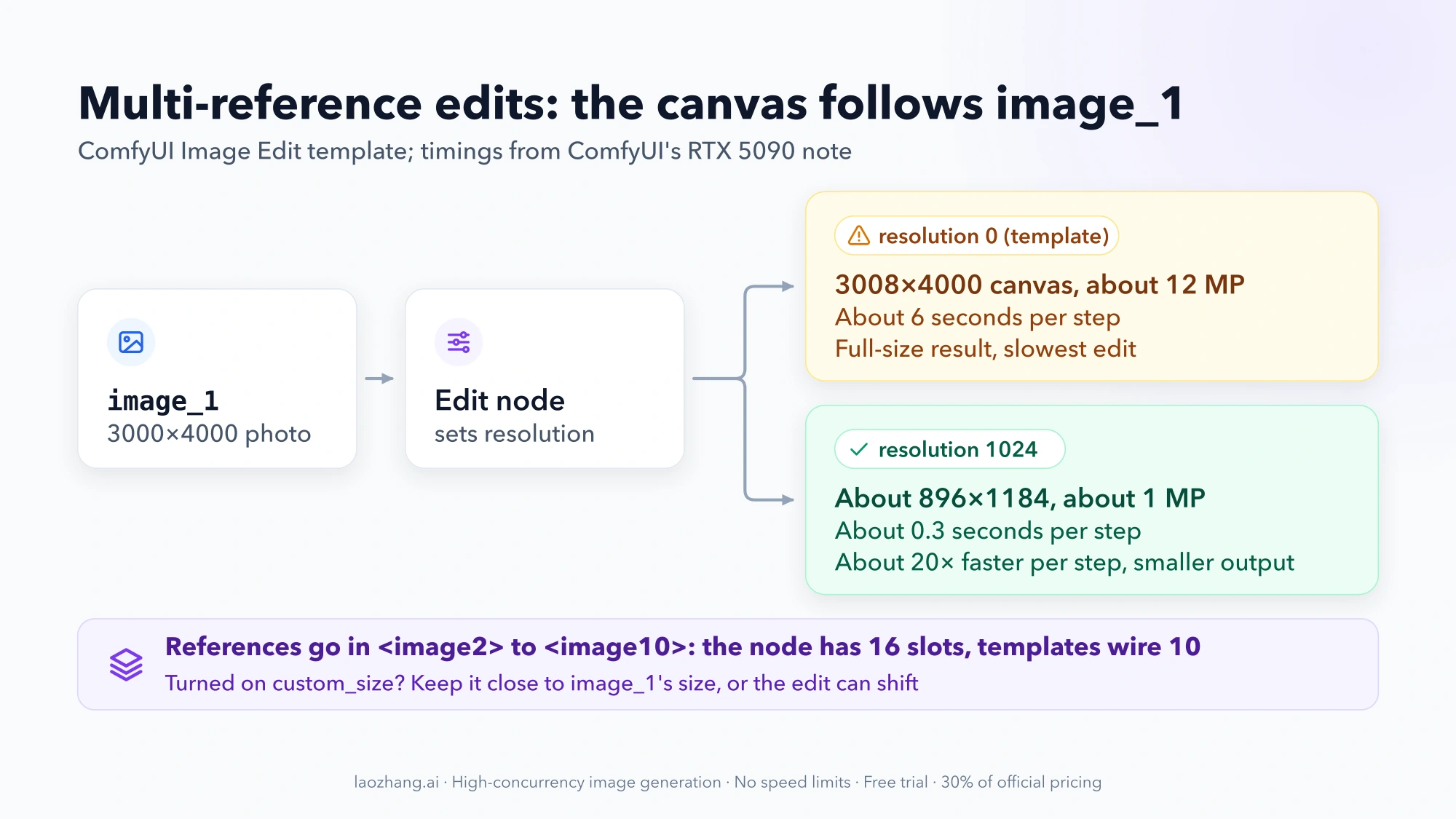
The edit canvas follows image_1. With the template's resolution set to 0, a 3000×4000 photo becomes a 3008×4000 canvas of about 12 megapixels, which is about 20 times slower per step than a 1-megapixel edit on ComfyUI's RTX 5090 numbers. Set resolution to 1024 and the same photo is edited at about 896×1184. That's faster, but smaller rather than more detailed. If you turn on custom_size, keep the size close to image_1's resized dimensions, or the edit can drift out of position.
Several large reference images slow the edit further. The experimental Qwen Image 2.1 Cache node helps here: set its device to cpu to keep the cache in system RAM at little speed cost, or its dtype to int8 to halve the cache at about bf16 accuracy.
Run Qwen-Image-2.1 from Python: Diffusers and a local OpenAI-style server
The official quick start uses Diffusers' QwenImage21Pipeline. Install the requirements:
pip install "torch>=2.4.0" "transformers>=5.17" accelerate pillow
pip install git+https://github.com/huggingface/diffusers
This script combines the README's transparent-image example with its memory-saving option. enable_model_cpu_offload() moves idle parts of the model to system RAM, so it replaces the usual .to("cuda"):
import torch
from diffusers import QwenImage21Pipeline

pipe = QwenImage21Pipeline.from_pretrained(
    "Qwen/Qwen-Image-2.1", torch_dtype=torch.bfloat16
)
pipe.enable_model_cpu_offload()  # for limited VRAM; use pipe.to("cuda") if it fits

image = pipe(
    prompt=(
        "This is an RGBA image with transparency. A ceramic coffee mug with a "
        "hand-painted blue wave pattern. The image has alpha channel and the "
        "background is transparent."
    ),
    width=1024,
    height=1024,
    num_inference_steps=40,
    generator=torch.Generator("cuda").manual_seed(42),
).images[0]

print(image.mode)  # RGBA when the model generated transparency
image.save("mug.png")
The pipeline defaults to 2048×2048 and 40 steps. Starting at 1024×1024 keeps the first run lighter. For editing, pass image=Image.open("input.png"), or a list of images for multi-reference work.
To give other tools an OpenAI-style endpoint, the README's vLLM-Omni route serves /v1/images/generations locally:
vllm serve Qwen/Qwen-Image-2.1 --omni --port 8091

curl http://localhost:8091/v1/images/generations \
  -H "Content-Type: application/json" \
  -d '{"model": "Qwen/Qwen-Image-2.1", "prompt": "A ceramic teapot on a wooden table", "size": "1024x1024", "num_inference_steps": 40, "seed": 42}'
SGLang (sglang generate), LightX2V, AMD ROCm and several non-NVIDIA chips via FlagOS are also supported, per the README. Running your own server doesn't change the license: an internal tool for evaluation is fine, but a paid service built on it needs the commercial license.
Qwen-Image-2.1 API pricing: $0.04 per image on Alibaba Cloud
Alibaba sells the model as qwen-image-2.1-pro in Model Studio. It takes text and images in and returns an image, with the same 7B description as the open model. Alibaba doesn't say whether the hosted "Pro" is identical to the downloadable weights, and its API takes a prompt_extend parameter that the local pipeline doesn't have. Treat it as Alibaba's hosted 2.1, not a guaranteed match for your local results.
| Model (Alibaba Cloud) | Price per output image | Notes |
|---|---|---|
qwen-image-2.1-pro, Singapore | $0.04 | 10 free images, Singapore only, valid 90 days |
qwen-image-2.1-pro, Global regions (Beijing, Hong Kong, Frankfurt, Virginia, Tokyo) | $0.035333 | No free quota |
qwen-image-3.0, Singapore | $0.03 (1K and 2K) | Closed model; input images $0.003 each |
qwen-image-3.0-pro, Singapore | $0.04 (1K) / $0.075 (2K) | Closed model |
qwen-image-2.0 / qwen-image-2.0-pro, Singapore | $0.035 / $0.075 | Closed models |
Per 1,000 successful images: 1,000 × $0.04 = $40 in Singapore, or 1,000 × $0.035333 ≈ $35.33 in the Global regions. Alibaba bills only images that generate successfully, so a failed request costs nothing. Rerolls you discard still count. Prices are list prices without promotions or tax.
Rate limits on the QwenCloud model page are 20 requests per minute, 10 concurrent requests and an async queue of 200 tasks. At 20 RPM, a 1,000-image batch takes at least 50 minutes. A minimal request:
curl --location 'https://maas.qwencloudapi.com/api/v1/services/aigc/multimodal-generation/generation' \
  --header 'Content-Type: application/json' \
  --header "Authorization: Bearer $DASHSCOPE_API_KEY" \
  --data '{
    "model": "qwen-image-2.1-pro",
    "input": {"messages": [{"role": "user", "content": [{"text": "A neon shop sign that reads \"OPEN LATE\", rainy night"}]}]},
    "parameters": {"prompt_extend": true}
  }'
The sample request on QwenCloud sets prompt_extend to true. As the name says, it extends your prompt on Alibaba's side before generation. When exact wording matters, such as text that must appear verbatim, compare true and false on the same prompt before you pick one.
Kie.ai also offers Qwen-Image-2.1 at 4 credits (about $0.02) per 1K image and 8 credits (about $0.04) per 2K image, which works out to about $20 or $40 per 1,000 images. New users get free credits. As covered above, its license arrangement with Alibaba isn't stated.
Qwen-Image-2.1 problems: out of memory, 4K drift and cfg mistakes
| Symptom | Likely cause | What to do |
|---|---|---|
| Out of memory on the first image | Resolution or format too large for your VRAM | Drop to 1024×1024, batch 1, then a smaller quant (GGUF Q4_K_M), then CPU offload. Fewer steps speeds things up but may not fix memory errors |
| Template missing or nodes red in ComfyUI | Outdated ComfyUI | Update to the latest build; new core nodes can reach nightly first |
| Negative prompt has no effect | cfg is 1, so ComfyUI skips the negative pass | Leave it empty, or raise cfg to 2 if you need it |
| Washed-out, over-bright or broken image | cfg changed too far | Return to cfg 1; use 2 at most for dense text |
| Prompt ignored at very large sizes | Target well above the 2K training size, such as 4K | Generate at the 2K presets and upscale separately |
| Edit is very slow | Canvas follows a large image_1 | Set resolution to 1024 or resize the source photo |
| Edit shifts or misaligns | custom_size far from image_1's size | Turn custom_size off or match the sizes |
| Transparent PNG shows a white background | Viewer flattened the alpha channel | Open the file in an image editor; check image.mode |
| Text in the image is wrong | Seed-dependent text rendering | Change the seed first; then try cfg 2 |
If the model still doesn't fit your hardware after all of this, stop tuning and switch to the Hugging Face Space for testing or the API for production.
Qwen-Image-2.1 FAQ
Is Qwen-Image-2.1 free?
Free to download and run, and free to try in the official Hugging Face Space or on ModelScope. It is not free for commercial use: the license covers research and evaluation only. Alibaba's API charges $0.035333–$0.04 per image.
Can I try Qwen-Image-2.1 online without installing anything?
Yes. The official Hugging Face Space runs on ZeroGPU and ModelScope offers online generation, with no published quota for either. wuli.art offers all features free, but only for users in mainland China. Kie.ai has a playground with free credits for new users. If you'd rather generate inside Claude, the Claude image generation connector guide explains how Hugging Face Spaces plug in there.
Does Qwen-Image-2.1 run on a Mac?
Yes, through GGUF quants. Unsloth suggests GGUF with a compatible native backend on Apple Silicon with 12–16 GB or more of unified memory. Unsloth's desktop app runs on macOS. Unsloth doesn't publish Mac timings, so time one 1024×1024 image before planning larger batches.
Is qwen-image-2.1-pro the same model as the open weights?
Alibaba describes it with the same 7B, 32-layer wording but doesn't state that the two are identical. The hosted version also takes a prompt_extend parameter that the local pipeline doesn't have. Compare outputs on your own prompts if consistency between local tests and production matters.
Should I use Qwen-Image-2.1 or Qwen-Image 3.0?
Use 2.1 if you need weights you can run offline, fine-tune with LoRAs or inspect. Use either through the API if you only need hosted generation: qwen-image-3.0 costs $0.03 per image in Singapore against $0.04 for 2.1 Pro, and no published test shows which gives better images.