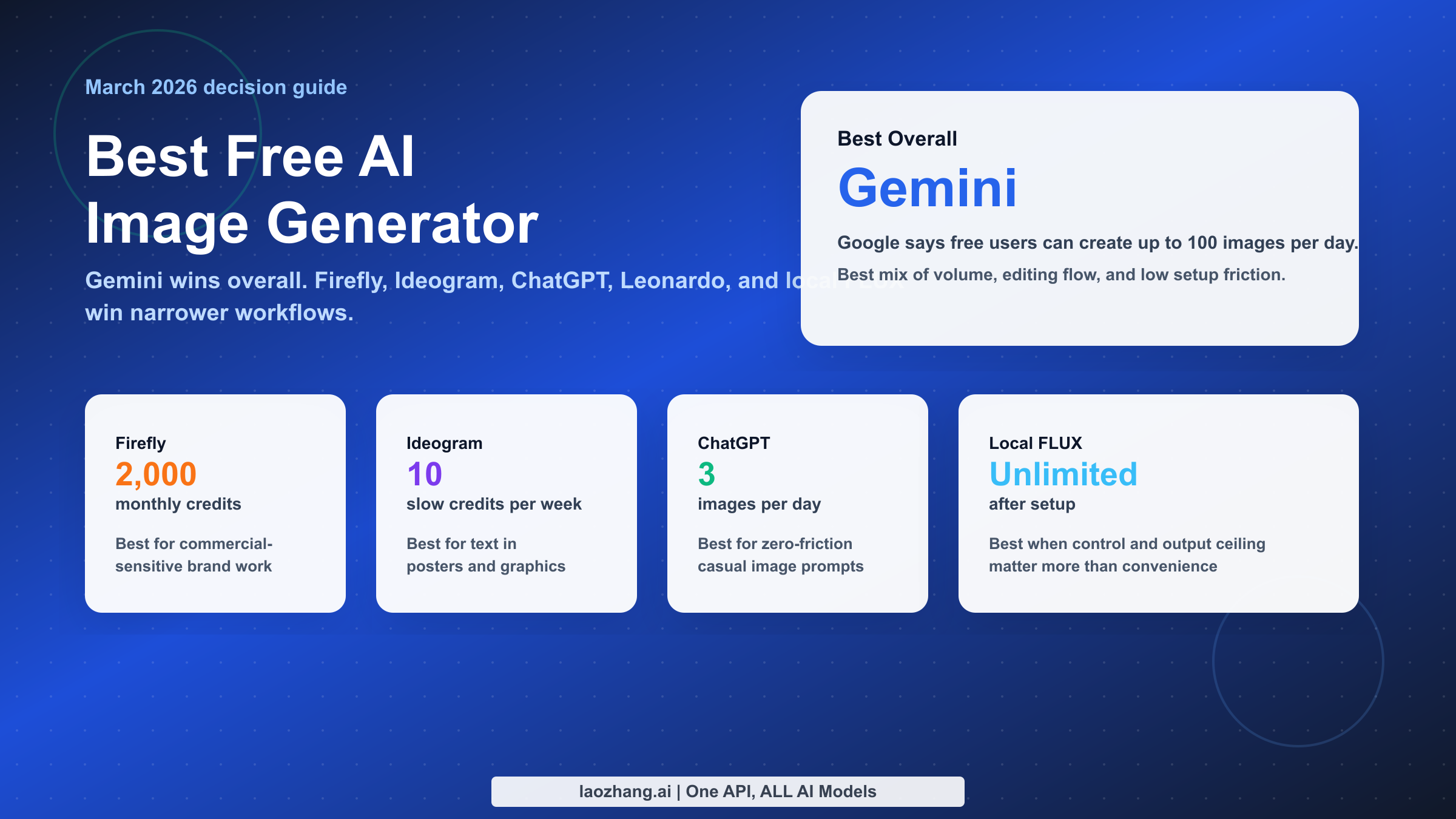
The short answer as of March 12, 2026: Gemini is the best free AI image generator for most people. It combines the most generous official daily limit I could verify for a mainstream consumer tool, strong text rendering, solid conversational editing, and almost no setup friction. If you need a different kind of "best," the answer changes: Adobe Firefly is the safer pick for commercial-sensitive design work, Ideogram is still the text-in-image specialist, ChatGPT is the easiest casual option, Leonardo is the better creator playground, and local FLUX or Stable Diffusion is the best answer if what you really want is unlimited generation rather than a SaaS free plan.
That ranking is an inference from current official plan pages, capability pages, and real user friction discussions, not a vendor claim. Most "best free AI image generator" listicles blur together apps with radically different cost models. A tool that gives you 100 images per day is not competing in the same category as a tool that gives you 10 slow credits per week, and neither should be judged the same way as a local FLUX setup that is technically free after you handle hardware and setup yourself. This guide is built around that distinction so you can make the right choice in one reading session instead of opening six tabs and reverse-engineering the fine print.
TL;DR
If you only need the answer and not the full argument, start here. These picks use official product pages checked on March 12, 2026 for volatile items such as free limits, credits, and plan language.
| Tool | Current free offer checked March 12, 2026 | Best for | Biggest caveat | Verdict |
|---|---|---|---|---|
| Gemini | Google says free users can create up to 100 images/day | Most people who want a generous, easy web tool | Consumer limits can change by plan or rollout | Best overall |
| Adobe Firefly | Adobe lists 2,000 monthly generative credits on Firefly Free | Brand work and commercial-sensitive teams | Credit model is generous, but not open-ended | Best for commercial-safe work |
| Ideogram | Ideogram lists 10 slow credits/week on the free plan | Text inside images, posters, thumbnails, ads | Free throughput is small | Best for text rendering |
| ChatGPT | OpenAI says free users can generate up to 3 images/day | People who want zero learning curve | Daily cap is much lower than Gemini's | Best beginner pick |
| Leonardo | Leonardo lists 150 fast tokens/day on the free tier | Creators who like more style and control options | Tokens burn unevenly by workflow | Best creator playground |
| FLUX or Stable Diffusion local | Software path can be free under the community/open model you choose | Unlimited output after setup | Hardware and setup effort are real costs | Best unlimited option |
My practical recommendation is simple. If you want a free image generator that feels generous enough to matter, start with Gemini. If your job involves client logos, ad creative, or anything where licensing anxiety matters, keep Firefly close. If your images need readable text, test Ideogram before anything else. If you are only making the occasional social image and already live inside ChatGPT, use ChatGPT. If you hate quotas more than you hate setup, skip all of them and run FLUX locally.
The one thing I would not do is choose based on aesthetics alone. Many readers think they are asking, "Which model makes the prettiest image?" What they are actually asking is, "Which tool lets me finish my task with the least frustration before I have to pay?" That is a different decision, and it is why free limits, workflow friction, and editing behavior matter more than a vague promise of photorealism.
How I Judged "Free" in March 2026
The biggest problem with this keyword is that "free" means at least three different things. First, there is daily free usage inside a mainstream app. Gemini and ChatGPT sit here. You open the app, type a prompt, and generate until you hit a daily cap. Second, there is the credit-bucket model, where the tool is free but only within a monthly or weekly allowance. Firefly, Ideogram, and Leonardo fit this pattern. Third, there is self-hosted free, where the software or license can be free but you supply the hardware, storage, and patience. FLUX and Stable Diffusion live here.
Those are not interchangeable offers. If a founder needs 30 product shots today, a weekly slow-credit plan is not really free enough to be useful. If a designer needs one campaign visual and cares about licensing posture, a 2,000-credit monthly plan may be better than a tool with a larger daily cap. If a hobbyist wants 500 experiments over a weekend, a local workflow can be far cheaper than chasing SaaS quotas. I score the tools against the job they are best suited for, not against a single abstract definition of quality.
My ranking uses six criteria. The first is usable free volume: not just whether a free tier exists, but whether it stays useful after the first five minutes. The second is quality on real tasks, especially realism, prompt adherence, and ability to handle edits without a full restart. The third is text rendering, which still separates average image models from genuinely helpful ones. The fourth is commercial safety and licensing clarity, because the best free generator for a school project is not necessarily the best free generator for paid client work. The fifth is editing workflow: can you revise the result conversationally, outpaint, swap text, or make small changes without rebuilding the whole composition? The sixth is friction: how much login pain, queueing, token math, and setup overhead stands between you and the image you want?
This is also where I need to be explicit about inference. No official product page says, "We are the best free AI image generator." The ranking below is my conclusion after comparing official limit pages from OpenAI, Google, Adobe, Ideogram, Leonardo, and Stability AI, plus community friction from Reddit discussions around tokens, queue behavior, and local setup. The sources tell you what exists. The ranking tells you what is worth your time.
One more point matters: most readers should optimize for decision speed, not for platform maximalism. A tool with twenty knobs is not better if you only need a LinkedIn banner and a blog thumbnail. A tool with a beautiful gallery is not better if you hit a credit wall after three experiments. That is why this guide deliberately favors clear task-to-tool matching over a cinematic "best of AI art" vibe.
The 5 Best Free AI Image Generators Right Now
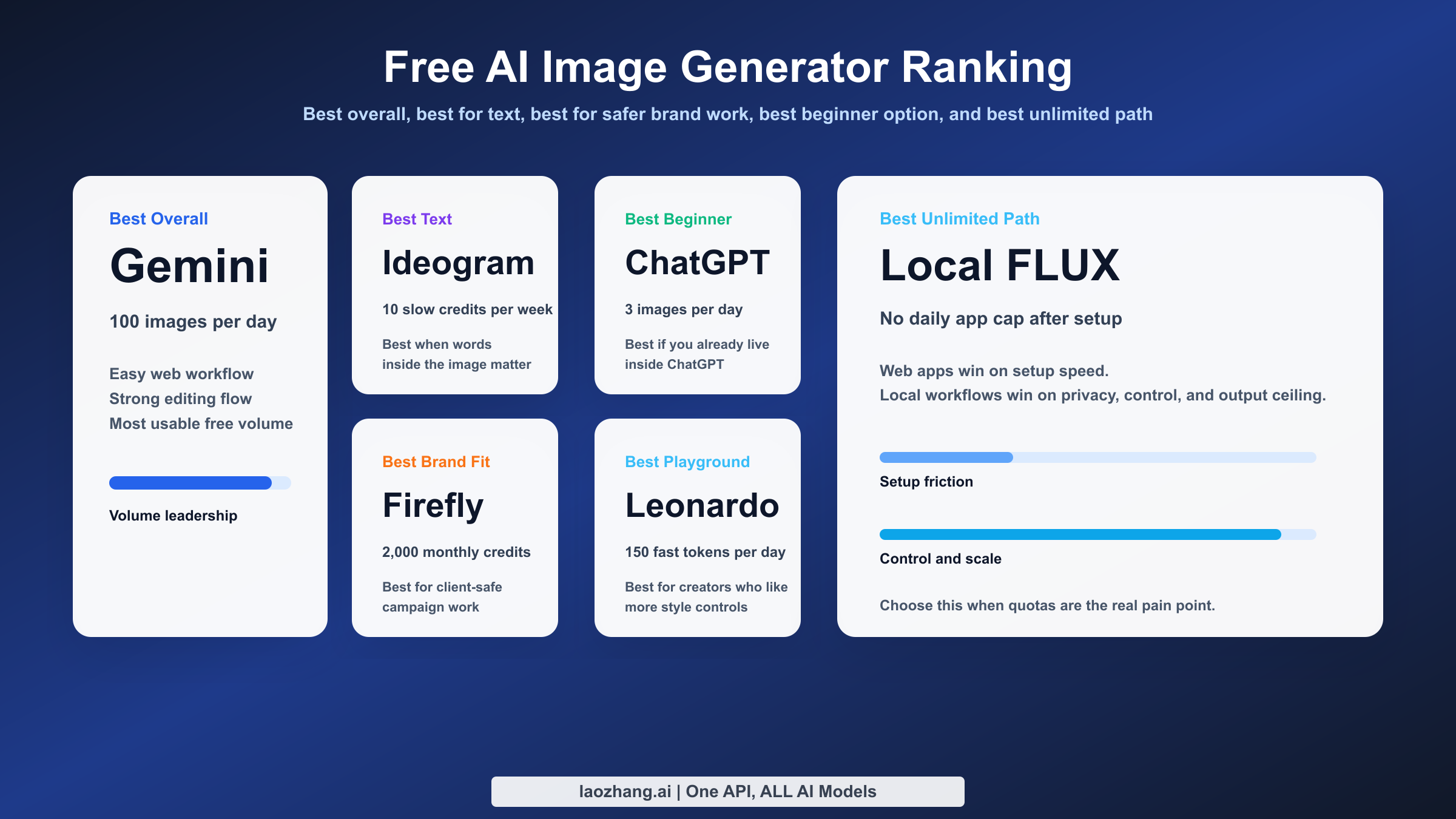
Gemini takes the top spot because it is the rare free image generator that is both easy and meaningfully usable. Google currently says free Gemini users can create up to 100 images per day, and that alone changes the economics of experimentation. Most free image tools become annoying precisely when you need them to be helpful: you make a few test images, learn the prompt, then hit a cap. Gemini's current limit is high enough that many students, marketers, blog owners, and indie builders can finish a real work session before thinking about payment.
The other reason Gemini wins is that it behaves like a modern assistant instead of a one-shot image box. Google highlights conversational editing, precise text rendering, and real-world knowledge on its Gemini Flash image page. In practice, that matters because the best free generator is not just the one that produces a pretty first output. It is the one that lets you say, "Keep the composition, change the headline, make the background warmer, and remove the coffee cup," without feeling like you are rolling the dice from scratch. For practical work, editability is part of quality.
Adobe Firefly ranks next, but only if your definition of best includes risk management. If you create paid social ads, client mockups, ecommerce visual concepts, or brand-safe design variations, Firefly deserves serious attention. Adobe currently lists 2,000 monthly generative credits on Firefly Free, and more importantly, Adobe positions Firefly around licensed training data and commercially safer usage. That does not make Firefly automatically superior artistically. It makes it easier to defend in a business workflow where "Can I use this?" matters as much as "Does this look good?" If your real job is to produce assets people will pay for, that tradeoff is rational.
Ideogram is still the specialist pick for text inside images. If your main task is generating posters, ad concepts, product announcements, thumbnail cards, or social graphics with large readable words, Ideogram remains unusually relevant. The free plan is limited, with 10 slow credits per week listed on the pricing page, which is why it does not win overall. But if your pain point is not volume and not licensing, and instead it is "I need the words in the image to look correct," Ideogram earns its slot near the top because text rendering is still where many otherwise strong generators fall apart.
ChatGPT ranks below Gemini on raw free value, but it should not be dismissed. OpenAI says free users can generate up to 3 images per day, and that cap is too low for heavy experimentation. Still, ChatGPT is the easiest free image generator for a large number of people because they already use it for other tasks. The conversational workflow is strong, the prompt-edit loop feels natural, and the barrier to entry is minimal. If you only create a few images per week and prize convenience above volume, ChatGPT is still one of the most pleasant ways to generate images for free. It simply stops being the best answer the moment you care about quantity.
Leonardo is the creator playground in this group. The free plan currently lists 150 fast tokens per day, which sounds generous until you realize token systems are harder to estimate than clean image counts. Some workflows feel efficient. Others chew through the daily allowance quickly. That unpredictability is why Leonardo is not my first recommendation for a beginner. But for users who like styles, presets, mode switching, and a more "creative platform" feel than ChatGPT or Gemini provide, Leonardo can be the more satisfying tool. It rewards curious users who do not mind a bit of quota management.
The fifth slot goes to local FLUX or Stable Diffusion workflows because there is a huge gap between what people say they want and what they actually need. If someone tells me, "I need a free AI image generator and I hate limits," the honest answer is often not another web app. It is a local workflow. Under the relevant community or open license path, the software side can be free, and once you have the hardware or cloud box, your usable image count becomes limited by time and compute rather than a daily plan wall. That is why local FLUX belongs in the same conversation even though it is a very different product category from Gemini or Firefly.
Why does local FLUX not rank first, then? Because most readers are not looking for a weekend configuration project. They want a result today. Local generation brings model choice, VRAM requirements, storage concerns, update churn, and workflow tooling like ComfyUI or Automatic1111 into the picture. For many users, that setup burden is worth it. For many others, it is precisely what they are trying to avoid. So the correct recommendation is conditional: local FLUX is the best unlimited free option, not the best free option for the average person.
This is also the right place to explain why Leonardo is not in my top three and why ChatGPT is not in my top two. Leonardo loses points for token complexity. ChatGPT loses points for a much smaller free cap. Firefly does not win overall because monthly credits and Adobe's broader design context are more specialized than Gemini's simple consumer value. Ideogram does not win overall because its free allowance is too narrow. In other words, the ranking is not punishing these tools for being bad. It is rewarding the tools that solve the most common reader problem with the least hidden friction.
If you want the single fastest path to a good answer, here it is again. Choose Gemini if you need a lot of free generations and strong general-purpose results. Choose Firefly if business usage is part of the story. Choose Ideogram if readable text is the story. Choose ChatGPT if ease is the story. Choose Leonardo if experimentation is the story. Choose local FLUX if limits are the enemy.
Which One Is Best for Your Specific Use Case?
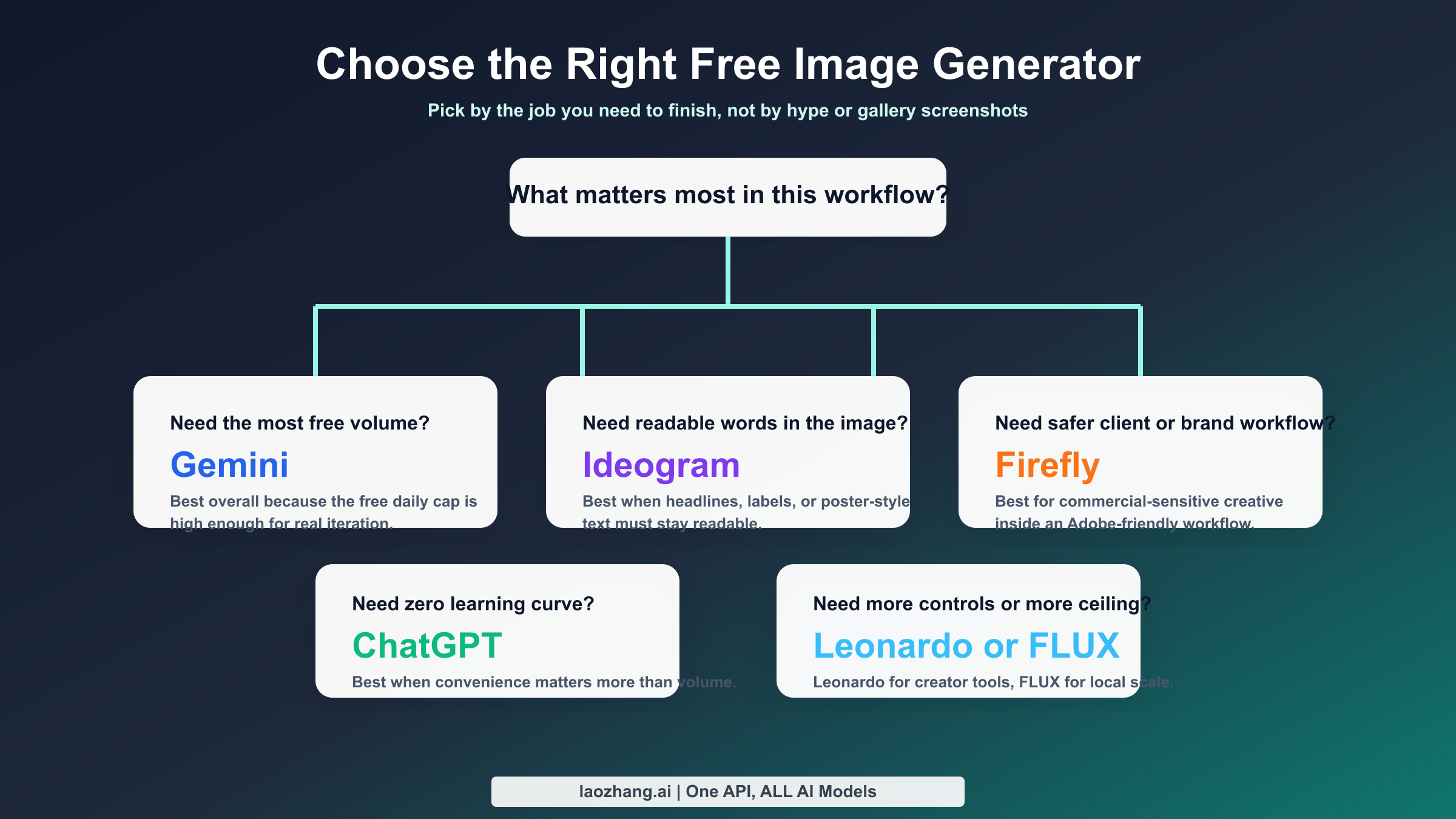
The best way to use this page is not to memorize the ranking. It is to map the ranking to your workflow. A blogger who needs feature images is solving a different problem than a designer building ad concepts, and both are solving a different problem than a hobbyist who wants to make hundreds of stylized experiments. That is why use-case matching beats generic top-10 scoring.
| Your situation | Best pick | Why it wins | What to watch |
|---|---|---|---|
| You need the most useful free web app for everyday images | Gemini | Highest current verified daily cap among the mainstream consumer tools in this comparison | Google can change consumer limits |
| You need readable words inside the image | Ideogram | Strong reputation for text rendering and layout-oriented outputs | Weekly free allowance is small |
| You work with clients, brands, or commercial campaigns | Adobe Firefly | Stronger commercial-safety positioning and Adobe ecosystem fit | Credit bucket, not unlimited usage |
| You want the easiest conversational workflow | ChatGPT | Friction is low and revisions feel natural | 3 free images/day is a real ceiling |
| You want more creative controls and style exploration | Leonardo | Good playground energy with multiple creator-oriented tools | Token math is harder to predict |
| You need effectively unlimited generation | Local FLUX or Stable Diffusion | No app-level daily cap once your setup is ready | Hardware, setup, and maintenance costs |
For bloggers and content marketers, Gemini is the most rational starting point. Most blog image tasks are not fine-art contests. They are repeatable needs such as hero images, diagrams, concept illustrations, article thumbnails, and social cards. Volume matters more than micro-differences in painterly style. With a 100-images-per-day free ceiling according to Google's current help page, Gemini gives you enough room to iterate without turning every prompt into a high-stakes bet. If your blog depends heavily on headline text inside the image, then Ideogram becomes the specialist backup.
For ecommerce operators and ad buyers, the choice splits fast. If you are roughing out product scenes, seasonal banners, or quick campaign concepts and just want output, Gemini is still the easiest free place to start. If you are already living in Adobe tools and care about cleaner business justification, Firefly is the smarter long-term workflow even if the free tier is structurally narrower. The decision is not only about the image. It is about whether the image can move through a team, a client review, or a paid campaign without triggering avoidable legal anxiety.
For designers and social media managers, Ideogram is often more valuable than its small credit count suggests. A tool that gets the headline right in one or two tries can beat a tool with more free generations that keeps mangling the text. This is where shallow listicles go wrong. They assume a bigger free pool always wins. That is false when the actual task has a failure mode the bigger-pool tool handles poorly. If your creative brief includes readable product names, date cards, price callouts, or event titles, Ideogram can save more time with 10 good slow credits than another app can save with 30 mediocre tries.
For students and casual users, ChatGPT remains relevant because almost everybody already knows how to talk to it. If you only need a few images for a presentation, mood board, class handout, or personal joke, the lower daily cap matters less than the simplicity. You do not need to learn a new platform, parse token costs, or pick between creative modes. That ease has value. The mistake is assuming that ease scales. It does not. Once the workload becomes real, Gemini's larger free limit is simply harder to argue against.
For hobbyists and prompt tinkerers, Leonardo is the more playful option. It feels designed for people who enjoy exploring looks, models, variations, and visual styles. Some readers will prefer that environment even if it is not the cleanest free-value leader. The key is to understand the tradeoff. If you like experimenting, the token system may feel acceptable because the tooling is part of the fun. If you need predictable throughput, tokens feel like accounting.
For power users, local FLUX or Stable Diffusion is where the conversation often ends. The strongest argument for local generation is not ideology. It is economics and control. Once you have the machine, you stop reorganizing your workflow around someone else's daily generosity. You can batch, automate, fine-tune, stack LoRAs, preserve privacy, and experiment without thinking about weekly slow credits or rolling resets. The reason I do not recommend this first is not that it is weak. It is that it solves a more advanced version of the problem.
This is also where internal research on adjacent tools helps. If your interest in Gemini is specifically API or model depth rather than the consumer app, the detailed breakdown in our Gemini image API free tier guide goes deeper into model access and quotas. If you are leaning toward ChatGPT but worry the cap will be too small, our ChatGPT free-plan image limit guide explains the constraint more directly. And if your real answer is "I probably need FLUX eventually," our FLUX image generation guide is the better next read after this article.
Hidden Costs That Make "Free" Less Free
The most misleading thing about this category is that the cash price can be zero while the workflow cost is high. Hidden costs show up as time, uncertainty, and low ceiling. The problem is not that free tiers exist. The problem is that many pages discuss them as if all free access were equally usable. It is not.
The first hidden cost is quota psychology. A tool with 3 free images per day changes how you prompt. You become careful, conservative, and less willing to explore. A tool with 100 images per day makes experimentation normal. That difference matters more than many readers expect. Creativity improves when you can afford mistakes. This is one reason Gemini feels more generous in real use than ChatGPT free even before you compare model behavior.
The second hidden cost is credit ambiguity. Firefly's 2,000 monthly credits sounds huge, and for many users it is. But credits are not the same as unlimited comfort. The mental model changes. You start asking, "How expensive is this workflow relative to my monthly bucket?" Leonardo's 150 fast tokens per day has the same issue in a different form. The token number looks concrete, but actual output volume depends on what kind of generation you do. When free users complain about these systems, they are rarely saying the platform is bad. They are saying predictability matters.
The third hidden cost is queue behavior and throughput feel. Community discussion around creator tools often revolves around whether the free experience feels responsive or constrained at peak times. This is why I used Reddit only for friction framing, not for hard facts. Official pricing pages tell you the plan. Community discussions tell you how the plan feels when humans try to use it. The strongest free tools are the ones whose official generosity survives contact with normal usage patterns.
The fourth hidden cost is commercial confidence. Plenty of readers search this keyword casually, but the image they generate may still end up on a sales page, ad, or client deck. At that point, licensing posture stops being an abstract policy topic. It becomes operational risk. Firefly's positioning around licensed and public-domain training data is a real product advantage, even if it is not the highest-volume free offer. A generic list that ignores that distinction may recommend a fine hobbyist tool for a job that needs a more defensible workflow.
The fifth hidden cost is learning overhead. ChatGPT hides complexity well. Gemini is also fairly approachable. Leonardo introduces more creator-style options. Local FLUX introduces much more than that: interfaces, models, checkpoints, VRAM, schedulers, nodes, seeds, and version sprawl. Some readers enjoy this. Others only want a banner image for tomorrow's newsletter. A free tool is not truly cheap if it steals your Saturday.
There is also a privacy and control dimension that almost no generic roundup handles properly. With SaaS tools, especially on free tiers, you are trusting a hosted workflow and the provider's evolving terms. With local generation, you gain privacy and control but accept system maintenance. The cheapest option in money is not always the cheapest option in stress. The right question is not "Which tool is free?" It is "What kind of cost am I willing to pay?"
Once you frame the category that way, the rankings make more sense. Gemini is best overall because it minimizes hidden costs for the average reader. Firefly is best for business-sensitive work because it reduces a different kind of hidden cost. Ideogram reduces the hidden cost of bad text rendering. ChatGPT reduces the hidden cost of learning a new interface. Leonardo reduces the hidden cost of creative boredom if you like exploration. Local FLUX removes the hidden cost of app-level quotas once you absorb the setup cost up front.
Should You Use a Web App or Run FLUX Locally?
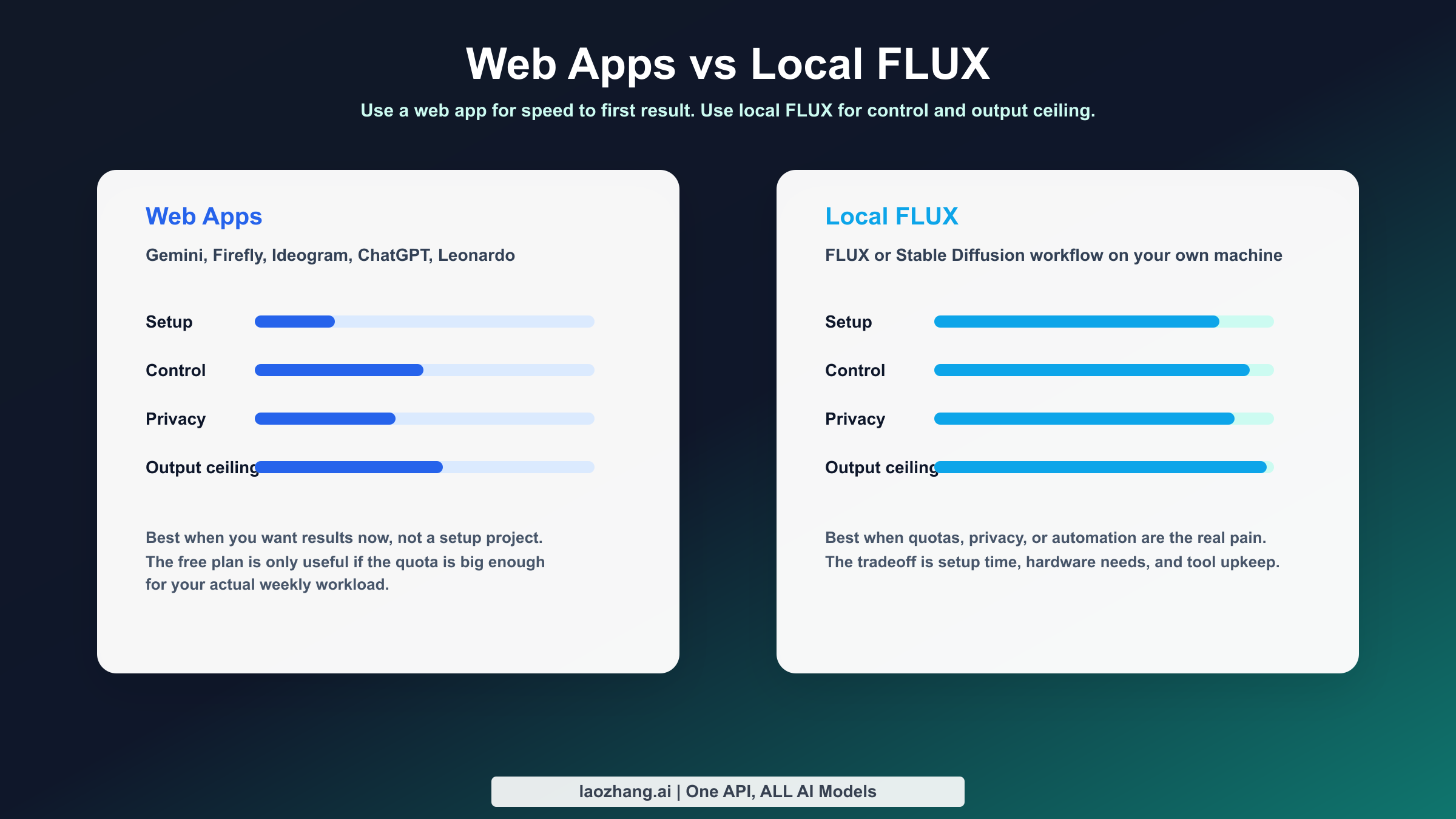
This is the fork in the road that most SERP articles refuse to make explicit. If your goal is convenience, use a web app. If your goal is control and essentially unlimited volume, run FLUX or Stable Diffusion locally. The problem is that many readers try to make one option satisfy both goals and end up unhappy.
Web apps win on speed to first result. Gemini, ChatGPT, Firefly, Ideogram, and Leonardo all let you start generating with a browser login and a prompt. That matters. It is the reason most people should begin there. You can learn what kind of images you actually need before you invest in hardware, workflows, or node graphs. Web apps also win on maintenance. There is no model download management, no CUDA debugging, no VRAM mismatch, and no broken extension after an update. If the image generator is only one small part of your job, this convenience is decisive.
Local FLUX wins on ceiling. Once your machine is ready, you do not negotiate with a plan page. You can generate 20, 50, or 500 images in a session if your hardware and time allow. You can choose specialized checkpoints, preserve privacy, automate batch runs, and tailor the workflow to your exact needs. This is why community discussions around local generation often sound like relief. For users who have outgrown free SaaS quotas, local image generation does not feel like a downgrade. It feels like getting their time back.
But local freedom is not free in the beginner sense. You need enough machine for the models you want to run. You need disk space, software updates, and tolerance for tool churn. You may need to learn ComfyUI, model selection, LoRA management, or workflow export and reuse. If that sounds fun, local FLUX is a great answer. If that sounds like unpaid operations work, it is probably the wrong answer today.
My rule of thumb is simple. Stay with web apps if your total weekly demand is modest, your tasks are not deeply repetitive, and you value speed more than control. Move local when you keep hitting quotas, care about privacy, need automation, or want consistent style systems at a scale that makes web-app limits feel absurd. This is also why some readers start with Gemini and later "graduate" to FLUX. That is not a contradiction. It is the normal path from convenience to control.
There is no shame in choosing the simpler option. In fact, a lot of wasted time in AI tooling comes from jumping into the most powerful path before the need is real. If Gemini gives you enough volume and quality, use Gemini. If Firefly gives your team enough confidence and Adobe fit, use Firefly. If your real frustration is that every hosted service eventually says no, start planning a local workflow. Choose based on your next six months of work, not on a forum fantasy about what a power user would do.
FAQ: The Questions Readers Usually Ask Next
The first question is whether any free AI image generator is truly unlimited. The honest answer is not in the normal web-app sense. Free SaaS plans are almost always limited by daily caps, monthly credits, slow queues, or token systems. If you want effectively unlimited generation, the realistic path is local FLUX or Stable Diffusion. That is why I separate local workflows from hosted free tools instead of pretending they are the same product class.
The second question is which free AI image generator is best for realistic photos. For most readers, Gemini is the safest first recommendation because it blends ease, volume, and strong general output. Leonardo may appeal to users who want to spend more time exploring styles and settings. Firefly can also be a smart option if the result is going into a brand-sensitive workflow. But for a normal user who just wants a good-looking realistic output without a lot of overhead, Gemini is still the most balanced answer.
The third question is which tool is best for text, logos, or promotional graphics. This is where Ideogram earns its place. If readable text is central to success, Ideogram is the specialist I would test first. Gemini has improved substantially, and Google's own model page emphasizes text rendering, but Ideogram still deserves the dedicated text-first recommendation because that focus is baked into how many users approach it.
The fourth question is which free AI image generator is safest for commercial use. That is the easiest category answer in this article: Adobe Firefly. The reason is not that Adobe has the highest free volume. It is that Adobe's positioning on licensed and public-domain training data is more directly aligned with commercial-sensitivity concerns. If the image will become revenue-facing creative, Firefly's value is bigger than its free credit number alone suggests.
The fifth question is whether ChatGPT is still worth using for free image generation. Yes, if your needs are light. No, if you want volume. OpenAI's current free cap of up to 3 images per day makes ChatGPT a pleasant casual tool rather than the strongest free-value tool. If you already use ChatGPT daily and only need occasional images, it remains a smart low-friction option. If you want to iterate heavily, Gemini is the better free starting point.
The final question is the one most readers should actually ask: which tool should I open first after reading this article? My answer is still Gemini for the average person. It has the cleanest balance of current free value, everyday usability, and practical output quality. Keep Firefly in reserve for business-sensitive work, Ideogram for text-heavy work, ChatGPT for casual convenience, Leonardo for creator-style exploration, and local FLUX for the moment when you decide that all quotas are a distraction.
That is the full decision in one paragraph. Use the tool whose strongest advantage matches the task you actually have this week. If that sounds obvious, good. The whole problem with this keyword is that most articles make it harder than it needs to be.