Qwen3.8-Flash-Next is locally runnable, but the honest starting point is not “Which GPU do I need?” It is “How much total memory remains after the operating system, runtime, KV cache, and my working tools are already present?”
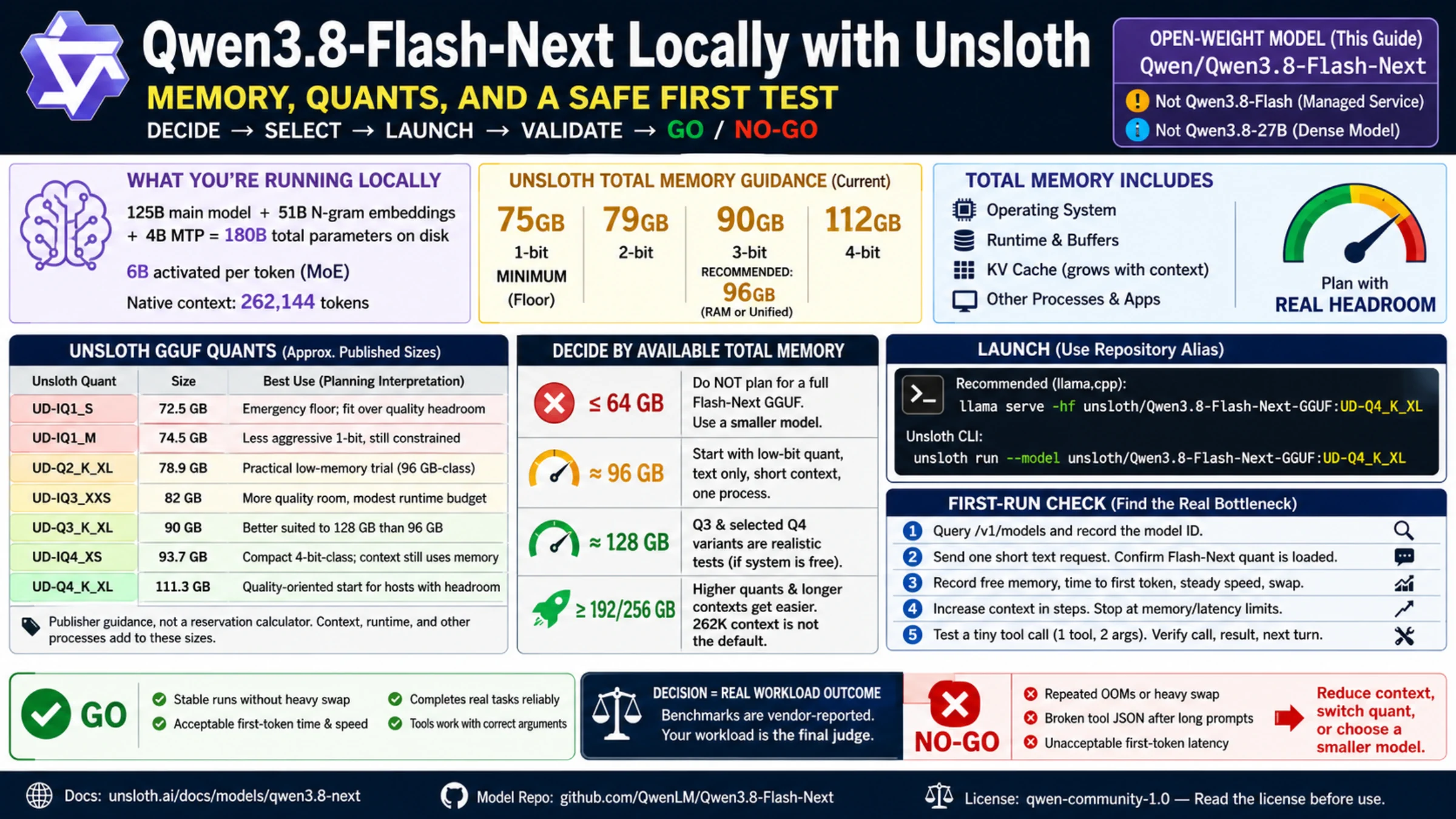
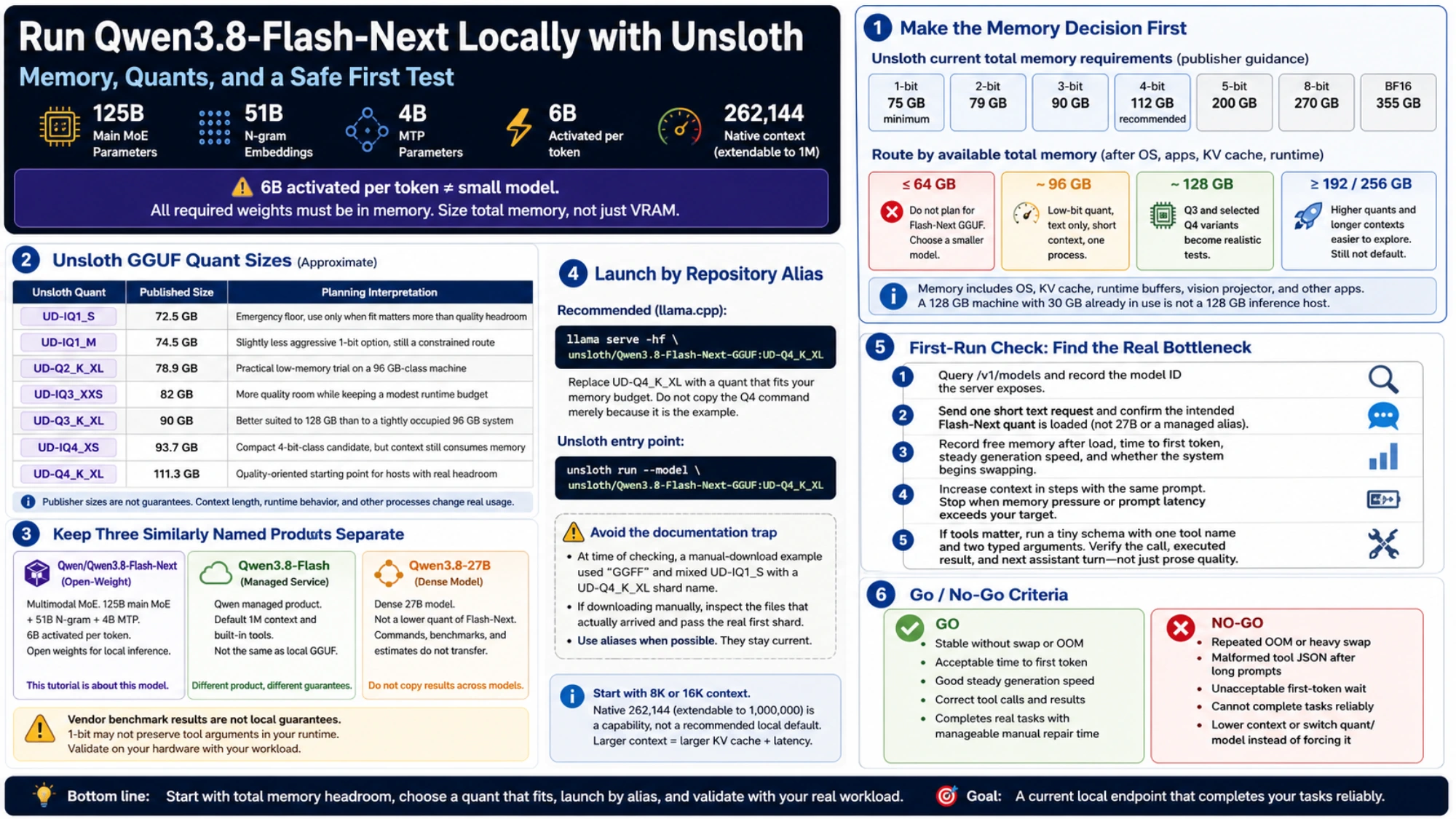
Unsloth’s guide lists 75 GB as the minimum for its smallest 1-bit quant and recommends a 96 GB RAM or unified-memory device. Its current 4-bit requirement is 96–114 GB. That makes a 128 GB machine a plausible Q3/Q4 test platform, not an unlimited-context guarantee.
The model's 6B active-parameter figure does not describe its storage footprint. According to the official Qwen model card, the main MoE has 125B parameters, with another 51B in N-gram embeddings and 4B in MTP. Six billion main-model parameters are activated for each token; all required weights still have to live somewhere.
Make the memory decision before the download
Use memory that is actually available during inference. On Apple Silicon, the model shares unified memory with macOS and every open app. On a discrete-GPU system, VRAM, system RAM, and offload behavior all matter. A 128 GB workstation that has 30 GB committed to builds, containers, an IDE, and browser tabs is not a 128 GB inference host.
Unsloth's current quant analysis gives these approximate artifact sizes:
| Unsloth quant | Published size | Sensible planning interpretation |
|---|---|---|
UD-IQ1_S | 72.5 GB | Smallest listed option; verify task quality before choosing it |
UD-IQ1_M | 74.5 GB | Slightly less aggressive 1-bit option, still a constrained route |
UD-Q2_K_XL | 78.9 GB | A practical low-memory trial on a 96 GB-class machine |
UD-IQ3_XXS | 82 GB | An 82 GB candidate; leave room for runtime and context |
UD-Q3_K_XL | 90 GB | Better suited to 128 GB than to a tightly occupied 96 GB system |
UD-IQ4_XS | 93.7 GB | A compact 4-bit-class candidate, but context still consumes memory |
UD-Q4_K_XL | 111.3 GB | A larger candidate for hosts with sufficient runtime headroom |
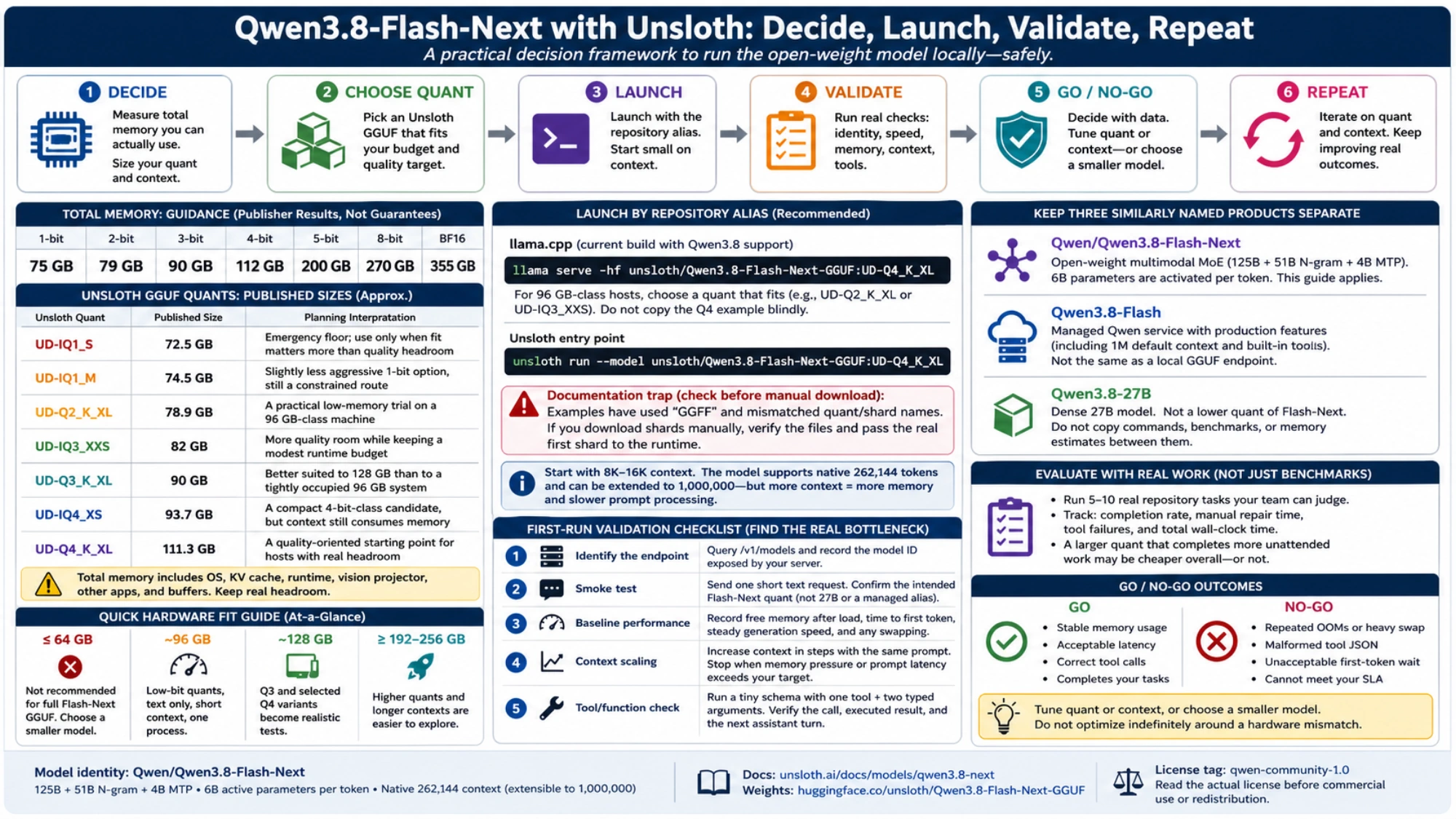
The same Unsloth guide summarizes total requirements as 75/79/90/96–114 GB for 1/2/3/4-bit, then 163 GB for 5-bit, 200 GB for 8-bit, and 355 GB for BF16. Treat those numbers as publisher guidance, not an exact estimate for your running process. Context length, runtime buffers, the vision projector, and other processes are additional variables.
That leads to a straightforward gate:
- At 64 GB or less, do not plan around a full Flash-Next GGUF. A smaller model is the reliable route.
- Around 96 GB, start with a low-bit quant, text only, short context, and one process.
- Around 128 GB, Q3 and selected Q4 variants become realistic tests, provided the machine is not already busy.
- Above 192/256 GB, higher quants and longer contexts become easier to explore, but native 262K context still should not be the default.
If your available memory is closer to 24–48 GB, the adjacent Qwen3.8-27B local agentic-coding guide addresses a different, much smaller model and is a better fit.
Keep three similarly named products separate
Qwen/Qwen3.8-Flash-Next is the open-weight model covered here. Qwen describes it as a multimodal MoE and an early preview of the architecture intended for Qwen4. Its hybrid design combines Gated DeltaNet with Qwen Sparse Attention, while the N-gram embeddings add capacity that is comparatively friendly to host-memory offload.
Qwen3.8-Flash is the managed Qwen service. Qwen says that product version adds production features including a default 1M context and built-in tools. Those features do not automatically exist in a local GGUF endpoint.
Qwen3.8-27B is a dense 27B model. It is not a lower quant of Flash-Next. A command, benchmark, or memory estimate for one cannot be copied to the other.
Qwen publishes strong coding, agent, and tool-use benchmark results for Flash-Next. They justify evaluation, but they are vendor-reported results from specified harnesses. They do not tell you whether a 1-bit Unsloth quant will preserve tool arguments in your runtime or whether your Mac will deliver acceptable first-token latency.
Launch by repository alias, not a guessed shard path
Use a current llama.cpp build with support for the model architecture. Before launching, set a modest context limit such as 8K or 16K through the installed runtime’s documented options or interface; do not begin with the model’s full context window. The Unsloth GGUF repository exposes quant aliases, so a current llama.cpp installation can fetch and serve the selected variant directly:
llama serve -hf unsloth/Qwen3.8-Flash-Next-GGUF:UD-Q4_K_XLFor a 96 GB-class host, replace UD-Q4_K_XL with a quant that fits the published budget; do not copy the Q4 command merely because it is the example. Unsloth also documents its own entry point:
unsloth run --model unsloth/Qwen3.8-Flash-Next-GGUF:UD-Q4_K_XLThe alias route avoids a current documentation trap. As of September 12, 2026, Unsloth's manual download example used a GGFF local-directory spelling and then combined an UD-IQ1_S directory with an UD-Q4_K_XL shard name. That example may be corrected quickly. If you download shards manually, inspect the files that actually arrived and pass the real first shard to the runtime; never reconstruct the path from memory.
Start with 8K or 16K context. The official model supports 262,144 tokens natively and can be extended to 1,000,000, but capability is not a recommended local default. Increasing context grows the KV cache and prompt-processing burden. A context setting that causes swap or ruins interaction latency is not useful capacity.
A first-run check that finds the real bottleneck
Do not begin with a giant coding agent session. Establish the layers in order:
- Query the local
/v1/modelsendpoint and record the model ID the server exposes. - Send one short text request and confirm that the intended Flash-Next quant, not the 27B model or a managed alias, is loaded.
- Record free memory after load, time to first token, steady generation speed, and whether the system begins swapping.
- Increase the configured context limit and test progressively longer representative inputs. Stop when memory pressure or prompt latency exceeds your service target.
- If tools matter, run a tiny schema with one tool name and two typed arguments. Verify the call, the executed result, and the next assistant turn—not just prose quality.
Then use a representative set of repository tasks whose results your team can judge. Track completion, manual repair time, tool failures, and total wall-clock time for each quant. A larger quant that completes four tasks unattended may be cheaper than a smaller one that needs constant correction; the opposite may also be true when latency dominates.
Loading is only a compatibility result. Repeated out-of-memory exits, heavy swap, malformed tool JSON after long prompts, or unacceptable first-token waits are legitimate no-go outcomes. Reduce context, switch quant, or choose a smaller model rather than optimizing indefinitely around a hardware mismatch.
When Flash-Next is the right experiment
The model is compelling when you have at least a 96 GB-class system, can accept a low-bit quality tradeoff, and want to test a large-capacity sparse model for long-context or agentic work. A 128 GB unified-memory system with enough free memory is a stronger Q3/Q4 lab, especially when you can close memory-heavy apps while evaluating it.
It is a poor choice when the main goal is a lightweight background assistant, when 64 GB is the hard ceiling, or when the workload requires predictable low latency more than model capacity. In those cases, choosing a smaller dense model is an engineering decision, not a failure to tune.
Check the official Qwen repository for current architecture and runtime support, and the Unsloth guide before committing to a large download. The current weight pages carry the qwen-community-1.0 license tag; read the actual license before commercial use or redistribution rather than treating the label as legal advice.