The Gemini Developer API still has a real free tier as of October 10, 2026. A new developer can create a project and API key in Google AI Studio, choose an eligible model, and send an API request without first moving the project to paid service.
For a new project, the free text models to start with are gemini-3.8-flash and gemini-3.5-flash-lite. Two more stable IDs, gemini-3.6-flash and gemini-3.1-flash-lite, are also free. The current Pro model, every image model, video, and music need billing when called through the API. The full list by model ID is below.
“Free” can mean that a model has a zero-dollar input and output row, that your project currently has an active quota, or that Google AI Studio lets you test a model in the browser. Those are separate conditions. A usable decision also depends on region, data handling, and how much failure your application can tolerate.
Already added billing, and AI Studio shows Tier 1 while a 429 still names a free-tier quota? The key usually belongs to a different project, or the billing account is not in a state Google treats as paid. The check order for billed projects stuck on Free Tier covers that case, and going back to the Free Tier covers the reverse move.
The four gates an unpaid project must pass
Use this order before you spend time integrating:
- Region: Google AI Studio and the Gemini API must be available where you access the service and where the relevant terms permit your client to operate.
- Model price: the exact model ID must show a free input and output path on Google's current pricing page.
- Project limits: AI Studio must show useful active RPM, TPM, and RPD for the project that owns the key.
- Workload fit: the data terms and variable capacity of unpaid service must be acceptable for the job.
Passing one gate does not waive the others. A model can show free token pricing while your project has little usable headroom. A generous-looking project quota is irrelevant if the input is confidential. An API key is not a separate allowance: keys inherit the project and its tier.
Which Gemini models currently show free pricing?
Google's Gemini Developer API pricing page is the authoritative place to answer this question. As of October 10, 2026, eight text model IDs show “Free of charge” for both input and output in the Free Tier column. A free row is not the same as access, so the table adds what Google's models page says about each one.
| Model ID | Free Tier price row | Status | Can a new project plan on it? |
|---|---|---|---|
gemini-3.8-flash | Free of charge | Stable, newest Flash | Yes. Google names it for new projects |
gemini-3.5-flash-lite | Free of charge | Stable | Yes. Google names it for new projects |
gemini-3.6-flash | Free of charge | Stable, previous-generation Flash | Yes. No restriction listed |
gemini-3.1-flash-lite | Free of charge | Stable | Yes. No restriction listed |
gemini-3-flash-preview | Free of charge | Preview | Not for anything you need to keep running |
gemini-2.5-pro | Free of charge | Served, access limited | Only if you actively used 2.5 models before |
gemini-2.5-flash | Free of charge | Served, access limited | Only if you actively used 2.5 models before |
gemini-2.5-flash-lite | Free of charge | Served, access limited | Only if you actively used 2.5 models before |
This table says nothing about how many requests you get. Pricing answers what one eligible token costs. The rate-limit view in AI Studio answers how much your project may process.
New projects and the 2.5 models
The three 2.5 rows are the ones most likely to mislead. Google's models page says it is “limiting access to the 2.5 models to users who have actively used them in the past” and tells new projects to use 3.5 Flash-Lite or 3.8 Flash. The 2.5 models are not deprecated, and Google does not define “actively used.” If your project is new, treat those rows as unavailable even though the price is zero.
This also settles the common “Is Gemini Pro free?” question. The only Pro row with free pricing is gemini-2.5-pro, which falls under that restriction. The current Pro model, gemini-3.1-pro-preview, has no free API row.
Preview models and names that sound alike
“Gemini 3 Flash” is a specific preview model, gemini-3-flash-preview. It is not a nickname for the current Flash line. Google says preview models “will typically have billing enabled, might come with more restrictive rate limits and will be deprecated with at least 2 weeks notice.” A free row on a preview model is fine for a quick test and a weak base for anything longer.
Check any ID you copied from a forum post or an older tutorial against this list of models Google now marks as shut down: gemini-2.0-flash, gemini-2.0-flash-lite, gemini-3.1-flash-lite-preview, and gemini-3-pro-preview. Calls to those IDs fail regardless of your tier.
Two older stable Flash IDs have left the pricing and models pages without failing. Google's deprecations page says requests to gemini-3.7-flash are routed automatically to gemini-3.8-flash, and requests to gemini-3.5-flash to gemini-3.6-flash. Code that still names them keeps working, but the answers come from the newer model, so pin the ID you actually get.
Other free rows: audio, embeddings, and Gemma
The pricing page also shows free input and output for several non-chat models:
- Live audio:
gemini-3.8-live,gemini-3.8-live-extended-thinking,gemini-3.1-flash-live-preview, andgemini-2.5-flash-native-audio-preview-12-2025 - Transcription and translation:
gemini-3.5-transcribe,gemini-3.5-transcribe-live, andgemini-3.5-live-translate-preview - Text to speech:
gemini-3.8-flash-tts,gemini-3.8-flash-lite-tts,gemini-3.1-flash-tts-preview, andgemini-2.5-flash-preview-tts - Embeddings: Gemini Embedding 2. The pricing page writes the ID as
gemini-embedding-2, while the models page listsgemini-embedding-2-preview, so confirm the ID in AI Studio before you hard-code it. - Gemma 4: free only. Its Paid Tier column says “Not available.”
Some tools are free on the free tier as well. Grounding with Google Search allows 500 requests per day, shared across Flash and Flash-Lite and not available for Pro. Google Maps grounding has the same 500-per-day allowance. Code execution, URL context, and File search are free of charge. Computer use is not available on the free tier.
Gemini models that need billing through the API
These rows say “Not available” in the Free Tier column as of October 10, 2026:
| Family | Model IDs or products | Free through the API? |
|---|---|---|
| Current Pro text | gemini-3.1-pro-preview, gemini-3.1-pro-preview-customtools | No |
| Image | gemini-nano-banana-2.1 (Nano Banana 2.1), gemini-3.1-flash-image (Nano Banana 2), gemini-3.1-flash-lite-image (Nano Banana 2 Lite), gemini-3-pro-image (Nano Banana Pro) | No |
| Video | gemini-omni-1.1-flash, gemini-omni-flash-preview, Veo 3.1 (standard, fast, lite) | No |
| Music | Lyria 3.5, Lyria 3 | No |
| Pro text to speech | gemini-2.5-pro-preview-tts | No |
The older image model gemini-2.5-flash-image is also paid only. Google first scheduled its shutdown for October 2, 2026, and its deprecations page now lists March 15, 2027, with gemini-3.1-flash-lite-image as the replacement. Move image code to one of the 3.1 image models before then.
“Can be tested in Google AI Studio” means the web UI
The pricing page adds a footnote to 3.1 Pro Preview, Nano Banana 2, and Nano Banana Pro: “Can be tested in Google AI Studio.” That refers to typing prompts in the AI Studio website. It does not give your API key free calls to those models. If a script requests gemini-3.1-pro-preview from a project without billing, the free tier does not cover it.
For image work specifically, the options across the app, AI Studio, and the API are covered in Gemini Image Generation Free Tier: App, AI Studio, or API?.
Which free model to start with
Start with gemini-3.8-flash for general text, code, and multimodal prompts. It is the newest stable Flash model, it has a free row, and Google names it for new projects. Choose gemini-3.5-flash-lite when the task is simple and high volume, such as classification, extraction, or short replies.
Pin the exact ID. The alias gemini-flash-latest is convenient for experiments, but Google swaps the model behind it with each release, so behavior can change without a code change on your side.
The Gemini 3.8 Flash API guide covers that model's ID, pricing, limits, and migration. For choosing by task across the family, see which Flash, Flash-Lite, or Pro to use.
Is the free Gemini app the same as the free API tier?
No. The Gemini app at gemini.google.com is a consumer product with its own free plan, and it gives you no API key or API quota.
As of October 1, 2026, Google's plans page lists a Free plan for the app that uses 3.6 Flash, notes that access to 3.1 Pro may change, and includes image generation and editing, Deep Research, Gemini Live, Canvas, and Gems. App usage is counted by compute, which depends on prompt complexity, features used, and conversation length. It resets every five hours up to a weekly limit. The page gives no daily prompt count, and plan contents vary by country.
The practical difference: the app can let you try a Pro model or make images for free in a chat window, while the same models are paid only through the API. A model being free in the app tells you nothing about your API project.
Your real allowance lives in the project
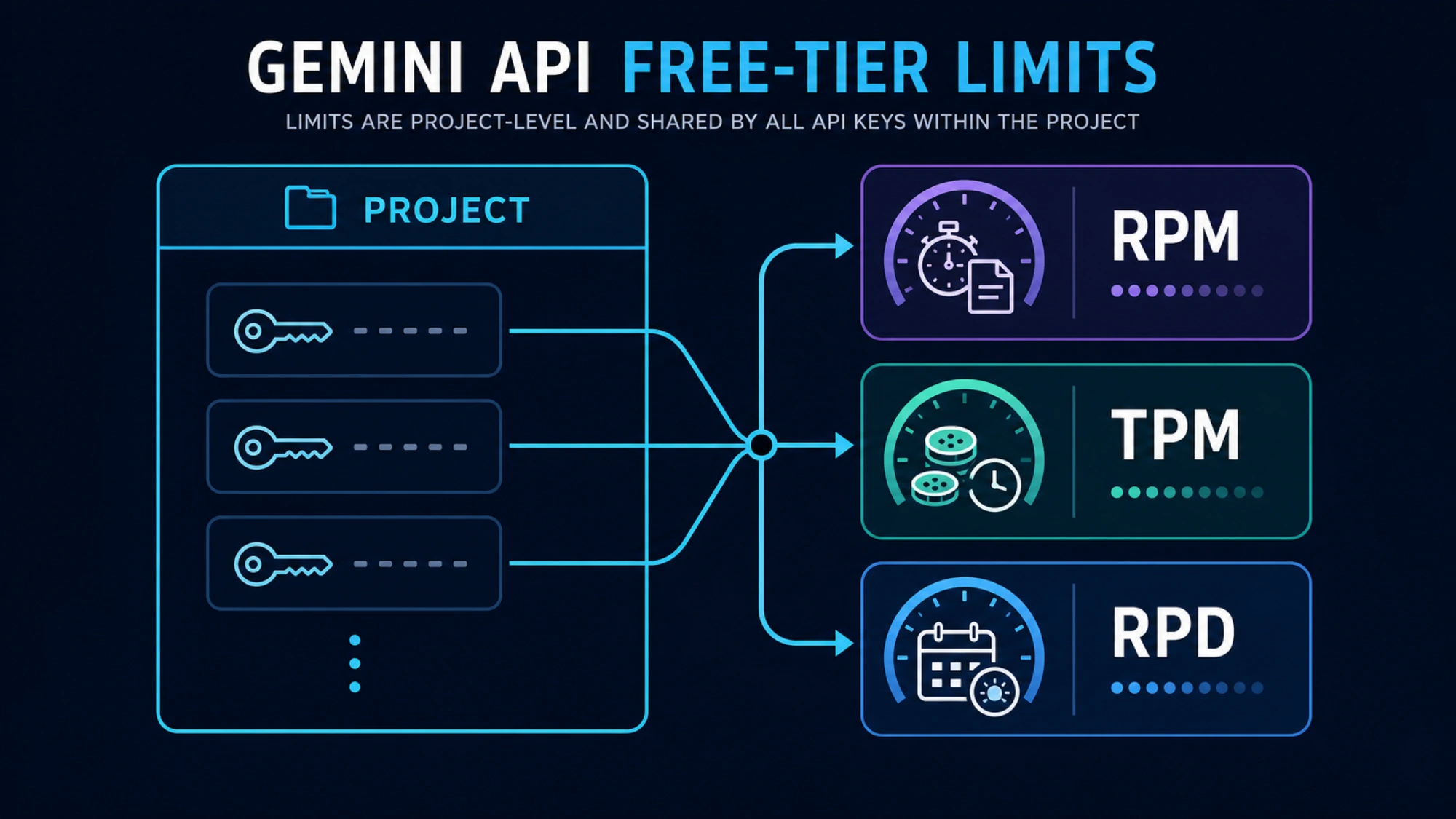
Google's rate-limit documentation describes three main dimensions:
| Limit | What it measures | Typical failure pattern |
|---|---|---|
| RPM | Requests per minute | A burst or too much concurrency fails quickly |
| TPM | Input tokens per minute | A few large documents can exhaust it |
| RPD | Requests per day | Calls work until the daily pool is spent |
Every request is evaluated against the relevant limits, and exceeding any one can produce a rate-limit error. RPD resets at midnight Pacific Time. Preview and experimental models have stricter limits.
Most importantly, limits apply per project, not per API key. The key itself costs nothing, but no free key is unlimited, and creating another key in the same project does not multiply quota. A notebook, cron job, staging deployment, and demo server can quietly compete for the same pool if they share that project.
Google publishes no per-model table of free-tier RPM, TPM, and RPD. Its documentation sends developers to AI Studio for the limits in force and says “Specified rate limits are not guaranteed and actual capacity may vary.” That makes a copied table of fixed request numbers a poor planning tool, even when it was correct for one model and date. For an implementation decision, open the project in AI Studio, select the exact model, and record the displayed RPM, TPM, RPD, and tier. Gemini API Rate Limits by Tier walks through reading those active limits.
A quick capacity estimate becomes meaningful only after that check. If a document workflow sends 30,000 input tokens per call, divide the displayed TPM by that input size to estimate the maximum token-bound call rate. If a chat endpoint sends tiny prompts to many users, RPM is more likely to be the first constraint. Keep the estimate below the maximum because free capacity can vary.
Make a current first call
Google's getting-started guide uses the Interactions API, available through the Python and JavaScript SDKs and REST. AI Studio creates a project and an API key automatically for new users. Keep the key in an environment variable:
export GEMINI_API_KEY="YOUR_API_KEY"
pip install -U google-genai
Then send a minimal request with a model that has a free row and is open to new projects:
from google import genai

client = genai.Client()

interaction = client.interactions.create(
    model="gemini-3.8-flash",
    input="Explain vector databases in three short sentences.",
)

print(interaction.output_text)
After it succeeds, inspect AI Studio again. Verify that usage landed on the project you expected and that the exact model still has the limits you planned around. This catches a wrong environment variable, a key from another project, or a stale model ID before those mistakes become application bugs.
If the call fails on a model ID taken from an older example, compare the ID with the tables above before you change anything else. A shut-down ID, a 2.5 model on a new project, and a paid-only model each fail for a different reason, and none of them is fixed by a new key.
Never put a raw Gemini key in a public frontend or commit it to source control. The free tier does not change normal credential security.
Diagnose 429 by the exhausted dimension
429 RESOURCE_EXHAUSTED is a category, not a complete diagnosis.
- A failure immediately after concurrent traffic usually points to RPM. Reduce concurrency and add jittered exponential backoff.
- Failure with a small request count but very large prompts points to TPM. Shorten, chunk, or schedule the input.
- A project that worked for hours and then stops for the rest of the day may have exhausted RPD. Backoff cannot refill a daily bucket.
- Several keys failing together points back to shared project limits.
- A preview model failing while a stable model works can reflect stricter preview capacity.
- A 429 whose body names a
free_tierquota on a project you have already billed is a billing-state problem, not a traffic problem. Use the billed-project check order instead of tuning retries.
Retrying makes sense for a short window or transient capacity event. It does not solve an exhausted daily allowance. Blind retries also have a cost: Google's billing FAQ says requests that fail with a 400 or 500 error are not billed for tokens but still count against quota.
If you need a deeper error decision tree, use the focused Gemini API 429, 400, and 500 guide. When the message appears inside AI Studio itself, see “You've Reached Your Rate Limit” in AI Studio.
Free service has a data contract
Google's Gemini API Additional Terms say content submitted to unpaid services, along with generated responses, is used to provide, improve, and develop Google products and machine-learning technologies. Human reviewers may read, annotate, and process that material, and Google tells users not to submit sensitive, confidential, or personal information to unpaid services.
That makes unpaid service a poor fit for private source code, customer records, contracts, health or financial documents, and internal material your organization does not allow to be used for model improvement. Paid-service prompts and responses are not used to improve Google's products under the paid-service terms, although normal security, retention, and compliance review still applies. The API counts as a paid service only when the call goes through a Cloud project with an active billing account.
Region can also change the answer. Google's availability page lists supported locations, and Gemini Isn't Available in Your Country? covers the region error itself. Two statements about Europe apply to different situations. Google's billing FAQ answers “Yes” to whether the Gemini API can be used for free in the EEA, the UK, and Switzerland, so a developer there can test on the free tier. The terms separately require paid services when an API client is made available to users in the EEA, Switzerland, or the UK. An individual experiment and a public product therefore reach different decisions in the same country.
When paying is the cheaper engineering decision
You do not need to set up billing to use the free tier. Stay unpaid when the workload is low-volume, non-sensitive, easy to queue, and inexpensive to interrupt. Enable billing, or choose a different route, when any of these becomes true:
- real users depend on predictable availability;
- free-tier capacity forces operational workarounds;
- prompts contain data that is unsuitable for unpaid terms;
- end-user geography requires paid service;
- a paid-only model or capability is necessary, such as the current Pro model, images, video, or music;
- the engineering time spent protecting a tiny quota exceeds the API cost.
Google's billing guide says moving from free to paid requires linking a Cloud Billing account and prepaying at least $5, or the local equivalent that AI Studio shows for your region. The move from Free to Tier 1 typically takes effect instantly. API keys inherit the project and billing state; they do not have independent billing switches.
Prepaid credit changes how a project fails. Unused credits expire after 12 months. When the balance reaches $0, requests fail with HTTP 402, and the project is not moved back to the free tier automatically. To return to free service you disable billing on the project, as described in going back to the Free Tier.
Do not confuse this with Google's general $300 Cloud welcome credit. Google says welcome credit for billing accounts opened after March 2, 2026 cannot pay for Gemini API or AI Studio usage. If you enable billing, set project spending controls, monitor the prepaid balance, and keep tracking RPM, TPM, and RPD rather than assuming payment removes every limit.
Free Tier vs paid tiers: what Tier 1, 2, and 3 require
Google sets the usage tier on the Cloud Billing account, not on a project or a key. Every project linked to that billing account inherits its tier, rate limits, and spend caps, and moving a project to another billing account switches it to that account's tier. The billing page and rate-limit page list these qualifications as of October 10, 2026:
| Usage tier | How the billing account qualifies | Monthly spend cap | Spend limit per rolling 10 minutes |
|---|---|---|---|
| Free | Active project or free trial | N/A | N/A |
| Tier 1 | Set up and link an active billing account | $250 | $10 |
| Tier 2 | Paid $100 + 3 days from first successful payment | $2,000 | $50 |
| Tier 3 | Paid $1,000 + 30 days from first successful payment | $20,000–$100,000+ | $200 |
Spend toward Tier 2 and Tier 3 counts all Google Cloud products on the billing account, not only the Gemini API. When the monthly cap is reached, service pauses for every linked project until the 1st of the next month. Google also says that in rare cases an upgrade may be denied “based on other factors.” The per-model RPM, TPM, and RPD for each tier appear in AI Studio, which is where Gemini API Rate Limits by Tier shows you how to read them.
For the payment side in more detail, see the safe way to pay for Gemini API access. The Gemini API token pricing guide covers per-token rates as of March 2026, so confirm current numbers on Google's pricing page.
Billing enabled but still on Free Tier: check these in order
A request gets its tier from the project that owns the API key, and that project gets it from its Cloud Billing account. So when AI Studio shows Tier 1 but requests still hit free-tier limits, the request is usually running on a project you did not bill, or the billing account is not in a state Google treats as paid. Waiting rarely helps: Google's rate-limit page says a move from Free to Tier 1 “will typically take effect instantly.”
Read the full 429 body first. The quota names tell you which case you are in:
- A metric or quota ID containing
free_tierorFreeTier, such asgenerate_content_free_tier_requestsorGenerateRequestsPerMinutePerProjectPerModel-FreeTier, means the request was evaluated against the free tier. That is the case this section covers. limit: 0beside that metric means the model has no free tier at all, as with the image models and the current Pro. That is why text calls can work on the same key while image calls fail at once; a Google staff member explained a July 2026 case exactly that way.- HTTP 402 means a Prepay balance of $0. The project is still paid, and adding credits restores it.
- A 429 with no free-tier name is a paid limit: the tier's RPM, TPM, or RPD, or the 10-minute spend limit in the tier table above.
- HTTP 403 “Your project has been denied access,” or “Unavailable” beside the project, points to an account flag (check 5).
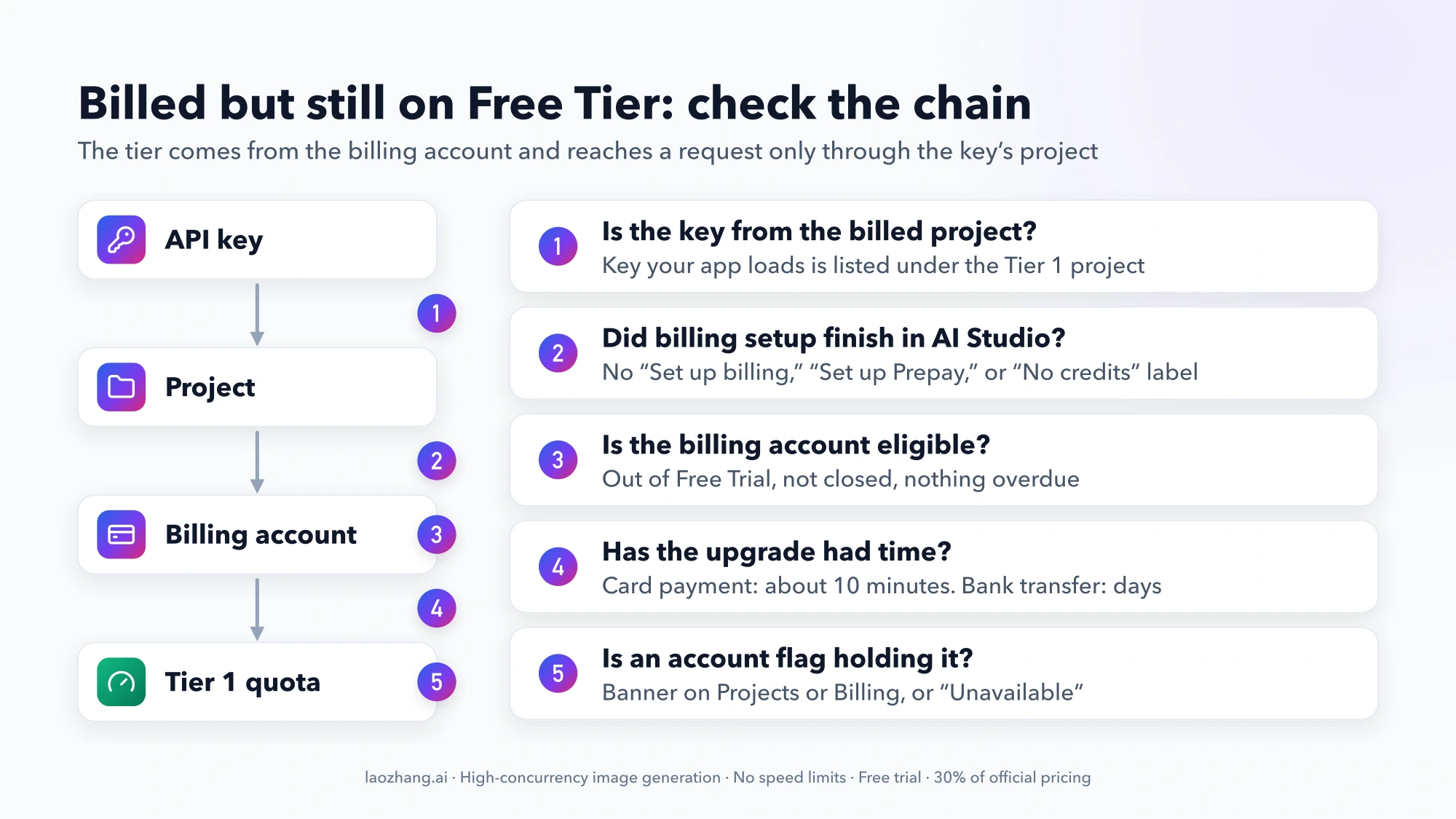
Then work through these checks in order:
| Check | Where to look | Move on when |
|---|---|---|
| 1. Key and project | AI Studio API keys page, and the key your running app loads | The key in use is listed under the project that shows Tier 1 |
| 2. Billing setup | AI Studio Projects page, Billing Tier and Status columns | The tier shows with no “Set up billing,” “Set up Prepay,” or “No credits” label |
| 3. Billing account state | Google Cloud console, Billing | Active, out of Free Trial, nothing overdue |
| 4. Upgrade timing | AI Studio Billing page | A card payment was confirmed more than 10 minutes ago |
| 5. Account flags | Banners on the AI Studio Projects and Billing pages, the project's email | No banner and no “Unavailable” |
1. Is the API key from the billed project?
API keys have no billing settings of their own; Google says they “inherit the tier limits and billing status of the project.” Many accounts hold more than one project. AI Studio creates a default project and key for new users, and billing a second project leaves that default project on the Free Tier. A key from an old .env file, a CI secret, or another Cloud project's credentials page keeps getting free limits however the billed project looks.
Open the AI Studio API keys page, which lists each key with its project, and compare it with the key your deployed process actually loads. Log a short suffix at startup rather than the whole key, and restart workers that may hold an old environment variable. In August 2026 a Google staff member's fix for one thread was to “generate a new API key explicitly tied to” the Tier 1 project. In another, staff found no 429 errors at all on the project the user named and blamed “a mixup on the projects / keys you're calling with.”
2. Did billing setup finish in AI Studio, not only in Cloud console?
Google defines the move from Free to Paid as linking a billing account and prepaying at least $5 through AI Studio's Set up billing flow; some accounts are offered or assigned Postpay instead. The Projects page shows any unfinished step:
- “Set up billing”: no billing account is attached to this project.
- “Set up Prepay”: a billing account is attached, but its required Prepay plan is not set up.
- “No credits”: Prepay is required and either is not set up or has run out.
Click the label to finish that step. Watch for one setup that has been reported not to upgrade: billing linked only in the Google Cloud console. A GitHub issue from March 2026 describes a project linked to a billing account “with active credits,” a key from the credentials page, and generate_content_free_tier_requests still capped at 20 requests per day; Google has not answered it. A likely reason, inferred from Google's billing page rather than stated by Google: the $300 Welcome credit cannot pay for Gemini API usage on billing accounts opened after March 2, 2026, and Prepay accounts must buy Prepay credits before any eligible Cloud credits apply. Credits alone do not finish the paid setup.
3. Is the billing account still in Free Trial, closed, or overdue?
These states are fixed in the Billing section of the Google Cloud console, not in AI Studio, and they block paid service even when AI Studio shows credit:
- Google Cloud Free Trial. The Cloud Free Trial and its $300 Welcome credit are not the Gemini API Free Tier, yet Google's tier table qualifies the Free tier as “Active project or free trial.” On September 8, 2026, a Google staff member told a forum user with Prepay credit that the project was on Free Tier limits because the billing account was “still in the Free Trial state.” The fix: finish the upgrade in Cloud console Billing, then add prepayment credits in AI Studio. The same reply said Google has no “manual billing sync mechanism.” AI Studio may show “The billing account type is inactive or unsupported” in this state.
- Closed account. The same message appears; reopen the account.
- Overdue balance, declined payment, or an invalid or expired payment method. Google's billing FAQ says any of these suspends Gemini API access regardless of Prepay credit, including unpaid charges for other Cloud services on the account.
- A canceled Prepay setup. Closing the window midway through adding Prepay to a Postpay account leaves it “unchargeable” for every linked project. Finish the setup, or ask Cloud Billing Support to reset it.
- Little payment history. In a July 2026 thread, Google staff said a Tier 1 Postpay project got free-tier limits “due to low historical billing activity” and suggested adding prepaid funds or attaching a billing account with an established payment history. In August, staff told a user who had prepaid on a Postpay account that “the billing account must reach the upgrade threshold irrespective of any prepay amount(s).” Neither condition is in Google's billing documentation.
4. How long does a Gemini API tier upgrade take?
Usually no more than 10 minutes. Google's billing page says tier upgrades “usually reflect within 10 minutes” after a successful payment, and Free to Tier 1 is typically instant. Payment is the exception: bank transfers can take several days to clear, and service upgrades only after the purchase is confirmed. Cost graphs can lag by up to 24 hours, so don't read them as a pending upgrade.
If a card payment cleared well over 10 minutes ago, time is not the cause; go back over checks 1 to 3. Retrying in a loop does not move requests into a paid bucket, and failed requests still count against quota.
5. Is an account flag holding the project on Free Tier?
In a July 2026 thread titled “Gemini API stuck on Free Tier after enabling billing,” Google staff said the likely cause was an automated flag on the account. Flags usually appear as banners on the AI Studio Projects and Billing pages, with next steps or an appeal link; the project's email address may also have instructions. In other threads, staff treat “Unavailable” or a 403 as the sign of a flag and suggest completing age verification, phone verification, and 2-Step Verification, then retrying or creating a new key. Without a banner to follow, they suggested requesting a temporary rate-limit increase.
Workspace accounts: is there really no free tier?
Some developers report that Google Workspace accounts get no Gemini API Free Tier. Google's documentation does not say so. Its Workspace page says AI Studio is on by default for all editions, admins can turn it off per organizational unit, and Workspace for Education users under 18 are blocked.
The reports are specific, though. A February 2026 write-up on note.com described a Workspace account whose unbilled projects showed “Unavailable” and whose first request returned 429, while the same steps worked on a personal @gmail.com account; the author concluded the Free Tier is not assigned to Workspace organization projects. Forum posts from September 2026 describe Workspace and Workspace for Education projects marked “Billing Tier: Unavailable” and “Status: Restricted,” with 403 errors. Against that, Google staff attribute “Unavailable” to account flags, and a personal Gmail user reported the same status in August 2026.
To test it, send the same request with a key from a project owned by a personal Google account. If only the Workspace project fails, ask the admin to confirm AI Studio is on for your unit. Beyond that, the route Google staff give is billing, which they say clears most flags but means “you lose your free tier quota.” A billed Workspace project that still gets free-tier quota goes through checks 1 to 5 like any other.
Every check passes: escalate with the project number, not the key
Some cases are on Google's side. In September 2026 staff said a Tier 1 Prepay project that returned 429 on every call for 48 hours had hit “a temporary backend error,” since resolved. Google publishes no list of conditions that keep a correctly billed project on free-tier quota and offers no self-service re-sync.
Cloud Billing support is free for all Google Cloud accounts, but a Billing Account Administrator must open the case. The other route is the Google AI Developers Forum. Include the project number, the time of a failing request, and the full error body, share the billing account ID only privately, and never post the API key.
How to go back to the Gemini API Free Tier
Disable billing on each project you want back on the Free Tier. That is Google's answer to “Can I revert back to Free Tier after I've upgraded,” and Google Cloud's project billing guide says the project's AI Studio billing tier then drops to the Free usage tier. Running out of credits does not do it: at a $0 Prepay balance, requests fail with HTTP 402 and projects “aren't automatically downgraded to the Free Tier.”
In the Google Cloud console, open Billing > My projects (or the billing account's Account management page), find the project, open its Actions menu, and choose Disable billing. A padlock icon means the link is locked and must be unlocked first. You need Project Owner, or Project Billing Manager with Project Browser. What changes:
- Only that project moves. Other projects on the same billing account keep its tier.
- Every other billable Cloud service in the project stops, and some resources may be removed for good. If the project runs other services, create a separate unbilled project for free Gemini calls instead.
- Prepay credits stay with the billing account. They expire 12 months after purchase, are not refundable, and are forfeited if you close the account.
- Free limits apply again. Paid-only models such as the current Pro and the image models fail with
limit: 0. - Data terms change. AI Studio prompts get paid-service terms only while at least one of your API projects is billed; with none, prompts and responses fall under the unpaid terms.
- Workspace projects may not come back usable. Given the reports above, an unbilled Workspace project can show “Unavailable” instead of free limits.
Often the better choice is to keep both. Google's FAQ says you can “switch between Paid Tier projects and Free Tier projects as needed by using the respective API keys linked to each type.” Use the free project's key for experiments and the billed one for production; each project keeps its own limits.
The durable answer
Gemini API free access remains useful in 2026, especially for learning, prompt validation, hackathons, and low-traffic prototypes. The durable way to use it is not to memorize a model list or a quota table. Confirm the region and data contract, check that the exact model ID still has a free price row and is open to your project, read the project's live limits in AI Studio, make a minimal call, and observe usage.
Once privacy, reliability, geography, a paid-only model, or engineering effort becomes the real constraint, the free phase has done its job. Treat paid service as a production decision, not as a failure to optimize the free tier. When you do pay, the tier follows the billing account and reaches your code only through the project that owns the key, so that link is the first thing to check if free limits come back.