Hitting rate limits on your Gemini API project is frustrating, especially when you know the solution exists but the upgrade process seems unclear. Whether you're blocked by the free tier's 5 RPM ceiling on Gemini 2.5 Pro or need enterprise-level throughput for a production application, understanding exactly how to upgrade through Google's tier system determines whether your project moves forward or stalls. This comprehensive guide walks you through every upgrade path, addresses the most common obstacles developers encounter, and helps you decide whether upgrading is the right choice for your specific situation.
TL;DR
Upgrading Gemini API tiers is straightforward once you understand the requirements. Free to Tier 1 requires only enabling billing in Google AI Studio and happens instantly, boosting your limits from 5 RPM to 150+ RPM. Tier 2 requires $250 in cumulative Google Cloud spending (free credits don't count) plus 30 days since your first payment, with approval typically taking 24-48 hours. Tier 3 requires $1,000 spend plus 30 days, or direct contact with Google Cloud sales for custom limits. The most common upgrade issues stem from free credit confusion and missing upgrade buttons, both addressed in detail below.
Understanding the Gemini API Tier System
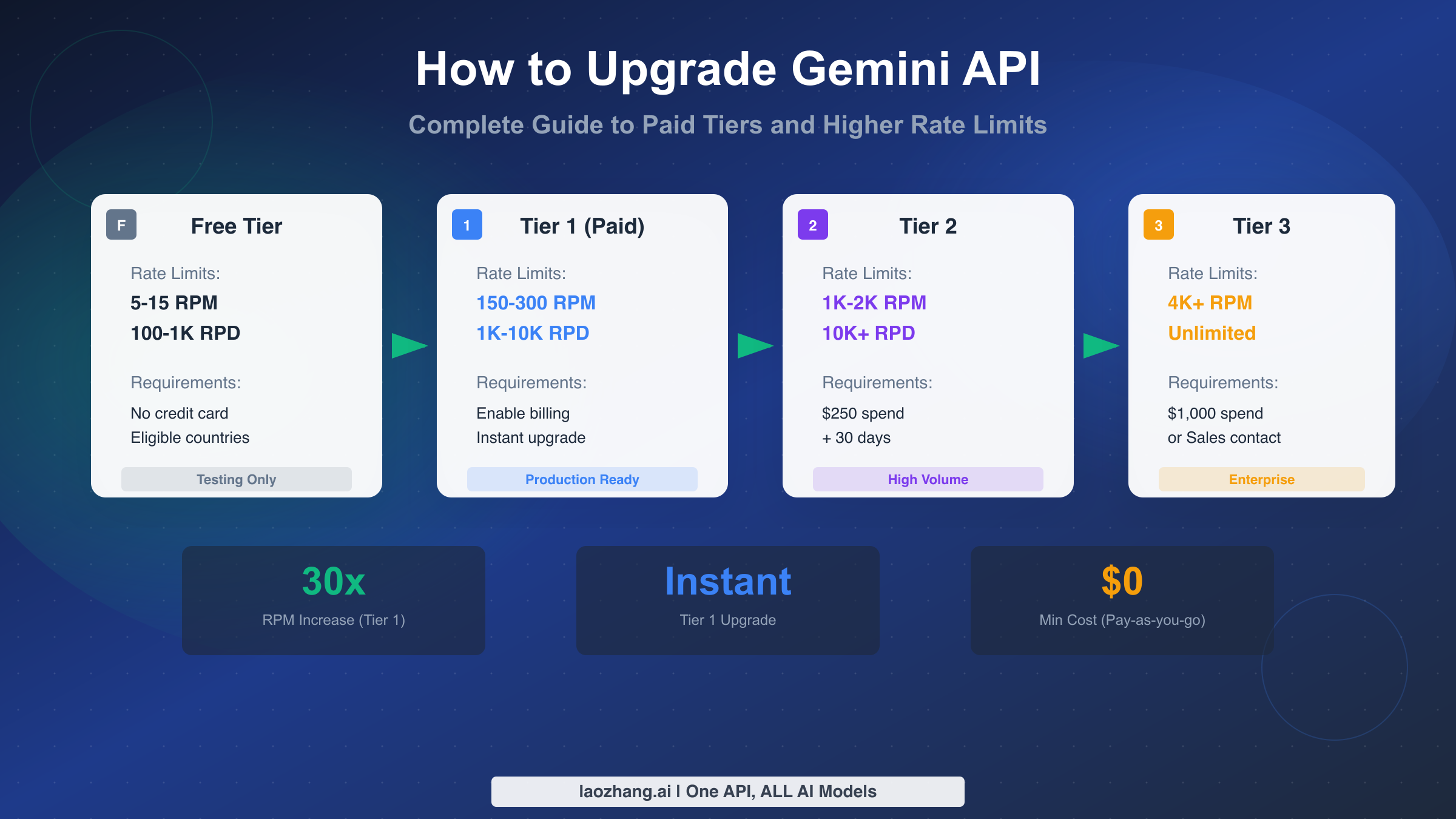
Google structures Gemini API access into four distinct tiers, each designed for different usage levels and representing a significant step up in capabilities. Understanding this architecture helps you plan your upgrade path and set realistic expectations for what each tier offers.
The tier system operates on a project level, meaning your rate limits apply to all API keys within a single Google Cloud project rather than per key. This architectural decision has important implications for how you structure applications with multiple components, as creating additional API keys within the same project does not multiply your quota. If you genuinely need separate quotas, you must create separate Google Cloud projects, each with its own billing configuration and tier status.
Free Tier serves as an entry point for developers exploring the API without financial commitment. Available in eligible countries without requiring a credit card, the free tier provides enough capacity for testing and small personal projects but imposes strict limits that make production use impractical. Following December 2025 quota reductions, free tier users face constraints of 5-15 RPM depending on model, 250,000 TPM, and 100-1,000 RPD. For a detailed breakdown of current free tier rate limits, our dedicated guide covers every model and dimension.
Tier 1 (Paid) represents the first production-capable tier and is where most developers land once they're ready to build real applications. Enabling billing instantly unlocks dramatically higher limits: 150-300 RPM, 1-2 million TPM, and 1,000-10,000 RPD depending on model. The jump from free tier represents roughly a 30x increase in request capacity, transforming the API from a testing tool into a viable production service.
Tier 2 targets teams and applications with substantial usage patterns. The limits expand further to 1,000-2,000 RPM and often unlimited daily requests, supporting high-traffic applications and multiple concurrent users. Reaching this tier requires both financial investment and time, ensuring only committed projects access these resources.
Tier 3 (Enterprise) provides custom limits negotiated directly with Google Cloud sales. Organizations at this level typically process millions of requests daily and require guaranteed SLAs, dedicated support, and potentially custom infrastructure arrangements. The negotiated limits can reach 4,000+ RPM and 50,000+ RPD based on specific agreements.
Step-by-Step Upgrade Process
The upgrade mechanics differ significantly between tier transitions, with each path having distinct requirements and timelines. Following these steps precisely ensures a smooth upgrade experience.
Upgrading from Free to Tier 1
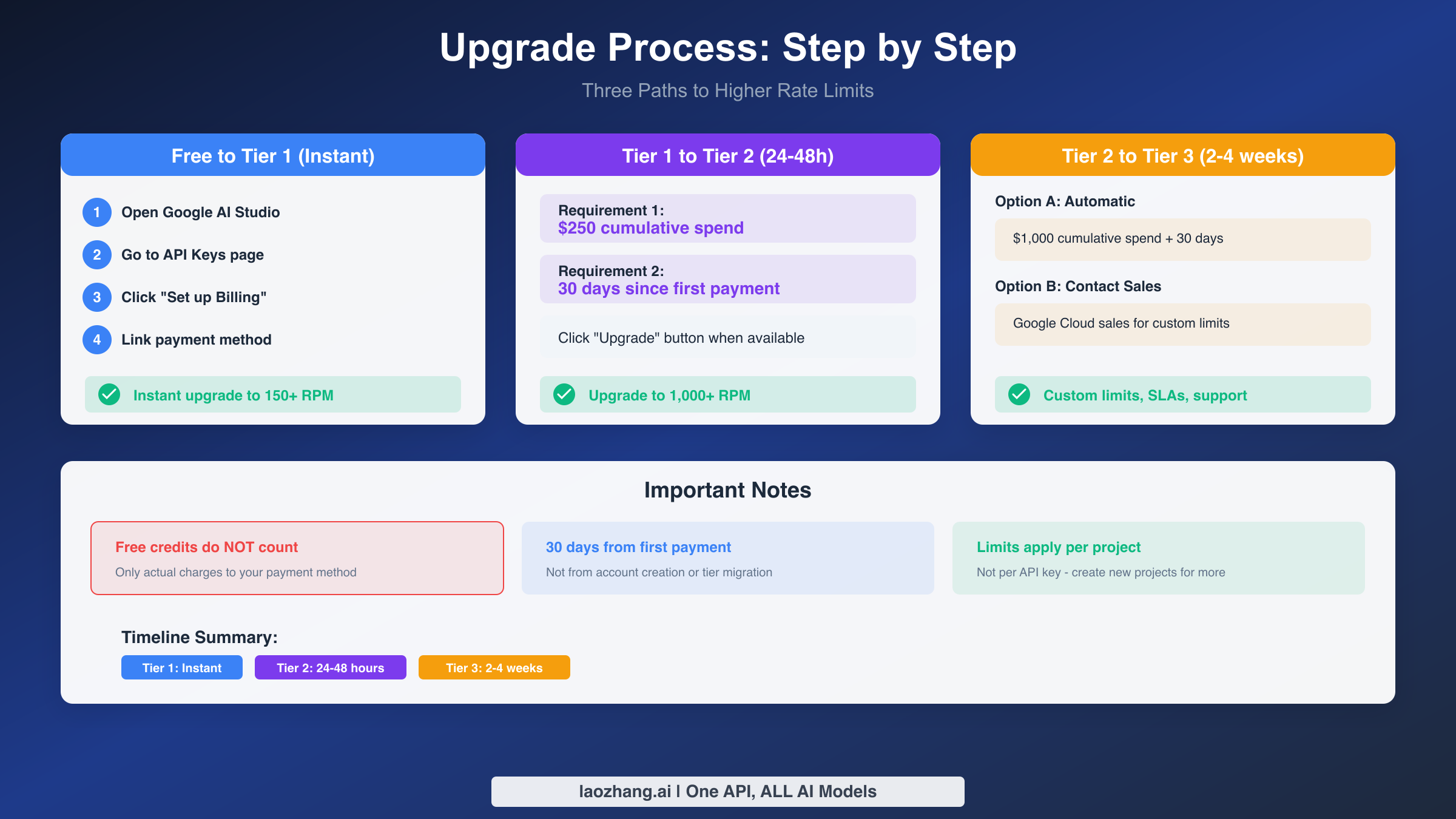
The transition from free tier to Tier 1 is the most straightforward upgrade path, requiring only that you enable billing on your Google Cloud project. No waiting period exists, no spending threshold must be met, and the upgrade takes effect immediately upon successful payment method verification. This instant upgrade reflects Google's interest in converting developers from testing to paying customers.
To begin the upgrade process, navigate to Google AI Studio at aistudio.google.com and sign in with your Google account. From the main interface, locate the API keys page through either the left sidebar navigation or by going directly to aistudio.google.com/api-keys. This page displays all your projects and their current tier status.
Find the project you want to upgrade and look for either a "Set up Billing" or "Upgrade" button, depending on your current configuration. Clicking "Set up Billing" redirects you to the Google Cloud console where you'll link a billing account to your project. If you already have a Google Cloud billing account, you can select it from the dropdown; otherwise, you'll need to create one by providing payment information.
Alternatively, you can initiate billing setup from within AI Studio by opening the Dashboard, then navigating to Usage and Billing, selecting the Billing tab, and clicking "Set up Billing" for your chosen project. Both paths lead to the same destination: linking a valid billing account to your project.
Google may require a one-time prepayment to activate the paid tier. This prepayment is not a fee but rather a credit applied directly to your account for future use. The amount helps maintain platform security and availability while filtering out potentially abusive accounts. Most payment methods process instantly, meaning your upgraded rate limits take effect within minutes of completing the billing setup.
Once billing is enabled, you benefit from higher rate limits and an important privacy consideration: your prompts and responses are no longer used to improve Google products. This change matters for applications handling sensitive data where training data usage poses concerns.
Upgrading from Tier 1 to Tier 2
The Tier 2 upgrade path introduces qualification requirements that ensure only committed, established users access higher resource allocations. Two conditions must be met simultaneously: $250 in cumulative Google Cloud spending and 30 days elapsed since your first successful payment.
The spending requirement specifically means actual charges to your payment method, not promotional credits or free tier usage. This distinction causes significant confusion among developers who see substantial credit usage in their billing dashboard but don't understand why the upgrade button never appears. If Google provided you $300 in promotional credits and you've consumed $280 of them, your actual spend toward Tier 2 qualification remains $0.
The 30-day waiting period starts from your first successful payment to Google Cloud, not from when you created your account or migrated to Tier 1. This timing ensures that the $250 spending threshold and the time requirement operate independently, meaning you could theoretically spend $250 in the first week and still wait the remaining 23 days before becoming eligible.
When both conditions are met, an "Upgrade" button appears on the API keys page in AI Studio next to your eligible project. Click this button to initiate the upgrade request. Google's automated system reviews the request and typically completes validation within 24-48 hours, though some users report faster processing. During this time, your project continues operating at Tier 1 limits.
The validation process checks several factors beyond the basic requirements, including billing account standing, payment history, and potentially usage patterns. While most requests process automatically, some may undergo manual review, extending the timeline to several business days.
Upgrading from Tier 2 to Tier 3
Enterprise tier access follows a fundamentally different process compared to the consumer tiers. While an automatic upgrade path exists for users who reach $1,000 in cumulative spending plus 30 days since first payment, most Tier 3 users engage directly with Google Cloud sales to negotiate custom arrangements.
The automatic path works similarly to Tier 2: meet the spending and time thresholds, and an upgrade button appears in AI Studio. However, organizations choosing this path receive the standard Tier 3 limits rather than custom configurations that might better fit their specific needs.
For organizations with substantial requirements, contacting Google Cloud sales directly makes more sense. The enterprise process typically takes 2-4 weeks and involves technical reviews, security assessments, and contract negotiations. Google's sales team works with you to understand your usage patterns, reliability requirements, and budget constraints, then proposes a custom arrangement including negotiated rate limits, SLAs, dedicated support channels, and potentially reserved capacity.
To initiate enterprise discussions, visit cloud.google.com/contact and select the appropriate option for AI/ML services. Having clear documentation of your expected usage volumes, peak traffic patterns, and reliability requirements accelerates these conversations.
What You Gain at Each Tier
Understanding the specific benefits of each tier helps justify the investment and plan your application architecture around the available resources.
Rate Limit Comparison
The rate limit improvements between tiers are dramatic, particularly for the most capable models. For Gemini 2.5 Pro, the jump from free tier's 5 RPM to Tier 1's 150 RPM represents a 30x increase, while Tier 2's 1,000 RPM offers another 6.7x improvement. For complete rate limits per tier, our comprehensive guide provides model-by-model breakdowns.
Flash models see even larger improvements. Gemini 2.5 Flash moves from 10-15 RPM in free tier to 300-1,000 RPM in Tier 1, and up to 2,000 RPM in Tier 2. This scaling makes Flash models particularly attractive for high-volume applications where throughput matters more than individual response quality.
Token limits follow similar patterns. Free tier's 250,000 TPM becomes 1-2 million TPM in Tier 1 and 2-4 million TPM in Tier 2. Daily request limits see the most dramatic changes, moving from 100-1,000 RPD in free tier to effectively unlimited requests in Tier 2 for most models.
Model-Specific Improvements
Beyond raw numbers, paid tiers unlock access to certain features and models. Some experimental models and capabilities appear exclusively in paid tiers, and batch processing quotas scale significantly with tier level. Tier 1 batch API limits start around 10 million tokens, increasing to 1 billion in Tier 2 and up to 5 billion in Tier 3, enabling large-scale offline processing workflows that would be impossible in lower tiers.
The paid tiers also provide more consistent performance during peak usage periods. Free tier users often experience degraded response times and increased error rates during high-traffic periods as Google prioritizes paid customers. Tier 2 and above typically receive priority access during capacity constraints.
Understanding Tier Requirements
Clarity on the exact requirements prevents frustration and helps you plan your upgrade timeline effectively.
Financial Requirements
The spending thresholds for tier advancement apply to cumulative Google Cloud spending across all services, not just Gemini API usage. This means charges for Cloud Storage, Compute Engine, BigQuery, or any other Google Cloud service count toward your tier qualification. Organizations already using Google Cloud services may find they qualify for higher tiers more quickly than expected.
However, several types of spending explicitly do not count toward tier requirements. Promotional credits provided by Google, including new account credits, partner credits, and trial credits, have no effect on tier qualification. Only actual charges that hit your payment method contribute to the cumulative total. Refunded charges may also be subtracted from your cumulative total, potentially affecting tier eligibility if you've processed significant refunds.
For Gemini API pricing details and cost planning, our pricing guide helps you estimate when you'll reach various spending thresholds based on your usage patterns.
Time Requirements
The 30-day waiting period for Tier 2 and Tier 3 starts from your first successful payment to Google Cloud. This date may differ from your account creation date, your first API call, or when you enabled billing. The exact start date can be found in your Google Cloud billing history under the payment transactions section.
The timer does not reset when you reach a new tier. If you achieved Tier 2 on day 30 and then reached $1,000 total spending on day 45, you would become eligible for Tier 3 immediately rather than waiting another 30 days. The time requirement applies once, measured from your entry into the paid ecosystem.
Troubleshooting Common Upgrade Issues
Despite the seemingly simple requirements, many developers encounter obstacles during the upgrade process. These issues often stem from misunderstandings about how Google counts spending and time, or from technical problems with billing configuration.
Missing Upgrade Button
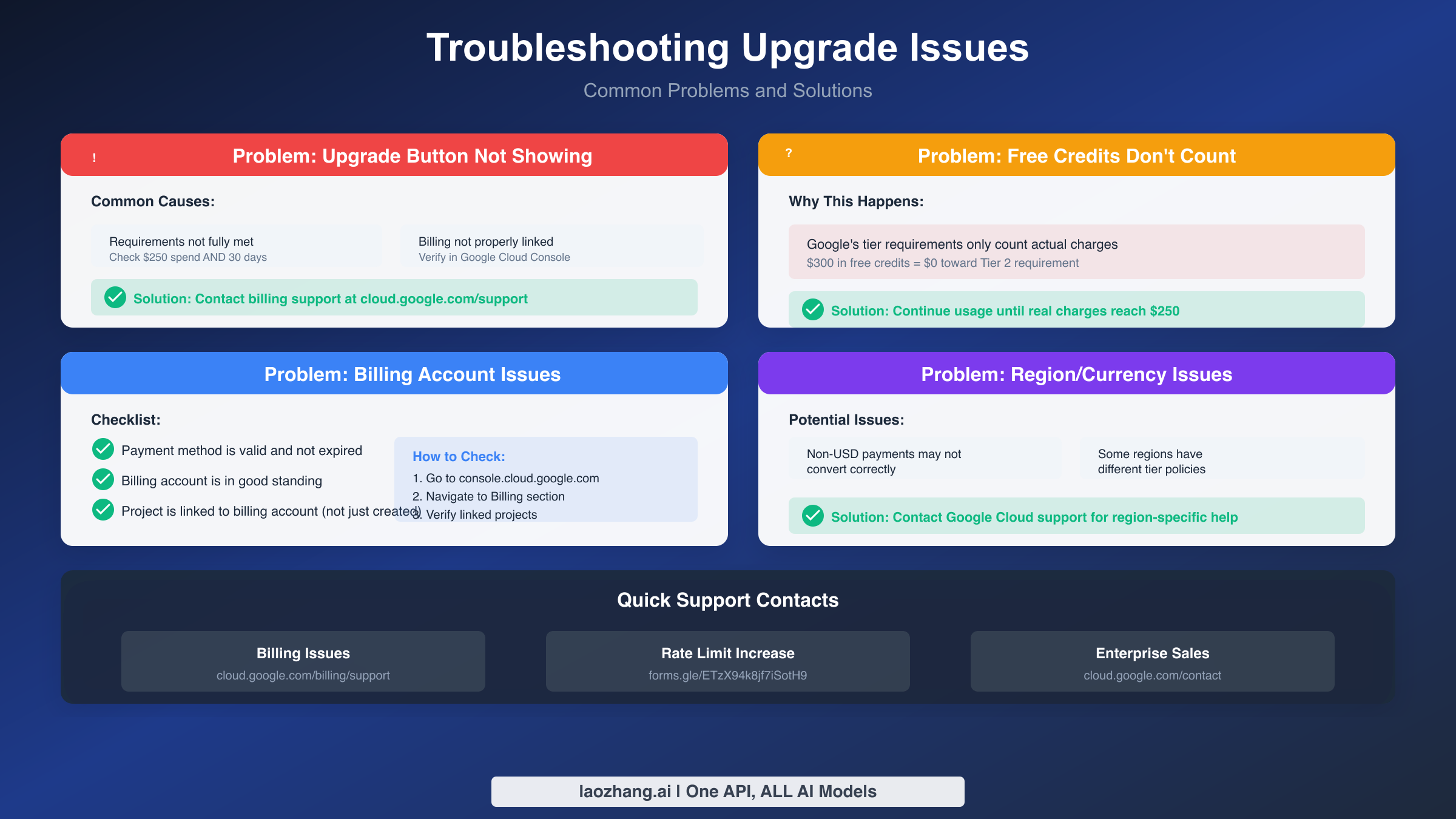
The most frequently reported issue is the upgrade button not appearing despite apparently meeting the requirements. Several scenarios cause this problem, each with different solutions.
If you believe you've met the spending requirement but no button appears, first verify your actual charged amount versus credit usage. Navigate to the Google Cloud Console billing section and examine your billing reports filtered to show only actual charges. The cumulative total here, not the usage summary that includes credits, determines tier eligibility.
Billing account configuration issues also prevent upgrades. Your project must have an active, properly linked billing account in good standing. Visit console.cloud.google.com, navigate to Billing, and verify that your target project appears under "Projects linked to this billing account." If the project isn't listed or shows as unlinked, you'll need to establish or repair the billing connection before upgrade options appear.
Regional or currency complications occasionally cause eligibility detection failures. If your billing account uses a non-USD currency, the conversion to USD for threshold comparison may not reflect current exchange rates or may process with delays. Some regions also have different tier policies or availability. For region-specific issues, contacting Google Cloud support provides the most direct resolution path.
Free Credits Confusion
The distinction between free credits and actual spending causes more confusion than any other upgrade-related topic. Forums and community discussions are filled with frustrated developers who've "spent" $300+ in credits wondering why they can't upgrade to Tier 2.
Google's tier system intentionally excludes promotional credits from qualification metrics. This design prevents users from receiving free credits, immediately upgrading to high tiers, consuming resources far beyond the credit value, and then abandoning the account. By requiring actual financial commitment, Google ensures that higher-tier users have genuine investment in the platform.
To check your actual spending versus credit usage, access the Google Cloud Console billing section and generate a report filtered by "Credits" to see how much promotional credit you've consumed. Generate a separate report filtered by "Cost" to see your actual charged amount. The difference often explains why upgrade buttons haven't appeared.
If you're currently operating on credits and want to accelerate tier qualification, you have limited options. Continue using the API until credits exhaust and real charges begin, or create a new project without promotional credits attached. Some developers choose to use Google Cloud services that don't have free tier allocations, generating immediate charges toward the spending threshold.
Billing Account Problems
Even with correct spending and time qualifications, billing account issues can prevent upgrades. Payment method problems rank among the most common blockers. Verify that your card isn't expired, has sufficient available credit, and hasn't been flagged by your bank for international transactions (Google charges originate from various locations).
Billing account suspension or holds, whether from failed payments, policy violations, or fraud prevention triggers, completely block tier upgrades until resolved. Check for any alerts or warnings in your Google Cloud billing section, and contact billing support if you see unexpected holds.
Projects occasionally become disconnected from billing accounts during organizational changes, project migrations, or account restructuring. Re-linking a project to billing doesn't automatically restore tier status; you may need to wait for the system to re-evaluate eligibility or contact support to expedite the process.
When Should You Upgrade?
Not every rate limit hit necessitates an immediate tier upgrade. Understanding when upgrading provides genuine value versus when optimization might solve your problem helps you make cost-effective decisions.
Usage Thresholds That Signal Upgrade Need
If you're consistently hitting rate limits before noon Pacific Time, upgrading almost certainly makes sense. The daily quota reset at midnight PT means that hitting limits early in your work day indicates usage patterns that free or lower tiers cannot accommodate.
Interactive applications where users experience delays due to RPM throttling represent another clear upgrade signal. User-facing latency directly impacts experience, and even brief waits for rate limit recovery frustrate users and reduce engagement. For these applications, the cost of upgrading typically pales compared to the user experience improvement.
Batch processing workflows that cannot complete within daily limits also benefit from upgrades. If you're breaking jobs into multi-day segments purely due to rate limits, the engineering complexity and operational overhead often exceed the cost of higher tier access.
Cost-Benefit Considerations
Before upgrading, calculate whether optimization might solve your problem more cheaply. Implementing response caching, request batching, or intelligent model routing can reduce effective API calls by 50-80% in many applications. These optimizations remain valuable even after upgrading, extending the utility of each tier level.
Consider the actual cost structure of paid tiers. Tier 1 operates on pure pay-as-you-go pricing with no minimum commitment beyond enabling billing. A moderate application making 500 daily requests with 2,000 tokens average might cost only $1-2 per day. Compare this against the engineering time spent working around free tier limits.
For cost-conscious developers, services like laozhang.ai aggregate multiple AI providers through unified endpoints, potentially offering cost advantages while maintaining access to the same underlying models. These alternatives work well for applications prioritizing cost efficiency over direct Google integration.
Alternatives and Optimization Strategies
Before committing to higher tiers, explore whether your current tier's limits can accommodate your needs with better usage patterns.
Optimize Before Upgrading
Request batching combines multiple queries into single API calls, dramatically reducing RPM consumption. Instead of making three separate calls for three questions, structure your prompt to ask all three and parse the combined response. While output tokens increase slightly, the RPM savings often reach 60-80%.
Response caching eliminates redundant API calls for repeated queries. Even a 15-minute cache on common requests can substantially reduce actual API usage while maintaining responsive user experiences. Implement caching at your application layer using Redis, Memcached, or simple in-memory solutions depending on scale requirements.
Model routing directs requests to appropriate models based on complexity. Simple classification tasks don't need Gemini 2.5 Pro; Flash or Flash-Lite handles them competently with higher rate limits and lower cost. Implementing intelligent routing can reduce Pro model calls by 50-70% in many applications while maintaining quality where it matters.
Conversation management strategies reduce token consumption per request. Rather than maintaining full conversation history, periodically summarize context and restart with condensed information. This approach can reduce per-request token counts by 60-80% for long-running sessions.
Third-Party Solutions
API aggregation services provide access to multiple AI providers through unified interfaces, often with different rate limit structures. These services can effectively multiply your available capacity by distributing requests across multiple provider accounts while maintaining consistent API interfaces.
Multi-project strategies within Google Cloud itself can increase effective limits. Since rate limits apply per project, creating multiple projects with separate billing accounts provides multiple quota pools. This approach adds complexity and management overhead but can be worthwhile for applications with highly variable traffic patterns.
Consider whether Vertex AI might better fit your needs. While it uses the same underlying models, Vertex AI operates under different quota structures and may offer advantages for certain use cases, particularly those involving other Google Cloud services or requiring enterprise features like VPC controls.
Conclusion
Upgrading your Gemini API tier unlocks dramatically higher rate limits that transform the API from a testing tool into a production-capable service. The path from free tier to Tier 1 requires only enabling billing and happens instantly, while higher tiers require cumulative spending thresholds and waiting periods that ensure committed usage before accessing premium resources.
The key takeaways for successful upgrades include understanding that free credits don't count toward spending requirements, the 30-day timer starts from your first actual payment, and upgrade buttons only appear when all requirements are simultaneously met. When troubleshooting, verify your actual charged spending in Google Cloud billing reports rather than relying on usage dashboards that include credits.
For most developers blocked by free tier limits, Tier 1 provides the right balance of capability and cost. The instant upgrade, pay-as-you-go pricing, and 30x rate limit improvement serve the vast majority of production applications. Consider optimization strategies before upgrading further, as request batching, caching, and model routing can extend each tier's effective capacity significantly.
Your next step depends on your current situation. If you're on free tier and hitting limits, enable billing now since Tier 1 activation is instant and costs nothing until you make API calls. If you're on Tier 1 and need more capacity, check your actual Google Cloud spending and first payment date to understand your Tier 2 timeline. For enterprise needs, contact Google Cloud sales early in your planning process since custom arrangements take weeks to negotiate.