Gemini API rate limits are no longer something you can plan from a copied “Free = 15 RPM, Tier 1 = 300 RPM” table. A usage tier is one input. The model, project, billing account, request path and current account standing also matter, and Google directs developers to AI Studio for the active limits that apply now.
The practical question is therefore not “What is the Tier 2 RPM?” It is: which project is making this request, which model and route is it using, what limits are active for that combination, and which dimension rejected the request? Once those facts are known, a 429 RESOURCE_EXHAUSTED response becomes an operational problem rather than a guessing exercise.
A usage tier is not a universal model quota
Google's current Gemini API rate-limit documentation says exact limits depend on several factors, including usage tier, and should be viewed in Google AI Studio. It also warns that specified rate limits are not guaranteed and actual capacity may vary.
That changes how a per-tier guide should be used:
- The tier explains which class of limits and billing cap the account can receive.
- AI Studio shows the active model limits for the project.
- Usage shows how much of each limit the project is consuming.
- The error and request route tell you which control may have rejected the call.
Do not infer a project's current capacity from an old screenshot, another account, or a different model in the same tier. Preview and experimental models are generally more restricted, and a new model revision may have different limits from the model it replaces.
Current tier qualifications and spend controls
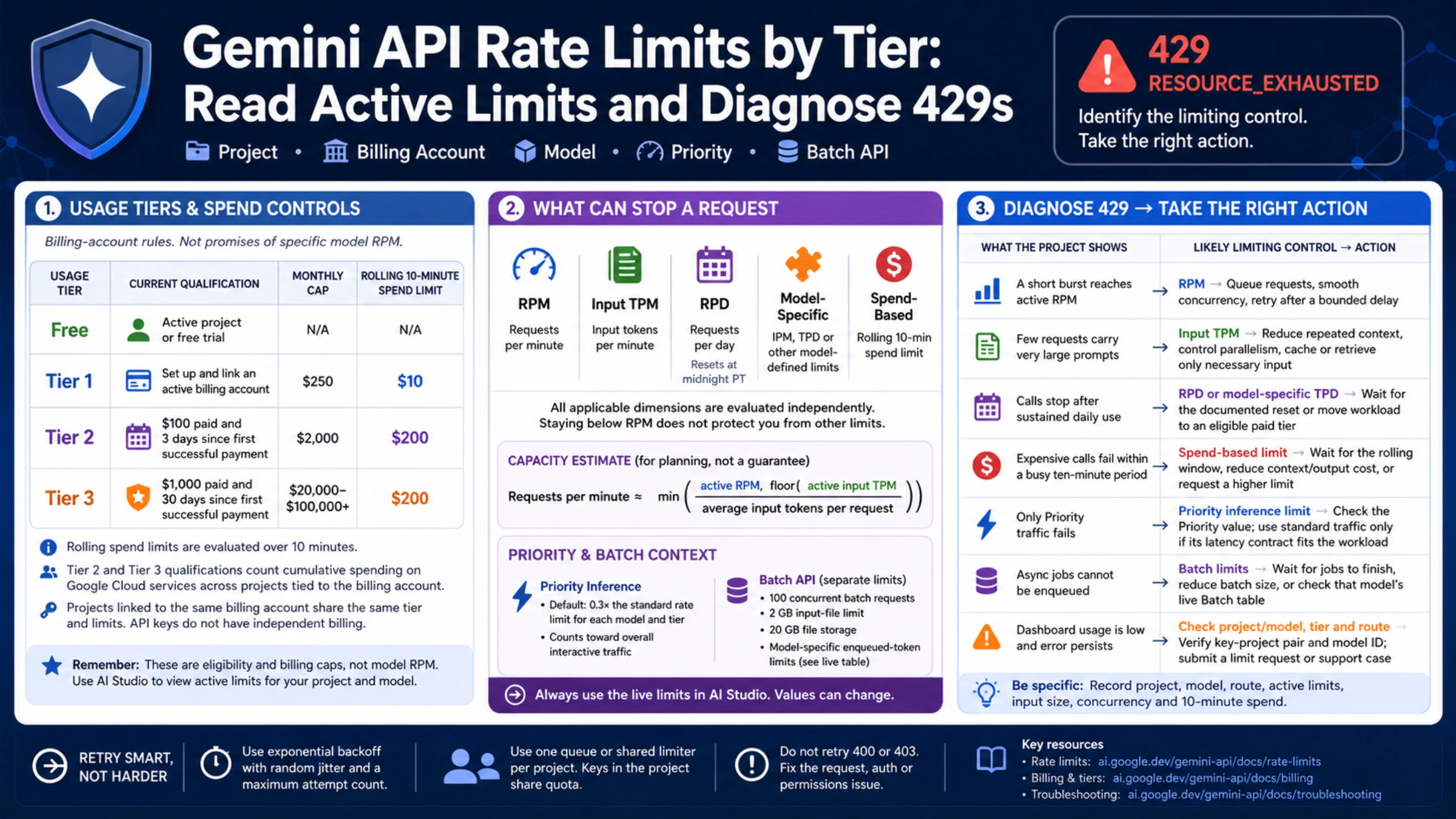
As of September 2, 2026, Google's Gemini API billing guide lists these qualifications. These are billing-account rules, not promises of a particular model RPM.
| Usage tier | Current qualification | Billing-account monthly cap | Rolling 10-minute spend limit |
|---|---|---|---|
| Free | Active project or free trial | Not applicable | Not applicable |
| Tier 1 | Set up and link an active billing account | $250 | $10 |
| Tier 2 | $100 paid and 3 days since the first successful payment | $2,000 | $50 |
| Tier 3 | $1,000 paid and 30 days since the first successful payment | $20,000–$100,000+ | $200 |
The monthly caps come from the billing guide. The rolling spend limits come from the rate-limit page, rechecked September 12, 2026, and are evaluated over ten minutes. Google says whether spend-based limits apply also depends on billing history and account standing. Crossing one can return 429 RESOURCE_EXHAUSTED even when request count and input tokens appear below their active limits.
For Tier 2 and Tier 3 qualification, Google counts cumulative spending on Google Cloud services across the projects tied to the linked billing account, not only charges from one Gemini API key.
Projects linked to the same Cloud Billing account inherit its usage tier and account cap. API keys do not have independent billing settings: a key inherits its project, and all keys in that project consume the project's shared limits. Creating more keys in one project therefore does not multiply capacity.
Google automatically upgrades eligible accounts, subject to processing and review. Free to Tier 1 typically takes effect immediately; later upgrades normally apply within ten minutes. The Projects page in AI Studio is the place to confirm the tier instead of assuming a payment has already propagated.
The dimensions that can stop a request
Google describes three common dimensions:
- RPM — requests per minute. A burst can exceed RPM even when each request is small.
- Input TPM — input tokens per minute. Large prompts, attached context and parallel requests can exhaust input TPM before RPM.
- RPD — requests per day. This resets at midnight Pacific time, not at local midnight.
Some models add their own controls. Image-capable models may use images per minute (IPM); another model can have tokens per day (TPD). Every applicable dimension is evaluated independently. Staying below RPM does not protect a request that exceeds input TPM, RPD, IPM, TPD or a spend-based limit.
A useful capacity estimate is:
requests per minute ≈ min(active RPM, floor(active input TPM / average input tokens per request))
This is an estimate, not a new quota. It helps explain why a service sending 40,000 input tokens per request can hit a token limit with far fewer calls than a service sending short prompts. Add headroom for traffic variance and do not plan at 100% of a specified limit, because Google does not guarantee that capacity.
Project, model and route must match the dashboard
Before diagnosing a 429, record the key’s identifier or label, project, model ID, and endpoint used by the failing process. Keep the secret key value out of logs and notes. Then open AI Studio and compare like with like:
- On the Projects or API keys page, confirm which project owns the key and which billing account and tier it inherits.
- In Dashboard, open the rate-limit view and select the exact model and tier used by the request.
- Open Usage for the same project and time window.
- Check whether the call is ordinary interactive traffic, Priority inference, or Batch API traffic.
Priority inference has its own rate limits. Google currently states a default of 0.3 times the standard rate limit for each model and tier, while Priority consumption still counts toward overall interactive traffic. A dashboard value for standard requests cannot be applied unchanged to Priority traffic.
Batch API requests are separate from non-batch calls. Google currently documents 100 concurrent batch requests, a 2 GB input-file limit, 20 GB of file storage and model-specific enqueued-token limits. The enqueued-token table changes with models and tiers, so use the live Batch limits rather than copying its entire matrix into capacity plans.
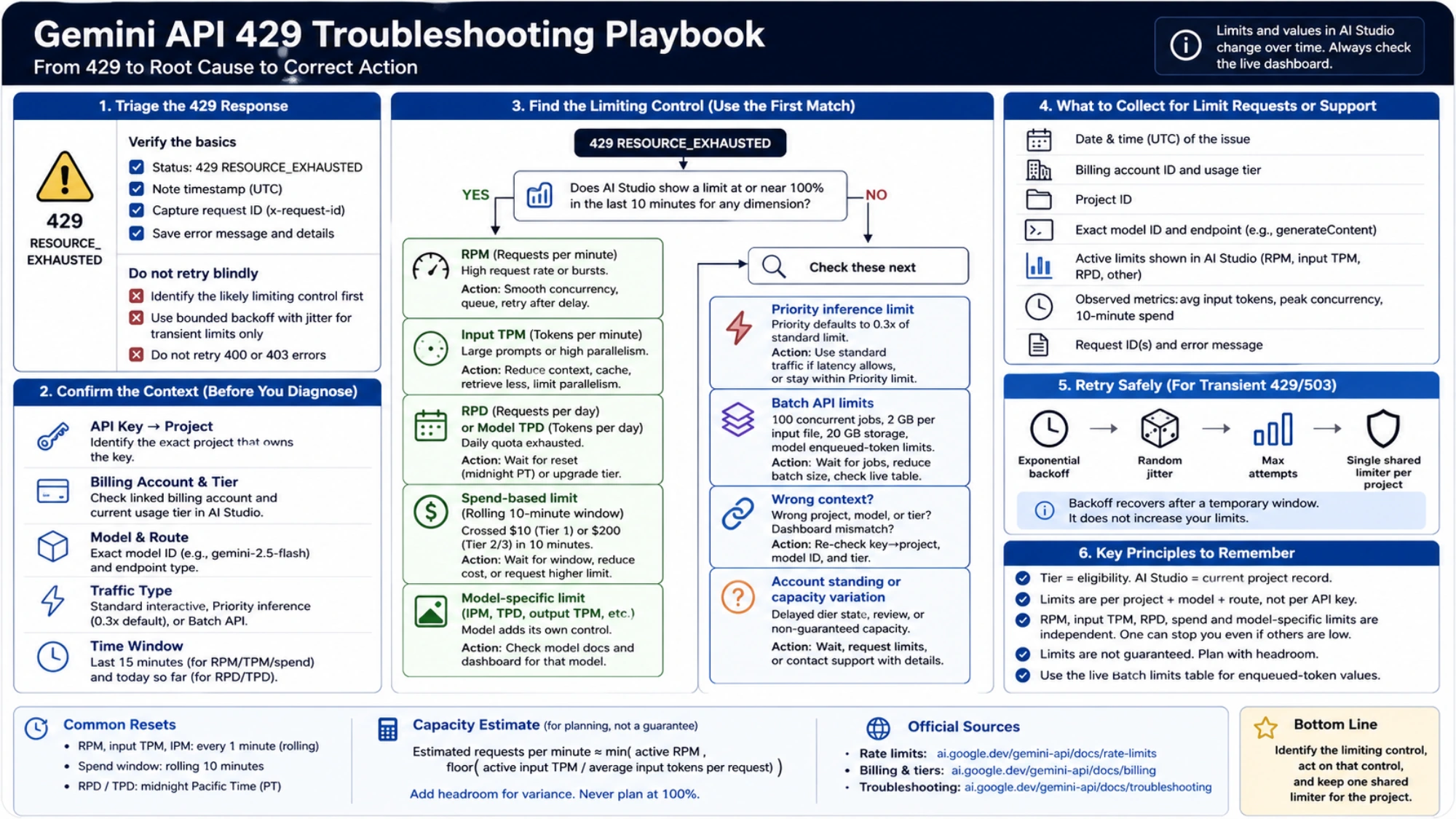
Diagnose the 429 before choosing a fix
Use the first matching cause, not every workaround at once.
| What the project shows | Likely limiting control | Action that addresses it |
|---|---|---|
| A short burst reaches active RPM | Requests per minute | Queue requests, smooth concurrency and retry after a bounded delay |
| Few requests carry very large prompts | Input TPM | Reduce repeated context, control parallelism, reuse application results where appropriate or retrieve only necessary input |
| Calls stop after sustained daily use | RPD or model-specific TPD | Wait for the documented reset or move an eligible workload to an appropriate paid tier |
| Expensive calls fail within a busy ten-minute period | Spend-based rate limit | Wait for the rolling window, reduce context/output cost, or request a higher limit if normal traffic requires it |
| Only Priority traffic fails | Priority inference limit | Check the Priority value; use standard traffic only if its latency is acceptable for the workload |
| Async jobs cannot be enqueued | Batch concurrent jobs or enqueued tokens | Wait for jobs to finish, reduce batch size, or check that model's live Batch table |
| Dashboard usage is low and the error persists | Wrong project/model, delayed tier state or capacity variation | Verify the key-project pair, exact model ID and tier; then submit a limit request or support case with those details |
Upgrading a tier is not the universal answer. It will not fix a process that is reading the wrong project's dashboard, using a preview model with tighter limits, or flooding the service with synchronized retries.
Retry transient failures without creating a retry storm
Google's troubleshooting guide recommends exponential backoff for transient errors such as 429 and 503, with random jitter and a maximum attempt count. Official SDKs include retry handling for some transient failures, so check the SDK behavior before adding another retry layer.
Backoff improves recovery after a temporary window; it does not increase RPM, TPM, RPD or spend capacity. If every worker retries at the same interval, the next burst can recreate the same failure. Use one queue or shared limiter for the project rather than independent per-key limiters, because keys in the project share quota.
Do not retry 400 or 403 as if they were temporary rate-limit errors. They usually indicate a bad request, unsupported parameter, authentication or permission problem. The Gemini API error guide separates those cases.
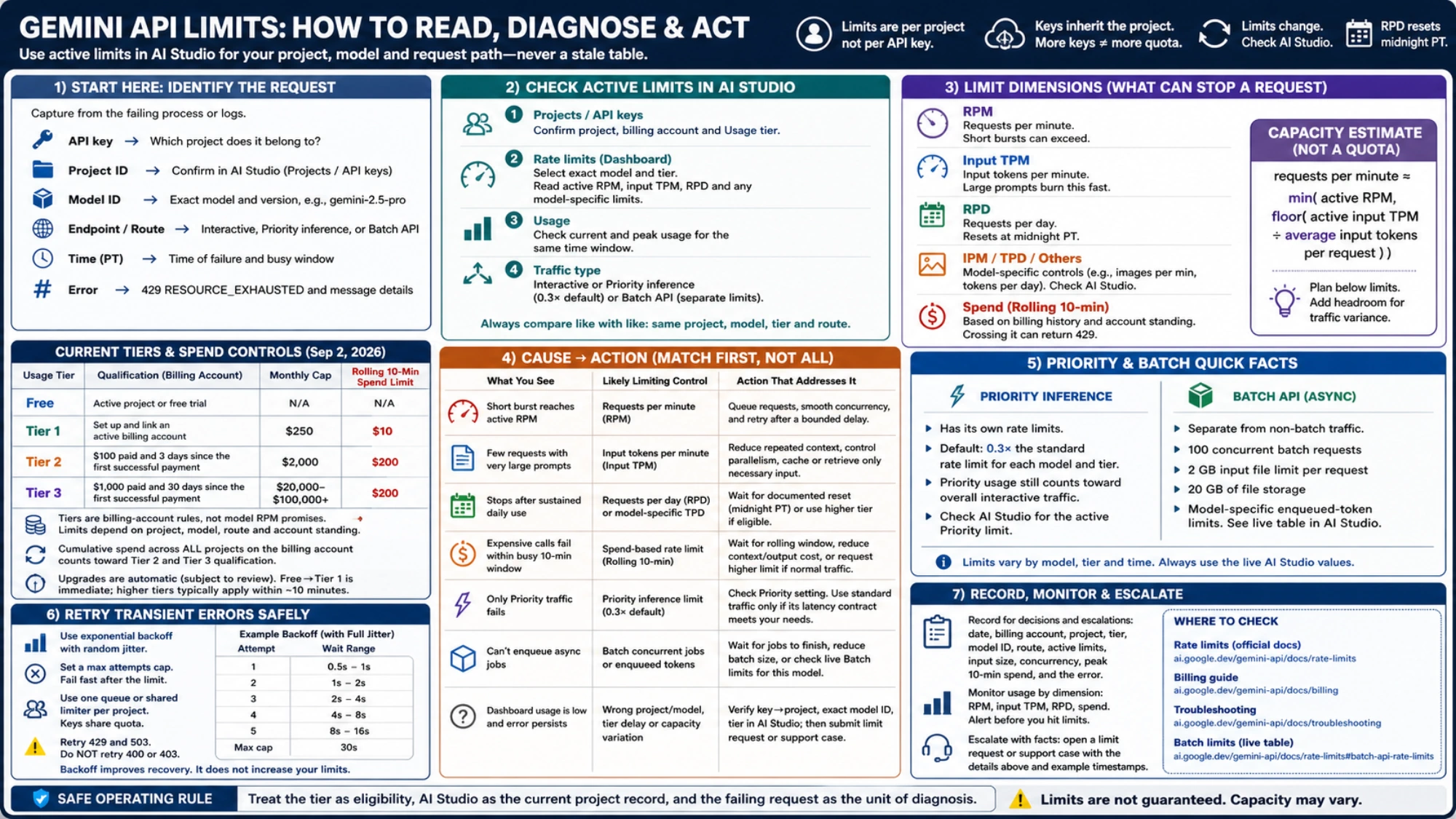
Turn a dashboard snapshot into a capacity decision
For a production decision, record the date, billing account, project, tier, exact model ID, route, active RPM/TPM/RPD or model-specific limits, observed input size, concurrency and peak ten-minute spend. That small record is more useful than a universal tier table because another engineer can reproduce the comparison later.
Use the free-quota guide when the question is whether unpaid access fits a prototype. Use the billing guide when the account must qualify for another tier. Use this page when the task is to explain effective capacity and a 429 across all tiers.
The safe operating rule is simple: treat the tier as eligibility, AI Studio as the current project record, and the failing request as the unit of diagnosis. That approach remains useful even when Google changes a model, a threshold or the dashboard again.