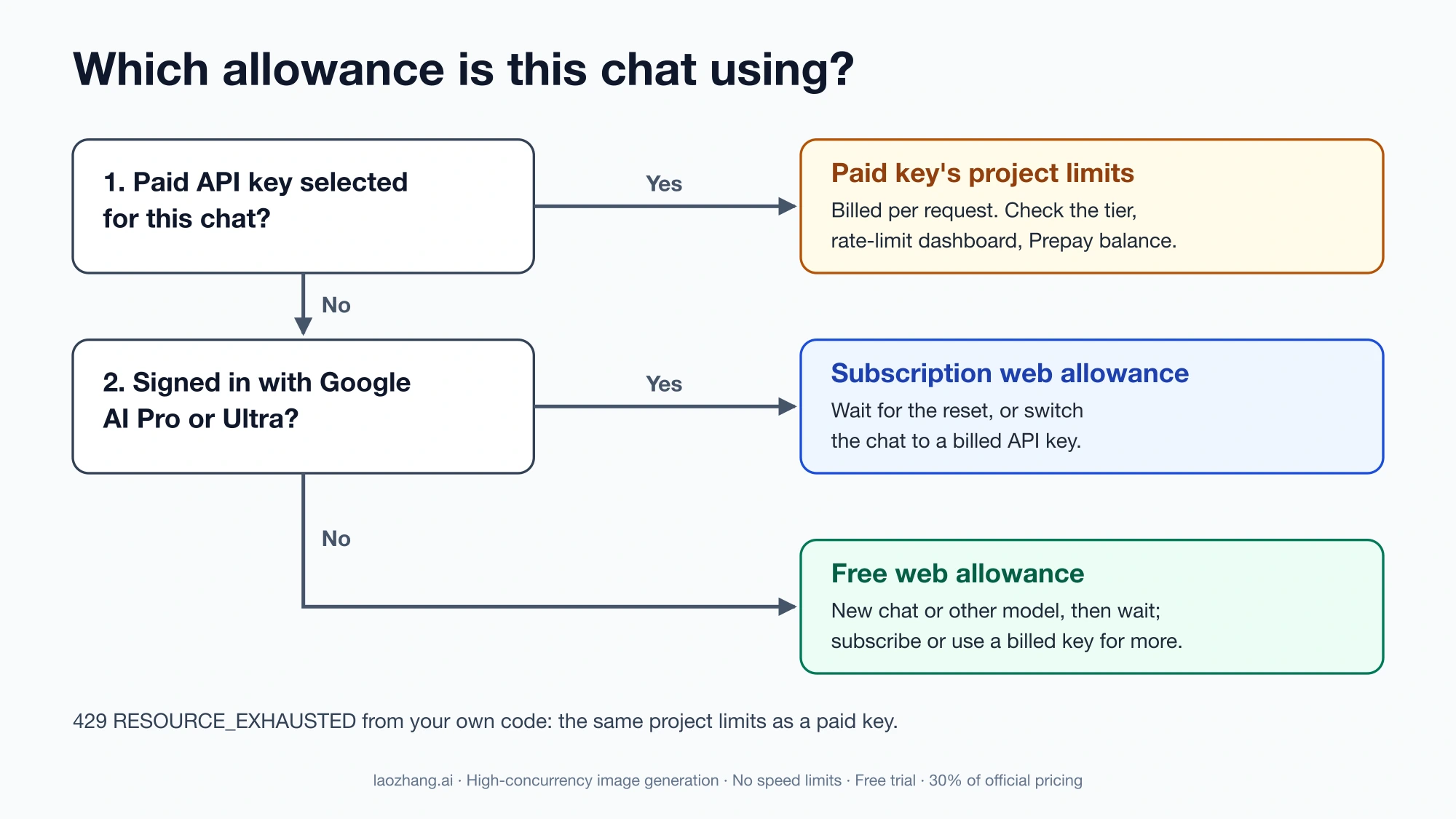
"You've reached your rate limit. Please try again later." means the allowance your current Google AI Studio chat draws on has run out for now. It doesn't say which allowance. AI Studio has three, and they recover differently:
- The free web allowance. You're signed in without a subscription and haven't selected a paid API key. Wait for the daily reset, or try a lighter model or a fresh chat.
- The Google AI Pro or Ultra web allowance. Since April 20, 2026, these subscriptions raise limits inside the AI Studio web interface. When that daily allowance is gone, you wait or continue with a billed API key.
- A paid API key's project limits. If you've switched the chat to a paid key, you're using that Google Cloud project's Gemini API limits and paying per request. Check the project's tier, rate-limit dashboard, and billing balance.
If you see a 429 RESOURCE_EXHAUSTED error from your own code rather than this message in the browser, skip to the section for API calls.
Find which allowance you're using
Answer two questions about the chat that stopped:
- Did you select a paid API key for this chat? If yes, the request ran against that key's project. AI Studio is free to use unless you link a paid API key, and once you do, Google bills that key for your AI Studio usage (billing FAQ).
- If not, is the signed-in account the one with Google AI Pro or Ultra? If yes, you're on the subscription web allowance. If no, you're on the free web allowance.
| Where the request comes from | Size of the allowance | What fixes it | What doesn't |
|---|---|---|---|
| Free web allowance | "Modest" in Google's plan table; no numbers published | Waiting for the daily reset; a different model or a fresh chat may still work; a subscription or billed key for more | A new API key; clearing your browser cache |
| Google AI Pro web allowance | "Higher" | Waiting for the reset; switching the chat to a billed API key | Buying Google One AI credits, which AI Studio doesn't accept |
| Google AI Ultra web allowance | "Highest" | Same as Pro | Same as Pro |
| Paid API key in AI Studio, or your own code | The project's active limits for its usage tier and model | Waiting out the exhausted metric; checking billing; a higher tier for sustained work | A new key in the same project; a Google AI subscription |
The size labels come from Google's AI plans page for AI Studio. It lists no request counts for any plan, and the message itself doesn't say whether you hit a per-minute limit, a daily limit, or something else.
The Gemini app at gemini.google.com is a separate product. A subscription raises limits in both places, but each product has its own allowance, and Gemini app usage doesn't tell you anything about AI Studio. Access errors are also a different problem. If AI Studio says it isn't available where you are, waiting won't help. See Gemini Isn't Available in Your Country? Check the Product Before the Fix. AI Studio also requires users to be 18 or older and may ask you to verify your age in your Google Account (access requirements). That block doesn't lift with time either.
How long "try again later" lasts in AI Studio: quota reset time
For the web allowances, Google hasn't published a reset time. Its plans page says subscriber daily limits "are enforced using resets rather than rolling time windows," so the allowance comes back all at once at a fixed point rather than trickling back. Users on Google's developer forum describe the reset as happening at midnight Pacific Time, the same as the API. That's an observation from users, not a documented rule.
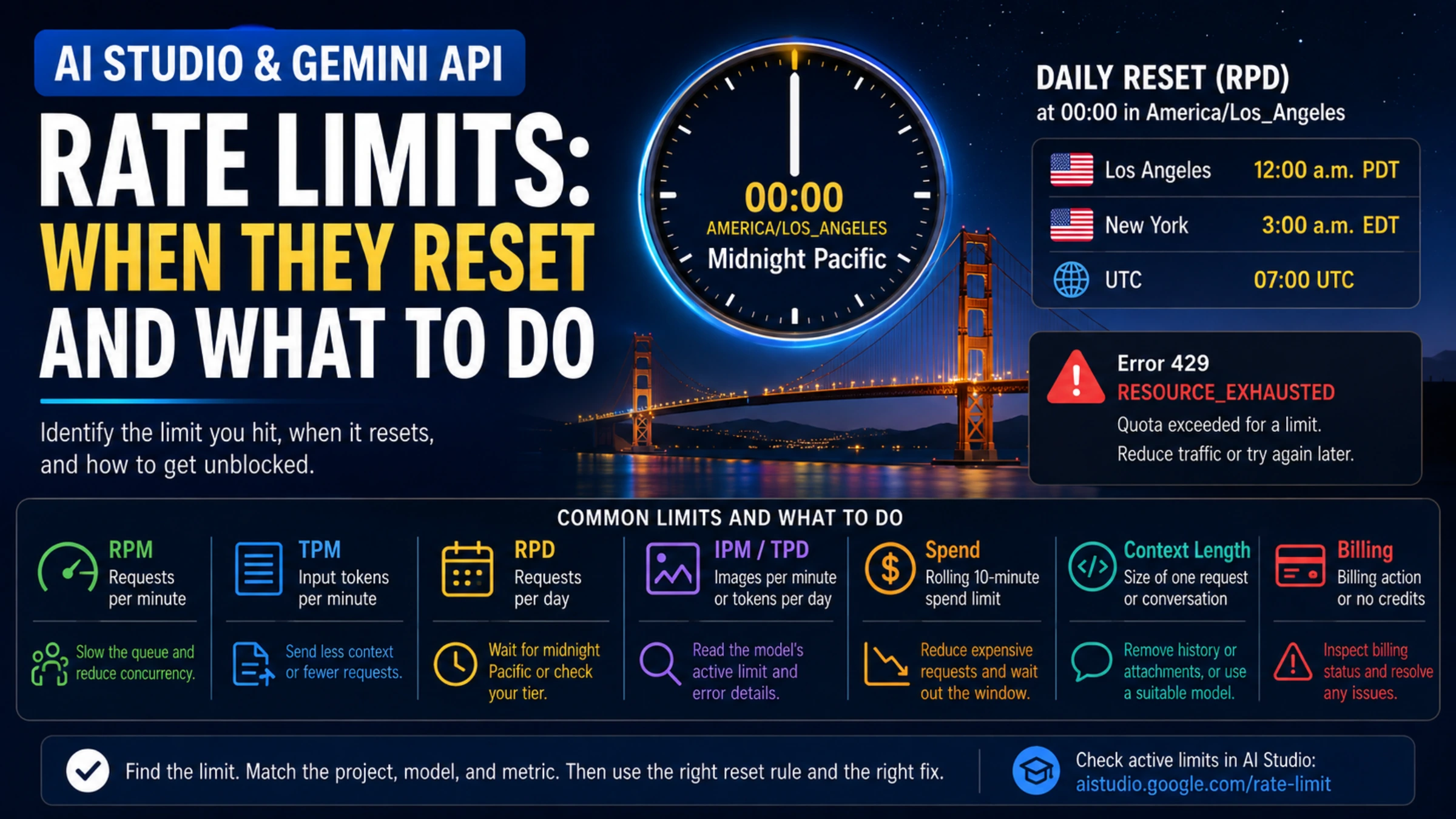
For a paid API key or your own code, the daily request quota (RPD) resets at midnight Pacific Time, per Google's rate-limit documentation. Use the named time zone America/Los_Angeles, because Pacific Time shifts between UTC−7 and UTC−8:
| Period | Reset in New York | Reset in UTC |
|---|---|---|
| Through October 31, 2026 (PDT) | 3:00 a.m. | 07:00 |
| November 1, 2026, to March 13, 2027 (PST) | 3:00 a.m. | 08:00 |
| From March 14, 2027 (PDT) | 3:00 a.m. | 07:00 |
Per-minute limits recover much sooner. A practical test: wait a couple of minutes and send one short message. If it goes through, you hit a short-term limit. If it fails again, treat it as a daily limit and stop retrying until the reset. Retries aren't free. For API requests, Google says a request that fails with a 400 or 500 error isn't billed but still counts against your quota (billing FAQ). Google doesn't say whether the web allowances work the same way, but one forum user reported that about 15 attempts ending in internal errors still used up the day's allowance.
What to try in AI Studio before paying
Start with the free changes, in this order:
- Start a new chat, or trim the long one. Every turn sends the whole conversation history to the model as input, and the API counts input tokens against its per-minute token limit (token counting). A chat that's hundreds of thousands of tokens long likely runs into limits sooner than a short one. Google doesn't say which metric the web message tracks, so this is an inference. In September 2026, several subscribers on the forum reported long chats failing while new chats with the same model worked. Copy the key context into a fresh chat instead of re-sending the long one.
- Switch the model. Gemini API limits are set per model, and preview and experimental models get tighter ones. If a Pro-class model stops, a Flash model may still have room. Google doesn't document whether the web allowances are counted per model, so treat this as something to try, not a guarantee.
- Remove heavy attachments. Video, long PDFs, and images count as input tokens, and they stay in the history that every later turn resends.
- Wait for the reset if none of these work.
A few things don't help. A new API key in the same project shares that project's limits. Clearing your browser cache or signing in again doesn't restore a server-side allowance. For image generation, the API tracks a separate images-per-minute limit on Nano Banana models. If you mainly want free image generation, How to Use Nano Banana for Free (and When It Isn't Free) covers the free options and where they stop.
There's no documented way around the limit beyond these steps, waiting, or paying for a larger allowance.
Does paying fix the rate limit? Subscription vs. billed API key
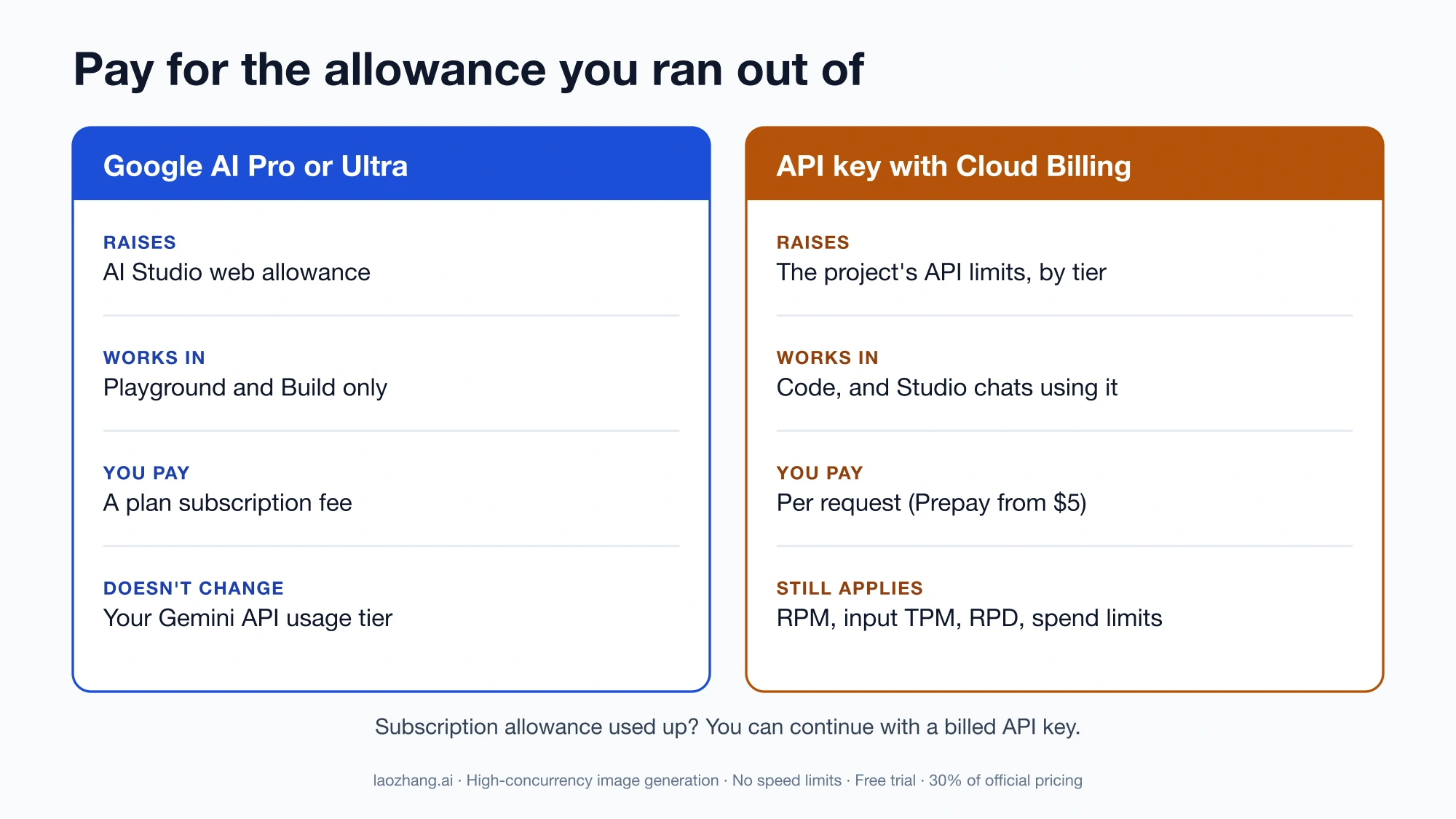
Paying fixes the problem only if you pay for the allowance you actually ran out of. The two paid options do different jobs:
| Google AI Pro or Ultra subscription | Gemini API key with Cloud Billing | |
|---|---|---|
| What it raises | Daily allowance in the AI Studio web interface (Playground and Build) | The project's Gemini API limits, set by its usage tier |
| Where it works | AI Studio web interface only | API calls from code, and AI Studio chats where you select that key |
| How you pay | Plan subscription fee | Per request; new accounts default to Prepay, with a $5 minimum top-up |
| What it doesn't do | Change your API usage tier; include Deep Research or Antigravity Preview in AI Studio, which need a paid key | Remove limits; the tier's per-minute, daily, and spend-based limits and its monthly spend cap still apply |
| Where to start | Upgrade button in AI Studio's left navigation | Set up billing on the AI Studio API keys page |
Google introduced the subscription benefit on April 20, 2026, calling it a "low-setup billing bridge" for people who have used up the free tier (announcement). The same post says pay-per-request API keys remain the standard for production. The plans page also says that when your subscription's daily allowance runs out, you can keep going with a billed Gemini API key.
A rough rule:
- You prototype in the browser most days and keep hitting the free cap. A subscription fits. It adds Gemini Pro and Nano Banana Pro access in AI Studio at a predictable cost.
- You hit the cap occasionally, or you need to finish one job today. Select a billed API key for that chat. You pay only for what you send, and you can switch back to a free-tier key afterward.
- You're building an app or running scripts. Only an API key with billing helps. The subscription does nothing for code.
Will selecting a paid key charge you? Yes, for usage in chats where that key is selected. It doesn't charge you for chats that stay on the free or subscription allowance.
When a paid key or subscription still shows the message
With a paid API key selected, the chat now draws on that project's limits. Check them in this order:
- The key and project. Make sure the selected key belongs to the billed project. A paid project elsewhere in your account doesn't raise the tier of the key you're using. The Projects page in AI Studio shows each project's tier.
- The active limits. Open the rate-limit dashboard and look at the model you're using. Preview models have tighter limits than stable ones. For how to read the numbers, see Gemini API Rate Limits by Tier: Read Active Limits and Diagnose 429s.
- Other callers. Scripts, apps, and teammates using any key in the same project share its limits.
- The billing balance. On Prepay, a $0 balance stops every API key in every project on that billing account at once. Requests fail with
402until you add credits (the minimum purchase is $5), and there's no fallback to the free tier. - The monthly spend cap. Each tier also caps Gemini API spending per billing account per month, added up across every linked project. Tier 1's cap is $250. Once it's reached, all linked projects pause until the 1st of the next month, so waiting for midnight Pacific won't help. Google doesn't document what AI Studio shows in that case, so check the account's billing page rather than assuming it's the same message.
With a Google AI Pro or Ultra subscription, first confirm that AI Studio is signed in to the subscribed account. The rate-limit dashboard shows API project limits. Google hasn't said whether it also shows the subscription web allowance.
Some cases look like a fault, not a normal limit:
- The message appears on your first request after a reset, or after only a handful of requests on a paid plan.
- The same model works in a new chat while one long chat keeps failing.
- The dashboard shows no exhausted limit, yet requests fail.
These cases have come up repeatedly on Google's developer forum. In December 2025, users reported the message with a paid API key already selected. From around September 4, 2026, AI Pro and Ultra subscribers reported free-tier-like caps of roughly 4 to 20 requests a day. A Google staff member said on September 14 that the issues with Gemini 3.8 Flash should be fixed. Afterward, users still reported long chats of several hundred thousand tokens failing while new chats worked. On September 22 and 23, two users said their limits were back to normal. These are individual reports, and Google hasn't published an explanation. As of September 23, 2026, it isn't clear whether every account has recovered.
If your case matches, retrying won't fix it. One subscriber reported that renewing with a different card changed nothing. Report it on the Google AI Developers Forum with:
- Your plan (free, Google AI Pro, Google AI Ultra, or paid key with its tier)
- The model, and the chat's token count
- The exact message and the time, with your time zone
- How many requests you sent since the last reset
- Whether a new chat with the same model works
Leave API keys out of screenshots. If the problem is the subscription itself, such as a plan that doesn't show as active, a forum moderator has pointed subscribers to Google One Help instead.
If you see a 429 from your own code: RPM, TPM, RPD and usage tiers
API errors come from the project behind your key, not from any web allowance. The basics:
- Limits apply per project, not per key. A new key in the same project adds nothing.
- Three measures apply independently: requests per minute (RPM), input tokens per minute (TPM), and requests per day (RPD). Exceeding any one of them triggers
429 RESOURCE_EXHAUSTED, even when the others have room. TPM counts input tokens only. Some models add images per minute or tokens per day. - A spend-based limit applies on a rolling 10-minute window for some accounts, depending on billing history. An expensive burst can hit it while RPM and TPM look fine.
- The tier depends on billing. Tier 1 needs a linked, active billing account, and higher tiers depend on cumulative spend and time since the first payment (usage tiers).
- A monthly spend cap applies per billing account, not per project: $250 at Tier 1, $2,000 at Tier 2, and $20,000 to $100,000 or more at Tier 3. Rate limits stay per project, but the cap sums spending across every linked project. You can request an increase (billing).
| What ran out | What to do |
|---|---|
| RPM | Slow the queue and cut concurrency, then retry with backoff |
| Input TPM | Send less context per request, or fewer requests per minute |
| RPD | Pause the work until midnight Pacific, or move to a higher tier for sustained volume |
| Spend-based limit | Use smaller contexts or shorter outputs, and let the 10-minute window pass |
Prepay balance at $0 (402) | Add credits; waiting won't help |
| Monthly spend cap | Wait for the 1st of the next month, or request a higher cap |
For retries, Google recommends exponential backoff with jitter, a maximum number of attempts, and retries only on transient errors like 429 and 5xx (troubleshooting guide). Don't retry 400, 402, or 403, which point to a bad request, depleted Prepay credits, or an access problem. The official SDKs already retry by default. The Python SDK retries up to four times, starting at about 1 second and capping at 60 seconds. Check this before adding your own retry loop, because two layered loops multiply the attempts.
Quick answers
What is the rate limit for Google AI Studio?
Google doesn't publish request counts for the web interface. Its plan table describes the free allowance as "Modest," Google AI Pro as "Higher," and Google AI Ultra as "Highest." If you select a paid API key, the limits are that project's API limits for the model, which you can read on the rate-limit dashboard.
How long does the AI Studio rate limit last?
A per-minute limit clears within a minute or two. A daily one lasts until the reset. For API keys, that's midnight Pacific Time, which is 3:00 a.m. in New York. For the web allowances, Google hasn't published the time, though users report the same midnight Pacific reset.
Does Google AI Pro raise my Gemini API limits?
No. Its AI Studio benefit applies only inside the AI Studio web interface. API usage tiers are separate and depend on billing.
Why did a new chat work when my old one kept failing?
Each turn of a long chat resends the whole conversation as input. That likely makes long chats hit limits sooner, though Google doesn't say which metric the web message measures. In September 2026, some subscribers reported long chats failing even while new chats had room, which looks more like a fault than an ordinary limit.