Update (October 8, 2026): Google released Nano Banana 2.1 (
gemini-nano-banana-2.1) on October 6, 2026, and markedgemini-3.1-flash-image(Nano Banana 2) as deprecated in the Gemini API, recommending a move to 2.1. No shutdown date is announced (an October 29 date announced that day was withdrawn on October 7). Nano Banana 2 model IDs, prices and code below still work for now; new projects should start on 2.1. For what changes and how to migrate, see Nano Banana 2.1 Is Out: Access, API Pricing and Moving Off Nano Banana 2.
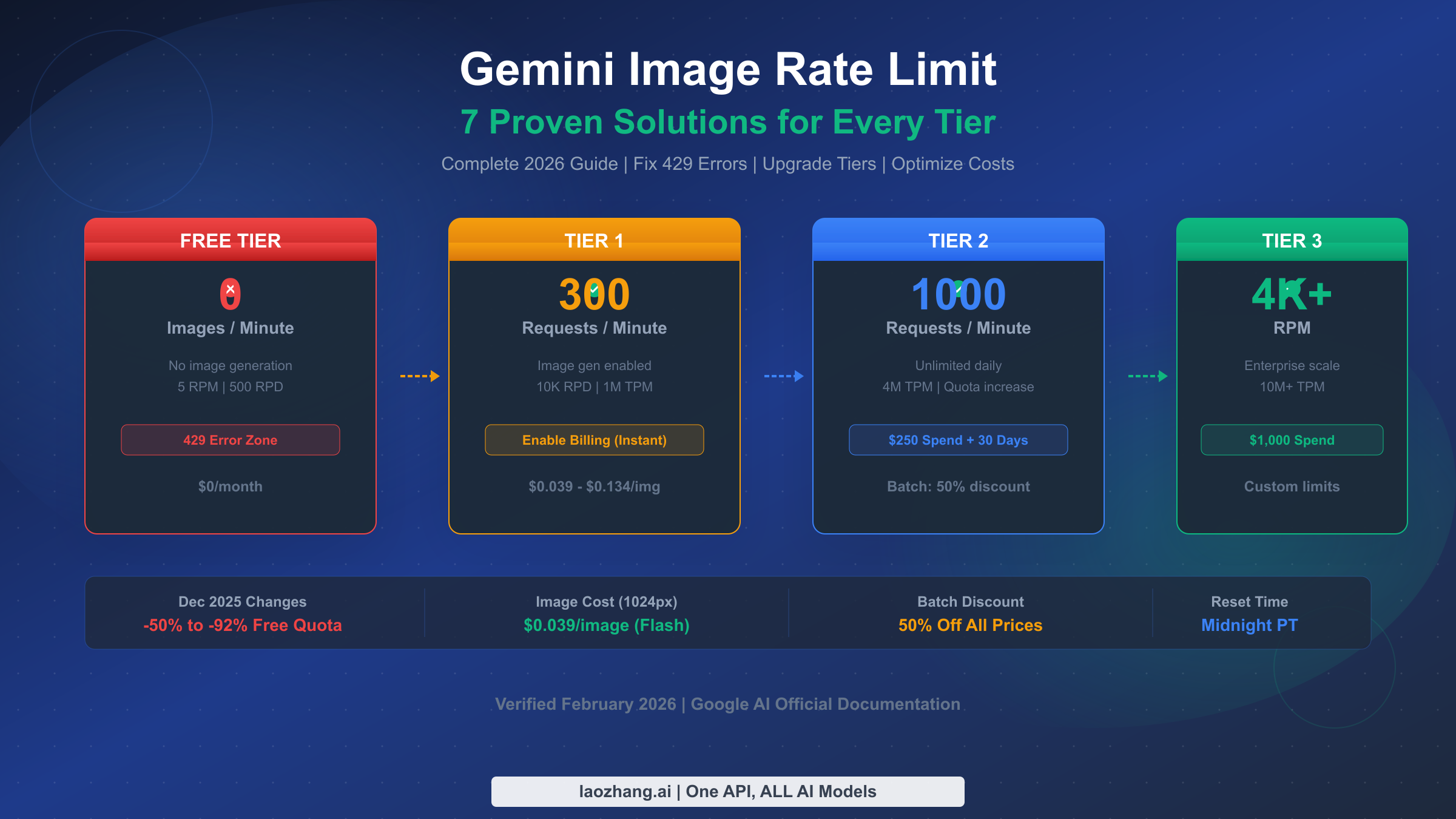
Gemini image 429 errors usually come from one of two root causes: the project does not yet have billable image access, or the project has exhausted a quota window that Google enforces at the project level. As of March 15, 2026, the current Gemini image preview models are a paid path, daily request quotas reset at midnight Pacific Time, and the official rate-limit page still treats project billing history as the gate between Free, Tier 1, Tier 2, and Tier 3.
That distinction matters because the fix is not always "retry harder." If your quota is effectively zero, exponential backoff will just delay the same failure. If billing is already enabled, the next question is whether you hit RPM, RPD, TPM, or IPM, whether the change is still propagating to the right project, or whether the problem is actually a 503 overload or an unsupported-country setup issue. The goal of this guide is to get you to the cheapest working fix fast, then show the scaling options that still make sense after the quick fix is in place.
TL;DR
Google's Gemini image API can return 429 RESOURCE_EXHAUSTED even when the real problem is "this project still has no paid image entitlement" rather than a temporary burst. The current official documentation says quotas are enforced per project, not per API key, RPD resets at midnight Pacific Time, Batch API gets a 50% discount with its own quota pool, and Tier 2 or Tier 3 eligibility still depends on cumulative spend plus a 30-day clock. The fastest path is to verify billing on the correct project, then read the error metadata or usage dashboard before choosing between retries, waiting, Batch API, or a different routing path.
| Symptom | Likely cause | Fastest fix | Expected recovery |
|---|---|---|---|
Image requests fail immediately with a quota of 0 or no usable image limit | The project still does not have paid image access for the model you are calling | Attach billing to the correct project and recheck the live rate-limit dashboard | Usually minutes, occasionally hours if billing verification lags |
| 429 appears only during bursts | RPM, TPM, or IPM window is exhausted | Add exponential backoff with jitter and reduce burst concurrency | Seconds to a few minutes |
| 429 appears after sustained usage all day | RPD is exhausted | Wait for the midnight Pacific reset or move non-urgent work to Batch API | Hours until reset |
| 429 continues after billing is enabled | Wrong project, propagation delay, or tier still too low for the workload | Verify project ID, billing account, tier state, and model-specific quota page | Minutes if it is propagation, longer if it is a real tier ceiling |
| The response is really 503 or a 400 region failure | This is not a quota problem | Retry 503s briefly, or attach billing / move to a supported region for 400 free-tier access failures | Depends on the actual error class |
Troubleshooting: Match Your Symptom to the Fastest Fix
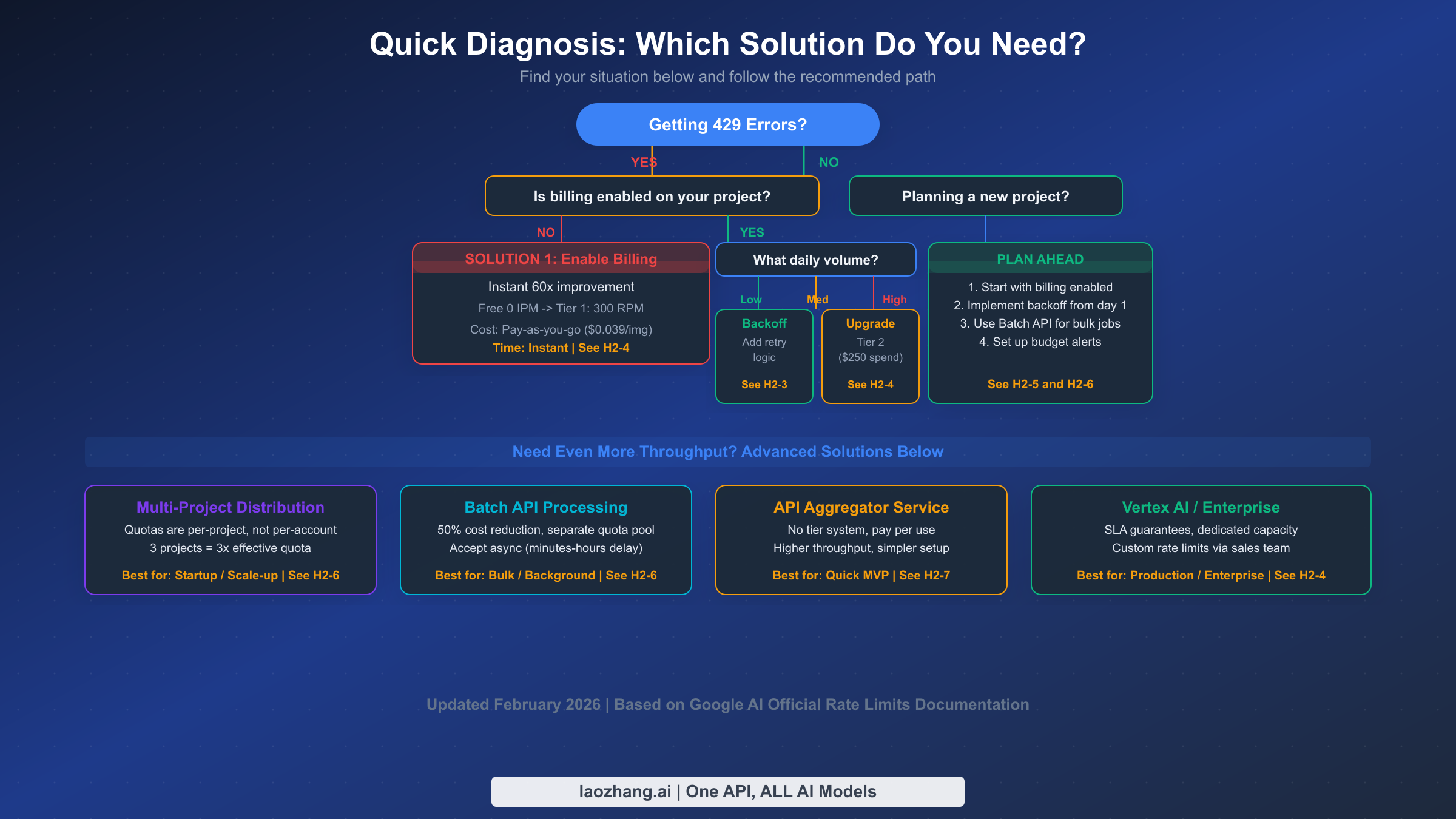
Before diving into the technical details, identify which failure class you are actually in. This sounds obvious, but it is the step most developers skip. They see the same 429 RESOURCE_EXHAUSTED wrapper and assume every failure has the same cause. In practice, the quickest fixes differ sharply depending on whether the project never had paid image access, whether it ran out of minute-level capacity, or whether the daily bucket is simply empty for the rest of the day.
If you are seeing 429 errors right now and need an immediate fix, start with one question: is billing attached to the exact Google Cloud project behind the API key you are using? The official billing guide says setting up billing enables billable usage immediately, but real-world threads show that developers still lose time because they enable billing in one project and keep calling another. If your usage page still shows a zero or unavailable image quota for the model, retries will not help. Fix the project and billing linkage first.
If billing is already enabled but you are still hitting limits, look for which bucket is failing. Burst traffic points to RPM, TPM, or IPM. A job that runs for hours and dies late in the day points to RPD. A workload that seems too small for either of those can still fail because billing just propagated, because the live project is on the wrong billing account, or because the model you chose is on a tighter preview limit than the text-only models you used before. This is why the error metadata, usage dashboard, and project ID matter more than generic "wait and retry" advice.
If you are planning a new project, build for quota reality from day one. Start with billing enabled, log project IDs and quota-limit metadata on every 429, route non-urgent generations through Batch API, and bookmark the official rate limits page so operators check current model limits instead of old screenshots. That approach costs little extra up front and prevents most of the "Gemini image not working" confusion that appears later in production.
Understanding Gemini Image Rate Limits in 2026
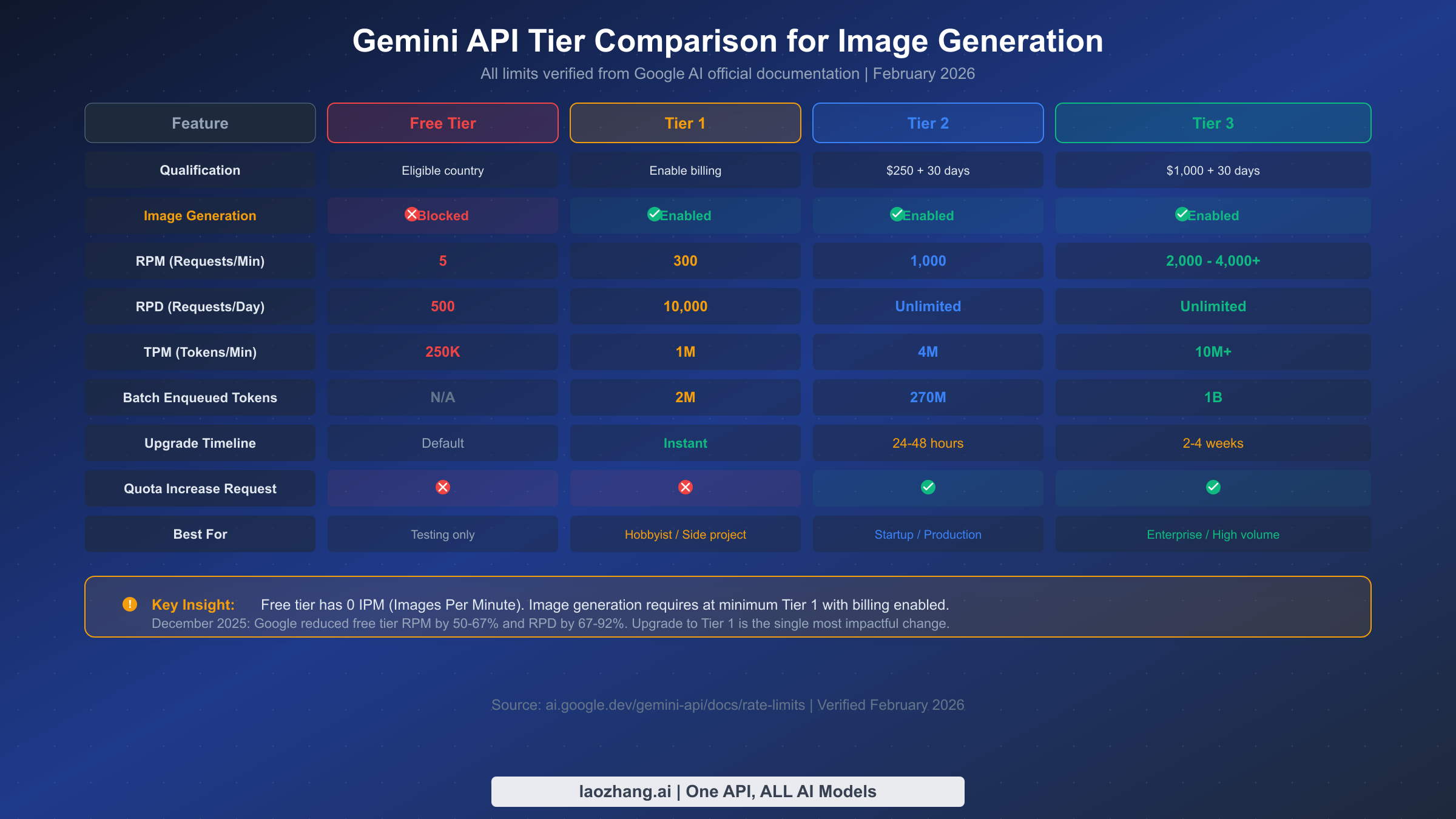
Google's Gemini API measures usage across four distinct dimensions, and understanding how they interact is essential for diagnosing and resolving image generation bottlenecks. Most developers focus exclusively on RPM (Requests Per Minute), but for image workloads the operational picture is wider: each dimension is checked independently, quotas are tied to a project, and the rate-limit tables can vary by model family and tier. That is why the official pricing page and rate-limit dashboard are more reliable than older blog screenshots.
RPM (Requests Per Minute) governs how many API calls you can make in a 60-second window. For image workloads, RPM is the limit people feel first during bursts, queue drains, and user-triggered retries. For a complete breakdown of Gemini API rate limits, including the current live tables Google publishes for each model, use our separate reference guide alongside the official dashboard.
RPD (Requests Per Day) sets a ceiling on total daily API calls. The official documentation still says RPD resets at midnight Pacific Time, which makes this the limit most likely to create "it worked this morning but not tonight" confusion. Understanding when Gemini image limits reset helps teams decide whether to wait, spread work across days, or push the backlog into Batch API.
TPM (Tokens Per Minute) measures token throughput rather than raw request count. For image generation, this becomes relevant when you pair image output with long prompts, multiple reference images, or hybrid text-plus-image calls. TPM is rarely the first number developers inspect, but it can be the hidden reason one prompt fails while another succeeds at the same request rate.
IPM (Images Per Minute) is the dimension most developers overlook, and it is the one that matters most for image generation workloads. It only exists for image-capable models, which is why teams migrating from text-only Gemini usage get surprised. In practice, the most important reader takeaway is this: if the project does not currently expose paid image access for the model you chose, the effective image quota is unusable no matter how healthy your text-model limits look.
The December 7, 2025 quota adjustment is the reason many older tutorials now feel misleading. Firebase's quota documentation explicitly warns that apps can start returning 429 RESOURCE_EXHAUSTED after that date, which is why a refresh grounded in current docs matters more than a generic "rate limits exist" explainer.
| What changes with billing and tier progression | Current official guidance |
|---|---|
| Project-level quota ownership | Quotas are enforced per project, not per API key |
| Tier 1 entry | Attach billing to the correct project to enable billable usage |
| Tier 2 requirement | More than $250 cumulative spend and at least 30 days since successful payment |
| Tier 3 requirement | More than $1,000 cumulative spend and at least 30 days since successful payment |
| Daily reset | RPD resets at midnight Pacific Time |
| Batch path | Separate batch quota pool with a 50% pricing discount and up to 24-hour turnaround |
One widespread misconception deserves explicit correction: quotas are enforced at the project level, not per API key. Creating multiple API keys within the same Google Cloud project will not multiply your limits. Another common misunderstanding involves how the four dimensions interact during a single request. The API can accept your current RPM but still reject the call because IPM or RPD is exhausted. That interaction pattern explains why intermittent image failures can appear even when your request count looks modest.
Fix 429 Errors in 5 Minutes: Exponential Backoff Implementation
When you're facing 429 errors and need image generation working again as quickly as possible, exponential backoff is the safest first code change. Google's troubleshooting guidance for 429 is still to retry later or request more quota, and in production the best practical way to "retry later" is progressive delay with jitter. This technique automatically retries failed requests with increasing delays, which gives minute-level quota windows time to recover without every worker hammering the API again at the same second.
The concept is straightforward: when a request returns a 429 status code, wait for a base delay before retrying. If the retry also fails, double the wait time. Continue doubling until you either succeed or reach a maximum number of retries. Adding random jitter (slight variation in the delay) prevents the "thundering herd" problem that occurs when multiple clients retry at exactly the same intervals, which can paradoxically make rate limiting worse. For a more detailed exploration of this error and its variations, see our guide to fixing 429 quota exceeded errors.
Here's a production-ready Python implementation that handles image generation specifically:
import time
import random
from google import generativeai as genai

def generate_image_with_retry(prompt, model_name="gemini-nano-banana-2.1",
                              max_retries=5, base_delay=1.0):
    """Generate an image with exponential backoff retry logic.

    Args:
        prompt: The image generation prompt
        model_name: Gemini model to use
        max_retries: Maximum retry attempts (default 5)
        base_delay: Initial delay in seconds (default 1.0)

    Returns:
        Generated content response or raises after max retries
    """
    model = genai.GenerativeModel(model_name)

    for attempt in range(max_retries):
        try:
            response = model.generate_content(prompt)
            return response

        except Exception as e:
            error_str = str(e)
            if "429" in error_str or "RESOURCE_EXHAUSTED" in error_str:
                if attempt == max_retries - 1:
                    raise RuntimeError(
                        f"Rate limit exceeded after {max_retries} retries. "
                        f"Consider upgrading your tier or reducing request frequency."
                    ) from e

                # Calculate delay with exponential backoff + jitter
                delay = base_delay * (2 ** attempt)
                jitter = delay * 0.25 * (random.random() - 0.5)
                wait_time = delay + jitter

                print(f"Rate limited (attempt {attempt + 1}/{max_retries}). "
                      f"Waiting {wait_time:.1f}s before retry...")
                time.sleep(wait_time)
            else:
                # Non-rate-limit errors should propagate immediately
                raise
This implementation includes several important details that basic retry snippets often miss. The jitter range of 25% prevents synchronized retries across multiple clients. The function distinguishes between rate limit errors (which should be retried) and other errors (which should propagate immediately to avoid masking bugs). The error message after exhausting retries includes actionable guidance pointing toward tier upgrades.
For JavaScript/TypeScript environments, here's the equivalent implementation using async/await:
const { GoogleGenerativeAI } = require("@google/generative-ai");

async function generateImageWithRetry(prompt, {
  modelName = "gemini-nano-banana-2.1",
  maxRetries = 5,
  baseDelay = 1000
} = {}) {
  const genAI = new GoogleGenerativeAI(process.env.GEMINI_API_KEY);
  const model = genAI.getGenerativeModel({ model: modelName });

  for (let attempt = 0; attempt < maxRetries; attempt++) {
    try {
      const result = await model.generateContent(prompt);
      return result.response;
    } catch (error) {
      const isRateLimit = error.message?.includes("429") ||
                          error.message?.includes("RESOURCE_EXHAUSTED");
      if (isRateLimit && attempt < maxRetries - 1) {
        const delay = baseDelay * Math.pow(2, attempt);
        const jitter = delay * 0.25 * (Math.random() - 0.5);
        const waitTime = delay + jitter;
        console.log(`Rate limited (attempt ${attempt + 1}/${maxRetries}). ` +
                     `Waiting ${(waitTime / 1000).toFixed(1)}s...`);
        await new Promise(resolve => setTimeout(resolve, waitTime));
      } else {
        throw error;
      }
    }
  }
}
Both implementations should be part of your standard API client rather than scattered throughout your application code — this ensures consistent retry behavior across all image generation calls. The retry logic acts as a safety net: it gracefully handles the transient 429 responses that occur naturally as your requests approach rate limit boundaries, without requiring you to manually track timing or spacing between calls.
When backoff alone isn't enough: Exponential backoff works well for temporary rate limit windows and bursty traffic patterns, but it cannot overcome fundamental quota limits. If you're consistently generating more images than your tier allows per minute or per day, backoff will only add latency without solving the underlying capacity problem. In that case, the solution is upgrading your tier, using the batch API, or distributing workload across multiple projects.
How to Upgrade Your Gemini API Tier (Complete Walkthrough)
Upgrading your tier is the most straightforward long-term solution to rate limit issues, and the process is simpler than most developers expect — though there are several gotchas that can cause unnecessary delays. The tier system is cumulative: you progress automatically from Free to Tier 1 to Tier 2 to Tier 3 as you meet each tier's spending and time requirements. No manual application is needed for the standard upgrade path.
Free to Tier 1 (Instant, Most Important): This single upgrade still has the largest practical impact for most readers. The official billing guide says billable usage is enabled immediately after setup, and the rate-limits guide treats paid billing as the path from Free to Tier 1. In plain English: if the project is still behaving like it has no usable image access, attaching billing is the first thing to fix. Importantly, enabling billing does not mean you are charged a subscription fee up front — you are charged for paid usage you actually consume. For a detailed walkthrough of the setup flow, our tier upgrade guide covers every step.
The fastest path is through AI Studio: navigate to aistudio.google.com, sign in with your Google account, go to Dashboard, then Usage and Billing, click the Billing tab, and select "Set up Billing." You'll need a payment method, but Google does not charge merely because billing is enabled. Another useful official detail: failed 400 and 500 requests are not billed, although they still count against quota. That means turning billing on early is less financially risky than many readers assume, but sloppy retry loops can still waste quota.
Common gotcha #1: Billing verification sometimes takes longer than expected, especially on new Google Cloud accounts. If your upgrade does not activate within an hour, check email for a billing verification request and confirm that the API key belongs to the same project that now has billing attached. This sounds trivial, but it is the exact shape of the forum and GitHub complaints: people flip billing on, then keep testing a different project or an older key.
If you still get 429 after billing is enabled, run a short checklist before making architectural changes. Confirm the live project ID in your request logs, confirm the billing account is active for that project, refresh the official usage page to see whether the model now shows a non-zero or billable image entitlement, and read the exact error again to make sure it is still 429 rather than 503 or a region-related 400. In other words, treat "billing is on" as a claim to verify, not as a box you assume is finished.
Tier 1 to Tier 2 ($250 spend + 30 days): The official rate-limits page still requires two conditions: more than $250 in cumulative Google Cloud spend and at least 30 days since successful payment. The upgrade remains automatic once both conditions are met. An important clarification: Google Cloud free trial credits do not count toward the spend threshold.
Tier 2 to Tier 3 ($1,000 spend + 30 days): Tier 3 still requires more than $1,000 in cumulative spend plus the same 30-day minimum. Organizations that need more than the published tier can still pursue enterprise quota discussions with Google, but for most readers the key point is simpler: if you need more throughput this week, the Tier 2 and Tier 3 clocks are too slow to be your only plan.
Common gotcha #2: Tier upgrades are per-project, not per-account. If you have multiple Google Cloud projects, each project has its own tier level and must independently meet the spending requirements. This is actually useful for the multi-project strategy discussed in the advanced section, but it can be confusing if you expect spending in one project to unlock tiers in another.
Requesting a quota increase beyond your tier: For Tier 2 and above, Google offers a quota increase request form through the Cloud Console (IAM & Admin, then Quotas). Search for "generate_content_requests_per_minute," click the three-dot menu, and select "Edit quota." Include a clear use case justification and your expected volume. Response times vary: standard requests are reviewed within 1-3 business days, though Google explicitly notes they make "no guarantees about increasing your rate limit." Enterprise customers with dedicated account managers typically receive faster responses.
What Gemini Image Generation Actually Costs
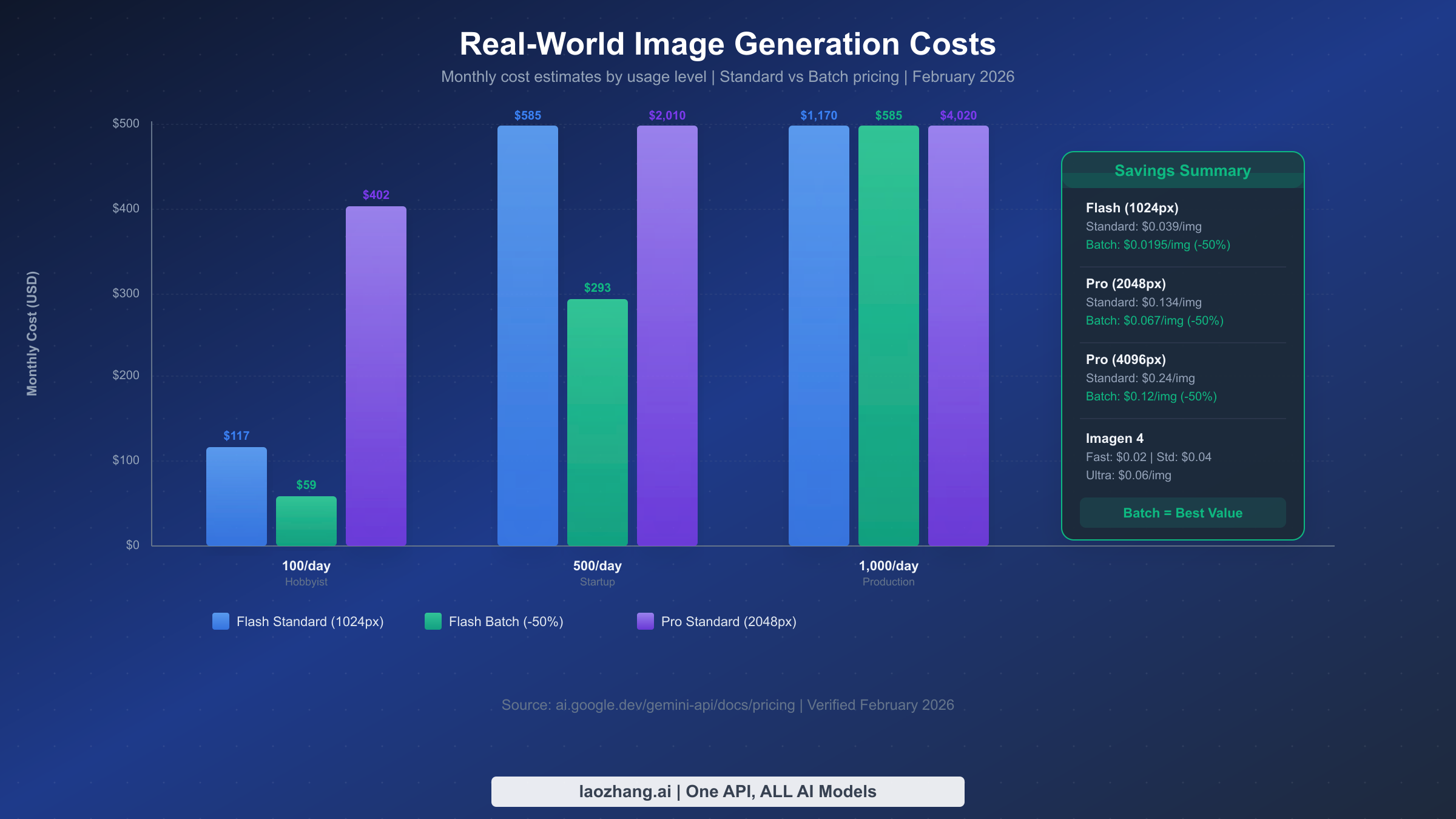
Understanding the real cost of Gemini image generation is crucial for budgeting and deciding which fix makes economic sense. The pricing structure depends on model and output size, and all figures in this section were rechecked against the official Google AI pricing page on March 15, 2026.
For most readers dealing with current Gemini image 429 errors, the practical paid entry point is Gemini 3.1 Flash Image Preview. Google's pricing page maps its output cost to $0.045 at 512, $0.067 at 1024, $0.101 at 2048, and $0.151 at 4096. If you need higher-end output, Gemini 3 Pro Image Preview is listed at $0.134 per image for 1024 and 2048, and $0.24 per image for 4096. Those numbers matter because they change the emotional framing of "turn billing on" from a vague financial risk into a concrete per-image decision.
The Batch API remains the most significant official cost optimization available: a flat 50% discount on token prices for accepting asynchronous processing with a documented turnaround of up to 24 hours. For workloads that do not need immediate output, that makes Batch API both a pricing tool and a rate-limit workaround. If you're exploring the cheapest ways to access Gemini image generation, batch processing should be at the top of your list.
Here's what real-world monthly costs look like across different usage levels:
| Usage Level | Images/Month | Flash 1024 Standard | Flash 1024 Batch | Pro 2K Standard | Pro 2K Batch |
|---|---|---|---|---|---|
| Hobbyist | 3,000 (100/day) | $201 | $100.50 | $402 | $201 |
| Startup | 15,000 (500/day) | $1,005 | $502.50 | $2,010 | $1,005 |
| Production | 30,000 (1K/day) | $2,010 | $1,005 | $4,020 | $2,010 |
| Enterprise | 300,000 (10K/day) | $20,100 | $10,050 | $40,200 | $20,100 |
Several cost-saving strategies stack together. Using Flash instead of Pro roughly halves per-image cost for many standard-resolution use cases. Adding Batch API halves the remaining cost again. In the current pricing table, Flash at 1024 drops from $0.067 to $0.0335 with batch, which means even 1,000 images per day lands near $1,005 per month instead of $2,010. For budget-conscious projects, billing alerts in Cloud Billing remain the simplest guardrail against surprise spend.
The tier qualification costs also factor into the total picture. Reaching Tier 2 still requires more than $250 in cumulative Google Cloud spend. At today's published image rates, that is roughly 3,731 Flash 1024 images or 1,865 Pro 2K images if all the spend came from those calls alone. In real projects the spend can come from any Google Cloud service, so for many teams the real choice is whether to wait for that cumulative threshold or use a relay such as laozhang.ai while the official tier clock catches up.
Advanced Strategies to Maximize Image Throughput
Once you've implemented basic retry logic and upgraded to an appropriate tier, several advanced strategies can multiply your effective throughput beyond what a single project at any given tier provides. These techniques are particularly valuable for production applications that need consistent, high-volume image generation without the latency penalties of aggressive backoff.
Multi-Project Distribution is the most powerful throughput multiplier available because quotas are enforced at the project level. Creating three Google Cloud projects and distributing requests across them effectively triples your rate limits. The implementation is straightforward: maintain a pool of API keys (one per project) and use round-robin or weighted distribution to balance requests. Each project independently tracks its own quota consumption, so a rate limit event on one project doesn't affect the others.
import itertools
from google import generativeai as genai

class MultiProjectImageGenerator:
    def __init__(self, api_keys: list[str], model_name: str = "gemini-nano-banana-2.1"):
        self.clients = []
        for key in api_keys:
            genai.configure(api_key=key)
            self.clients.append(genai.GenerativeModel(model_name))
        self.key_cycle = itertools.cycle(range(len(self.clients)))

    def generate(self, prompt: str):
        """Generate image using next available project in rotation."""
        project_idx = next(self.key_cycle)
        client = self.clients[project_idx]
        try:
            return client.generate_content(prompt)
        except Exception as e:
            if "429" in str(e):
                # Try next project on rate limit
                next_idx = next(self.key_cycle)
                return self.clients[next_idx].generate_content(prompt)
            raise

# Usage: 3 projects = ~3x effective throughput
generator = MultiProjectImageGenerator([
    "AIzaSy-project1-key",
    "AIzaSy-project2-key",
    "AIzaSy-project3-key",
])
The key consideration with multi-project distribution is that each project needs its own billing account and tier progression. The $250 Tier 2 threshold applies per project, so three projects at Tier 2 represent $750 in total Google Cloud spending. For many production workloads, this investment pays for itself quickly through avoided downtime and rate limit errors.
Batch API for Background Processing separates urgent, real-time image generation from bulk processing that can tolerate delays. The official docs describe Batch API as a separate quota system with a 24-hour completion window, a 50% discount, a 100 concurrent jobs limit, 2 GB maximum file size per input file, and 20 GB total batch storage. By routing non-urgent workloads through Batch API, you keep real-time quota available for user-facing requests instead of exhausting it on background work.
Request Queue with Rate Limiting adds a local safeguard that prevents your application from exceeding rate limits in the first place. Rather than relying solely on 429 errors and retries (which add latency), a pre-emptive rate limiter ensures requests are spaced appropriately. A token bucket algorithm works well for this: maintain a bucket that refills at your tier's RPM rate, and only dispatch requests when tokens are available. Requests that arrive when the bucket is empty get queued rather than sent to the API, eliminating 429 errors entirely while maintaining maximum throughput.
Caching Generated Images is often overlooked but can dramatically reduce API calls for applications that frequently generate similar images. If your users commonly request variations on common themes or your application generates images for a finite set of content types, implementing a cache layer (Redis, local filesystem, or CDN) can serve previously generated images without consuming any quota. Even a simple hash-based cache with a 24-hour TTL can reduce API calls by 30-50% in many applications.
Timing Your Requests around the quota reset schedule provides a simple but effective optimization. Daily quotas reset at midnight Pacific Time for API users, so starting the heaviest batch runs shortly after that reset gives you the largest uninterrupted daily window.
Model Fallback Chains add resilience by automatically switching to alternative models when your primary choice hits a rate limit. Since Gemini 1.5 models were not affected by the December 2025 quota reductions, they serve as reliable fallbacks for non-image workloads. For image generation specifically, you can chain Gemini 3 Pro Image Preview as your primary model (highest quality), Gemini 2.5 Flash Image as the secondary (most cost-effective), and Imagen 4 as a tertiary option. Each model has independent rate limits, so a 429 on one model doesn't block the others. The fallback pattern works particularly well when combined with the multi-project strategy, creating a matrix of model-project combinations that dramatically reduces the probability of all paths being rate-limited simultaneously.
Monitoring Your Quota Usage proactively prevents rate limit issues before they impact your users. Log the project ID, model name, error code, and quota_limit metadata whenever a 429 appears. Combine that with the AI Studio or Cloud quota dashboard and simple alerting at 70% and 90% of daily usage. That data will tell you whether you need a higher tier, a queue, Batch API, or a new routing layer instead of guessing from one-off failures.
When to Consider Third-Party Alternatives and What to Do Next
Despite all the optimization strategies available for the official Gemini API, there are legitimate scenarios where a third-party approach makes more sense than fighting Google's tier system. The decision isn't just about cost — it's about development velocity, operational simplicity, and the specific constraints of your project timeline.
API aggregator services like laozhang.ai provide access to Gemini image generation models through a unified endpoint that operates outside Google's tier system. Instead of managing tier upgrades, billing accounts, and multi-project distribution, you get a single API key with pay-per-use pricing and typically higher throughput limits. The trade-off is that you're adding a third-party dependency to your architecture, and pricing structures may differ from Google's direct pricing. For startups building MVPs where development speed matters more than optimizing per-image costs, this can be the pragmatic choice.
When to stay with the official API: If you're building a production system that requires SLA guarantees, data residency compliance, or direct integration with other Google Cloud services (Vertex AI, Cloud Functions, BigQuery), the official API is the right choice. Enterprise customers also benefit from the negotiated rate limits and dedicated support that come with Tier 3 and formal enterprise agreements. Organizations in regulated industries like healthcare or finance often need the audit trail and compliance certifications that come with a direct Google Cloud relationship, and the official API path provides those guarantees out of the box. Additionally, if your application already runs on Google Cloud infrastructure, keeping everything within the same ecosystem simplifies networking, reduces latency, and allows you to leverage VPC Service Controls for additional security.
When to consider alternatives: If your project has a tight deadline and the 30-day wait for Tier 2 qualification would block your launch, or if your usage pattern is highly variable (bursts of thousands of images followed by quiet periods), or if you need access to multiple AI image generation models (not just Gemini) through a single integration, aggregator services can eliminate the operational overhead of managing multiple API relationships. This is particularly relevant for agencies and consultancies that build applications for multiple clients — maintaining separate Google Cloud projects, billing accounts, and tier progressions for each client creates significant administrative burden that a single aggregator API key can eliminate. The cost comparison should factor in not just the per-image price but also the developer hours spent managing infrastructure, monitoring quotas, and troubleshooting tier upgrades across multiple projects.
Alternative image generation models also deserve consideration when evaluating your options. Imagen 4 remains a cheaper Google-native image path in some scenarios, while OpenAI, Stability, and Midjourney expose different rate-limit regimes entirely. For teams that need resilience more than brand purity, multi-model routing is often the cleanest operational answer: if one provider tightens limits unexpectedly, you can shift work instead of stalling the product.
The right next step depends on your timeline. For immediate relief, verify billing on the correct project and add exponential backoff. For the next month, progress toward Tier 2 while moving non-urgent work into Batch API. For production scale, treat rate limits as an architectural concern: queue requests, monitor quota metadata, split work across projects where justified, and decide whether an official tier or a relay such as laozhang.ai gives you the cleaner operational path.
FAQ
How many images can I generate per day with Gemini's free tier?
Treat the practical answer as zero reliable paid-image output through the API until billing is attached to the project. The exact live quota table can vary by model and change over time, but the current Gemini image preview workflow is a paid path. This is why the first productive fix is usually enabling billing, not tuning retries.
How long does it take to upgrade from Free to Tier 1?
Usually within minutes. The billing documentation says billable usage activates immediately, but new accounts and some payment methods can still introduce verification lag. If you are still failing after an hour, verify the project, the billing account, and the rate-limit dashboard before assuming the API is broken.
Do multiple API keys increase my rate limit?
No. Rate limits are enforced at the project level, not per API key. Creating ten API keys inside one project gives you ten keys pointing at the same bucket. To increase capacity you need a higher tier, a different project, Batch API for async work, or a different routing strategy.
When do Gemini rate limits reset?
Per-minute limits recover on their own rolling windows. Daily request limits reset at midnight Pacific Time for API users. If the backlog can wait, timing larger jobs right after the reset is the simplest no-code workaround.
Is the Batch API worth it for image generation?
Absolutely, if you can tolerate asynchronous processing. The official docs still promise a 50% discount and an up-to-24-hour completion window, while using a separate quota pool from interactive traffic. For thumbnail generation, asset backfills, or content pipelines, that makes Batch API one of the best official answers to repeated 429s.
Why am I still getting 429 after I already enabled billing?
Because "billing enabled" is not the same thing as "the exact project and model are ready for the traffic I am sending." The usual causes are propagation delay, the wrong project, a still-low tier for the workload, or a neighboring error that got lumped into the same debugging session. Check the project ID, the live quota page, and the raw error metadata before changing code.
Should I request a quota increase or build a workaround first?
If you need relief this week, build the workaround first. Requesting more quota is sensible for a stable production workload, but it is not the fastest rescue path. Backoff, Batch API, and better project hygiene usually solve the immediate problem faster than waiting on an approval queue or a 30-day tier clock.