
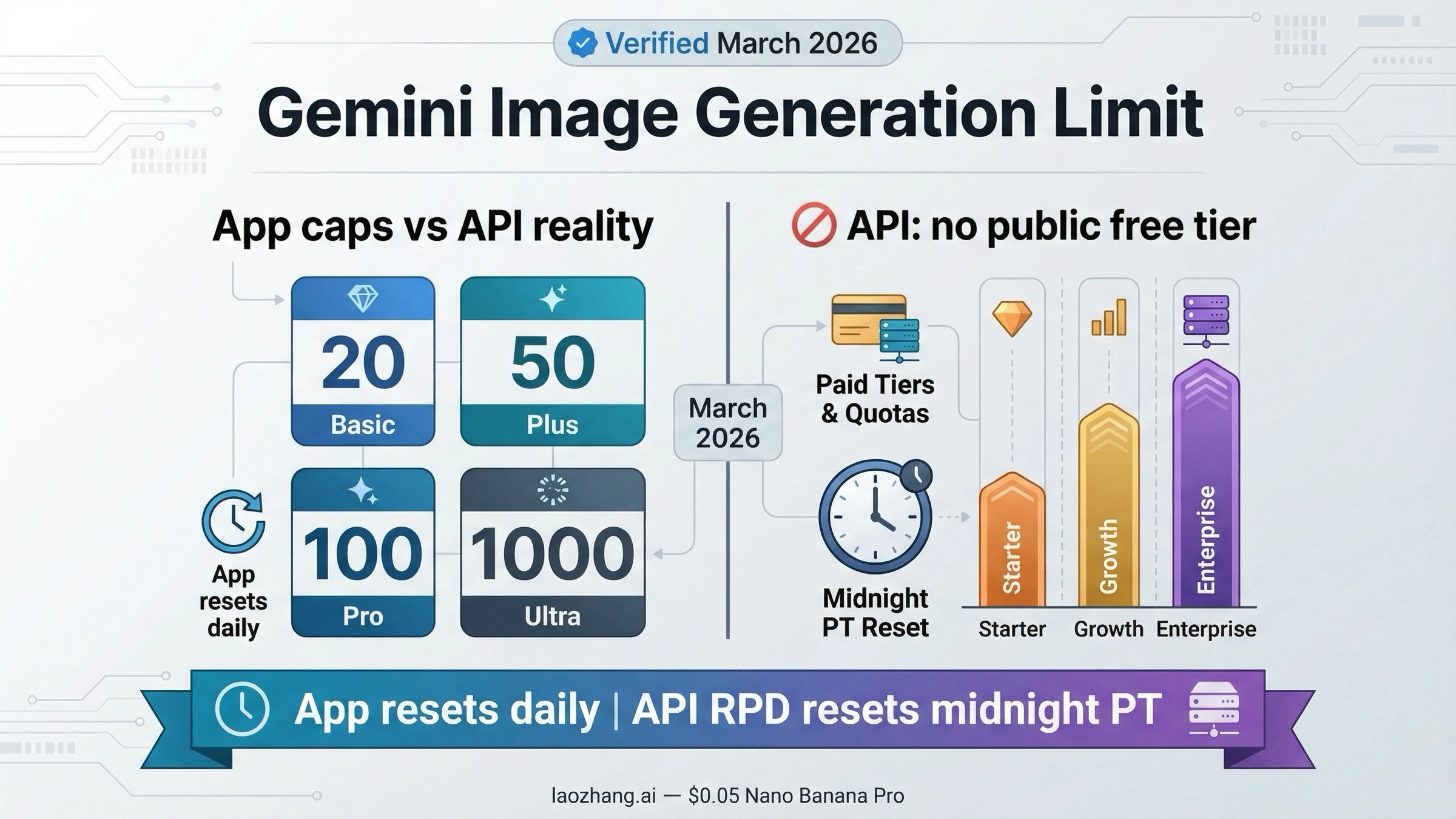
As of March 22, 2026, if you are asking when the Gemini image generation limit resets, the answer depends on whether you mean the Gemini app or the Gemini API. In the Gemini app, Google currently lists Nano Banana 2 daily image caps that vary by plan. In the Gemini API, the current image models are paid-only and requests-per-day quotas reset at midnight Pacific Time.
Most confusion comes from mixing those two surfaces. App limits are plan-based and can change frequently, while API limits follow the published rate-limit rules for your project tier. If you separate app usage from API usage first, the reset timing and next step become much clearer.
TL;DR
If you only need the short version, use this table.
| Surface | Current limit picture | Reset rule | What matters most |
|---|---|---|---|
| Gemini app Basic | Up to 20 Nano Banana 2 images/day | Resets daily; limits may change and are distributed through the day | Best for light manual use |
| Google AI Plus | Up to 50 images/day | Resets daily | Adds Nano Banana Pro redo access |
| Google AI Pro | Up to 100 images/day | Resets daily | Best fit for heavier app users |
| Google AI Ultra | Up to 1,000 images/day | Resets daily | Highest app-side volume |
| Gemini 3.1 Flash Image Preview API | No public free tier on current pricing page | API RPD resets at midnight Pacific Time | Current high-volume paid API lane |
| Gemini 3 Pro Image Preview API | No public free tier on current pricing page | API RPD resets at midnight Pacific Time | Highest-quality paid API lane |
| Gemini 2.5 Flash Image API | No public free tier on current pricing page | API RPD resets at midnight Pacific Time | Legacy paid lane scheduled to shut down on October 2, 2026 |
Three details matter more than the headline numbers.
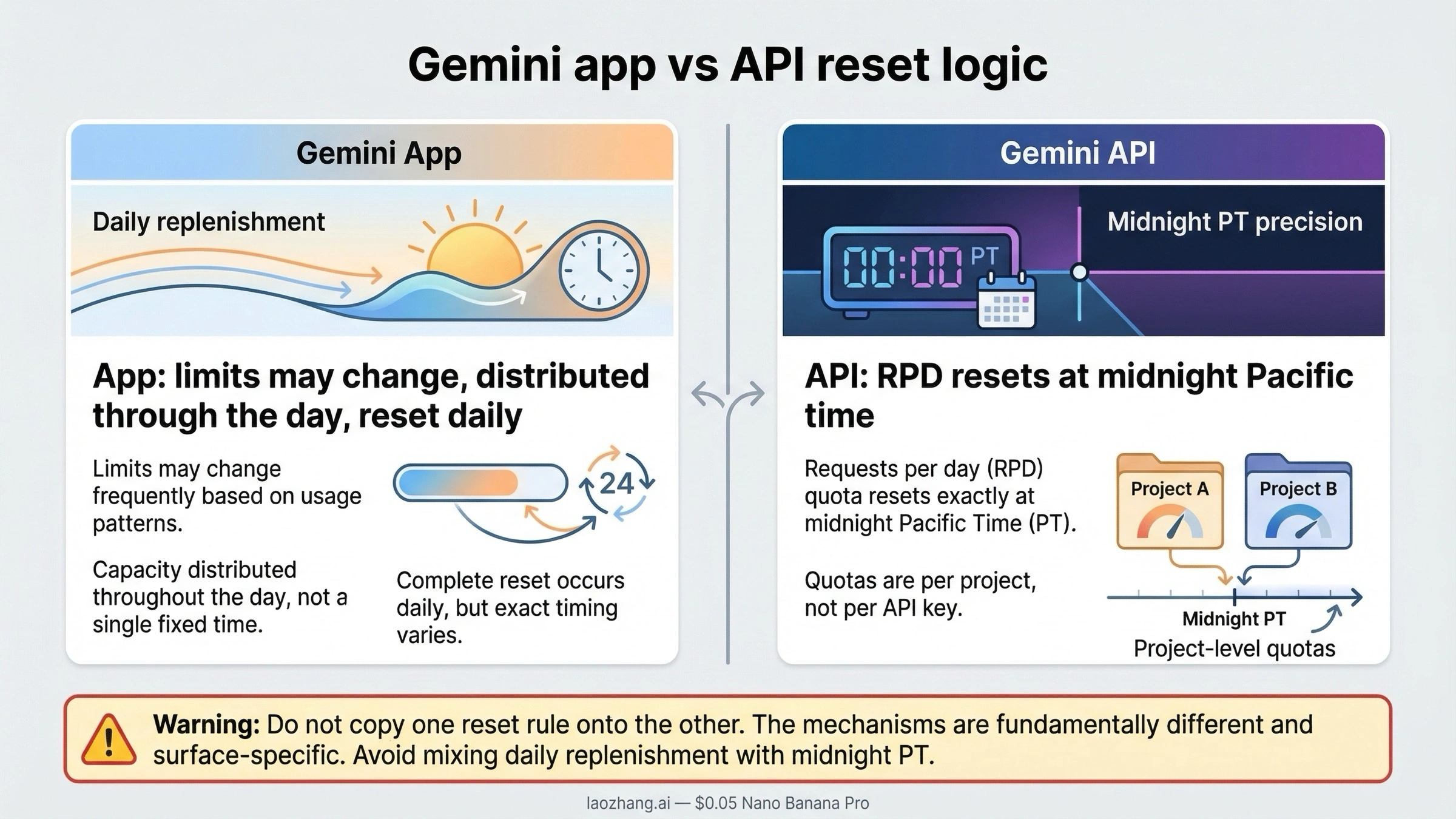
First, the Gemini app no longer supports a clean universal reset-time claim on the same terms older blog posts used. Google's current Gemini app limits page says image-generation limits may change frequently, are distributed throughout the day, and reset daily. That is different from the old "everything resets at midnight PT" blog formula.
Second, the Gemini API still has a clean reset rule, but it belongs only to the API. Google's current rate-limits page says Requests per day reset at midnight Pacific time and that active limits are tied to the project you see in AI Studio.
Third, older "free Gemini image API" answers are often stale because the product changed. The current Gemini Developer API pricing page lists Not available under Free Tier for Gemini 3.1 Flash Image Preview, Gemini 3 Pro Image Preview, and Gemini 2.5 Flash Image.
The Current Gemini App Limits in March 2026
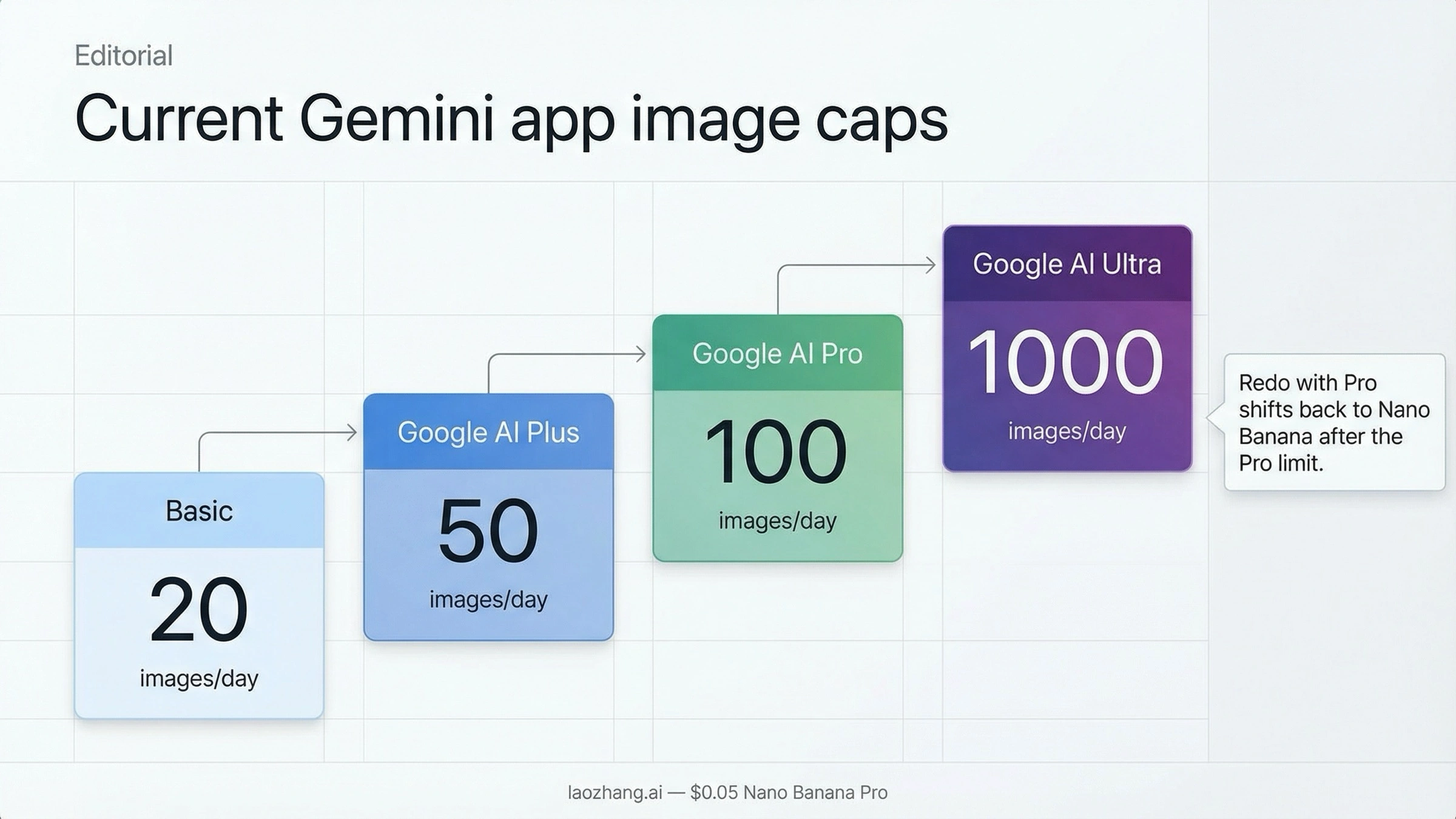
The current app-side answer comes from Google's live help-center table, not from recycled 2025 roundups. On the official Gemini Apps limits and upgrades page, Google currently shows up to 20 images per day on the Basic tier, 50 on Google AI Plus, 100 on Google AI Pro, and 1,000 on Google AI Ultra under "Image generation and editing with Nano Banana 2."
That change matters because the consumer-app story is no longer centered on "how many Nano Banana Pro images do free users get?" The live table is now centered on Nano Banana 2 as the default image-generation experience. Google also breaks out a separate line for "Redo images with Nano Banana Pro," which means the premium image lane is now framed as an enhancement path inside the app rather than the main default route.
The practical result is that many users are carrying around the wrong mental model. They still remember late-2025 headlines like "free users get 2" or "free users get 3" Nano Banana Pro generations per day, and then conclude that Gemini image generation itself has become nearly unusable. That is not the most accurate March 2026 reading. The current app-side answer is more nuanced: the free experience still exists, but it is now a Nano Banana 2 story first.
Here is the current plan ladder in a simpler format:
| Plan | Current image-generation allowance | What changes after you hit the Pro lane |
|---|---|---|
| Basic | Up to 20 Nano Banana 2 images/day | No Nano Banana Pro redo path |
| Google AI Plus | Up to 50 Nano Banana 2 images/day | Up to 50 Nano Banana Pro redo actions/day |
| Google AI Pro | Up to 100 Nano Banana 2 images/day | Up to 100 Nano Banana Pro redo actions/day |
| Google AI Ultra | Up to 1,000 Nano Banana 2 images/day | Up to 1,000 Nano Banana Pro redo actions/day |
Two caveats on the same help page are easy to miss but matter a lot.
Google says image generation is in high demand, so limits may change frequently. It also says those limits are distributed throughout the day and reset daily. That wording is deliberately softer than a hard public timezone promise for every app surface. The page also says that once your Nano Banana Pro redo limit is exhausted, additional image requests shift back to Nano Banana until that limit is also exhausted. In plain English, that means paid users can hit the Pro-quality ceiling before they hit the broader image-generation ceiling.
If you are a normal app user creating social graphics, concept art, mockups, or image edits by hand, this app-side answer is usually the answer you were actually searching for. The biggest correction is not a new trick or workaround. It is simply understanding that the current free and paid caps are attached to Gemini app plans, while older blog posts often mixed those app entitlements with older API stories.
Why the Gemini App and Gemini API Give Different Answers
This is the part most SERP pages still fail to explain clearly enough. The Gemini app and the Gemini image API are no longer interchangeable answers to the same quota question.
If you stay inside the Gemini web app or mobile app, you are operating under the consumer plan system Google describes on the help-center page. That is where the Basic, Google AI Plus, Google AI Pro, and Google AI Ultra caps live. Those limits are expressed as images per day and are written for people generating and editing images manually in the Gemini interface.
If you switch to the Gemini Developer API, you are in a different world. The live pricing page does not say "here is your free app-style daily image allowance." Instead, it lists paid pricing for the current image models:
- Gemini 3.1 Flash Image Preview starts around $0.067 per 1K image, with higher prices for 2K and 4K output.
- Gemini 3 Pro Image Preview starts around $0.134 per 1K or 2K image, with $0.24 per 4K image.
- Gemini 2.5 Flash Image remains available as a cheaper legacy lane at about $0.039 per image.
More important than the exact numbers is the Free Tier column. For all three current image-capable Gemini API lanes above, the live pricing page currently shows Not available under Free Tier. That is why a user can truthfully hear "Gemini still gives me daily images in the app" and also truthfully hear "the current Gemini image API is paid." The two statements are not actually conflicting. They belong to different product surfaces.
Google's own model-family guidance reinforces that split. In the current Gemini 3 Developer Guide, Google describes Nano Banana Pro as its highest-quality image generation model and Nano Banana 2 as the high-volume, high-efficiency, lower-price equivalent. That is a model-selection framework, not a consumer-plan promise. Once you move into API usage, you are choosing between model lanes, pricing, rate limits, and project quotas rather than app-plan image buckets.
This is also why "I hit the Gemini image limit" can describe two very different situations:
- an app user who has consumed the day's consumer allowance
- a developer who is dealing with API billing, RPD, or per-project limits
If your real need is automation, batching, or product integration, the consumer Gemini plan is no longer the whole answer. The problem has shifted from "how many manual images do I get?" to "which paid image lane should I run, and what are my active project limits in AI Studio?" For that scenario, a pricing explainer like Gemini image generation API pricing is more useful than a consumer-limit roundup.
When the Limit Resets and What That Really Means
Older Gemini limit guides often led with a universal reset clock. In March 2026, that is too blunt.
For the Gemini API, the answer is still clean. Google's current rate-limits documentation says that Requests per day quotas reset at midnight Pacific time. That rule belongs to the API, and it matters for anyone running image generation programmatically. The same page also says rate limits are applied per project, not per API key, and that active limits can be viewed in AI Studio. So if your team sees a particular quota in one project, treat that as project-specific live state rather than as a universal article-wide promise.
For the Gemini app, the safest current answer is more conservative. Google's live help-center language says image-generation limits may change frequently, are distributed throughout the day, and reset daily. That means the app still has a daily replenishment cycle, but the support page is not currently promising the same simple public timezone rule older guides liked to repeat. If a blog post says "the Gemini app always resets at midnight PT" without any caveat, that article is now over-confident relative to Google's current wording.
This distinction explains why users feel like some limit guides are "almost right" but still not helpful enough. App users often want an exact clock, but the official app documentation now emphasizes dynamic capacity and daily replenishment. API users want the exact clock, and Google still gives it to them: midnight Pacific for RPD.
The most useful way to think about it is this:
- Gemini app: daily replenishment, but Google now keeps the public wording flexible
- Gemini API: explicit midnight Pacific RPD reset
If you are troubleshooting an API-side quota issue, you should also remember that image generation is not the only limit in play. The rate-limits page says actual limits vary by tier and project, and preview models tend to have stricter limits than stable ones. So if your code is failing, the fix may not be "wait until tomorrow." It may be "check the active project limits in AI Studio, your billing status, and whether you are still on a preview image lane."
For a deeper API-side troubleshooting path, this is where a dedicated guide like Gemini image rate limit solution becomes the better next read.
Which Older Gemini Limit Claims Are Now Stale
The current confusion around Gemini image limits is not just about quotas. It is also about model lifecycle.
Google's current deprecations page shows that gemini-2.5-flash-image-preview shut down on January 15, 2026 and that gemini-2.5-flash-image is scheduled to shut down on October 2, 2026 in favor of gemini-3.1-flash-image-preview. The same deprecations table shows that gemini-3.1-flash-image-preview launched on February 26, 2026 and that gemini-3-pro-image-preview launched on November 20, 2025.
That model history is why older articles still ranking for this topic can feel believable while still being wrong for today's user. They were often written during a real earlier stage of the product, then left mostly unchanged while the live model lineup moved on.
Use this correction table as a quick freshness filter:
| Older claim you may still see | Why it used to circulate | Current March 2026 correction |
|---|---|---|
| "Gemini gives 100 free images per day" | Older app-side reporting and mixed quota summaries simplified the limit picture | The current Gemini app help page shows up to 20/day on Basic, 50 on Google AI Plus, 100 on Google AI Pro, and 1,000 on Google AI Ultra |
| "Free users get 2 or 3 Nano Banana Pro images per day" | Late-2025 coverage focused on Nano Banana Pro free-user caps during high-demand periods | The current app story centers Nano Banana 2 image generation, while Nano Banana Pro appears as a redo path on paid plans |
| "Use gemini-2.5-flash-image-preview for free Gemini image generation" | That preview model was part of the older API story | Google's official deprecations page says it shut down on January 15, 2026 |
| "The Gemini image API still has a public free tier" | Older guides mixed text-model free tier coverage with older image-model guidance | The current pricing page lists no public free tier for Gemini 3.1 Flash Image Preview, Gemini 3 Pro Image Preview, or Gemini 2.5 Flash Image |
| "Everything resets at midnight PT" | A clean API rule got copied into generic app guides | The API still resets RPD at midnight Pacific, but the app documentation now uses a softer daily-reset formula |
This is the part of the keyword where freshness matters more than usual. If an article does not mention the January 15, 2026 shutdown of gemini-2.5-flash-image-preview or the February 26, 2026 launch of gemini-3.1-flash-image-preview, there is a good chance it is still answering an older version of the product.
That does not mean older pages were written carelessly. It means the product moved. For the reader, the practical takeaway is simple: trust current help, pricing, and deprecation pages more than remembered quota folklore.
What To Do After You Hit the Limit
Once you hit the cap, the right next step depends on what kind of user you are.
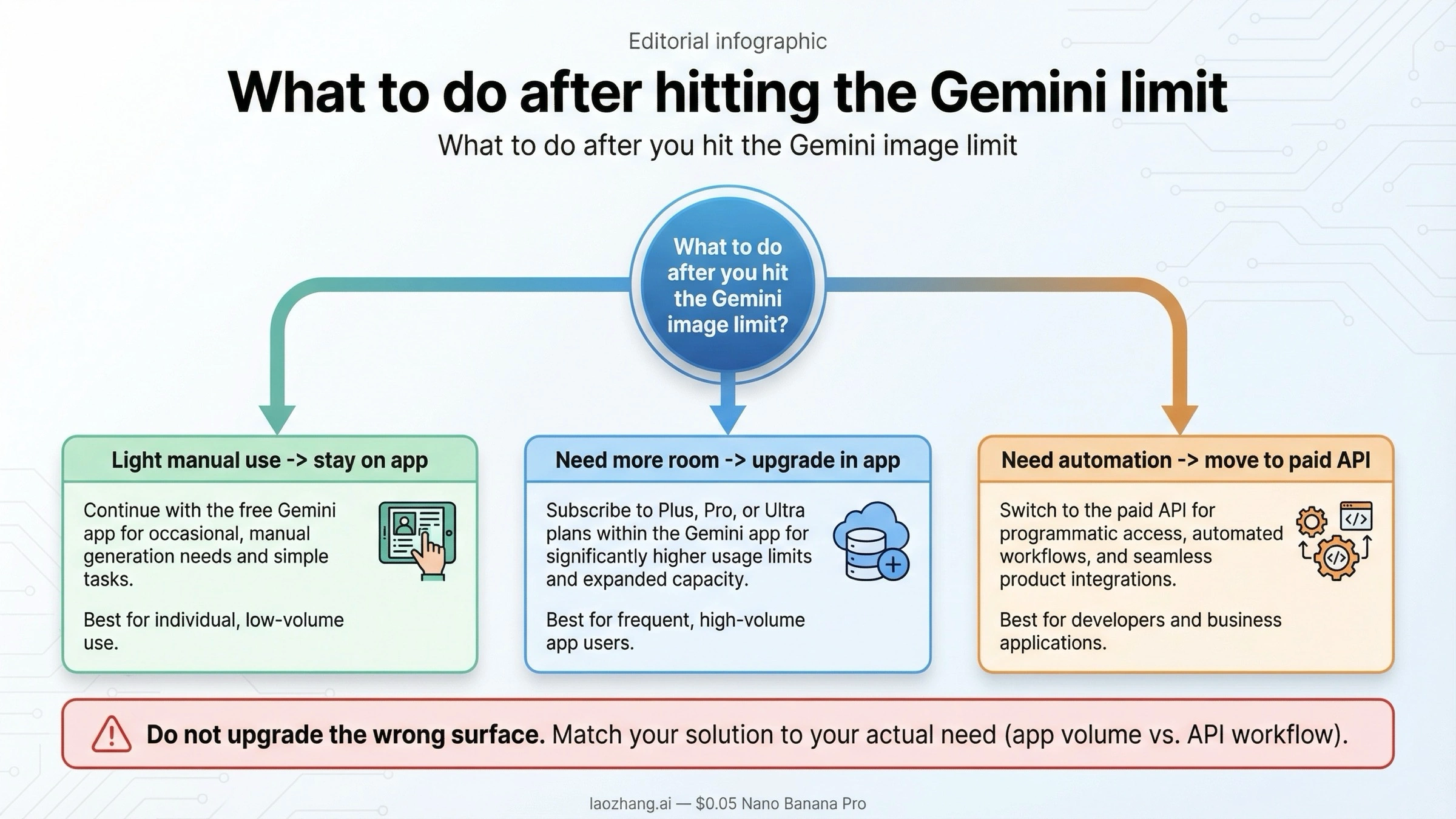
If you are a casual app user who only needs a few images for social posts, concept art, or quick edits, stay inside the Gemini app first. The free Basic allowance is still real, and if you only generate a handful of images per day, the cheapest move is usually patience rather than an immediate upgrade. In that situation, this page is your answer: the limit is app-side, the reset is daily, and the old API stories are mostly a distraction.
If you are a frequent app user and your real problem is simply that 20 images per day is too tight, then upgrading inside the app is usually the most direct fix. Google AI Plus, Pro, and Ultra move you from 20 to 50, 100, or 1,000 images per day, and they also add the Nano Banana Pro redo path. If your workflow is still manual and lives in the Gemini UI, the cleanest answer is usually to upgrade the surface you already use.
If you are a developer, builder, or team who needs automation, scheduled jobs, multi-user workflows, or product integration, stop thinking like a consumer-plan buyer. At that point the real issue is not "how do I squeeze more app images out of Gemini?" It is "which paid image lane should I use, and how do I manage project limits and cost?" For that job, the right next reads are Gemini API free tier complete guide, Gemini image generation API pricing, and how to increase Gemini 3 Pro image quota.
This is the easiest decision framework:
- Need a few manual images in Gemini itself: stay on the app and work within the daily cap.
- Need more room but still want the Gemini interface: upgrade to Google AI Plus, Pro, or Ultra.
- Need code, automation, or production routing: treat the image API as a paid workflow and choose the model lane deliberately.
That last distinction is where many expensive mistakes begin. People often search the right keyword but solve the wrong problem. They upgrade an app plan when what they really need is API access, or they spend hours chasing an old "free image API" setup that no longer reflects the live pricing page.
FAQ
How many Gemini images can I generate for free right now?
If you mean the Gemini app, the current help-center table says the Basic tier gets up to 20 Nano Banana 2 images per day as of March 21, 2026. If you mean the current Gemini image API, Google's current pricing page does not advertise a public free tier for the live image models.
When does the Gemini image limit reset?
For the Gemini API, the official answer is midnight Pacific time for Requests per day. For the Gemini app, Google's current wording is that limits may change, are distributed throughout the day, and reset daily. That is why a single universal reset clock is no longer the safest answer for app users.
Is Nano Banana Pro still free?
Not in the broad way many late-2025 posts implied. Google's current app table centers Nano Banana 2 for image generation, while Nano Banana Pro appears as a redo path on paid plans like Google AI Plus, Google AI Pro, and Google AI Ultra.
Does the Gemini API still have a free image tier?
Not on the current public pricing page for the live image-capable Gemini models. Gemini 3.1 Flash Image Preview, Gemini 3 Pro Image Preview, and Gemini 2.5 Flash Image all show Not available under Free Tier on the current pricing page.
Why do older Gemini limit articles disagree with each other?
Because several of them were written against older model names and older plan framing. The biggest cleanup date is January 15, 2026, when gemini-2.5-flash-image-preview shut down. Another important date is February 26, 2026, when gemini-3.1-flash-image-preview became the current Flash Image preview lane.
What is the cheapest current Gemini image API lane?
On the current pricing page, Gemini 2.5 Flash Image is the cheapest listed image lane at about $0.039 per image, but it is a legacy route and Google's deprecations page says it is scheduled to shut down on October 2, 2026. If you are starting fresh, do not confuse "cheapest current" with "best long-term default."
Bottom Line
The current answer to "Gemini image generation limit" is no longer one number. As of March 21, 2026, the Gemini app still offers daily image generation with plan-based caps, while the current Gemini image API is a paid set of model lanes with its own pricing and midnight-Pacific reset rule. If you keep those two surfaces separate, most of the apparent contradictions in page one disappear.
That is also why this keyword now rewards freshness more than generic how-to advice. The best answer is not the longest table. It is the one that tells you which Gemini surface you are actually using, which old answers are stale, and what your next move should be after you hit the cap.


