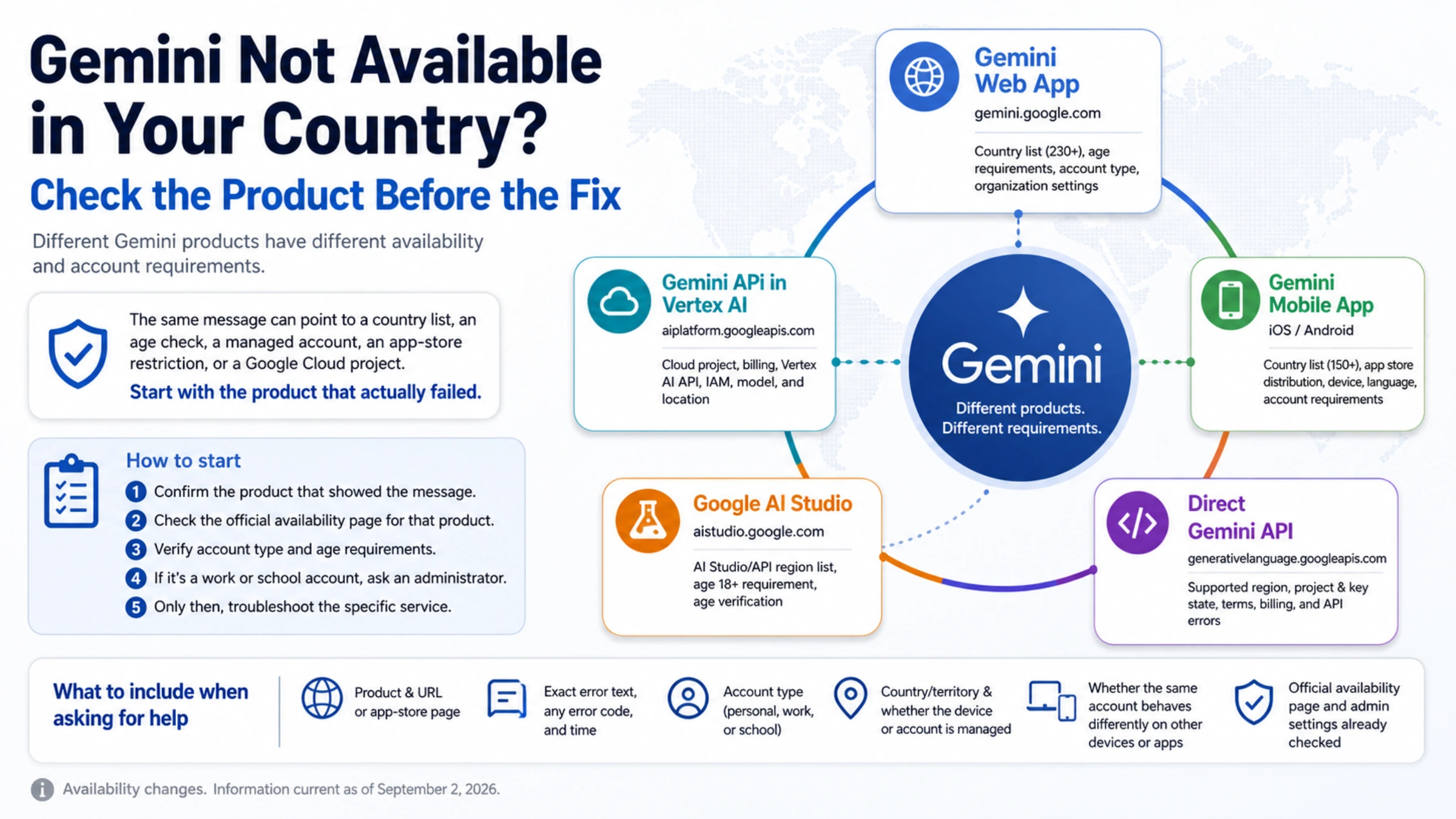
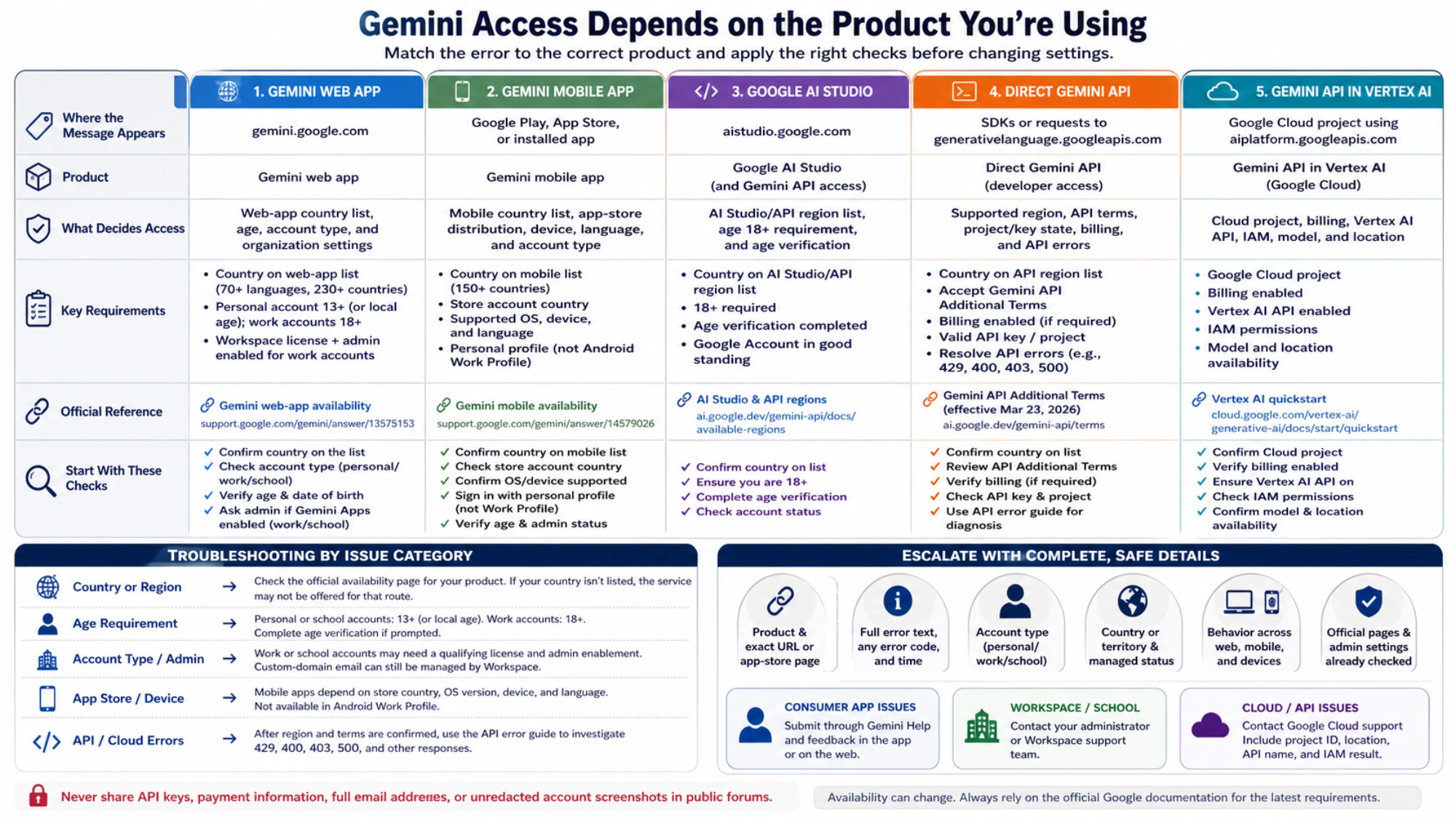
“Gemini isn't currently supported in your country” sounds like a single problem. It is not. Google publishes different availability and eligibility rules for the Gemini web app, Gemini mobile apps, Google AI Studio and the direct Gemini API. The Gemini API in Vertex AI is yet another route, with Google Cloud project and billing requirements.
Before changing a browser setting, record the exact message and the page that displayed it. Clearing cookies can repair a broken session. It cannot add a country to an official availability list, satisfy an age requirement, enable Gemini for a Workspace account, or configure a Cloud project.
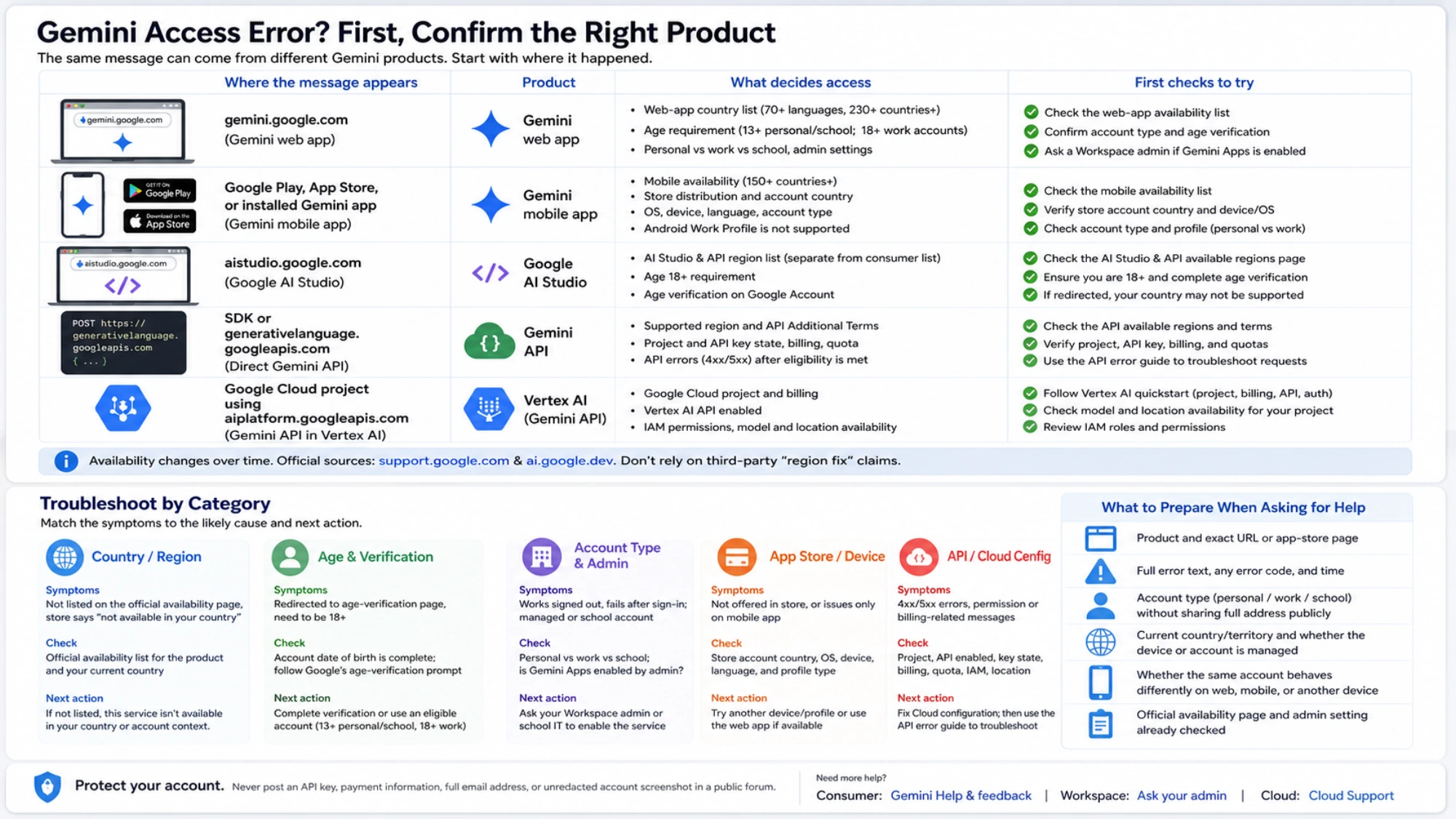
Identify the Gemini product that rejected access
The fastest useful check is the URL or app where the error appeared.
| Where the message appears | Product to investigate | What decides access |
|---|---|---|
gemini.google.com | Gemini web app | Web-app country list, age, account type, and organization settings |
| Google Play, the App Store, or the installed Gemini app | Gemini mobile app | Mobile country list, store distribution, device, language, and account requirements |
aistudio.google.com | Google AI Studio | AI Studio/API region list, age 18 requirement, and age verification |
An SDK or generativelanguage.googleapis.com request | Direct Gemini API | Supported region, project and key state, terms, billing, and API errors |
A Google Cloud project using aiplatform.googleapis.com | Gemini API in Vertex AI | Project, billing, Vertex AI API, IAM, model, and location |
An App Store message does not establish that the web app is unavailable. An AI Studio redirect does not use the consumer web-app country list. A 403 or FAILED_PRECONDITION response from code also needs API-specific diagnosis; once region eligibility is confirmed, use the Gemini API error guide to investigate the request itself.
Web access depends on both location and account eligibility
Google's live Gemini web-app availability page lists supported countries, territories, and languages. The list includes qualifications that matter. Mainland China, for example, is marked “Workspace only.” That does not mean every personal account in mainland China is eligible, or that every Workspace administrator has enabled the service.
The separate Gemini sign-in requirements explain the account side. A personal Google Account can be eligible. Work accounts need a qualifying Workspace edition, and school accounts need the service enabled by the institution. Personal and school users generally need to be at least 13, or the applicable age in their country; work-account users must be 18 or older.
Google also says that a generic “Something went wrong” during sign-in can involve location, age, or account type. The wording alone does not reveal which one. Use observable differences instead:
- Confirm the current country or territory on Google's web-app list.
- Check whether the sign-in is a personal, work, school, or supervised account. A custom-domain address may still be managed through Workspace.
- Make sure the account's real date of birth is complete and follow Google's age-verification prompt if one appears.
- For work or school accounts, ask the administrator whether Gemini Apps is enabled for the relevant organizational unit and license.
If the page works while signed out but fails after one account signs in, the account is a more useful lead than the device. It is not proof of a specific internal flag. Trying another eligible account can isolate the issue, but creating disposable accounts or repeatedly changing a country setting is not an official repair process.
Mobile availability is narrower and store-specific
Gemini mobile apps use a separate mobile availability and requirements page. The mobile country list differs from the web-app list. Android and iOS distribution can also depend on the store account, supported language, operating system, hardware, and account type.
This explains two common situations without invoking a network block:
- The Gemini web app works, but the app is not offered by the current Play Store or App Store.
- The app is installed, but access changes when the user switches to a work, school, or managed profile.
For a store-level “not available in your country or region” message, check the mobile list and the store account's genuine country. For a sign-in error after installation, check age and account administration. Google also states that the Android app cannot be accessed in an Android Work Profile, so an installation on the personal profile does not prove availability inside the work profile.
AI Studio and the direct Gemini API use their own region list
Google's available regions for AI Studio and the Gemini API is not the consumer Gemini list. The page identifies three reasons a user may land there: AI Studio is unavailable in the region, the user does not meet the 18-plus requirement, or the Google Account has not completed age verification.
If AI Studio redirects to that page, check whether the country is listed and whether the account satisfies the 18-plus and age-verification requirements. A new API key, cleared cookies, or a different browser does not turn an unlisted country into a supported one.
Developers also need to read the current Gemini API Additional Terms. The version effective March 23, 2026 says the services may only be accessed, and API Clients made available, within an available region. It also says API Clients made available to users in the European Economic Area, Switzerland, or the United Kingdom may use only Paid Services. Those are deployment conditions for the direct developer service; they do not determine whether someone can sign in to the consumer web app.
Only after region and terms are satisfied does it make sense to debug a Cloud project, API key, billing, or quota. The Gemini API free-tier guide covers that later decision, but a free tier does not create regional eligibility.
Vertex AI is a Cloud development path, not a web-app switch
The official Gemini API in Vertex AI quickstart starts with a Google Cloud project, billing, the Vertex AI API, and authentication. Model and location availability still need to be checked for the project being used.
That route can be appropriate for an organization already deploying on Google Cloud. It is not a universal fix for gemini.google.com, and creating a service account will not change a consumer account's web-app eligibility. Treating these products separately also prevents a personal user from configuring IAM and billing for a problem that exists entirely in the consumer application.
Why common “region fixes” are unreliable diagnoses
A VPN, residential proxy, reverse proxy, or API relay changes the network path. It does not establish that the account, country, or deployed API Client meets Google's current requirements. Provider claims such as “99% success,” “clean IP,” or fixed added latency have no common official test method and say nothing about long-term availability, data handling, or account recovery.
Changing a payment profile, entering a false residence or age, repeatedly registering accounts, or wiping all browser data also should not be treated as standard troubleshooting. These actions can affect other Google services without changing the official country list, and false account information creates additional terms and recovery risks.
Client-side checks are still useful when kept in proportion. Use a supported browser, disable an extension that may be blocking the sign-in flow, sign in again once, and compare the same account on another device. If the same account fails across devices while another eligible account works, stop repeating cache resets and escalate the account-specific problem.
Send the right details to the right support channel
Before reporting the issue, collect information that allows someone else to identify the affected service:
- the product and exact URL or app-store page;
- the complete error text, any error code, and the time it occurred;
- whether the account is personal, work, or school, without posting the full address publicly;
- the current country or territory and whether the device or account is managed;
- whether the same account behaves differently on web, mobile, or another device;
- the official availability page and administrator setting already checked.
Consumer-app issues can be submitted through Gemini's Help and feedback menu. Workspace users should involve their administrator or Workspace support. For Vertex AI and Cloud API failures, include the project ID, location, API name, and relevant IAM result when contacting Google Cloud support. Never post an API key, payment information, full email address, or unredacted account screenshot in a public forum.
Once you identify the product, account, and applicable availability rules, choose the corresponding next step: repair a local sign-in flow, ask an administrator, correct a Cloud configuration, or accept that this particular service is not currently offered in the country or account context.