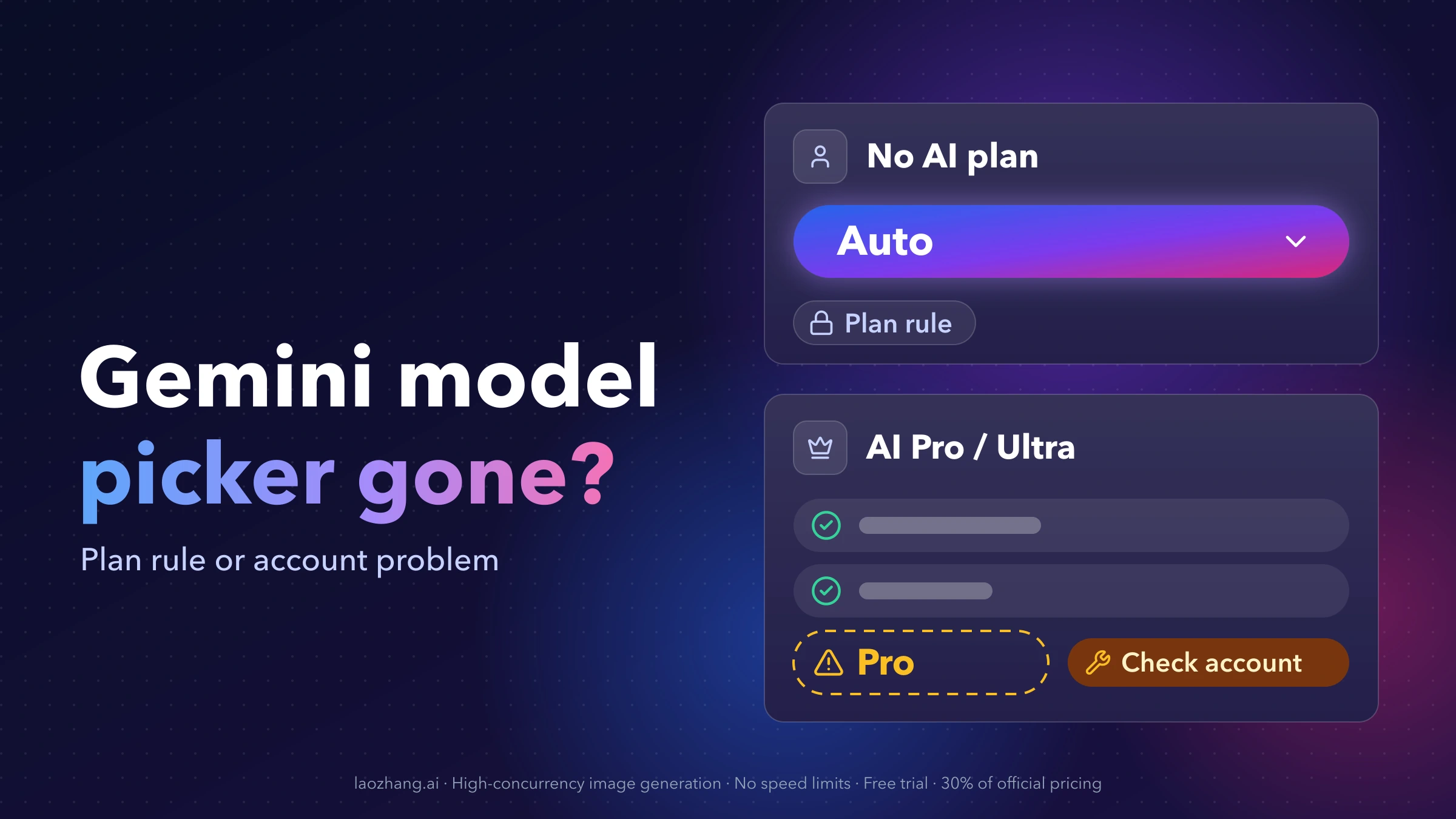
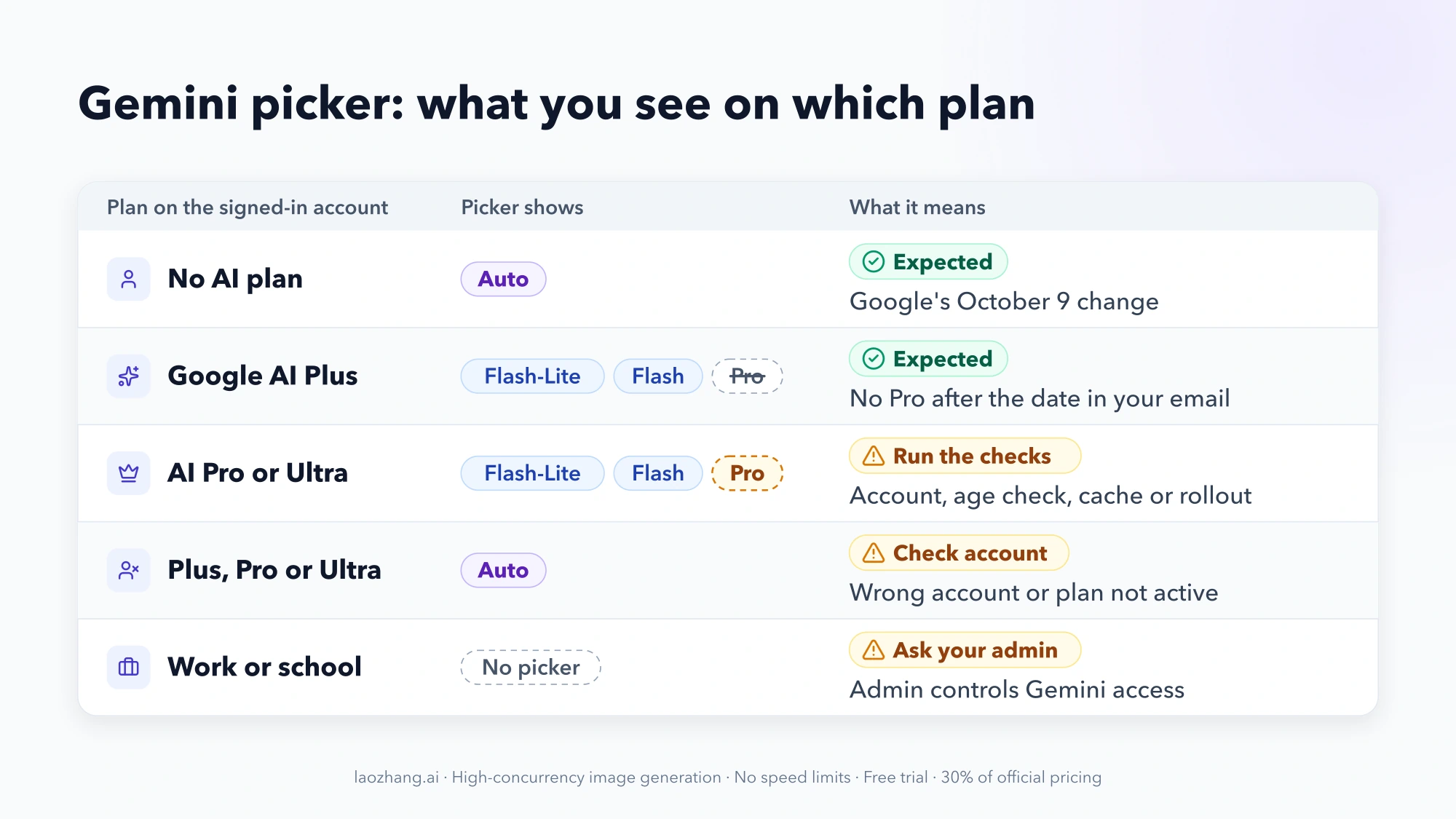
If the Gemini model picker shows only "Auto" and the account you're signed in with has no Google AI plan, nothing is broken: since October 9, 2026, users without a plan can no longer choose a model. Google AI Plus subscribers lose the Pro model on a date Google sends them by email. If you pay for Google AI Pro or Google AI Ultra and the Pro option is gone, that's a different problem — often the account, a pending age check, a work-account setting or a stale app — and the checks further down have brought Pro back for some subscribers.
Two things tell you which case you're in, and both take about a minute:
- Which plan the signed-in account actually holds. Tap your profile picture, confirm it's the account you pay with, and check that the subscription shows as active rather than pending or expired.
- Exactly what the picker shows. Only "Auto"; Flash-Lite and Flash but no Pro; Fast and Thinking but no Pro; or no picker at all.
What the Gemini model picker should show on each plan
As of October 10, 2026, Google's help page Changes to Gemini model access and limits lists this model access for personal accounts once the October changes reach you:
| Plan (US price) | What you can pick in the Gemini app | Usage limit vs. no plan |
|---|---|---|
| No AI plan ($0) | "Auto" only — Gemini picks the model for each prompt | Standard |
| Google AI Plus ($4.99/month) | Flash-Lite and Flash; no Pro after the date in your email | 2x |
| Google AI Pro ($19.99/month) | Flash-Lite, Flash and Pro | 4x |
| Google AI Ultra (from $99.99/month) | Flash-Lite, Flash and Pro | 5x or 20x AI Pro |
Prices are the US figures on the Gemini subscriptions page; they vary by country, so check that page for yours. Ultra comes in two tiers, $99.99 and $199.99 a month.
That subscriptions page hasn't caught up with the help page yet. As of October 10, 2026, it still lists "Access to 3.1 Pro" under Google AI Plus and only "3.5 Flash-Lite" under Free. The help page carries the newer rules, so go by it. The help page itself changed between October 9 and October 10: the earlier version said users without a plan would get Flash-Lite only, so news written before then may still say that.
Only Auto, no Pro or no picker: match what you see to the cause
Find the row that matches your plan and what you see in the picker:
| What you see | Plan on the signed-in account | What it means | What to do |
|---|---|---|---|
| Only "Auto" | No AI plan | Google's October 9 change | Nothing to fix; see the options for getting model choice back |
| Flash and Pro still selectable | No AI plan | The change hasn't reached your account yet | Expect "Auto" soon |
| Flash-Lite and Flash, no Pro | Google AI Plus | Expected after the date in Google's email | Upgrade to AI Pro if you need Pro |
| Only "Auto" or free options | Plus, Pro or Ultra | Gemini doesn't see your plan on this account | Check the account and subscription status |
| Fast and Thinking, or Flash options, but no Pro | Google AI Pro or Ultra | Account, age check, cache or rollout problem | Run the paid-plan checks in order |
| Pro worked, then answers came from a smaller model | Google AI Pro or Ultra | Usage limit reached, or smart model selection turned on | Wait for the limit to refresh or turn the setting off |
| No picker, or "Provisioning Error" | Work or school account | Your organization's admin controls Gemini access | Ask your admin |
| New labels or effort levels, nothing missing | Any | The picker was redesigned | Nothing to fix |
Free account shows only "Auto": the October 9 change
Starting October 9, 2026, Google moved users without an AI plan to auto model selection. In Google's words on the help page, "Gemini will use auto model selection to send each prompt to the Gemini model that suits it best. Most prompts will go to Flash-Lite, our fastest model. Prompts that need deeper reasoning may go to Flash or Pro."
In practice that means:
- You can't choose Flash or Pro anymore. 9to5Google reported on October 9 that the only option left in the free picker is "Auto" with "Gemini 3 models", and that the change had reached most of its free test accounts by that evening (Pacific time).
- Pro isn't ruled out, but you don't control it. A prompt Gemini judges to need deeper reasoning may be sent to Flash or Pro. Google doesn't say how it decides or how often that happens.
- Turning off smart model selection doesn't bring the picker back. Per the same help page, if smart model selection is off, chats without an AI plan use Flash-Lite for every response. Google doesn't document where free users find that switch.
No setting, cache clear or app reinstall brings the old picker back on a free account. It's a plan rule, not a bug.
Getting model choice back after the free plan change
You have three real options:
- Google AI Plus ($4.99/month in the US) gives you a picker again, with Flash-Lite and Flash. It does not include the Pro model once your Plus change date arrives, whatever the subscriptions page still says.
- Google AI Pro ($19.99/month in the US) is the cheapest plan that keeps the Pro model in the picker, with 4x the no-plan usage limit. Google AI Ultra adds higher limits and early access to features such as Deep Think.
- Google AI Studio or the Gemini API lets you pick a fixed model without a subscription. It's a separate product with its own terms and model list: free text models there include
gemini-3.8-flashandgemini-3.5-flash-lite, while the current Pro model needs billing. The details are in Gemini API Free Tier in 2026: What Is Free and What to Check.
Whichever plan you use, each model in the app now also has an effort level — low, medium or high. Higher effort gives more thorough answers but uses more of your limit. According to 9to5Google, these levels replace the old "Extended" option, appear as "Quick and efficient", "Balanced depth" and "Extra thorough", and are still rolling out to subscribers.
Google AI Plus subscriber with no Pro option
If you're on Google AI Plus and see Flash-Lite and Flash but no Pro, the picker is doing what the current plan allows. Google's help page shows Plus without Pro after the change, and Google emails each Plus subscriber the date it takes effect for them. 9to5Google described the same thing: Plus "will soon be limited to Flash-Lite and (3.8) Flash."
This is where answers in the Gemini Help Community contradict each other. In a September 2026 thread titled "Wheres my 3 models.", one volunteer said Plus includes Flash-Lite, Flash and Pro, while another said Plus doesn't include the higher-tier models. The help page settles it: no Pro on Plus.
If you're on Plus and see only "Auto", that's not the Plus picker. Run the account check in the next section first.
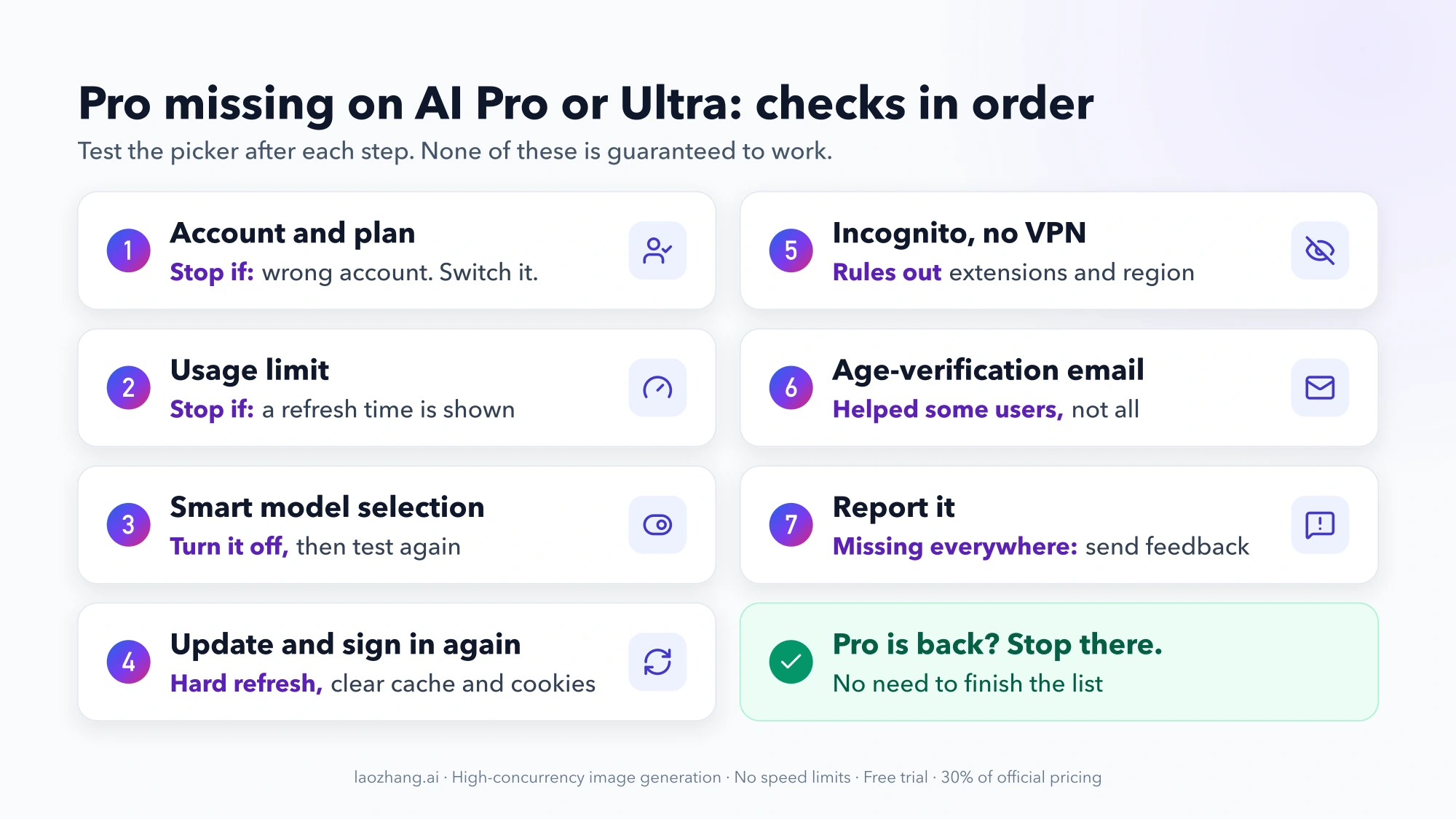
Paying for AI Pro or Ultra and Pro is missing: checks in order
A missing Pro option on Google AI Pro or Ultra isn't covered by any plan change. Google has never publicly explained these episodes. In February 2026, some AI Pro subscribers saw only Fast and Thinking while others on the same plan still saw Pro. A Help Community thread, "pro option missing from the drop down menu", collected 51 "same question" votes, and PiunikaWeb reported that support told some users it looked like a system issue being escalated.
The steps below come from Google's help pages and from fixes other users and volunteer Product Experts reported in the Gemini Help Community. Volunteers aren't Google staff, and none of these steps is guaranteed. Work through them in order and stop as soon as Pro comes back.
- Confirm the account and the plan. A plan belongs to one Google account. If you're signed in with another account or browser profile, the picker shows only what that account gets. Check the avatar in Gemini, then check that the subscription shows as active, not pending or expired. Stop here if it was the wrong account: switch accounts.
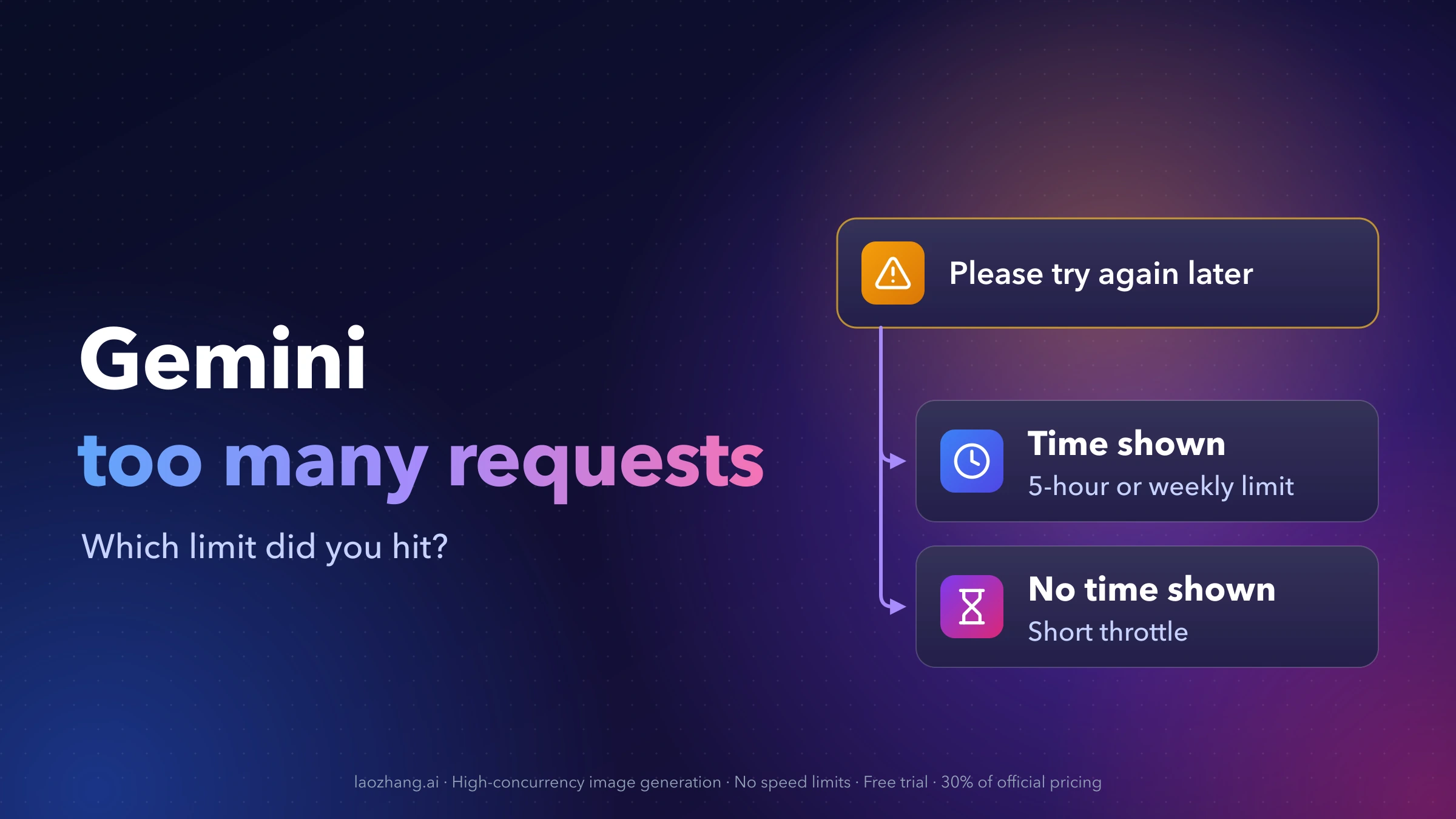
- Rule out a usage limit. Limits are compute-based, refresh every 5 hours up to a weekly cap, and the Pro model, Deep Research, Deep Think and media generation use more of them. Reaching a limit can leave you on a smaller model for a while. How the 5-hour and weekly limits behave is covered in Gemini "Too Many Requests in a Short Time": Which Limit You Hit. Stop here if a refresh time is shown: Pro returns after it.
- Check smart model selection. Nokiapoweruser reported in August 2026 a "Smart model selection" switch for paid subscribers under your profile picture → Settings → Advanced settings, off by default. It sends simple prompts to lighter models to stretch your limits, so if you turned it on, answers can come from Flash even on a paid plan. Google doesn't document where the switch is, so it may sit elsewhere on your account. Turn it off and test again.
- Refresh the app and the session. Update the Gemini app on Android or iOS. On the web, hard-refresh with Ctrl+F5 (Windows) or Cmd+Shift+R (Mac), then sign out, clear cookies and cache for Gemini, and sign back in.
- Remove what can hide the drop-down. Try an Incognito window to rule out ad blockers and other extensions, and turn off a VPN that routes through a region where Gemini isn't offered. If region is the suspect, Gemini Isn't Available in Your Country? Check the Product Before the Fix explains how availability works.
- Look for an age-verification email. In a 2025 thread, an AI Pro subscriber who had lost the Pro option said Google emailed them a request to verify their age, and completing it restored Pro and Gems. A Product Expert recommended that answer. It isn't a universal fix: a March 2026 user had already verified their age and still had no selector. Google has also rolled earlier Gemini changes out to under-18 accounts on a separate schedule.
- Report it and stop. If Pro is missing on every device and browser with the right account, the problem is most likely on Google's side. Send feedback from Gemini or post in the Gemini Help Community with your plan, device, browser, region and a screenshot of the picker, then contact Google support (Google Workspace support for a business account). Further clearing and reinstalling won't help.
Work or school account: no selector or "Provisioning Error"
With a Google Workspace account from work or school, your organization's admin decides whether the Gemini app is available, per organizational unit or group, in the Admin console under Generative AI → Gemini app (Workspace Admin Help). In a March 2026 thread titled "Missing Model Selector - Provisioning Error.", a Product Expert said that error with no selector often means the admin hasn't fully enabled Gemini for your organization.
You can't change that yourself. Send your admin the error text and the account you used. The plan table above covers personal accounts; a work account follows your organization's settings.
The picker looks different, but nothing was removed
Gemini's picker labels have changed several times, so a picker that looks unfamiliar isn't always a removal:
- Fast, Thinking and Pro: in November 2025, "Thinking" meant Gemini 3 Pro. From December 2025, "Fast" and "Thinking" ran on Flash and Pro got its own entry, which has carried 3.1 Pro since February 2026.
- Version names: Gemini's release notes told users to select "3.5 Flash" (May 2026) and "3.6 Flash" (July 2026) in the model drop-down. As of October 10, 2026, the subscriptions page lists 3.8 Flash and 3.1 Pro for AI Pro and Ultra.
- Deep Think is chosen in the prompt bar, not in the model picker.
- Effort levels (low, medium, high) are new per-model controls that replace "Extended".
What each label meant over time, and how Flash, Pro and Deep Think compare, is covered in Gemini 3 Deep Think vs Flash vs Pro: Thinking Levels Explained.
Questions about the missing Gemini picker
Does Gemini Auto ever use the Pro model on a free account?
It can. Google says prompts that need deeper reasoning "may go to Flash or Pro", while most go to Flash-Lite. You can't request Pro, and Google doesn't publish how often it happens.
Does Google AI Plus include Gemini Pro?
Not after the change date in your Plus email. Google's help page shows Plus with Flash-Lite and Flash only. As of October 10, 2026, the subscriptions page still lists 3.1 Pro under Plus, but the help page has the current rules.
How do I enable Gemini Pro in the app?
There's no setting that turns it on. Pro comes with Google AI Pro or Google AI Ultra. If you already pay for one of those and Pro is missing, work through the paid-plan checks above.
Is the missing model list in Google AI Studio the same problem?
No. AI Studio and the Gemini API have their own model list and terms, separate from the Gemini app's plans. A change there doesn't affect the app's picker, and the app's plan rules don't apply in AI Studio.