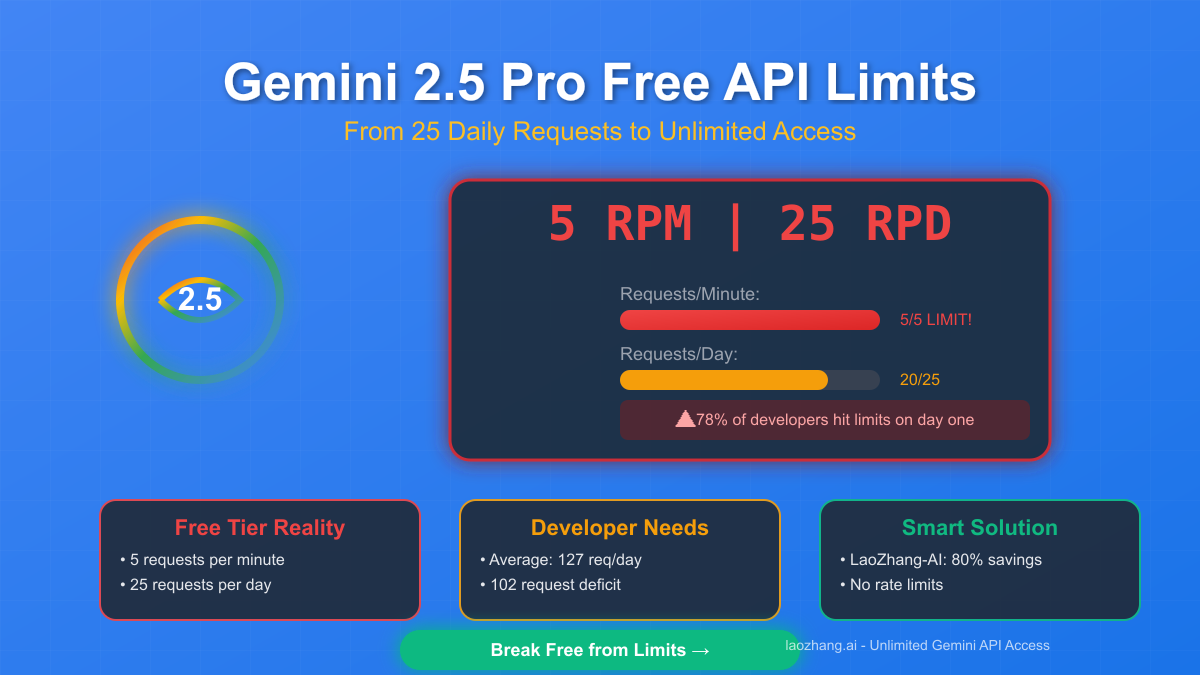
Google's Gemini API rate limits control how many requests developers can make within specific timeframes, with limits enforced across four independent dimensions: RPM (requests per minute), TPM (tokens per minute), RPD (requests per day), and IPM (images per minute). As of December 2025, following significant quota adjustments on December 7th, the Free tier allows just 5 RPM and 25 RPD for Gemini 2.5 Pro, while Paid Tier 1 users can access up to 1,000 RPM depending on the model. Understanding these limits is critical because exceeding any single dimension triggers HTTP 429 errors that halt your application immediately. This comprehensive guide covers current limits for all models and tiers, explains the December 2025 changes, and provides production-ready solutions for handling and avoiding rate limit errors.
Understanding Gemini Products: Advanced Subscription vs API
Before diving into rate limits, it's essential to understand a common source of confusion: "Gemini Advanced" refers to two completely different products, and their rate limits work in entirely different ways. Mixing up these products leads to frustration when developers search for API rate limits but find subscription information, or vice versa.
Gemini Advanced (Consumer Subscription) is Google's premium $20/month subscription plan (recently rebranded to "Google AI Pro"). This subscription provides access to Gemini's most capable models through the Gemini app and Google Workspace integrations. According to Google's support documentation (support.google.com/gemini), subscription limits for Gemini 2.5 Pro currently stand at approximately 50-100 queries per day, though Google has been adjusting these limits—with Josh Woodward from Google announcing in late 2025 that they doubled the Pro plan's daily limit from 50 to 100 queries. These subscription limits are designed for individual productivity use, not application development.
Gemini API (Developer Access) is what developers use to build applications, and it operates on an entirely different tier system. API rate limits are enforced per-project (not per-API-key), measured in requests per minute, tokens per minute, and requests per day. This is the product covered in detail throughout this guide. When you're building software that calls Gemini, you're using the API, not the subscription.
The confusion matters because troubleshooting steps differ entirely. If you're a Gemini Advanced subscriber hitting limits in the Gemini app, you need to wait for your daily quota to reset or consider the AI Ultra subscription for higher limits. If you're a developer hitting API 429 errors, you need to implement exponential backoff, upgrade your tier, or optimize your request patterns—strategies we'll cover in depth below. For developers working with both the consumer subscription and the API, understanding this distinction prevents hours of troubleshooting the wrong problem.
Complete Gemini Rate Limit Reference (December 2025)
The rate limit tables below represent verified limits as of December 2025, incorporating the quota adjustments that took effect on December 7, 2025. Rate limits vary by model and tier, with each dimension enforced independently—meaning you can hit limits even if you're under quota on other dimensions.
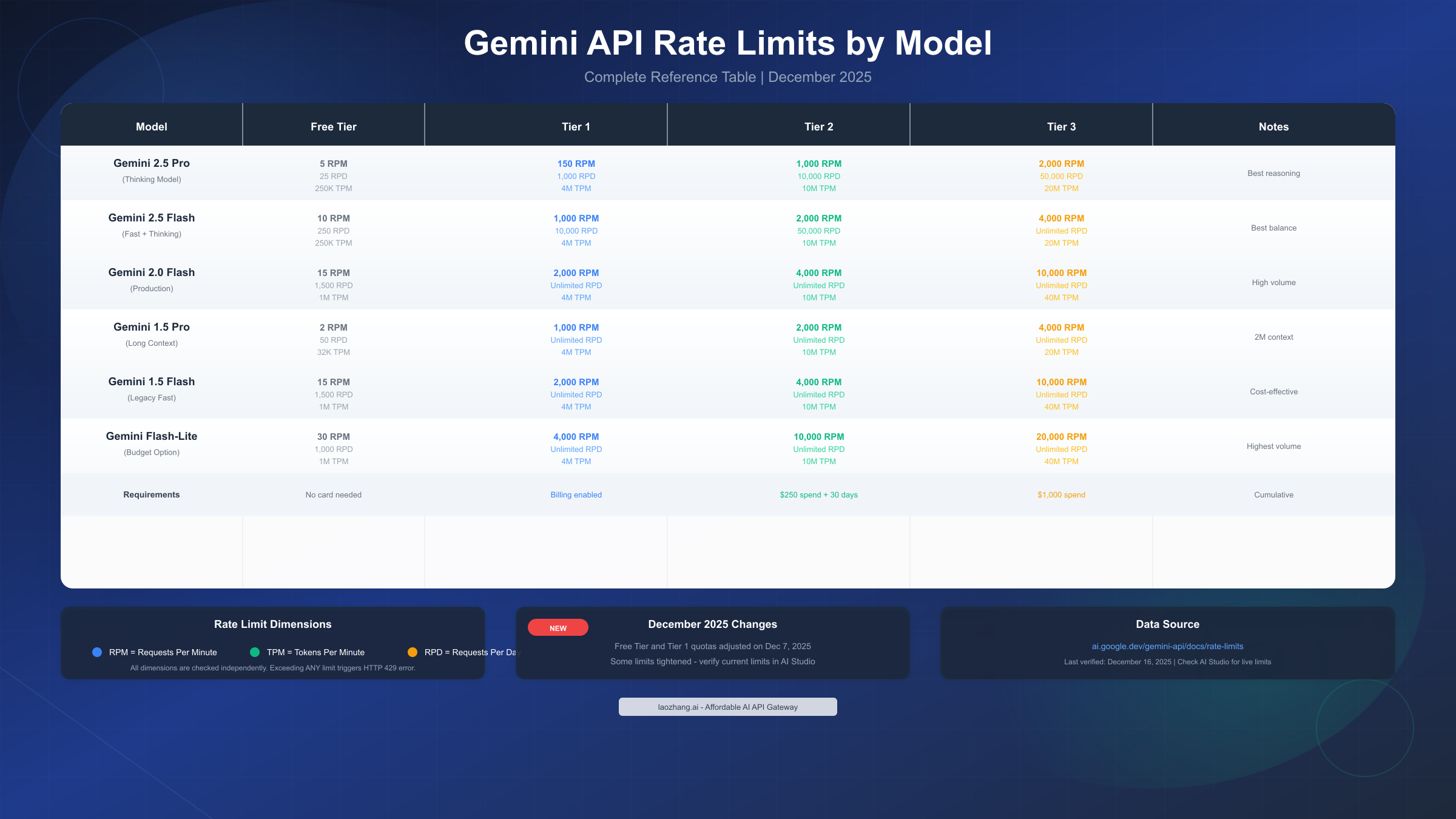
Gemini 2.5 Pro (Thinking Model) — Google's most capable reasoning model — operates with the strictest free tier limits:
| Tier | RPM | TPM | RPD | Notes |
|---|---|---|---|---|
| Free | 5 | 250,000 | 25 | Most restrictive |
| Tier 1 | 150 | 4,000,000 | 1,000 | Billing enabled |
| Tier 2 | 1,000 | 10,000,000 | 10,000 | $250 spend + 30 days |
| Tier 3 | 2,000 | 20,000,000 | 50,000 | $1,000+ cumulative |
These limits reflect the computational intensity of Gemini 2.5 Pro's reasoning capabilities. The free tier's 5 RPM means one request every 12 seconds maximum, which effectively limits free users to approximately 2 hours of active development before exhausting daily quotas. For developers needing the full power of Gemini 2.5 Pro without these restrictions, upgrading to at least Tier 1 is essential.
Gemini 2.5 Flash offers a better balance between performance and accessibility:
| Tier | RPM | TPM | RPD | Notes |
|---|---|---|---|---|
| Free | 10 | 250,000 | 250 | 10x more daily requests than Pro |
| Tier 1 | 1,000 | 4,000,000 | 10,000 | Good for development |
| Tier 2 | 2,000 | 10,000,000 | 50,000 | Production-ready |
| Tier 3 | 4,000 | 20,000,000 | Unlimited | Enterprise scale |
Flash models represent Google's recommended path for most production use cases, offering significantly higher limits while maintaining strong performance. The 250 RPD on the free tier provides much more room for experimentation compared to Pro's 25 RPD.
Gemini 2.0 Flash and Gemini 1.5 Flash offer the highest throughput for production workloads:
| Model | Free RPM | Free RPD | Tier 3 RPM | Tier 3 RPD |
|---|---|---|---|---|
| 2.0 Flash | 15 | 1,500 | 10,000 | Unlimited |
| 1.5 Flash | 15 | 1,500 | 10,000 | Unlimited |
| 1.5 Flash-8B | 30 | 1,000 | 20,000 | Unlimited |
For developers seeking more granular information about Gemini's free tier restrictions and optimization strategies, our detailed guide on Gemini 2.5 Pro free tier limitations covers workarounds and alternative approaches.
Critical Understanding: All four rate limit dimensions are checked independently. You might be well under your RPM limit but still trigger a 429 error because your TPM or RPD was exceeded. This catches many developers off-guard, especially when working with long-context requests that consume large token counts despite making few requests.
What Changed in December 2025
On December 7, 2025, Google implemented significant adjustments to the Gemini Developer API quotas affecting both Free Tier and Paid Tier 1 users. These changes caught many developers by surprise, resulting in unexpected 429 errors in applications that had been running smoothly for months.
Key Changes Implemented:
The most impactful change involved stricter enforcement mechanisms. Google moved from what many developers described as "soft limits" to hard enforcement using a token bucket approach. Previously, occasional bursts slightly exceeding limits might go unnoticed. Now, each dimension (RPM, TPM, RPD, IPM) maintains separate tracking, and exceeding any limit triggers immediate 429 responses.
According to discussions on the Google AI Developers Forum (discuss.ai.google.dev), developers reported that Gemini 2.5 Pro was effectively removed from the free tier for practical use cases, with daily free requests for Gemini 2.5 Flash also reduced. The specific numbers varied by region and account, but the overall trend involved tightening the free tier to push developers toward paid plans.
Why These Changes Matter:
For developers who had been operating just under previous limits, these adjustments may require immediate code changes. Applications that made assumptions about "acceptable" burst patterns now need proper rate limiting and retry logic. The changes particularly affect:
- Automated systems making regular API calls throughout the day
- Development workflows relying on free tier for testing
- Applications that previously handled occasional bursts gracefully
Mitigation Strategies:
If you started seeing 429 errors after December 7th, implement these immediate fixes: First, add exponential backoff to all API calls (detailed in the next section). Second, review your current tier status in Google AI Studio—your rate limits are displayed directly in the console. Third, consider upgrading to Tier 1 by enabling billing, which provides an immediate increase in limits without waiting for spending thresholds.
How to Handle 429 Rate Limit Errors
HTTP 429 "RESOURCE_EXHAUSTED" errors indicate your project has exceeded one of its rate limits. Rather than viewing these as failures, treat them as expected events in any production system. Proper handling ensures your application remains resilient while maximizing available throughput.
Implementing Exponential Backoff
Exponential backoff is the foundational strategy for handling 429 errors, mandated by best practices and proven through decades of distributed systems experience. The pattern increases wait times exponentially after each retry, preventing the "thundering herd" problem where many clients retry simultaneously and overwhelm the API.
Python Implementation with Tenacity:
pythonfrom tenacity import retry, wait_exponential, stop_after_attempt
import google.generativeai as genai

genai.configure(api_key="YOUR_API_KEY")
model = genai.GenerativeModel('gemini-2.5-flash')

@retry(
    wait=wait_exponential(multiplier=1, min=4, max=60),
    stop=stop_after_attempt(5)
)
def generate_with_retry(prompt: str) -> str:
    """Generate content with automatic retry on rate limits."""
    try:
        response = model.generate_content(prompt)
        return response.text
    except Exception as e:
        if "429" in str(e) or "RESOURCE_EXHAUSTED" in str(e):
            print(f"Rate limit hit, retrying...")
            raise  # Tenacity will catch and retry
        raise  # Re-raise other exceptions

# Usage
result = generate_with_retry("Explain quantum computing")
JavaScript/Node.js Implementation:
javascriptasync function generateWithRetry(prompt, maxRetries = 5) {
  const { GoogleGenerativeAI } = require("@google/generative-ai");
  const genAI = new GoogleGenerativeAI(process.env.API_KEY);
  const model = genAI.getGenerativeModel({ model: "gemini-2.5-flash" });

  for (let attempt = 0; attempt < maxRetries; attempt++) {
    try {
      const result = await model.generateContent(prompt);
      return result.response.text();
    } catch (error) {
      if (error.message?.includes("429") ||
          error.message?.includes("RESOURCE_EXHAUSTED")) {
        const waitTime = Math.min(1000 * Math.pow(2, attempt), 60000);
        const jitter = Math.random() * 1000;
        console.log(`Rate limit hit. Waiting ${waitTime + jitter}ms...`);
        await new Promise(r => setTimeout(r, waitTime + jitter));
      } else {
        throw error;
      }
    }
  }
  throw new Error("Max retries exceeded");
}
Identifying Which Limit Was Exceeded
When you receive a 429 error, the response typically indicates which specific limit was exceeded. Understanding this helps you optimize your approach:
- "requests per minute": Too many API calls too quickly. Implement request queuing.
- "tokens per minute": Your prompts or responses are consuming too many tokens. Consider shorter prompts or response limits.
- "requests per day": Daily quota exhausted. This resets at midnight Pacific Time.
For developers also working with other AI APIs, our guide on similar rate limit handling for Claude API provides complementary strategies that apply across multiple providers. The fundamental patterns—exponential backoff, request queuing, and graceful degradation—transfer directly.
For production applications needing guaranteed throughput without tier restrictions, services like laozhang.ai offer unified API access to Gemini and other models with higher rate limits and simplified billing.
How to Upgrade Your Gemini API Tier
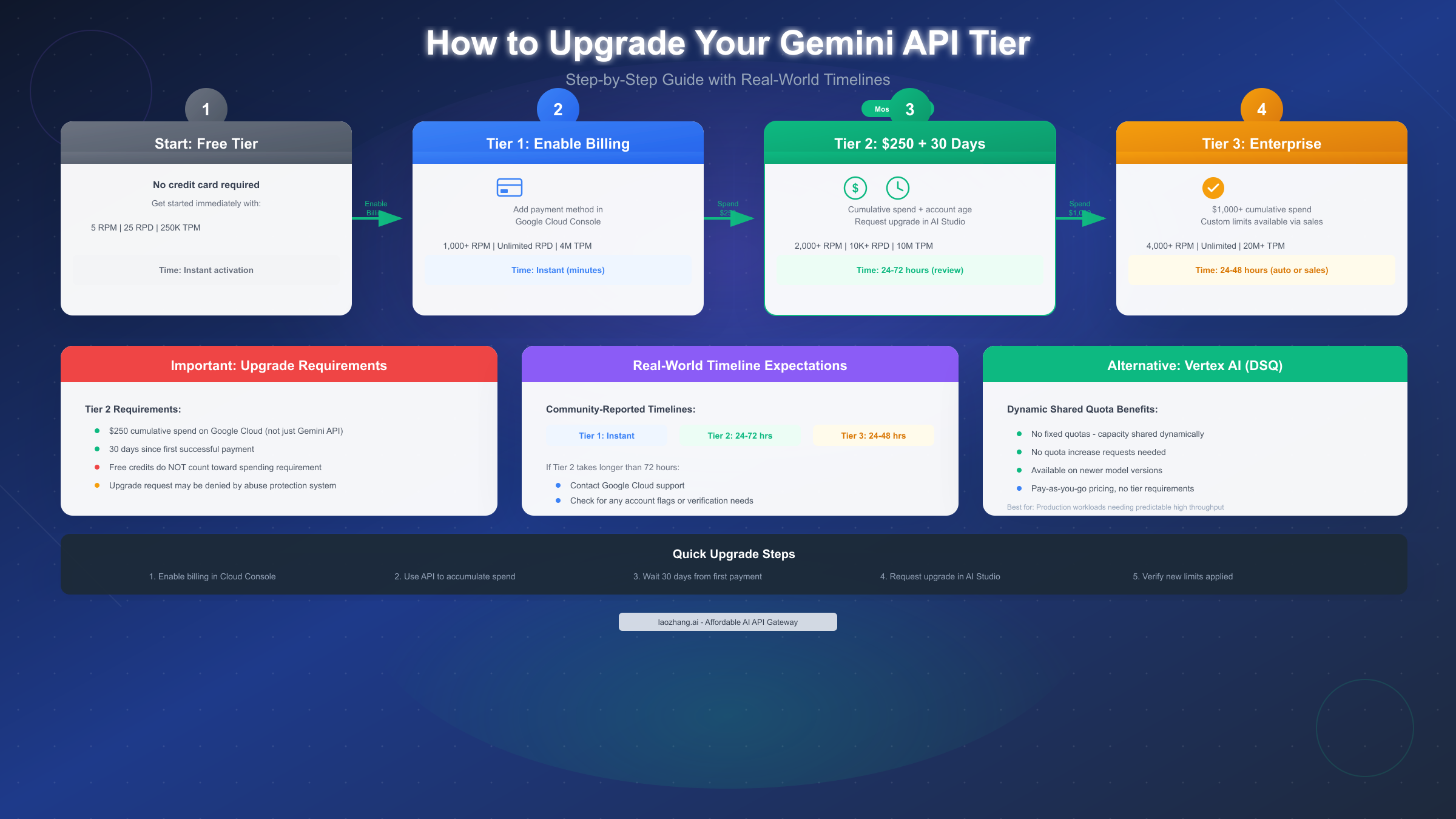
Upgrading your tier is the most direct solution to rate limit constraints. Each tier provides significantly higher limits, and the upgrade process—while involving spending requirements—is straightforward once you understand the qualifications.
From Free to Tier 1: Enable Billing
The transition from Free to Tier 1 requires only enabling Cloud Billing on your Google Cloud project. No spending threshold, no waiting period—limits increase immediately upon successful payment method verification.
Steps:
- Navigate to Google Cloud Console (console.cloud.google.com)
- Select or create a project for Gemini API usage
- Go to Billing > Link a billing account
- Add a valid payment method (credit card or invoice)
- Verify the billing account is active for your project
Your rate limits increase automatically within minutes. In AI Studio, you can verify your current tier by navigating to the API keys page where your project's tier status is displayed.
From Tier 1 to Tier 2: The $250 Threshold
Tier 2 upgrades have specific requirements that confuse many developers:
Requirements:
- $250 cumulative spend on Google Cloud services (not just Gemini API)
- 30 days since your first successful payment
- Passing automated abuse protection checks
Critical Clarifications: Free credits do NOT count toward the spending requirement—only actual charges to your payment method qualify. The $250 can include other Google Cloud services like Compute Engine, Cloud Storage, or BigQuery, not just Gemini API usage.
When you meet these qualifications, an "Upgrade" button appears in AI Studio on the API keys page. Click it to request the upgrade. Google's automated system reviews the request, typically completing within 24-48 hours. Some developers report longer waits of 72+ hours, particularly for new accounts or unusual usage patterns.
If your upgrade takes longer than 72 hours:
- Check for any account verification requirements in Cloud Console
- Review your project for any policy violations or flags
- Contact Google Cloud Support for status updates
While waiting for tier upgrades, developers can continue their work using alternative API providers like laozhang.ai, which offer immediate access without tier restrictions.
Tier 3 and Enterprise Options
Tier 3 requires $1,000+ cumulative spend and typically processes automatically within 24-48 hours once the threshold is met. For organizations needing limits beyond Tier 3, Google offers enterprise arrangements through their sales team, including custom rate limits, service level agreements, and dedicated support.
Vertex AI Alternative: For production workloads, consider Vertex AI's Dynamic Shared Quota (DSQ) system. Newer models on Vertex AI use DSQ, which dynamically distributes available capacity among all customers for a specific model and region. This eliminates fixed quotas entirely—you pay for what you use without quota restrictions. DSQ is particularly attractive for high-volume, variable workloads where predicting capacity needs is difficult.
Strategies to Optimize Rate Limit Usage
Before upgrading tiers, optimize your current usage to maximize efficiency. These strategies can reduce effective API calls by 40-60% in many applications.
Request Batching: Instead of making individual API calls for each piece of content, batch related requests together. A single prompt that processes multiple items uses one RPM quota slot instead of many.
python# Instead of:
for item in items:
    result = model.generate_content(f"Analyze: {item}")

# Batch into single request:
batch_prompt = "Analyze each item:\n" + "\n".join(
    f"{i+1}. {item}" for i, item in enumerate(items)
)
result = model.generate_content(batch_prompt)
Response Caching: Implement caching for repeated or similar queries. A simple cache layer can reduce API calls by 40-60% for applications with common queries.
pythonfrom functools import lru_cache
import hashlib

@lru_cache(maxsize=1000)
def cached_generate(prompt_hash: str, prompt: str) -> str:
    return generate_with_retry(prompt)

def generate_cached(prompt: str) -> str:
    prompt_hash = hashlib.md5(prompt.encode()).hexdigest()
    return cached_generate(prompt_hash, prompt)
Model Selection Based on Task Complexity: Not every request needs Gemini 2.5 Pro's full reasoning capabilities. Route simpler tasks—formatting, basic Q&A, straightforward extraction—to Flash-Lite (with its 1,000 RPD free tier limit) while reserving Pro's 25 daily requests for genuinely complex analysis. This tiered approach can increase your effective daily capacity by 5-10x.
Prompt Optimization: Shorter prompts consume fewer tokens. Remove unnecessary instructions, use concise phrasing, and eliminate redundant context. A 50% reduction in prompt length doubles your effective TPM capacity.
For high-volume production needs where optimization isn't sufficient, third-party API gateways like laozhang.ai can reduce costs by up to 70% compared to direct pricing while eliminating rate limit concerns entirely.
Choosing the Right Tier for Your Needs
Selecting the appropriate tier depends on your usage patterns, budget, and growth expectations. This decision framework helps you make an informed choice.
For a complete analysis of pricing across tiers, our Gemini API pricing guide provides detailed cost calculations and optimization strategies.
Free Tier is Appropriate When:
- You're learning Gemini API capabilities
- Building proof-of-concept applications
- Usage stays under 25 Pro requests or 250 Flash requests daily
- Budget is zero and development timeline is flexible
Tier 1 Makes Sense When:
- You're actively developing and need more than 25 daily requests
- Building demo applications or prototypes for stakeholders
- Testing before production deployment
- Cost is under $20/month estimated usage
Tier 2 is Optimal When:
- You're running production applications with real users
- Daily requests exceed 1,000 or token usage exceeds 4M TPM
- Reliability and higher limits are worth the investment
- You've already spent $250+ on Google Cloud
Tier 3 or Enterprise When:
- Processing high-volume workloads (10K+ daily requests)
- Running revenue-generating applications
- Requiring SLA guarantees
- Needing custom limits for specific use cases
Cost Comparison Example: At 5,000 requests per day with average 1,000 tokens per request, Tier 2 limits are necessary. At Gemini 2.5 Flash pricing of $0.15/1M input tokens and $0.60/1M output tokens, monthly costs would be approximately $90-150 depending on output length—well within the $250 threshold required for Tier 2.
For organizations evaluating alternatives to tier upgrades, services like laozhang.ai offer an interesting middle ground: access to Gemini models at reduced rates without tier requirements, though without the direct relationship with Google's infrastructure.
FAQ and Quick Troubleshooting
Q: Why am I getting 429 errors even though I'm under my RPM limit?
Rate limits are enforced across four independent dimensions. You may be under RPM but exceeding TPM (tokens per minute), RPD (requests per day), or IPM (images per minute). Check all dimensions in AI Studio—the quota page shows current usage across all metrics. The most common surprise is TPM exhaustion from long-context requests that consume large token counts despite few requests.
Q: When do rate limits reset?
RPM resets every minute (rolling window). RPD resets at midnight Pacific Time. TPM resets every minute. Plan your workloads accordingly—if you're near daily limits, consider spreading requests across days or upgrading your tier.
Q: Can I use multiple API keys to bypass rate limits?
No. Rate limits are applied per-project, not per-API-key. Creating multiple API keys within the same project doesn't increase your available quota. To get additional capacity, you would need separate Google Cloud projects, each with their own billing—but this violates Google's terms of service if done specifically to circumvent rate limits.
Q: How long does the Tier 2 upgrade take?
Official documentation states 24-48 hours, but community reports suggest it can take 72 hours or longer for some accounts. The process involves automated abuse protection checks that may flag certain usage patterns for manual review. If your upgrade takes more than 72 hours, contact Google Cloud Support.
Q: Are there alternatives to upgrading my tier?
Yes. Third-party API gateways like laozhang.ai provide access to Gemini models without tier restrictions. These services typically offer simplified billing and often lower per-token costs, though you're not using Google's infrastructure directly. Additionally, Vertex AI's Dynamic Shared Quota system eliminates fixed quotas entirely for pay-as-you-go usage.
Q: What's the difference between Gemini API limits and Gemini Advanced subscription limits?
Completely different systems. Gemini API limits (covered in this guide) apply to developer applications making programmatic requests. Gemini Advanced subscription limits apply to individual users interacting through the Gemini app or Workspace integrations. A Gemini Advanced subscriber seeing "limit reached" in the app needs to wait for their daily quota reset or upgrade to AI Ultra—API tier upgrades won't help.
Q: Do free trial credits count toward Tier 2 requirements?
No. Only actual charges to your payment method count toward the $250 spending requirement for Tier 2. Google Cloud free credits, trial credits, and promotional credits are explicitly excluded. You must accumulate $250 in real billings.
Q: How can I monitor my usage before hitting limits?
Check AI Studio's quota page for current usage across all dimensions. For programmatic monitoring, you can track your own request counts and token usage, implementing alerts when approaching thresholds (e.g., at 80% of daily quota). Google doesn't currently offer proactive alerting for approaching limits, so client-side monitoring is essential.
Understanding Gemini's rate limit system empowers you to build resilient applications that maximize available capacity while gracefully handling constraints. Whether you're optimizing free tier usage, strategically upgrading tiers, or implementing production-grade retry logic, the strategies in this guide provide a foundation for reliable Gemini API integration. For the most current limits, always verify in AI Studio, as Google continues to adjust quotas based on infrastructure capacity and product evolution.