Google's Gemini 3 Pro introduces a powerful media_resolution parameter that directly controls how the API processes images, videos, and PDFs. Understanding this parameter is essential for developers who want to optimize token usage while maintaining output quality within free tier limits.
This guide covers everything you need to know about Gemini 3 Pro resolution settings: from the five available levels and their token costs, to practical code examples and strategies for maximizing your free tier quota in December 2025.
Understanding Gemini Media Resolution
The media_resolution parameter determines the maximum number of tokens allocated for processing media inputs. This directly affects three key factors: response quality, processing latency, and API costs.
Why Resolution Matters for AI Processing
When you send an image or video to Gemini, the model converts visual content into tokens for analysis. Higher resolution means more tokens, which provides greater detail for the model to work with. However, more tokens also mean higher costs and potentially slower responses.
Google's official documentation states: "Set config.media_resolution to optimize for speed or quality. Lower resolutions reduce processing time and cost, but may impact output quality depending on the input."
Gemini 3 vs Gemini 2.5 Resolution Capabilities
Gemini 3 introduces a significant advancement: per-part resolution control. This means you can set different resolution levels for individual media objects within a single request. For example, you might use HIGH resolution for a complex diagram while using LOW for a simple contextual image in the same API call.
This feature is exclusive to Gemini 3 models and provides fine-grained optimization that wasn't possible with Gemini 2.5, where resolution could only be set globally for the entire request.
Configuration Options
You can configure resolution in two ways:
- Global setting: Apply one resolution level to all media in a request via
GenerationConfig - Per-part setting (Gemini 3 only): Set resolution individually for each media object
The per-part approach is experimental but allows for significant token savings when processing mixed-complexity content.
Complete Resolution Levels Breakdown
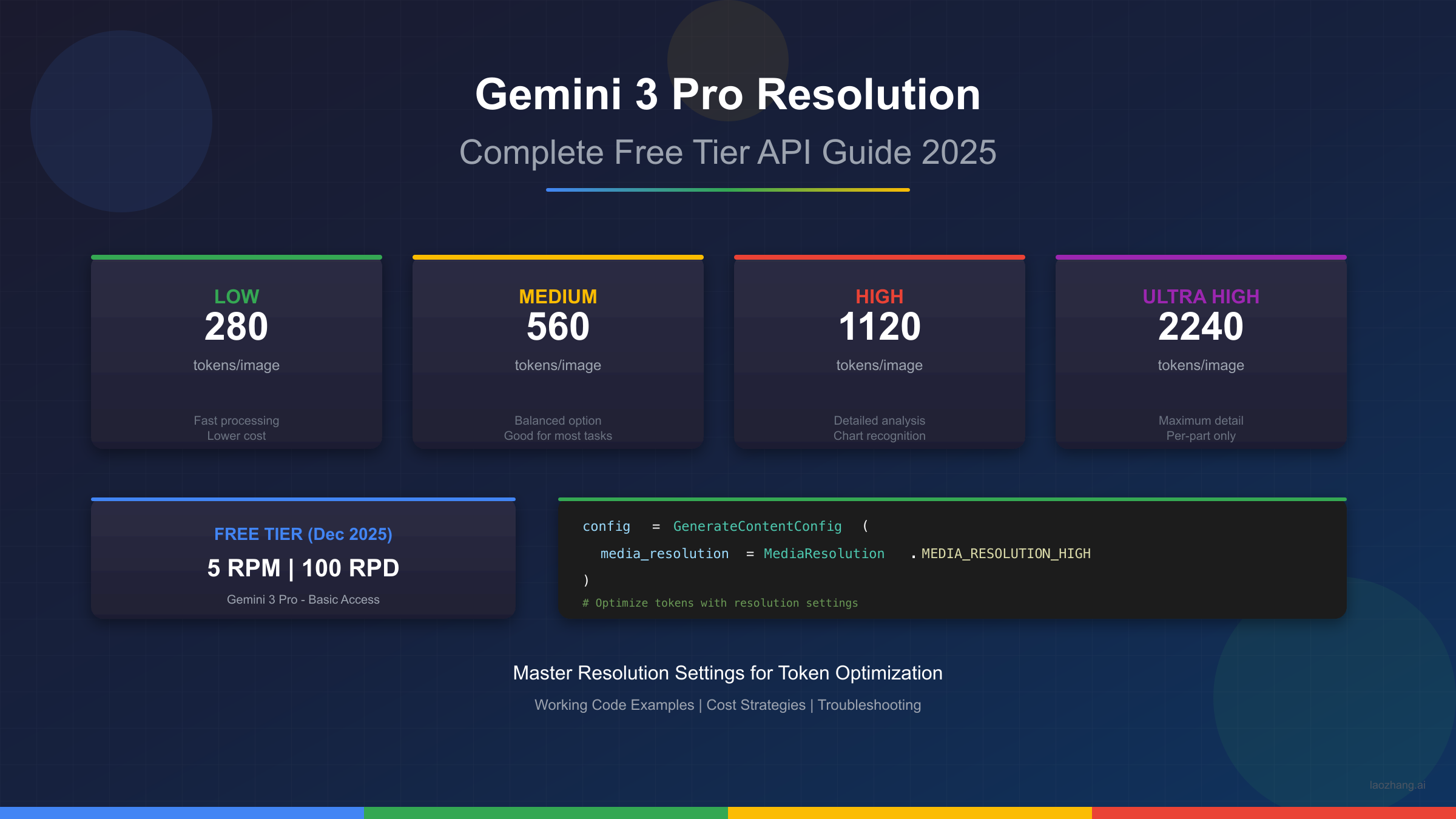
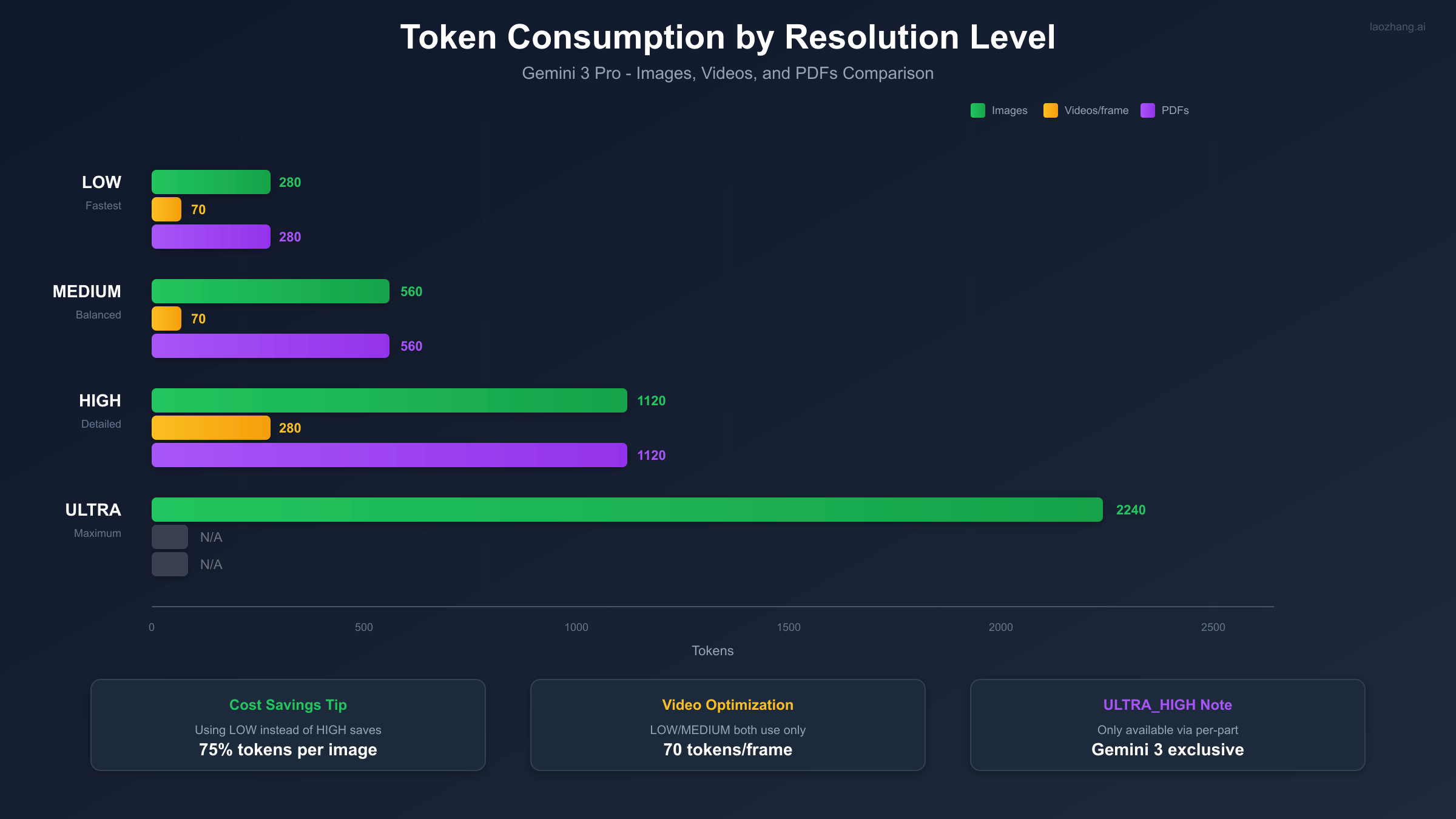
Gemini 3 Pro supports five distinct resolution levels. Each level corresponds to a specific token allocation that scales linearly with detail requirements.
| Resolution Level | Token Count (Images) | Token Count (Videos/frame) | Token Count (PDFs) | Best For |
|---|---|---|---|---|
| MEDIA_RESOLUTION_LOW | 280 | 70 | 280 | Simple thumbnails, basic recognition |
| MEDIA_RESOLUTION_MEDIUM | 560 | 70 | 560 | Portraits, general analysis |
| MEDIA_RESOLUTION_HIGH | 1120 | 280 | 1120 | Charts, detailed documents |
| MEDIA_RESOLUTION_ULTRA_HIGH | 2240 | N/A | N/A | Complex diagrams, per-part only |
| UNSPECIFIED | Varies | Varies | Varies | Model chooses optimal |
Understanding the Token Scaling
The token counts follow a predictable pattern for images and PDFs:
- LOW to MEDIUM: 2x increase (280 to 560)
- MEDIUM to HIGH: 2x increase (560 to 1120)
- HIGH to ULTRA_HIGH: 2x increase (1120 to 2240)
For videos, the scaling is different. Both LOW and MEDIUM use only 70 tokens per frame, making them highly efficient for video processing. HIGH jumps to 280 tokens per frame, and ULTRA_HIGH is not available for video content.
When UNSPECIFIED is Optimal
If you don't set a resolution, Gemini uses intelligent defaults based on the media type and content. According to Google's documentation, this often provides good results, but explicit settings give you predictable token usage for cost management.
Token Costs and Free Tier Limits
Understanding both token consumption and free tier limits is essential for cost-effective API usage.
Token Counts by Media Type
The relationship between resolution and tokens differs by media type:
| Media Type | LOW | MEDIUM | HIGH | ULTRA_HIGH |
|---|---|---|---|---|
| Single Image | 280 tokens | 560 tokens | 1120 tokens | 2240 tokens |
| Video (per frame) | 70 tokens | 70 tokens | 280 tokens | N/A |
| PDF (per page) | 280 tokens | 560 tokens | 1120 tokens | N/A |
Cost Calculation Example
For a request analyzing 10 images at each resolution level:
- LOW: 10 x 280 = 2,800 tokens
- MEDIUM: 10 x 560 = 5,600 tokens
- HIGH: 10 x 1120 = 11,200 tokens
- ULTRA_HIGH: 10 x 2,240 = 22,400 tokens
Using LOW instead of HIGH saves 75% of tokens per image, which directly translates to cost savings or extended free tier usage.
Free Tier RPM/RPD Limits
As of December 2025, Google provides free tier access with the following limits for Gemini 3 Pro:
| Metric | Gemini 3 Pro | Gemini 2.5 Pro | Gemini 2.5 Flash |
|---|---|---|---|
| Requests Per Minute (RPM) | 5 | 5 | 10 |
| Requests Per Day (RPD) | 100 | 100 | 500 |
| Tokens Per Minute (TPM) | 250,000 | 250,000 | 1,000,000 |
For detailed information on rate limits and how to handle them, see our Gemini API Rate Limit Guide.
December 2025 Limit Changes
In November 2025, Google reduced free tier access due to high demand. The changes include:
- Free tier now provides "basic access" with variable limits
- Daily limits may fluctuate based on overall system demand
- Image generation reduced from 3 to 2 images per day for consumer app users
Google stated: "Image generation & editing is in high demand. Limits may change frequently and will reset daily."
The API free tier remains more stable than the consumer app, making it the preferred option for developers. For those who need higher limits, services like laozhang.ai provide alternative access with pooled quotas. For current pricing details, check our Gemini API Pricing Guide.
Reset Times
Free tier limits reset at different times depending on the interface:
- API users: Midnight Pacific Time (PT)
- Consumer app users: Midnight UTC
Implementation Guide with Code
Here's how to implement resolution settings in your applications using Python and JavaScript.
Python SDK Setup
First, install the Google Generative AI SDK:
bashpip install google-genai
Basic configuration with resolution settings:
pythonfrom google import genai
from google.genai import types

# Initialize client
client = genai.Client(api_key="YOUR_API_KEY")

# Configure resolution globally
config = types.GenerateContentConfig(
    media_resolution=types.MediaResolution.MEDIA_RESOLUTION_HIGH
)

# Use in a request
response = client.models.generate_content(
    model="gemini-3-pro",
    contents=[
        types.Part.from_image(open("chart.png", "rb").read()),
        "Analyze this chart and extract all data points"
    ],
    config=config
)

print(response.text)
For API key setup instructions, see our Gemini API Key Guide.
JavaScript/TypeScript Examples
Using the Google AI SDK for JavaScript:
javascriptimport { GoogleGenerativeAI } from "@google/generative-ai";

const genAI = new GoogleGenerativeAI("YOUR_API_KEY");

const model = genAI.getGenerativeModel({
  model: "gemini-3-pro",
  generationConfig: {
    mediaResolution: "MEDIA_RESOLUTION_MEDIUM"
  }
});

async function analyzeImage(imagePath) {
  const imageData = fs.readFileSync(imagePath);
  const base64Image = imageData.toString("base64");

  const result = await model.generateContent([
    {
      inlineData: {
        mimeType: "image/png",
        data: base64Image
      }
    },
    "Describe what you see in this image"
  ]);

  return result.response.text();
}
Per-Part Resolution (Gemini 3 Exclusive)
The most powerful feature of Gemini 3 is per-part resolution control. This allows optimizing token usage when processing multiple media files of varying complexity:
pythonfrom google import genai
from google.genai import types

client = genai.Client(api_key="YOUR_API_KEY")

# Create parts with different resolutions
complex_chart = types.Part.from_image(
    open("financial_chart.png", "rb").read(),
    media_resolution=types.MediaResolution.MEDIA_RESOLUTION_HIGH
)

simple_logo = types.Part.from_image(
    open("company_logo.png", "rb").read(),
    media_resolution=types.MediaResolution.MEDIA_RESOLUTION_LOW
)

# Mixed resolution in single request
response = client.models.generate_content(
    model="gemini-3-pro",
    contents=[
        complex_chart,
        simple_logo,
        "Analyze the financial data in the chart. The logo is for context only."
    ]
)

# Token usage: 1120 (chart) + 280 (logo) = 1400 tokens
# vs. all HIGH: 1120 + 1120 = 2240 tokens (37.5% savings)
This approach is particularly effective when:
- Processing documents with both complex charts and simple images
- Analyzing video frames where only some contain text
- Batch processing images of varying complexity
Cost Optimization Strategies
Maximizing your free tier usage requires strategic thinking about resolution settings.
Maximize Free Tier Usage
Strategy 1: Start Low, Increase as Needed
Always begin with MEDIA_RESOLUTION_LOW and only increase if output quality is insufficient:
pythondef analyze_with_adaptive_resolution(image_path, prompt):
    """Try LOW first, upgrade if output indicates insufficient detail"""

    resolutions = [
        types.MediaResolution.MEDIA_RESOLUTION_LOW,
        types.MediaResolution.MEDIA_RESOLUTION_MEDIUM,
        types.MediaResolution.MEDIA_RESOLUTION_HIGH
    ]

    for resolution in resolutions:
        config = types.GenerateContentConfig(media_resolution=resolution)
        response = client.models.generate_content(
            model="gemini-3-pro",
            contents=[types.Part.from_image(open(image_path, "rb").read()), prompt],
            config=config
        )

        # Check if response indicates need for higher resolution
        if "unclear" not in response.text.lower() and "cannot read" not in response.text.lower():
            return response, resolution

    return response, resolutions[-1]
Strategy 2: Batch by Complexity
Group your requests by media complexity to apply appropriate resolution levels:
python# Separate processing queues
simple_images = []  # thumbnails, logos, icons
complex_images = []  # charts, documents, diagrams

for img in all_images:
    if img.size < (500, 500) or img.type in ['logo', 'icon']:
        simple_images.append((img, types.MediaResolution.MEDIA_RESOLUTION_LOW))
    else:
        complex_images.append((img, types.MediaResolution.MEDIA_RESOLUTION_HIGH))
Resolution-Based Token Savings
The table below shows potential savings for common use cases:
| Use Case | Typical Approach | Optimized Approach | Token Savings |
|---|---|---|---|
| 100 product thumbnails | HIGH (112,000) | LOW (28,000) | 75% |
| 50 document pages | HIGH (56,000) | MEDIUM (28,000) | 50% |
| 10 charts + 40 photos | All HIGH (56,000) | Mixed (22,400) | 60% |
| 1-hour video (30fps) | HIGH (302,400) | LOW (75,600) | 75% |
laozhang.ai Alternative
When free tier limits become restrictive, laozhang.ai offers an alternative API access solution:
- Unified API: Access multiple AI models through a single endpoint
- Pooled quotas: Bypass individual account restrictions
- Cost efficiency: Competitive pricing compared to direct API access
- No rate limit concerns: Higher throughput for production applications
This is particularly valuable when:
- Your free tier quota is exhausted
- You need higher RPM/RPD than free tier provides
- You want to avoid managing multiple API keys
For more details on handling rate limit errors, see our guide on fixing Gemini 429 errors.
Resolution Selection by Use Case
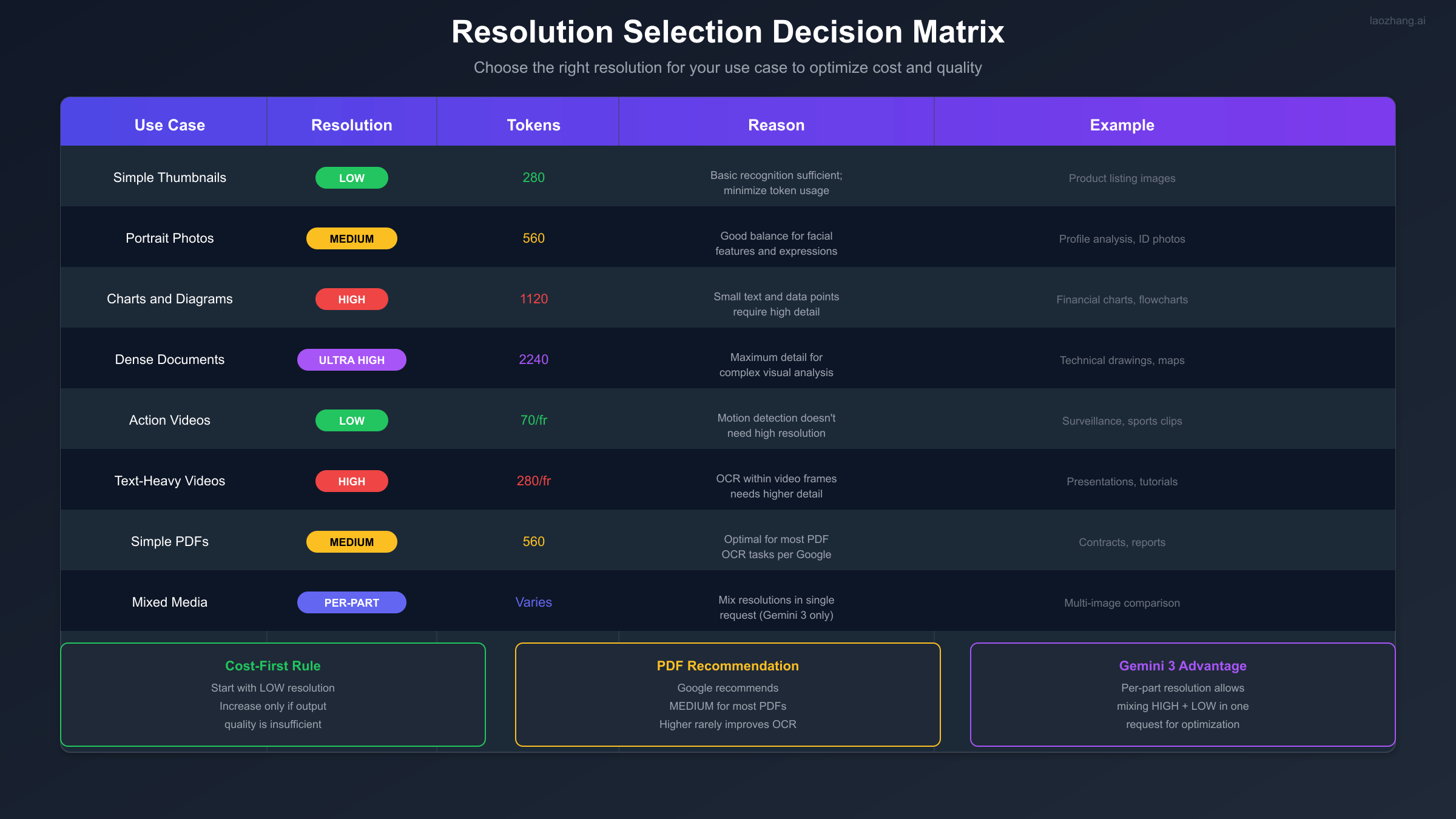
Choosing the right resolution depends on your specific use case. Here's a detailed decision guide.
Images: Portraits, Charts, Documents
| Image Type | Recommended Resolution | Reasoning |
|---|---|---|
| Product thumbnails | LOW (280) | Basic object recognition sufficient |
| Social media images | LOW (280) | General content understanding only |
| Portrait photos | MEDIUM (560) | Facial features need moderate detail |
| Charts and graphs | HIGH (1120) | Small text and data labels critical |
| Technical diagrams | HIGH/ULTRA (1120-2240) | Fine details matter for accuracy |
| Screenshots with text | HIGH (1120) | OCR requires readable text |
Videos: Action, Text-Heavy, Surveillance
Video resolution selection follows different rules because the per-frame token cost compounds quickly:
| Video Type | Recommended | Tokens/Frame | Reasoning |
|---|---|---|---|
| Action/sports | LOW | 70 | Motion detection doesn't need detail |
| Surveillance | LOW | 70 | Basic activity recognition sufficient |
| Tutorials with text | HIGH | 280 | On-screen text must be readable |
| Presentations | HIGH | 280 | Slide content needs OCR capability |
| General content | MEDIUM | 70 | Good balance for mixed content |
For a 1-minute video at 30fps:
- LOW: 1,800 frames x 70 = 126,000 tokens
- HIGH: 1,800 frames x 280 = 504,000 tokens
For high-volume video processing that exceeds free tier limits, consider using laozhang.ai for cost-effective API access.
PDFs: Text-Only, Mixed Content
Google's documentation specifically recommends MEDIUM resolution for most PDF processing: "MEDIUM provides optimal results for PDFs. Higher settings rarely improve OCR accuracy."
| PDF Type | Recommended | Reasoning |
|---|---|---|
| Text-only documents | MEDIUM (560) | OCR optimized at this level |
| Contracts/reports | MEDIUM (560) | Standard business documents |
| Technical manuals with diagrams | HIGH (1120) | Diagrams need detail |
| Scanned documents (low quality) | HIGH (1120) | Compensate for poor scan quality |
Troubleshooting Common Issues
Understanding common errors helps you build robust applications.
Rate Limit Errors
When you exceed free tier limits, the API returns a 429 error with "RESOURCE_EXHAUSTED" status:
pythonfrom google.api_core import exceptions
import time

def make_request_with_retry(prompt, max_retries=3):
    for attempt in range(max_retries):
        try:
            return client.models.generate_content(
                model="gemini-3-pro",
                contents=prompt
            )
        except exceptions.ResourceExhausted as e:
            if attempt < max_retries - 1:
                wait_time = (2 ** attempt) * 10  # Exponential backoff
                print(f"Rate limited. Waiting {wait_time} seconds...")
                time.sleep(wait_time)
            else:
                raise e
Resolution Configuration Errors
Common mistakes when setting resolution:
- Using ULTRA_HIGH globally: ULTRA_HIGH is only available via per-part settings
python# Wrong - will fail
config = types.GenerateContentConfig(
    media_resolution=types.MediaResolution.MEDIA_RESOLUTION_ULTRA_HIGH
)

# Correct - per-part only
part = types.Part.from_image(
    image_data,
    media_resolution=types.MediaResolution.MEDIA_RESOLUTION_ULTRA_HIGH
)
- Mixing global and per-part settings: Per-part settings override global config
python# The per-part setting (LOW) will be used, not the global (HIGH)
config = types.GenerateContentConfig(
    media_resolution=types.MediaResolution.MEDIA_RESOLUTION_HIGH
)

part = types.Part.from_image(
    image_data,
    media_resolution=types.MediaResolution.MEDIA_RESOLUTION_LOW
)
Quality vs Cost Trade-offs
If output quality is poor at LOW resolution, consider these factors before increasing:
- Image quality: Is the source image itself low resolution?
- Task complexity: Does the task actually require reading fine details?
- Prompt clarity: Is your prompt specific about what to analyze?
Often, improving prompt specificity achieves better results than increasing resolution:
python# Vague prompt at HIGH resolution - wasteful
"Analyze this image"

# Specific prompt at LOW resolution - efficient
"Identify the main subject and its position in this image. You don't need to read any text."
For more troubleshooting tips, check our Gemini image API free tier guide.
Summary and Next Steps
The media_resolution parameter in Gemini 3 Pro provides powerful control over token usage and output quality. Here's what you should remember:
Key Takeaways
- Resolution directly affects tokens: LOW (280) to ULTRA_HIGH (2240) for images
- Gemini 3 exclusive per-part control: Mix resolutions in a single request for optimization
- Free tier limits: 5 RPM, 100 RPD for Gemini 3 Pro (December 2025)
- Start low, increase as needed: 75% token savings using LOW vs HIGH
- Videos are token-intensive: Consider LOW (70 tokens/frame) for most video analysis
Recommended Actions
- Audit your current usage: Identify requests that could use lower resolution
- Implement adaptive resolution: Start LOW, increase only when output quality insufficient
- Use per-part resolution: For mixed-complexity requests, apply appropriate levels per media
- Monitor your quota: Track RPM/RPD usage to avoid hitting limits
- Consider laozhang.ai: When free tier limits become restrictive
Additional Resources
- Official Media Resolution Documentation
- Gemini API Pricing Guide
- Gemini API Rate Limits
- Handling 429 Errors
The combination of resolution optimization and strategic API usage can extend your free tier significantly while maintaining output quality for production applications.