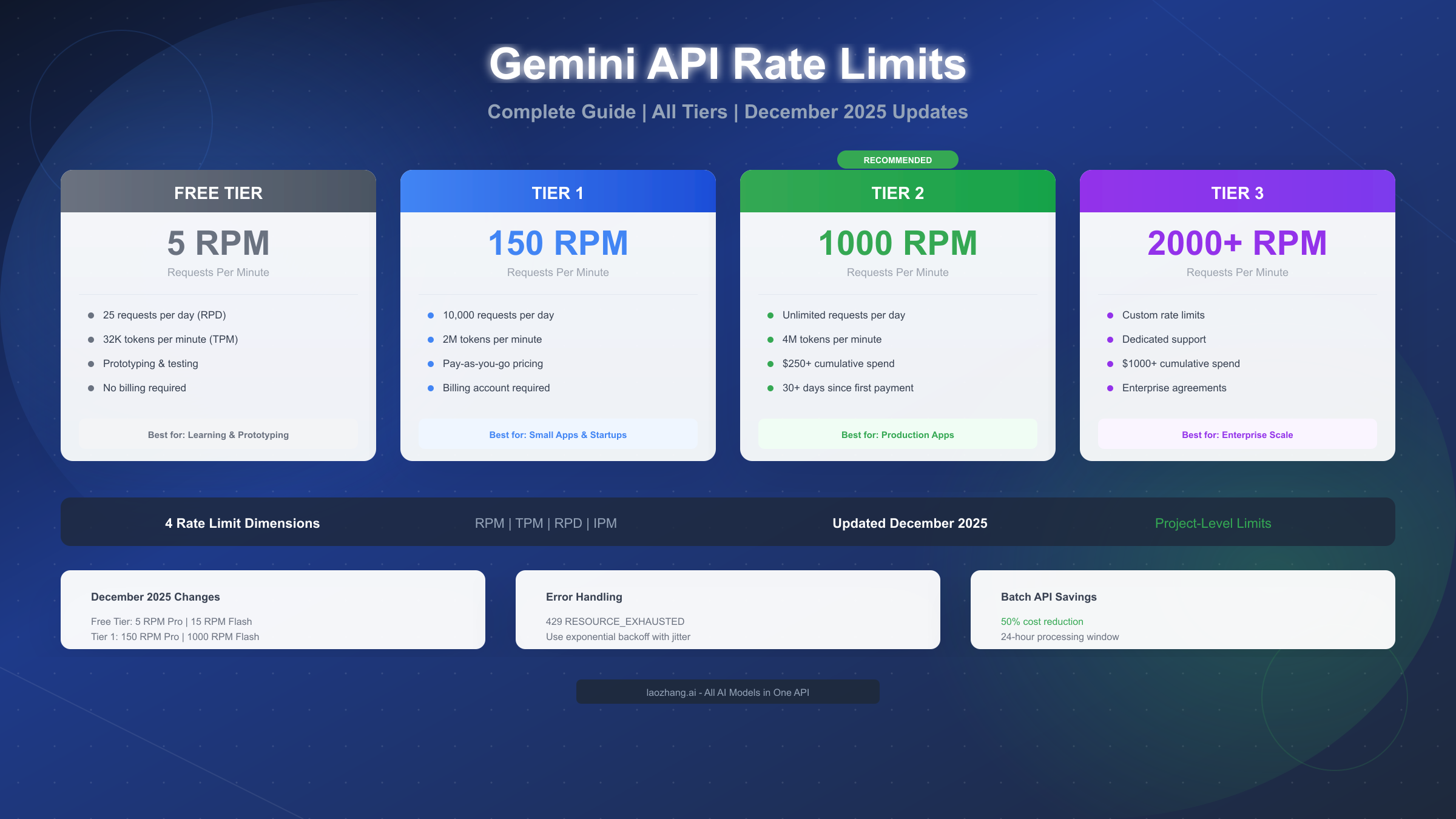
Gemini API rate limits control how many requests you can make within specific timeframes, measured across four dimensions: RPM (requests per minute), TPM (tokens per minute), RPD (requests per day), and IPM (images per minute). As of December 2025, Google adjusted limits for both Free Tier and Paid Tier 1, with the Free tier now offering 5 RPM for Pro models and 15 RPM for Flash models. Understanding these limits is essential for building reliable applications that scale from prototype to production without unexpected interruptions.
The rate limiting system operates at the project level rather than individual API keys, which means all API keys within a single Google Cloud project share the same quota pool. This architectural decision has significant implications for how you design and deploy applications, particularly when multiple services or team members access the same project. Exceeding any single limit dimension triggers HTTP 429 errors, which can cascade through your application if not handled properly.
What Are Gemini API Rate Limits
Rate limits serve as guardrails that regulate API access to ensure fair usage across all developers, protect against abuse patterns, and maintain consistent system performance for Google's AI infrastructure. When you make a request to the Gemini API, Google's systems track your usage across multiple dimensions simultaneously, and exceeding any single threshold will result in temporary request rejection until your usage falls back within acceptable bounds.
The concept of rate limiting in AI APIs differs significantly from traditional web APIs because generative AI requests consume substantial computational resources. A single prompt to Gemini 2.5 Pro might involve processing millions of tokens through massive neural networks, consuming GPU cycles that could otherwise serve other users. This resource intensity explains why AI API rate limits tend to be more restrictive than those for conventional web services, and why tier progression involves cumulative spending thresholds rather than simple request volume.
Google implements rate limits through a quota system that tracks usage across four distinct dimensions. Understanding each dimension helps you optimize your application architecture and avoid unexpected throttling. The RPM (requests per minute) limit caps how many individual API calls you can make regardless of their size, making it the most commonly encountered constraint for applications with high request frequency. TPM (tokens per minute) restricts the total token throughput, affecting applications that process large documents or generate lengthy responses. RPD (requests per day) provides a daily ceiling that resets at midnight Pacific Time, while IPM (images per minute) specifically governs image generation models like Imagen 3.
Before diving deeper into rate limits, you should ensure your API access is properly configured. If you haven't obtained your credentials yet, check out our guide on how to get your Gemini API key for step-by-step instructions on setting up your Google AI Studio account and generating API keys.
December 2025 Rate Limit Changes
Google announced significant adjustments to Gemini API quotas starting December 7, 2025, affecting both Free Tier and Paid Tier 1 users. These changes represent the most substantial rate limit restructuring since the API's general availability launch, and developers who built applications based on previous limits may experience unexpected 429 errors if they haven't updated their implementations.
The most impactful change affects Free Tier users, where Google reduced daily request limits across all models. Previously, developers could make 250 requests per day on Flash models during the free tier, but the December 2025 update reduced this to significantly lower thresholds. For Gemini 2.5 Pro, the free tier now allows only 100 requests per day compared to the previous higher allocation. Google stated these adjustments aim to ensure sustainable free access while managing infrastructure costs associated with the rapidly growing developer base.
Tier 1 paid users also experienced quota modifications, though these changes were generally less restrictive than the Free Tier adjustments. The primary change for Tier 1 involves adjusted token-per-minute limits for certain model variants, particularly the experimental and preview models that Google continuously updates. Importantly, these changes don't affect developers who have progressed to Tier 2 or Tier 3, as higher tiers maintain their negotiated or standard elevated limits.
Key December 2025 Changes:
| Model | Previous Free Tier | New Free Tier | Impact |
|---|---|---|---|
| Gemini 2.5 Pro | 250 RPD | 100 RPD | 60% reduction |
| Gemini 2.5 Flash | 1000 RPD | 250 RPD | 75% reduction |
| Gemini 2.0 Flash | 1500 RPD | 1500 RPD | No change |
| Gemini 3 Pro Preview | 100 RPD | 50 RPD | 50% reduction |
For developers affected by these changes, several migration strategies exist. The most straightforward approach involves upgrading to Tier 1 by enabling billing on your Google Cloud project, which immediately unlocks substantially higher limits. Alternatively, implementing request batching can dramatically reduce your RPM consumption while maintaining equivalent functionality. Services like laozhang.ai offer API aggregation with higher default limits and built-in retry logic, providing a path forward for developers who prefer not to manage billing directly with Google Cloud.
Complete Rate Limits by Model and Tier
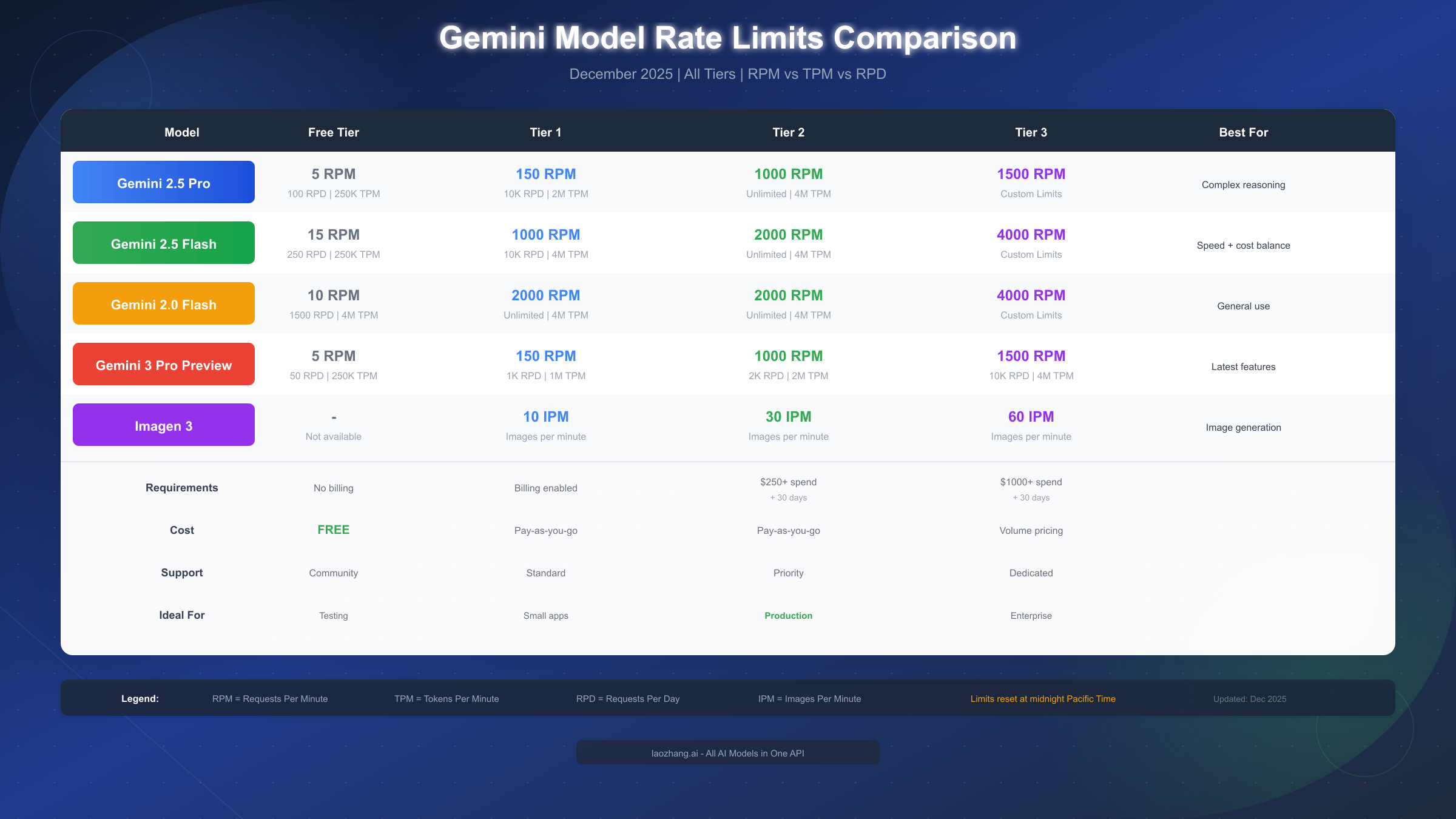
Understanding the specific rate limits for each model and tier combination enables you to select the optimal configuration for your use case. The following comprehensive table reflects the December 2025 limits and includes all currently available Gemini models through both the AI Studio and Vertex AI interfaces.
Gemini 2.5 Pro Rate Limits
Gemini 2.5 Pro delivers the highest reasoning capabilities in the Gemini family, making it ideal for complex analytical tasks, detailed code generation, and sophisticated reasoning problems. However, this computational intensity comes with more restrictive rate limits compared to Flash variants.
| Tier | RPM | TPM | RPD |
|---|---|---|---|
| Free | 5 | 250,000 | 100 |
| Tier 1 | 150 | 2,000,000 | 10,000 |
| Tier 2 | 1,000 | 4,000,000 | Unlimited |
| Tier 3 | 1,500 | 4,000,000+ | Unlimited |
The 5 RPM limit on the Free tier translates to one request every 12 seconds, which is sufficient for development and testing but inadequate for any production deployment. Even a simple chatbot serving multiple users would quickly exhaust this allocation. The jump to Tier 1's 150 RPM represents a 30x increase, transforming the API from a testing tool to a production-capable service.
Gemini 2.5 Flash Rate Limits
Gemini 2.5 Flash offers an excellent balance between performance and throughput, making it the recommended choice for most production applications that don't require maximum reasoning capability. Its higher rate limits accommodate applications with substantial traffic while maintaining competitive output quality.
| Tier | RPM | TPM | RPD |
|---|---|---|---|
| Free | 15 | 250,000 | 250 |
| Tier 1 | 1,000 | 4,000,000 | 10,000 |
| Tier 2 | 2,000 | 4,000,000 | Unlimited |
| Tier 3 | 4,000 | 4,000,000+ | Unlimited |
Flash models provide 3x the RPM allocation compared to Pro models at every tier level, reflecting their optimized inference path and lower per-request computational cost. For applications where response time matters more than maximum reasoning depth, Flash models deliver superior throughput without sacrificing practical utility.
For a deeper understanding of the pricing implications of these different models and tiers, consult our detailed Gemini API pricing guide which breaks down cost-per-token calculations and helps you estimate monthly expenses based on your expected usage patterns.
Image Generation Rate Limits (Imagen 3)
Imagen 3 uses a separate rate limiting dimension—IPM (images per minute)—rather than the token-based metrics used by text models. This specialized measurement reflects the unique resource requirements of image generation, which involves GPU-intensive diffusion processes distinct from text generation.
| Tier | IPM | Notes |
|---|---|---|
| Free | N/A | Not available |
| Tier 1 | 10 | Per project |
| Tier 2 | 30 | Per project |
| Tier 3 | 60+ | Negotiable |
Image generation is not available on the Free tier, requiring at minimum Tier 1 access with billing enabled. This restriction exists because image generation consumes significantly more computational resources than text generation, making it economically unsustainable to offer free access.
Understanding the Tier System
Google structures Gemini API access around a tier system that progressively unlocks higher rate limits as your usage and spending increase. Understanding this system helps you plan your application's growth trajectory and budget accordingly.
Free Tier provides limited access ideal for prototyping, learning, and small-scale experimentation. With just 5 RPM for Pro models and 15 RPM for Flash models, developers can test basic functionality but cannot build production applications. The 32,000 TPM allowance supports processing roughly 8,000 words per minute, sufficient for simple experiments but constraining for any real workload. No billing information is required for Free tier access, making it the fastest path to initial API experimentation.
Tier 1 represents the entry point for production applications. Unlocked by simply enabling Cloud Billing for your Google Cloud project, Tier 1 delivers a dramatic upgrade—the 150 RPM limit for Pro models represents a 30x increase over Free tier. Importantly, Tier 1 includes access to batch processing mode, which offers 50% cost reduction for non-real-time workloads. The pay-as-you-go pricing model means you only pay for actual usage without minimum commitments.
Tier 2 targets growing applications with substantial usage requirements. Achieving this tier requires meeting two conditions: $250 in cumulative Google Cloud spending (across all services, not just Gemini API) plus 30 days since your first successful payment. The spending threshold can be reached within 1-2 months of moderate usage, while the time requirement ensures account stability. Tier 2 offers 1,000 RPM for Pro and 2,000 RPM for Flash, along with unlimited daily requests—a significant upgrade for scaling applications.
Tier 3 provides enterprise-grade limits tailored to specific business needs. Qualification requires $1,000 in cumulative spending plus the 30-day waiting period. Organizations at this level can also contact Google Cloud sales to negotiate custom limits beyond the standard Tier 3 allocations, including reserved capacity and priority access during high-demand periods.
For developers who need production-level rate limits without the spending thresholds and waiting periods, alternative API providers like laozhang.ai offer aggregated access with higher default quotas. These services handle the relationship with Google and other AI providers, passing through requests while adding value through unified billing, enhanced retry logic, and fallback routing.
Tier Upgrade Process:
The upgrade between tiers happens automatically once you meet the qualifications. Navigate to the API keys page in AI Studio (aistudio.google.com), locate your project, and the "Upgrade" button will appear when your account meets the next tier's requirements. After clicking Upgrade, Google performs a quick validation before applying the new limits, typically completing within minutes.
Handling 429 Rate Limit Errors
When your application exceeds any rate limit dimension, the Gemini API returns a 429 status code with detailed information about which limit was exceeded and when requests can resume. Properly handling these errors is essential for building resilient applications that degrade gracefully under load rather than failing catastrophically.
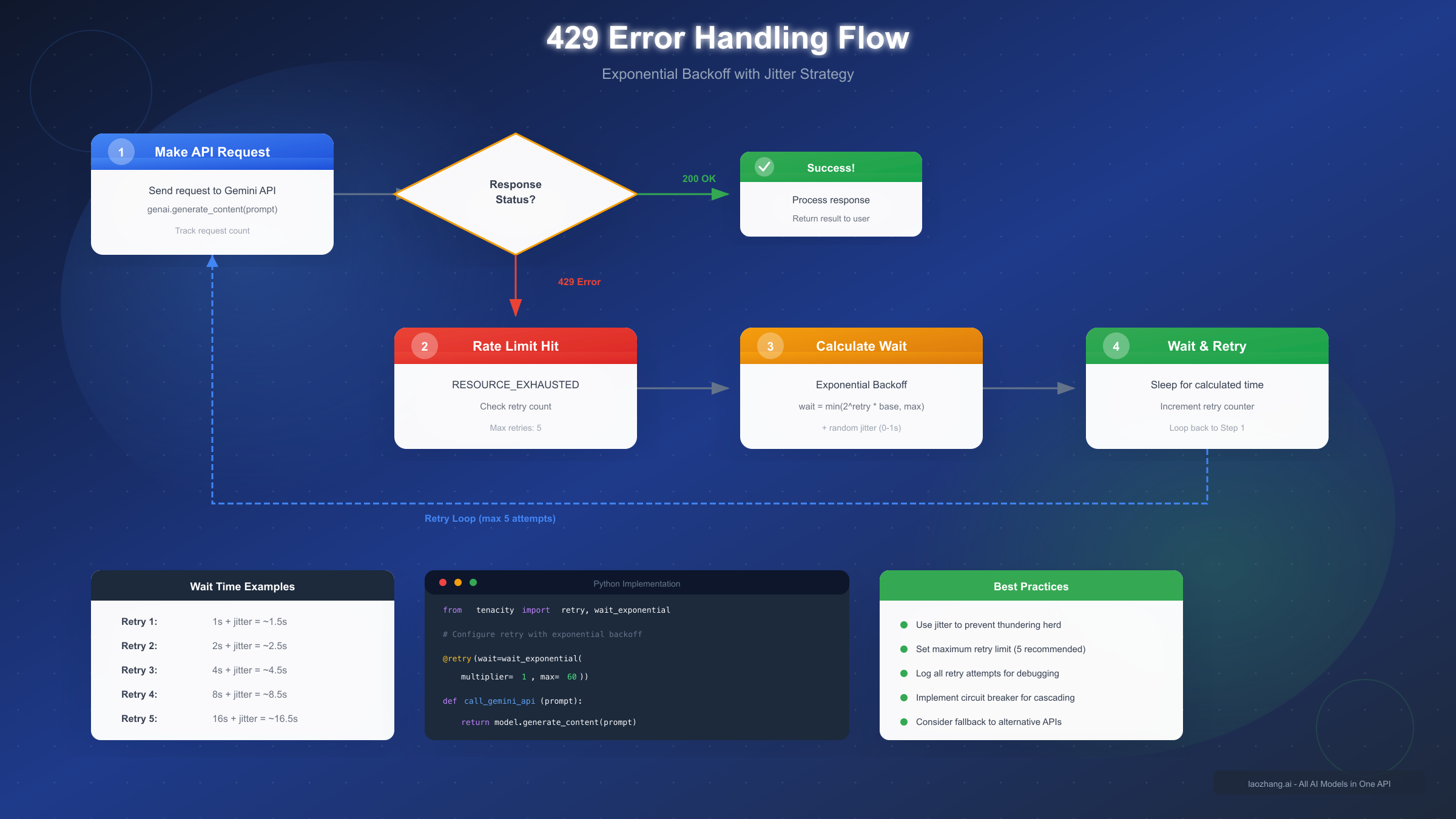
The 429 response includes headers indicating the specific quota exceeded and the reset time, enabling sophisticated retry logic that adapts to current conditions. Rather than blindly retrying immediately, well-designed applications parse this information to schedule retries optimally.
Exponential Backoff Implementation
Exponential backoff with jitter represents the gold standard for handling rate limit errors. This approach progressively increases wait times between retries while adding random variation to prevent synchronized retry storms that could further overwhelm the API.
pythonfrom tenacity import retry, wait_exponential_jitter, stop_after_attempt
import google.generativeai as genai

# Configure with exponential backoff and jitter
@retry(
    wait=wait_exponential_jitter(initial=1, max=60, jitter=2),
    stop=stop_after_attempt(5)
)
def call_gemini_with_retry(prompt):
    """Make Gemini API call with automatic retry on rate limits."""
    model = genai.GenerativeModel('gemini-2.5-flash')
    response = model.generate_content(prompt)
    return response.text

# Usage
try:
    result = call_gemini_with_retry("Explain quantum computing")
    print(result)
except Exception as e:
    print(f"Failed after retries: {e}")
The wait_exponential_jitter configuration starts with a 1-second wait, doubles on each retry up to 60 seconds maximum, and adds random jitter to prevent thundering herd problems. The 5-attempt limit prevents infinite loops while providing reasonable resilience against transient rate limiting.
For developers working with other AI APIs, similar patterns apply universally. Our guide on Claude API 429 solutions demonstrates analogous techniques that work across different AI providers, reinforcing that these retry patterns represent industry best practices rather than Gemini-specific workarounds.
Request Queue Management
For high-throughput applications, implementing a request queue with rate limiting at the application level prevents 429 errors before they occur. This proactive approach proves more efficient than reactive retry logic alone.
javascriptclass GeminiRateLimiter {
  constructor(rpm = 15) {
    this.requestsPerMinute = rpm;
    this.queue = [];
    this.processing = false;
    this.requestTimes = [];
  }

  async enqueue(request) {
    return new Promise((resolve, reject) => {
      this.queue.push({ request, resolve, reject });
      this.processQueue();
    });
  }

  async processQueue() {
    if (this.processing || this.queue.length === 0) return;
    this.processing = true;

    while (this.queue.length > 0) {
      // Clean old request times
      const now = Date.now();
      this.requestTimes = this.requestTimes.filter(t => now - t < 60000);

      if (this.requestTimes.length >= this.requestsPerMinute) {
        // Wait until oldest request expires from window
        const waitTime = 60000 - (now - this.requestTimes[0]) + 100;
        await new Promise(r => setTimeout(r, waitTime));
        continue;
      }

      const { request, resolve, reject } = this.queue.shift();
      this.requestTimes.push(Date.now());

      try {
        const result = await request();
        resolve(result);
      } catch (error) {
        reject(error);
      }
    }

    this.processing = false;
  }
}
This client-side rate limiter tracks request timing and automatically throttles submissions to stay within your allocated RPM. By preventing limit exceedances at the source, you avoid the latency penalty of server-side rejection and retry cycles.
Choosing the Right Model for Your Limits
Selecting the optimal Gemini model involves balancing capability requirements against rate limit constraints. Different models serve different purposes, and understanding their trade-offs helps you maximize value within your allocated quotas.
Gemini 2.5 Pro excels at complex reasoning, detailed analysis, and tasks requiring maximum intelligence. Use Pro when accuracy matters more than speed: code review, legal document analysis, research synthesis, or any task where errors carry significant consequences. The lower rate limits (5 RPM Free, 150 RPM Tier 1) reflect its computational intensity, so reserve Pro requests for high-value operations.
Gemini 2.5 Flash delivers the best balance for most production applications. With 3x the rate limits of Pro and competitive quality for routine tasks, Flash handles chatbots, content generation, summarization, and general-purpose AI features effectively. Its speed advantage (typically 2-3x faster response times) combines with higher quotas to maximize throughput.
Gemini 2.0 Flash offers the highest rate limits in the free tier (10 RPM, 1500 RPD), making it ideal for high-volume applications that can accept slightly older model capabilities. For tasks like classification, simple Q&A, or text transformation, the 2.0 generation often performs comparably to 2.5 while enabling significantly higher throughput.
Decision Framework:
| Use Case | Recommended Model | Rationale |
|---|---|---|
| Code generation | 2.5 Pro | Highest accuracy for complex code |
| Customer chatbot | 2.5 Flash | Balance of quality and throughput |
| Content classification | 2.0 Flash | Speed and volume over nuance |
| Document analysis | 2.5 Pro | Complex reasoning required |
| Real-time translation | 2.5 Flash | Speed with quality |
| Bulk processing | 2.0 Flash + Batch | Maximum efficiency |
For applications that experience variable load patterns, consider implementing dynamic model selection that routes to Pro for complex queries while defaulting to Flash for routine operations. This approach maximizes quality for challenging requests while preserving quota for volume.
To understand the cost implications of these model choices in detail, our Gemini 2.5 Pro free tier limitations guide provides specific calculations for budgeting your API usage across different scenarios.
7 Strategies to Optimize API Usage
Maximizing value within your rate limits requires deliberate optimization strategies. These techniques, drawn from production deployments, can dramatically increase effective throughput without requiring tier upgrades.
Strategy 1: Request Batching
Batching stands as the most impactful optimization technique. Instead of sending individual requests, combine multiple prompts into single API calls using structured output formats. This approach dramatically reduces RPM consumption while maintaining high throughput.
pythondef batch_prompts(prompts, batch_size=5):
    """Combine multiple prompts into batched requests."""
    batched_prompt = "Process the following items. Return JSON array:\n\n"
    for i, prompt in enumerate(prompts):
        batched_prompt += f"Item {i+1}: {prompt}\n"

    batched_prompt += "\nRespond with JSON: [{\"item\": 1, \"response\": \"...\"}, ...]"
    return batched_prompt

# Instead of 20 requests, make 4 batched requests
prompts = ["Summarize: " + doc for doc in documents]
batches = [prompts[i:i+5] for i in range(0, len(prompts), 5)]
results = [call_gemini(batch_prompts(batch)) for batch in batches]
Batching 5 prompts per request transforms a 20-request workload into just 4 API calls—an 80% reduction in RPM consumption while maintaining equivalent output.
Strategy 2: Response Caching
Implement intelligent caching for responses to identical or semantically similar prompts. Cache hits eliminate API calls entirely, providing infinite effective throughput for repeated queries.
pythonimport hashlib
from functools import lru_cache

def hash_prompt(prompt):
    """Create consistent hash for prompt caching."""
    return hashlib.sha256(prompt.encode()).hexdigest()[:16]

@lru_cache(maxsize=10000)
def cached_gemini_call(prompt_hash, prompt):
    """Cache Gemini responses for repeated prompts."""
    return call_gemini_with_retry(prompt)

def smart_call(prompt):
    """Make cached API call."""
    prompt_hash = hash_prompt(prompt)
    return cached_gemini_call(prompt_hash, prompt)
For production systems, replace the simple lru_cache with Redis or Memcached for distributed caching that persists across application restarts and scales across multiple instances.
Strategy 3: Token Optimization
Reducing token consumption directly impacts your TPM ceiling. Concise prompts that eliminate redundancy while preserving intent stretch your quota further without sacrificing output quality.
- Remove unnecessary context and examples from prompts
- Use system instructions effectively to reduce per-request overhead
- Implement token counting to prevent exceeding context limits
- Truncate or summarize long inputs before processing
Strategy 4: Dynamic Model Routing
Route requests to different models based on complexity assessment. Simple queries go to faster, higher-quota models while complex operations use Pro when necessary.
pythondef route_to_model(query, complexity_threshold=0.7):
    """Route to appropriate model based on query complexity."""
    complexity = assess_complexity(query)  # Your complexity heuristic

    if complexity > complexity_threshold:
        return "gemini-2.5-pro"
    elif complexity > 0.3:
        return "gemini-2.5-flash"
    else:
        return "gemini-2.0-flash"
Strategy 5: Off-Peak Processing
Schedule batch operations during off-peak hours when rate limits are less likely to be contested. While Google's official limits don't change by time of day, real-world performance often improves during low-traffic periods.
Strategy 6: Multi-Provider Fallback
Implement fallback to alternative API providers when primary limits are exhausted. Services like laozhang.ai aggregate multiple AI providers, offering seamless fallback when Gemini limits are reached. This architecture ensures continuity while distributing load across providers.
pythonasync def resilient_ai_call(prompt):
    """Call with automatic fallback to alternative providers."""
    providers = [
        ("gemini", call_gemini),
        ("laozhang", call_laozhang_gemini),  # Higher limits
        ("claude", call_claude_fallback),
    ]

    for provider_name, provider_func in providers:
        try:
            return await provider_func(prompt)
        except RateLimitError:
            print(f"{provider_name} rate limited, trying next...")
            continue

    raise Exception("All providers exhausted")
Strategy 7: Graceful Degradation
Design your application to degrade gracefully under rate limit pressure. This might mean showing cached results, reducing response detail, or queuing requests for delayed processing rather than failing outright.
Batch Processing for Higher Throughput
The Gemini Batch API offers a compelling alternative for non-real-time workloads, providing 50% cost reduction and separate quota pools that don't impact your real-time limits. Understanding when and how to use batch processing can dramatically improve your application's economics.
Batch processing works by submitting jobs to a queue that Google processes within a 24-hour window. While individual request latency increases substantially, the aggregate throughput and cost efficiency make batching ideal for data processing pipelines, content generation at scale, and any workload where immediate response isn't required.
Batch API Rate Limits:
| Tier | Concurrent Batch Jobs | Enqueued Tokens Limit |
|---|---|---|
| Tier 1 | 100 | 50M tokens |
| Tier 2 | 100 | 500M tokens |
| Tier 3 | 100 | 5B tokens |
The enqueued tokens limit represents how much data you can have pending in the batch queue simultaneously. For Tier 2 users, 500 million tokens enables processing hundreds of thousands of documents in a single batch operation.
pythonimport google.generativeai as genai
from google.generativeai import BatchJob

# Prepare batch input
batch_requests = [
    {"prompt": f"Summarize: {doc}", "model": "gemini-2.5-flash"}
    for doc in large_document_collection
]

# Submit batch job
job = BatchJob.create(
    display_name="document-summarization",
    requests=batch_requests
)

# Poll for completion (or use webhook callback)
while job.state != "COMPLETED":
    job.refresh()
    time.sleep(60)

# Retrieve results
results = job.get_results()
Batch processing excels for use cases including document processing pipelines where thousands of documents need analysis, content generation at scale for marketing or product descriptions, data enrichment tasks that enhance existing datasets with AI-generated metadata, and research workloads that process large corpora.
For real-time applications that can tolerate brief delays, consider a hybrid approach: route time-sensitive requests through the standard API while directing background operations to the batch queue. This architecture maximizes cost efficiency while maintaining user experience.
The cost savings from batch processing compound with other optimization strategies. Combining batching with request aggregation and caching can reduce effective API costs by 70-80% compared to naive implementation, transforming previously uneconomical workloads into viable production systems.
Alternative providers like laozhang.ai offer similar batch processing capabilities with potentially higher throughput limits and unified access across multiple AI providers. For organizations processing large volumes across multiple models, these aggregated services can simplify architecture while providing cost savings up to 84% compared to direct API access.
FAQ and Troubleshooting
How do I check my current rate limit usage?
Navigate to Google AI Studio (aistudio.google.com) and select your project. The dashboard displays real-time quota consumption across all dimensions. For programmatic monitoring, the API response headers include x-ratelimit-remaining values that enable application-level tracking.
Why am I getting 429 errors despite staying under limits?
Rate limits apply per project, not per API key. If multiple applications or team members share a project, their combined usage counts against the same quota. Consider creating separate projects for production and development workloads to prevent interference.
How long until rate limits reset?
RPM limits reset every minute on a rolling window basis. RPD limits reset at midnight Pacific Time (UTC-8 or UTC-7 during daylight saving). After a 429 error, the response header indicates when requests can resume.
Can I request a rate limit increase?
Paid tier users can submit increase requests through the Google Cloud Console. Navigate to IAM & Admin > Quotas, find the Gemini API quotas, and click "Request Increase." Approval depends on your usage history and business justification. Tier 3 users can also negotiate custom limits directly with Google Cloud sales.
What's the difference between project-level and key-level limits?
All rate limits apply at the project level. Individual API keys within the same project share the quota pool. This design simplifies management but requires careful architecture when multiple services access the same project.
Do experimental models have different limits?
Yes, preview and experimental models typically have more restrictive limits that may change without notice. For production applications, use stable model versions to ensure consistent quota availability.
How do rate limits affect streaming responses?
Streaming responses count as a single request regardless of duration. However, connection timeouts may cause retries that consume additional quota. Implement proper timeout handling to prevent unnecessary retry loops.
What happens if I exceed limits frequently?
Repeated limit violations don't result in account suspension, but they do impact application reliability. Google's systems may apply temporary additional restrictions if patterns suggest abuse. Implementing proper rate limiting at the application level prevents this scenario.
For developers requiring higher limits without the tier progression wait times, services like laozhang.ai provide immediate access to production-grade quotas with transparent pricing and unified billing across multiple AI providers.
Conclusion
Mastering Gemini API rate limits enables you to build reliable, scalable AI applications that perform consistently from prototype through production. The key takeaways from this guide include understanding that limits apply per project across four dimensions (RPM, TPM, RPD, IPM), recognizing the December 2025 changes that significantly reduced Free Tier allocations, and implementing proper error handling with exponential backoff and jitter.
For production applications, the path forward typically involves enabling billing to reach Tier 1, implementing the optimization strategies outlined above, and planning tier progression based on your growth trajectory. The $250 threshold for Tier 2 access can be reached within 1-2 months of moderate usage, unlocking substantially higher limits that support serious production workloads.
Remember that rate limits exist to ensure fair access and system stability—they're guardrails, not obstacles. By designing your application architecture around these constraints from the beginning, you avoid painful refactoring later while building systems that gracefully handle the realities of shared infrastructure.
The combination of proper model selection, request batching, intelligent caching, and fallback strategies can increase your effective throughput by 5-10x without any tier upgrades. These optimizations compound, transforming rate limits from constraints into manageable parameters within your application's design space.
As Google continues developing the Gemini model family, expect rate limits to evolve. Monitor the official documentation (ai.google.dev/gemini-api/docs/rate-limits) and Google AI Developer Forum for announcements about limit changes. Building flexibility into your rate limit handling today prepares your application for whatever changes tomorrow brings.