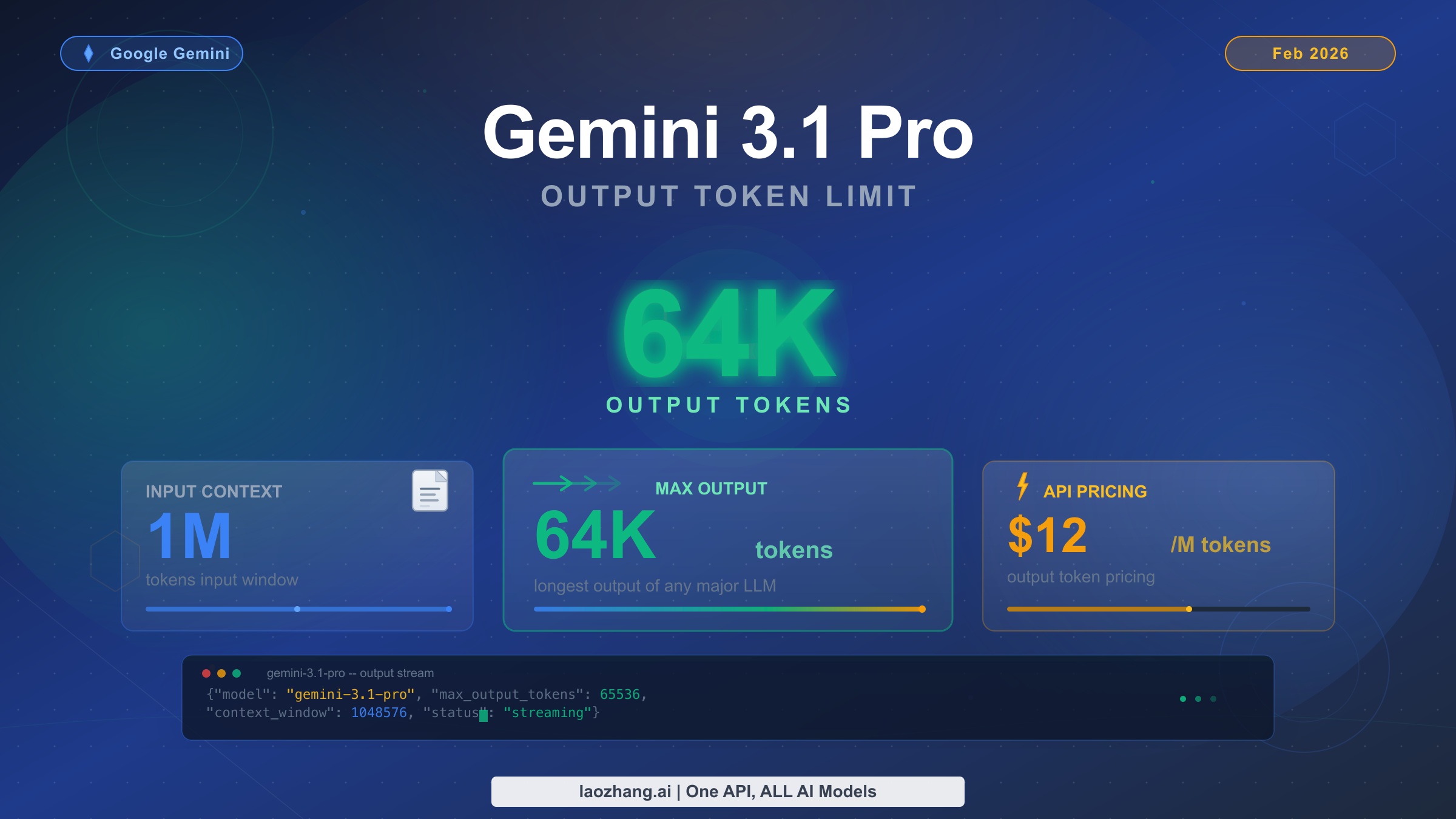
Gemini 3.1 Pro supports a maximum output of 65,536 tokens per API response, which translates to approximately 49,000 English words or 98 pages of text. Released on February 19, 2026, this model pairs a 1 million token input context window with one of the largest output capacities available from any frontier AI model. However, a critical detail that most guides miss is that the default maxOutputTokens is only 8,192 — developers must explicitly configure this parameter to unlock the full 64K output capacity. At $12 per million output tokens (Google AI Developer API, February 2026), generating a maximum-length response costs approximately $0.78.
What Is the Gemini 3.1 Pro Output Limit?
Understanding the exact output specifications for Gemini 3.1 Pro requires cutting through some confusion in the documentation and press coverage. Different sources cite slightly different numbers — 64K, 65K, or 65,536 — and the distinction matters when you are configuring your API calls for production workloads. The official Google AI Developer documentation for the Gemini 3 model family specifies the output capacity as part of a "1M / 64k" input-output pair, while the API itself accepts maxOutputTokens values in the range of 1 to 65,537 (exclusive), meaning the actual maximum you can set is 65,536 tokens.
The number 65,536 is significant because it equals 2^16, a natural boundary in computing systems. When Google markets the model as having "64K output," they are rounding 65,536 down to the nearest thousand for simplicity. Both descriptions refer to the same underlying capability, and you should always use the precise value of 65,536 when setting your maxOutputTokens parameter to get every available token.
Here is the complete specification table for Gemini 3.1 Pro based on the official Google documentation (ai.google.dev, verified February 20, 2026):
| Specification | Gemini 3.1 Pro | Gemini 3.0 Pro | Change |
|---|---|---|---|
| Input context window | 1,000,000 tokens | 1,000,000 tokens | Same |
| Maximum output tokens | 65,536 tokens | 65,536 tokens | Same ceiling |
| Default maxOutputTokens | 8,192 tokens | 8,192 tokens | Same default |
| Knowledge cutoff | January 2025 | January 2025 | Same |
| File upload limit | 100 MB | 20 MB | 5x increase |
| Thinking levels | minimal, low, medium, high | low, high | +2 levels |
| Model ID | gemini-3.1-pro-preview | gemini-3-pro-preview | Updated |
The most important takeaway from this table is the gap between the maximum output (65,536) and the default output (8,192). This eight-fold difference is the root cause of most output truncation issues that developers encounter. If you are calling the Gemini 3.1 Pro API without explicitly setting maxOutputTokens, your responses will be capped at roughly 6,000 words regardless of how much content you request in your prompt.
Gemini 3.1 Pro also introduced several major improvements beyond the output limit itself. The model achieved a 77.1% score on ARC-AGI-2 (up from 31.1% for Gemini 3.0 Pro), 80.6% on SWE-Bench Verified for agentic coding, and an Elo rating of 2,887 on LiveCodeBench Pro. These benchmark gains mean that the content generated within your 64K output budget will be significantly higher quality than what the previous generation could produce, particularly for complex reasoning and code generation tasks.
It is also worth noting what has not changed between Gemini 3.0 Pro and 3.1 Pro. The output ceiling remains at 65,536 tokens — Google did not increase the maximum output capacity in this release. The pricing also remains identical at $2 per million input tokens and $12 per million output tokens for requests under 200,000 input tokens, with a higher tier of $4/$18 for requests between 200,000 and 1,000,000 input tokens (Google AI Developer API pricing page, verified February 20, 2026). What has changed dramatically is the quality of reasoning, coding ability, and agentic performance, meaning that developers who were already using Gemini 3 Pro's 64K output can expect noticeably better results from the same output budget simply by switching to the 3.1 Pro model ID. The new customtools endpoint variant (gemini-3.1-pro-preview-customtools) also offers improved tool-calling performance for developers building agentic workflows that produce long structured outputs.
What 64K Output Tokens Means in Practice
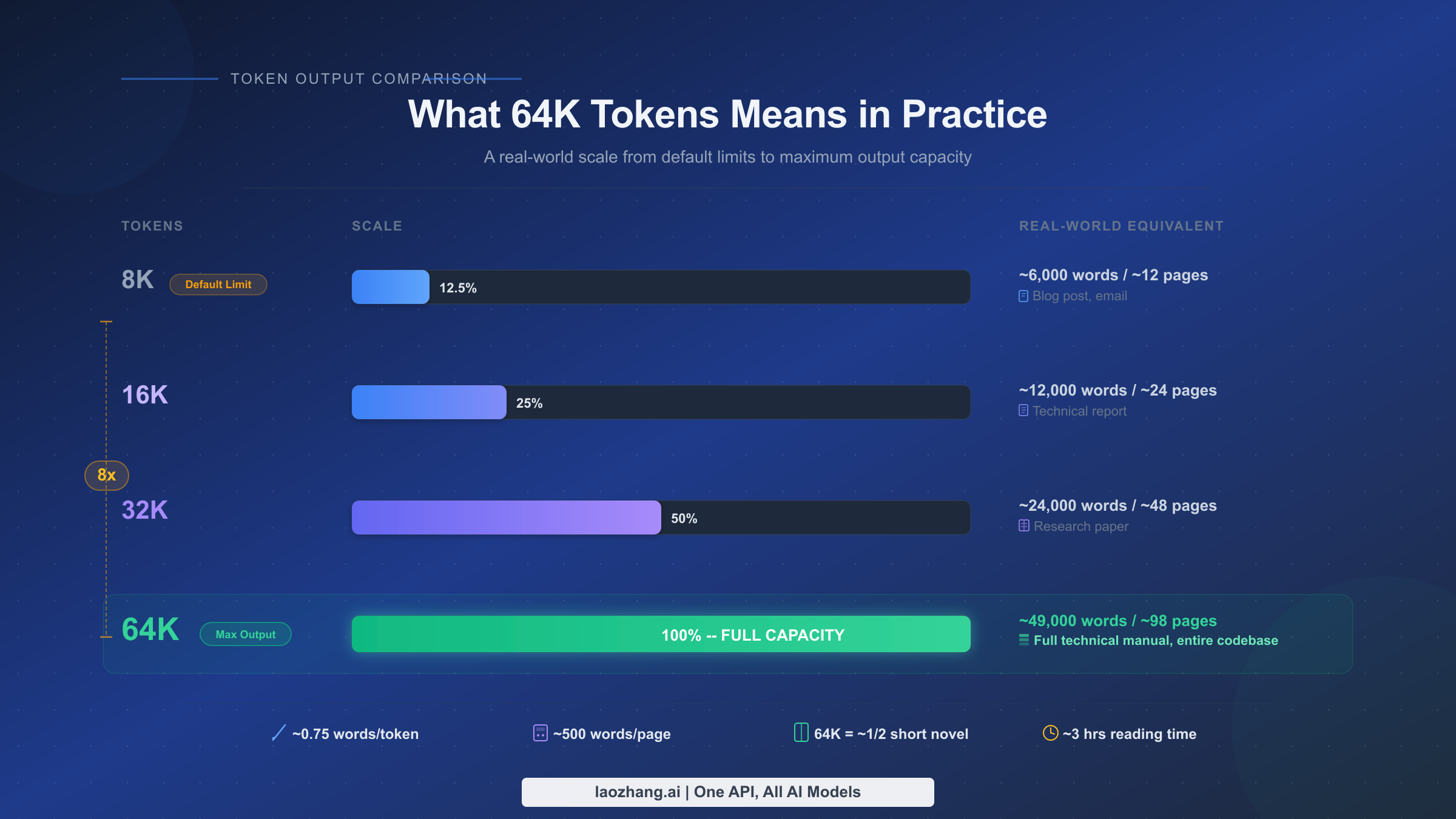
Before diving into API configuration, it helps to understand what 65,536 output tokens actually represents in real-world terms. Token counts do not map directly to word counts because tokenizers split text differently depending on the language and content type. For standard English prose, the Gemini tokenizer produces approximately 1 token per 0.75 words, which means 65,536 tokens translates to roughly 49,000 words. For code, the ratio is different — programming languages tend to use more tokens per line due to special characters, operators, and syntax elements, so you typically get around 40,000 to 45,000 words equivalent of code.
To put these numbers in concrete perspective, consider what you can generate in a single API call at different output sizes. At the default 8,192 token limit, you are working with approximately 6,000 words — enough for a substantial blog post or a short technical document, but not much more. At 16,384 tokens, you double to roughly 12,000 words, which covers a detailed technical report or a comprehensive tutorial with code examples. At 32,768 tokens, you reach approximately 24,000 words, equivalent to a lengthy research paper or a short e-book chapter. And at the full 65,536 token limit, you are generating approximately 49,000 words — the length of a complete technical manual, an entire semester's worth of lecture notes, or a multi-module Python application with comprehensive documentation.
This scale matters enormously for specific use cases where generating content in a single pass produces better results than stitching together multiple shorter responses. When you split a long document across multiple API calls, you lose contextual coherence between sections, you may introduce inconsistencies in terminology or style, and you add complexity to your application's orchestration layer. The 64K output limit eliminates these problems for most long-form generation tasks.
Here are the use cases where Gemini 3.1 Pro's full output capacity provides the most value. Technical documentation generation benefits tremendously because API references, user guides, and integration manuals require consistent formatting and cross-referencing that breaks down when split across calls. Full codebase generation for small-to-medium applications — such as complete CRUD APIs, CLI tools, or data pipelines — can be produced in a single coherent response rather than function-by-function. Legal and compliance document drafting, where consistency of language is legally significant, benefits from single-pass generation. Academic paper and research report writing, where arguments must build logically across thousands of words, gains coherence from the expanded output window. Translation of long documents, where context from early paragraphs informs later choices, works dramatically better with large output budgets.
For developers building production applications, the practical rule of thumb is straightforward: if your expected output is under 6,000 words, the default 8,192 token limit works fine. If you need between 6,000 and 25,000 words, set maxOutputTokens to 32,768. And if you need maximum output capacity for document-scale generation, set it to 65,536 and accept the corresponding latency and cost tradeoffs that come with generating that volume of content.
One important consideration is how Gemini tokenizes different types of content. English text averages around 1 token per 0.75 words, but structured content like JSON, XML, or code with extensive comments can inflate the token count significantly. A 10,000-line Python codebase with docstrings, type annotations, and inline comments might consume 80,000 to 100,000 tokens when measured as output, which exceeds the 65,536 limit. For these cases, you need to structure your generation requests to produce manageable chunks — for example, generating module-by-module rather than attempting the entire codebase in one call. Similarly, languages like Chinese, Japanese, and Korean consume tokens differently than English, with approximately 1 token per 0.6-0.7 characters, which means the effective word-equivalent output is shorter for Asian language generation.
How to Configure maxOutputTokens in the API
The single most important configuration step for unlocking Gemini 3.1 Pro's full output capacity is explicitly setting the maxOutputTokens parameter. Without this, every API call defaults to 8,192 tokens regardless of your prompt's instructions. Here is how to configure it across every major access method.
Python (google-generativeai SDK)
The Google AI Python SDK provides the most straightforward configuration path. You set maxOutputTokens as part of the generation_config parameter when creating the model or calling generate_content:
import google.generativeai as genai

genai.configure(api_key="YOUR_API_KEY")

model = genai.GenerativeModel(
    model_name="gemini-3.1-pro-preview",
    generation_config={
        "max_output_tokens": 65536,
        "temperature": 1.0,
    }
)

response = model.generate_content(
    "Write a comprehensive technical manual for building REST APIs with Python FastAPI."
)

print(f"Output tokens used: {response.usage_metadata.candidates_token_count}")
print(response.text)
Note the use of temperature: 1.0, which is the recommended default for Gemini 3 models. Google's documentation specifically warns that changing the temperature from 1.0 can cause "looping or degraded performance" on complex reasoning tasks — a departure from earlier models where lower temperatures were common for factual outputs.
Node.js (Google AI JavaScript SDK)
const { GoogleGenerativeAI } = require("@google/generative-ai");

const genAI = new GoogleGenerativeAI("YOUR_API_KEY");

const model = genAI.getGenerativeModel({
  model: "gemini-3.1-pro-preview",
  generationConfig: {
    maxOutputTokens: 65536,
    temperature: 1.0,
  },
});

const result = await model.generateContent(
  "Generate a complete Node.js Express application with authentication, CRUD operations, and tests."
);

console.log(`Tokens used: ${result.response.usageMetadata.candidatesTokenCount}`);
console.log(result.response.text());
cURL (Direct REST API)
For direct HTTP calls or when integrating with languages without an official SDK, the REST API accepts maxOutputTokens in the generationConfig object:
curl "https://generativelanguage.googleapis.com/v1beta/models/gemini-3.1-pro-preview:generateContent?key=YOUR_API_KEY" \
  -H "Content-Type: application/json" \
  -d '{
    "contents": [{
      "parts": [{"text": "Write a complete Python data pipeline framework with error handling, logging, and tests."}]
    }],
    "generationConfig": {
      "maxOutputTokens": 65536,
      "temperature": 1.0
    }
  }'
Google AI Studio
If you are prototyping in Google AI Studio rather than coding against the API directly, the output token limit is configured in the right-hand settings panel. Click the gear icon, find "Max output tokens" under the generation settings, and drag the slider or type the value 65536 directly. This setting persists for your session and applies to all subsequent prompts until you change it.
Vertex AI
For enterprise deployments through Google Cloud's Vertex AI, the configuration follows the same pattern but uses the Vertex AI client library:
from google.cloud import aiplatform
from vertexai.generative_models import GenerativeModel, GenerationConfig

model = GenerativeModel("gemini-3.1-pro-preview")

response = model.generate_content(
    "Your prompt here",
    generation_config=GenerationConfig(
        max_output_tokens=65536,
        temperature=1.0,
    )
)
A common mistake developers make is setting maxOutputTokens to a value higher than 65,536, which returns a 400 error from the API. The valid range is 1 to 65,537 (exclusive), so 65,536 is the ceiling. Another frequent error is confusing the maxOutputTokens setting with a guarantee — setting it to 65,536 does not mean the model will always produce 65,536 tokens. The parameter sets the upper bound, and the model may generate fewer tokens if it determines the response is complete. For tasks where you need to maximize output length, your prompt engineering matters as much as the configuration: explicitly request comprehensive, detailed responses and specify the desired output format and length.
Understanding Thinking Tokens and Their Impact on Output
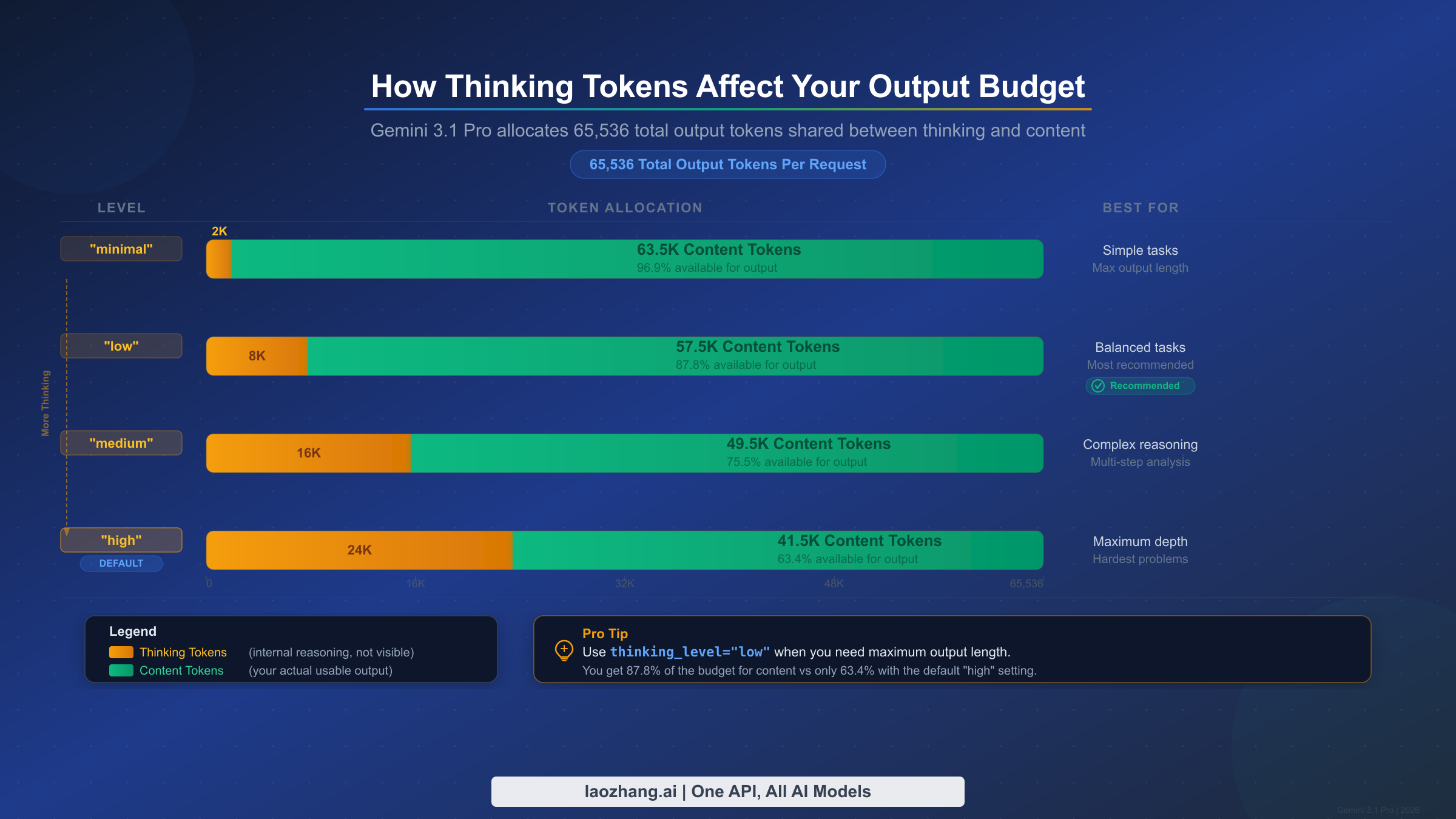
One of the most underappreciated aspects of Gemini 3.1 Pro's output system is how the thinking (reasoning) capability interacts with your output token budget. Gemini 3.1 Pro introduced an expanded thinking system with four levels — minimal, low, medium, and high — and the tokens consumed by the model's internal reasoning process come out of your total output budget. This means that when you set maxOutputTokens to 65,536, you are not necessarily getting 65,536 tokens of visible content. The actual content you receive depends on how many tokens the model spends on its internal reasoning chain.
The thinking_level parameter controls the depth of reasoning the model performs before generating its response. At the "high" level (which is the default), the model allocates a substantial portion of its output budget to internal reasoning. This is excellent for complex tasks like multi-step mathematical proofs, sophisticated code architecture decisions, or nuanced analytical writing, but it means your visible output could be significantly less than the 65,536 token maximum. At the "minimal" level, the model performs the least internal reasoning, which maximizes the tokens available for actual content output. For a detailed guide to Gemini thinking levels, including benchmarks at each level, see our dedicated article.
Here is how each thinking level approximately affects your available content tokens (based on testing with document generation prompts):
| Thinking Level | Approximate Thinking Tokens | Available Content Tokens | Best For |
|---|---|---|---|
| minimal | ~1,000–3,000 | ~62,500–64,500 | Simple formatting, translation, summarization |
| low | ~5,000–10,000 | ~55,500–60,500 | Standard content generation, Q&A |
| medium | ~12,000–20,000 | ~45,500–53,500 | Technical writing, moderate reasoning |
| high (default) | ~18,000–30,000 | ~35,500–47,500 | Complex coding, deep analysis, research |
These numbers are approximate because the model dynamically allocates thinking tokens based on the complexity of each specific prompt. A simple formatting task at the "high" thinking level may still consume fewer thinking tokens than a complex mathematical proof at the "low" level. The thinking system is dynamic by default, meaning the model decides how much reasoning each prompt requires, regardless of the level you set. The thinking_level parameter influences rather than dictates the allocation.
The practical implication is significant for developers building long-form content generation systems. If you are generating a technical manual and need every possible content token, setting thinking_level to "low" or "minimal" is the right choice — the content generation task does not require the deep multi-step reasoning that "high" enables, and you reclaim 15,000 to 25,000 tokens of output capacity. Conversely, if you are asking the model to architect a complex software system or solve a difficult algorithmic problem, the thinking tokens spent at the "high" level directly improve the quality of the shorter output you receive.
You can configure thinking level alongside maxOutputTokens in the same API call:
response = model.generate_content(
    "Write a complete 40,000-word technical manual on Kubernetes deployment.",
    generation_config={
        "max_output_tokens": 65536,
        "temperature": 1.0,
        "thinking_level": "low",  # Maximize content output
    }
)
The thinking tokens are not visible in the model's response text — they are consumed internally and only appear in the usage metadata. You can check how many tokens were used for thinking versus content by examining the response's usage_metadata object, which breaks down token consumption by category.
How Gemini 3.1 Pro Output Compares to Competitors
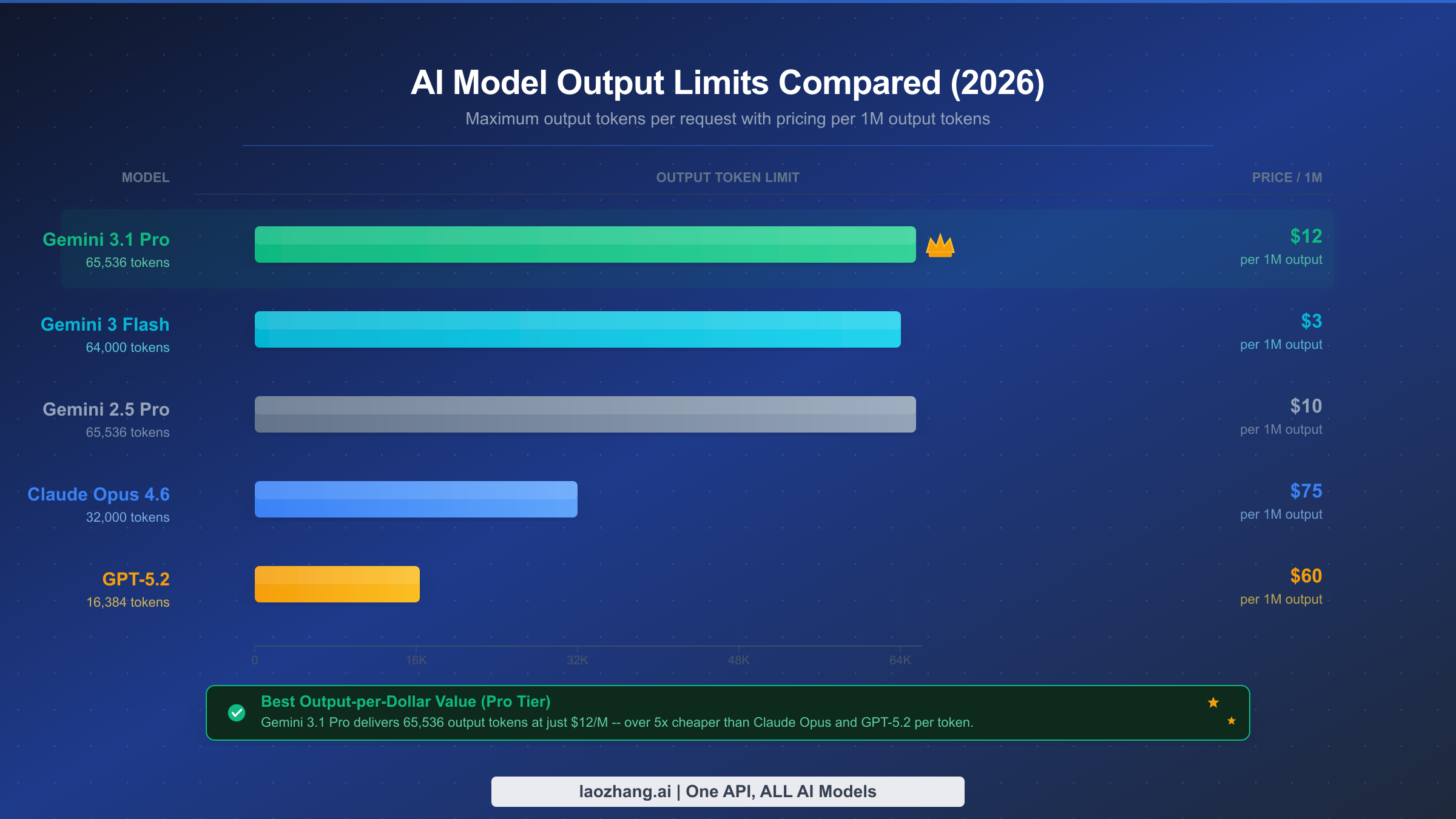
Choosing the right model for long-form generation requires comparing not just output limits but also cost efficiency, quality at high token counts, and practical throughput. As of February 2026, the frontier model landscape offers dramatically different output capabilities, and Gemini 3.1 Pro occupies a distinctive position: it matches or exceeds most competitors on raw output capacity while maintaining significantly lower per-token pricing.
Here is the comprehensive comparison of output token limits across major AI models, verified from official documentation as of February 20, 2026:
| Model | Max Output Tokens | Output Price (per 1M) | Max Output Cost | Context Window |
|---|---|---|---|---|
| Gemini 3.1 Pro | 65,536 | $12.00 | $0.79 | 1M tokens |
| Gemini 3.0 Pro | 65,536 | $12.00 | $0.79 | 1M tokens |
| Gemini 3 Flash | 64,000 | $3.00 | $0.19 | 1M tokens |
| Gemini 2.5 Pro | 65,536 | $10.00 | $0.66 | 1M tokens |
| Claude Opus 4.6 | 32,000 | $75.00 | $2.40 | 200K tokens |
| Claude Sonnet 4.6 | 16,000 | $15.00 | $0.24 | 200K tokens |
| GPT-5.2 | 16,384 | $60.00 | $0.98 | 128K tokens |
Several patterns emerge from this comparison. Gemini models dominate the output capacity column, with three different models (3.1 Pro, 3.0 Pro, and 2.5 Pro) all offering 65,536 tokens. This is not coincidental — Google has consistently invested in long-output capabilities as a differentiator. By contrast, Claude Opus 4.6 caps at 32,000 tokens (roughly half of Gemini's maximum) and GPT-5.2 is limited to 16,384 tokens (roughly a quarter).
The cost efficiency comparison is equally striking. Generating a maximum-length response with Gemini 3.1 Pro costs $0.79, while the same operation with Claude Opus 4.6 would cost $2.40 for half the tokens. GPT-5.2 costs $0.98 for a quarter of the tokens. For production workloads that require substantial output volume — such as batch document generation, automated report writing, or code generation pipelines — the cost difference at scale becomes enormous. Processing 1,000 maximum-output requests would cost $790 with Gemini 3.1 Pro versus $2,400 with Claude Opus 4.6.
However, raw output capacity is not the only factor. Claude Opus 4.6 achieves a marginally higher score on SWE-Bench Verified (80.8% vs. 80.6%) and some developers report preferring its output style for certain types of prose writing. GPT-5.2, despite its lower output cap, excels at specific structured output tasks and has a mature function-calling ecosystem. The right choice depends on your specific use case: if maximum output length and cost efficiency are primary requirements, Gemini 3.1 Pro is the clear leader. If you need the highest reasoning quality for shorter outputs and budget is not a constraint, Claude Opus 4.6 remains competitive.
For developers who need to access multiple models through a single API endpoint — switching between Gemini for long outputs and Claude for specialized tasks — aggregator platforms like laozhang.ai provide a unified interface that simplifies multi-model workflows without managing separate API keys and billing accounts for each provider.
For a more detailed head-to-head comparison between Gemini 3.1 Pro and Claude Opus 4.6 across benchmarks, coding tasks, and real-world use cases, see our dedicated analysis.
Cost Optimization Strategies for Large Outputs
Generating long outputs with Gemini 3.1 Pro is powerful, but costs can accumulate quickly in production workloads. At $12 per million output tokens, a single 65,536-token response costs $0.79. For applications that process hundreds or thousands of requests daily, understanding and optimizing these costs is essential.
The first and most impactful optimization strategy is right-sizing your maxOutputTokens parameter for each request type. Many developers set maxOutputTokens to 65,536 for all requests as a "safe" default, but this wastes money when the model generates shorter responses that trigger billing for the full output. The more efficient approach is to categorize your request types and assign appropriate limits: 8,192 for chatbot responses and quick summaries, 16,384 for standard content generation, 32,768 for detailed technical documents, and 65,536 only for tasks that genuinely require maximum output capacity.
The second major optimization lever is the thinking level. As discussed in the previous section, higher thinking levels consume more output tokens internally, which means you are paying for reasoning tokens that never appear in your response. For straightforward generation tasks like formatting, translation, or templated content, setting thinking_level to "minimal" or "low" reduces the total tokens consumed per request by 15,000 to 25,000 tokens, potentially saving $0.18 to $0.30 per request. Over thousands of daily requests, this adds up significantly.
Context caching is the third optimization strategy and is particularly valuable for applications that repeatedly process similar prompts. If you are generating multiple documents based on the same template, style guide, or reference material, you can cache the shared context and pay only $0.50 per million cached input tokens per hour instead of re-sending the full context with each request. For a complete walkthrough of this technique, see our guide on context caching to reduce API costs.
The Batch API provides the fourth cost reduction opportunity. Google offers a 50% discount on all token costs when you submit requests through the Batch API instead of the real-time API. For workloads where latency is not critical — such as overnight document generation, weekly report compilation, or batch translation jobs — switching to the Batch API cuts your output cost from $12 to $6 per million tokens, bringing the cost of a maximum-output response down to approximately $0.39.
Here is a cost comparison table for common production scenarios, based on the complete Gemini API pricing guide:
| Scenario | Output Tokens | Real-time Cost | Batch API Cost | Monthly (1K req/day) |
|---|---|---|---|---|
| Chat response | 2,000 | $0.024 | $0.012 | $720 / $360 |
| Blog post | 8,192 | $0.098 | $0.049 | $2,940 / $1,470 |
| Technical doc | 32,768 | $0.393 | $0.197 | $11,790 / $5,895 |
| Full manual | 65,536 | $0.786 | $0.393 | $23,580 / $11,790 |
The fifth strategy is choosing the right model within the Gemini family. Gemini 3 Flash offers 64,000 output tokens at only $3 per million — four times cheaper than Gemini 3.1 Pro. For tasks that require long output but not the highest reasoning capability, such as straightforward document expansion, translation, or format conversion, Flash provides comparable output length at a fraction of the cost. Reserve Gemini 3.1 Pro for tasks that genuinely benefit from its superior reasoning: complex analysis, sophisticated code generation, and multi-step problem solving.
A practical cost optimization workflow for a production document generation system might look like this: first, use Gemini 3.1 Pro with high thinking to generate the outline and key analytical sections (where reasoning quality matters most), then switch to Gemini 3 Flash with maxOutputTokens set to 64,000 for expanding each section into full prose (where output volume matters more than reasoning depth). This hybrid approach can reduce your overall costs by 60-70% compared to using Gemini 3.1 Pro for the entire pipeline, while maintaining high quality where it counts most. The input tokens for each Flash call would include the Pro-generated outline as context, ensuring consistency across the final document.
For teams evaluating the total cost of ownership, remember that output tokens are typically 6x more expensive than input tokens for Gemini 3.1 Pro ($12 vs $2 per million). This means that long-output workloads are disproportionately affected by output pricing. Any strategy that reduces unnecessary output — whether through better prompt engineering that avoids repetitive content, thinking level optimization, or model selection — has an outsized impact on your bill.
Troubleshooting Output Truncation and Common Issues
Output truncation is the most frequently reported issue when working with Gemini 3.1 Pro's large output capacity. Understanding the common causes and their fixes saves hours of debugging and prevents frustration when building production applications. Here is a systematic guide to diagnosing and resolving output truncation, based on the most common patterns reported in the developer community and documented in Google's official forums.
The default maxOutputTokens is 8,192, not 65,536. This is by far the most common cause of unexpected truncation. If you have not explicitly set maxOutputTokens in your generationConfig, every response will be capped at approximately 6,000 words regardless of your prompt. The fix is straightforward: always set maxOutputTokens explicitly for any request where you expect a long response. As documented in the Gemini API rate limits guide, the default limits apply at every tier level, and upgrading your billing tier does not change the default output tokens — you must always configure this parameter yourself.
Thinking tokens are consuming your output budget. When using the default "high" thinking level, the model may allocate 20,000 or more tokens to internal reasoning, leaving only 40,000–45,000 tokens for visible content. If you are expecting close to 65,000 tokens of content but receiving substantially less, check whether your thinking level is appropriate for the task. Setting thinking_level: "low" for content generation tasks can recover a significant portion of your output budget.
The model determined the response was complete. Setting maxOutputTokens to 65,536 does not force the model to generate that many tokens — it sets the upper limit. If the model believes it has fully addressed your prompt in 30,000 tokens, it will stop there. To encourage longer output, be explicit in your prompt: specify the desired word count, request comprehensive coverage of subtopics, or structure your prompt as a multi-section document outline that naturally requires more content.
Rate limiting is truncating your response. If you are on the free tier or a low-paid tier, rate limits may cause responses to terminate early during high-demand periods. Google's free tier imposes relatively strict limits (5–15 RPM depending on the model, with daily request caps). If you experience consistent truncation during peak hours but not during off-peak times, rate limiting is likely the cause. Upgrading to Tier 1 (which begins after $50 of cumulative spend) significantly increases your RPM allocation and reduces the likelihood of demand-related truncation.
Network timeouts are cutting off long responses. Generating 65,536 tokens takes considerable time — early testing by Simon Willison reported response times of 100 to 300+ seconds for complex outputs. If your HTTP client, load balancer, or proxy has a default timeout shorter than the response generation time, the connection may close before the response completes. For maximum-length outputs, set your HTTP client timeout to at least 600 seconds (10 minutes) and configure any intermediate proxies accordingly.
Safety filters are blocking or truncating content. Gemini's safety filters may truncate responses that contain content the system classifies as potentially harmful, even when the content is legitimate. The default safety setting is BLOCK_MEDIUM_AND_ABOVE, which is appropriate for most applications but can interfere with content generation in domains like medical writing, legal analysis, or fiction that involves conflict. You can adjust safety settings per request, but exercise caution and review Google's acceptable use policies.
If you have verified all of the above and are still experiencing truncation, examine the finishReason field in the API response. A finishReason of STOP indicates the model chose to stop, MAX_TOKENS indicates the output limit was reached, SAFETY indicates content was blocked, and OTHER indicates an unexpected termination that may warrant a retry.
Here is a diagnostic code snippet that checks all common truncation causes:
response = model.generate_content("Your prompt here")

# Check finish reason
finish_reason = response.candidates[0].finish_reason
print(f"Finish reason: {finish_reason}")

# Check token usage
metadata = response.usage_metadata
print(f"Output tokens: {metadata.candidates_token_count}")
print(f"Total tokens: {metadata.total_token_count}")

# Diagnose truncation
if finish_reason == "MAX_TOKENS":
    print("Output hit token limit - increase maxOutputTokens")
elif finish_reason == "SAFETY":
    print("Safety filter triggered - review content or adjust settings")
elif finish_reason == "STOP" and metadata.candidates_token_count < 1000:
    print("Model stopped early - improve prompt specificity")
The "lost in the middle" phenomenon is causing incomplete outputs. For prompts with very long input contexts (hundreds of thousands of tokens), the model may lose track of instructions placed in the middle of the input. Google's own documentation acknowledges this limitation. The workaround is to place your most critical instructions — including output length requirements and format specifications — at both the beginning and the end of your prompt. This redundancy helps the model maintain focus on your output requirements even when processing large context windows.
Getting Started with Gemini 3.1 Pro
Putting everything in this guide into practice requires just a few minutes of setup. Start by obtaining a Gemini API key from Google AI Studio, where you can experiment with Gemini 3.1 Pro at no cost on the free tier. The free tier provides limited requests per minute and per day, but it is sufficient for testing and prototyping your output configuration before committing to a paid plan.
Here is the minimal code to get started with maximum output from Gemini 3.1 Pro:
import google.generativeai as genai

genai.configure(api_key="YOUR_API_KEY")

model = genai.GenerativeModel(
    model_name="gemini-3.1-pro-preview",
    generation_config={
        "max_output_tokens": 65536,
        "temperature": 1.0,
        "thinking_level": "low",  # Maximize content output
    }
)

response = model.generate_content("Your detailed prompt here")

# Check token usage
metadata = response.usage_metadata
print(f"Input tokens: {metadata.prompt_token_count}")
print(f"Output tokens: {metadata.candidates_token_count}")
print(f"Total tokens: {metadata.total_token_count}")
For production deployments, remember these key principles from this guide. Always set maxOutputTokens explicitly — never rely on the default 8,192 limit. Match thinking_level to task complexity to optimize the balance between reasoning quality and output length. Use the Batch API for non-real-time workloads to cut costs by 50%. Monitor your token usage through the response metadata to detect unexpected truncation early. And consider an API aggregator like laozhang.ai if you need seamless access to Gemini alongside Claude and GPT models through a unified endpoint — this is particularly valuable when you want to route long-output tasks to Gemini and specialized tasks to other models without managing multiple API integrations.
The model ID you should use is gemini-3.1-pro-preview for the standard model and gemini-3.1-pro-preview-customtools for enhanced tool-calling performance. Both are currently in preview, meaning Google may make changes to behavior and capabilities before the general availability release. Keep this in mind when building production systems — pin your model version and test thoroughly before upgrading. Also note that "thought signatures" are required for multi-turn conversations with function calling: the encrypted reasoning context must be passed back in subsequent turns, and missing signatures will result in a 400 error.
Gemini 3.1 Pro's 64K output capability represents a genuine step forward for AI-powered long-form content generation. The model does not just produce more tokens — it produces better tokens, with benchmark improvements of 77.1% on ARC-AGI-2 reasoning, 80.6% on SWE-Bench coding tasks, and Elo 2,887 on competitive coding. Whether you are building document generation pipelines, automated coding assistants, or research tools that require comprehensive output, configuring and optimizing the output limit is the foundation for getting the most value from this model.