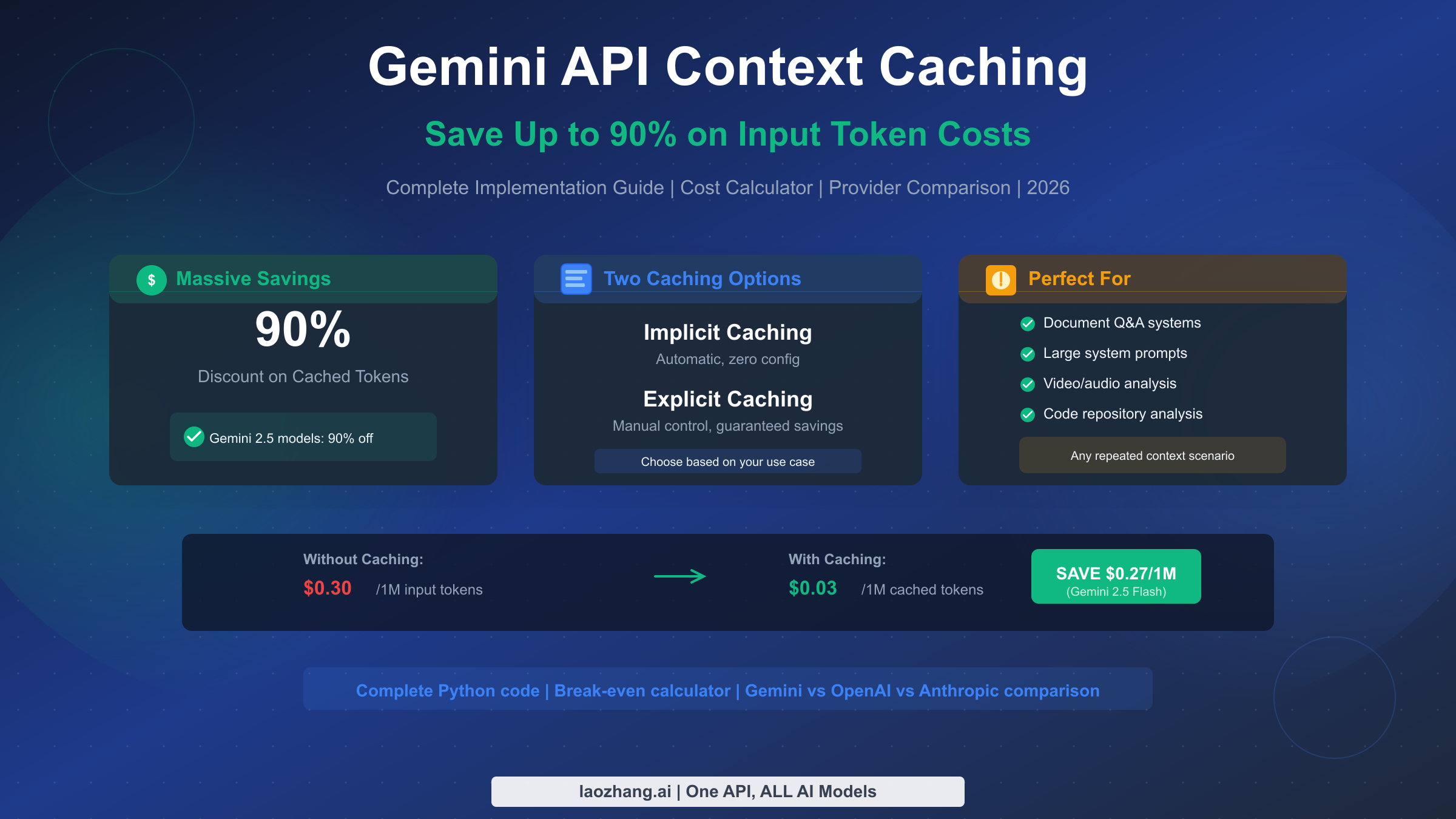
Context caching in Gemini API lets you save up to 90% on input token costs by storing frequently used content once and referencing it across multiple requests. Instead of paying full price every time you send the same document, system prompt, or media file, you pay reduced rates for cached tokens. With Gemini 2.5 models offering 90% discounts on cached reads and implicit caching now enabled by default since May 2025, this feature has become essential for any cost-conscious Gemini API user.
This guide goes beyond basic tutorials to provide what most resources miss: a complete cost calculator to determine when caching actually saves money, production-ready Python code with error handling, and a comprehensive comparison of caching approaches across Gemini, OpenAI, and Anthropic. Whether you're building a document Q&A system, processing video content, or optimizing API costs for a production application, you'll find actionable guidance tailored to real-world scenarios.
What is Context Caching and Why It Matters for Your API Costs
Every time you call the Gemini API with a large document, lengthy system prompt, or media file, you pay for those input tokens at the full rate. If you're making multiple queries against the same content—which is common in chatbots, document analysis systems, and interactive applications—you're essentially paying for the same tokens over and over again. Context caching solves this by letting you upload content once, cache the processed tokens, and reference that cache for subsequent requests at drastically reduced rates.
The Gemini API offers two distinct caching mechanisms, each suited to different use cases. Understanding the difference is crucial for choosing the right approach and maximizing your cost savings.
Implicit caching operates automatically with zero configuration required. When enabled (which it is by default on most Gemini models since May 2025), Google's infrastructure automatically detects when your requests contain repeated content prefixes and applies caching opportunistically. You don't need to change any code—the system handles everything behind the scenes. The trade-off is that you don't have guaranteed savings; you receive discounts only when the system determines a cache hit occurred. For applications with naturally repetitive patterns, this can provide meaningful savings with no development effort.
Explicit caching gives you full control over the caching lifecycle. You manually create caches for specific content, set custom time-to-live (TTL) values, and receive guaranteed discounts on every request that references your cache. This approach requires code changes but delivers predictable, consistent savings. For production applications where cost predictability matters, explicit caching is typically the better choice despite the additional implementation complexity.
The potential savings are substantial. On Gemini 2.5 models, cached token reads cost 90% less than standard input tokens. On Gemini 2.0 models, the discount is 75%. These aren't marginal improvements—for applications processing large contexts repeatedly, caching can transform API costs from prohibitive to manageable.
The Economics: When Context Caching Actually Saves Money
Before implementing context caching, you need to determine whether it will actually reduce your costs. This isn't always obvious because explicit caching involves storage costs that can exceed your savings in certain scenarios. Let's work through the math with real Gemini pricing.
The fundamental trade-off is query frequency versus storage cost. With explicit caching, you pay storage fees based on how long you keep the cache alive (the TTL) and how many tokens you cache. If you query the cached content frequently enough during that period, the savings on input tokens exceed the storage costs. If you don't query frequently enough, you lose money.
Here's the formula for calculating your break-even point with Gemini 2.5 Flash:
Standard input cost per query = (tokens / 1,000,000) × $0.30
Cached input cost per query = (tokens / 1,000,000) × $0.03  (90% discount)
Savings per query = $0.27 per million tokens
Storage cost per hour = (tokens / 1,000,000) × $1.00

Break-even queries per hour = Storage cost / Savings per query
                            = $1.00 / $0.27
                            = ~3.7 queries per hour per million tokens
This means if you're caching 1 million tokens with a 1-hour TTL, you need at least 4 queries during that hour to break even. Anything beyond that is pure savings. Let's see how this plays out in three realistic scenarios.
Scenario 1: Single developer testing (1 user, 15 queries/day)
For a single user querying a 50,000-token knowledge base 15 times per day:
Without caching: 15 queries × 50K tokens × $0.30/1M = $0.225/day
With caching (assuming 8-hour active development, 1-hour TTL refreshed 8 times):
- Storage: 8 hours × 50K tokens × $1.00/1M = $0.40/day
- Queries: 15 × 50K tokens × $0.03/1M = $0.0225/day
- Total: $0.4225/day
Result: Caching costs 88% more. For single-user, low-volume scenarios, explicit caching doesn't make financial sense. Use implicit caching (free, automatic) instead.
Scenario 2: Small team application (10 concurrent users)
For a team of 10 users, each making 15 queries/day against shared 50K-token context:
Without caching: 150 queries × 50K tokens × $0.30/1M = $2.25/day
With caching (single shared cache, 12-hour TTL):
- Storage: 12 hours × 50K tokens × $1.00/1M = $0.60/day
- Queries: 150 × 50K tokens × $0.03/1M = $0.225/day
- Total: $0.825/day
Result: Caching saves 63%. The economics start favoring caching once you have multiple users querying shared content.
Scenario 3: Production application (100+ users)
For a production document Q&A system with 100 users averaging 15 queries/day:
Without caching: 1,500 queries × 50K tokens × $0.30/1M = $22.50/day
With caching (24-hour TTL, continuous availability):
- Storage: 24 hours × 50K tokens × $1.00/1M = $1.20/day
- Queries: 1,500 × 50K tokens × $0.03/1M = $2.25/day
- Total: $3.45/day
Result: Caching saves 85%. At production scale, caching delivers transformative cost reductions.
For a deeper understanding of Gemini API pricing across all models and tiers, see our complete Gemini API pricing guide for 2026.
Complete Python Implementation with Production-Ready Code
Let's move from theory to practice with complete, working Python code. We'll start with a basic example to understand the mechanics, then build a production-ready class with proper error handling, TTL management, and async support.
Basic implementation: Create a cache and query it
This example demonstrates the core workflow—uploading content, creating a cache, and making queries against it:
pythonfrom google import genai
from google.genai.types import CreateCachedContentConfig, GenerateContentConfig
import os

# Initialize the client
client = genai.Client(api_key=os.getenv("GEMINI_API_KEY"))

# Define the model (must include version suffix for caching)
model_id = "gemini-2.5-flash"

# Your large context - could be documentation, code, transcripts, etc.
large_context = """
[Your 50,000+ token document goes here]
This could be API documentation, a codebase, legal documents,
research papers, or any content you'll query repeatedly.
"""

# Create a cache with a 1-hour TTL
cache = client.caches.create(
    model=model_id,
    config=CreateCachedContentConfig(
        display_name="My Documentation Cache",
        system_instruction=(
            "You are an expert assistant helping users understand "
            "the documentation provided. Answer questions accurately "
            "and cite specific sections when relevant."
        ),
        contents=[large_context],
        ttl="3600s",  # 1 hour
    ),
)

print(f"Cache created: {cache.name}")
print(f"Cached tokens: {cache.usage_metadata.total_token_count}")

# Query the cache multiple times - each query costs only 10% of standard
queries = [
    "What are the main features?",
    "How do I authenticate?",
    "What are the rate limits?",
]

for query in queries:
    response = client.models.generate_content(
        model=model_id,
        contents=query,
        config=GenerateContentConfig(cached_content=cache.name),
    )
    print(f"\nQ: {query}")
    print(f"A: {response.text[:200]}...")
    print(f"Cached tokens used: {response.usage_metadata.cached_content_token_count}")

# Clean up when done
client.caches.delete(name=cache.name)
Production-ready implementation with error handling
For real applications, you need proper error handling, automatic TTL extension, and clean resource management. Here's a complete class that handles these concerns:
pythonfrom google import genai
from google.genai.types import (
    CreateCachedContentConfig,
    GenerateContentConfig,
    UpdateCachedContentConfig
)
from google.api_core import exceptions
import os
import time
from datetime import datetime, timezone, timedelta
from typing import Optional, List
import logging

logging.basicConfig(level=logging.INFO)
logger = logging.getLogger(__name__)


class GeminiCachedKnowledgeBase:
    """Production-ready Gemini context caching with lifecycle management."""

    def __init__(
        self,
        api_key: str = None,
        model_id: str = "gemini-2.5-flash",
        default_ttl_seconds: int = 3600
    ):
        self.client = genai.Client(api_key=api_key or os.getenv("GEMINI_API_KEY"))
        self.model_id = model_id
        self.default_ttl = default_ttl_seconds
        self.cache = None
        self.cache_name = None

    def create_cache(
        self,
        content: str,
        system_instruction: str,
        display_name: str = "Knowledge Base",
        ttl_seconds: int = None
    ) -> dict:
        """Create a new cache with the provided content."""
        ttl = ttl_seconds or self.default_ttl

        try:
            self.cache = self.client.caches.create(
                model=self.model_id,
                config=CreateCachedContentConfig(
                    display_name=display_name,
                    system_instruction=system_instruction,
                    contents=[content],
                    ttl=f"{ttl}s",
                ),
            )
            self.cache_name = self.cache.name

            logger.info(f"Cache created: {self.cache_name}")
            logger.info(f"Token count: {self.cache.usage_metadata.total_token_count}")

            return {
                "name": self.cache_name,
                "tokens": self.cache.usage_metadata.total_token_count,
                "expires": self.cache.expire_time
            }

        except exceptions.InvalidArgument as e:
            if "minimum" in str(e).lower():
                raise ValueError(
                    f"Content too small for caching. Minimum is 1,024 tokens "
                    f"for implicit caching or 32,768 for explicit caching. "
                    f"Error: {e}"
                )
            raise

    def query(
        self,
        question: str,
        temperature: float = 0.7,
        max_retries: int = 3
    ) -> dict:
        """Query the cached content with automatic retry on cache expiration."""
        if not self.cache_name:
            raise RuntimeError("No cache available. Call create_cache() first.")

        for attempt in range(max_retries):
            try:
                response = self.client.models.generate_content(
                    model=self.model_id,
                    contents=question,
                    config=GenerateContentConfig(
                        cached_content=self.cache_name,
                        temperature=temperature,
                    ),
                )

                return {
                    "answer": response.text,
                    "cached_tokens": response.usage_metadata.cached_content_token_count,
                    "total_tokens": response.usage_metadata.total_token_count,
                }

            except exceptions.NotFound:
                logger.warning(f"Cache expired or not found (attempt {attempt + 1})")
                if attempt < max_retries - 1:
                    # Cache expired - caller should recreate
                    raise RuntimeError(
                        "Cache has expired. Recreate the cache with create_cache()."
                    )
                raise

            except exceptions.ResourceExhausted:
                wait_time = 2 ** attempt
                logger.warning(f"Rate limited, waiting {wait_time}s")
                time.sleep(wait_time)

        raise RuntimeError("Max retries exceeded")

    def extend_ttl(self, additional_seconds: int = 3600) -> datetime:
        """Extend the cache TTL before it expires."""
        if not self.cache_name:
            raise RuntimeError("No cache to extend.")

        try:
            new_expire = datetime.now(timezone.utc) + timedelta(seconds=additional_seconds)

            self.client.caches.update(
                name=self.cache_name,
                config=UpdateCachedContentConfig(expire_time=new_expire)
            )

            logger.info(f"Cache TTL extended to {new_expire}")
            return new_expire

        except exceptions.NotFound:
            raise RuntimeError("Cache has already expired.")

    def get_cache_info(self) -> dict:
        """Get current cache status and metadata."""
        if not self.cache_name:
            return {"status": "no_cache"}

        try:
            cache = self.client.caches.get(name=self.cache_name)
            return {
                "status": "active",
                "name": cache.name,
                "tokens": cache.usage_metadata.total_token_count,
                "expires": cache.expire_time,
                "created": cache.create_time,
            }
        except exceptions.NotFound:
            return {"status": "expired"}

    def cleanup(self):
        """Delete the cache to stop storage charges."""
        if self.cache_name:
            try:
                self.client.caches.delete(name=self.cache_name)
                logger.info(f"Cache deleted: {self.cache_name}")
            except exceptions.NotFound:
                logger.info("Cache already expired/deleted")
            finally:
                self.cache_name = None
                self.cache = None


# Example usage
if __name__ == "__main__":
    kb = GeminiCachedKnowledgeBase()

    # Load your documentation
    documentation = open("api_docs.txt").read()

    # Create cache
    cache_info = kb.create_cache(
        content=documentation,
        system_instruction="You are a helpful API documentation assistant.",
        display_name="API Docs v2.0"
    )
    print(f"Cache ready: {cache_info}")

    # Make queries
    result = kb.query("How do I authenticate with the API?")
    print(f"Answer: {result['answer']}")
    print(f"Cached tokens used: {result['cached_tokens']}")

    # Extend TTL if needed
    kb.extend_ttl(additional_seconds=7200)

    # Clean up
    kb.cleanup()
Async implementation for high-throughput applications
For applications handling many concurrent requests, here's an async version:
pythonimport asyncio
from google import genai
from google.genai.types import CreateCachedContentConfig, GenerateContentConfig

async def query_with_cache(client, model_id, cache_name, question):
    """Async query against cached content."""
    response = await asyncio.to_thread(
        client.models.generate_content,
        model=model_id,
        contents=question,
        config=GenerateContentConfig(cached_content=cache_name),
    )
    return response.text

async def batch_query(questions: list, cache_name: str):
    """Process multiple questions concurrently."""
    client = genai.Client()
    model_id = "gemini-2.5-flash"

    tasks = [
        query_with_cache(client, model_id, cache_name, q)
        for q in questions
    ]

    return await asyncio.gather(*tasks)
TTL strategy recommendations
Choosing the right TTL depends on your usage pattern. Here are guidelines based on common scenarios:
For interactive sessions (user chatting with documents), set TTL to 30-60 minutes. This covers a typical session while minimizing storage costs during idle periods.
For batch processing (analyzing multiple documents), set TTL to just cover your processing time plus a buffer—perhaps 15-30 minutes. Delete the cache immediately after processing completes.
For always-on services (production APIs serving multiple users), consider 4-12 hour TTLs with automatic renewal. The higher TTL reduces the overhead of cache recreation, and continuous usage ensures you're well above the break-even point.
Decision Framework: Should You Use Context Caching?
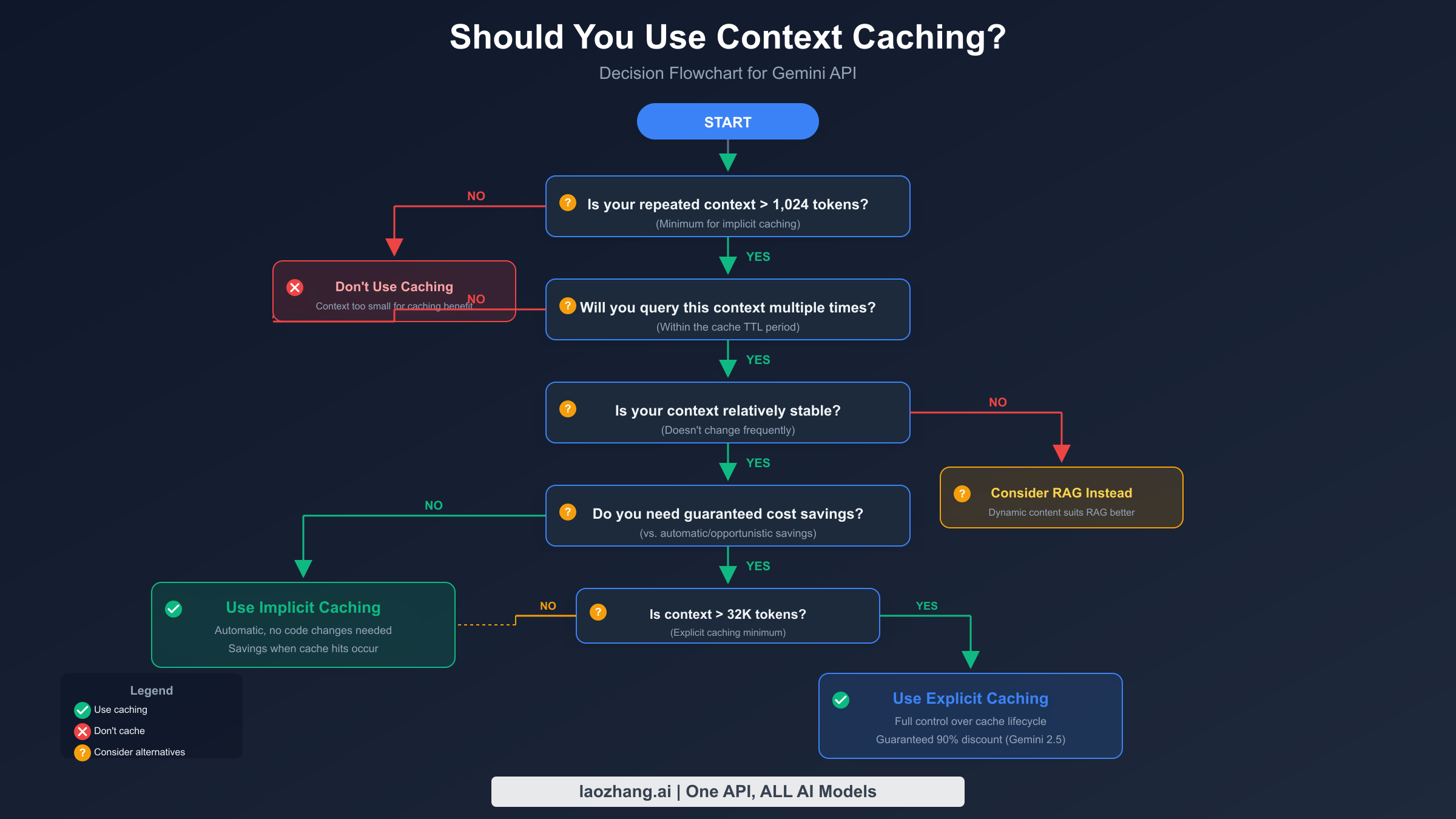
The decision to use context caching—and which type—depends on several factors. This framework will help you make the right choice.
Start with your token count. Implicit caching requires a minimum of 1,024 tokens (for Gemini 2.5 Flash) to 2,048 tokens (for Gemini 2.5 Pro). Explicit caching requires 32,768 tokens minimum. If your repeated context falls below these thresholds, caching won't apply.
Consider your query frequency. As demonstrated in the economics section, you need sufficient query volume to offset storage costs. For explicit caching with Gemini 2.5 Flash, you need roughly 4 queries per hour per million cached tokens to break even. Below this threshold, stick with implicit caching (which has no storage cost) or skip caching entirely.
Evaluate context stability. Caching works best with static or slowly-changing content. If your context changes frequently—say, every few minutes—the overhead of recreating caches may outweigh the benefits. For dynamic content, consider RAG (Retrieval-Augmented Generation) instead, which we'll discuss later.
Determine your need for guaranteed savings. Implicit caching provides savings opportunistically—you get discounts when the system detects cache hits, but there's no guarantee. If cost predictability is important (common in production applications with budgets), explicit caching gives you certainty.
When to use implicit caching: Single-user applications, prototyping, applications with unpredictable usage patterns, contexts under 32K tokens.
When to use explicit caching: Production applications with predictable high volume, large contexts (32K+ tokens), need for guaranteed cost savings, scenarios requiring TTL control.
When to skip caching entirely: One-time document analysis, rapidly changing content, very low query volume, contexts under 1K tokens.
Understanding Gemini API rate limits is also important when designing your caching strategy, as rate limits apply regardless of whether content is cached.
Gemini vs OpenAI vs Anthropic: Caching Comparison
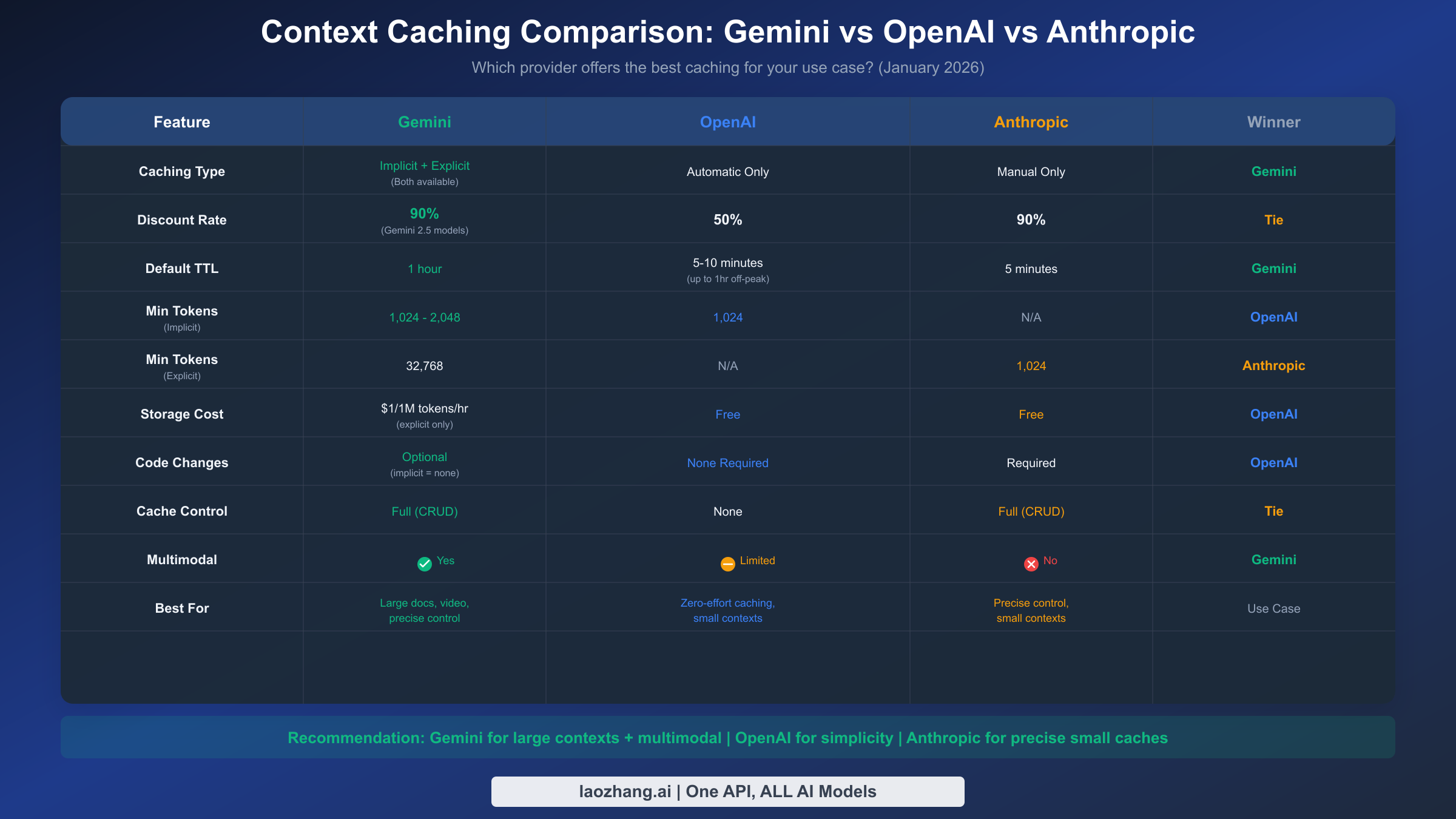
If you're evaluating caching across providers or considering a multi-provider strategy, understanding the differences is essential. Here's how Gemini's approach compares to OpenAI and Anthropic.
Gemini offers the most flexibility with both implicit and explicit options. You can get automatic opportunistic caching with zero code changes, or full manual control with guaranteed discounts. The 90% discount on Gemini 2.5 models ties with Anthropic for the highest savings rate. The main trade-off is storage costs for explicit caching ($1 per million tokens per hour), which other providers don't charge.
OpenAI provides the simplest approach with fully automatic caching. Once your prompt exceeds 1,024 tokens, caching activates automatically with no code changes needed. The discount is lower (50%) but there's no storage cost and no management overhead. The TTL is shorter (5-10 minutes, up to 1 hour during off-peak) and you have no control over cache behavior.
Anthropic requires manual implementation but offers excellent small-context support. With only a 1,024 token minimum for explicit caching (compared to Gemini's 32K minimum for explicit caching), Anthropic works well for smaller contexts. The 90% discount matches Gemini's top rate, and there's no storage cost.
For a detailed pricing comparison, see our Gemini vs OpenAI API pricing comparison.
Choosing based on your use case:
Choose Gemini when you're working with multimodal content (video, audio, PDFs), need very long cache TTLs, want both automatic and manual options, or are already in the Google Cloud ecosystem.
Choose OpenAI when you want zero implementation effort, your contexts are under 32K tokens, you prefer fully automatic behavior, or cost predictability is less important than simplicity.
Choose Anthropic when you need precise cache control with smaller contexts, want no storage fees with manual caching, or Claude's output quality is important for your use case.
Context Caching vs RAG: Which Should You Choose?
Context caching and RAG (Retrieval-Augmented Generation) both help you work with large amounts of information, but they solve different problems. Understanding when to use each—or when to combine them—is crucial for building effective applications.
Context caching is fundamentally about cost optimization for static content. You take a fixed set of content, upload it once, and query it repeatedly at reduced cost. The model sees the entire cached context every time, maintaining full awareness of all information. This works well when your content fits within the model's context window and doesn't change frequently.
RAG is about working with dynamic, large-scale knowledge bases. You chunk your documents, create vector embeddings, store them in a database, and retrieve only relevant portions for each query. This scales to virtually unlimited content sizes and handles updates naturally. The trade-off is added complexity, potential retrieval errors, and the model seeing only selected chunks rather than full context.
Choose context caching when:
Your content fits within the model's context window (up to 1M+ tokens for Gemini 2.5 Pro). Your content is relatively static during user sessions. Users need comprehensive understanding of the entire document. You're optimizing for simplicity and cost with moderate content sizes.
Choose RAG when:
Your knowledge base exceeds model context limits. Content changes frequently and needs real-time updates. You need semantic search across diverse topics. You're building a long-term knowledge system for many users.
Hybrid approaches often work best. Consider caching your system instructions and core documentation while using RAG for user-specific or frequently-updated content. For example, a customer support bot might cache the product manual (static, accessed by everyone) while using RAG to retrieve user-specific order history and recent support tickets.
Best Practices and Common Mistakes
Building on insights from production implementations and the Gemini documentation, here are key practices to follow and pitfalls to avoid.
Structure your prompts for cache efficiency. Both implicit and explicit caching work on prefix matching—your request must start with the cached content. Place stable content (system instructions, reference documents) at the beginning of your prompts, and variable content (user questions, session-specific data) at the end. Rearranging this order breaks cache hits.
Monitor your actual cache hit rates. Don't assume caching is working—verify it. Check the cached_content_token_count field in responses. If this is zero when you expect cache hits, investigate your prompt structure or cache status.
Implement proactive TTL management. Don't wait for caches to expire unexpectedly. Track expiration times and extend TTLs before they lapse, especially for production services. A cache miss during high-load periods can cause significant cost spikes.
Delete caches promptly when finished. Explicit caches continue accruing storage charges until deleted or expired. For batch processing jobs, always clean up caches in a finally block or equivalent error-handling structure.
Common mistakes to avoid:
Forgetting to include model version suffixes (e.g., using "gemini-2.5-flash" instead of the exact version string when required by the SDK version). Always check SDK documentation for exact model naming requirements.
Caching content below the minimum threshold. If you're using explicit caching with content under 32K tokens, your requests will fail. Use implicit caching or pad your content if absolutely necessary.
Assuming cached content can be modified. Once created, cached content is immutable. To update content, you must delete the old cache and create a new one.
Ignoring storage costs in break-even calculations. It's easy to focus on the 90% discount and forget that storage fees can exceed your savings for low-volume use cases.
For access to Gemini and other models through a simplified API interface, consider exploring laozhang.ai, which provides unified access to multiple AI providers including Gemini.
Frequently Asked Questions
How much does Gemini context caching actually cost?
For explicit caching, you pay $1 per million tokens per hour of storage plus the reduced input rate (90% off for Gemini 2.5 models, 75% off for Gemini 2.0). Implicit caching has no storage cost—you only pay reduced rates when cache hits occur. For Gemini 2.5 Flash, cached reads cost $0.03 per million tokens versus $0.30 for uncached.
What's the minimum token count for caching?
For implicit caching: 1,024 tokens (Gemini 2.5 Flash) or 2,048 tokens (Gemini 2.5 Pro). For explicit caching: 32,768 tokens. Content below these thresholds won't be cached.
Can I cache images, videos, or audio?
Yes, Gemini supports multimodal caching. You can cache PDFs, images, video, and audio content. Upload files using the File API first, then include them in your cache creation request.
How long can caches last?
The default TTL is 1 hour, but you can set custom durations. There's no documented maximum TTL. You can extend TTLs before expiration to maintain long-lived caches.
Does caching affect response quality?
No. The model processes cached tokens identically to fresh tokens. Caching is purely a cost and performance optimization.
Can I retrieve cached content?
No, you can only retrieve cache metadata (name, token count, expiration). The actual cached content cannot be read back, only referenced in generation requests.
Is implicit caching available for all Gemini models?
Implicit caching is available for most Gemini models since May 2025. Check the official documentation for your specific model version.
What happens if my cache expires mid-request?
The request will fail with a NotFound error. Implement retry logic that detects this condition and recreates the cache. The production code example above handles this scenario.
If you're interested in exploring free tier options while learning about Gemini, see our guide on free Gemini 2.5 Pro API access.
Context caching represents one of the most impactful cost optimization techniques available for Gemini API users. By understanding the economics, implementing proper cache management, and choosing the right caching approach for your use case, you can reduce API costs by up to 90% while maintaining full functionality. Start with implicit caching to benefit immediately, then graduate to explicit caching as your usage patterns become clear and query volumes justify the additional implementation effort.