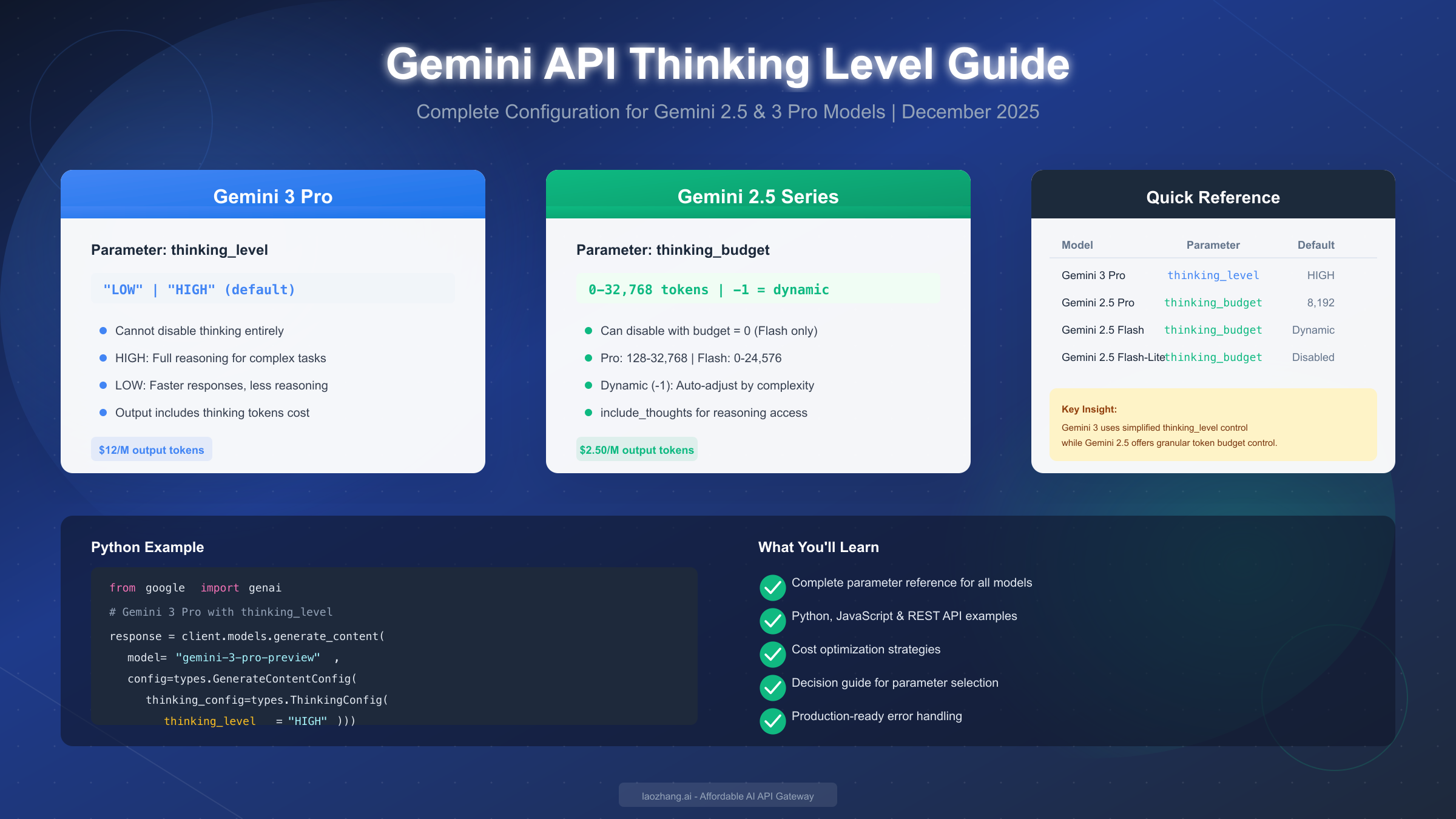
Google's Gemini API introduces powerful thinking capabilities that allow models to reason through complex problems before generating responses. For Gemini 3 Pro, you control this with the thinking_level parameter using values "LOW" or "HIGH" (default). For Gemini 2.5 series models, you use thinking_budget with token ranges from 0 to 32,768 depending on the specific model. As of December 2025, thinking cannot be disabled on Gemini 3 Pro, but can be set to 0 on Gemini 2.5 Flash variants. This comprehensive guide covers all parameters, working code examples in multiple languages, and cost optimization strategies to help you configure thinking mode effectively.
What is Gemini Thinking Mode and Why It Matters
Gemini thinking models represent a significant advancement in AI reasoning capabilities. Unlike standard language models that generate responses token-by-token in a single pass, thinking models perform an internal deliberation process before producing their final output. This deliberation—often called "chain of thought" reasoning—allows the model to break down complex problems, consider multiple approaches, and arrive at more accurate conclusions.
The thinking process works by allocating additional computational resources to analyze your prompt before generating a response. When you send a request to a thinking-enabled Gemini model, it first processes your input through its reasoning system, generating internal "thought" tokens that help it understand the problem better. These thought tokens are not directly visible in the response by default, but you can access summaries of the model's reasoning process through the include_thoughts parameter.
Understanding when to enable thinking—and at what intensity—is crucial for optimizing both response quality and costs. For simple factual queries or straightforward text generation, thinking may add unnecessary latency and expense. However, for complex mathematical problems, multi-step coding tasks, or nuanced analytical questions, the enhanced reasoning capabilities can dramatically improve output quality.
The practical implications are significant. According to Google's benchmarks, Gemini 2.5 Flash with thinking enabled performs strongly on LMArena's Hard Prompts benchmark, ranking second only to Gemini 2.5 Pro among publicly available models. This makes proper configuration of thinking parameters essential for developers who want to leverage these capabilities while managing costs effectively. If you're just getting started with Google's AI platform, you may want to first review our Gemini API key guide for setup instructions before diving into thinking configuration.
Complete Parameter Reference for All Models
The Gemini API uses two distinct parameter systems for controlling thinking behavior, depending on which model generation you're using. This section provides a complete reference table to eliminate any confusion about which parameter to use with which model.
| Model | Parameter | Type | Valid Range | Default | Can Disable |
|---|---|---|---|---|---|
| Gemini 3 Pro | thinking_level | Enum | "LOW", "HIGH" | "HIGH" | No |
| Gemini 3 Pro Image | thinking_level | Enum | "LOW", "HIGH" | "HIGH" | No |
| Gemini 2.5 Pro | thinking_budget | Integer | 128-32,768 | 8,192 | No |
| Gemini 2.5 Flash | thinking_budget | Integer | 0-24,576 | Dynamic (-1) | Yes (0) |
| Gemini 2.5 Flash-Lite | thinking_budget | Integer | 512-24,576 | Disabled (0) | Yes (0) |
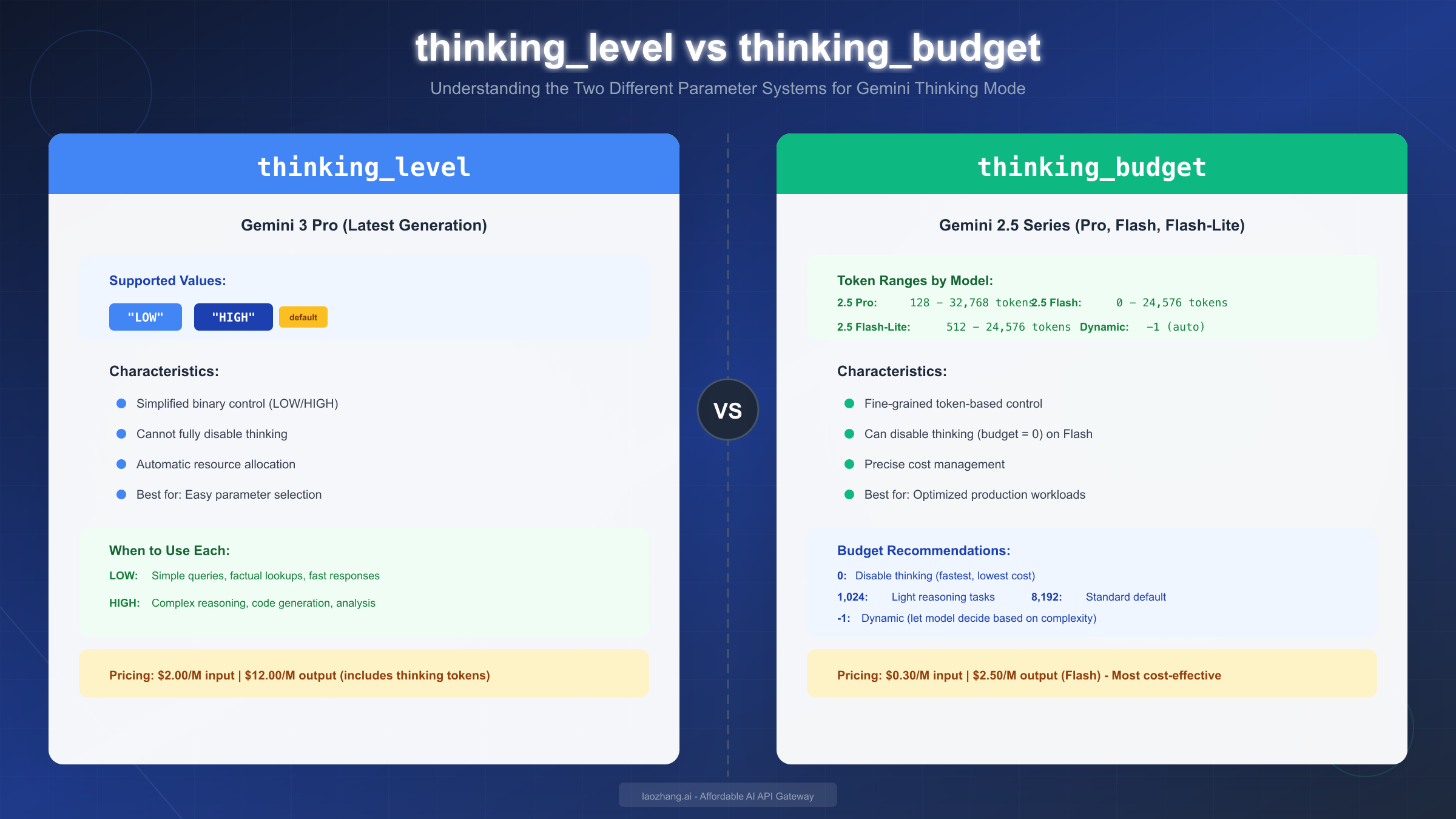
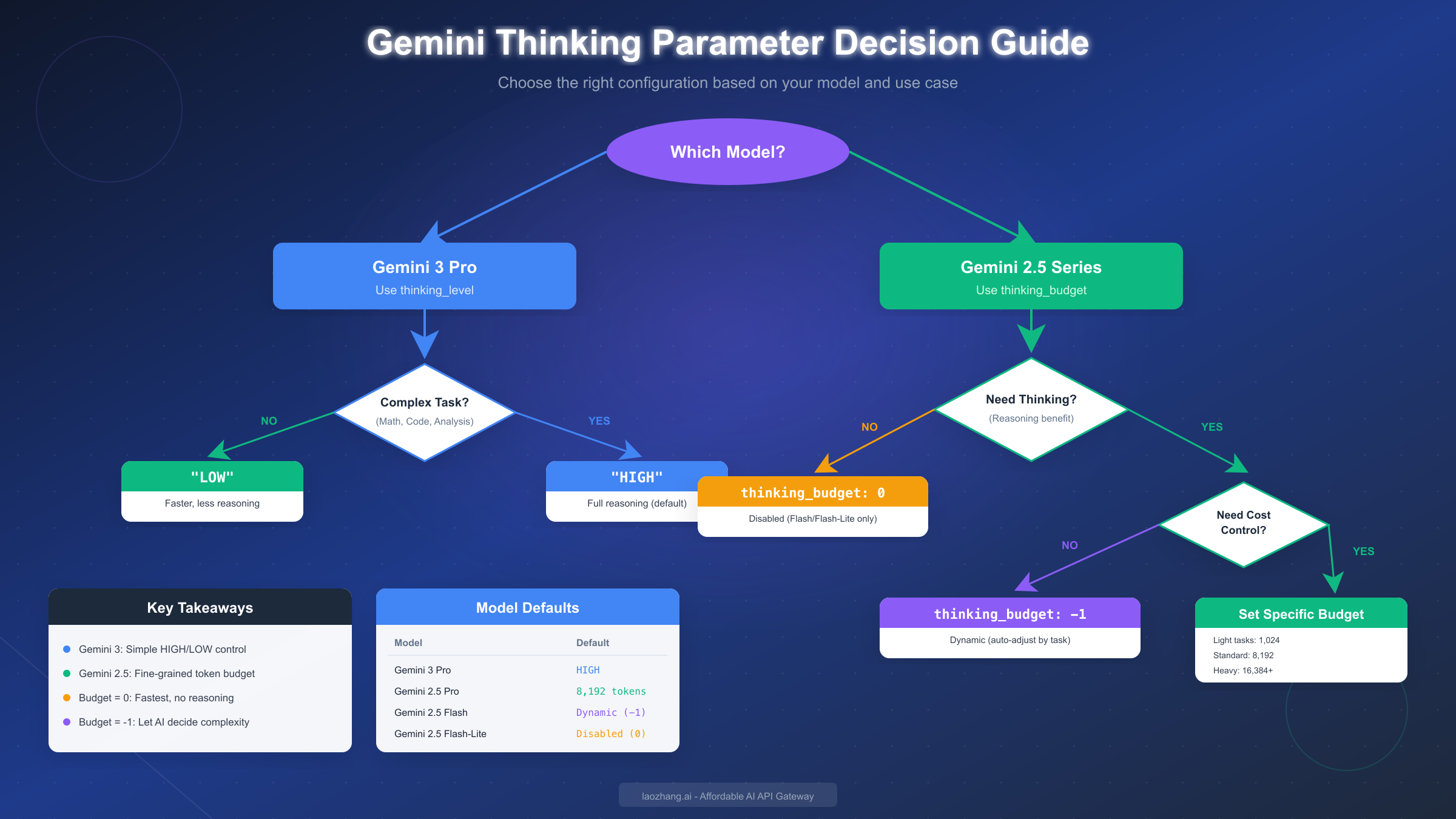
Critical distinction: You cannot use thinking_level with Gemini 2.5 models, nor can you use thinking_budget with Gemini 3 models. The API will return an error if you mix parameters incorrectly.
The thinking_budget parameter accepts a special value of -1 which enables dynamic budgeting. When set to -1, the model automatically adjusts its thinking effort based on the perceived complexity of your request. This is often the best choice for production applications where you want the model to use minimal thinking for simple queries while investing more resources in complex ones. The model won't necessarily use the full budget you allocate—it intelligently determines how much reasoning is actually needed.
For developers using API gateway services like laozhang.ai, these parameters work identically through the proxy endpoint, allowing you to access all Gemini thinking features with the same configuration syntax while benefiting from cost savings and unified billing across multiple AI providers.
Gemini 3 Pro: Configuring thinking_level
Gemini 3 Pro represents Google's latest and most capable model, described as "the best model in the world for multimodal understanding" according to official documentation. The thinking system in Gemini 3 has been simplified compared to the 2.5 series, using a binary thinking_level parameter instead of granular token budgets.
The thinking_level parameter accepts exactly two values:
LOW constrains the model to use fewer tokens for its internal reasoning process. This setting is designed for simpler tasks where you want faster responses and lower costs, but still want some level of enhanced reasoning beyond what a non-thinking model would provide. Use LOW for tasks like basic summarization, simple question answering, or straightforward text transformation.
HIGH (the default) allows the model to engage in extensive reasoning for complex tasks. This is the recommended setting for mathematical problems, code generation, logical analysis, and any task requiring multi-step reasoning. The model will use as many internal thinking tokens as it determines necessary to solve the problem effectively.
An important limitation to understand: you cannot completely disable thinking on Gemini 3 Pro. Even with thinking_level: "LOW", the model will still perform some internal reasoning. If you need to completely eliminate thinking overhead for maximum speed, you'll need to use a Gemini 2.5 Flash model with thinking_budget: 0 instead.
Here's a complete Python example showing how to configure thinking_level for Gemini 3 Pro:
pythonfrom google import genai
from google.genai import types

# Initialize client with your API key
client = genai.Client(api_key="YOUR_API_KEY")

# Configure HIGH thinking for complex reasoning
response = client.models.generate_content(
    model="gemini-3-pro-preview",
    contents="Solve this step by step: A train leaves Station A at 9:00 AM traveling at 60 mph. Another train leaves Station B at 10:00 AM traveling at 80 mph toward Station A. If the stations are 280 miles apart, when and where do the trains meet?",
    config=types.GenerateContentConfig(
        thinking_config=types.ThinkingConfig(
            thinking_level="HIGH"
        )
    )
)

print(response.text)

# For simpler tasks, use LOW thinking
simple_response = client.models.generate_content(
    model="gemini-3-pro-preview",
    contents="Summarize this text in one sentence: [your text here]",
    config=types.GenerateContentConfig(
        thinking_config=types.ThinkingConfig(
            thinking_level="LOW"
        )
    )
)
The JavaScript/TypeScript configuration follows a similar pattern using the @google/genai npm package:
javascriptimport { GoogleGenerativeAI } from "@google/genai";

const genAI = new GoogleGenerativeAI("YOUR_API_KEY");

const model = genAI.getGenerativeModel({
  model: "gemini-3-pro-preview",
  generationConfig: {
    thinkingConfig: {
      thinkingLevel: "HIGH"
    }
  }
});

const result = await model.generateContent(
  "Explain the mathematical proof for why there are infinitely many prime numbers."
);
console.log(result.response.text());
For more details on Gemini 3's complete capabilities including multimodal features and pricing, see our comprehensive Gemini 3 API guide.
Gemini 2.5 Series: Configuring thinking_budget
The Gemini 2.5 series offers more granular control over thinking through the thinking_budget parameter, which specifies the maximum number of tokens the model can use for internal reasoning. This token-based approach gives developers precise control over the cost-quality tradeoff.
Understanding the token budget ranges:
Each model in the 2.5 series has different valid ranges reflecting their capabilities and intended use cases. Gemini 2.5 Pro, designed for the most demanding reasoning tasks, supports budgets from 128 to 32,768 tokens with a default of 8,192. Gemini 2.5 Flash, the balanced price-performance option, accepts 0 to 24,576 tokens and defaults to dynamic allocation (-1). Gemini 2.5 Flash-Lite, optimized for speed and cost, ranges from 512 to 24,576 tokens but defaults to disabled (0).
The dynamic budget option (-1) is particularly powerful. When you set thinking_budget: -1, the model automatically assesses the complexity of each request and allocates thinking resources accordingly. A simple factual query might use minimal thinking tokens, while a complex code debugging task might use several thousand. This approach often provides the best balance between response quality and cost efficiency because you're not paying for unnecessary thinking on simple requests.
Disabling thinking entirely is possible on Flash and Flash-Lite models by setting thinking_budget: 0. This produces the fastest responses at the lowest cost, essentially making the model behave like a traditional non-thinking LLM. This setting is ideal for high-throughput applications where latency is critical and tasks don't require complex reasoning.
Accessing the model's thought process is available through the include_thoughts parameter. When enabled, the API response includes a summary of the model's reasoning steps, which can be valuable for debugging, auditing AI decisions, or building applications where transparency is important.
pythonfrom google import genai
from google.genai import types

client = genai.Client(api_key="YOUR_API_KEY")

# Gemini 2.5 Pro with specific thinking budget
response = client.models.generate_content(
    model="gemini-2.5-pro",
    contents="Write a Python function to find all prime factors of a number, with detailed comments explaining the algorithm.",
    config=types.GenerateContentConfig(
        thinking_config=types.ThinkingConfig(
            thinking_budget=16384,  # Higher budget for complex task
            include_thoughts=True   # See the model's reasoning
        )
    )
)

print("Response:", response.text)
if response.candidates[0].thoughts:
    print("Thought Summary:", response.candidates[0].thoughts)

# Gemini 2.5 Flash with dynamic budget (recommended default)
flash_response = client.models.generate_content(
    model="gemini-2.5-flash",
    contents="What is the capital of France?",
    config=types.GenerateContentConfig(
        thinking_config=types.ThinkingConfig(
            thinking_budget=-1  # Let model decide
        )
    )
)

# Gemini 2.5 Flash-Lite with thinking disabled for speed
lite_response = client.models.generate_content(
    model="gemini-2.5-flash-lite",
    contents="Translate 'Hello' to Spanish",
    config=types.GenerateContentConfig(
        thinking_config=types.ThinkingConfig(
            thinking_budget=0  # No thinking, maximum speed
        )
    )
)
For developers interested in exploring the free tier limits and rate restrictions for Gemini 2.5 models, our Gemini 2.5 Pro free API limits guide provides detailed information on quotas and best practices.
Code Examples: Python, JavaScript, and REST API
This section provides production-ready code examples for all major platforms and languages. Each example includes proper error handling and demonstrates best practices for working with Gemini thinking parameters.
Python SDK Examples
The Python SDK (google-genai) provides the most straightforward integration. Here's a comprehensive example that handles multiple scenarios:
pythonfrom google import genai
from google.genai import types
import os

# Initialize client from environment variable (recommended)
client = genai.Client(api_key=os.environ.get("GEMINI_API_KEY"))

def generate_with_thinking(
    prompt: str,
    model: str = "gemini-2.5-flash",
    thinking_budget: int = -1,
    include_thoughts: bool = False
) -> dict:
    """
    Generate content with configurable thinking parameters.

    Args:
        prompt: The input prompt
        model: Model identifier
        thinking_budget: Token budget (-1 for dynamic, 0 to disable)
        include_thoughts: Whether to return thought summaries

    Returns:
        Dictionary with response text and optional thoughts
    """
    try:
        config = types.GenerateContentConfig(
            thinking_config=types.ThinkingConfig(
                thinking_budget=thinking_budget,
                include_thoughts=include_thoughts
            )
        )

        response = client.models.generate_content(
            model=model,
            contents=prompt,
            config=config
        )

        result = {"text": response.text}

        if include_thoughts and response.candidates:
            candidate = response.candidates[0]
            if hasattr(candidate, 'thoughts') and candidate.thoughts:
                result["thoughts"] = candidate.thoughts

        # Include usage metadata for cost tracking
        if response.usage_metadata:
            result["usage"] = {
                "prompt_tokens": response.usage_metadata.prompt_token_count,
                "output_tokens": response.usage_metadata.candidates_token_count,
                "thoughts_tokens": getattr(
                    response.usage_metadata, 'thoughts_token_count', 0
                )
            }

        return result

    except Exception as e:
        return {"error": str(e)}

# Example usage
result = generate_with_thinking(
    prompt="Explain quantum entanglement in simple terms",
    model="gemini-2.5-flash",
    thinking_budget=8192,
    include_thoughts=True
)
print(result)
JavaScript/TypeScript Examples
For Node.js applications, the @google/genai package provides similar functionality:
typescriptimport { GoogleGenerativeAI, ThinkingConfig } from "@google/genai";

const genAI = new GoogleGenerativeAI(process.env.GEMINI_API_KEY);

interface GenerationOptions {
  model: string;
  thinkingLevel?: "LOW" | "HIGH";
  thinkingBudget?: number;
}

async function generateWithThinking(
  prompt: string,
  options: GenerationOptions
): Promise<{ text: string; error?: string }> {
  try {
    // Configure thinking based on model type
    let thinkingConfig: ThinkingConfig;

    if (options.model.includes("gemini-3")) {
      // Gemini 3 uses thinking_level
      thinkingConfig = {
        thinkingLevel: options.thinkingLevel || "HIGH"
      };
    } else {
      // Gemini 2.5 uses thinking_budget
      thinkingConfig = {
        thinkingBudget: options.thinkingBudget ?? -1
      };
    }

    const model = genAI.getGenerativeModel({
      model: options.model,
      generationConfig: { thinkingConfig }
    });

    const result = await model.generateContent(prompt);
    return { text: result.response.text() };

  } catch (error) {
    return {
      text: "",
      error: error instanceof Error ? error.message : "Unknown error"
    };
  }
}

// Usage examples
const gemini3Result = await generateWithThinking(
  "Write a recursive fibonacci function with memoization",
  { model: "gemini-3-pro-preview", thinkingLevel: "HIGH" }
);

const gemini25Result = await generateWithThinking(
  "What is 2 + 2?",
  { model: "gemini-2.5-flash", thinkingBudget: 0 }  // No thinking needed
);
REST API Examples
For direct HTTP integration or languages without an official SDK, use the REST API with cURL:
bash# Gemini 3 Pro with HIGH thinking_level
curl -X POST "https://generativelanguage.googleapis.com/v1beta/models/gemini-3-pro-preview:generateContent?key=${GEMINI_API_KEY}" \
  -H "Content-Type: application/json" \
  -d '{
    "contents": [{
      "parts": [{"text": "Solve: If x^2 + 5x + 6 = 0, find x"}]
    }],
    "generationConfig": {
      "thinkingConfig": {
        "thinkingLevel": "HIGH"
      }
    }
  }'

# Gemini 2.5 Flash with dynamic thinking budget
curl -X POST "https://generativelanguage.googleapis.com/v1beta/models/gemini-2.5-flash:generateContent?key=${GEMINI_API_KEY}" \
  -H "Content-Type: application/json" \
  -d '{
    "contents": [{
      "parts": [{"text": "Explain how a transformer neural network works"}]
    }],
    "generationConfig": {
      "thinkingConfig": {
        "thinkingBudget": -1,
        "includeThoughts": true
      }
    }
  }'

# Gemini 2.5 Flash-Lite with thinking disabled
curl -X POST "https://generativelanguage.googleapis.com/v1beta/models/gemini-2.5-flash-lite:generateContent?key=${GEMINI_API_KEY}" \
  -H "Content-Type: application/json" \
  -d '{
    "contents": [{
      "parts": [{"text": "Translate hello to Japanese"}]
    }],
    "generationConfig": {
      "thinkingConfig": {
        "thinkingBudget": 0
      }
    }
  }'
When using API gateway services like laozhang.ai, simply change the endpoint URL while keeping the same request body structure, giving you access to multiple AI providers through a unified interface.
Pricing and Cost Optimization
Understanding the cost implications of thinking is essential for production deployments. Thinking tokens are billed as part of your output token count, which means enabling thinking can significantly increase costs for complex tasks.
| Model | Input Price | Output Price (incl. thinking) | Batch Discount |
|---|---|---|---|
| Gemini 3 Pro | $2.00/M tokens | $12.00/M tokens | 50% |
| Gemini 2.5 Pro | $1.25/M tokens | $10.00/M tokens | 50% |
| Gemini 2.5 Flash | $0.30/M tokens | $2.50/M tokens | 50% |
| Gemini 2.5 Flash-Lite | $0.10/M tokens | $0.40/M tokens | 50% |
Cost calculation example: Consider a coding assistant that processes 1,000 requests daily. Each request has approximately 500 input tokens and generates 1,000 output tokens including thinking.
With Gemini 3 Pro at HIGH thinking level:
- Daily input cost: (500 × 1,000) / 1,000,000 × $2.00 = $1.00
- Daily output cost: (1,000 × 1,000) / 1,000,000 × $12.00 = $12.00
- Total daily cost: $13.00 (roughly $390/month)
With Gemini 2.5 Flash at dynamic thinking budget:
- Daily input cost: (500 × 1,000) / 1,000,000 × $0.30 = $0.15
- Daily output cost: (1,000 × 1,000) / 1,000,000 × $2.50 = $2.50
- Total daily cost: $2.65 (roughly $80/month)
The 5x cost difference demonstrates why model selection matters significantly. For most applications, Gemini 2.5 Flash with dynamic thinking provides excellent quality at a fraction of the cost of Gemini 3 Pro.
Cost optimization strategies include:
Using dynamic thinking budget (-1) rather than fixed high values ensures you only pay for thinking when the model determines it's necessary. This alone can reduce costs by 30-50% compared to always using maximum thinking budgets.
Implementing tiered routing based on query complexity allows you to send simple queries to Flash-Lite with thinking disabled while routing complex queries to more capable models. A simple heuristic based on prompt length or keywords can achieve this effectively.
Leveraging the Batch API for non-time-sensitive workloads provides a 50% discount on all token costs, making it significantly cheaper to process large volumes of content overnight.
Context caching reduces input token costs by 90% when you're sending similar prompts repeatedly. For applications that use system prompts or reference documents, this can dramatically reduce overall costs.
For detailed pricing breakdowns across all Google AI models, refer to our comprehensive Gemini API pricing guide which covers free tier limits, paid tier rates, and advanced billing considerations.
Best Practices and Decision Guide
Selecting the right thinking configuration depends on your specific use case, latency requirements, and budget constraints. This section provides practical guidance for common scenarios.
For simple factual queries like "What is the capital of France?" or "Convert 100 USD to EUR," use Gemini 2.5 Flash-Lite with thinking_budget: 0. These queries don't benefit from reasoning, and disabling thinking provides the fastest response times at the lowest cost. You'll typically see response times under 200ms with this configuration.
For moderate reasoning tasks such as summarization, translation, or straightforward code completion, use Gemini 2.5 Flash with thinking_budget: -1 (dynamic). The model will allocate minimal thinking for easy tasks and scale up automatically for more complex ones. This is the recommended default for most production applications because it balances quality and cost effectively.
For complex analytical tasks including multi-step math problems, debugging code, or writing detailed technical explanations, use either Gemini 3 Pro with thinking_level: "HIGH" or Gemini 2.5 Pro with thinking_budget: 8192 or higher. These configurations provide the strongest reasoning capabilities but at higher cost and latency.
For agentic applications that require reliable tool use, function calling, or multi-turn reasoning, Gemini 3 Pro is explicitly designed for this purpose. According to Google, it's their "most powerful agentic model yet," making it the best choice for AI agent frameworks and autonomous systems.
Common pitfalls to avoid:
Setting thinking_budget too low for complex tasks will degrade response quality. If you notice poor reasoning or incomplete answers, try increasing the budget before assuming the model can't handle your task.
Using thinking_level: "LOW" when you actually need deep reasoning wastes money without providing the benefits of simpler models. If your task is simple enough for LOW thinking, it might be better served by Flash-Lite with thinking disabled entirely.
Forgetting that thinking tokens count toward output billing is a common surprise. Monitor your thoughts_token_count in usage metadata to understand what portion of your costs come from thinking.
Not leveraging the batch API for non-real-time processing leaves significant savings on the table. If response latency isn't critical, batch processing at half the price is almost always the better choice.
Troubleshooting and FAQ
Q: Why am I getting "Invalid parameter" errors when using thinking_level with Gemini 2.5?
The thinking_level parameter only works with Gemini 3 models. For Gemini 2.5, you must use thinking_budget instead. Double-check your model identifier—if it contains "2.5", use thinking_budget; if it contains "3", use thinking_level.
Q: Can I completely disable thinking on Gemini 3 Pro?
No, thinking cannot be disabled on Gemini 3 Pro. The minimum setting is thinking_level: "LOW" which still performs some reasoning. If you need zero-thinking responses for maximum speed, use Gemini 2.5 Flash with thinking_budget: 0.
Q: How do I see what the model is thinking?
Set include_thoughts: true (Python) or includeThoughts: true (REST/JavaScript) in your thinking config. The response will include thought summaries in the candidates object. Note this is a "best effort" feature and may not always return detailed thoughts.
Q: Why is my thinking_budget being ignored?
The model uses your budget as a maximum, not a requirement. It will use fewer tokens if it determines the task is simple. If you want to force more thinking, you can rephrase your prompt to explicitly request step-by-step reasoning.
Q: What happens if I exceed rate limits while using thinking models?
Thinking requests count the same as regular requests against your quota. However, they may take longer to process, potentially causing timeout issues before you hit rate limits. If you encounter quota issues, our guide on fixing Gemini quota exceeded errors provides detailed solutions.
Q: How do streaming responses work with thinking?
When streaming is enabled, the API returns "rolling, incremental summaries" of the model's thinking process during generation. The thought summaries update as the model reasons through the problem, allowing you to display reasoning progress in real-time applications.
Q: Are thinking tokens cached?
The thinking process itself is not cached, but input tokens (including system instructions) can be cached normally. This means cached prompts still benefit from the 90% input cost reduction, but each response generates new thinking tokens.
Additional resources:
- Official Google AI Documentation - Primary reference for thinking parameters
- Gemini API Cookbook on GitHub - Code examples and notebooks
- Google AI Studio - Interactive testing environment
For production deployments, consider using an API gateway service like laozhang.ai that provides unified access to Gemini and other AI models with automatic failover, cost tracking, and lower per-token rates through aggregated volume pricing.