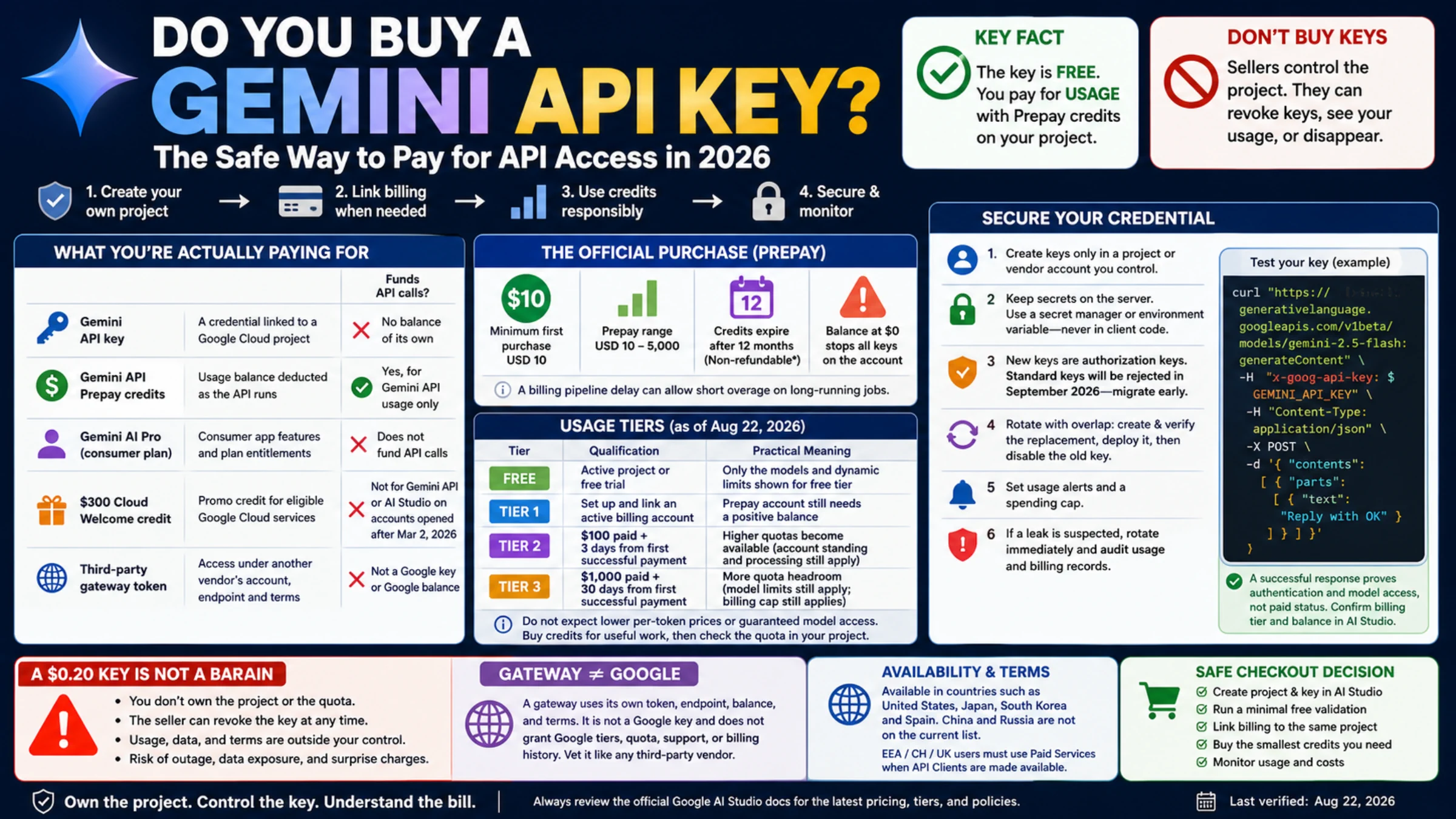
You should not buy a Google Gemini API key from another person. Create the key in a Google Cloud project you control. The key itself is free; the bill belongs to the project and its linked Cloud Billing account.
That ownership distinction is more important than the price of the first API call. A seller who sends you a ready-made key still controls the project behind it. They can revoke it, inspect aggregate usage, share its quota with other buyers, or leave you with charges and outages you cannot diagnose. A legitimate setup gives you control of the project, credential rotation, usage records, and billing.
What you are actually paying for
Several Google products use the Gemini name, but their payments do not collapse into one balance.
| Item | What it provides | Does it fund Gemini API calls? |
|---|---|---|
| Gemini API key | A credential associated with a Google Cloud project | No balance of its own; it inherits the project's billing and quota |
| Gemini API Prepay credits | A usage balance deducted as the Developer API runs | Yes, for Gemini API usage only |
| Google AI Pro or another consumer plan | Consumer-app features and plan entitlements | It does not establish developer API billing |
| $300 Google Cloud Welcome credit | Promotional credit for eligible Google Cloud services | Not for Gemini API or AI Studio on accounts opened after March 2, 2026 |
| Third-party gateway token | Access under another vendor's account, endpoint, and terms | No; it is not a Google key or Google balance |
This leads to a clean rule: if direct Google access fits your location and account, create your own key first. Link billing only when you need a paid model, paid-tier data terms, or more quota than the applicable free tier offers. If you intentionally choose a gateway, evaluate it as a separate vendor—not as a discount store for Google secrets.
The official purchase is a credit transaction
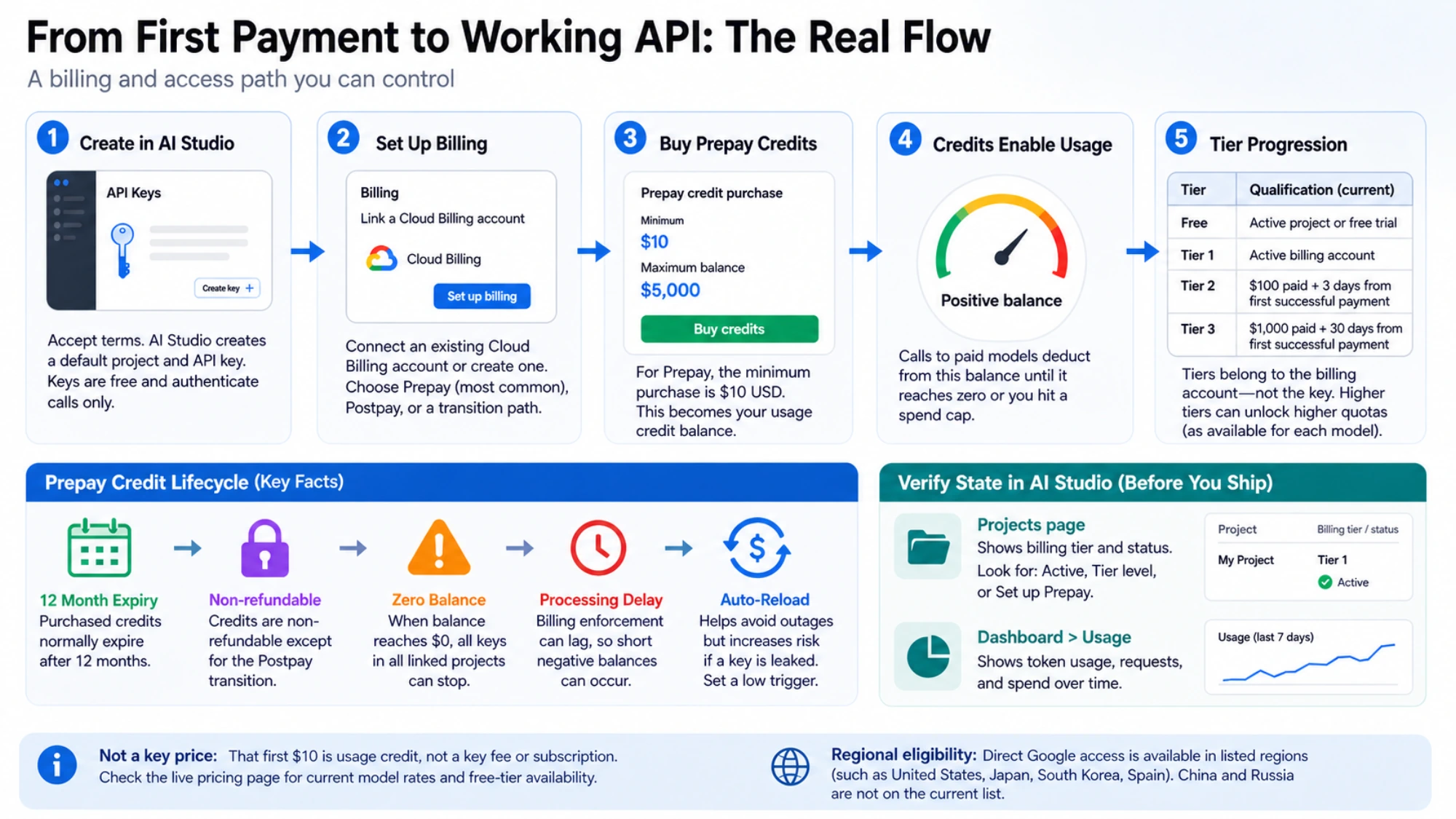
Google's Gemini API getting-started guide says AI Studio creates a default project and API key for a new user after the terms are accepted. You can view or create additional credentials on the AI Studio API Keys page.
To move a project to paid access, select Set up billing for that project. AI Studio will connect an existing Cloud Billing account or guide you through creating one. Your account may use Prepay, Postpay, or a temporary transition path; the screen presented to your account is authoritative.
For a Prepay account, Google's current billing guide states that the minimum credit purchase is $10 and the maximum prepaid balance is $5,000. That first $10 is not a key price or monthly subscription. It becomes usage credit, and calls deduct from it according to the selected model, input and output tokens, caching, media, and tools.
Before confirming a purchase, check the live Gemini Developer API pricing table. There is no honest universal “Gemini price”: free-tier availability, token rates, batch rates, and tool charges vary by model and processing mode.
Prepay also has consequences that a checkout total does not show:
- Purchased credits generally expire after 12 months and are nonrefundable except for Google's documented transition to Postpay.
- When the balance reaches zero, every key in every project linked to that billing account can stop at once.
- Billing enforcement has a processing delay, so a long-running job can create a small negative balance after the displayed credit is exhausted.
- Auto-reload reduces service interruptions but increases the loss possible from a leaked credential. Set a low trigger and a deliberate reload amount.
After payment, verify state in AI Studio rather than stress-testing the endpoint. The Projects page shows the billing tier and status, while Dashboard > Usage shows consumption. Labels such as Set up Prepay or No credits mean the project is not ready to use paid capacity.
Tiers belong to the billing account, not the key
Creating five keys does not create five quotas. Keys are credentials inside projects, and projects inherit the usage tier, billing cap, and associated limits of their billing account.
As of August 22, 2026, Google's rate-limits documentation lists these qualifications:
| Usage tier | Current qualification | Practical meaning |
|---|---|---|
| Free | Active project or free trial | Only the models and dynamic limits shown for the free tier |
| Tier 1 | Set up and link an active billing account | A Prepay account still needs a positive balance |
| Tier 2 | $100 paid plus 3 days from the first successful payment | Account standing and processing still apply |
| Tier 3 | $1,000 paid plus 30 days from the first successful payment | Model-specific quotas and the billing cap still apply |
Older guides that say Tier 2 requires $250 and 30 days are stale. The newer $100/three-day qualification is not permission to spend wastefully, either. A higher tier does not automatically lower per-token prices, guarantee a particular preview model, or remove model-level rate limits. Buy credits for useful work, then check the quota actually assigned to the project.
A $0.20 key is not a bargain
Very cheap key listings typically sell possession of a credential, not ownership of the project. Even if a resold key works during a quick test, it leaves several questions unanswered:
- Can you rotate or disable the key without asking the seller?
- Can you see the billing account, current tier, quota, and per-call usage?
- Is the quota dedicated to you or pooled among buyers?
- Was the project created with truthful account and payment information?
- Who receives prompts, files, and logs, and whose terms govern them?
- What happens when Google detects a leak or the seller closes the project?
If you cannot answer those questions from a console and contract you control, do not put the key in an application. The low purchase price merely hides the cost of migration, downtime, and possible data exposure.
A gateway can be a valid architecture choice, but it is a different product. A gateway issues its own token, uses its own base URL, meters its own balance, and may translate request formats. It does not give you Google's tier, quota, support, or billing history. Verify its current model ID, endpoint, data policy, failure billing, logs, spending controls, refund rules, and region availability before funding it.
Secure the credential before the first real workload
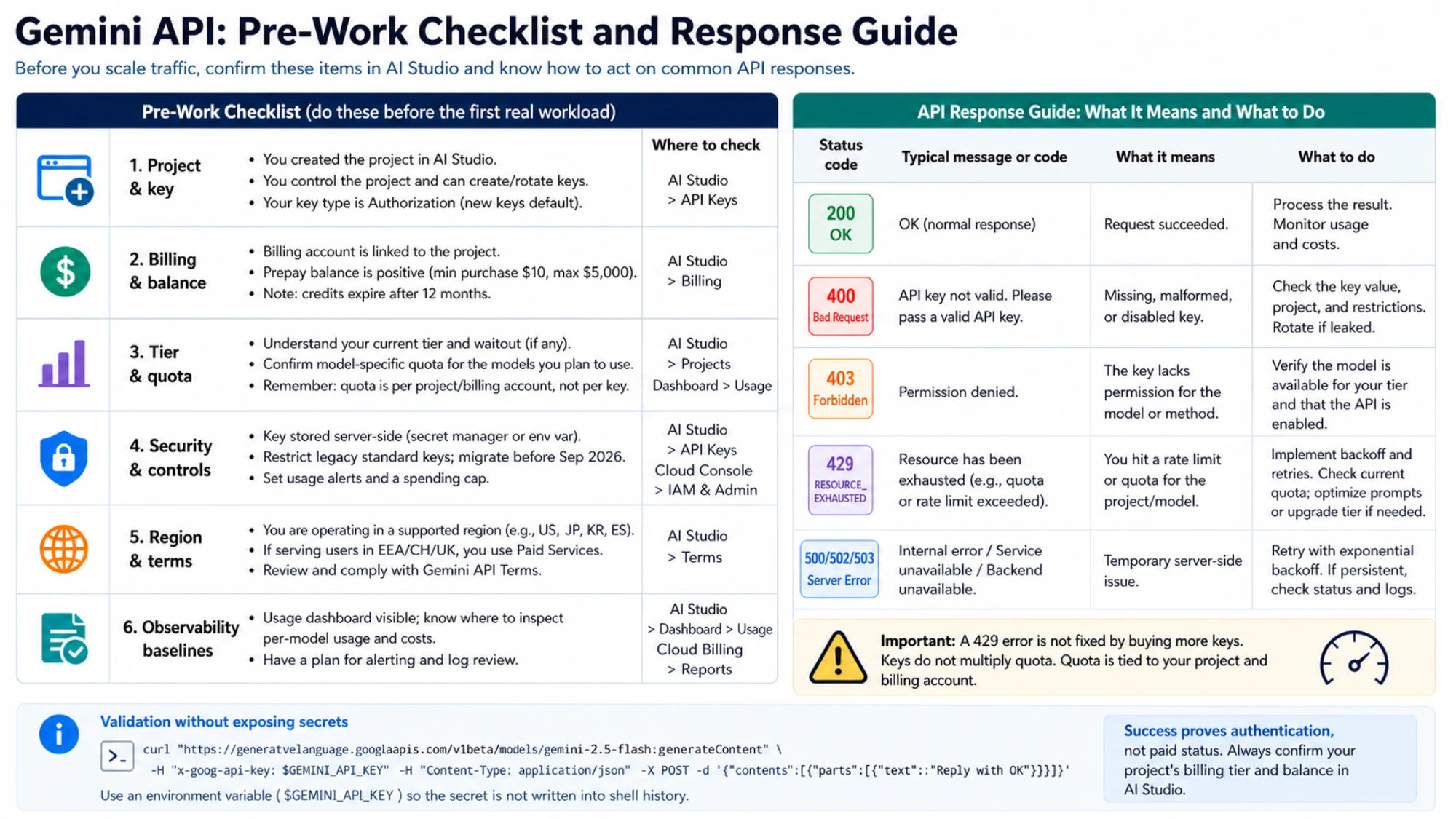
Google is moving the Gemini API from standard API keys to authorization keys. The current API-key guide says all new keys created in AI Studio default to authorization keys and that standard keys are scheduled to be rejected in September 2026. Authorization keys are tied to a service account; they are not OAuth tokens and should not be treated as interchangeable with legacy unrestricted keys.
Use these controls regardless of the key type:
- Create credentials only in a project or vendor account your team controls.
- Keep the secret on the server. Load it from a secret manager or environment variable; never ship it in browser, desktop, or mobile client code.
- Restrict legacy standard keys and migrate them before the September cutoff.
- Rotate with overlap: create and verify the replacement, deploy it, then disable the old key.
- Configure usage alerts and a spending cap appropriate to the workload.
- If a leak is suspected, rotate immediately and audit AI Studio usage and Cloud Billing records.
This command validates a Google key you created yourself. It uses an environment variable so the secret is not written into shell history with the command:
curl "https://generativelanguage.googleapis.com/v1beta/models/gemini-2.5-flash:generateContent" \
  -H "x-goog-api-key: $GEMINI_API_KEY" \
  -H "Content-Type: application/json" \
  -X POST \
  -d '{"contents":[{"parts":[{"text":"Reply with OK"}]}]}'
A successful response proves authentication and model access, not paid status; a free-tier request can succeed too. Confirm the project's billing tier and balance in AI Studio. If the API returns 429 RESOURCE_EXHAUSTED, inspect the current project/model quota instead of purchasing additional keys—the limit is not multiplied by credential count.
The checkout decision
For most US developers, the safest path is simple: create a project and key in AI Studio, run a minimal free validation, link billing to that same project, and start with the smallest credit purchase that supports a real workload. You retain the controls needed to rotate credentials, understand charges, and move through tiers naturally.
Do not buy a seller-controlled Google secret. If you need a third-party provider for procurement, routing, or multi-model access, buy that provider's service knowingly and integrate its documented token and endpoint. The test is not whether the key works once; it is whether you own the credential lifecycle and can explain every dollar and request behind it.