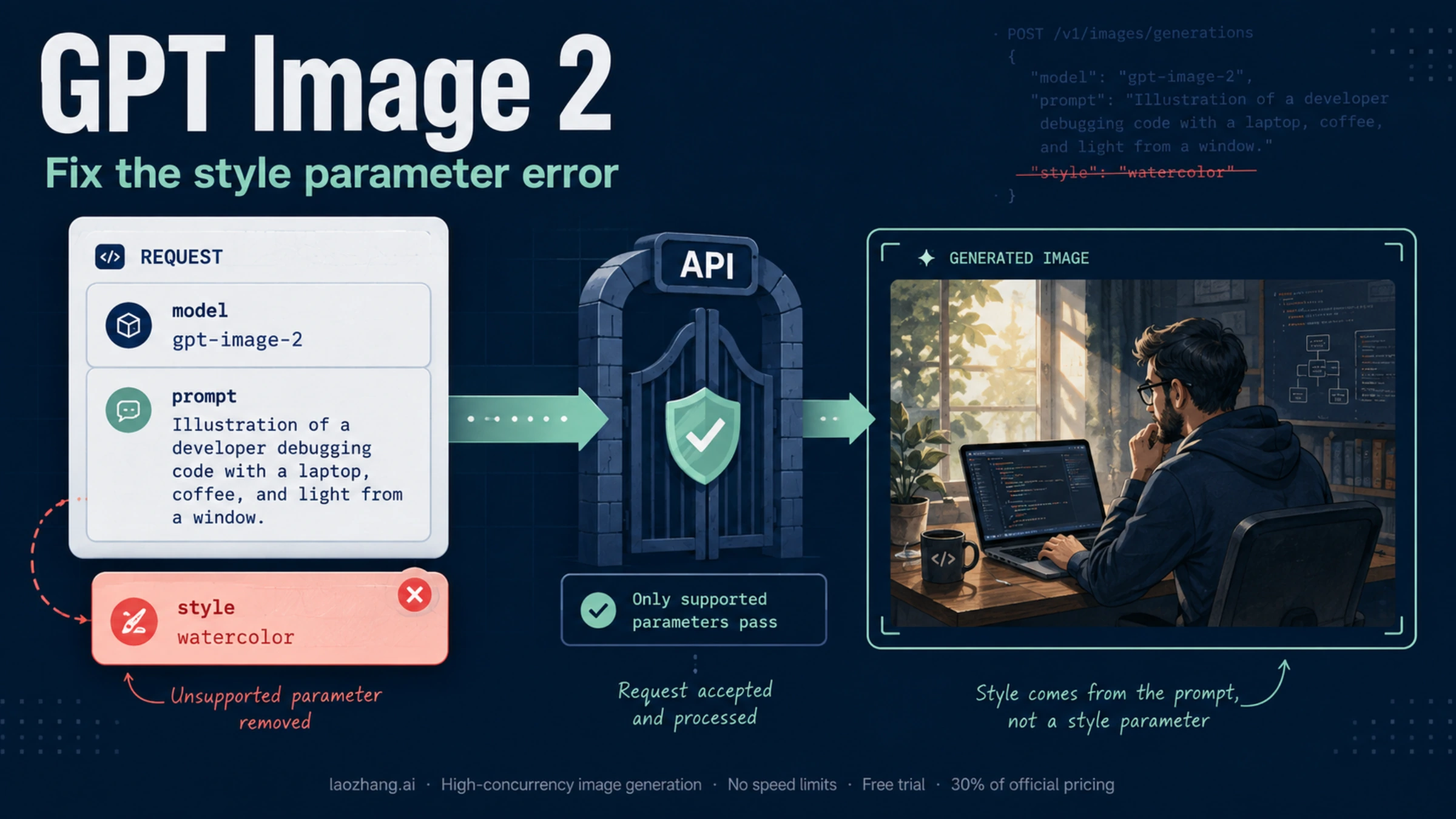
If GPT Image 2 returns Unknown parameter: 'style', remove the style key from the request body entirely. In OpenAI's Images API, that field belongs to DALL·E 3. To keep the visual direction, describe the appearance in prompt. Switching from "vivid" to "natural" does not make the field compatible. OpenAI Create image reference
There are two places to finish the repair: the request your client actually sends, and the image output your application consumes. An old module can inject style even when its dropdown looks empty; a downstream step can still expect a URL after generation starts working.
Start with a request containing only model and prompt
For a direct call to POST https://api.openai.com/v1/images/generations, reduce the JSON to this:
{
  "model": "gpt-image-2",
  "prompt": "A ceramic coffee mug on a kitchen counter, photographed in soft window light with muted colors and realistic textures."
}
The prompt carries the intended look. You could replace its visual description with “bold editorial illustration, saturated colors, dramatic lighting” without adding a separate API parameter. These are creative instructions, not a promise to reproduce a DALL·E preset exactly.
OpenAI's image generation guide uses this minimal model and prompt pattern for GPT Image 2. Start here so you can separate a request problem from optional settings. Add supported options after the basic call works.
Do not replace the rejected field with "style": "" or "style": null. Both still put a style key in JSON. Omission means the key is absent. You cannot assume that every gateway handles a null value the same way, so null is not a portable way to remove a field.
If you are migrating an older request, also review these nearby fields:
| Old request field | GPT Image 2 action |
|---|---|
style: "vivid" or style: "natural" | Remove the field; put the visual direction in prompt. |
response_format: "url" | Remove it; adapt the consumer to image bytes. |
response_format: "b64_json" | Remove it too. GPT Image already returns Base64. |
quality: "hd" or quality: "standard" | Omit initially; use low, medium, high, or auto when needed. |
| An image encoding requirement | Use output_format with png, jpeg, or webp. |
These rules apply to OpenAI's direct Images API. The parameter reference covers several models in one schema, so a field appearing in an SDK type or documentation page does not mean every image model accepts it.
If style keeps coming back, inspect the outgoing request
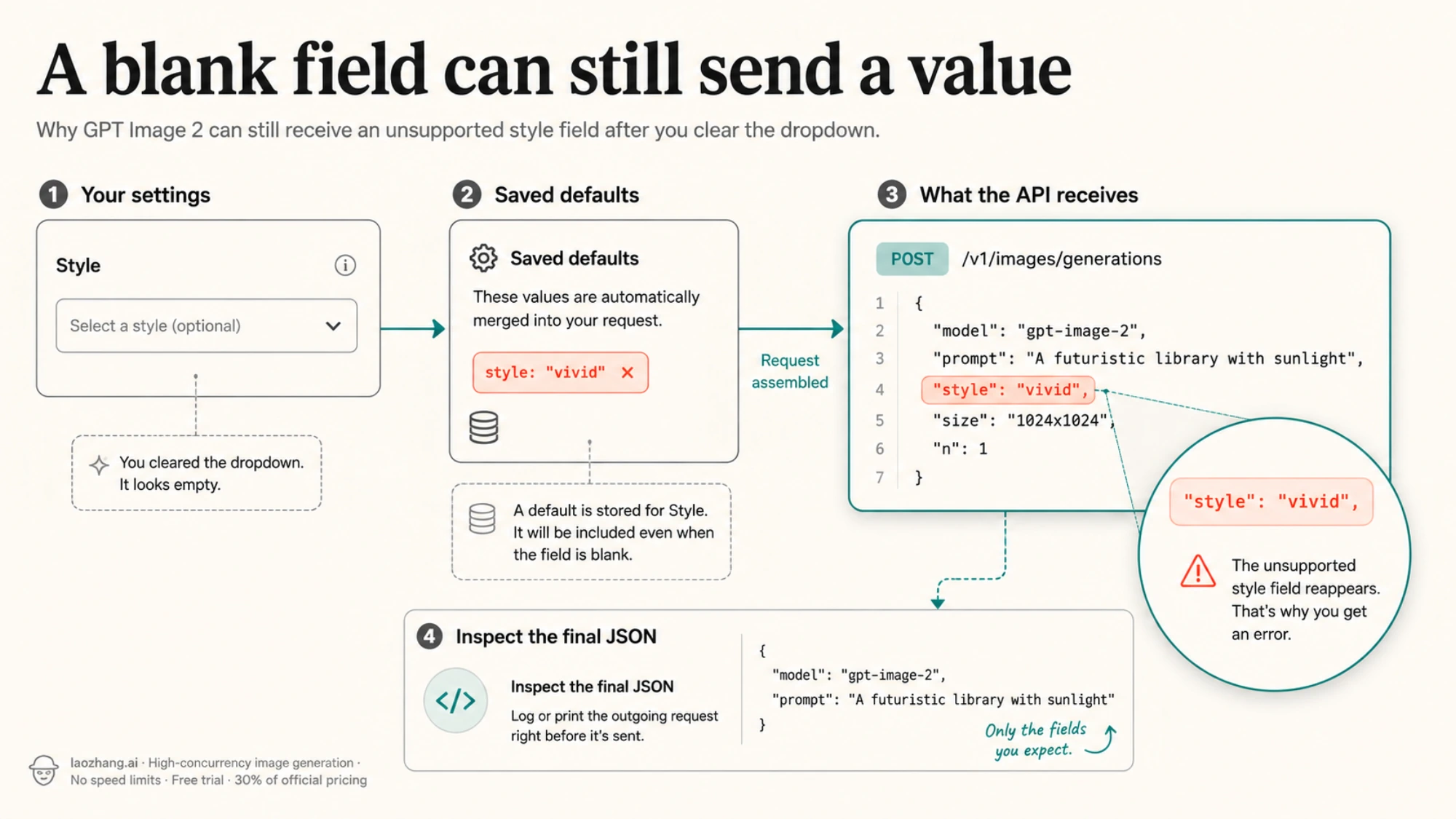
Changing the object you wrote is not enough if a helper merges defaults afterward. For example, this JavaScript code reintroduces the unsupported field:
const defaults = { style: "vivid" };
const userOptions = { model: "gpt-image-2", prompt: "A watercolor teapot" };
const payload = { ...defaults, ...userOptions };
// payload still contains style
For a diagnostic call, build a fresh object from the values you need instead of spreading an older options object:
const payload = {
  model: "gpt-image-2",
  prompt: userOptions.prompt,
};
console.log(Object.keys(payload)); // ["model", "prompt"]
That log confirms this object's keys. It does not prove a wrapper will send the object unchanged. Inspect the outgoing HTTP body after any middleware, shared defaults, or connector serialization has run. Use a local debugger, your client's request inspection facility, or the automation platform's execution details where available. Keep authorization headers and private prompt contents out of shared logs.
Work through the result:
- The outgoing body contains
style: trace where it is added. Search request builders, default option objects, saved module settings, and any legacy image helper. Remove it at the final construction point. - Your inspected body omits it, but the same error returns: confirm that you inspected the failing run. Check the destination host, endpoint, selected model, and deployed code or saved scenario version. A gateway may transform a request after your client sends it.
- A fresh minimal request works against the same destination: compare its keys with the failing integration. The difference is more useful than repeatedly changing the prompt.
Keep the destination consistent during comparisons. Success against OpenAI directly does not establish what a third-party gateway forwards, and a provider's URL-returning option does not change OpenAI's schema. If the integration mixes API types or provider endpoints, see the GPT Image 2 API guide before changing more fields.
In Make or another visual automation tool
An unmapped field is a UI state, not a view of the final JSON. A Make community report describes the exact style error despite the field being unmapped. The discussion then moves to replacing an older generation module and handling the new image output. The reported working workflow used GPT Image 1; it does not establish a reproduced GPT Image 2 bug in every current Make module.
In your own scenario, check the module's actual model support and the failing execution details. If the module cannot omit the field, use a module that supports the selected GPT Image model or an HTTP request step whose body you control. Then reconnect its output explicitly: a replacement module may expose file data where the old one exposed an image URL.
Updating an SDK or connector is useful if it changes this behavior. An upgrade alone is not evidence that style stopped being sent, and retrying identical invalid JSON does not correct it.
Save the image instead of looking for data[0].url
For the direct, non-streaming Images API, GPT Image returns the generated image as Base64 in data[0].b64_json. PNG is the default encoding. Decode that string to bytes and save those bytes; do not write the Base64 text directly into a .png file. OpenAI image generation guide
With the OpenAI Python package installed and OPENAI_API_KEY set in your environment, this example makes the minimal request and writes a PNG:
import base64
from pathlib import Path
from openai import OpenAI

client = OpenAI()
result = client.images.generate(
    model="gpt-image-2",
    prompt=(
        "A ceramic coffee mug on a kitchen counter, photographed in soft "
        "window light with muted colors and realistic textures."
    ),
)

if not result.data or not result.data[0].b64_json:
    raise RuntimeError("The response did not contain image data")

image_bytes = base64.b64decode(result.data[0].b64_json, validate=True)
if not image_bytes:
    raise RuntimeError("The decoded image is empty")

output = Path("generated-image.png")
output.write_bytes(image_bytes)
print(f"Saved {len(image_bytes)} bytes to {output.resolve()}")
The request and decoding pattern follow the official guide; this example is not a claim that your account, wrapper, or specific failure has been tested. Open the saved image to confirm it is usable. A successful HTTP status or a parsed JSON response alone is not the final result.
If you set output_format="webp" on the generation call, save the decoded bytes with a .webp extension and send image/webp as the MIME type wherever your next step requires one. Use .jpg and image/jpeg for output_format="jpeg". Changing the filename extension alone does not convert an image.
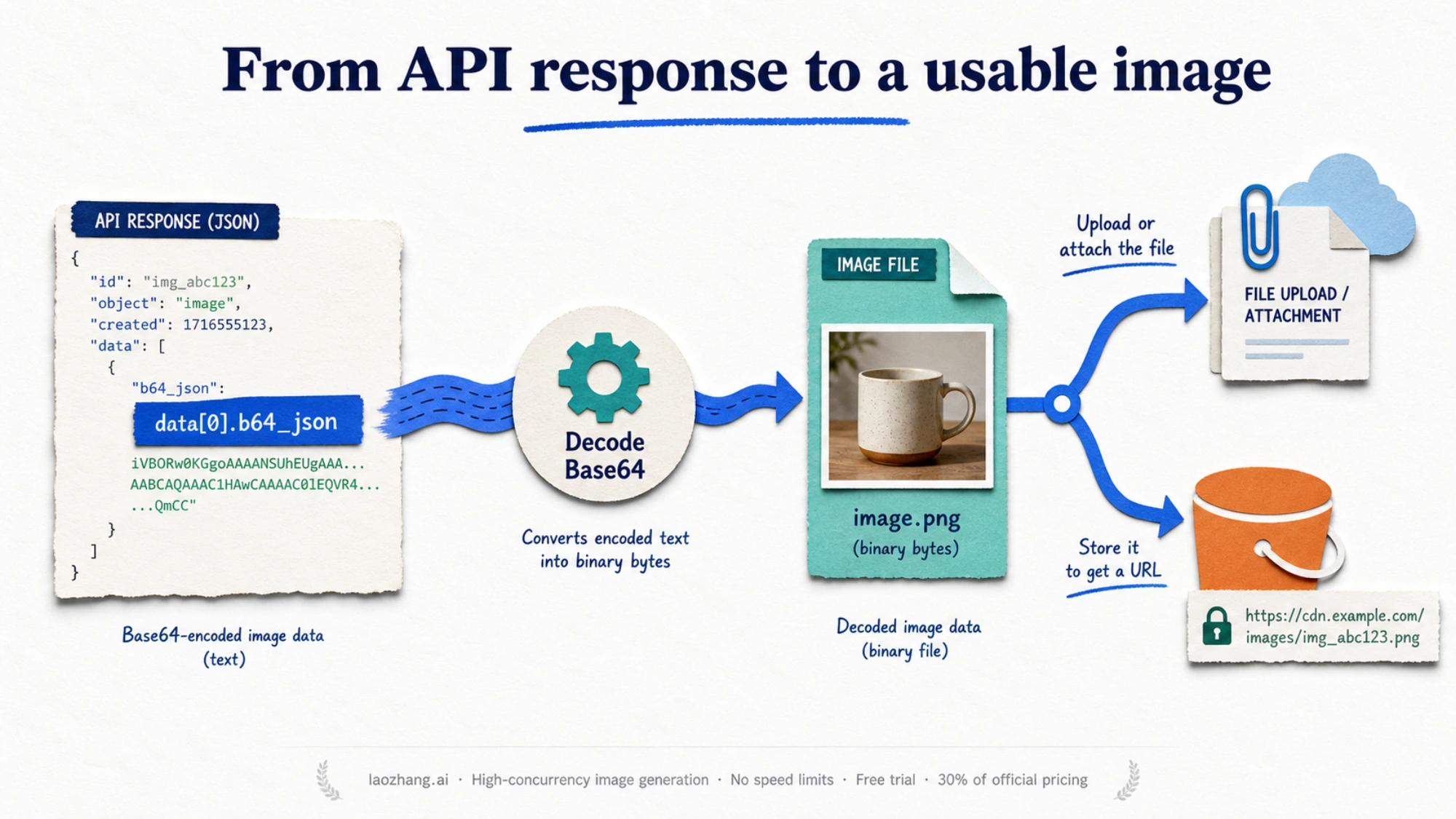
What you pass on depends on what the next step accepts:
| The next step accepts… | Pass it… |
|---|---|
| A local file | The decoded file path. |
| An upload or attachment | The decoded bytes, filename, and matching MIME type. |
| Only an HTTPS image URL | A reachable URL after uploading the decoded file to storage you control. |
| A platform-specific file object | The connector's file output, mapped to the consumer's file input. |
Do not add response_format: "url" to satisfy the third case. Uploading the image and obtaining a URL is a separate step. Check that the receiving service can fetch that URL with the access permissions you chose.
What should be true when the fix is complete?
You should be able to identify the actual destination and model, show that the transmitted body omits style and other unsupported legacy fields, and open the decoded image. Your downstream step should consume that file or a URL you created for it.
If the cleaned request now fails with a different error, use the new message to choose the next action. The style error identifies a rejected parameter; it does not establish whether your account has model access or whether a later request will finish successfully. Keep the minimal request as the baseline while resolving the new failure.