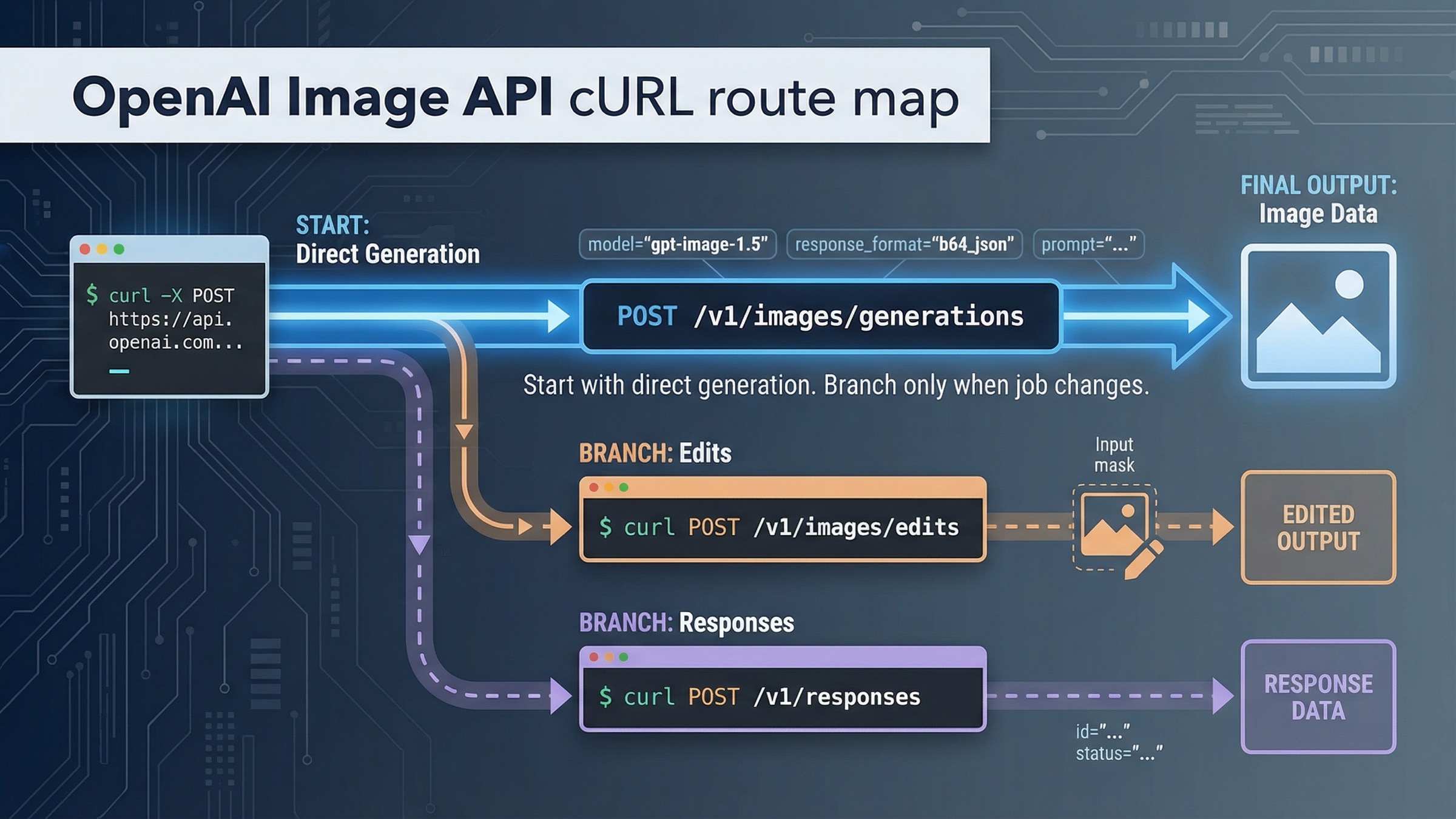
If you want a current OpenAI image generation API curl request that works, start with POST /v1/images/generations, keep the first request square and boring, save the raw JSON response, and decode .data[0].b64_json into a file. That is the safest direct path for a one-shot image request today.
The only two branches that should change that default are straightforward. If you already have source images and want to modify them, move to POST /v1/images/edits with multipart form fields. If image generation is only one step inside a larger multimodal workflow, move to POST /v1/responses with the hosted image_generation tool. Everything else is usually premature complexity.
This keyword keeps feeling messier than it should because OpenAI spreads the answer across several official pages. The main image generation guide is broad and practical. The Images API reference is the cleanest raw endpoint source. The Responses image_generation tool guide covers the alternate route. And on March 24, 2026, the official guide still showed a GPT Image cURL snippet against https://api.openai.com/v1/images, while the reference documented /images/generations and /images/edits as the raw endpoints. This article exists to collapse that split into one operator workflow.
TL;DR
- Use
POST /v1/images/generationswithgpt-image-1.5for the first raw cURL test. - Save the JSON response and decode
.data[0].b64_json; do not assume you will get a hosted image URL. - Switch to
POST /v1/images/editsonly when you already have input images and need multipart uploads. - Switch to
POST /v1/responsesonly when image generation belongs inside a larger tool-driven workflow.
Start with POST /v1/images/generations for one-shot image output
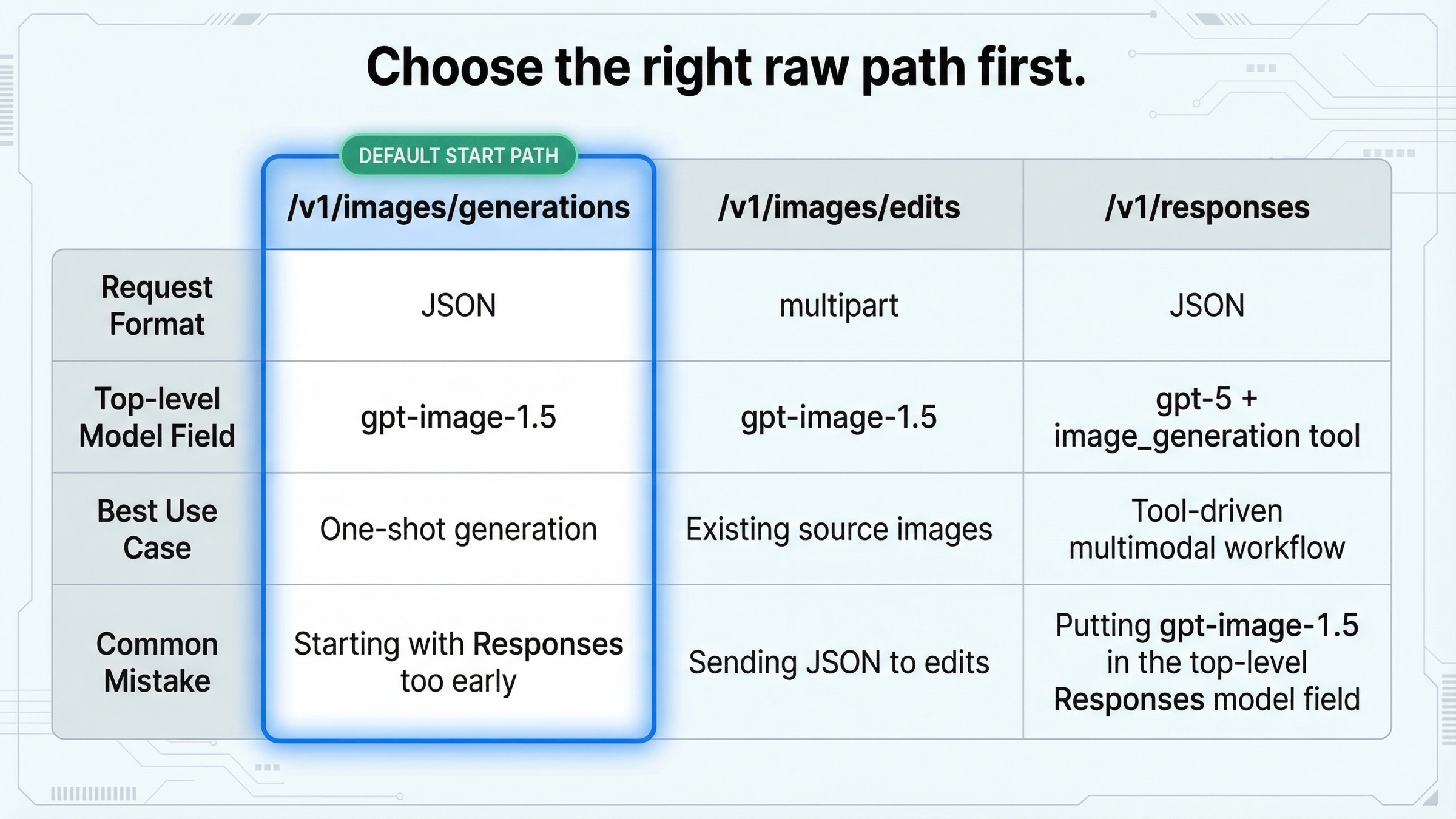
If your actual job is "turn this prompt into one image from a shell script or backend test," the direct Images API is still the best place to start. The official Images API reference names POST /images/generations as the raw generation route, which means the full production URL is https://api.openai.com/v1/images/generations.
That is the path to recommend first because it keeps the first success loop small:
- send JSON
- receive JSON
- extract base64
- save a file
It also fits the current model lineup. The official All models page lists GPT Image 1.5 as the current state-of-the-art image generation model, with chatgpt-image-latest as the ChatGPT image alias, gpt-image-1 as the previous model, and gpt-image-1-mini as the budget lane. So for a fresh cURL example, the clean default is gpt-image-1.5, not GPT Image 1 and definitely not a DALL-E fallback.
Use this first:
bashcurl https://api.openai.com/v1/images/generations \
  -H "Authorization: Bearer $OPENAI_API_KEY" \
  -H "Content-Type: application/json" \
  -d '{
    "model": "gpt-image-1.5",
    "prompt": "Create a clean editorial illustration of a robot camera operator in a bright studio",
    "size": "1024x1024",
    "quality": "medium"
  }' > response.json
That is deliberately boring. The official guide says square images are fastest and that 1024x1024 is the default size. That matters because your first request is not where you prove transparency, edits, landscape composition, streamed partial images, and cross-platform decode logic all at once. Your first request is where you prove the account, endpoint, model name, payload shape, and output path are all real.
The table below is the shortest route split most readers actually need:
| Situation | Best raw path | Keep model simple? | Why this is the default |
|---|---|---|---|
| One-shot generation from a text prompt | POST /v1/images/generations | Yes: use gpt-image-1.5 | Fewest moving parts and the clearest cURL workflow |
| Edit or combine existing input images | POST /v1/images/edits | Yes: use gpt-image-1.5 | Same direct Images API family, but multipart instead of JSON-only |
| Generate an image inside a larger assistant workflow | POST /v1/responses with image_generation tool | No: top-level model should be a text-capable model like gpt-5 | Better when image output is only one tool in a broader flow |
That table looks simple because the decision really is simple once you stop mixing API surfaces. The mistake page one keeps making is treating all three routes as if they are interchangeable "image API examples." They are not. They answer different jobs.
There is one budget caveat worth naming early. If cost is the first question rather than the flagship default, the current model catalog also exposes gpt-image-1-mini as the cost-efficient lane. That does not change the raw endpoint path, but it can change which model you benchmark first. If that is your actual decision, use our OpenAI image generation API models guide after you prove the cURL route works.
If you want the broader route-choice article after this page, read OpenAI image generation API endpoint. This page stays narrower on purpose: it is for people who want the raw shell path first.
What the response actually returns and how to decode it safely
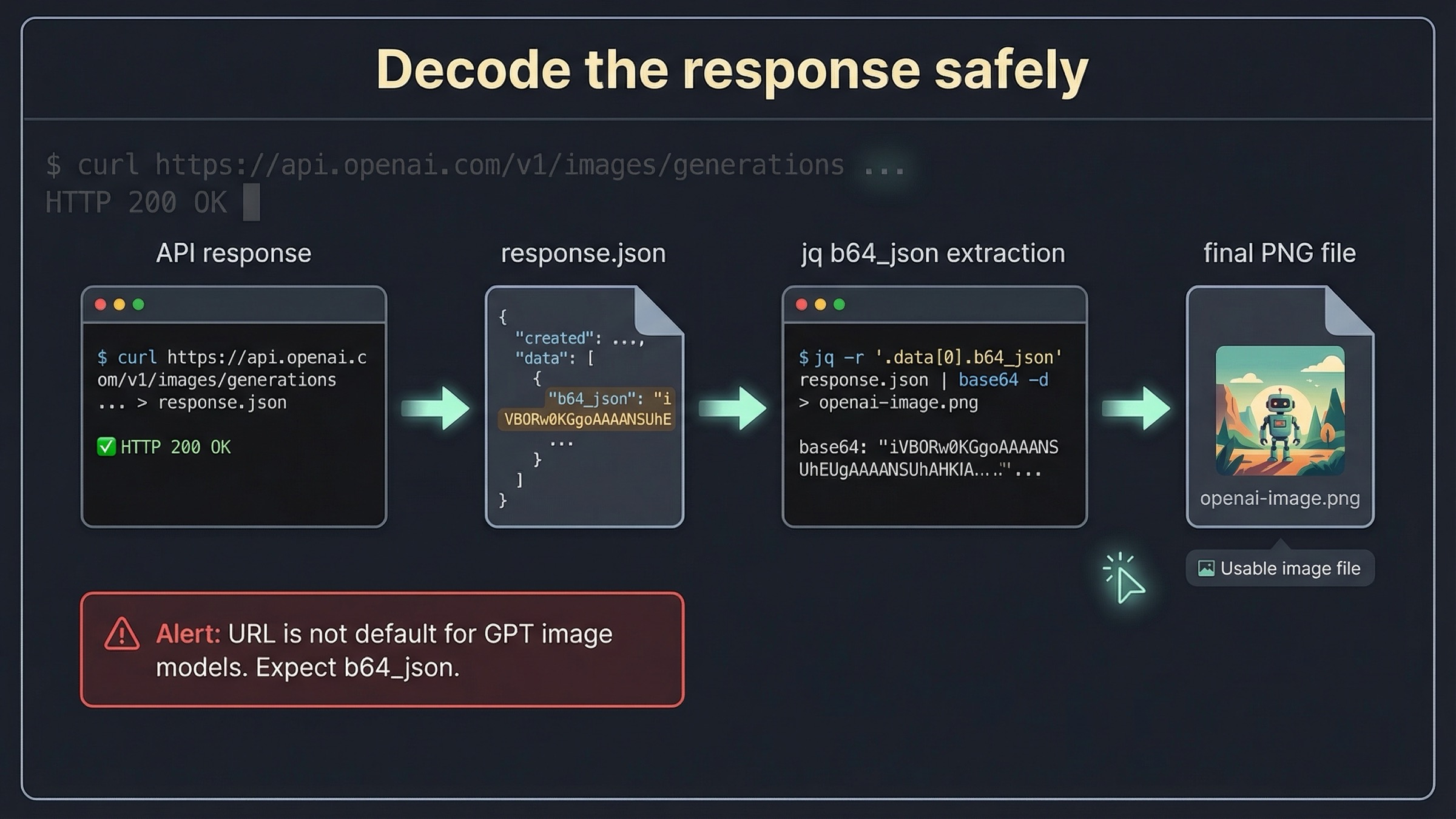
The biggest cURL-specific trap is not the POST itself. It is what happens next.
The official Images API reference says the Image object contains b64_json, revised_prompt, and url, and it adds the detail that matters most for shell users: for GPT image models, b64_json is returned by default and URL output is unsupported. That means a strong cURL article cannot stop at "here is the request." It has to solve the decode step.
The safest operator habit is to save the raw response first:
bashcurl https://api.openai.com/v1/images/generations \
  -H "Authorization: Bearer $OPENAI_API_KEY" \
  -H "Content-Type: application/json" \
  -d '{
    "model": "gpt-image-1.5",
    "prompt": "Create a clean editorial illustration of a robot camera operator in a bright studio",
    "size": "1024x1024",
    "quality": "medium"
  }' > response.json

jq '.data[0] | {has_b64_json: has("b64_json"), revised_prompt, url}' response.json
That extra jq step is worth the few seconds it costs. It proves the response shape before you pipe the image data away, and it gives you something to inspect when the request succeeds but the final file is missing or corrupted.
For Linux or any environment with GNU base64, decoding can stay short:
bashjq -r '.data[0].b64_json' response.json | base64 --decode > openai-image.png
On macOS, the platform flag is usually -D instead of --decode:
bashjq -r '.data[0].b64_json' response.json | base64 -D > openai-image.png
If you want one portable command that sidesteps the GNU-versus-BSD flag split entirely, use Python for the decode step:
bashjq -r '.data[0].b64_json' response.json \
  | python -c 'import sys, base64; sys.stdout.buffer.write(base64.b64decode(sys.stdin.read()))' \
  > openai-image.png
That is one of the simplest places to beat page-one average. Weak cURL examples often do the opposite: they immediately pipe the request into jq, assume one base64 flag works everywhere, and leave the reader with a broken output file if the shell differs from the author’s machine.
There is also a second response-shape confusion worth clearing up. Older OpenAI image content trained many developers to expect a URL field as the main happy path. That is exactly why the official reference note matters. For GPT image models, the default result is a base64 payload. So if your shell script is still trying to fetch .data[0].url, you are debugging the wrong API era.
This is also where the guide-versus-reference mismatch becomes real. The official guide currently shows a GPT Image cURL example against https://api.openai.com/v1/images, while the raw reference names POST /images/generations. For a cURL-first article, the safer recommendation is to anchor on the reference path names because they are the clearest raw contract OpenAI publishes.
If you want a broader language-by-language example page after this, read OpenAI image generation API example. The difference here is intent: this page is trying to make the raw HTTP workflow dependable, not just show one more code block.
Use multipart /v1/images/edits when you already have source images
If you already have a product shot, brand asset, or reference image, do not stretch the generation route until it becomes an editing tutorial by accident. Stay on the direct Images API, but switch to the edit branch.
The official Images API reference names POST /images/edits as the raw edit endpoint, and the main image generation guide includes a current cURL example that uses multipart form uploads with repeated image[] fields.
The raw pattern looks like this:
bashcurl -s -D >(grep -i x-request-id >&2) \
  -o >(jq -r '.data[0].b64_json' | base64 --decode > edited-image.png) \
  -X POST "https://api.openai.com/v1/images/edits" \
  -H "Authorization: Bearer $OPENAI_API_KEY" \
  -F "model=gpt-image-1.5" \
  -F "image[]=@product-shot.png" \
  -F "image[]=@logo.png" \
  -F 'prompt=Place the logo on the product box as if it were printed on the packaging.'
That is the first important branch point: generation uses JSON; edits use multipart form fields. A lot of 400-level cURL errors come from trying to force edit uploads through the same Content-Type: application/json path as prompt-only generation.
The second branch point is fidelity. The official guide says that if you are using gpt-image-1.5, the first 5 input images can be preserved with higher fidelity and that you can enable that behavior with input_fidelity=high. That matters when you are editing a source asset and actually care about preserving composition, logos, or facial details rather than loosely reimagining the image.
In raw cURL terms, that means adding another multipart field:
bashcurl -s \
  -X POST "https://api.openai.com/v1/images/edits" \
  -H "Authorization: Bearer $OPENAI_API_KEY" \
  -F "model=gpt-image-1.5" \
  -F "image[]=@woman.jpg" \
  -F "image[]=@logo.png" \
  -F "input_fidelity=high" \
  -F 'prompt=Add the logo to the woman'\''s jacket as if stitched into the fabric.' \
  > edit-response.json
You should not add input_fidelity=high by habit. Use it when the whole point of the edit is to preserve the source image more closely. Skip it when the job is a looser transformation and cost or speed matters more than strict preservation.
This section is where many broad tutorials go wrong. They treat editing as proof that you should move to the Responses API because the workflow is now "advanced." That is the wrong lesson. Editing is still a first-class direct Images API use case. The route changes when the workflow changes, not when the image job becomes more serious.
If your actual question is deeper than route choice and you need a full editing guide, the better next page is OpenAI image editing API. For the cURL query, the most important rule is narrower: use multipart edits when you already have source images and keep the route direct.
Only switch to /v1/responses when image generation is part of a bigger flow
The Responses image_generation tool guide exists for a different job from the direct Images API. It is for workflows where image generation is one tool inside a broader model interaction.
That distinction matters because the field-level rules change.
The guide makes the most important rule explicit: GPT image models are not valid values for the top-level model field in the Responses API. When you use /v1/responses, the top-level model should be a text-capable mainline model such as gpt-4.1 or gpt-5, and the hosted image_generation tool handles the image layer behind the scenes.
Here is the raw cURL shape:
bashcurl https://api.openai.com/v1/responses \
  -H "Authorization: Bearer $OPENAI_API_KEY" \
  -H "Content-Type: application/json" \
  -d '{
    "model": "gpt-5",
    "input": "Generate a transparent sticker-style icon of a paper airplane for a travel app",
    "tools": [
      {
        "type": "image_generation",
        "background": "transparent",
        "quality": "high"
      }
    ]
  }' > responses-output.json

jq -r '.output[] | select(.type=="image_generation_call") | .result' responses-output.json \
  | python -c 'import sys, base64; sys.stdout.buffer.write(base64.b64decode(sys.stdin.read()))' \
  > plane.png
That route is correct when:
- the same call may produce text and images
- the model needs to decide whether to invoke image generation
- image output is part of a larger assistant or multimodal system
That route is overkill when:
- you just want one prompt-to-image request
- you are only trying to verify raw endpoint access
- you are debugging account access, model names, or output decoding
The practical rule is simple. Do not start with Responses just because it looks newer. Start with Responses only when orchestration is the real job.
This is one of the best places for the article to show judgment rather than just structure. Most searchers are not actually asking for a philosophical API comparison. They want to know whether adding /v1/responses to the first cURL example makes their life easier or harder. For the ordinary exact-match query, the answer is harder.
If you want the broader tutorial after this section, read OpenAI image API tutorial. This page is keeping the Responses branch short on purpose so the default workflow stays obvious.
Troubleshooting: the cURL failures that mean payload trouble versus access trouble
This is the section page one usually under-builds.
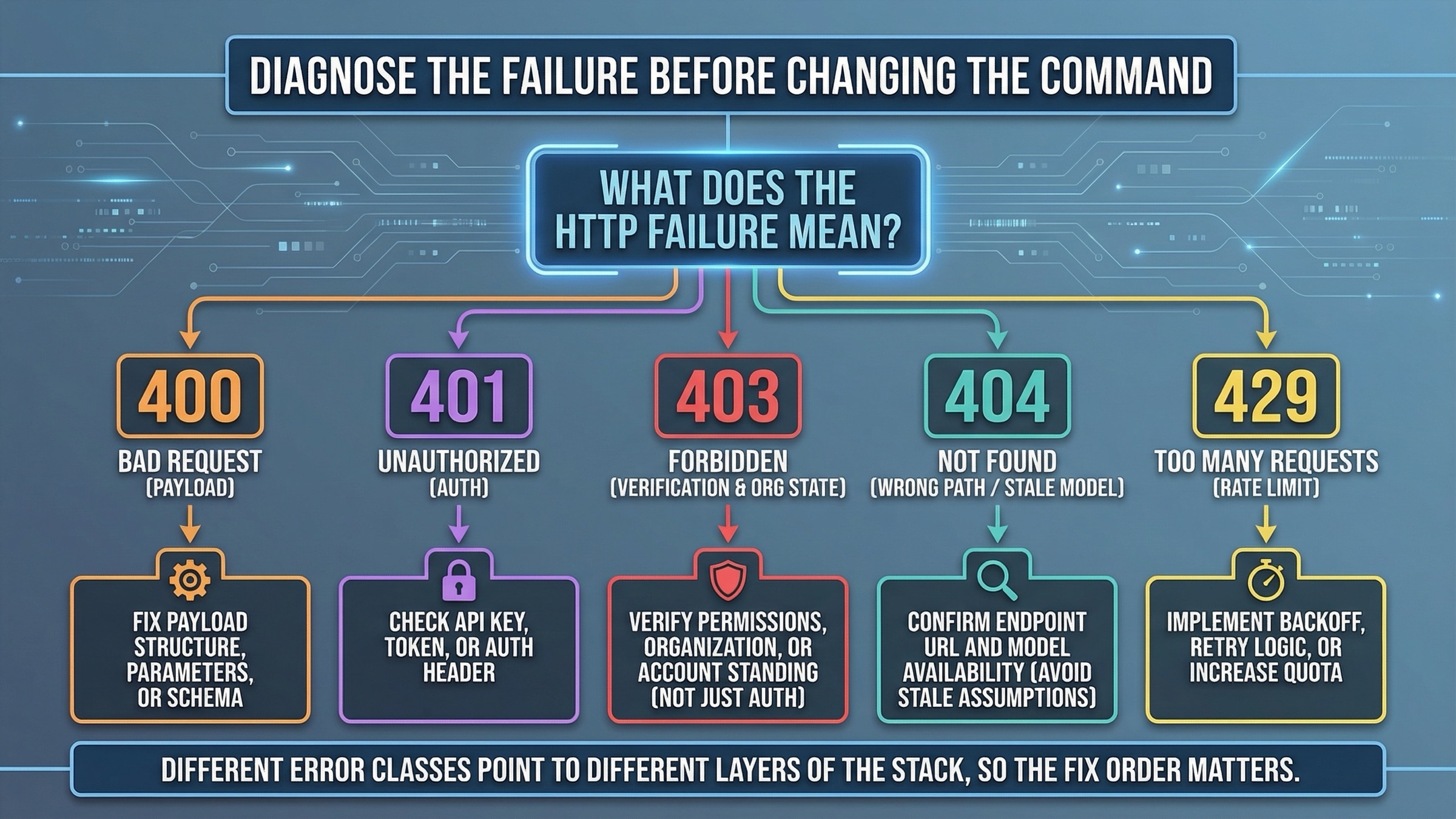
When a cURL example fails, the next question is not "which random parameter should I change?" It is "what class of failure is this?" The right fix depends on whether the problem is your payload, your key, your organization state, your model assumption, or your account limits.
Use this table first:
| What you see | What it usually means | What to fix first |
|---|---|---|
400 Bad Request | Wrong JSON shape, wrong Content-Type, or you used JSON when the edit endpoint needed multipart fields | Recheck endpoint, body format, and whether you should be using -d or -F |
401 Unauthorized | Bad or missing API key | Recheck OPENAI_API_KEY, shell expansion, and whether the key belongs to the right project |
403 with verification or image-access wording | The account surface is not fully ready for image generation | Recheck organization verification, org selection, propagation delay, and a fresh key |
404 or model-not-found wording | Wrong path, stale model assumption, or rollout-era guidance copied into current code | Recheck the endpoint path and that you are using a current model name for the route you chose |
429 or rate-limit wording | Tier or throughput limit, not malformed cURL | Recheck rate limits, usage tier, and whether you should lower request volume or quality first |
The 403 branch is especially important because it often looks like a code problem when it is really an account-state problem. The official API Organization Verification article says that verification unlocks image generation capabilities in the API and that if a not-verified message persists you should wait up to 30 minutes, generate a new API key, refresh, and make sure the correct organization is active. That is not optional cleanup. It is the highest-value fix sequence for this class of failure.
The official API Model Availability by Usage Tier and Verification Status page adds the second access clue: gpt-image-1 and gpt-image-1-mini are available on tiers 1 through 5, with some access subject to organization verification. So if you are debugging a 403 or 429, stop treating it like a JSON typo until you confirm the account surface.
The 404 branch needs a different kind of caution. OpenAI's own GPT-Image-1.5 rollout thread shows that during the initial rollout on December 16, 2025, developers saw model-not-found errors and supported-value lists that still excluded gpt-image-1.5. Those posts explain why stale snippets still float around this keyword. They do not mean you should treat rollout-era 404s as the current default explanation. Today, the safer first move is to recheck the path, the model name, and whether you copied an old example.
There is also one failure mode that is not an HTTP error at all: you got 200 OK, but the output file is empty or unreadable. In that case, the request may be fine and the decode step may be wrong. Save response.json, inspect .data[0].b64_json, and decode explicitly instead of assuming the shell pipeline is fine.
One extra operator habit is worth stealing from the official edit example: emit the request ID when you can. In shell, this is a cheap way to keep better evidence when support is needed:
bashcurl -s -D >(grep -i x-request-id >&2) \
  -o response.json \
  https://api.openai.com/v1/images/generations \
  -H "Authorization: Bearer $OPENAI_API_KEY" \
  -H "Content-Type: application/json" \
  -d '{
    "model": "gpt-image-1.5",
    "prompt": "Create a clean editorial illustration of a robot camera operator in a bright studio",
    "size": "1024x1024",
    "quality": "medium"
  }'
That will not fix a bad request, but it will shorten the next debugging step when the problem is on OpenAI’s side or tied to account state instead of your terminal command.
If your blocker is clearly verification and not payload shape, the more focused next read is OpenAI image generation API verification.
Parameters worth changing only after the first request works
Once the base request succeeds, then you can start optimizing. The official guide and reference together surface the knobs that matter most:
size:1024x1024,1024x1536,1536x1024, orautoquality:low,medium,high, orautobackground:transparent,opaque, orautooutput_format:png,webp, orjpeg
The most important practical judgment call is still to keep the first request simple. If you change size, quality, output format, and transparency before the first request ever succeeds, you have no clean baseline for whether the problem is access, payload shape, or output handling.
For most one-shot generation tests:
- keep
sizeat1024x1024 - keep
qualityatmedium - keep the background default unless transparency is the real requirement
- leave file-format optimization until the route already works
If you need transparent output, the guide and reference both support that branch. The raw request just becomes more explicit:
bashcurl https://api.openai.com/v1/images/generations \
  -H "Authorization: Bearer $OPENAI_API_KEY" \
  -H "Content-Type: application/json" \
  -d '{
    "model": "gpt-image-1.5",
    "prompt": "Draw a transparent sticker-style icon of a paper airplane for a travel app",
    "size": "1024x1024",
    "quality": "high",
    "background": "transparent",
    "output_format": "png"
  }' > transparent-response.json
If you care about lower transfer size more than alpha support, move to jpeg or webp after the core path is proven. If you care about progressive previews or streaming, the official guide shows a streaming branch with partial_images, but that is not where a cURL-first reader should begin. It is an optimize-later feature, not the main answer to this keyword.
This is also where the article can help the reader avoid wasted work. A lot of developers treat prompt tuning as the first optimization step. For a raw API workflow, that is usually the wrong order. The better order is:
- prove the endpoint and output path
- prove the decode path
- prove the correct route branch
- then optimize quality, size, background, and prompt detail
If your next question after that is cost instead of raw HTTP shape, go to OpenAI image generation API pricing. Pricing becomes easier to reason about once the route is stable.
Final recommendation
If you only want the shortest safe rule, use this one: start with POST /v1/images/generations, decode b64_json, move to multipart /v1/images/edits only when you already have input images, and move to /v1/responses only when image generation belongs inside a larger tool-driven flow.
That rule beats the current result average because it solves the whole shell workflow instead of only one screenshot-worthy request. It also respects the way OpenAI’s current docs are actually split: the guide is good for route choice, the reference is good for raw endpoints, the model pages are good for freshness, and the help pages are good for access failures. A strong cURL article should stitch those pieces together so the reader can ship, not just skim.