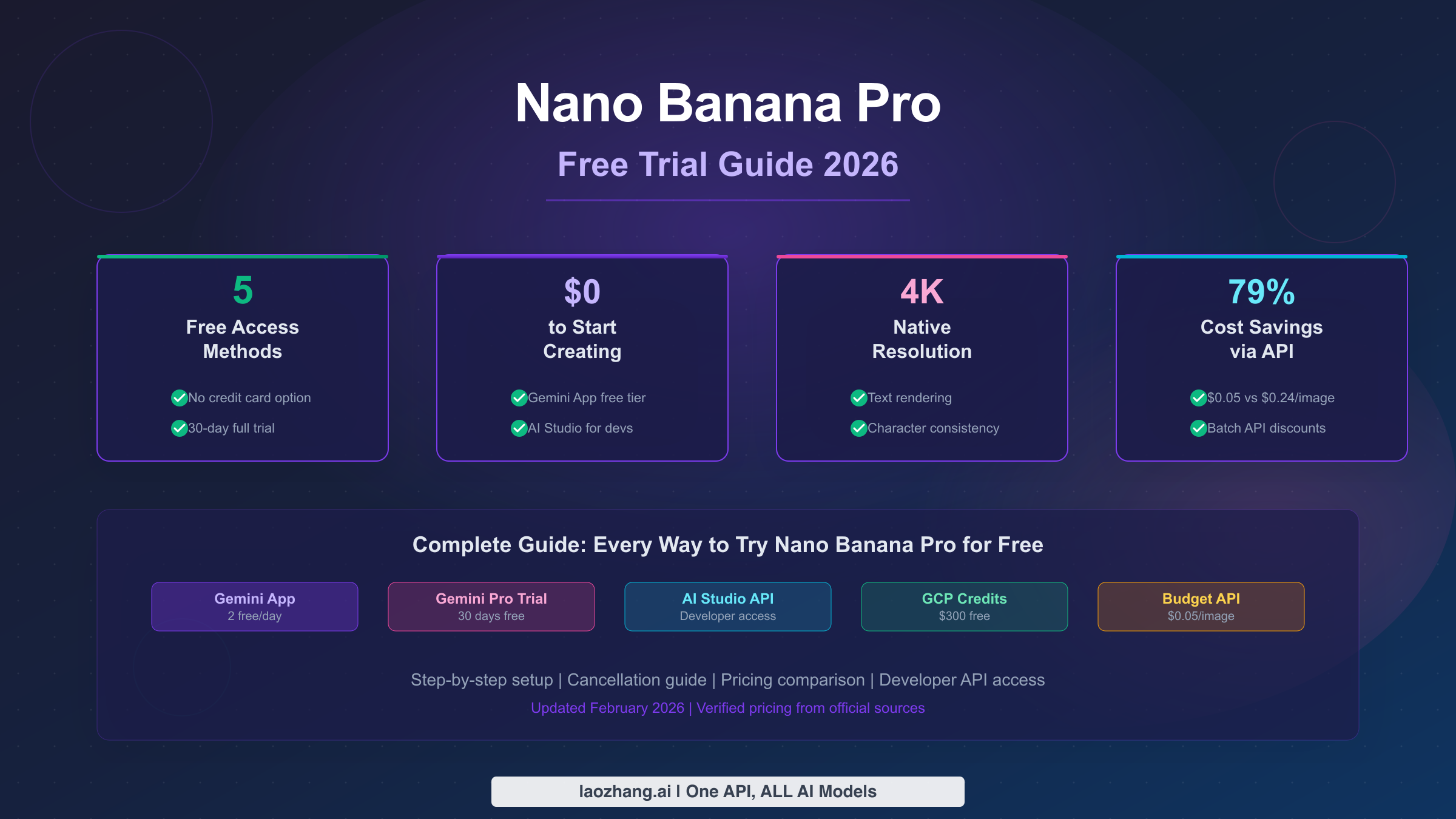
Nano Banana Pro does not offer a standalone free trial, but there are five legitimate ways to use it for free in 2026. The best option for most users is Google's 30-day Gemini Pro free trial, which unlocks approximately 100 high-resolution image generations per day at 2K resolution. If you prefer zero commitment, the Gemini app provides 2 free images daily at 1K resolution—no credit card required. For developers, Google AI Studio offers API access with up to 500 free requests per day. This guide walks through every free method, compares what you get at each tier, and includes cancellation instructions so you never pay a cent more than you intended.
TL;DR
| Method | Cost | Daily Quota | Resolution | Credit Card | Best For |
|---|---|---|---|---|---|
| Gemini App Free | $0 | 2 images | 1K | No | Quick testing |
| Gemini Pro Trial | $0 for 30 days | ~100 images | 2K | Yes | Serious evaluation |
| AI Studio API | $0 | 500 requests | 1K-2K | No | Developers |
| GCP $300 Credits | $0 | ~2,200 total | Up to 4K | Yes | High-volume testing |
| Third-party API | From $0.05/img | Unlimited | Up to 4K | No | Production use |
Bottom line: Start with the Gemini App free tier to test quality. If you like it, activate the 30-day Gemini Pro trial for the full experience. Developers should go straight to AI Studio. Set a calendar reminder for day 25 to decide whether to keep or cancel your trial.
What Is Nano Banana Pro? The Gemini 3 Pro Image Model Explained
Before diving into free access methods, it helps to understand what Nano Banana Pro actually is—because the naming can be confusing. Nano Banana Pro is the consumer-facing name for Google's Gemini 3 Pro Image model, developed by Google DeepMind. The "Nano Banana" name originated from anonymous testing on the LMArena benchmark platform, where the model was disguised under a codename to prevent bias. When the model consistently outperformed competitors like GPT-Image 1, Flux Pro, and Midjourney in blind evaluations, the codename stuck as a cultural reference. If you've seen articles referencing Nano Banana Pro as Google's Gemini 3 Pro Image model, they're talking about the exact same technology.
What makes Nano Banana Pro worth trying? The model represents a genuine leap forward in several areas that matter to creators. Native 4K resolution support at 3840x2160 pixels produces images that are genuinely print-ready, which is something no other AI image generator offered at launch. The text rendering capability is perhaps the most impressive advancement—Nano Banana Pro can generate images with correctly spelled, legible text in multiple languages, whether you need a short tagline or an entire paragraph embedded in a poster design. Character consistency tracking allows you to maintain recognizable versions of up to 5 people across multiple generations, while the 14-image blending feature lets you combine reference photos in ways that weren't previously possible. These capabilities are powered by the Gemini 3 Pro foundation model, which means the system understands context and intent at a level that pure image generation models cannot match (Google DeepMind, February 2026). The model is available across multiple platforms—the Gemini app, Google AI Studio, the Gemini API, and Vertex AI Studio—each offering different levels of access and pricing.
Every Free Way to Use Nano Banana Pro in 2026
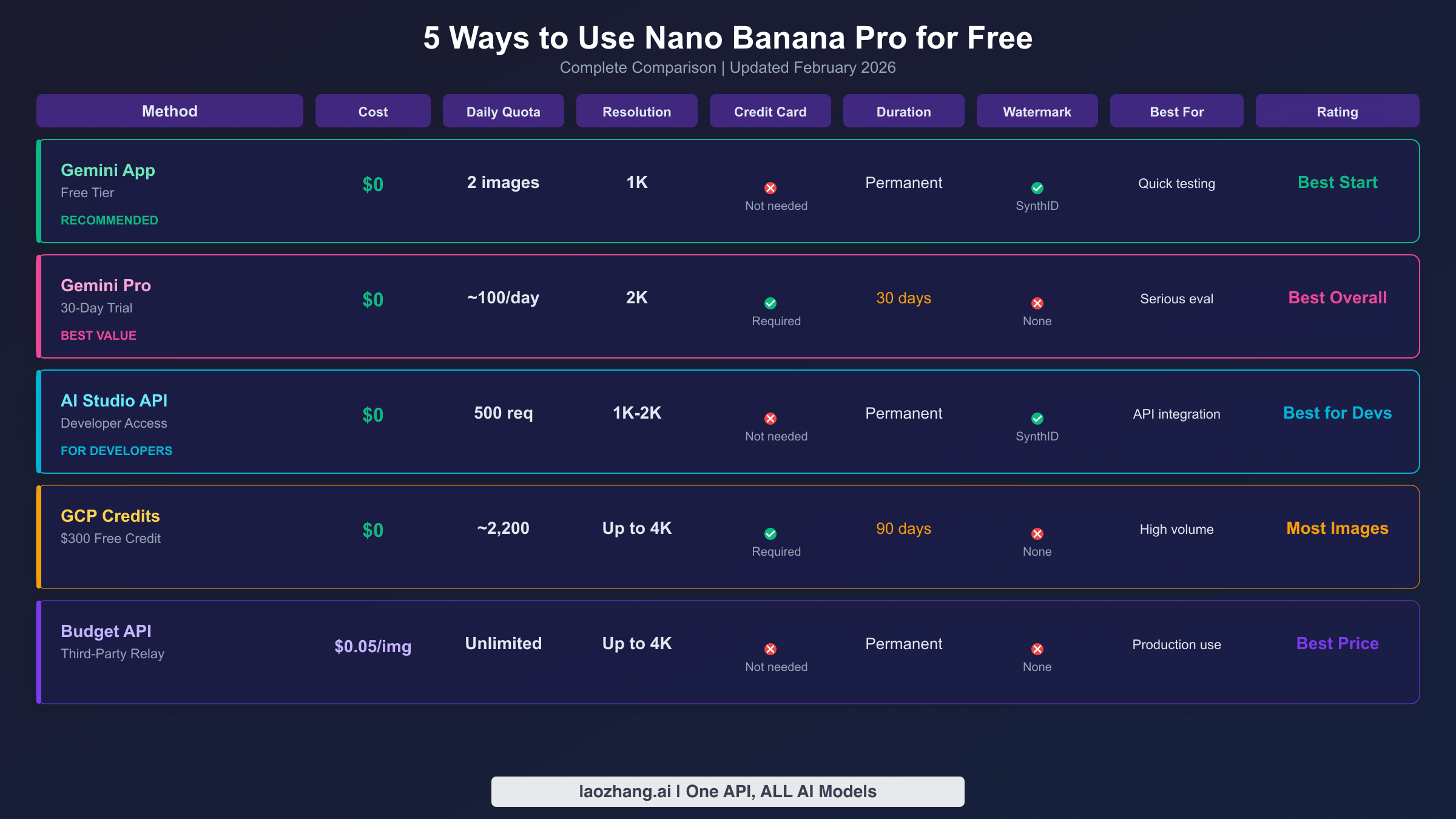
There are five distinct paths to using Nano Banana Pro without spending money, and each one serves a different use case. Understanding the differences is crucial because choosing the wrong method could leave you frustrated with limitations that another option would have solved. Here is every free access method available as of February 2026, with honest assessments of what each one actually delivers.
Method 1: Gemini App Free Tier (No signup required)
The simplest way to try Nano Banana Pro is through the Gemini app on Android or iOS, or via gemini.google.com on the web. Free users get 2 image generations per day at 1K resolution using the Nano Banana Pro model in "Thinking" mode. This is genuinely free—no credit card, no trial period, no strings attached. The catch is that 1K resolution produces images at roughly 1024x1024 pixels, which looks fine on screens but won't work for printing or professional use. Your images will carry an invisible SynthID watermark for AI content identification, though this doesn't visually affect the output. If you just want to see what the fuss is about, this is where to start.
Method 2: Gemini Pro 30-Day Free Trial (Best overall value)
Google offers a one-month free trial of the Gemini AI Pro subscription, which includes full Nano Banana Pro access. During the trial, you get approximately 100 image generations per day at 2K resolution with no visible watermarks and full commercial usage rights. This is the closest thing to a "real" free trial—you experience the product exactly as paying subscribers do. The trial requires a valid credit card, and you'll be charged $19.99/month automatically when the 30 days end unless you cancel. For serious evaluation of whether Nano Banana Pro fits your creative workflow, this is the recommended path. For a detailed breakdown of free tier limitations, our comparison guide covers the nuances that Google's marketing doesn't highlight.
Method 3: Google AI Studio API (Best for developers)
Developers who want to integrate Nano Banana Pro into applications can access the Gemini 3 Pro Image Preview API through Google AI Studio. The current model identifier is gemini-3-pro-image-preview, and it accepts standard Gemini API calls with image generation parameters. AI Studio provides a free tier with up to 500 requests per day, rate-limited to 5-10 requests per minute. No credit card is required—just a Google account and an API key. The free tier produces images at 1K-2K resolution depending on your parameters, with SynthID watermarking applied. This method is ideal for prototyping and testing API integration before committing to paid access. For details on current Gemini image API free tier limits, availability can fluctuate, so check the latest status.
Method 4: Google Cloud Platform $300 Credits
New Google Cloud Platform accounts receive $300 in free credits valid for 90 days. These credits can be applied to Vertex AI, which includes access to the Gemini 3 Pro Image API at all resolution tiers including 4K. At the standard API rate of $0.134 per 2K image, $300 in credits translates to roughly 2,200 image generations—a substantial testing budget. This method requires a credit card and a GCP account, but Google explicitly commits to not charging beyond your free credits during the trial period. The advantage over other free methods is access to full 4K resolution and no daily quota limits beyond your credit balance.
Method 5: Third-Party API Relay Services
Several third-party platforms offer access to the Gemini 3 Pro Image API at significantly reduced prices compared to Google's official rates. While not technically "free," services like laozhang.ai provide the same model at $0.05 per image regardless of resolution—79% cheaper than Google's official $0.24 rate for 4K images (ai.google.dev/pricing, February 2026 verified). Most of these platforms don't require credit cards and offer pay-as-you-go billing, making them a practical alternative for users who need more than the free tier provides but don't want a monthly subscription. For a comprehensive price comparison, see our guide to the most cost-effective Gemini 3 Pro Image API access.
How to Start Your 30-Day Gemini Pro Free Trial (Step by Step)
The Gemini Pro free trial is the most valuable free option because it gives you the full Pro experience for an entire month. Here is exactly how to activate it, along with important details that Google doesn't make obvious.
Before you begin, you'll need a Google account and a valid credit card or debit card. Google supports most major credit cards and some prepaid cards, though virtual card compatibility varies by region. The trial is available in most countries, but some regions may see a different pricing structure, so confirm the $19.99/month rate before proceeding.
Step 1: Navigate to gemini.google.com and sign in with your Google account. If you're on mobile, download the Gemini app from the Google Play Store or Apple App Store and sign in there instead.
Step 2: Look for the "Try Gemini Pro" or "Upgrade" button, typically displayed as a prominent banner at the top of the interface or in the settings menu. Click it to open the subscription page.
Step 3: On the subscription page, you'll see the plan details: "Gemini AI Pro - $19.99/month." Below the price, there should be a note indicating "1-month free trial" or "First month free." If you don't see a free trial offer, it may mean you've previously used a trial on this Google account—free trials are limited to one per account.
Step 4: Enter your payment information. Google will place a temporary authorization hold (usually $0 or $1) on your card to verify it's valid. This hold is released within a few days and you won't be charged for the subscription until the trial ends.
Step 5: Confirm the subscription. You'll receive an email confirming your trial activation with the exact date when billing begins. Screenshot this email or note the date—this is your deadline for cancellation if you decide not to continue.
Step 6: Start generating. In the Gemini interface, you can now request image generation by simply describing what you want. The "Thinking" model provides Nano Banana Pro quality, while the "Fast" model uses the standard Nano Banana (Gemini 2.5 Flash Image). For the best results, explicitly request high-resolution output in your prompts.
One important detail: the trial clock starts the moment you activate it, not when you first generate an image. If you activate the trial on a busy week and don't use it, those days are still counted. Plan to begin your trial when you have time to actually evaluate the product.
How to Cancel Before You Get Charged
This section exists because every free trial guide should include an exit strategy, yet almost none do. The cancellation process for Gemini Pro is straightforward, but timing matters. Here is exactly how to cancel and what to watch for.
You can cancel your Gemini Pro trial at any time during the 30-day period without being charged. Your access to Pro features continues until the trial period ends, regardless of when you cancel. This means you can cancel on day 1 and still use Pro features for the remaining 29 days—a smart approach if you're prone to forgetting subscription deadlines.
To cancel, open the Gemini app or visit gemini.google.com, navigate to Settings, then tap "Manage subscription" or "Your plan." You'll see your current plan details and the renewal date. Tap "Cancel subscription" and follow the confirmation prompts. Google will ask why you're canceling (you can select any reason), and then confirm the cancellation with an email. Keep this cancellation confirmation email as proof in case of billing disputes.
There are several important timing considerations to keep in mind. The safest approach is to set a calendar reminder for day 25 of your trial. This gives you five days of buffer to make your decision. If you cancel before the renewal date, you won't be charged. If you miss the deadline, Google charges the full monthly fee immediately, and their refund policy is inconsistent, meaning you may or may not receive a refund depending on your region and how quickly you request one. Also note that if you cancel and later want to re-subscribe, you'll be charged immediately at the full $19.99/month rate because the free trial is a one-time offer per Google account.
For families or teams evaluating Nano Banana Pro, consider using different Google accounts for each person's trial rather than sharing one account. Each account gets its own 30-day trial, effectively multiplying your free evaluation period.
Free vs Paid: What You Actually Get at Each Tier
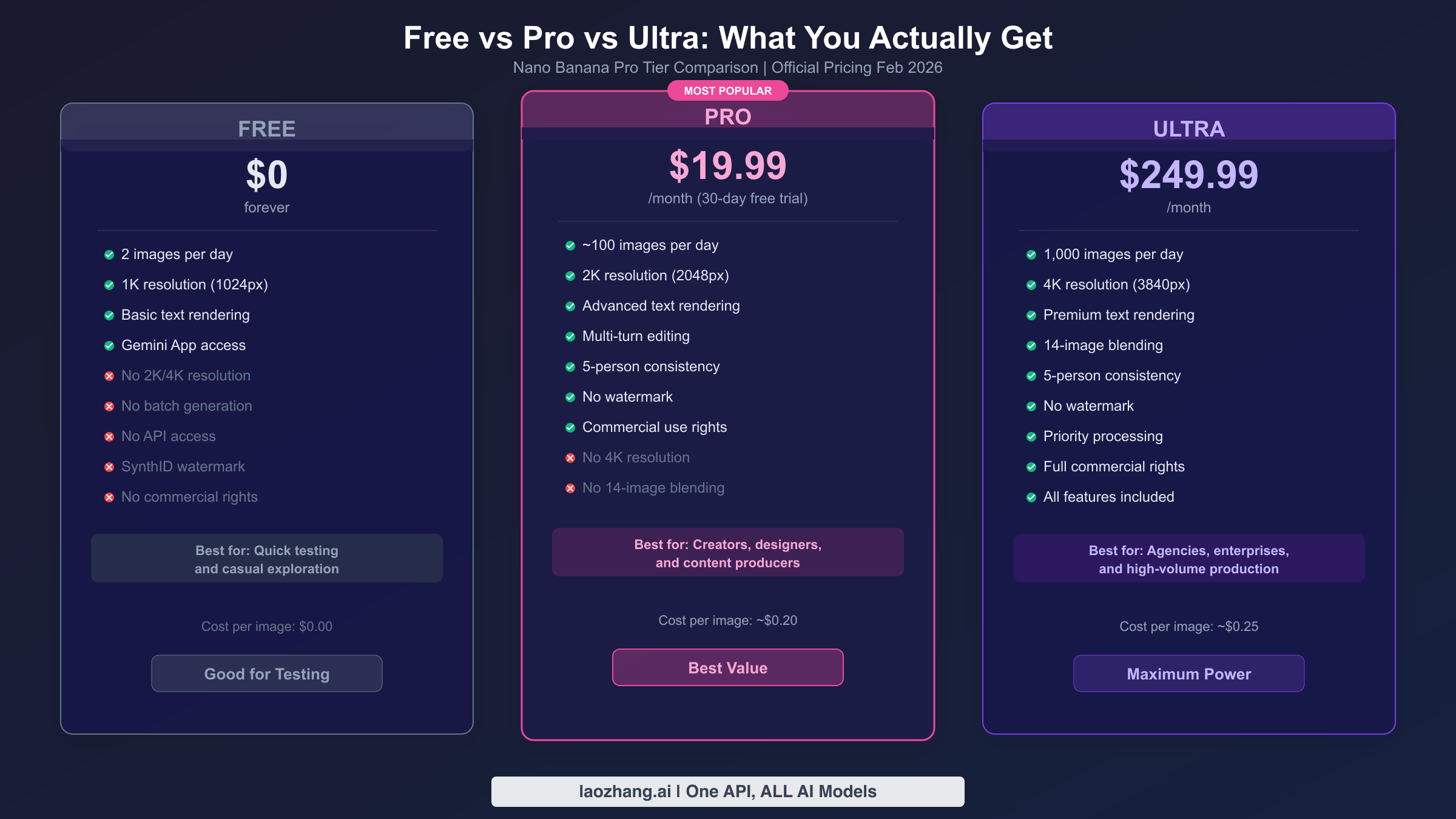
Understanding the concrete differences between free and paid tiers helps you decide whether upgrading is worth it for your specific needs. Here is what changes at each level, explained in practical terms rather than just spec sheets.
Resolution: 1K vs 2K vs 4K
The free tier generates images at 1K resolution, which means roughly 1024x1024 pixels. At this size, images look perfectly fine on social media, messaging apps, and web thumbnails. They start showing visible quality loss when viewed fullscreen on a modern monitor or when cropped significantly. The Pro tier's 2K resolution (2048x2048) is the sweet spot for most creative work—it's sharp enough for blog images, presentation slides, and even small prints. Ultra's 4K resolution (3840x2160) is genuinely professional-grade and suitable for large-format printing, detailed product mockups, and commercial photography replacement. For a hands-on look at what you can achieve with the highest tier, our Nano Banana Pro 4K generation guide covers the techniques and limitations in depth.
Daily Quotas and What They Mean in Practice
The free tier's 2 images per day sounds extremely limiting, and it is—but it's enough to evaluate image quality and understand the model's strengths. At 2 per day for a month, you get roughly 60 generations to experiment with. The Pro tier's approximately 100 daily generations is surprisingly generous for individual creators. A typical design session might produce 15-30 images (including iterations and variations), meaning Pro easily covers most professional workflows. Ultra's 1,000 daily limit is designed for teams and production environments where image generation is a core part of the output pipeline. Note that these quotas are Google's best-effort targets rather than hard guarantees—during peak usage periods, actual availability may be slightly lower.
Watermarks and Commercial Rights
Free tier images carry SynthID, Google's invisible AI watermark that's embedded in the image data rather than displayed visually. This watermark can be detected by AI content identification tools but is invisible to the human eye. However, free tier images don't come with explicit commercial usage rights, making them unsuitable for client work, product listings, or advertising. Pro and Ultra tiers remove the commercial restriction entirely—you own full usage rights to everything you generate, which is essential for any professional application.
Feature Access Differences
Beyond resolution and quotas, the tiers differ in creative capabilities. Free users get basic generation and simple editing. Pro users gain multi-turn editing (refining images through conversation), advanced text rendering, and 5-person character consistency. Ultra adds 14-image blending, priority processing speeds, and the full 4K pipeline. The multi-turn editing alone is worth the Pro upgrade for serious creative work, as it lets you iteratively refine an image through natural language instructions rather than starting from scratch each time.
For Developers: Free API Access and Budget-Friendly Alternatives
Developers evaluating Nano Banana Pro for integration into applications have several cost-effective paths that don't require a Gemini subscription. The API ecosystem around Gemini 3 Pro Image is mature enough that you can build, test, and even deploy without breaking the bank.
Google AI Studio Free Tier
The most straightforward developer path is Google AI Studio, which provides API access to gemini-3-pro-image-preview with a free tier of up to 500 requests per day. Rate limiting sits at 5-10 requests per minute, which is sufficient for development and testing but not for production. To get started, visit ai.google.dev, create an API key, and begin making requests. The API accepts standard HTTP calls with JSON payloads describing your image generation request. Here is a minimal Python example:
import google.generativeai as genai

genai.configure(api_key="YOUR_API_KEY")
model = genai.GenerativeModel("gemini-3-pro-image-preview")

response = model.generate_content(
    "Generate a professional product photo of a ceramic coffee mug "
    "on a wooden table with soft morning light"
)

# Save the generated image
if response.candidates[0].content.parts:
    for part in response.candidates[0].content.parts:
        if hasattr(part, 'inline_data'):
            with open("output.png", "wb") as f:
                f.write(part.inline_data.data)
Official API Pricing When Free Tier Isn't Enough
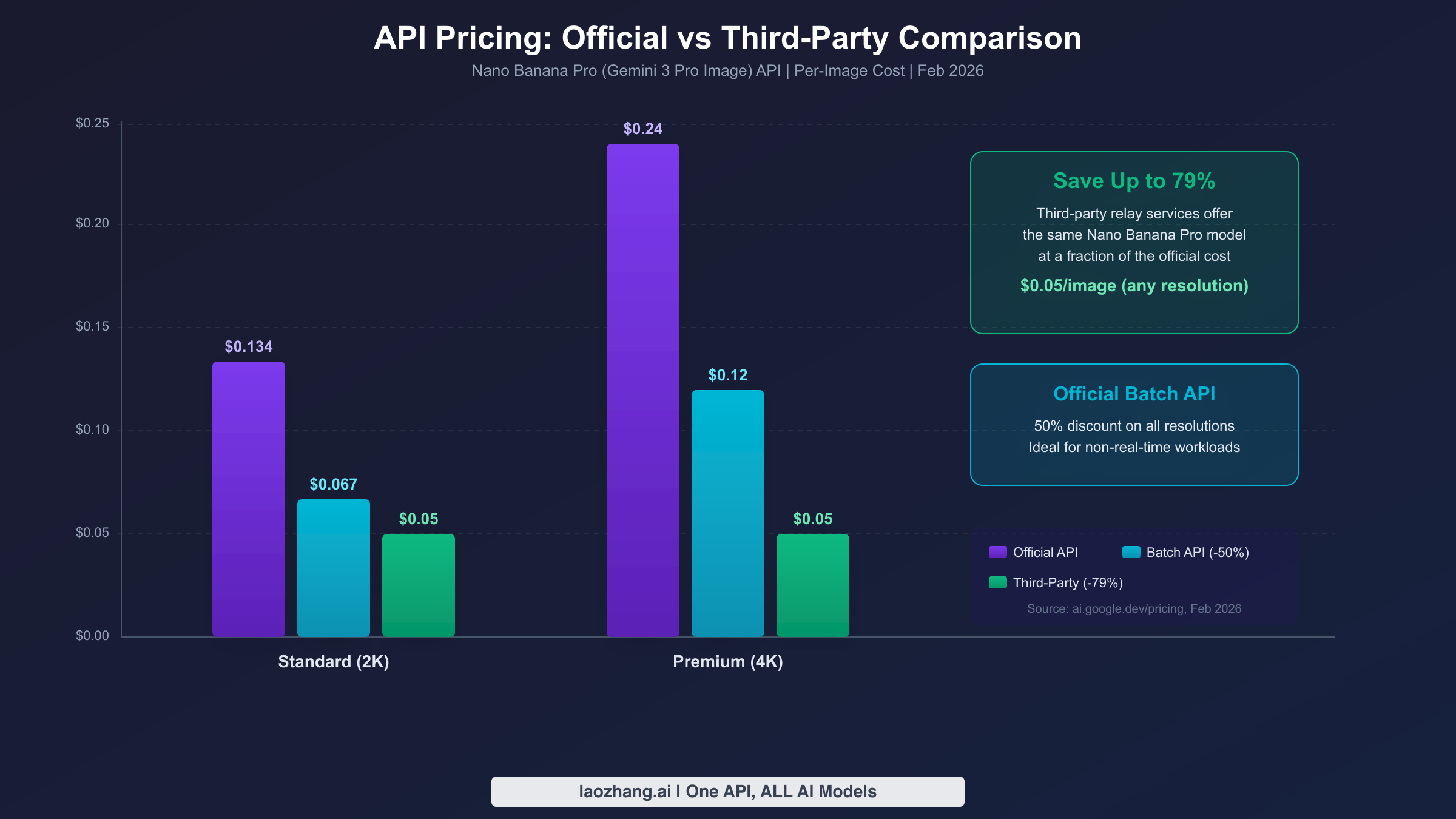
Once you exceed the free tier, Google's official API pricing is $0.134 per image at 1K-2K resolution and $0.24 per image at 4K resolution (ai.google.dev/pricing, February 2026 verified). The Batch API offers a 50% discount on these rates—$0.067 and $0.12 respectively—for workloads that don't require real-time response. Batch processing is ideal for scenarios like generating product catalogs, creating social media content libraries, or processing bulk design requests where a few minutes of delay is acceptable.
Budget-Friendly API Alternatives
For production use where official pricing feels steep, third-party API relay services provide the same Gemini 3 Pro Image model at substantially lower costs. Platforms like laozhang.ai offer Nano Banana Pro API access at $0.05 per image regardless of resolution—representing a 79% savings compared to official 4K pricing and a 63% savings compared to standard 2K pricing. These services work by aggregating API access across multiple accounts and regions, passing volume discounts on to individual developers. The trade-off is that you're routing requests through a third party, which may not be acceptable for applications handling sensitive data. For prototyping, content generation, and non-sensitive applications, the cost savings are significant enough to warrant serious consideration.
The GCP Credits Path
New Google Cloud accounts receive $300 in free credits applicable to Vertex AI, which provides Gemini 3 Pro Image API access at the same pricing as the standard API. At $0.134 per 2K image, this translates to approximately 2,240 free generations—more than enough to build and test a complete integration. The Vertex AI endpoint also provides access to enterprise features like content filtering controls, custom safety settings, and detailed usage analytics that aren't available through the standard Gemini API.
How Nano Banana Pro Compares to Other Free AI Image Tools
If you're considering Nano Banana Pro, you're probably also evaluating other AI image generators that offer free access. Here is an honest comparison of how the major free tiers stack up against each other, based on capabilities available in February 2026.
ChatGPT's image generation (powered by GPT-Image 1) offers free users a limited number of daily generations—the exact quota varies and isn't officially published, but most users report 2-5 images per day on the free plan. The quality is strong, particularly for photorealistic images and complex scenes with multiple elements. However, ChatGPT's image generation produces images at a maximum resolution of approximately 1024x1024, similar to Nano Banana Pro's free tier. Where ChatGPT excels is in conversational image editing—you can describe modifications naturally, and the system typically understands nuanced requests. Where it falls behind Nano Banana Pro is in text rendering accuracy and character consistency across multiple generations. For a detailed head-to-head comparison, our Nano Banana Pro vs ChatGPT image generator analysis covers specific scenarios where each tool wins.
Midjourney's free tier has been inconsistent—the service has offered and revoked free access multiple times. As of early 2026, new users can generate approximately 25 images through the trial on the Midjourney website. Midjourney's strength lies in aesthetic quality and artistic styles, producing images with a distinctive look that many creators prefer for editorial and social media content. The limitation is control—Midjourney's prompt interpretation is less literal than Nano Banana Pro's, meaning precise compositions and specific text rendering are more difficult to achieve. For pure artistic quality, Midjourney often produces more visually striking results. For precise control, accurate text, and consistency, Nano Banana Pro has the edge.
DALL-E 3 remains accessible through Microsoft Copilot and Bing Image Creator with daily generation limits. The quality is solid for general-purpose image creation, and the integration with Microsoft's ecosystem makes it convenient for users already in that environment. DALL-E 3 handles text rendering reasonably well, though not at Nano Banana Pro's level, and produces images at roughly 1024x1024 resolution on the free tier.
The strategic advantage of Nano Banana Pro's free tier is the upgrade path. Starting free on the Gemini platform means your workflows, saved conversations, and iterative editing sessions carry forward seamlessly when you upgrade to Pro or Ultra. With competitor free tiers, you're often locked into a completely different experience when you move to paid, requiring you to rebuild your creative process from scratch.
Frequently Asked Questions
Is Nano Banana Pro really free to use?
Partially. The Gemini App provides permanent free access to Nano Banana Pro with a limit of 2 images per day at 1K resolution. For more generous access, the 30-day Gemini Pro free trial gives you approximately 100 daily generations at 2K resolution, but requires a credit card and auto-renews at $19.99/month. Developers can access the API for free through Google AI Studio with up to 500 daily requests.
What happens when my free trial ends?
If you don't cancel before the 30-day trial period ends, Google automatically charges $19.99 to your card on file and your subscription continues monthly. You can cancel at any time during the trial to avoid charges—your Pro access continues until the trial period officially ends, even after cancellation.
Can I use free tier Nano Banana Pro images commercially?
Free tier images come with SynthID watermarking and don't include explicit commercial usage rights. For commercial use—including client work, product images, marketing materials, and content for sale—you need a Pro or Ultra subscription, or you need to use the API through an account with commercial licensing.
Is Nano Banana Pro the same as Gemini 3 Pro Image?
Yes, they refer to the same underlying model. "Nano Banana Pro" is the consumer-facing name used in the Gemini app and marketing, while "Gemini 3 Pro Image Preview" (model ID: gemini-3-pro-image-preview) is the technical name used in API documentation. The model, its capabilities, and output quality are identical regardless of which name is used.
Why can't I find Nano Banana Pro in Google AI Studio?
In AI Studio, the model is listed under its technical name "Gemini 3 Pro Image Preview" rather than "Nano Banana Pro." Look for it in the model selector, or specify gemini-3-pro-image-preview directly in your API calls. If the model doesn't appear, ensure your Google account is in a supported region and that you've accepted the latest terms of service.
How does Nano Banana Pro compare to the standard Nano Banana model?
Standard Nano Banana uses the Gemini 2.5 Flash Image model, which is optimized for speed and costs $0.039 per API generation. Nano Banana Pro uses the Gemini 3 Pro Image model, which prioritizes quality over speed and costs $0.134-$0.24 per generation depending on resolution. In the Gemini app, Nano Banana Pro is accessed through "Thinking" mode, while standard Nano Banana runs in "Fast" mode. The Pro version produces noticeably higher quality output, especially for text rendering, fine details, and complex compositions.


