
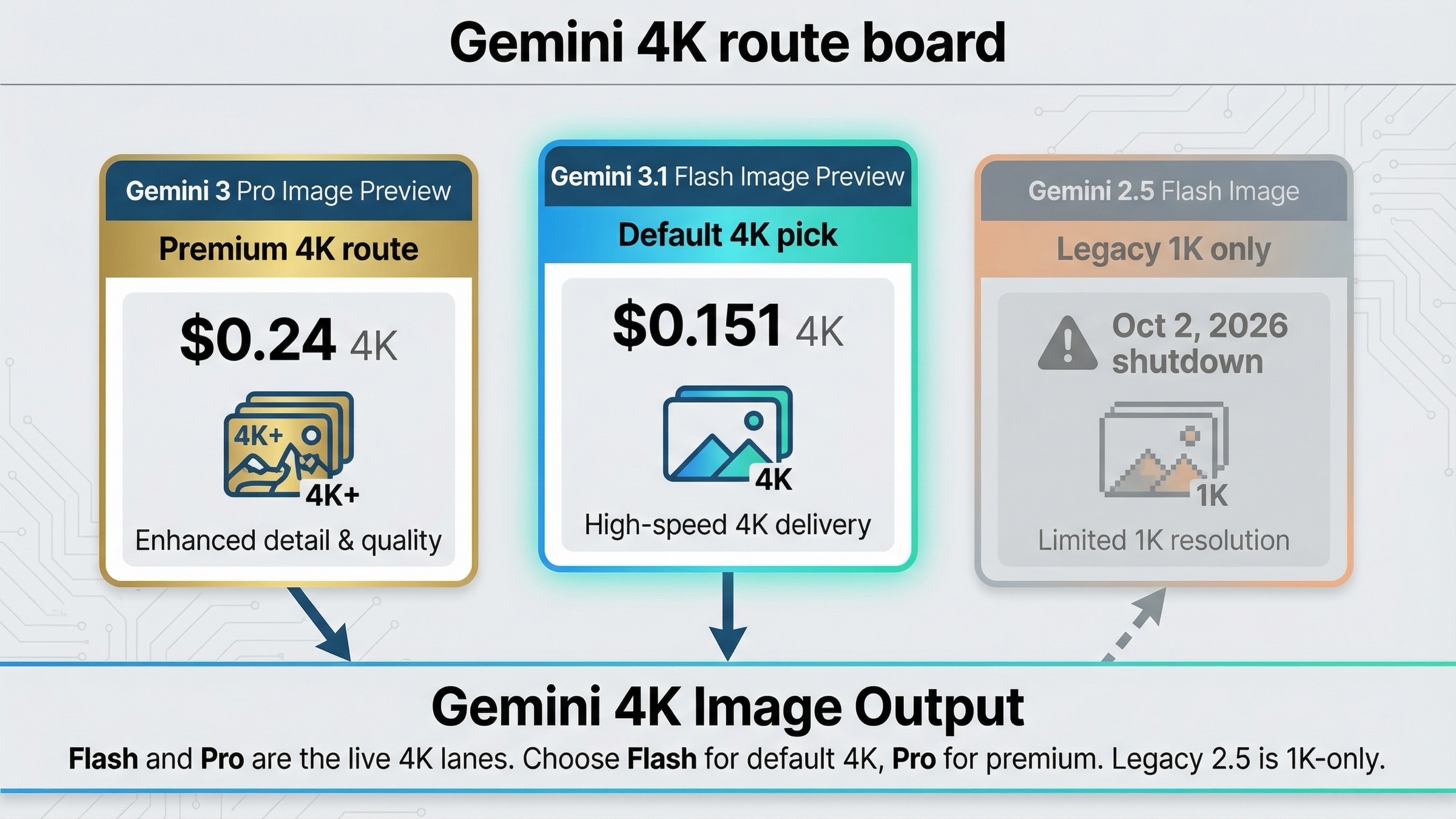
As checked on March 23, 2026, Gemini can generate 4K images, but the current 4K-capable lanes are gemini-3.1-flash-image-preview and gemini-3-pro-image-preview, not the legacy gemini-2.5-flash-image model. If you need one fast recommendation, start with Gemini 3.1 Flash Image Preview for most 4K work and move to Gemini 3 Pro Image Preview only when premium text rendering, more demanding references, or higher-stakes assets justify the extra cost.
That default matters because this keyword is easy to answer badly. Google's current docs split the truth across image generation, pricing, models, deprecations, and rate limits. If you read only one of those pages, you can still miss the actual route decision.
The route decision is simple once the pieces are in one place. Flash is the better default 4K lane because it already supports 4K at a lower price and is positioned for speed plus higher-volume use. Pro is the premium 4K lane when the image itself is expensive enough that the cost of weak adherence, weak text rendering, or repeated retries matters more than the extra API bill.
TL;DR
If you only need the answer and not the full explanation, use this table first.
| Model | 4K support | Current standard price | Best default use | Biggest caveat |
|---|---|---|---|---|
gemini-3.1-flash-image-preview | Yes | $0.151 per 4K image | Best default for most 4K output, especially when you need a balance of cost, speed, and flexibility | Still a preview lane, so capacity can vary |
gemini-3-pro-image-preview | Yes | $0.24 per 4K image | Premium 4K work where text fidelity, complex instructions, or higher-stakes creative output matter more than cost | Much more expensive than Flash 4K |
gemini-2.5-flash-image | No | $0.039 per image up to 1024x1024 | Cheap legacy 1K generation while it remains live | Not a 4K route and scheduled to shut down on October 2, 2026 |
The practical rule is this: use Flash 4K when you genuinely need larger output, use Pro 4K when the asset quality bar is high enough to justify a premium lane, and stay at 1K or 2K unless the image job really benefits from the extra resolution.
Which Gemini Models Actually Support 4K Output?
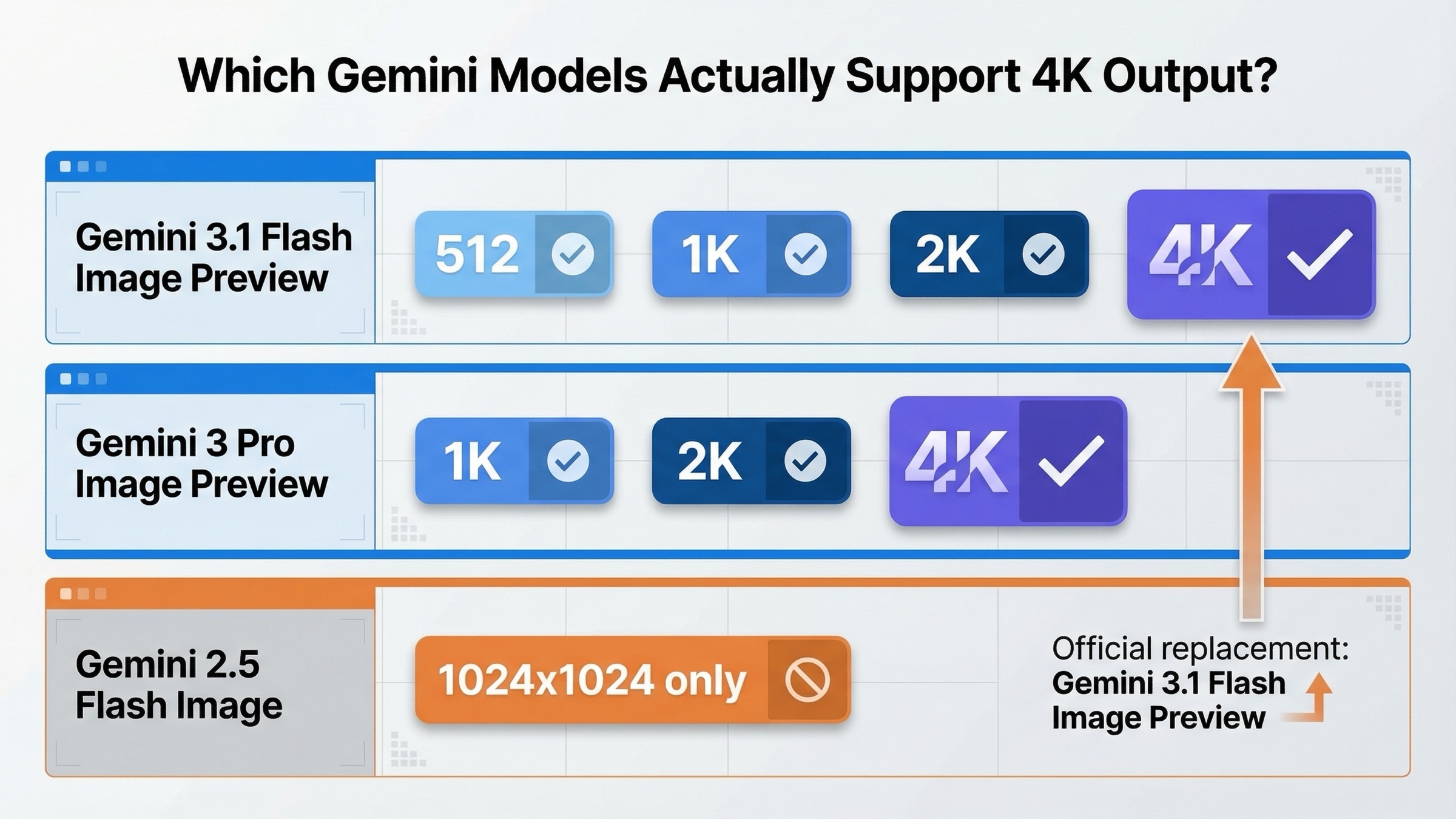
The easiest mistake in this topic is assuming that "Gemini image generation" is one product with one resolution story. It is not. Google's current image-generation guide says Gemini 3 image models support high-resolution output for 1K, 2K, and 4K, while Gemini 3.1 Flash Image adds the smaller 512 option. The API reference for ImageConfig also documents imageSize values of 512, 1K, 2K, and 4K, with 1K as the default when you do not set a size.
That means the live 4K answer belongs to the Gemini 3 preview image family:
gemini-3.1-flash-image-previewfor the current speed and high-volume routegemini-3-pro-image-previewfor the premium route
The older gemini-2.5-flash-image lane is different. Google's current pricing page prices it only as output up to 1024x1024, and the deprecations table says it is scheduled to shut down on October 2, 2026, with gemini-3.1-flash-image-preview as the recommended replacement. So if your real question is "which Gemini image model should I use for 4K today," the old 2.5 lane only matters as historical context and as the cheapest legacy 1K fallback, not as the actual answer.
This is also why older pages feel contradictory. Google's August 2025 launch post for Gemini 2.5 Flash Image still makes that model sound like the center of the Gemini image story, because at launch it was. The 2026 answer is narrower and cleaner: use the Gemini 3 preview image lanes when 4K is the requirement.
Should You Use Gemini 3.1 Flash Image Preview or Gemini 3 Pro Image Preview for 4K?
The wrong way to answer this is "Pro is the best one, so pay for Pro." The better answer is to ask what kind of 4K job you are actually running.
For most teams, Gemini 3.1 Flash Image Preview is the better default 4K route. The current models page describes Nano Banana 2 as a powerful, high-efficiency image generation and editing model optimized for speed and high-volume use cases. That framing matters because many 4K jobs are not rare museum pieces. They are larger marketing graphics, cleaner export sizes, better crop flexibility, or assets that should look less cramped when text and visual detail share the same canvas.
Flash also avoids the most common buyer mistake in this keyword family: paying premium prices before the workflow has earned them. At $0.151 per 4K image, Flash is still meaningfully cheaper than Pro at $0.24. If the job is already good on Flash, the extra spend is just budget leakage.
Gemini 3 Pro Image Preview becomes the right route when the image itself is expensive enough that quality failures cost more than API savings. Google's image-generation guide positions Pro for professional asset production and complex instructions. The pricing page describes it as a native image generation model optimized for speed, flexibility, and contextual understanding. That is the lane to use when your output is text-heavy, brand-sensitive, reference-heavy, or expensive to redo manually after generation.
There is one more subtle reason not to turn this into a simple "Flash cheap, Pro good" split. The Gemini 3.1 Flash Image model card says Flash Image is already suited to professional precision and control, clear text for posters and intricate diagrams, and quick iterations. The same model card also says the 1K model is weaker on small text and long paragraphs. That is exactly the kind of evidence that makes 2K or 4K on Flash reasonable for many infographic-like jobs. In other words, the real upgrade path is often Flash 1K -> Flash 2K or 4K -> Pro 4K, not Flash -> Pro as the first move.
If your real question is broader than just 4K, our Gemini image generation pricing guide goes deeper on how the whole family is currently priced.
How Much Does Gemini 4K Image Generation Cost?
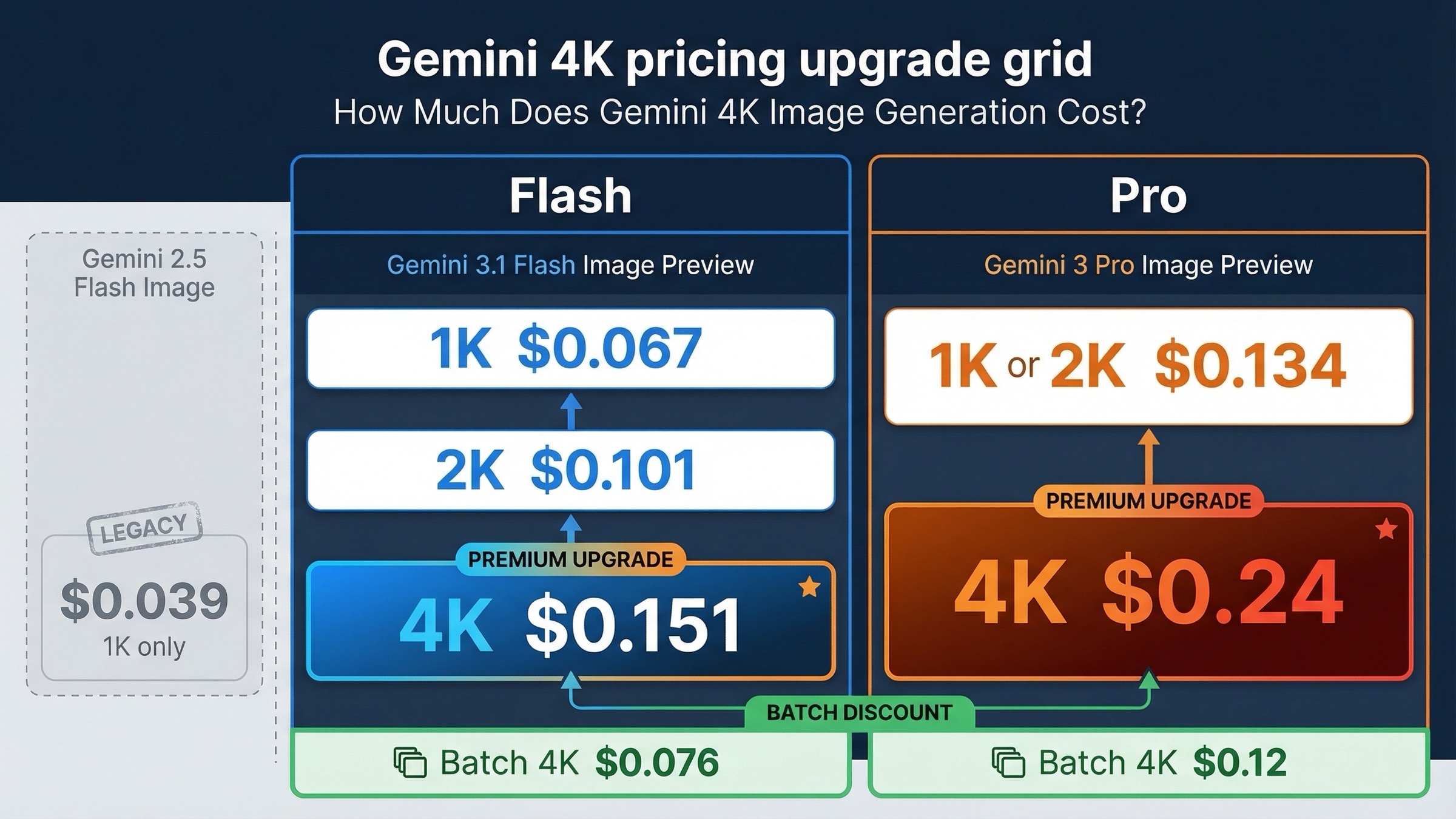
The pricing question is where most weak pages stop too early. Raw prices matter, but the real decision is how much extra resolution changes your bill and whether the result actually needs it.
As checked on March 23, 2026, Google's current Gemini Developer API pricing page lists:
| Model | 1K price | 2K price | 4K price | Batch 4K price | What the upgrade is really buying |
|---|---|---|---|---|---|
gemini-3.1-flash-image-preview | $0.067 | $0.101 | $0.151 | $0.076 | Cheaper 4K path for most current production work |
gemini-3-pro-image-preview | $0.134 | $0.134 | $0.24 | $0.12 | Premium 4K lane when adherence and asset quality matter more than cost |
gemini-2.5-flash-image | $0.039 | N/A | N/A | N/A | Legacy 1K-only lane, not a 4K option |
That table gives the fast math, but the important advice is what not to do with it.
First, do not assume 4K is the safe default. On Flash, moving from 1K to 4K more than doubles the cost. On Pro, the difference between 2K and 4K is still large enough that 4K should be attached to a reason, not to a vague feeling that "higher is better."
Second, do not assume Pro is automatically the better value at 4K just because it is more expensive. If Flash already solves the image job, Pro's higher price is not buying anything meaningful. The premium lane only makes sense when the cost of weak output, weak prompt adherence, or repeated revision loops is already high.
Third, batch mode is the most obvious cost-control lever if your workflow is not interactive. Flash 4K drops from $0.151 to $0.076 in batch. Pro 4K drops from $0.24 to $0.12. For large generation queues, that matters more than most articles admit.
The pricing also explains why the old 2.5 lane keeps hanging around in search behavior. A $0.039 1K image is still attractive if the job is cheap drafts or disposable creative testing. The reason it is not the right 4K answer is not because it became useless. It is because Google's current docs keep it in the legacy 1K lane and give it a shutdown date.
For the wider resolution-and-pricing tradeoff across Google's image stack, the companion read is Gemini 2.5 Flash Image replacement.
How To Request 4K Output Without Accidentally Falling Back to 1K
The implementation rule here is straightforward: set imageConfig.imageSize explicitly. The API reference says the supported size values are 512, 1K, 2K, and 4K, and the default is 1K if you omit the field. That means you should not assume a vague prompt like "make this high resolution" will automatically move the request into a 4K output path.
The minimal JavaScript shape looks like this:
javascriptconst response = await ai.models.generateContent({
  model: "gemini-3.1-flash-image-preview",
  contents: "Create a clean product launch graphic with large, readable text.",
  config: {
    responseModalities: ["IMAGE"],
    imageConfig: {
      aspectRatio: "16:9",
      imageSize: "4K"
    }
  }
});
Two practical caveats matter more than the snippet itself.
The first is that aspect ratio and resolution are different decisions. Setting aspectRatio alone does not tell the API to use 4K. If you want 4K, ask for it directly.
The second is that documented support does not always mean every SDK and every workflow behaves perfectly in every preview-era edge case. A current Google AI Developers Forum thread titled Gemini 3 Pro Image API completely ignores imageSize: '2K' parameter is a good example of the kind of debugging friction people still hit. That thread is not a reason to distrust the official docs. It is a reason to treat higher-resolution rollout as something you test, not something you assume.
The best operational habit is:
- confirm the right model lane first
- set
imageSizeexplicitly - verify the returned dimensions in your own pipeline
- downgrade to 2K or 1K when the higher-resolution output does not create real downstream value
If you are comparing Google against another image stack rather than choosing only inside Gemini, Gemini Image API vs OpenAI Image API is the better broader route guide.
Why 4K Gemini Jobs Still Fail or Slow Down in Practice
This is where articles that sound clean on paper often stop being useful.
Google's current rate-limits page says two things that should shape how you talk about 4K in production. First, active limits depend on quota tier and account status, and Google tells you to check the live numbers in AI Studio. Second, the page says specified rate limits are not guaranteed and actual capacity may vary. That is already enough to rule out any article that promises a fixed, friction-free 4K throughput story.
The community evidence fills in the emotional reality behind that wording. In the forum thread Gemini 3 Pro Nano Banana (Tier 1) (4K Image) - 503 Unavailable Error: The model is overloaded, a user reported a high rate of 503 overloaded errors specifically while trying to generate 4K images. That thread is not official policy. It is still valuable because it matches the anxiety people actually bring to this keyword.
The right way to interpret this is not "Gemini 4K is broken." The better interpretation is:
- 4K is officially supported
- preview lanes still carry real operational variance
- larger outputs put more pressure on cost, throughput, and patience than 1K jobs do
This is also why a lot of teams should not default to 4K for every request. When the image is going to be displayed at normal web size, the extra resolution often adds more cost and more waiting than real user value. Save 4K for cases where it changes the final deliverable: dense text, large-format exports, heavier cropping needs, or premium assets where quality problems become expensive.
Best Route by Use Case
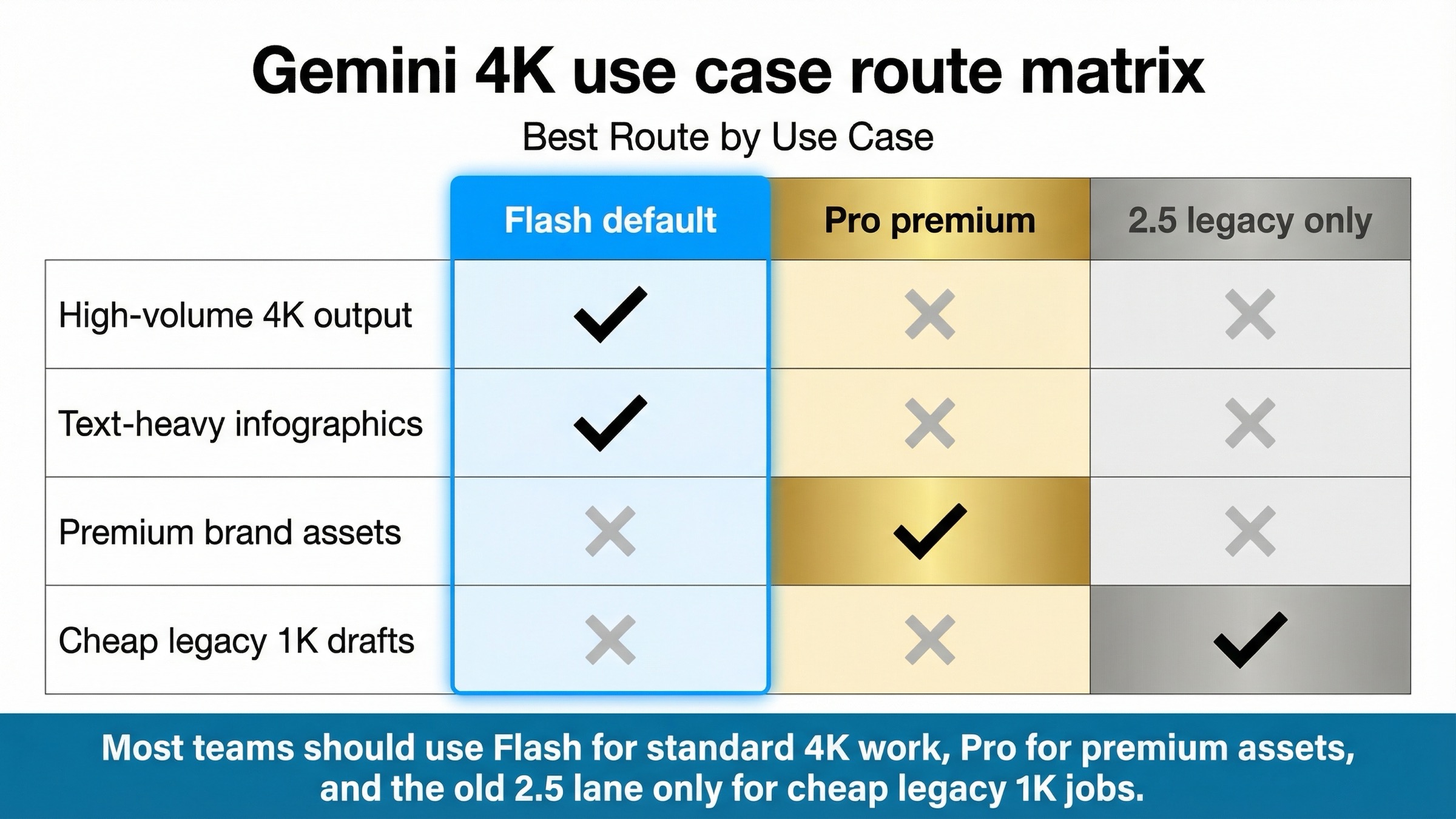
The easiest way to choose is to stop asking which model is "best" and start asking what kind of image job you are paying for.
If you need the default current 4K route for most work, choose gemini-3.1-flash-image-preview. That is the cleanest answer for product graphics, marketing visuals, richer export sizes, and many infographic-style assets where the newer Flash lane already gives enough control.
If you need premium 4K assets where text rendering, complex instructions, or reference-heavy generation matter more than budget, choose gemini-3-pro-image-preview. That is the route for the image job that already costs real time or money when it goes wrong.
If you need the cheapest official Gemini image output and 4K is not actually required, keep gemini-2.5-flash-image only as a short-term legacy 1K option, and do not build new 4K plans around it. The replacement guide is the better read for that decision.
If you need high volume but not premium quality, use Flash and test whether 2K is already enough before jumping to 4K. That is the most common over-spend pattern in this topic.
If you need premium assets but only occasionally, do not force every workflow onto Pro. Keep Flash as the default lane and route only the expensive jobs upward. That usually produces a better cost structure than treating Pro as the team-wide default.
FAQ
Can Gemini app image generation be treated the same as Gemini API 4K support?
Not for planning purposes. The official 4K controls are documented on the Gemini API side through imageConfig.imageSize. Consumer-facing app behavior can overlap with the same model family, but it is not the right source of truth for production routing.
Can gemini-2.5-flash-image do 4K if I just set the right aspect ratio?
No current official source supports that claim. Google's pricing page still treats gemini-2.5-flash-image as output up to 1024x1024, and the deprecations page says its official replacement is gemini-3.1-flash-image-preview.
Is 4K worth it for every Gemini image job?
No. Use it when the resolution changes the deliverable: dense text, larger-format export, heavier crops, or premium brand-sensitive assets. If the image will mostly live at ordinary web size, 1K or 2K is often the better default.
Why would I ever pay for Pro if Flash already supports 4K?
Because the real reason to choose Pro is not "only Pro can do 4K." The reason is that some 4K jobs are expensive enough that stronger text fidelity, more demanding prompt handling, or better premium-asset behavior is worth paying for.


