
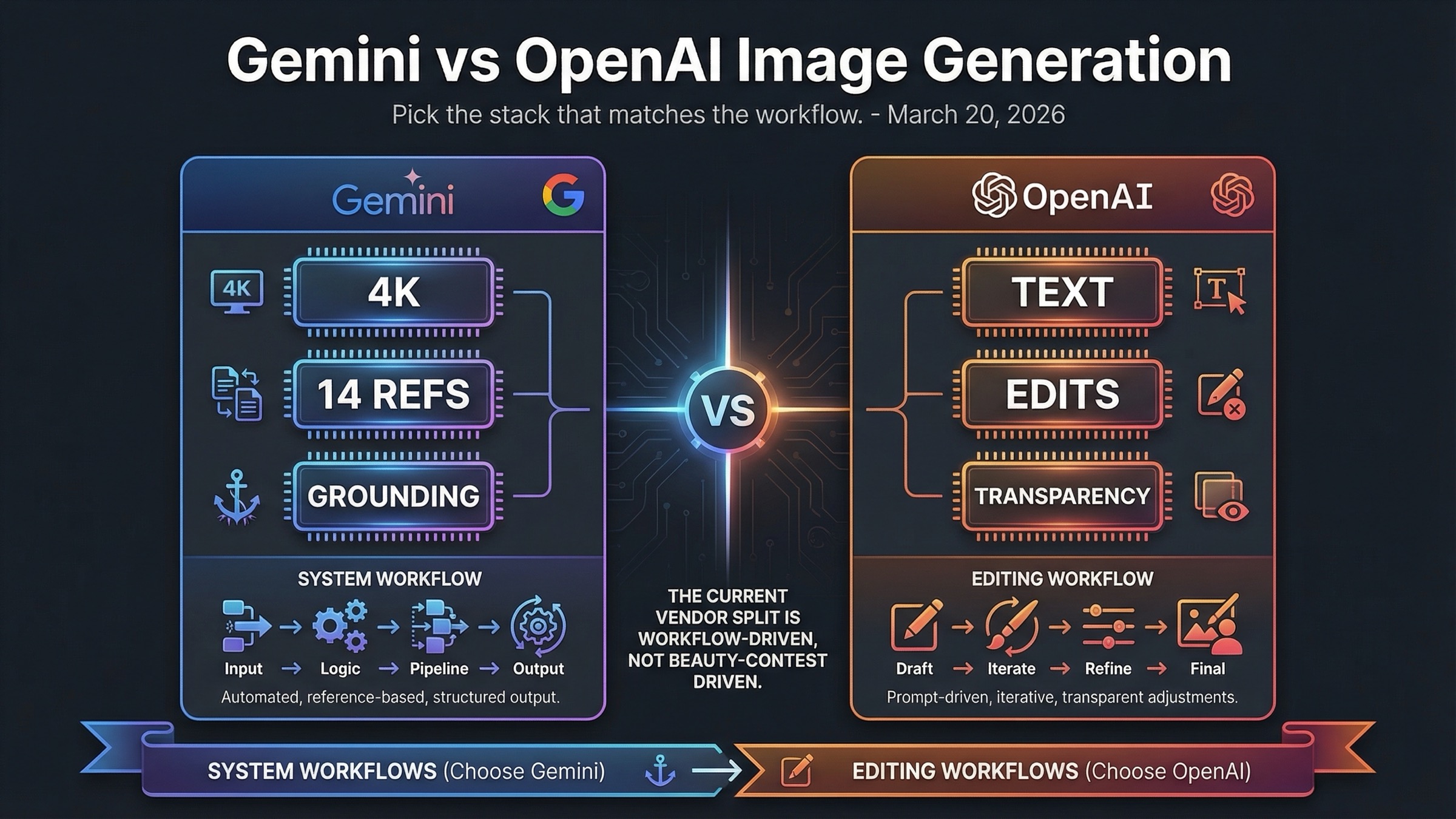
Pick Gemini Image API when your workflow depends on 2K or 4K output, heavy reference-image use, and Google Search grounding. Pick OpenAI Image API when text rendering, precise edits, transparent backgrounds, and an easier GPT Image 1.5 adoption path matter more.
The practical decision is not whose images look nicer. It is which API stack creates fewer retries for the kind of work you actually ship: configurable, reference-heavy production workflows on Google's side or edit-heavy, text-sensitive image operations on OpenAI's side.
TL;DR
If you only need the decision and not the full explanation, use the table below. It gives the fastest honest answer to the keyword without pretending the two stacks are interchangeable.
| Your priority | Better pick | Why |
|---|---|---|
| Cheapest current square output | OpenAI | GPT Image 1.5 starts at $0.009 for a low 1024x1024 output, while Gemini 3.1 Flash Image Preview starts at $0.067 for a 1K image. |
| Text-heavy graphics, signs, labels, or UI mockups | OpenAI | GPT Image 1.5 is the safer choice when readable text inside the image matters more than raw generation flexibility. |
| Clean image editing workflow | OpenAI | OpenAI's current image guide explicitly centers edits, masks, transparent backgrounds, and high input fidelity. |
| 2K or 4K output from the current default lane | Gemini | Gemini 3.1 Flash Image Preview exposes a true 1K, 2K, and 4K ladder that OpenAI's current image docs do not match. |
| Reference-heavy generation | Gemini | Google's current image docs support up to 14 reference images across the Gemini image family. |
| Search-grounded image generation | Gemini | Google's current image stack exposes Google Search grounding directly in its image workflow. |
| Simpler model naming and cleaner product-to-API story | OpenAI | GPT Image 1.5 is easier to identify and route than Google's Nano Banana naming layer. |
| Best overall default for mixed production teams | It depends | Use Gemini when the workflow is system-like and configurable. Use OpenAI when the workflow is edit-heavy and text-sensitive. |
The fastest practical rule is this: choose OpenAI when the image is part of a creative editing workflow, and choose Gemini when the image is part of a configurable production workflow. That is a much better decision rule than asking which vendor is "better overall."
Why This Comparison Gets Messy Fast
The phrase "Gemini vs OpenAI image generation" sounds cleaner than the market actually is. On the Google side, you are not comparing one single image model. The current official image-generation doc says Nano Banana is the name for Gemini's native image-generation capabilities and maps that family to three distinct models: Nano Banana 2 (gemini-3.1-flash-image-preview), Nano Banana Pro (gemini-3-pro-image-preview), and Nano Banana (gemini-2.5-flash-image). That means any serious comparison has to decide which Gemini lane it is really evaluating.
OpenAI's side is cleaner, but only if you stay disciplined about which surface you mean. The product story is the new ChatGPT Images experience. The API story is GPT Image 1.5. The current OpenAI docs make those two surfaces easier to connect than Google's docs do, but they are still not identical. If a page mixes ChatGPT subscription convenience with per-image API math, it is already halfway to a misleading conclusion.
This is also why many page-one comparisons feel unsatisfying. A hands-on article may still be useful for revealing obvious strengths and weaknesses, but it often compares different layers of the stack without saying so. The Beebom comparison that still ranks for this query family is a good example: it is useful as a test-driven page, but it compares ChatGPT 4o against Gemini 2.0 Flash from March 27, 2025, which is not the current 2026 image-model story. That kind of result ranks because it is easy to click, not because it is the cleanest possible answer.
The stronger way to compare the stacks is to ask four narrower questions.
First, which vendor is easier to understand and route in current docs? OpenAI has the advantage there.
Second, which vendor exposes more configuration and more image-native control for production-style generation? Gemini has the advantage there.
Third, which vendor is stronger for edits, masks, transparent backgrounds, and text-heavy outputs? OpenAI has the advantage there.
Fourth, which vendor gives you a better answer when you need 2K or 4K generation with broader reference-image support? Gemini has the advantage there.
Once you use those questions instead of "who wins the benchmark," the comparison stops sounding vague and starts sounding useful.
Gemini Image API vs OpenAI Image API at a Glance
The table below is the cleanest way to see the current decision support in one place. It is deliberately not a beauty contest table. The goal is to show how the stacks differ in the dimensions that actually change a buying decision.
| Dimension | Gemini image stack | OpenAI image stack |
|---|---|---|
| Current default lane for this comparison | Gemini 3.1 Flash Image Preview (gemini-3.1-flash-image-preview) | GPT Image 1.5 |
| Premium lane | Gemini 3 Pro Image Preview (gemini-3-pro-image-preview) | GPT Image 1.5 high-quality outputs rather than a separate premium image model |
| Primary image API surface | Gemini-native generateContent, with a separate decision about which Nano Banana lane to call | OpenAI images plus the Responses image-generation tool around one main flagship lane |
| Max output story in current official docs | Explicit 1K, 2K, and 4K options | Explicit 1024x1024, 1536x1024, and 1024x1536 options |
| Editing story | Strong, but the current SERP and docs emphasize generation, references, and grounding more than edit-centric marketing | Stronger edit-centric story with masks, transparent backgrounds, image references, and high input fidelity |
| Reference-image story | Up to 14 reference images across the family, with different object and character limits by model | One or more reference images supported, with the first five input images preserved with higher fidelity on GPT Image 1.5 |
| Search-grounded image story | Yes, directly exposed in Google's current image docs | No equivalent search-grounded image workflow in the current OpenAI image docs |
| Current official pricing posture | Resolution-led math with per-image equivalents and batch discounts | Quality-led math with exact per-image prices by size and tier |
| Throughput posture | Tier-based limits and preview-model caution in current Google docs | Exact IPM ladder published on the GPT Image 1.5 model page |
| Best fit | Configurable, reference-heavy, production-style image workflows | Text-heavy, edit-heavy, design-sensitive workflows in the OpenAI ecosystem |
The most important takeaway from this table is that the two APIs are solving different problems well. Google's image stack is more configurable and system-like. OpenAI's stack is more editing-centric and product-like. Neither of those advantages is abstract. They change the actual cost, failure modes, and retry patterns a team experiences.
This is also why the phrase "Gemini is cheaper" is not safe as a blanket claim. If you compare current square-output prices, OpenAI often looks cheaper. If you compare what happens when a team needs 2K or 4K output, broader references, or search-grounded generation, Gemini's feature set becomes easier to justify. The fair answer depends on what you need the image system to do.
Where Gemini Wins Today
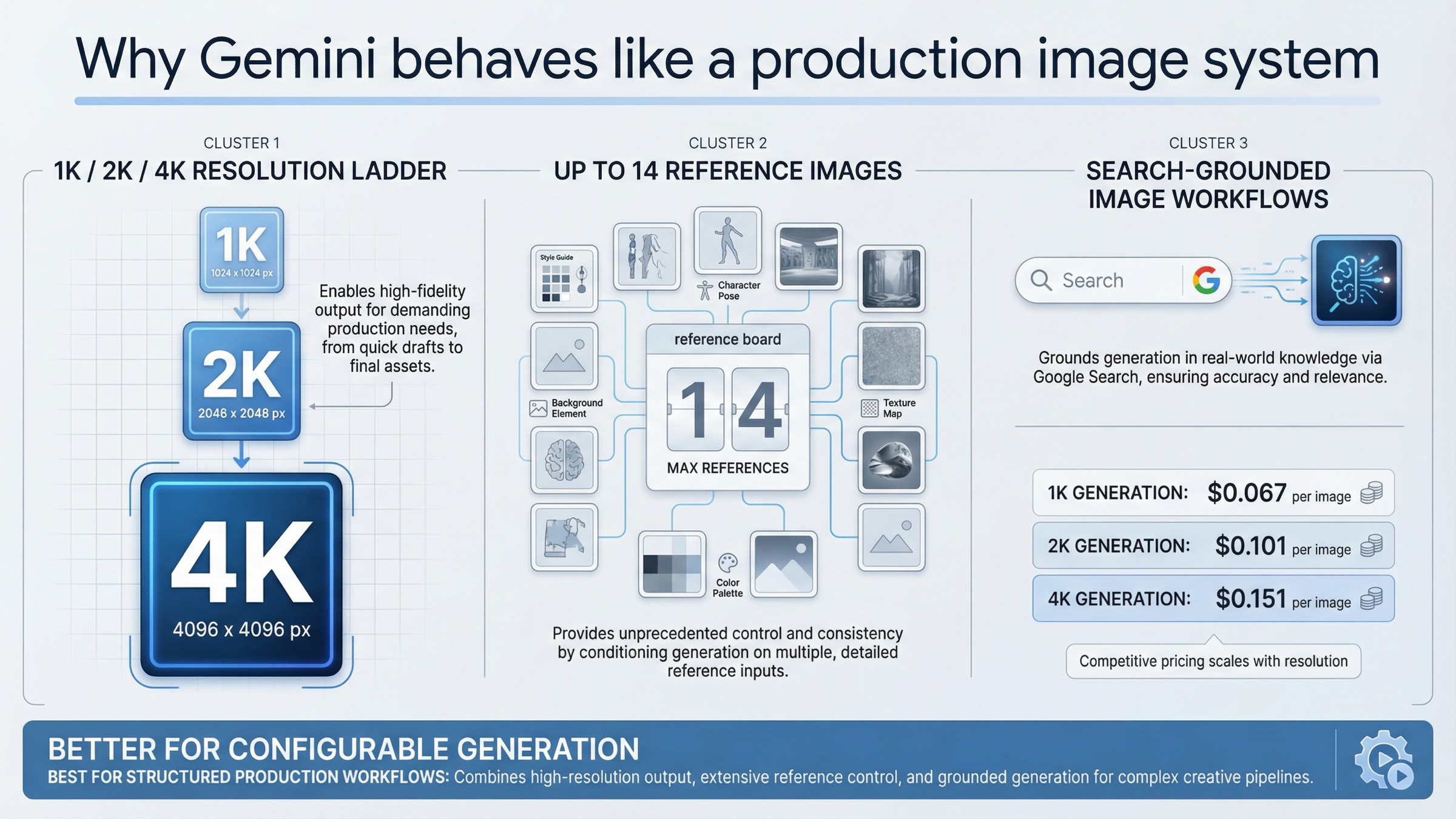
Gemini's strongest case is not that it beats OpenAI on every image task. Its strongest case is that Google's current image stack exposes capabilities that feel more like production controls than creative conveniences. If your image workflow behaves like a small system rather than a one-off prompt, Gemini starts to look more attractive very quickly.
The clearest example is resolution. Google's current pricing page does not hide behind a vague "high quality" label. It tells you directly what the current Gemini 3.1 Flash Image Preview lane costs at 1K, 2K, and 4K. As rechecked on March 20, 2026, those official prices are $0.067 per 1K image, $0.101 per 2K image, and $0.151 per 4K image, with batch pricing at $0.034, $0.050, and $0.076. The premium Gemini 3 Pro Image Preview lane is more expensive at $0.134 per 1K or 2K image and $0.24 per 4K image, but it gives Google a premium path instead of forcing every stronger job into one generic flagship bucket.
That matters because OpenAI's current image docs top out at 1024x1024, 1536x1024, and 1024x1536 outputs. If your workflow genuinely needs larger assets, Google is offering a capability ladder that OpenAI is not exposing in the same way right now. A team making print-ready posters, localized large-format marketing assets, or flexible downstream design crops does not experience 4K as a minor nice-to-have. It changes whether the first draft is usable.
Gemini's second major edge is reference-heavy generation. Google's current image docs say the Gemini 3 image models can mix up to 14 reference images, with different object and character-consistency limits depending on the model. That is a very different proposition from a simple text-to-image prompt. It means the stack is designed for workflows where the image has to stay close to brand assets, prior designs, or a controlled multi-image brief.
The third edge is grounding. Google's image docs now show image workflows that use Google Search grounding directly. That gives Gemini a distinctive lane for informational or real-world grounded creative work. Not every team needs that. But if your system creates travel graphics, event visuals, educational assets, or search-informed explainer images, that grounding layer can be more important than shaving a few cents off a standard square output.
There is also a quieter but meaningful advantage in how Google packages image generation as part of a broader Gemini-native workflow. If your team already uses the Gemini API, Gemini tooling, or AI Studio, the image lane feels like an extension of the same operating model. That does not make it simpler in naming, but it does make it more coherent once the naming tax is paid.
The honest caveat is that Gemini does not win by default on the cheapest current low-end output. Nor does it win automatically for dense text layouts. Its win is more structural than cosmetic: better when you need the image system to be configurable, reference-aware, and resolution-flexible.
Where OpenAI Wins Today
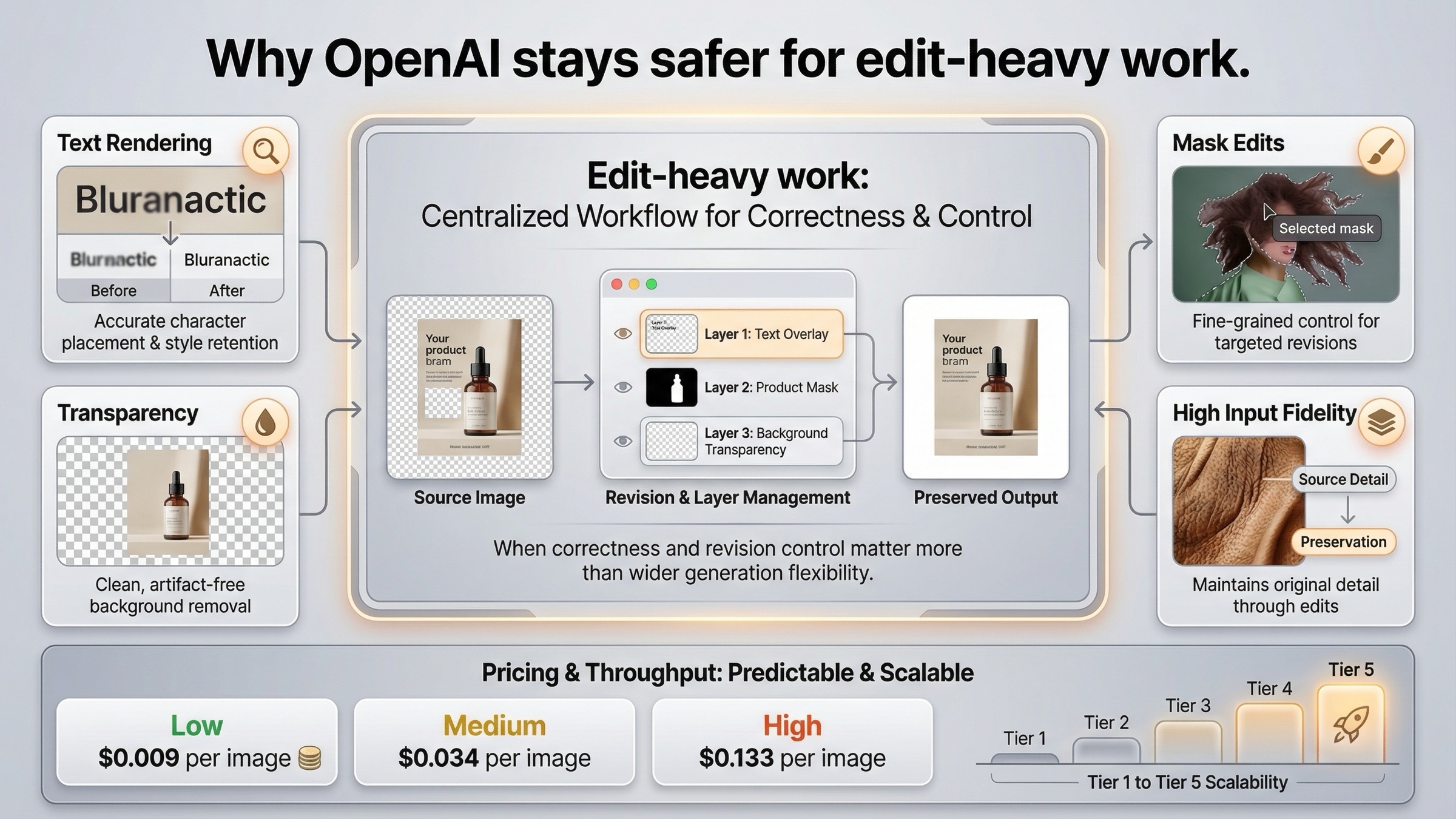
OpenAI's strongest case is almost the mirror image of Google's. It wins when the image task is not just generation but directed creative editing. That is why GPT Image 1.5 feels so strong for design-sensitive work even when it is not the most obviously feature-rich stack on paper.
The first edge is text rendering. Many image comparisons talk loosely about "quality," but text-heavy images expose a more practical failure mode. An image can look beautiful and still be unusable if the headline is wrong, the UI labels are broken, or the product mockup has garbled copy. OpenAI's current launch and documentation language explicitly lean into denser text rendering and more precise instruction following. That is why GPT Image 1.5 remains the safer answer for banners, promo tiles, app mockups, diagrams, menus, packaging concepts, and other assets where readable words are part of the deliverable.
The second edge is editing. OpenAI's current image-generation guide treats edits as a core part of the workflow rather than an afterthought. The guide documents image references, mask-based edits, transparent or opaque backgrounds, and high input fidelity for preserving details in input images. It also notes that GPT Image 1.5 can preserve the first five input images with higher fidelity. That is a strong edit story, especially for teams working with logos, faces, product shots, or brand systems that have to survive multiple revisions without drifting too far from the source asset.
The third edge is operational clarity. OpenAI's model page gives exact current per-image pricing by size and quality. For GPT Image 1.5, the current official page shows $0.009 for a low 1024x1024 output, $0.034 for medium, and $0.133 for high. It shows $0.013, $0.05, and $0.20 for the larger landscape and portrait outputs. That is not automatically better than Google's pricing model, but it is very easy to reason about if your workflow already thinks in terms of simple square, portrait, and landscape assets.
OpenAI is also clearer about throughput. The current GPT Image 1.5 model page publishes image rate limits by usage tier: 5 IPM at Tier 1, 20 IPM at Tier 2, 50 IPM at Tier 3, 150 IPM at Tier 4, and 250 IPM at Tier 5. Google's current docs are also tier-based, but OpenAI's image page is easier to turn into a quick planning answer for a team that needs to know whether the stack can support a launch workload next week.
Finally, OpenAI's current product story is simply easier to explain. OpenAI introduced GPT Image 1.5 on December 16, 2025, described it as stronger on instruction following and editing, and rolled it out in both ChatGPT and the API. That product-to-API continuity matters. It lowers the chance that a team will compare one surface in testing and accidentally buy another surface in production.
The honest caveat on OpenAI's side is that its image stack is not the best answer when a workflow really needs Google's larger resolution ladder or search-grounded generation. But for text-heavy, edit-heavy, and brand-sensitive creative work, GPT Image 1.5 remains the cleaner choice.
Pricing and Workflow Math for Real Teams
The easiest pricing mistake in this topic is to compare two rows that are not answering the same question. Google's current image pricing is resolution-led. OpenAI's current image pricing is quality-led. A fair comparison has to say what kind of asset you are actually buying.
The cleanest view is the table below. It is built from Google's current Gemini pricing page and OpenAI's current GPT Image 1.5 model page, both rechecked on March 20, 2026.
| Scenario | Gemini image pricing | OpenAI image pricing | Better default |
|---|---|---|---|
| Cheapest current simple output | Gemini 3.1 Flash 1K: $0.067 | GPT Image 1.5 low 1024x1024: $0.009 | OpenAI |
| Standard 1024-ish production draft | Gemini 3.1 Flash 1K: $0.067 | GPT Image 1.5 medium 1024x1024: $0.034 | OpenAI |
| Premium square output | Gemini 3 Pro 1K or 2K: $0.134 | GPT Image 1.5 high 1024x1024: $0.133 | Tie on headline price; decide by workflow |
| Large output beyond OpenAI's current size ladder | Gemini 3.1 Flash 4K: $0.151 or Gemini 3 Pro 4K: $0.24 | No current 4K size in the official GPT Image 1.5 size list | Gemini |
| Batch generation | Google batch pricing is explicit and usually 50% of standard image-output pricing | OpenAI batch discounts exist, but the image comparison still revolves more around quality tiers and workflow context | Gemini for large scheduled runs |
This table should change how you read the keyword. If your workload is mostly square 1024-ish generation, OpenAI's current official pricing is often cheaper than Google's current default Flash image lane. That is why the lazy claim that "Gemini is cheaper" does not hold up as a universal answer.
Gemini becomes compelling when the job definition changes. If you need 2K or 4K output, Google's resolution ladder starts to matter more than a low-end 1024 price floor. If you need larger reference-image sets or search-grounded image creation, the feature set changes what "value" means. If you need large background jobs, Google's explicit batch math is unusually easy to reason about.
OpenAI becomes more compelling when the team's actual pain is not output size but revision cost. A model that edits more cleanly, preserves key details better, and renders text more reliably can be the cheaper model in practice even when its nominal per-image price is higher. That is especially true for design teams, marketing teams, and product teams working on assets that have to be correct, not just visually interesting.
The most pragmatic answer for serious teams is not exclusivity. It is routing. Use the cheaper or simpler lane for the default work, and reserve the more specialized lane for the jobs where its strengths materially reduce retries or cleanup.
| Team type | Better default | Why | When to override |
|---|---|---|---|
| Solo creator making standard social graphics | OpenAI | Lower current square-output price and cleaner text/edit workflow | Override to Gemini when 2K or 4K output or larger references matter |
| Marketing team making many variants with minimal text | Gemini | Resolution ladder, references, and batch value matter more than the cheapest low-end square price | Override to OpenAI for copy-heavy or edit-heavy assets |
| Product team making UI mockups or text-heavy assets | OpenAI | Text rendering and editability matter more than wider resolution choice | Override to Gemini when grounded or reference-heavy generation becomes central |
| Team generating large image volumes from structured source assets | Gemini | More system-like feature set for configurable production workflows | Override to OpenAI for the subset of final assets that need exact text or cleaner edits |
| OpenAI-native developer stack | OpenAI | Lower integration friction and clearer current model naming | Override to Gemini when 4K, broader references, or search grounding change the task |
| Google-native developer stack | Gemini | Better fit with the rest of the Gemini ecosystem | Override to OpenAI for text-sensitive and edit-sensitive exceptions |
That routing mindset is much stronger than asking for one permanent universal winner in a market that is still changing month by month.
For deeper cost detail on either side, our current guides to Gemini image generation API pricing and OpenAI image generation API pricing go further than this vendor-comparison page can.
Which One Should You Choose for Your Use Case?
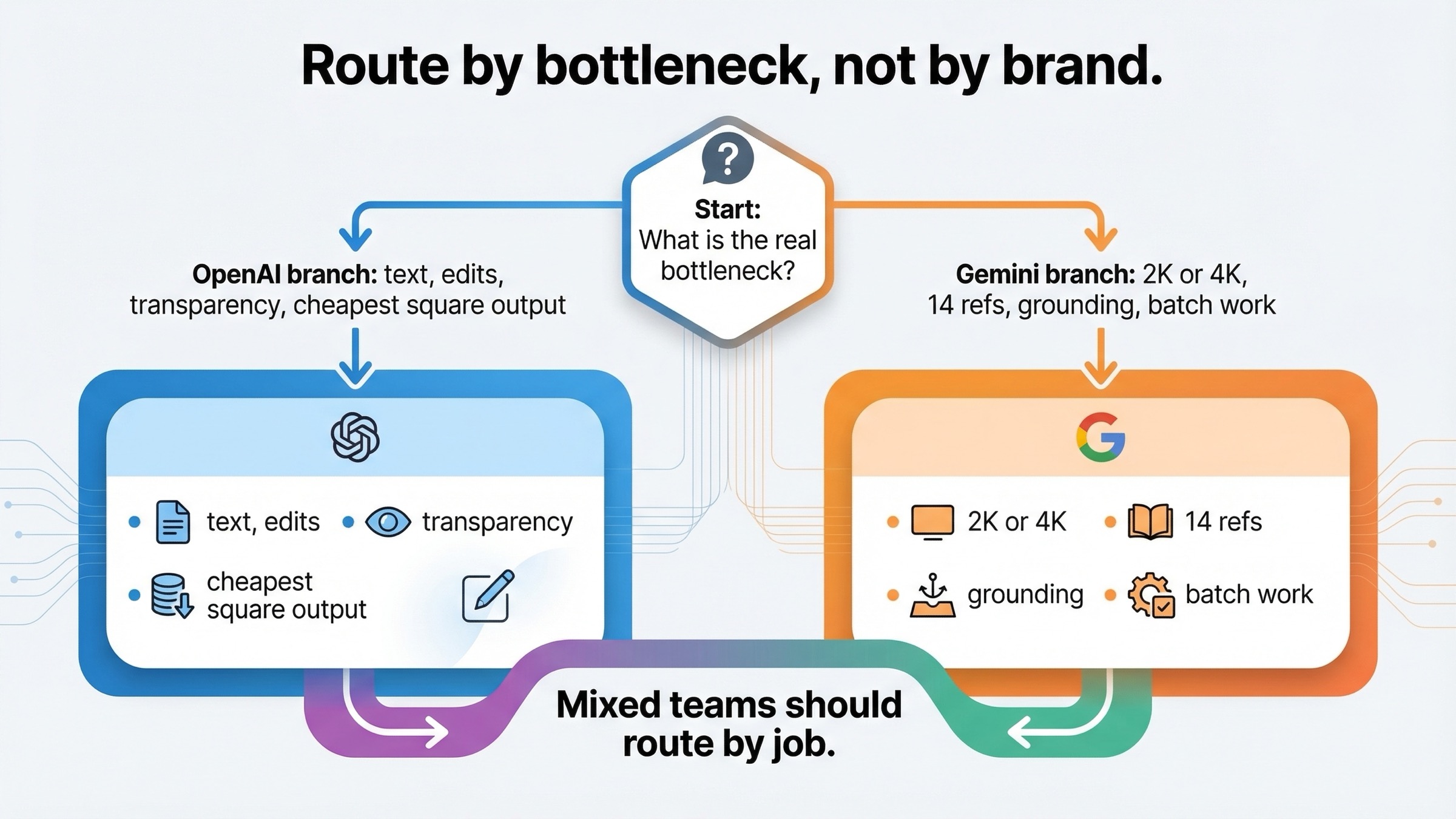
At this point the recommendation should be clear enough to say plainly.
If you are building a workflow where the image system needs to be configurable, reference-heavy, search-grounded, or capable of moving into 2K or 4K output, choose Gemini first. That is the stronger current default for production-style image generation systems.
If you are building a workflow where the image has to survive dense text, multiple edits, transparent background handling, or high-fidelity preservation of input assets, choose OpenAI first. That is the stronger current default for creative editing systems.
If you only want the lowest visible official price for a simple square output, choose OpenAI. The current GPT Image 1.5 low and medium price points are clearly below Google's current default Flash image lane at 1K.
If you are choosing for a mixed team rather than a single task, the best answer is often hybrid. Route general image generation, larger outputs, and structured batch work to Gemini. Route text-sensitive and edit-sensitive work to OpenAI. That is not indecision. It is the most realistic way to use the two stacks according to what they are actually good at today.
For readers who want the narrower model-to-model version of this question, our direct comparison of Nano Banana 2 vs GPT Image 1.5 is the next page to read. For readers who care about OpenAI workflow integration rather than vendor strategy, our OpenAI GPT Image in ComfyUI guide is the more useful follow-up.
FAQ
Is this really Gemini vs OpenAI, or Gemini vs ChatGPT?
For this article, the comparison is mostly vendor-stack and API-oriented. If your real question is which consumer app feels better to use day to day, the app-level answer is slightly different and is better covered in our Gemini image vs ChatGPT guide.
Is Gemini cheaper than OpenAI for image generation?
Not as a blanket rule. On current official pricing, OpenAI is cheaper for low-end and medium square outputs. Gemini becomes easier to justify when you need the resolution ladder, broader reference support, grounding, or production-style batch workflows.
Is OpenAI better for text in images?
Yes, that is the safer current default. GPT Image 1.5 is the better choice when the output needs readable copy, clearer labels, or cleaner revision behavior on text-heavy assets.
What is the current Gemini model I should actually compare against GPT Image 1.5?
For most current vendor-comparison decisions, the right Gemini default lane is Gemini 3.1 Flash Image Preview (gemini-3.1-flash-image-preview), which the current Google docs package as Nano Banana 2. If you need the premium Google lane, compare Gemini 3 Pro Image Preview as the higher-end alternative.
Which stack should a developer standardize on first?
Standardize on the ecosystem you already use unless a hard capability gap forces you elsewhere. OpenAI-native teams should usually start with GPT Image 1.5. Google-native teams or teams that care more about configurable generation than edit-heavy creative work should usually start with Gemini.


