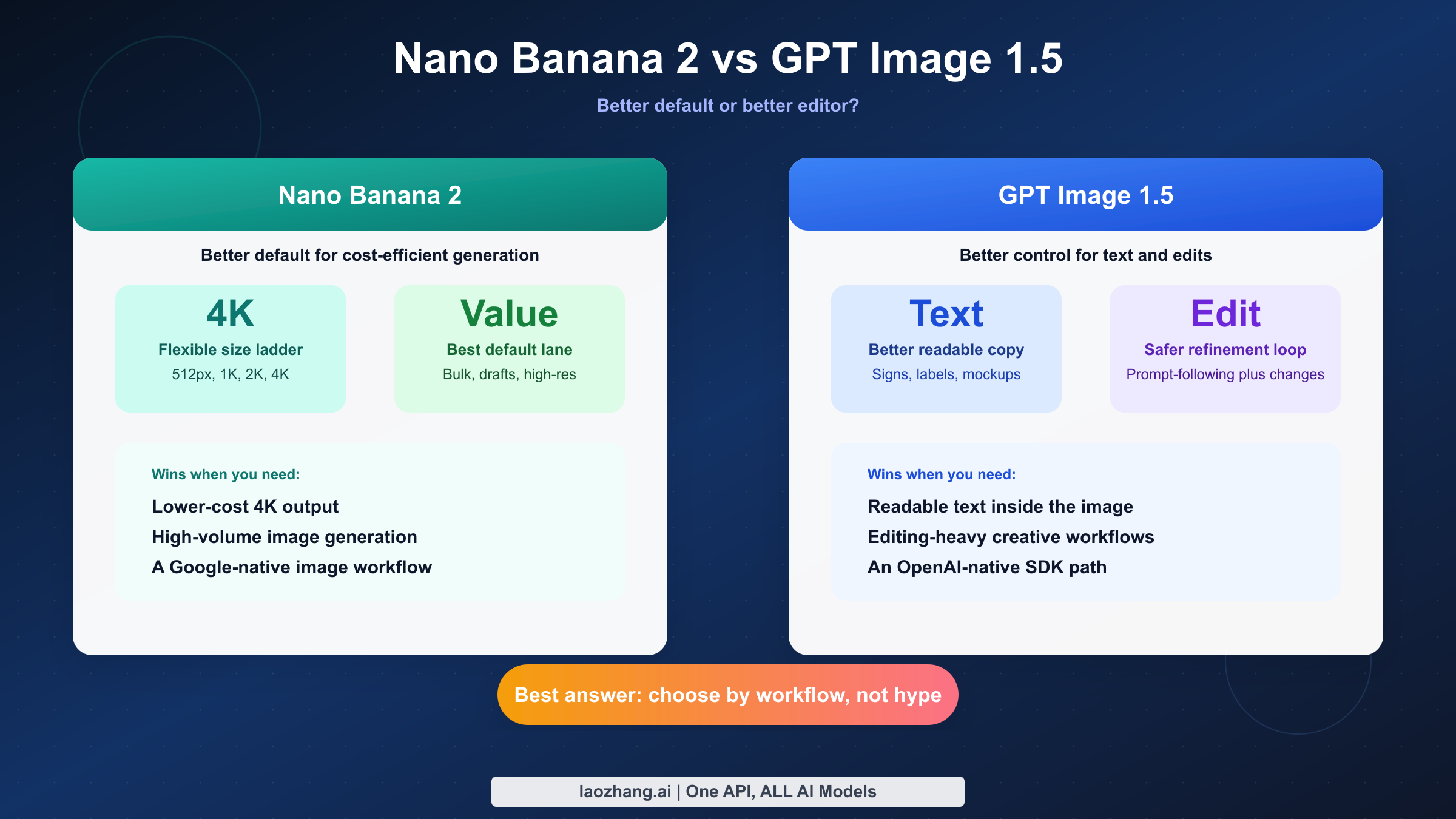
Short answer as of March 13, 2026: Nano Banana 2 is the better default if your main goals are cheaper high-resolution output, faster iteration on large image batches, and a Google-native image workflow. GPT Image 1.5 is better if your project lives or dies on readable text inside images, precise editing, and tighter prompt-following inside the OpenAI ecosystem. There is no honest single winner without first deciding what kind of work you are actually doing.
That distinction matters because most ranking pages for this keyword flatten the problem into a shallow scorecard. The real choice is not "which model is stronger in the abstract" but "which model causes fewer downstream problems for my exact workflow." A content team making social graphics, a startup building an image-generation feature, and a designer producing text-heavy product mockups will not make the same choice, even if they start from the same search query.
There is also a naming problem that page one mostly ignores. In current Google-facing docs, the model surface you actually need to recognize is gemini-3.1-flash-image-preview, while many comparison pages and relay providers still use the simpler buyer-facing nickname "Nano Banana 2." On the OpenAI side, the surface is much cleaner: the current official image-generation guide is explicitly built around GPT Image 1.5 and its generation-and-editing workflow. If you skip that naming cleanup, the rest of the comparison becomes messy fast.
TL;DR
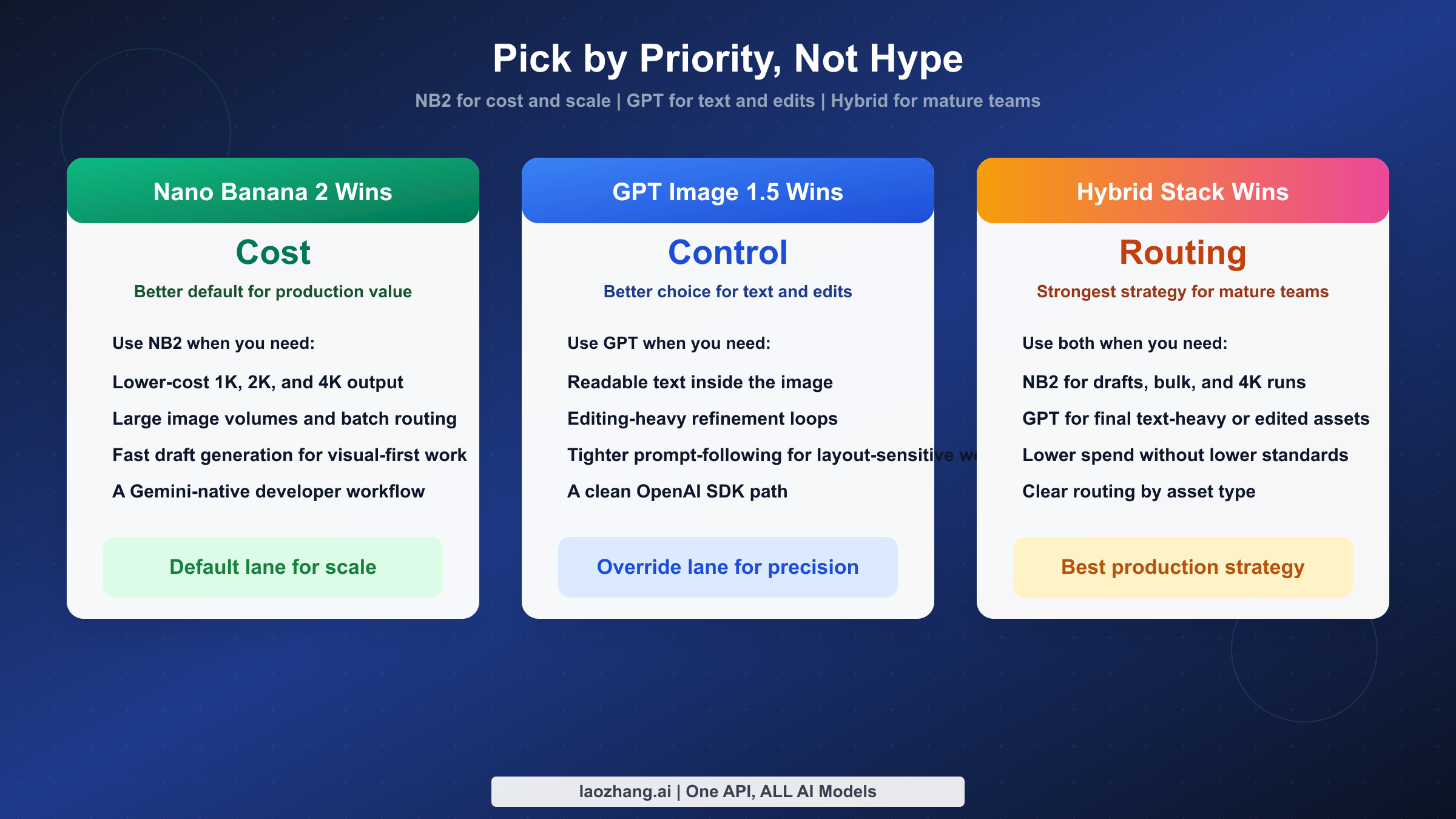
If you only need the decision and not the long explanation, use the table below. It captures the fastest honest answer to the keyword without pretending these tools are interchangeable.
| Your priority | Better choice | Why it wins |
|---|---|---|
| Lowest cost for usable API images | GPT Image 1.5 low | OpenAI's current pricing floor is about $0.01 per image, though quality is clearly entry-level. |
| Better default for production-quality volume generation | Nano Banana 2 | Current March 2026 price framing puts NB2 at about $0.067 for 1K, $0.101 for 2K, and $0.151 for 4K, with batch pricing at 50% off. |
| Best text rendering inside the image | GPT Image 1.5 | It is the safer choice for signs, labels, social graphics, UI mockups, and other text-heavy outputs. |
| Better built-in editing workflow | GPT Image 1.5 | OpenAI's current guide positions GPT Image 1.5 as a generation-and-editing tool, not just a one-shot image model. |
| Better option when 4K output matters | Nano Banana 2 | NB2's current model packaging is built around resolution flexibility from 512px through 4K. |
| Better fit for Google-native workflows | Nano Banana 2 | If your team already uses Gemini tooling, the model naming, docs, and broader Google context line up more naturally. |
| Better fit for OpenAI-native workflows | GPT Image 1.5 | If your application already uses the OpenAI SDK and OpenAI auth flows, GPT Image 1.5 usually creates less integration friction. |
The practical recommendation is simple. Start with Nano Banana 2 if you want the best general-purpose value, especially for large volumes or higher resolutions. Override that default and choose GPT Image 1.5 when text fidelity, editability, or OpenAI ecosystem consistency matters more than saving a few cents per image.
What "Nano Banana 2" Actually Means in 2026
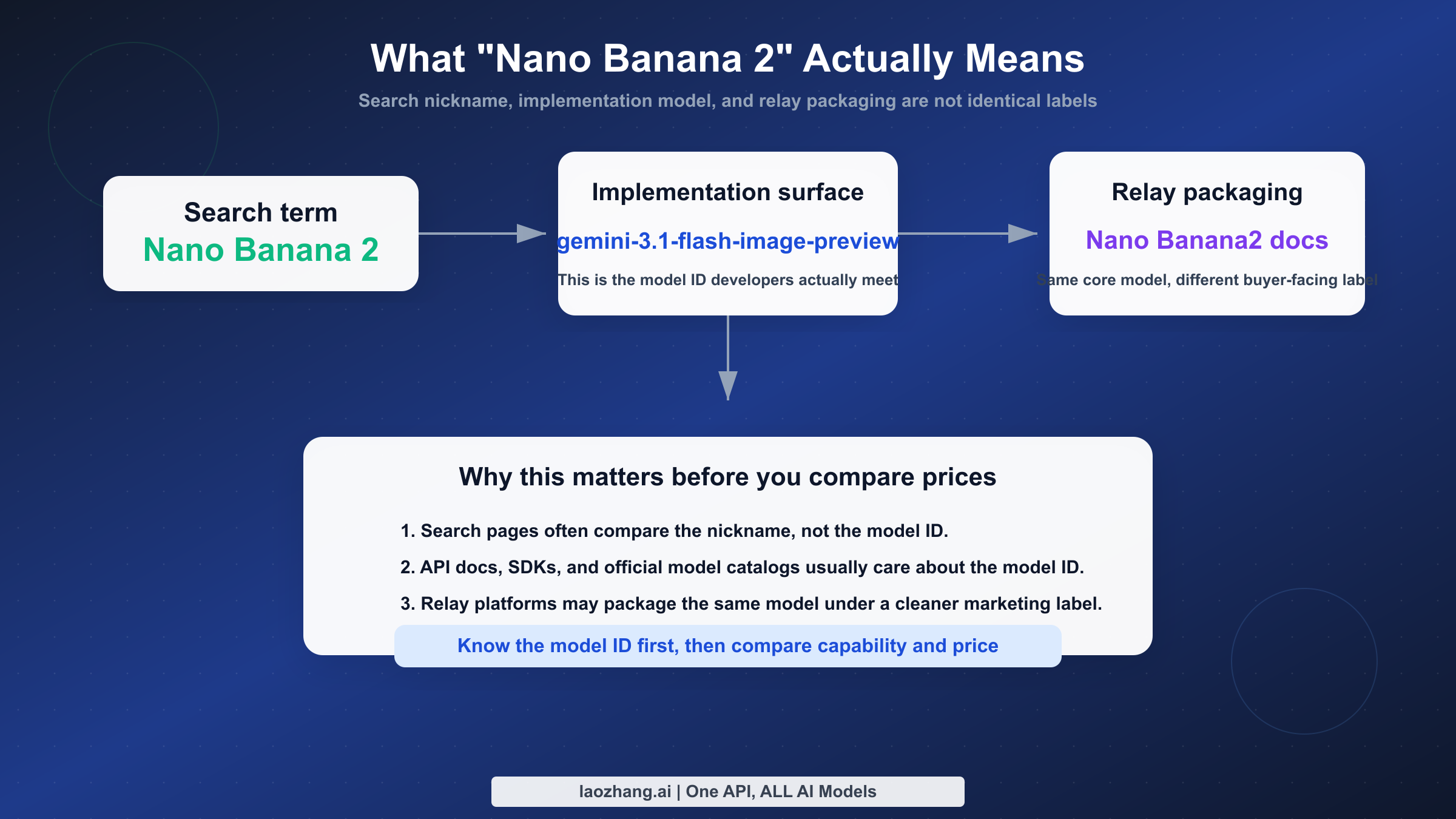
The first thing to fix is the naming confusion. Search results often talk about Nano Banana 2 as if it were a single, perfectly stable product name, but the live ecosystem is more complicated than that. In current Google-facing documentation, the model that buyers usually mean is the Flash-image surface built around gemini-3.1-flash-image-preview. In relay-platform documentation, including current Nano Banana2 API docs on LaoZhang, that same underlying model is often packaged and marketed under the shorter Nano Banana2 name. Those are not two unrelated products. They are different surfaces around the same family.
This matters for two reasons. First, developers searching for code examples need to know which model ID actually appears in code, pricing pages, and SDK docs. "Nano Banana 2" is a useful buying label, but gemini-3.1-flash-image-preview is the thing you will recognize in implementation. Second, if you read a comparison page that mixes Google-first-party language, Gemini app language, and relay branding without telling you which is which, you can end up comparing the wrong prices or the wrong workflow assumptions.
OpenAI's side of the comparison is cleaner. The current OpenAI image-generation guide directly exposes GPT Image 1.5 as the relevant current model surface, and the OpenAI API pricing page puts the current image-generation price tiers in the same product family. That does not make GPT Image 1.5 better, but it does make the buyer journey easier. You spend less time decoding naming and more time deciding whether the model fits your work.
In other words, if your team values buyer clarity and standardized SDK ergonomics, GPT Image 1.5 begins with a small advantage before you even look at outputs. If your team values Google's image stack, Google-native workflows, and cheaper higher-resolution generation, the naming tax on Nano Banana 2 is real but manageable. The trick is to acknowledge that tax instead of pretending it does not exist.
For readers who want the broader context around Google's current image family, see our full guide to Nano Banana 2 / Gemini 3.1 Flash Image Preview and our breakdown of Nano Banana 2 vs Nano Banana Pro.
Specs, Pricing, and Workflow Snapshot
The table below is the cleanest way to see the decision support in one place. It deliberately separates model identity, official price framing, and workflow strengths, because that separation is where most ranking pages get sloppy.
| Dimension | Nano Banana 2 | GPT Image 1.5 |
|---|---|---|
| Current model surface | gemini-3.1-flash-image-preview packaged widely as Nano Banana 2 | GPT Image 1.5 |
| Current docs anchor | Google Gemini image docs and Google model catalog | OpenAI image-generation guide |
| Primary positioning | Fast, flexible, lower-cost image generation with higher-resolution options | Strong prompt following plus image generation and editing in the OpenAI stack |
| Output sizes most often cited in current materials | 512px, 1K, 2K, 4K | OpenAI quality tiers rather than a simple 4-size ladder; pricing is usually discussed as low, medium, and high |
| Current price framing | About $0.045 at 512px, $0.067 at 1K, $0.101 at 2K, $0.151 at 4K; batch mode at 50% off in current March 2026 pricing notes | About $0.01 low, $0.04 medium, $0.17 high on the current OpenAI pricing page |
| Text rendering | Improved, but still not the safest choice for dense text layouts | Better option for signs, labels, mockups, and text-heavy images |
| Editing workflow | Can handle generation and image workflows in Gemini, but editing is not the core story of the SERP | OpenAI explicitly frames the current model around generation plus editing |
| Provenance / watermarking | Google docs state generated images include SynthID watermarking | OpenAI pricing and guide pages focus more on API workflow than a Google-style provenance callout |
| Best default use case | High-volume, higher-resolution, cost-sensitive generation | Text-heavy creatives, edits, and OpenAI-native multimodal workflows |
Three points matter more than anything else in this table. First, NB2 is easier to defend when you need higher-resolution output at a sane unit cost. Second, GPT Image 1.5 is easier to defend when you care about text and editability more than absolute cost. Third, the cheapest row on a price sheet does not automatically tell you which tool is cheaper for your real team. A low-quality image that requires three retries or manual cleanup is not actually cheap.
That is why it helps to split the comparison into two questions. The first question is technical: what can each model do? The second question is operational: how much cleanup, retrying, post-editing, or rerouting will your workflow require after the model has already produced an output? GPT Image 1.5 often wins the second question for text-heavy work. NB2 often wins it for cheap large-volume production, especially when 2K or 4K output is actually useful.
Where Nano Banana 2 Is Better
Nano Banana 2 is better when your goal is broad production efficiency rather than maximum control over text inside the image. The core advantage is not one flashy feature but a stack of practical benefits that reinforce each other: flexible resolution tiers, better cost-per-output at larger sizes, a Flash-style performance posture, and a workflow that makes sense for teams already leaning into Gemini or broader Google tooling. This is why so many "best image model of 2026" pages push it hard. Even when they oversell it, they are responding to a real shift in value.
The pricing shape is the first reason. In current March 2026 pricing notes sourced from Google's official pricing surface and recent repo verification, NB2 lands at roughly $0.045 for 512px, $0.067 for 1K, $0.101 for 2K, and $0.151 for 4K, with batch mode cutting those prices in half. That structure matters because it gives teams real routing options instead of a single blunt price. A team generating lightweight blog thumbnails does not need to pay for 4K. A commerce team building large product hero images does not need to settle for 1K. NB2 lets you move up and down the ladder with cleaner economics than most competing models.
The second reason is that Nano Banana 2 feels like the more natural default for batch-style thinking. If your team is creating 100, 500, 1,000, or 10,000 images per month, the questions you ask are different from the questions a solo designer asks. You care about unit cost, queue throughput, retry behavior, and whether high-resolution output can be used directly instead of upscaled later. On that kind of workload, NB2's structure is attractive because the model is designed to be a workhorse rather than a precious premium endpoint.
There is also a product-architecture reason. Google's current Gemini image-generation documentation treats image generation as part of the broader Gemini API environment rather than as an isolated legacy tool. That matters for teams that want the image model to sit inside a Google-shaped pipeline: prompt generation, multimodal context, possible grounding workflows, and eventually other Gemini-native steps around the image request. If your organization already uses Google Cloud, Gemini, or internal Google-oriented developer tooling, that alignment lowers friction even before you compare outputs.
NB2 is also the stronger answer when the buyer means "best value" rather than "best capability." The model does not need to beat GPT Image 1.5 at every category to be the better value purchase. It only needs to win enough of the daily work that the extra money and extra retries for GPT are not justified. For teams creating product backgrounds, concept art variants, social assets without dense text, blog visuals, landscape scenes, or higher-resolution illustration work, NB2 is easier to justify as the default lane.
Finally, Nano Banana 2 is better if you need a clearer path to 2K and 4K output without treating those sizes as a niche premium corner case. GPT Image 1.5 can absolutely produce strong images, but the OpenAI-side pricing discussion is centered on quality tiers, not on the same kind of obvious resolution ladder. If your creative ops team regularly thinks in terms of 1K, 2K, and 4K, NB2's packaging is easier to plan around.
Where GPT Image 1.5 Is Better
GPT Image 1.5 is better when you need the model to behave more like a careful visual editor than a cheap image factory. This is the part of the comparison that too many NB2-first pages underplay. Text rendering, editability, and prompt fidelity are not niche concerns. They are the entire business case for many teams. If your output has headlines, pricing badges, UI labels, poster copy, store signage, product names, or any other text that a human being must actually read, GPT Image 1.5 is still the safer recommendation.
That conclusion follows both the SERP and the official product framing. The current OpenAI guide for GPT Image 1.5 does not treat the model as a one-dimensional text-to-image endpoint. It positions the workflow around image generation and editing together. That is important because many real teams are not starting from a blank prompt. They are modifying a concept, iterating on a layout, or repairing part of an already-generated image. In those cases, editability can matter more than raw generation price.
Text is the clearest category where GPT Image 1.5 still has the sharper story. A lot of "which is better" pages talk loosely about quality, but users do not experience quality as one number. They experience it through failure modes. GPT Image 1.5 tends to fail less often on the kinds of outputs where the text itself is part of the design: app screenshots, banner ads, social promos, packaging mockups, and internal marketing experiments. If your image looks good but the text is wrong, the asset is unusable. That means GPT Image 1.5's text advantage often outweighs a modest price disadvantage.
Prompt following is the second major reason to choose it. OpenAI's image stack is simply more comfortable for teams already used to directing GPT-style models with detailed natural-language instructions. That matters when the prompt is not just "a mountain lake at sunset" but "a clean ecommerce hero image with a white ceramic mug on the left, a pale beige background, soft morning light, headline space on the right, and room for two lines of readable promo copy." Those are the requests where "better at following instructions" turns into fewer rounds of cleanup.
The third reason is ecosystem simplicity. If your application already uses the OpenAI SDK, OpenAI auth, and OpenAI account management, GPT Image 1.5 creates less operational sprawl. You do not need to translate model naming or switch your team's mental model between Google-style docs and OpenAI-style docs. That is not a model-quality argument, but it is a legitimate buying argument. Teams often underestimate the cost of fragmented tooling until they are supporting it every week.
Pricing does not erase those benefits. On the current OpenAI API pricing page, GPT Image 1.5 sits at about $0.01 for low, $0.04 for medium, and $0.17 for high. The low tier is the cheapest visible price floor in this comparison, but low quality is not the setting most serious teams should center their pipeline around. The more realistic comparison for production work is often NB2 against GPT Image 1.5 medium or high. Once you make that more honest comparison, the decision becomes less about "which one costs less on paper" and more about "which one yields a usable first draft more often in my workflow."
If your team's monthly workload is relatively small but each image is high-stakes, GPT Image 1.5 becomes easier to justify. Paying more for 50 or 200 critical assets is a completely different decision from paying more for 5,000 commodity assets. That is why GPT Image 1.5 often wins for design-led teams even when it loses the generalized "best value" conversation.
Readers leaning toward the OpenAI ecosystem should also see our workflow guide to OpenAI GPT Image 1 in ComfyUI, which is useful if your real comparison is not just model quality but how the model plugs into an existing creative stack.
Cost and Team Workflow Math
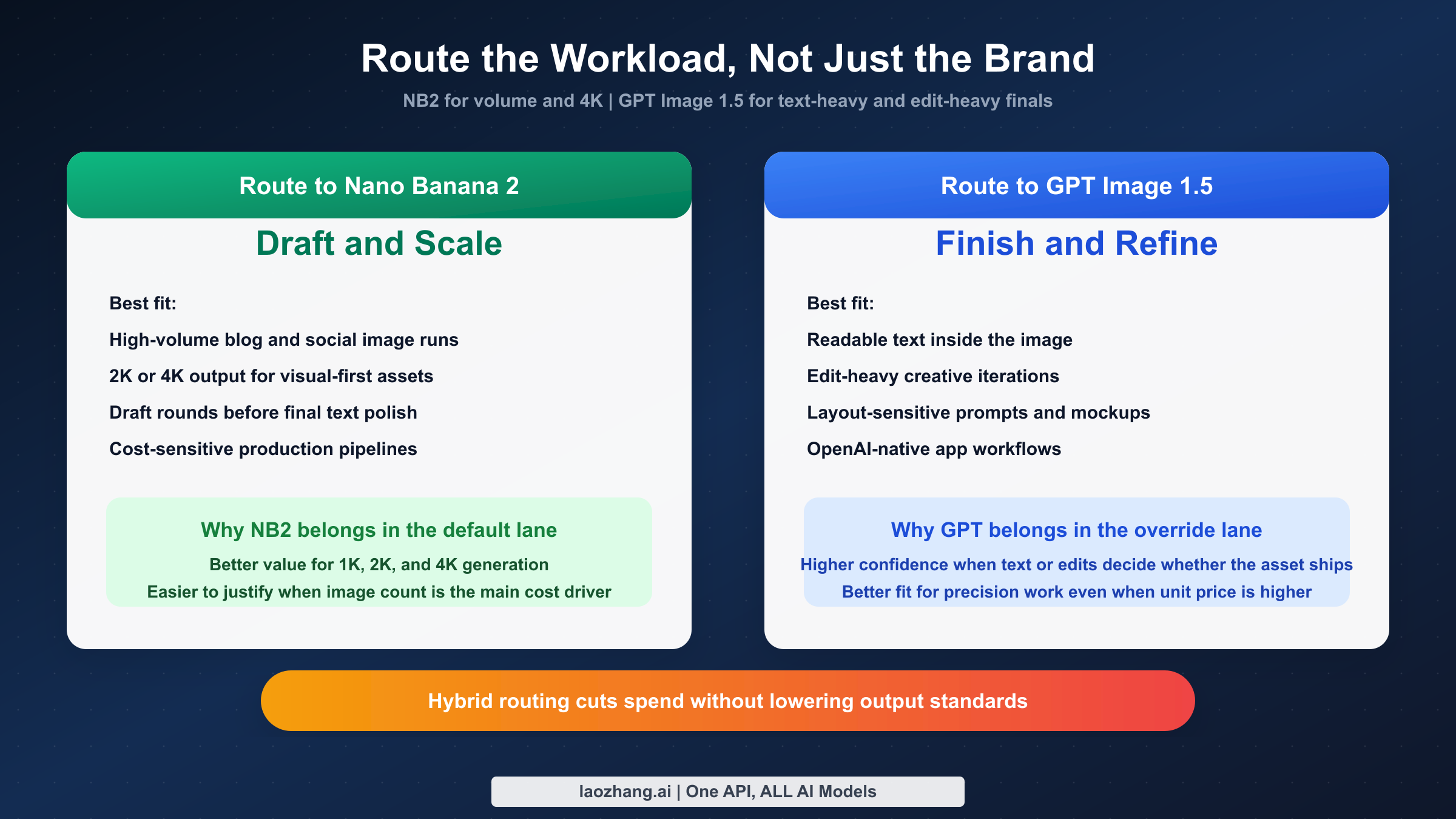
Cost is the easiest part of this comparison to misunderstand because the price points do not line up cleanly. Nano Banana 2 organizes the choice around resolution tiers. GPT Image 1.5 organizes it around quality tiers. That means the right question is not "which row is lower?" but "what kind of asset am I buying and how often am I buying it?"
| Team scenario | Typical monthly volume | Better default | Why |
|---|---|---|---|
| Solo creator making blog and social visuals | 100-300 images | Nano Banana 2 | Lower unit cost, enough quality for most visual-only assets, and a clearer path to 2K or 4K when needed. |
| Marketing team generating many variants without much text | 500-5,000 images | Nano Banana 2 | This is the clearest NB2 lane because high volume turns small unit-price differences into big monthly differences. |
| Team making banners, posters, or UI-heavy visuals | 50-500 images | GPT Image 1.5 | Text accuracy and editing confidence matter more than saving a few cents. |
| Product team already deep in OpenAI APIs | 100-1,000 images | GPT Image 1.5 | Lower integration friction can outweigh a higher image price. |
| Hybrid stack with distinct draft and final stages | 500+ images | Both | Route exploration and 4K generation to NB2, then use GPT Image 1.5 only for text-heavy or edit-heavy finals. |
A few cost examples make the tradeoff concrete. At current March 2026 pricing, 100 NB2 images at 1K come to about $6.70, while 100 GPT Image 1.5 medium images land around $4.00 and 100 high images land around $17.00. At 1,000 images, those become about $67, $40, and $170 respectively. At first glance, that sounds like GPT Image 1.5 medium wins the cost battle. But those rows are not measuring the same thing. NB2 is often being chosen for higher-resolution and broader-volume utility, while GPT medium may still lose to NB2 on 4K flexibility and may not be the quality level you actually need for production.
That is why a hybrid routing strategy often beats both single-model extremes. Use NB2 for draft generation, volume production, large-resolution work, and image-only assets. Use GPT Image 1.5 for the subset of outputs where readable text, precise editing, or tighter instruction following determines whether the asset ships. Teams that adopt this routing mindset usually stop asking which model is globally better and start asking which default saves the most money without creating avoidable creative debt.
There is also a consumer-versus-developer trap here. Some pages compare a consumer subscription on one side with official API pricing on the other and call it a fair fight. It is not. If your decision is about production workflows, compare API-like surfaces with API-like surfaces. If your decision is about everyday creative use inside a chat product, compare the chat surfaces. Mixing those categories creates fake conclusions.
For teams evaluating Google's side more deeply, our broader market comparison of Nano Banana 2 vs Midjourney vs GPT Image vs FLUX.2 is a useful next step because it shows where NB2 sits in the wider 2026 field rather than only against OpenAI.
Which Is Better for Your Use Case?
At this point the answer should be clear enough to say plainly. If you are choosing a single default model for cost-efficient, high-resolution, high-volume image generation in March 2026, Nano Banana 2 is the better default. It has the cleaner value story, the more useful resolution ladder, and the more attractive economics for teams that generate images at scale. That is the answer most marketers, founders, and operations-minded teams should start with.
If you are choosing the better model for text-heavy visuals, refined edits, and prompt-sensitive creative work, GPT Image 1.5 is the better model. It is the safer answer when a model mistake creates visible design debt, especially in outputs with readable text or in workflows where the image needs to be edited rather than simply generated.
If you are a developer building a product and want the least disruptive path, the decision depends on your current stack. An OpenAI-native team will usually move faster with GPT Image 1.5. A Google-native team or a team optimizing for raw image throughput will usually move faster with NB2. In both cases, the right decision is the one that reduces system complexity without forcing the wrong model onto the wrong job.
The most pragmatic answer for serious teams is not exclusivity but routing. Make NB2 the default lane for large-scale generation and high-resolution output. Make GPT Image 1.5 the override lane for text-heavy, edit-heavy, or instruction-sensitive work. That routing logic is far more robust than trying to declare one permanent universal winner in a market that is still changing month by month.
FAQ
Is Nano Banana 2 an official Google model name?
Not in the cleanest developer sense. The safer technical identifier is gemini-3.1-flash-image-preview, while "Nano Banana 2" is the buyer-friendly label widely used in search results, community discussions, and relay-platform packaging. When you compare tools, make sure you know whether the page is talking about the nickname or the underlying model ID.
Which model is better for text inside the image?
GPT Image 1.5 is the safer choice. If the image contains headlines, labels, UI text, signage, or any copy that needs to be read, OpenAI's current image model is easier to trust than NB2.
Which one is cheaper?
It depends on what you mean by cheaper. GPT Image 1.5 has the lowest visible price floor at about $0.01 on the current OpenAI pricing page, but that is the low-quality tier. NB2 is usually the better answer for higher-resolution production value, with current March 2026 price framing around $0.045, $0.067, $0.101, and $0.151 across its size ladder.
Which one is better for editing?
GPT Image 1.5. OpenAI's current guide makes editing central to the product story, and that matches how the market talks about it. If your workflow is iterative modification rather than bulk generation, GPT should start with an edge.
Which one should a developer standardize on first?
Standardize on the ecosystem you already use unless you have a strong reason not to. If you already run on OpenAI APIs and need text-heavy or edit-heavy images, start with GPT Image 1.5. If you want cheaper higher-resolution generation at scale or you are already leaning into Gemini-native tooling, start with NB2 and add GPT only for the cases where its strengths clearly matter.