
Yes, Nano Banana Pro IS free to use in the Gemini app—but with strict daily limits that have frustrated many users in late 2025. As of December 2025, free tier users can generate approximately 2 images per day (reduced from 3 in November 2025 due to overwhelming demand). Limits reset at midnight Pacific Time (8:00 AM GMT), and when your quota depletes, you're automatically downgraded to the standard Nano Banana model with lower quality output. For those needing more, Google AI Pro costs $19.99/month with approximately 100 images daily, while the API offers a separate 500 requests/day free tier that operates independently from the consumer app.
TL;DR - Quick Facts About Nano Banana Pro Free Tier
Before diving into the details, here are the five essential facts you need to know about Nano Banana Pro's free tier in the Gemini app. These numbers are current as of December 2025 and reflect the reduced limits Google implemented in November due to high demand.
The key numbers at a glance:
| Aspect | Free Tier | Pro ($19.99/mo) | Ultra ($34.99/mo) |
|---|---|---|---|
| Daily Images | ~2 (dynamic) | ~100 | 1,000 |
| Max Resolution | 1024px | 4K | 4K |
| Reset Time | Midnight PT | Midnight PT | Midnight PT |
| Auto-Downgrade | Yes | No | No |
| Thinking Mode | Yes (limited) | Yes (full) | Yes (full) |
What happens when you hit the limit? You're automatically switched to the standard Nano Banana model (non-Pro), which produces noticeably lower quality results at a maximum of 1K resolution. There's no error message—the switch happens silently, so you might not realize you're using the downgraded model until you notice the quality difference.
The API is separate. This is crucial: the Gemini API's free tier offers 500 requests per day that operate completely independently from your consumer app quota. If you're a developer or comfortable with API calls, this is your best workaround.
Failed attempts count. One frustrating reality: even failed image generations—whether due to content policy rejections or technical errors—consume your daily quota. Refining your prompts before hitting generate can save precious attempts.
What Is Nano Banana Pro? (Google's New Image AI)
Nano Banana Pro represents Google DeepMind's most advanced AI image generation model, officially released on November 20, 2025. Built on the Gemini 3 Pro foundation, it leverages state-of-the-art reasoning capabilities and real-world knowledge to create images that surpass anything Google has previously offered.
The evolution from Nano Banana to Nano Banana Pro is significant. The original Nano Banana (based on Gemini 2.5 Flash) became popular earlier in 2025 for casual tasks like restoring old photos and generating mini figurines. While useful for quick creative work, it had notable limitations—particularly with text rendering, where longer sentences often resulted in spelling errors, and perspective text on products and posters appeared distorted.
Nano Banana Pro addresses these limitations comprehensively. According to Google's official announcement (https://blog.google/technology/ai/nano-banana-pro/ ), the model delivers native 2K resolution that intelligently upscales to 4K clarity using a 16-bit color pipeline. The result is physics-compliant, high-fidelity visual assets generated in under 10 seconds.
Key capabilities that set Nano Banana Pro apart include:
-
Advanced text rendering: Accurately renders text across different languages, fonts, and styles, supporting complex sentences without distortion. This makes it ideal for product labels, posters, infographics, and UI mockups.
-
Multi-subject consistency: Can blend up to 14 reference objects within a single output and maintain consistency for up to 5 people across edits—crucial for marketing campaigns and commercial work.
-
Professional creative controls: Fine-grained controls for scene lighting, depth-of-field, camera angle, focus, and color grade that were much more limited in the original Nano Banana.
-
Thinking mode: Leverages Gemini 3 Pro's advanced reasoning to handle complex prompts, producing more accurate and contextually appropriate results.
-
Web search grounding: Can combine real-time search data (weather, sports events, current news) to generate context-rich infographics and accurate visualizations.
Where you can access Nano Banana Pro extends beyond just the Gemini app. According to Google's product blog (https://blog.google/products/gemini/where-to-use-nano-banana-pro/ ), you can access it through AI Mode in Search, NotebookLM, and Workspace tools like Slides and Vids. Enterprise users can access it through Vertex AI and Google Workspace, with Gemini Enterprise support coming soon.
The model is particularly transformative for commercial applications. Industry leaders like Adobe, Figma, and Canva are already integrating Nano Banana Pro to deliver next-generation AI capabilities within their platforms.
Complete Tier Limits Breakdown (December 2025)
Understanding the exact limits for each tier is essential for planning your image generation workflow. Google has made several changes to these limits throughout 2025, with the most significant reduction occurring in late November when free tier access was curtailed due to overwhelming demand.
The official limits as of December 2025:
| Tier | Monthly Cost | Daily Image Limit | Max Resolution | Priority Access | Advanced Features |
|---|---|---|---|---|---|
| Free | $0 | ~2 (dynamic) | 1024x1024 | No | Limited |
| Pro | $19.99 | ~100 | 4K (2048+) | Yes | Full |
| Ultra | $34.99 | 1,000 | 4K (2048+) | Yes | Full |
| API Free | $0 | 500 requests | Varies | N/A | Full (no consumer UI) |
| API Paid | Pay-per-use | Unlimited | 4K | N/A | Full |
The "dynamic" nature of free tier limits deserves explanation. Google's support documentation (https://support.google.com/gemini/answer/16275805 ) states that free tier supports "up to 100 images per day for generation and editing," but immediately adds an important caveat: "Image generation & editing is in high demand. Limits may change frequently and will reset daily."
In practice, this means the 100-image claim is a theoretical maximum that users rarely experience. Community reports on Google's support forums indicate that during peak demand periods, free users may be limited to as few as 2-10 images. Google's November 2025 update officially reduced the guaranteed minimum from 3 to 2 images daily.
Resolution consumption is an often-overlooked factor. Generating images at 4K resolution (available to paid tiers) consumes 1.5-2x more quota than standard 1K resolution. This means a Pro subscriber generating primarily 4K images might effectively have ~50-70 daily generations rather than the advertised 100.
The silent downgrade mechanism is particularly frustrating for free users. When your Nano Banana Pro quota depletes, you're automatically switched to the standard Nano Banana model. There's no notification—the switch happens silently. Users only realize this when they notice:
- Lower image quality and detail
- Maximum resolution capped at 1K
- Text rendering issues returning
- Advanced creative controls becoming unresponsive
This downgrade persists until the next daily reset at midnight Pacific Time.
For cost-conscious users, the Pro subscription offers excellent value at approximately $0.20 per image for active users who generate near the daily limit. If you consistently hit the free tier limit and need higher quality output, upgrading makes financial sense compared to third-party alternatives.
For those interested in understanding similar limit structures across AI platforms, our guide on Gemini API pricing provides detailed cost comparisons.
When Do Limits Reset? (Global Timezone Guide)
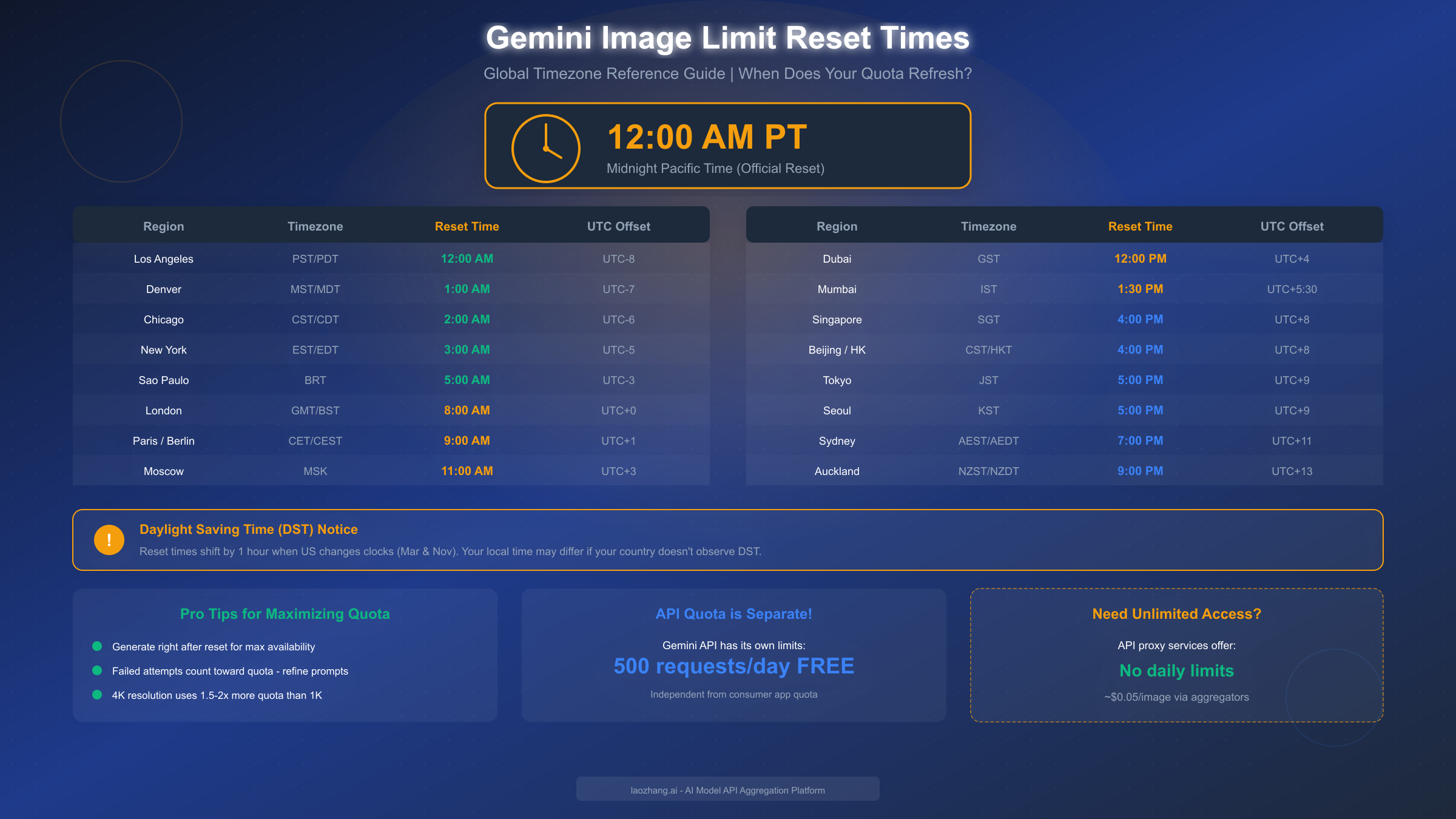
One of the most common questions from Nano Banana Pro users is exactly when their daily quota refreshes. Google resets limits at midnight Pacific Time (PT), which translates to different local times around the world—and the calculation is complicated by Daylight Saving Time changes.
The official reset time is 12:00 AM Pacific Time. This corresponds to:
| Region | Timezone | Reset Time (Standard) | Reset Time (DST) |
|---|---|---|---|
| Los Angeles | PST/PDT | 12:00 AM | 12:00 AM |
| Denver | MST/MDT | 1:00 AM | 1:00 AM |
| Chicago | CST/CDT | 2:00 AM | 2:00 AM |
| New York | EST/EDT | 3:00 AM | 3:00 AM |
| São Paulo | BRT | 5:00 AM | 4:00 AM |
| London | GMT/BST | 8:00 AM | 7:00 AM |
| Paris / Berlin | CET/CEST | 9:00 AM | 8:00 AM |
| Moscow | MSK | 11:00 AM | 11:00 AM |
| Dubai | GST | 12:00 PM | 12:00 PM |
| Mumbai | IST | 1:30 PM | 1:30 PM |
| Singapore | SGT | 4:00 PM | 4:00 PM |
| Beijing / Hong Kong | CST/HKT | 4:00 PM | 4:00 PM |
| Tokyo / Seoul | JST/KST | 5:00 PM | 5:00 PM |
| Sydney | AEST/AEDT | 7:00 PM | 6:00 PM |
| Auckland | NZST/NZDT | 9:00 PM | 8:00 PM |
Daylight Saving Time creates complexity. The United States observes DST from the second Sunday in March through the first Sunday in November. During this period, Pacific Time shifts from PST (UTC-8) to PDT (UTC-7). If your country doesn't observe DST (or observes it on different dates), your local reset time relative to your clock may shift by an hour twice yearly when the US changes clocks.
Why understanding dynamic throttling matters. Beyond the fixed reset time, Google implements dynamic load balancing that can temporarily reduce your available quota during peak demand periods. According to community reports and Google's own documentation, limits "may change frequently" based on system load. This means even if you haven't used your quota, you might find reduced availability during high-traffic periods.
Peak demand periods typically occur during:
- Weekday afternoons in the Americas (when both US and European users are active)
- Major product launches or AI-related news cycles
- Holiday periods when casual users have more time for creative projects
Strategies for working with reset times:
The first approach is to generate immediately after reset if you have specific projects. For users in Asia-Pacific regions, the 4-5 PM reset time means you can plan creative work around this window. European users benefit from the 8-9 AM reset aligning with the start of the workday.
Another consideration is that unused quota doesn't roll over. If you didn't use your 2 images today, you still only have 2 images tomorrow—not 4. There's no accumulation benefit to saving quota, so use what you have each day.
Nano Banana vs Nano Banana Pro (Feature Comparison)
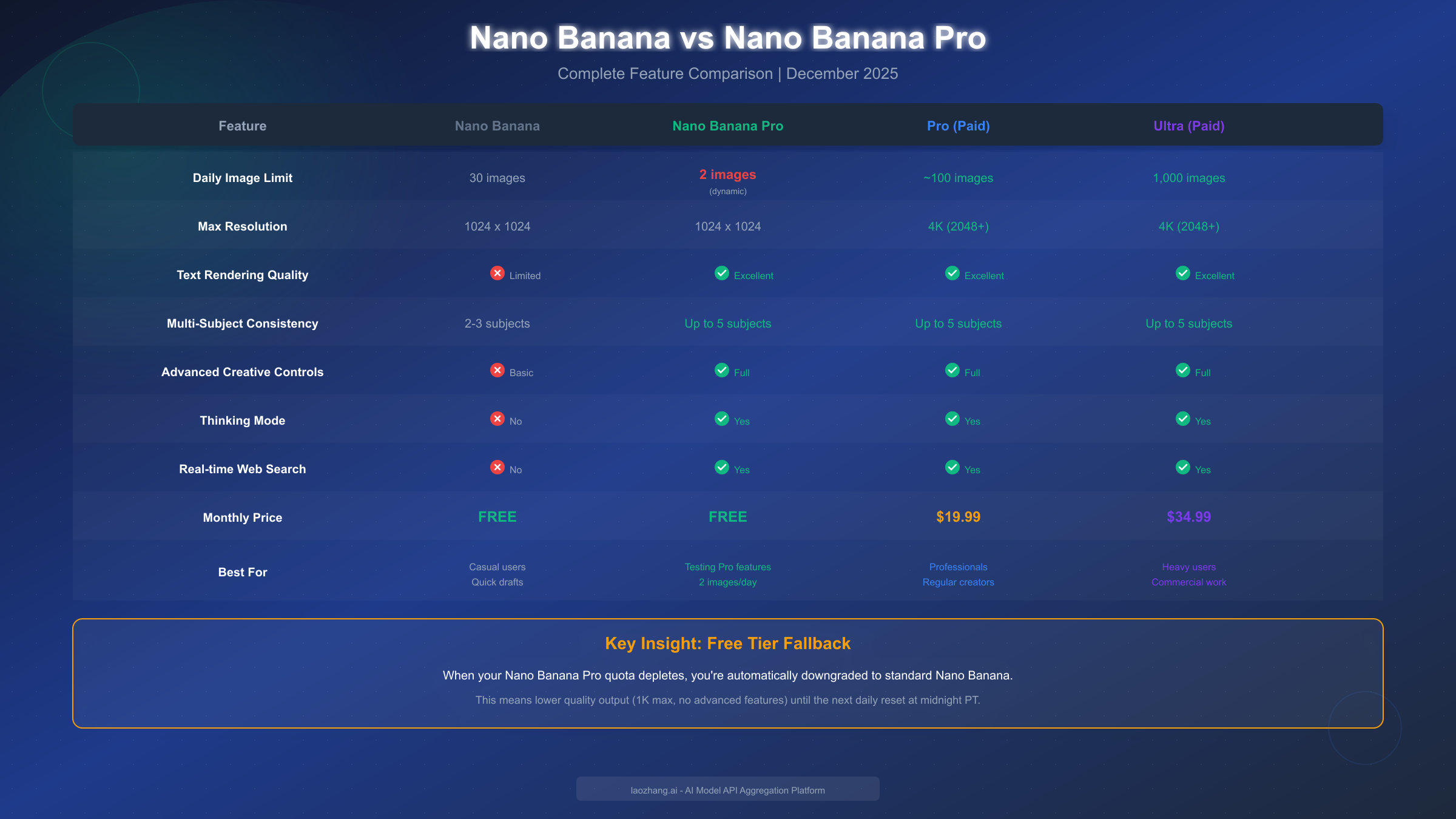
Understanding the differences between standard Nano Banana and Nano Banana Pro helps clarify what you lose during the automatic downgrade and whether the Pro experience justifies a paid subscription.
Resolution and output quality represent the most visible differences. Standard Nano Banana caps output at 1024x1024 pixels—adequate for social media posts and quick drafts but insufficient for print materials or large displays. When images are enlarged, fine details blur and micro textures degrade. Nano Banana Pro offers native 2K resolution with intelligent upscaling to 4K, using a 16-bit color pipeline that preserves quality even at large display sizes.
Text rendering is where the Pro model dramatically outperforms the standard version. The original Nano Banana struggles with text in several ways:
- Simple single words or short phrases work reasonably well
- Longer sentences often contain spelling errors
- Perspective text (labels on products, signs, posters) frequently appears distorted
- Non-Latin scripts may render incorrectly
Nano Banana Pro, according to Google's announcement, "accurately renders text across different languages, fonts, and styles, supporting complex sentences without distortion." This is particularly important for:
- Marketing materials requiring headline text
- Infographics with data labels
- Product mockups with packaging text
- UI/UX design prototypes
Creative control depth differs significantly. While standard Nano Banana offers basic prompt-based generation, Nano Banana Pro provides professional-grade controls including:
| Control Type | Nano Banana | Nano Banana Pro |
|---|---|---|
| Scene Lighting | Basic | Full adjustment |
| Depth of Field | Not available | Adjustable |
| Camera Angle | Limited | Precise control |
| Color Grading | Automatic only | Manual override |
| Localized Edits | Not available | Supported |
Multi-subject consistency is a Pro-exclusive capability. Standard Nano Banana can handle 2-3 subjects within a scene but often loses consistency when generating related images. Nano Banana Pro maintains consistency for up to 5 people/subjects across edits, using improved contextual reasoning to reduce hallucinations and generate visuals grounded in realistic physics.
When should you use each model?
Standard Nano Banana works well when speed is critical—rapid brainstorming sessions, testing multiple concept variations quickly, or creating social media content that doesn't require perfect quality. The 30 images/day limit (for free users not using Pro) provides more attempts if you need volume over quality.
Nano Banana Pro becomes essential when quality is non-negotiable—client deliverables, commercial campaigns, professional presentations, print materials. You'll need Pro's features if text must appear correctly, if you work with multiple languages, if 2K/4K resolution is essential, or if advanced camera controls affect your output.
The automatic downgrade behavior means free users experience the Pro model's capabilities during their first 2 images, then switch to standard Nano Banana for any additional generations. This silent transition often creates confusion when later images appear noticeably lower quality than earlier ones from the same session.
Should You Upgrade? (Decision Framework)
Deciding whether to pay for Gemini Pro or Ultra requires honest assessment of your usage patterns and quality requirements. Here's a framework for making that decision based on different user profiles.
Calculate your actual usage first. Track how often you hit the free tier limit over a two-week period. If you're consistently reaching the 2-image cap daily and need more, the math favors upgrading. If you only occasionally need additional images, the API free tier (500 requests/day) might suffice.
Cost-per-image analysis shows when upgrades make sense:
| Usage Level | Free Tier Cost | Pro Cost | Ultra Cost |
|---|---|---|---|
| 2 images/day | $0 | N/A | N/A |
| 30 images/day | Not possible | $0.67/image | $0.23/image |
| 100 images/day | Not possible | $0.20/image | $0.12/image |
| 500 images/day | Not possible | Not possible | $0.07/image |
Profile 1: Casual Creator You generate images occasionally for personal projects, social media, or experimentation. The 2-image free limit is sufficient most days, and when you need more, you can wait until tomorrow or use the API. Recommendation: Stay on Free tier + explore API.
Profile 2: Content Creator You regularly create content requiring AI images—blog posts, social media campaigns, YouTube thumbnails. You hit the free limit multiple times per week and quality matters for your audience. Recommendation: Pro subscription at $19.99/month offers excellent value.
Profile 3: Professional/Commercial User You use AI images for client work, commercial projects, or high-volume content operations. Quality, resolution, and reliability are critical. You need 4K output and consistent access. Recommendation: Ultra at $34.99/month or explore API with paid tier for unlimited access.
Profile 4: Developer/Technical User You're building applications, testing AI capabilities, or integrating image generation into workflows. You're comfortable with API calls and don't need the consumer app interface. Recommendation: Use the Gemini API free tier (500 requests/day) before considering paid API access.
Hidden costs to consider. The subscription prices don't tell the complete story. Resolution affects quota consumption—4K images use 1.5-2x more quota than 1K. If you're generating primarily at 4K, your effective daily limit is lower than advertised. Also, failed generations consume quota, so imprecise prompts waste your allocation.
Third-party alternatives can be more cost-effective for heavy users. API aggregation services often offer image generation at $0.03-0.05 per image with no daily limits. For users generating hundreds of images daily, this can significantly undercut even the Ultra subscription. We'll explore these alternatives in the next section.
Alternatives When You Hit the Limit
When your Nano Banana Pro quota depletes and you need to continue generating images, several alternatives exist—from Google's own API to third-party services and competing platforms.
The Gemini API represents your first workaround. This is crucial to understand: the API's quota operates completely independently from the consumer Gemini app. Free API users receive 500 requests per day, which is 250x the consumer app's free allocation. Accessing the API requires:
- Creating a Google AI Studio account at ai.google.dev
- Generating an API key
- Using the key either directly in code or through compatible applications
For a detailed walkthrough, our guide on getting your Gemini API key covers the complete process. Once configured, you can generate images through the API without touching your consumer app quota.
Third-party API aggregators offer another solution. Services like laozhang.ai provide access to multiple AI models including Gemini's image generation through a unified API. The advantages include:
- No daily limits (pay-per-use model)
- Often lower per-image costs ($0.03-0.05 vs. Google's official rates)
- Access to multiple models through one interface
- No subscription commitment
The cost comparison typically favors aggregators for heavy users. At $0.05 per image through an aggregator, 100 images costs $5—compared to $19.99 for Pro or $34.99 for Ultra monthly. For occasional heavy usage days without sustained daily needs, pay-per-use makes more financial sense. You can explore laozhang.ai's documentation at https://docs.laozhang.ai/ for integration details.
Competing platforms offer alternatives when Gemini isn't essential:
| Platform | Free Tier | Paid Plans | Strength |
|---|---|---|---|
| FLUX | Limited | API-based | Photorealistic quality |
| Midjourney | No free tier | $10-60/month | Artistic style |
| DALL-E 3 | Via ChatGPT limits | API-based | Text rendering |
| Stable Diffusion | Unlimited (local) | Free (self-hosted) | Full control |
For those interested in FLUX as an alternative, our FLUX image generation API guide provides comprehensive coverage of that platform's capabilities and pricing.
Local deployment eliminates limits entirely for users with capable hardware. Running Stable Diffusion locally requires:
- A GPU with 8GB+ VRAM
- Initial setup time (1-2 hours)
- Some technical comfort with command line tools
Once running, you have unlimited generations at only the cost of electricity. Quality depends on the model and settings you choose.
Multiple Google accounts technically allow multiplying your free quota, though this exists in a gray area of Google's terms of service. Each account receives its own 2-image daily allocation. However, Google actively discourages this practice and may restrict accounts detected as duplicates.
Strategic timing can effectively extend your quota. Since limits reset at midnight Pacific Time, planning generation sessions around this window means you can generate 2 images just before midnight and 2 more immediately after—effectively 4 images within a short period. For users in Asia-Pacific regions where midnight PT falls during afternoon hours, this scheduling is naturally convenient.
FAQ - Common Questions Answered
Based on community discussions and support forums, here are answers to the most frequently asked questions about Nano Banana Pro's free tier and limits.
Q: My limit says 100 but I can only generate 2 images. What's happening?
This discrepancy reflects Google's "dynamic throttling" system. The 100-image limit is a theoretical maximum that applies during low-demand periods. During high demand (which is essentially all the time since Nano Banana Pro launched), Google reduces free tier allocations to maintain service quality for paid subscribers. The current effective limit for most free users is 2 images daily.
Q: Do failed image generations count against my quota?
Yes, unfortunately. Whether your generation fails due to content policy violations, technical errors, or network issues, the attempt consumes quota. This is one of the most frustrating aspects of the system. To minimize wasted attempts, refine your prompts carefully before generating, avoid potentially policy-violating content, and ensure stable internet connectivity.
Q: Can I see how many images I have remaining?
Checking remaining quota isn't straightforward in the Gemini app. Some users report finding usage information under Profile > Usage & Limits, but the interface varies by platform. The most reliable method is attempting a generation—if you're redirected to upgrade prompts or notice quality degradation, you've likely exhausted Pro quota.
Q: Why did my image quality suddenly drop mid-session?
This indicates you've hit your Nano Banana Pro limit and been automatically downgraded to standard Nano Banana. The transition happens silently—there's no notification. You'll notice lower resolution (1K max), degraded text rendering, and reduced detail. This persists until the next reset at midnight Pacific Time.
Q: Is the API limit really separate from the app?
Yes, completely separate. The Gemini API's 500 requests/day free tier operates independently from the consumer Gemini app's quota. You could exhaust your 2-image app limit and still have 500 API requests available. This makes the API the primary workaround for users who need more generations.
Q: When exactly do limits reset in my timezone?
Limits reset at midnight Pacific Time (PT), which is UTC-8 during standard time and UTC-7 during Daylight Saving Time. Use the timezone table earlier in this article to find your local reset time. Remember that if your country doesn't observe DST on the same schedule as the US, your local reset time will shift by an hour twice yearly.
Q: Does upgrading mid-month give me the full limit immediately?
Yes, upgrading to Pro or Ultra provides immediate access to the higher limits. Your billing cycle starts from the upgrade date. There's no prorated calculation—you get the full daily limit the moment you subscribe.
Q: Are there student or educator discounts for Gemini subscriptions?
Google occasionally offers promotional pricing, but as of December 2025, there's no permanent student discount for Gemini subscriptions. Some users report success accessing discounts through Google One bundles or promotional periods. For education-focused AI access, exploring Gemini's student offers may reveal current promotions.
Q: Can I use Nano Banana Pro for commercial projects on the free tier?
Google's terms of service allow commercial use of generated images across all tiers, including free. However, the 2-image daily limit makes free tier impractical for any meaningful commercial production. Commercial users typically require Pro or Ultra subscriptions for sufficient volume.
Q: Why are my images sometimes rejected by content policy?
Nano Banana Pro includes content filtering that blocks certain types of generations. Common rejection triggers include realistic human faces (especially of public figures), violence, adult content, and copyrighted character likenesses. These rejections consume quota, so understanding the content policy before attempting generations saves wasted attempts.
Summary and Key Takeaways
Nano Banana Pro delivers impressive AI image generation capabilities that genuinely outperform previous models—but the free tier's limitations in late 2025 mean most users will need to plan around strict daily quotas or consider paid alternatives.
The essential facts to remember:
The free tier provides approximately 2 images daily (reduced from 3 in November 2025) with automatic downgrade to standard Nano Banana when quota depletes. This limit is dynamic and may vary based on system demand. For users needing consistent access, Pro at $19.99/month offers approximately 100 daily images with full 4K resolution and priority access.
The Gemini API operates on a completely separate quota—500 free requests daily—making it the primary workaround for technically comfortable users who've exhausted their consumer app allocation.
Limits reset at midnight Pacific Time (8:00 AM GMT), and understanding your local equivalent helps plan generation sessions. Failed attempts count toward quota, so refining prompts before generating saves wasted allocations.
For most users, the decision framework is straightforward:
- Casual users generating occasionally: Free tier + API backup
- Regular content creators: Pro subscription at $19.99/month
- Professional/commercial users: Ultra at $34.99/month or API with paid tier
- Developers: API free tier before considering paid API access
The landscape of AI image generation continues evolving rapidly. Google may adjust these limits based on demand and competitive pressure. For users frustrated by current restrictions, third-party alternatives and the API free tier provide viable workarounds while deciding whether subscription costs align with usage needs.
Whether Nano Banana Pro's free tier meets your needs depends entirely on your volume requirements. For 2 high-quality images daily with the option to fall back on standard Nano Banana or the API for overflow, the free tier remains genuinely useful. For anything beyond casual experimentation, the paid tiers or alternative services become essential.
Related reading: For understanding similar limit structures across AI platforms, see our guides on ChatGPT's image generation limits and Gemini API pricing.


