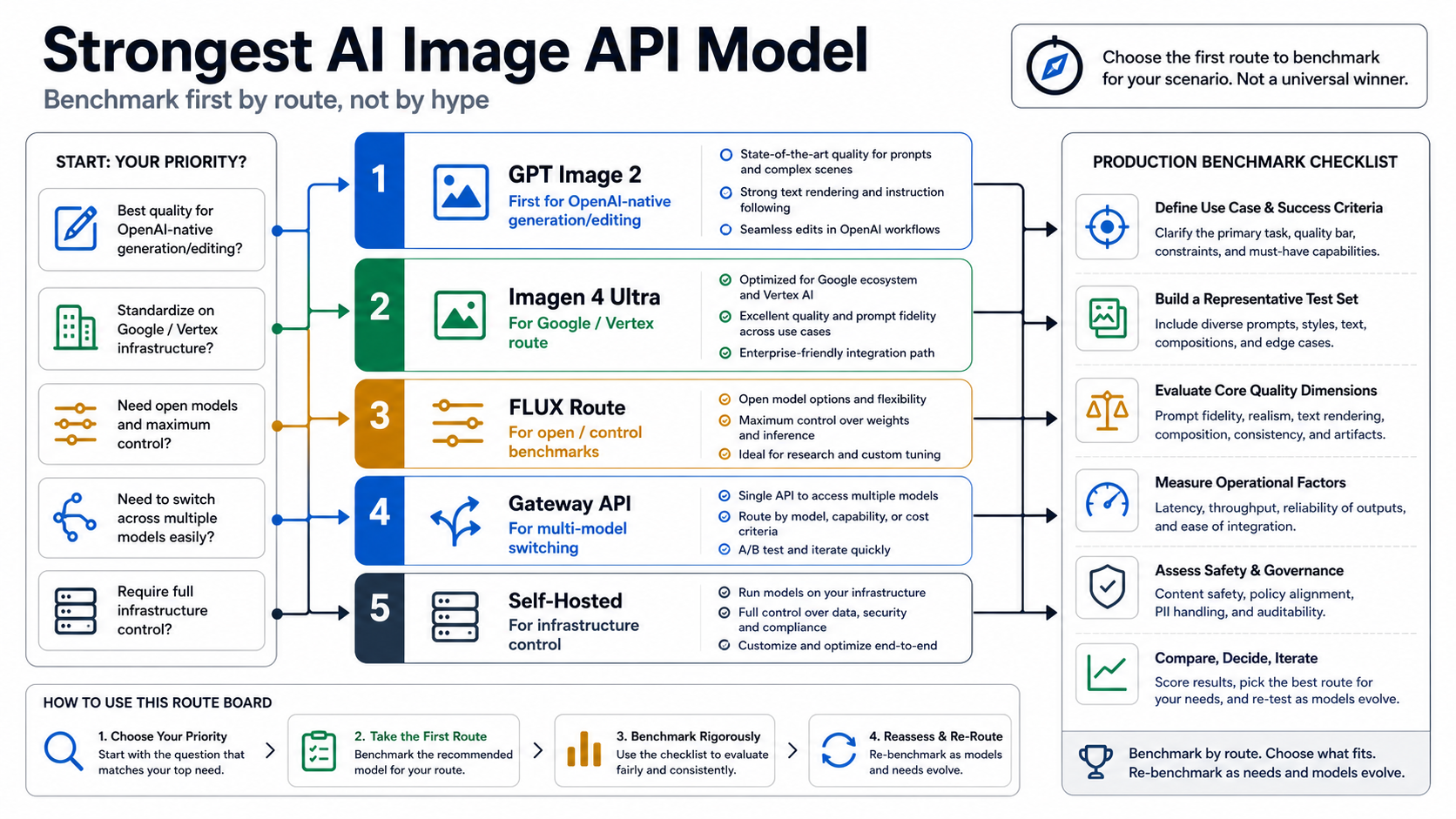
If you can benchmark only one image API first, start with GPT Image 2 for most OpenAI-native generation and editing work. The caveat is that "strongest" changes when your real constraint is Google/Vertex integration, FLUX-style control, gateway aggregation, self-hosting, cost, or deployment ownership. Treat the first choice as a benchmark route, not as a permanent model crown.
| Your job | First benchmark | Route owner to verify |
|---|---|---|
| OpenAI-native image generation or editing | GPT Image 2 | OpenAI Images API, Responses image_generation tool, organization verification, pricing calculator, and current limitations |
| Google Cloud or Vertex AI production stack | Imagen 4 Ultra | Vertex AI model ID, quota, safety settings, watermarking, and supported generation modes |
| Open-control or photorealism-specific benchmark | FLUX/provider route | Provider endpoint, model coverage, license, price, support, retry behavior, and data handling |
| One API across multiple image models | Gateway API | Gateway coverage, billing owner, fallback behavior, logging, storage, and support owner |
| Full infrastructure and deployment control | Self-hosted route | Hardware cost, serving latency, model license, safety, monitoring, and operational burden |
As of May 20, 2026, OpenAI's public docs identify gpt-image-2 as the current GPT Image model and describe it as state of the art for image generation and editing. That is enough to make it the first OpenAI-native benchmark, but it is not enough to skip your own prompt set, latency logs, price check, retry test, and support review before production.
Do not choose an image API from a model ranking alone. The route that ships your product also has to own endpoint behavior, billing, quota, storage, safety policy, support, and fallback when generation fails.
Pick the first model by job, not by a universal leaderboard
The useful question is not "which model wins every image task?" It is "which route deserves the first serious benchmark for this product?" A visual model can look unbeatable in one sample and still be the wrong production choice if the endpoint, account rules, cost model, or fallback path do not fit your workflow.
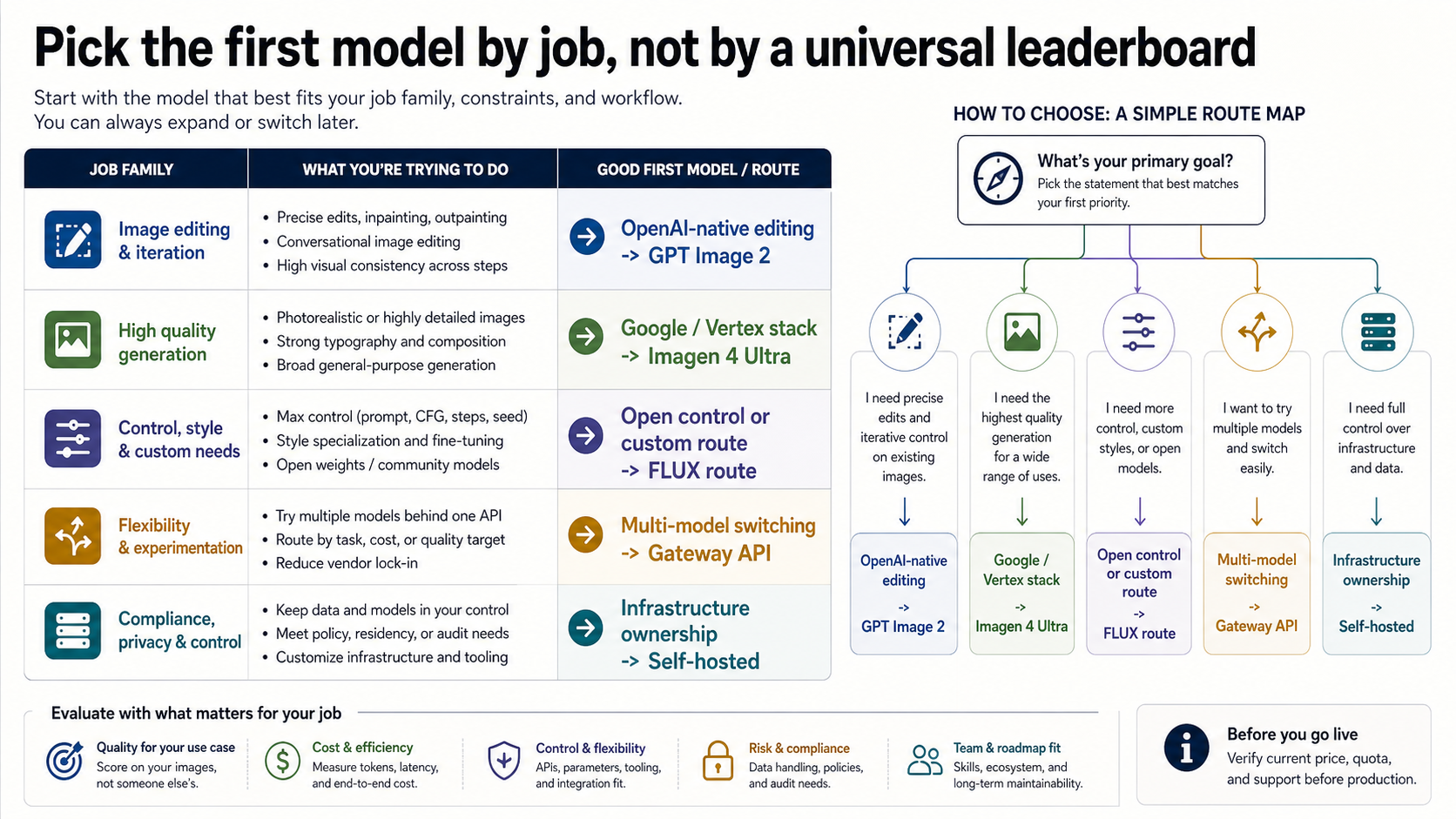
Start with GPT Image 2 when the product already belongs inside an OpenAI workflow: direct image generation, source-image editing, assistant-driven creative flows, or a backend that already logs OpenAI requests. OpenAI's image generation guide places GPT Image 2 on the Images API for direct generation and edits, while Responses image generation uses a hosted image_generation tool inside a text-capable model flow.
Start with Imagen 4 Ultra when the system is already committed to Google Cloud, Vertex AI governance, Google-side quota, or Google-owned safety and watermark behavior. Google's Vertex AI docs list the imagen-4.0-ultra-generate-001 model ID and make it clear that this is a Google route with its own supported features, safety controls, quota behavior, and pricing pages.
Start with a FLUX/provider route when the first question is open-model control, photorealism under a specific provider, or a provider's model marketplace. In that branch, the provider owns more of the decision than the model name does: endpoint shape, model version, license, output storage, price, support, and retry behavior must all be checked on the exact route you will use.
Start with a gateway API when one integration across several models is more valuable than first-party contract clarity. A gateway can be the right production choice if you need payment handling, model switching, route fallback, or an OpenAI-compatible interface across providers. It should not be described as the model winner; it is an access and operations route.
Why GPT Image 2 is the current OpenAI-native default
GPT Image 2 earns the first OpenAI-native benchmark because it is the current official image model, not because every image job is best solved by OpenAI. OpenAI's model page lists the model ID gpt-image-2 and snapshot gpt-image-2-2026-04-21, and OpenAI's image generation guide shows it in direct Images API generation and editing examples.
That official status matters for implementation. If your application needs a direct image generation call, the model placement is simple: model: "gpt-image-2" belongs in the Images API request. If the application needs an assistant to reason, use tools, and generate an image as one step inside a larger interaction, the top-level Responses model should be a text-capable model and the image work should happen through the hosted image_generation tool.
import OpenAI from "openai";

const client = new OpenAI({ apiKey: process.env.OPENAI_API_KEY });

const image = await client.images.generate({
  model: "gpt-image-2",
  prompt: "A product-style route board for choosing an image API model",
  size: "1536x1024",
  quality: "medium",
});
Keep the first test this plain. Before adding complex reference images, streaming, edits, or a provider gateway, confirm that your organization can use the model, the request fields are accepted, the output can be stored, and the bill belongs to the route you plan to ship.
Two current caveats belong near the first implementation. First, GPT Image models may require organization verification. Treat access failure as an account-readiness branch before you rewrite the architecture. Second, OpenAI's current guidance says GPT Image 2 does not support transparent backgrounds. If your product needs alpha-channel cutouts, logos, stickers, or UI overlays, that requirement can change the first benchmark.
When Imagen, FLUX, gateway, or self-hosted routes should be tested first
GPT Image 2 should not absorb every first test. The route should change when the product has a stronger non-OpenAI constraint.
Use Imagen 4 Ultra first when Google owns the production surface. The official Imagen 4 Ultra Generate page documents the Vertex AI model ID and the Google-side feature boundary. If your organization needs Vertex AI quota management, Provisioned Throughput, Google safety controls, or Google watermark and verification behavior, the right first benchmark is probably inside that route rather than through a neutral model leaderboard.
Use a FLUX/provider route first when the work is closer to provider-specific photorealism, open-model control, or model-marketplace availability. That does not mean a provider claim is automatically neutral. It means you should make the provider contract visible: what exact model version is being served, what license applies, how failures are billed, where outputs are stored, how support works, and whether the same request can be repeated later.
Use a gateway first when the application value is operational routing. For example, if you need one API surface for multiple image models, a gateway can let you test GPT Image 2, Imagen, FLUX, and other routes behind one integration pattern. For this site's API/developer route, laozhang.ai docs and api.laozhang.ai are useful starting points when multi-model switching is the actual job. Do not convert that into an unverified price, uptime, or model-coverage promise; the gateway is helpful because it changes integration friction, not because it makes every model claim official.
Use self-hosting first only when infrastructure ownership is the point. Self-hosting can make sense when data residency, offline inference, custom deployment, or model control matter more than first-party hosted quality. It also moves the burden to your team: hardware, serving latency, model updates, monitoring, abuse controls, prompt safety, and incident response all become your work.
Model strength is not the same as API route quality
A strong model can still be a weak production route for your use case. Model strength answers whether the output is good enough. API route quality answers whether your product can call it, pay for it, recover from failure, log it, and explain it to users.
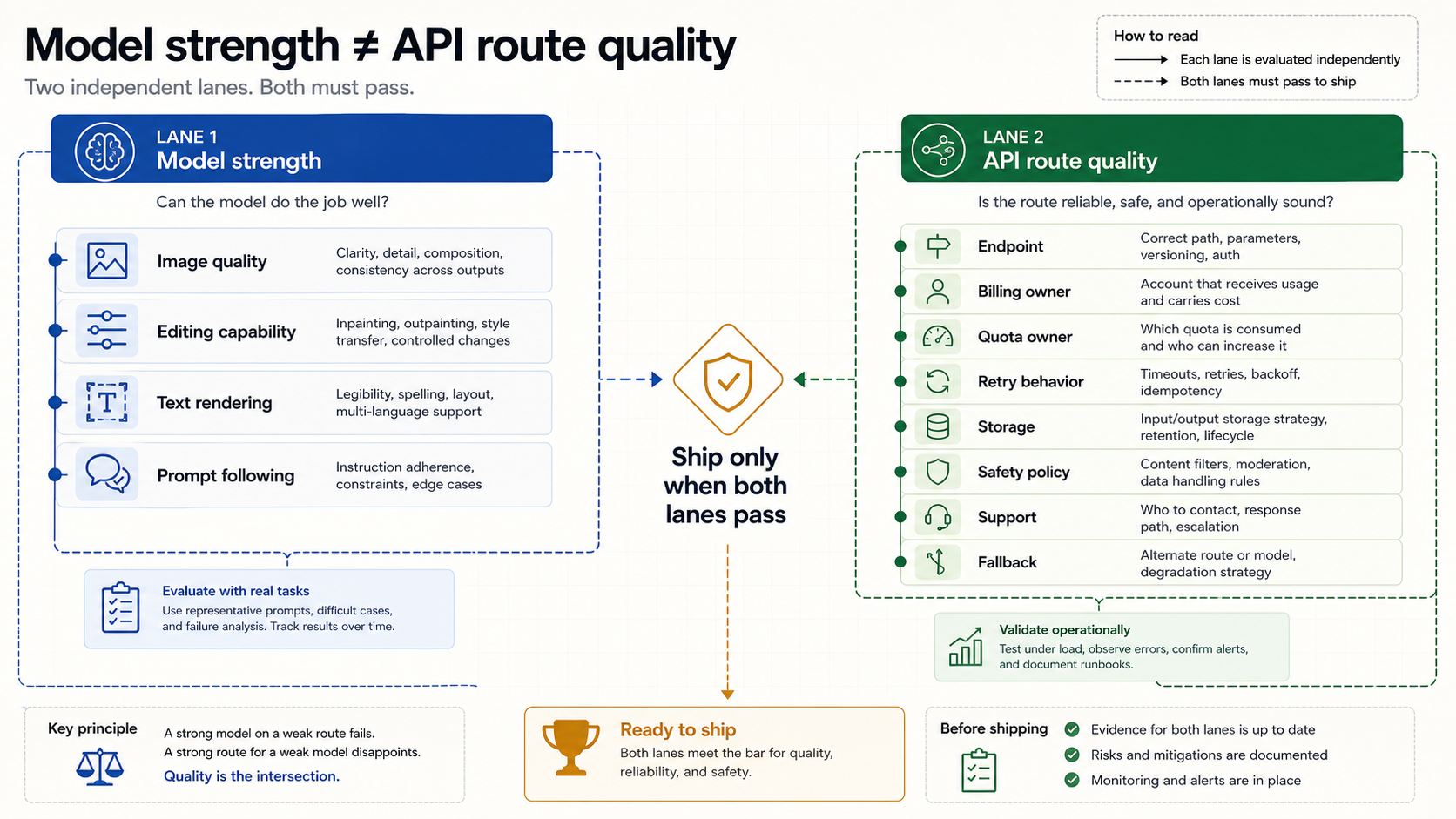
Judge model strength with image-focused criteria:
- Does it follow the prompt without over-interpreting the task?
- Does it preserve references, product geometry, identity, or style constraints?
- Does it handle readable text, layout hierarchy, and brand-like details?
- Does editing preserve the parts that should not change?
- Does the output stay consistent enough across repeated runs to support the product?
Judge route quality with operations-focused criteria:
- Which endpoint or tool owns the request?
- Which account, project, gateway, or deployment owns billing?
- Where do quota, rate limits, and support live?
- How are partial outputs, retries, moderation, and failures logged?
- Where are generated files stored, and who can delete or audit them?
- What happens when the first route is down, blocked, too expensive, or missing a needed feature?
That split prevents two common mistakes. The first mistake is choosing a gateway because it feels like the "best API" and then discovering that the base model, price, policy behavior, or support path is not the same as the official provider route. The second mistake is choosing the model with the prettiest sample and then discovering that the product needed transparent assets, enterprise quota, self-hosted data handling, or a multi-model fallback.
Run this benchmark before you commit
After the first route is chosen, run a benchmark that matches the real product. Do not rely on a public screenshot, a viral sample, or a provider's best-case gallery. Your prompt set should be boring enough to reproduce and strict enough to expose what matters.
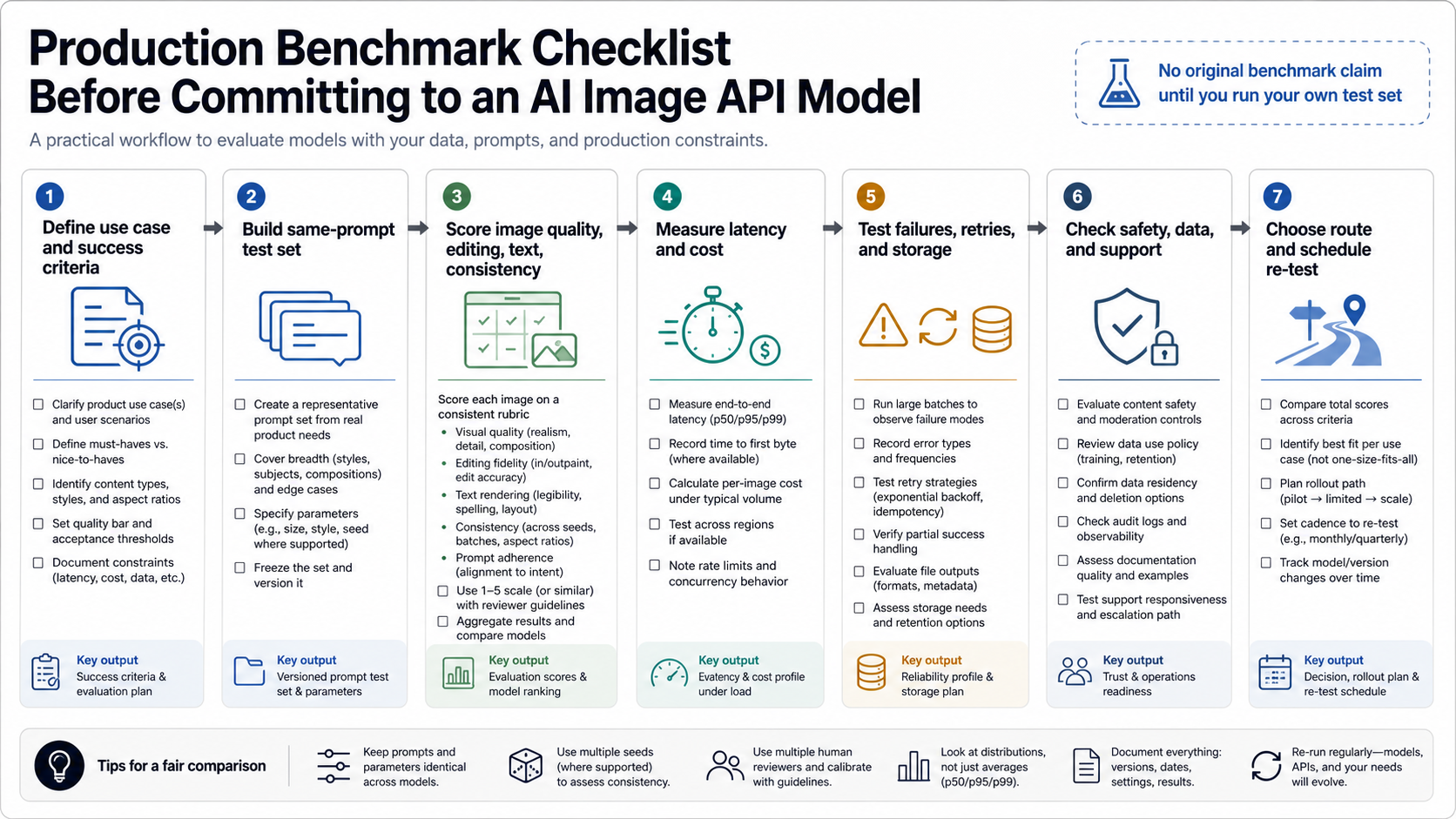
Use at least five prompt families:
| Prompt family | What it reveals |
|---|---|
| Product or marketing image | object fidelity, lighting, brand-like details, and repeatability |
| Text-heavy board or poster | typography, label stability, layout, and hierarchy |
| Source-image edit | preservation, change control, and artifact handling |
| Multi-step assistant request | whether the route needs direct Images API or Responses-style tool use |
| Failure or edge prompt | safety behavior, retry handling, unsupported options, and escalation path |
For each output, log the route owner, model name, date, prompt, input assets, size, quality setting, response ID if available, latency, stored asset path, and billing owner. If you test a gateway, log both the gateway route and the underlying model label. If you test self-hosting, log hardware, model version, deployment hash, and serving configuration.
The acceptance line should be practical: would this output survive the next real step? If the text board needs a designer to rebuild all copy, it failed the text job. If the edit changes a product reference, it failed the edit job. If the image looks excellent but the route has no clear billing owner or fallback, it failed production readiness.
Which guide to read next
Use the route board above to choose the first benchmark route. Then move into the implementation guide that matches the choice.
If you choose OpenAI, use the GPT Image 2 API guide for the Images API, Responses tool split, Codex workflow boundary, and billing separation. If you need endpoint sequencing before choosing the model, the OpenAI image generation API endpoint guide is the broader route reference. If your actual decision is a narrower Google-versus-OpenAI image comparison, use the Nano Banana Pro vs GPT Image 2 guide instead of turning the decision into a two-model debate.
Keep the stale-page risk visible too. Older OpenAI image model pages that still center GPT Image 1.5 or DALL-E-era guidance should not be used as the current default for a 2026 image API build. The current first benchmark for OpenAI-native work is GPT Image 2, with exceptions handled by job and route.
FAQ
What is the strongest AI image API model right now?
For most OpenAI-native generation and editing API work, start by benchmarking GPT Image 2. It is the current official OpenAI image model in public developer docs. The stronger production answer is route-specific: Imagen, FLUX/provider, gateway, or self-hosted routes can be better first tests when their constraints match the job.
Is GPT Image 2 better than Imagen 4 Ultra?
Not as a universal statement. GPT Image 2 is the first OpenAI-native benchmark. Imagen 4 Ultra is the first route to test when your product is already committed to Google Cloud or Vertex AI and needs Google-owned model, quota, safety, watermark, or enterprise controls.
Is a gateway API the same as the strongest model?
No. A gateway API is an access and operations layer. It can be valuable when you need model switching, payment handling, fallback, or one integration surface, but the gateway's pricing, coverage, support, and route behavior are provider-owned claims.
Should I use FLUX instead of GPT Image 2?
Benchmark a FLUX/provider route first when the work depends on provider-specific photorealism, open-model control, licensing, or deployment options. Do not decide from the model name alone. Verify the exact provider endpoint, model version, license, price, support, retry behavior, and data handling.
What should I test before production?
Use a same-prompt set that covers product imagery, text and layout, source-image edits, assistant workflows, and edge cases. Log route owner, model, size, quality, latency, stored output, response ID, billing owner, retry behavior, and unsupported options. Choose the model route only after those checks match the workflow you plan to ship.


