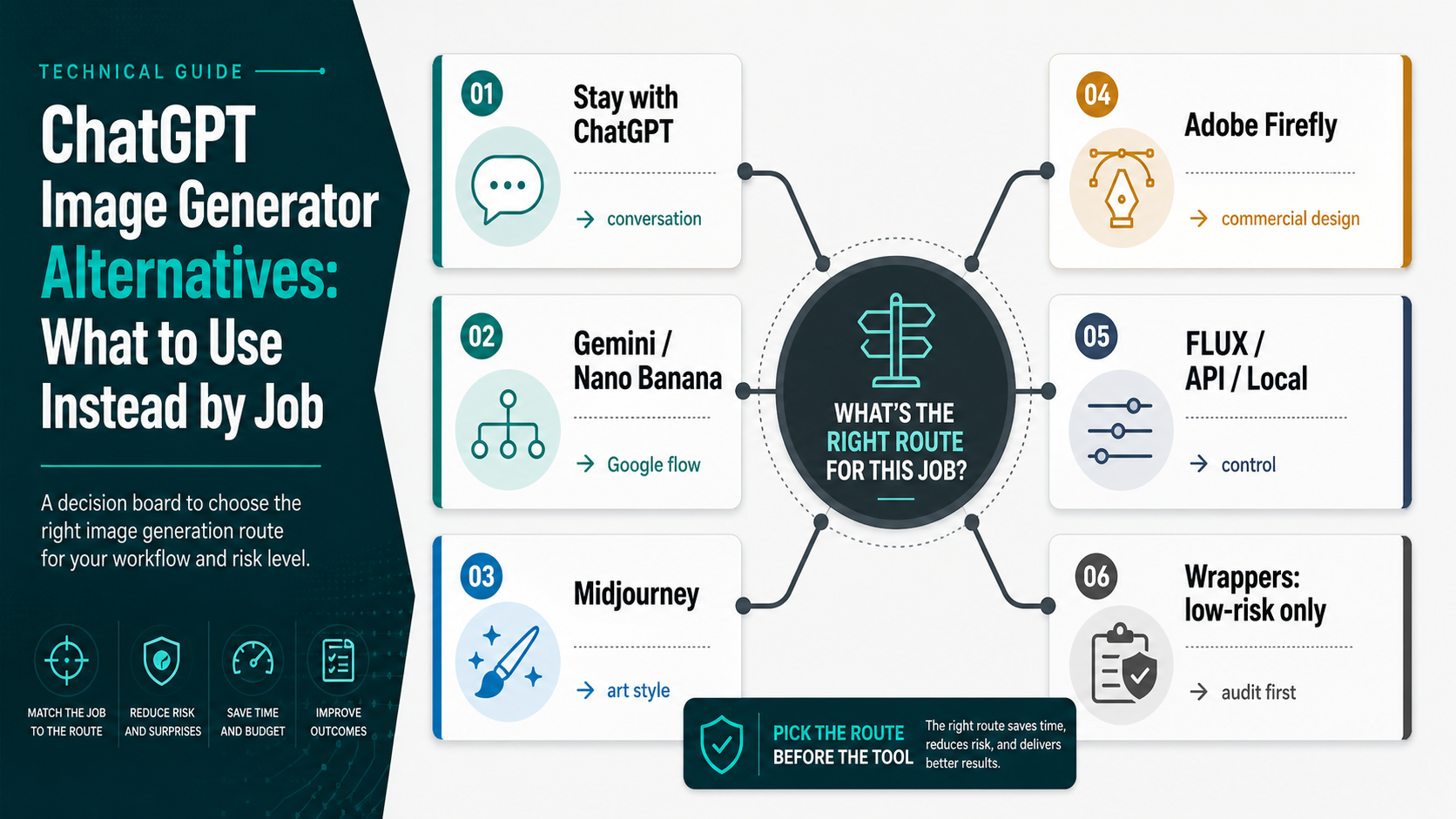
Do not replace ChatGPT Images just because a list says another model is better. Choose the route that matches the job: stay with ChatGPT for conversational iteration, try Gemini or Nano Banana for a similar Google app or Workspace flow, use Midjourney for stylized art direction, use Firefly for commercial design work, move to FLUX, API, or local routes when you need control, and touch wrappers only with low-risk assets.
Before uploading a source image, check route owner, retention and deletion, training use, output rights, billing owner, support path, and failure behavior. If the image is private, client-owned, unreleased, regulated, brand-sensitive, or a real-person likeness, wait until the route is approved.
If the real problem is a ChatGPT outage, quota, browser, account, or prompt-policy failure, fix that branch first. If the real problem is replacing OpenAI image generation inside an application, use an API-specific comparison; the broad replacement decision should stay focused on the first safe route to test.
Start With the Route, Not the Tool Name
The fastest way to choose a ChatGPT Images replacement is to name the job first. A route that is excellent for stylized concept art can be the wrong route for a client product mockup. A no-login browser page can be fine for a public prompt and unsafe for a private source image. A developer API can be the right answer for automation and the wrong answer for someone who only wants a quick image in a chat window.
Use this first-pass board:
| If your job is... | Test this route first | Why |
|---|---|---|
| conversational ideation, quick prompt iteration, or simple edits | Stay with ChatGPT Images | You keep the chat workflow and avoid switching just for novelty |
| a similar app flow inside Google's ecosystem | Gemini / Nano Banana | Google owns the app, Workspace, Search/AI Mode, Flow, AI Studio, and Vertex branches where available |
| stylized, cinematic, or art-directed images | Midjourney | It is built around creative direction and subscription-based image work |
| commercial design workflow, brand assets, or Creative Cloud handoff | Adobe Firefly | Firefly is positioned around responsible commercial creation and design-suite integration |
| API control, local experimentation, repeatability, or multi-reference editing | FLUX, OpenAI API, or local/API routes | You get more control over integration, governance, and reproducibility |
| casual free testing or multi-model convenience | Wrapper tools | Useful only after the upload and rights audit fits the risk |
That table is deliberately not a leaderboard. The useful question is not whether Gemini is "better" than Midjourney or Firefly is "better" than ChatGPT. The useful question is whether the route contract matches the image you are about to make.
Stay With ChatGPT When Conversation Is the Workflow
ChatGPT Images is still the right default when the work is conversational: brainstorming prompts, revising a concept through back-and-forth instructions, creating low-risk examples, or exploring whether an idea is worth turning into a production asset. OpenAI's own help and product surfaces frame image creation as a current ChatGPT capability, while OpenAI's developer docs keep the API route separate. That split matters: success in ChatGPT proves the idea can work in a product surface, not that your application has the right API access, billing, and governance.
Stay with ChatGPT when you mainly need these things:
- a natural-language loop where the prompt evolves over several turns
- one-off idea exploration without automation
- a fast sanity check before deeper production work
- a safe place for public prompts and disposable test images
- a workflow where text reasoning and image iteration happen together
Leaving ChatGPT too early can add friction without solving the real problem. If the image failed because of a temporary service issue, a broken browser session, a missing image-capable tool, quota state, an upload problem, or a policy-sensitive prompt, the better next step is diagnosis. The branch-based recovery guide for ChatGPT image generation not working is the cleaner path when the system itself is failing.
When the problem is quality, style, commercial workflow, text layout, or API control, then a replacement route makes sense. Even then, the first move is to pick the route category before opening accounts or uploading source material.
Stop Before Uploading Private or Client Images
Free tools and wrappers are where alternative searches become risky. Many of them are useful for disposable experiments, but "free", "no login", or "ChatGPT alternative" does not prove who runs the model route, how uploads are stored, whether outputs are used for training, whether deletion works, or who owns support when something fails.
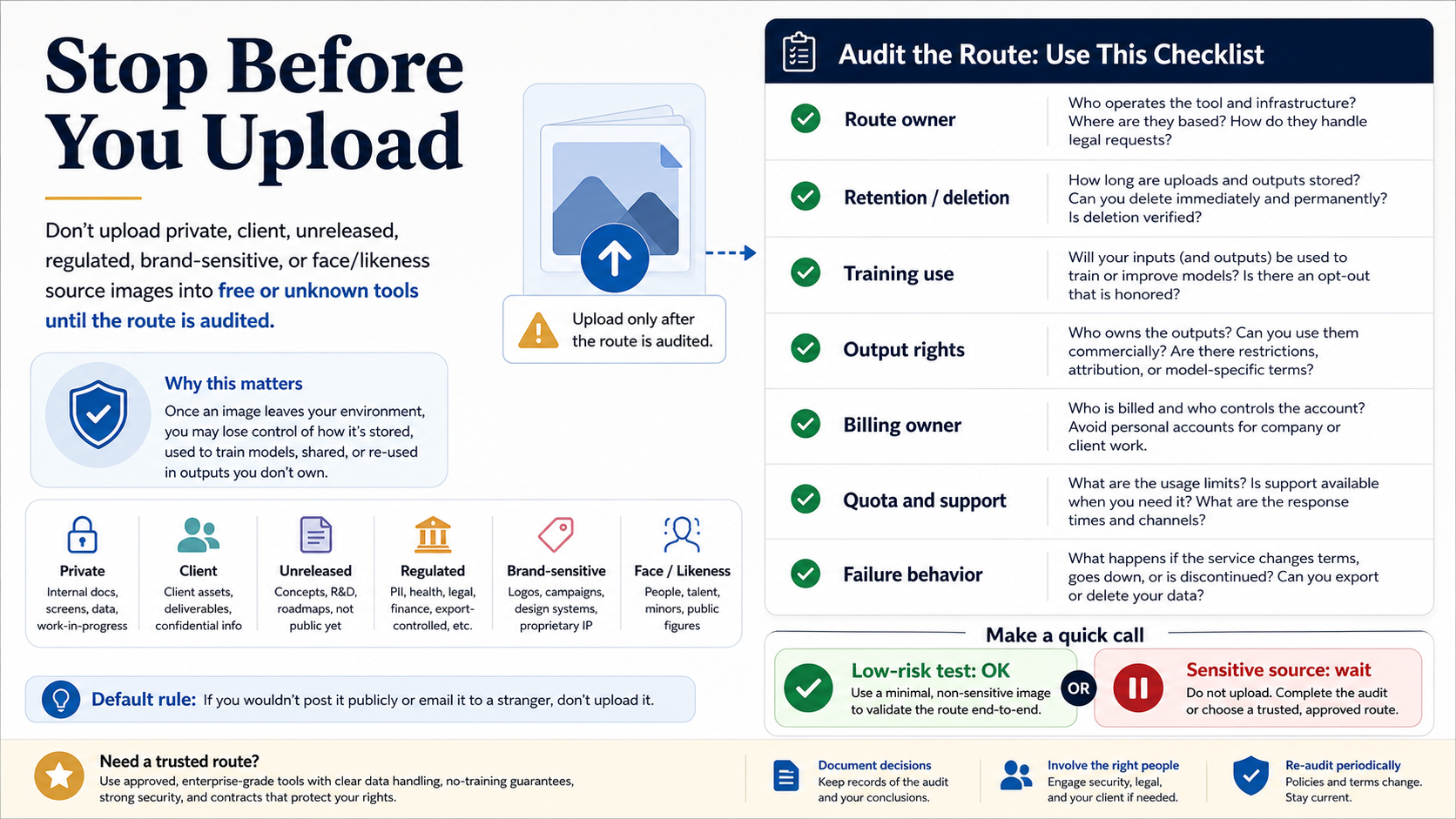
Do not upload these images until the route is approved:
- client files, customer photos, contracts, screenshots, or product data
- unreleased brand, campaign, roadmap, or R&D material
- regulated or sensitive files, including health, legal, financial, education, or identity data
- real-person likenesses, public-figure edits, employee photos, minors, or consent-sensitive images
- anything you would not publish, email to a stranger, or add to a public demo
The audit is simple but non-negotiable. Check the route owner, retention and deletion rules, training use, output rights, billing owner, quota and support path, and failure behavior. If those answers are missing, keep the test disposable. Use a synthetic image, a public-domain sample, or a text-only prompt. The few minutes saved by skipping the audit are not worth losing control of a sensitive source image.
This rule also protects commercial claims. Adobe can make a commercial-workflow argument for Firefly because it publishes a specific product position around licensed and commercially safe creation. A random wrapper cannot inherit that promise just because it offers a button that looks easier.
Separate App, Design Suite, API, and Wrapper Routes
The biggest mistake is comparing every alternative as if it were the same kind of product. A consumer app, a design suite, a developer API, a local model, and a wrapper have different owners and different failure modes. They should not sit in one undifferentiated ranking.
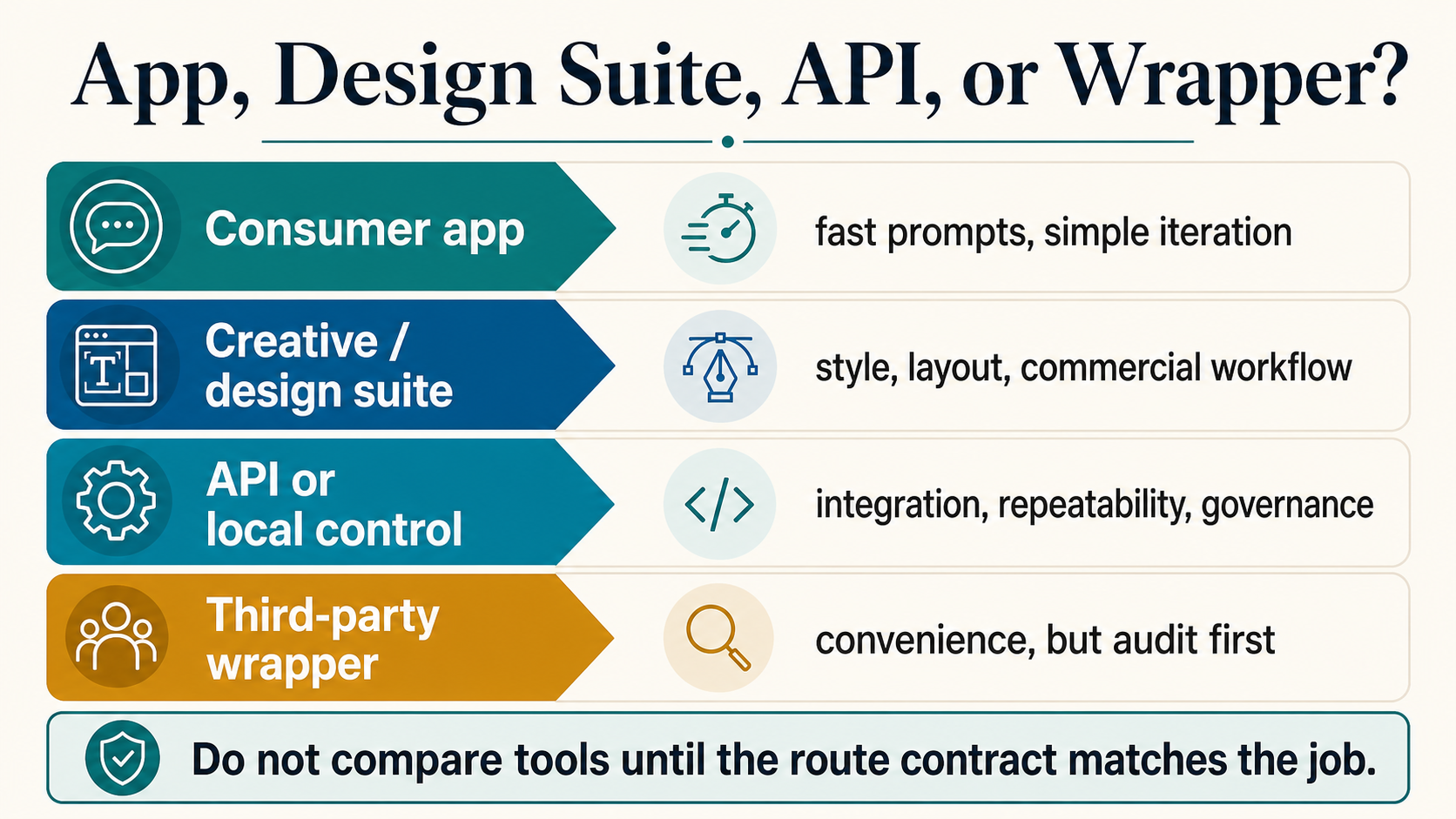
Use a consumer app when speed and iteration matter more than governance. Gemini or Nano Banana belongs here when the reader wants a Google-owned surface, especially around the Gemini app, Google AI subscriptions, Workspace, Search/AI Mode, Flow, AI Studio, or Vertex routes that Google currently describes. The value is not only output quality; it is that the route owner is clear.
Use a creative or design suite when the deliverable has a style, layout, brand, or commercial handoff requirement. Midjourney is strongest as an art-direction route, especially when the team cares about visual mood, cinematic composition, or stylized results. Firefly is stronger when the work lives near Adobe tools, brand systems, or commercial design review. Ideogram and design-focused tools are worth testing when text inside the image, poster layout, or ad creative is the real job.
Use API or local routes when the output becomes a repeatable workflow. OpenAI's image generation docs separate the Images API from Responses with image_generation; Black Forest Labs positions FLUX.2 around generation, editing, multi-reference control, API access, and open-weight routes. Those choices are not just "another image generator." They are integration choices. If your real need is to replace OpenAI image generation inside a product, start with the API-specific guide to OpenAI image generation API alternatives instead of forcing a consumer-tool comparison to do developer work.
Use wrappers only when convenience is the job and the input is low risk. A wrapper can be helpful for trying several models quickly or avoiding subscription hopping, but it must be treated as a separate contract. The wrapper owns the interface, the logs, the billing surface, and often the support path.
Which Alternative Should You Test First?
For a simple ChatGPT-like replacement, start with Gemini or Nano Banana. The reason is workflow fit: it gives readers a familiar app route backed by Google's own product surfaces. If you already live in Google Workspace or want image generation near Search, NotebookLM, Flow, AI Studio, or Vertex, that route deserves the first serious test.
For art direction, start with Midjourney. It is not the cheapest or simplest answer for every user, and it is not a drop-in API replacement for ChatGPT. It is the route to test when the desired output is stylized, cinematic, editorial, or visually expressive and when subscription workflow is acceptable.
For commercial design work, start with Adobe Firefly. The advantage is not that Firefly is automatically more beautiful than every other model. The advantage is the design-suite route and Adobe's commercial-safety positioning. If a design, marketing, or brand team needs a route that feels closer to production review, Firefly belongs near the top of the shortlist.
For text-heavy layouts, posters, ads, labels, and graphic compositions, test Ideogram or a design-focused tool alongside ChatGPT and Gemini. Text in images is one of the fastest ways to expose whether an image model fits the job. A tool that handles typography and layout well can beat a prettier generator for that specific asset class.
For developer control, local experimentation, or multi-reference editing, test FLUX or a direct API route. The route is more complex, but that complexity can be the point: repeatability, governance, model choice, local control, or integration. If cost is the only reason you are leaving an API route, use the cost-specific cheaper OpenAI image API alternative path instead of turning a consumer alternatives article into a pricing spreadsheet.
For free access, keep the scope honest. Free can mean a limited ChatGPT tier, a consumer trial, a no-login page, provider credits, a community demo, or local open weights. Those are not equivalent. The free-online branch for GPT Image 2 online testing is the better follow-up when the main question is free access rather than replacement fit.
Use the Same-Prompt Test Instead of a Universal Winner Claim
No public sample gallery can tell you which route will win for your specific asset. The only reliable lightweight test is to run a controlled prompt against two or three routes that match your job and compare the output against the actual requirement.
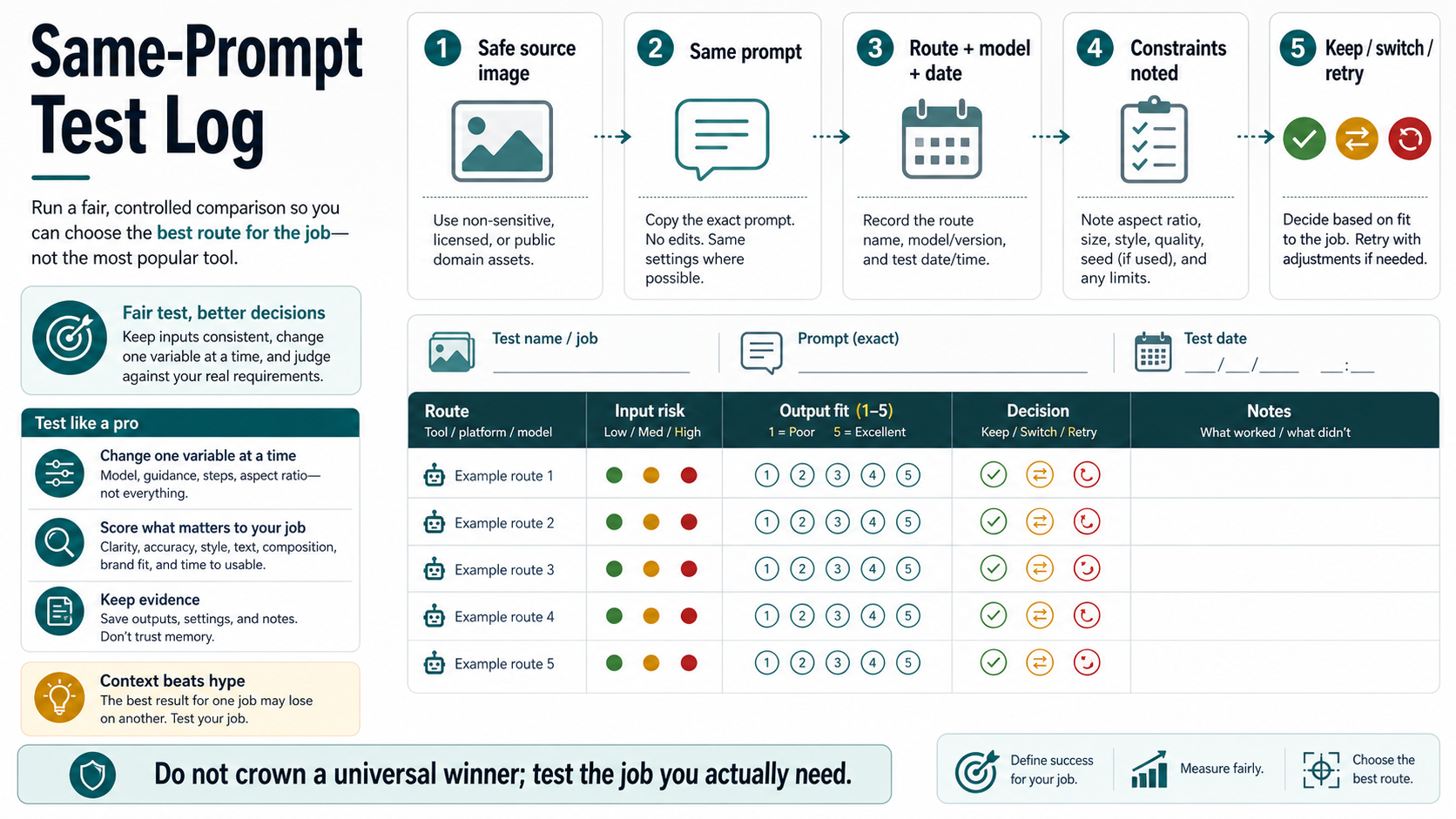
Run the test this way:
- Use a safe source image or no source image at all.
- Copy the exact same prompt into each route.
- Record the route name, model or version if visible, date, aspect ratio, quality setting, and limits.
- Score against the job, not against general beauty. Use criteria such as clarity, text accuracy, style fit, brand fit, editability, composition, and time to usable output.
- Decide whether to keep, switch, or retry with a narrower prompt.
The test should change one variable at a time. If you change the prompt, aspect ratio, style reference, and model together, you may get a better image but you will not know why. If you are making a client or production decision, save the prompt, output file, route, date, and notes. That record is more useful than memory when a teammate asks why one tool was chosen.
This method also prevents over-switching. ChatGPT may lose one poster-layout test and still win conversational concept iteration. Midjourney may win mood and composition while losing text fidelity. Firefly may win handoff confidence inside a design workflow. FLUX or an API route may win control while costing more setup time. The winner is the route that clears the job's threshold, not the route with the broadest hype.
Keep API Replacement and ChatGPT Failure in Their Own Branches
A broad replacement page should not absorb every adjacent job. If the reader is building an application, the decision is endpoint, model, account, billing, retry, storage, and governance. That belongs in an API guide, not in a consumer route table.
OpenAI's developer docs make the split explicit: use the Images API for direct image generation or editing, and use Responses with the hosted image_generation tool for assistant-style flows. That is a different contract from opening ChatGPT and asking for an image. A team replacing OpenAI in production should compare APIs, not only consumer tools.
The same boundary applies to broken ChatGPT sessions. If image generation is missing, spinning, rejecting a harmless prompt, failing uploads, or behaving differently across accounts and browsers, replacement may be the wrong first move. Diagnose status, session, account access, prompt policy, upload branch, and quota before paying for another tool.
Use the narrow branch when the job narrows:
| Narrow job | Better next step |
|---|---|
| ChatGPT image generation fails or the tool is missing | ChatGPT image generation not working |
| You need free browser testing | GPT Image 2 free online |
| You are replacing OpenAI image generation in an app | OpenAI image generation API alternative |
| The issue is API cost | OpenAI image generation API cheaper alternative |
| You specifically want Gemini versus ChatGPT | Gemini image vs ChatGPT 2026 |
Keeping those branches separate makes the replacement decision cleaner. The reader who needs a quick creative route should not have to read API billing detail, and the developer who needs an endpoint comparison should not have to infer production advice from consumer app rankings.
FAQ
What is the best ChatGPT Images alternative overall?
There is no single best overall replacement. Use Gemini or Nano Banana for a similar Google app flow, Midjourney for stylized art direction, Firefly for commercial design workflow, FLUX or API/local routes for control, Ideogram or design tools for text-heavy layouts, and wrappers only after the upload risk is acceptable.
Is Gemini or Nano Banana better than ChatGPT for image generation?
It can be the better first test when you want a Google-owned app, Workspace, Search, Flow, AI Studio, or Vertex route. That does not make it automatically better for every image. Compare it against the asset job and keep ChatGPT if the conversational loop is still the advantage.
Are free ChatGPT image alternatives safe?
Free alternatives can be useful for public prompts and disposable images. They are not automatically safe for private uploads. Before using a free or no-login tool with source images, check route owner, retention and deletion, training use, output rights, billing owner, support, quota, and failure behavior.
Should developers use these consumer tools instead of the OpenAI API?
Usually not as the main production route. Consumer tools are good for ideation and prompt exploration. Developers need endpoint behavior, billing owner, logs, retries, output storage, model availability, and account governance. Use API-specific comparisons when the output will ship inside an application.
Is Midjourney a good replacement for ChatGPT Images?
Midjourney is a strong replacement when art direction, stylized output, and visual mood matter more than chat-style iteration. It is not the best default for API automation, commercial design governance, or no-cost casual testing.
When should I not switch away from ChatGPT?
Do not switch if ChatGPT still gives the fastest safe iteration for the job, if the problem is a temporary failure that can be diagnosed, or if the only reason to switch is a generic ranking. Switch when the job clearly needs a different route: Google app flow, art direction, commercial design, text-heavy layout, API/local control, or audited low-risk wrapper testing.
![Three tile stacks on a white plinth comparing price per 1 MP image: [klein] LoRA $0.015, [pro] with one reference $0.045, [dev] LoRA $0.021](/posts/en/flux-2-pro-lora-product-photography-n8n/img/cover.webp)
