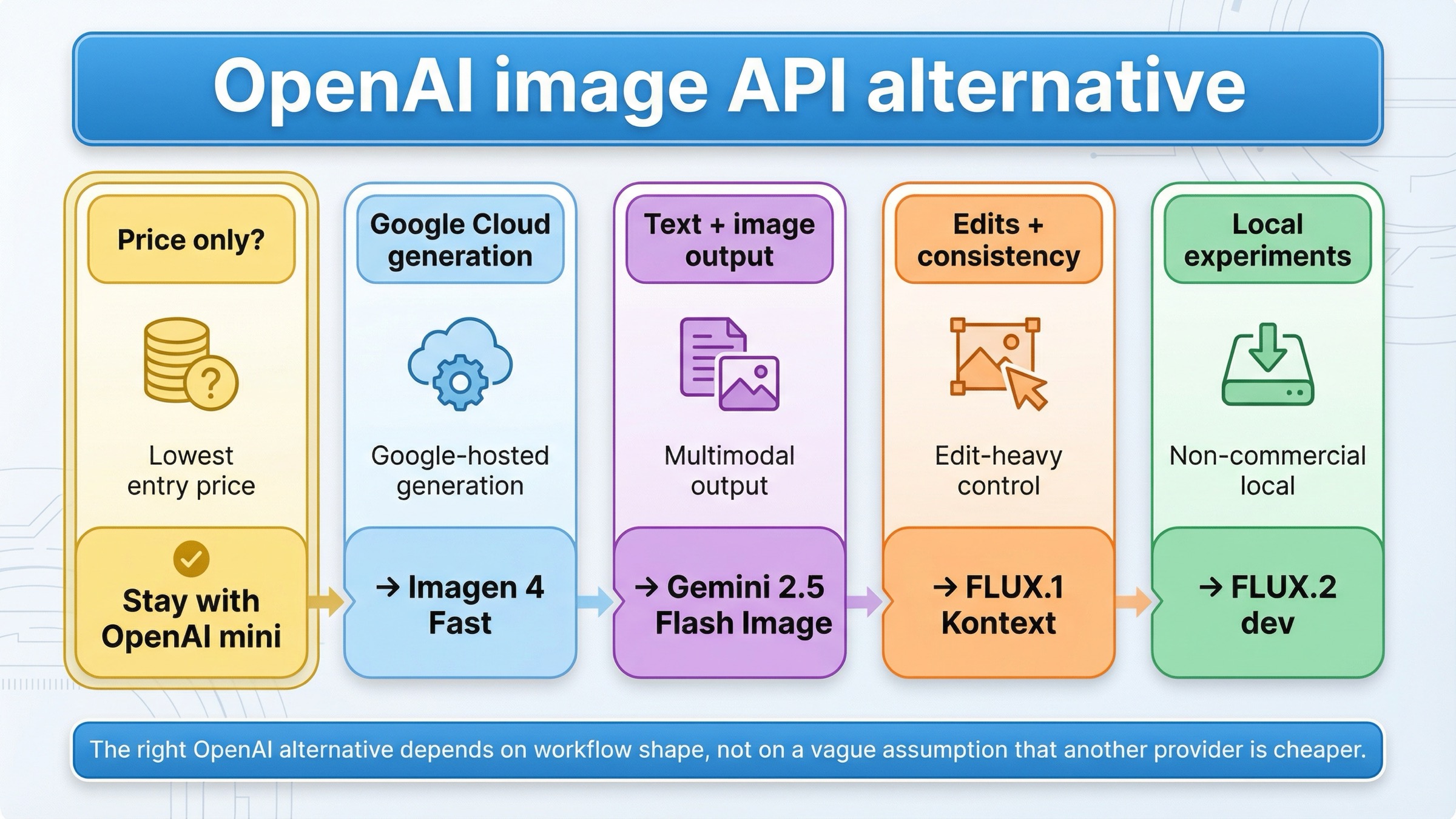
As checked on March 24, 2026, the best OpenAI image generation API alternative depends on the exact reason OpenAI stopped being the right default. If price is the only issue, do not switch yet: OpenAI's own gpt-image-1-mini still starts at $0.005 for a low 1024x1024 image. Switch only when you need a different workflow surface. Use Imagen 4 Fast for a Google Cloud hosted generation stack, Gemini 2.5 Flash Image if your app needs text and image output in one interaction, FLUX.1 Kontext if OpenAI is failing on iterative edits or character consistency, and FLUX.2 dev if you mainly want a local non-commercial experimentation lane.
That short answer matters because the current SERP keeps flattening several different decisions into one broad "best AI image API" market survey. But most developers do not search for an OpenAI alternative because they suddenly want to browse every image model. They search because something concrete is no longer working: GPT Image 1.5 is too expensive for the job, the app really needs a mixed multimodal model instead of a direct image API, edit-heavy workflows feel too awkward, or the team wants to test locally before committing to another hosted bill.
There is one caveat worth stating early. Not every "OpenAI alternative" search actually needs a switch. OpenAI's own image generation guide says the Image API is still the best path for single-image generation and edits, while the Responses API is better for conversational editable image experiences. Some teams are searching for a replacement when the real fix is choosing the right OpenAI surface or clearing tier and verification friction.
TL;DR
If you only need the routing rule, use this table.
| If OpenAI is failing you because... | Use this instead | Why it is better for that job | Main tradeoff |
|---|---|---|---|
| you want a Google Cloud hosted generation stack instead of OpenAI's image surface | Imagen 4 Fast | Google sells a dedicated hosted image lane on Vertex AI with a simple per-image price and up to 4 outputs per prompt | It is not the cheapest official entry lane, and it is not a drop-in OpenAI surface |
| your app needs one model interaction that can return both text and images | Gemini 2.5 Flash Image | Google documents text and image inputs plus text and image outputs in one model route | Pricing is token-based and the workflow is less clean if all you want is plain image generation |
| OpenAI is not the best fit for iterative edits, character consistency, or text changes inside images | FLUX.1 Kontext | Black Forest Labs positions Kontext around editing, consistency, and text editing, not just one-shot generation | Hosted Kontext pricing is still not "cheap" at scale, and the stack is less mainstream than Google or OpenAI |
| you want a local non-commercial experimentation path before committing to another hosted API | FLUX.2 dev | Black Forest Labs lists FLUX.2 dev as free for local development, non-commercial use | It is not a hosted commercial production default |
| the problem is really OpenAI setup, tier gating, or using the wrong API surface | Stay with OpenAI | The issue may be account state or route choice rather than model mismatch | You still keep OpenAI's cost and tier logic |
Why developers are looking for an OpenAI image-generation API alternative now
Most readers are not leaving OpenAI because GPT Image suddenly became weak. They are leaving because the buying math or workflow shape stopped fitting the product they are trying to ship.
The first trigger is cost clarity. OpenAI's current GPT Image 1.5 model page is actually more transparent than many competitors: low 1024x1024 generation starts at $0.009, medium at $0.034, and high at $0.133. But OpenAI's own gpt-image-1-mini page still lists $0.005 for a low 1024x1024 image. That means "I need the cheapest official entry lane" is not a strong reason to leave OpenAI. Cost still matters, but it does not automatically point away from OpenAI.
The second trigger is workflow shape. OpenAI's own docs now split the world clearly between the Images API and the Responses API. That is rational from a platform-design standpoint, but it also means OpenAI is not automatically the best choice if your app wants a model that naturally returns text and images together, or if you want a more edit-centric stack than a direct generation API.
The third trigger is access friction. OpenAI's API model availability article says gpt-image-1 and gpt-image-1-mini are available to usage tiers 1 through 5, with some access still subject to organization verification. That sounds manageable until you read community threads where users report rate-limit or access failures even after adding funds or changing organizations. Not every complaint means OpenAI is the wrong product, but those friction points do explain why "alternative" demand stays alive even when the flagship model itself is strong.
So the useful question is not "what is the best image API in the abstract?" The useful question is what exactly is OpenAI failing at for your current workload? Once you answer that, the right alternative gets much easier to pick.
Best OpenAI image-generation API alternatives at a glance
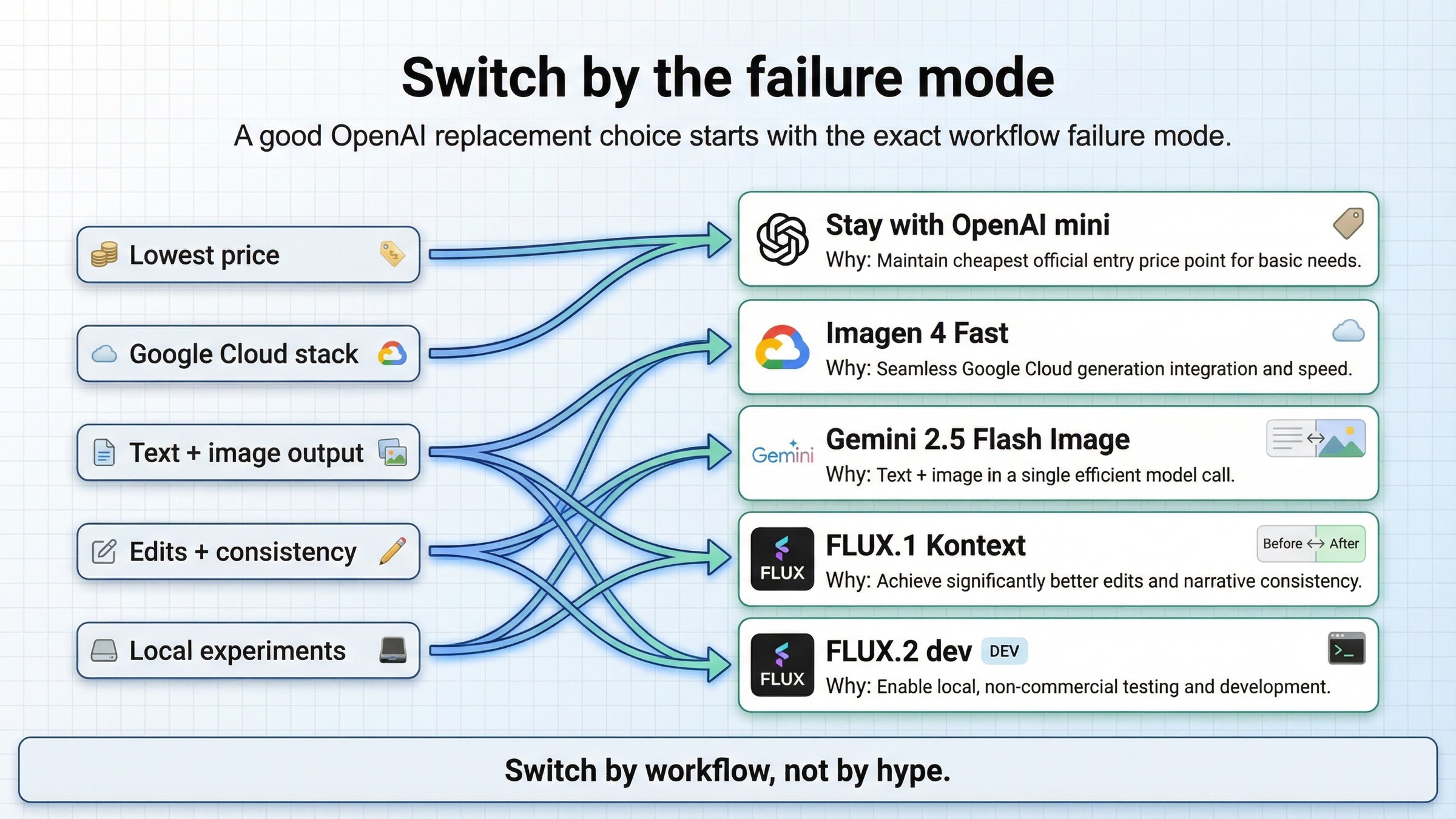
The alternatives split into four clear lanes.
Imagen 4 Fast is the best answer when your complaint is not "I need the absolute cheapest official entry price" but rather "I want a clean Google Cloud hosted image-generation stack." Google's official Vertex AI pricing page lists Imagen 4 Fast at $0.02 per image, with standard Imagen 4 at $0.04 and Imagen 4 Ultra at $0.06. That does not beat OpenAI's own mini model on entry price. It does give you a different provider stack, a different pricing shape, and a dedicated Google image lane.
Gemini 2.5 Flash Image is the best answer when you do not really want a pure image API at all. Google's model documentation explicitly says the model supports text and image inputs and text and image outputs. That is a different product shape from OpenAI's direct Images API. If the application experience needs one interaction that can reason in text and then return an image, Gemini is often the stronger alternative.
FLUX.1 Kontext is the best answer when your pain is less about price and more about control during edits. Black Forest Labs positions Kontext around text-to-image generation, image editing, character consistency, text editing, and style transformation. In other words, it is built for the kind of iterative visual work where a team keeps saying "that first image is close, but now change these specific details without losing the rest."
FLUX.2 dev is the best answer when you want to experiment locally before paying another hosted provider. On Black Forest Labs' pricing page, FLUX.2 dev is listed as free for local development, non-commercial use. That does not replace a commercial hosted API. It does give builders a practical way to test workflows without making OpenAI, Google, or another paid provider the immediate next commitment.
Those four lanes are what current listicles usually hide. They keep saying "here are ten image APIs" when the real choice is much narrower: Google-hosted generation, multimodal text-plus-image output, edit-heavy control, or local experimentation.
Imagen 4 Fast is the best Google Cloud hosted alternative
If OpenAI is mainly failing you because you want a Google Cloud hosted image-generation stack, this is where I would start.
The reason is straightforward. Google now sells Imagen 4 Fast as a dedicated hosted image lane on Vertex AI with a simple $0.02 per image price card. That matters because some teams are not actually trying to beat OpenAI's cheapest possible entry price. They are trying to move onto Google Cloud, simplify provider choice inside a Google environment, or separate direct image generation from a more assistant-like workflow.
The more useful comparison is not "is Google cheaper than every OpenAI price point?" It is "when does Google's provider and workflow shape fit the workload better?" If the team is generating large batches of straightforward product images, marketing backgrounds, or repeated prompt families and wants that work to live in Google's stack, Imagen 4 Fast is the stronger default because the model is sold as a clean image-generation surface rather than as one piece of a broader assistant stack.
Google's Imagen 4 documentation also reinforces that this is a real image-generation surface, not a conversational image tool in disguise. The doc describes Imagen 4 as Google's latest line of image models and says it supports up to 4 output images per prompt. That helps when the product requirement is "generate images predictably and at known cost" rather than "blend reasoning, text response, and image output into one conversation."
The tradeoff is that Imagen is not the best replacement if your real need is mixed multimodal output, edit-heavy revisions, or the cheapest official entry price. It wins when the core job is hosted image generation inside a Google Cloud-native stack, not when the core job is a more complicated workflow.
If you already know your blocker is raw per-image budget, our deeper OpenAI image generation API pricing and GPT Image 1.5 pricing API guides are the best follow-ups. This article is intentionally narrower: it is about when to leave, not every way to tune OpenAI costs.
Gemini 2.5 Flash Image is the best mixed text-and-image alternative
Some teams search for an OpenAI alternative when the real problem is that OpenAI's image stack is too separated from the rest of their multimodal workflow.
This is where Gemini 2.5 Flash Image becomes much more interesting than plain price comparisons suggest. Google's official doc says the model accepts text and images as input and returns text and image as output. It also documents that generating one image consumes 1290 tokens. That sounds like an implementation detail, but it actually defines the product shape. Gemini 2.5 Flash Image is not only a different generator. It is a route for applications where one call needs to reason, explain, and render.
That is why I would not treat Gemini 2.5 Flash Image as a direct substitute for every OpenAI image workload. If your product wants a clean generation endpoint and nothing else, Imagen or even OpenAI's own Images API may still be easier. But if your application experience naturally mixes instruction, explanation, revision logic, and image creation, Gemini's unified text-plus-image route can remove a lot of orchestration overhead.
Google's current Gemini API rate-limits page also makes it clear that scaling lives inside Google's own usage-tier logic rather than inside a consumer product wrapper. That can be attractive for teams who want Google infrastructure and Google billing logic behind the stack they are building.
The tradeoff is that token-based multimodal pricing is not as intuitively simple as a pure per-image price card. If your finance or operations team mostly wants a stable image-generation number, Imagen 4 Fast is easier to reason about. Gemini 2.5 Flash Image is better when the workflow itself needs a multimodal brain, not just a different image endpoint.
If that is your situation, the right adjacent read is Gemini image generation API pricing, because the implementation details matter much more once you decide the multimodal route is worth it.
FLUX.1 Kontext is the best alternative for edits, character consistency, and text changes
If OpenAI is frustrating you because the first image is never the final image, FLUX.1 Kontext is probably the better move than chasing another generation-only provider.
This is where many roundups go wrong. They treat image APIs like they all solve the same problem with different price tags. But the pain behind many alternative searches is not "generation quality" in a general sense. It is the operational frustration of repeated edits: keep the product shape, fix the typography, keep the character face, replace the jacket logo, update the poster text, or shift the scene style without rebuilding the image from zero.
Black Forest Labs positions FLUX.1 Kontext exactly around those jobs: image editing, character consistency, text editing, and style transformation. That is a better fit when your prompt loops keep looking more like directed visual iteration than like fresh generation every time.
The pricing also tells the same story. On the official BFL pricing page, Kontext [pro] is $0.04 per image and Kontext [max] is $0.08 per image. That is not the cheapest hosted option in this article. It is the most obviously edit-oriented one. So the question is not "is FLUX cheaper than OpenAI in every case?" The better question is "will FLUX save more labor because the workflow matches the type of change requests we actually make?" In edit-heavy teams, the answer is often yes.
This is also where a lot of API buyers should stop benchmarking only final-image beauty. If the job is marketing assets, character kits, iterative design systems, or product visuals with multiple revision rounds, the winning API is often the one that preserves the most useful parts of the current image while changing only what you asked for. That is why Kontext belongs in this article even though Google may win the price argument.
If you want the longer technical background, our FLUX.1 API guide is the best next step.
FLUX.2 dev is the best local non-commercial experimentation path
Some readers do not want another hosted bill yet. They want to prove the workflow first.
This is the lane most current alternative pages underserve. They compare hosted services against hosted services and forget that some builders are still deciding whether the workflow deserves production investment at all. For those users, the official BFL pricing page is unusually helpful because it does not only list commercial hosted models. It also lists FLUX.2 dev as free for local development, non-commercial use.
That makes FLUX.2 dev a very different kind of alternative. It is not the best answer if your job is "replace OpenAI in production tomorrow." It is the best answer if the real goal is "prototype the workflow locally, learn what image-edit or generation shape I actually need, and avoid another immediate paid dependency while I figure that out."
This matters more than most listicles admit. A lot of alternative searches happen before the buyer has even stabilized the problem. If the team is still experimenting with image prompts, edit loops, or offline/local constraints, the smartest move may be to test locally first and delay the hosted production decision until the use case is less fuzzy.
The obvious tradeoff is commercial readiness. FLUX.2 dev is not your forever hosted API. It is your cleanest official bridge between OpenAI dissatisfaction and a better-informed next decision.
When staying with OpenAI is still the better move
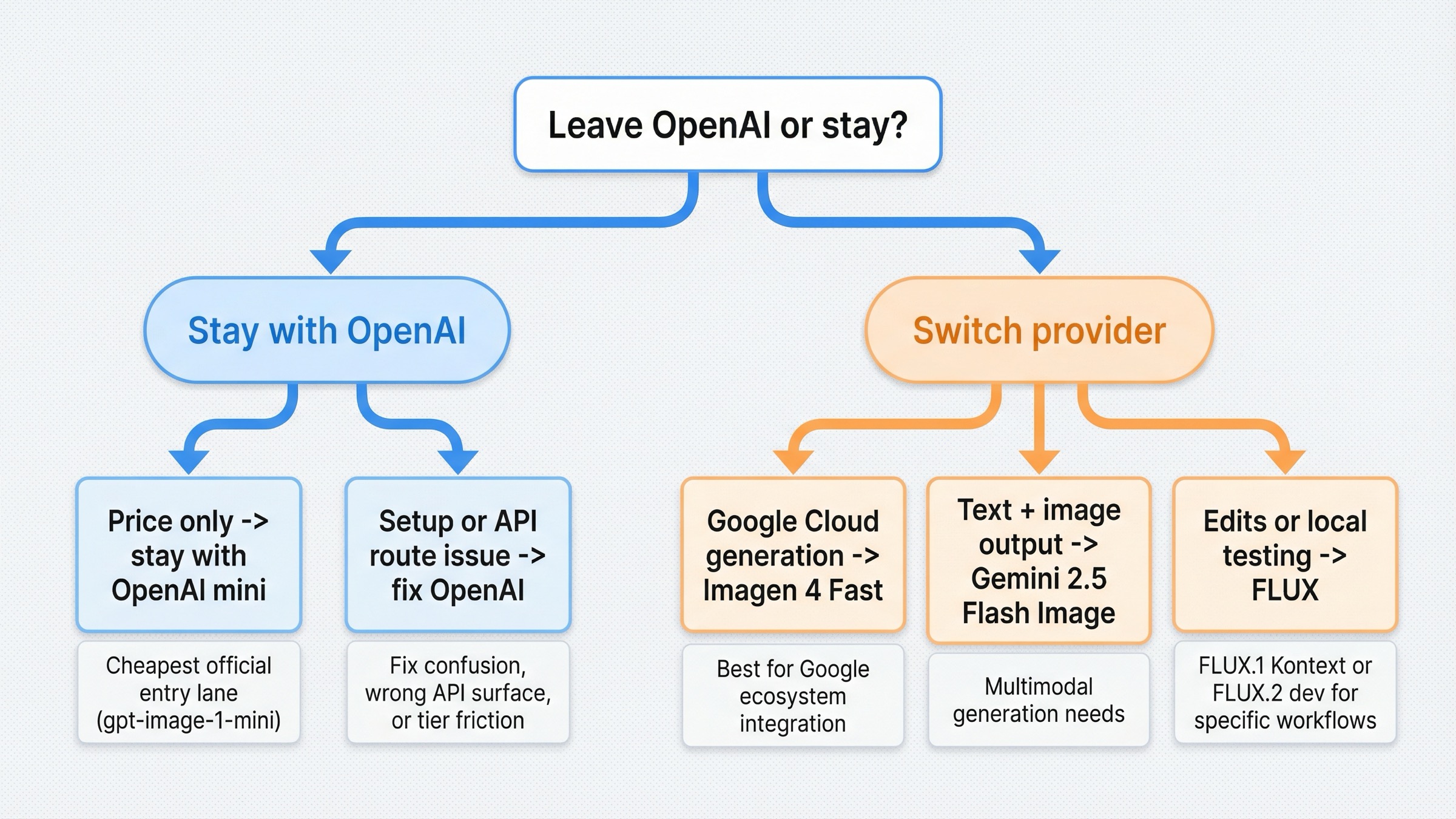
A trustworthy alternatives article needs one section that tells you when not to switch.
OpenAI is still the better move when the problem is mostly API-surface confusion or account friction. If the team should really be on the Images API instead of the Responses API, or if the issue is tier access and organization verification, changing vendors can solve the wrong problem. OpenAI's own docs already state that the Images API is the best direct route for single-image generation and edits. If that is your workload, OpenAI may still be the cleanest answer.
OpenAI can also still be the right default when prompt adherence, readable text, one-shot direct generation, or cheapest official entry pricing matter more than the alternative lane's headline advantage. An alternatives article should not pretend that another provider automatically beats OpenAI everywhere. Sometimes Google Cloud hosting is the real reason to move. Sometimes a unified multimodal model is worth it. Sometimes edit-heavy FLUX workflows are worth it. But if your current product mostly needs OpenAI's direct image surface or the lowest official entry price, the smarter move is to stay and tune the current stack.
This is where community evidence helps. The OpenAI forum threads on image generation diagnostics and rate-limit failures even before a first image show the lived version of the docs: some developers are angry at OpenAI when the deeper issue is account state, not product fit. That does not make the frustration fake. It does mean the correct fix is sometimes operational, not competitive.
If that sounds like your case, read our OpenAI image API tutorial before you migrate the whole stack.
What I would choose in five common developer situations
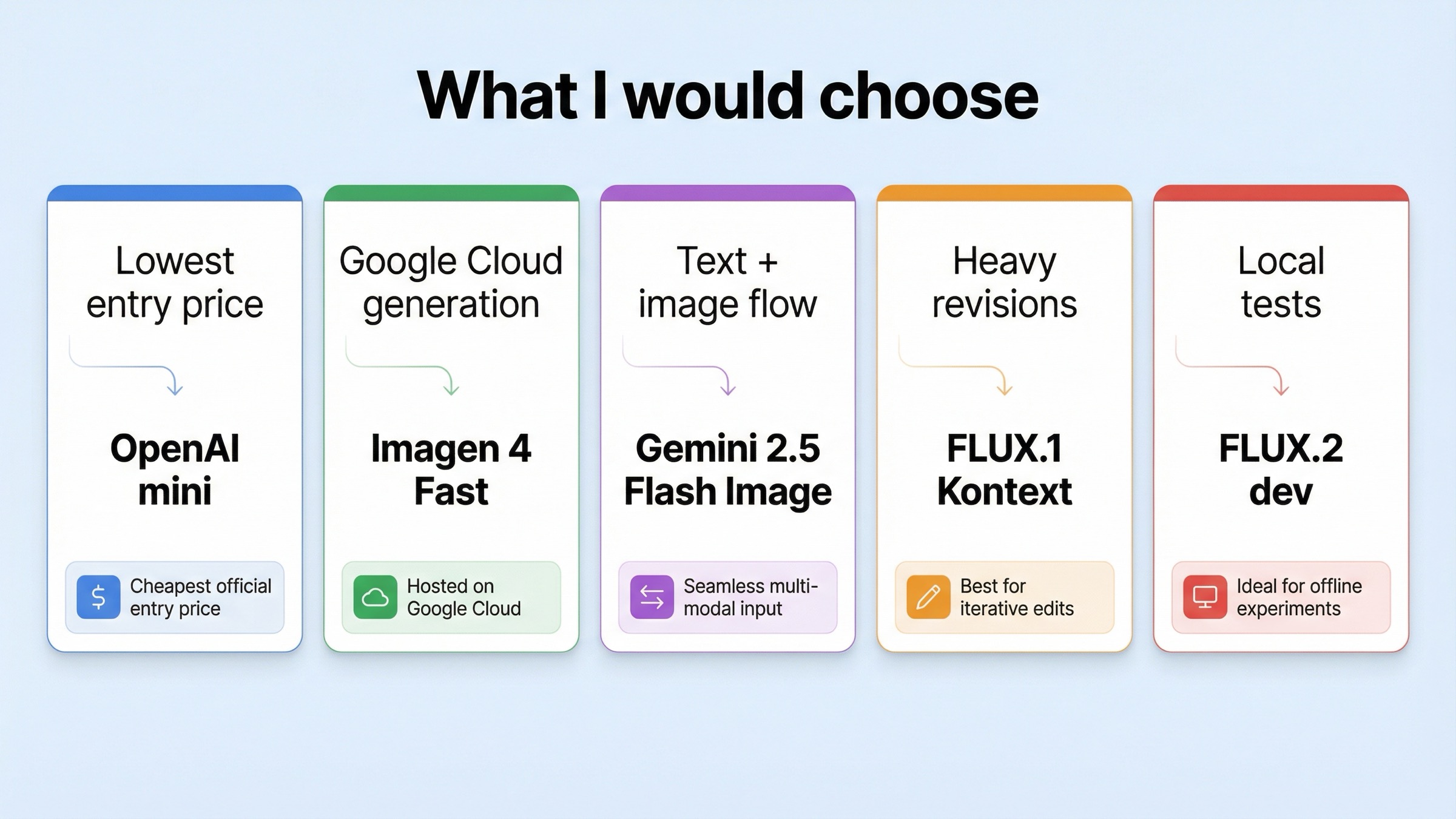
If I were making this decision today, I would use these rules.
1. I only care about the cheapest official entry price. Stay with gpt-image-1-mini. OpenAI still owns the lowest official entry lane here, so switching providers just for price is usually the wrong move.
2. I am shipping on Google Cloud and want a dedicated hosted image-generation stack. Choose Imagen 4 Fast. This is the cleanest answer when your job is straightforward hosted generation and you want that work to live in Google's stack.
3. My app needs to talk, reason, and return images in one flow. Choose Gemini 2.5 Flash Image. This is the better answer when the app experience is naturally multimodal and you do not want image generation isolated from the rest of the interaction.
4. My team keeps revising the same image instead of generating from scratch. Choose FLUX.1 Kontext. This is the right move when preserving the good parts of an existing image matters more than absolute lowest hosted cost.
5. I want to experiment locally before I commit to another paid hosted provider. Choose FLUX.2 dev. This is the best bridge when the workflow is still exploratory and commercial production is not the immediate next step.
Bottom line
The best OpenAI image generation API alternative is not one brand. It is the API shape that fixes the specific reason OpenAI stopped being the right default.
If price is the only issue, stay with OpenAI and move to gpt-image-1-mini. Choose Imagen 4 Fast if you want a Google Cloud hosted generation stack. Choose Gemini 2.5 Flash Image if the app needs text and image output together. Choose FLUX.1 Kontext if the real pain is iterative edits, character consistency, or text changes. Choose FLUX.2 dev if you want local non-commercial experimentation before another hosted commitment. And if the real issue is OpenAI setup or surface choice, stay with OpenAI and fix the route before you switch vendors.