![Tile stacks on a white plinth comparing FLUX.2 starting prices per image: [klein] 9B $0.015, [pro] $0.03 and [max] $0.07](/posts/en/flux-1-api-comprehensive-guide/img/cover.webp)
The FLUX API is the hosted API that Black Forest Labs (BFL) runs at api.bfl.ai for its FLUX image models. As of September 30, 2026, the current image family is FLUX.2, and the short answer looks like this:
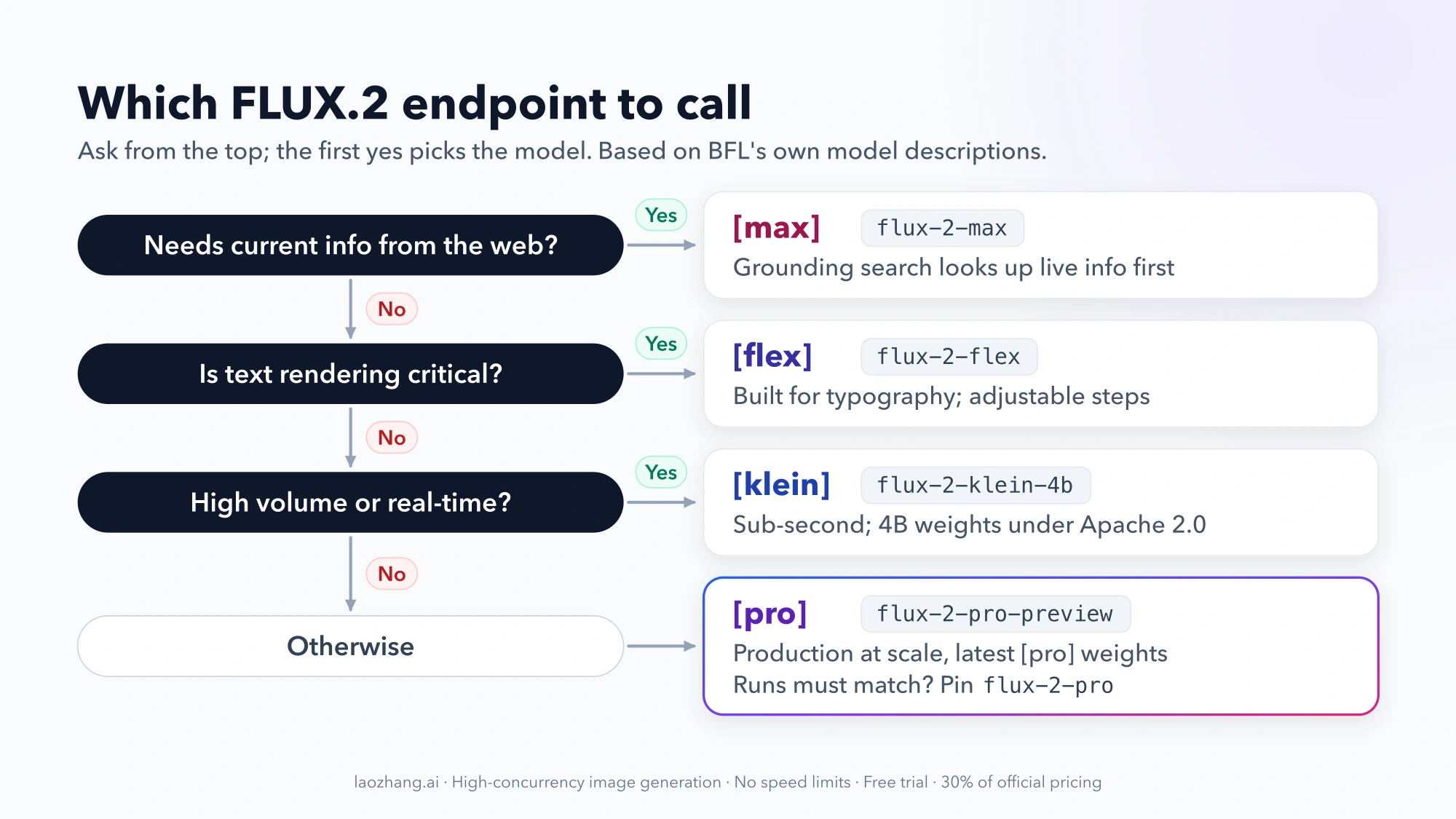
- Which model: start with FLUX.2 [pro] (
flux-2-pro-preview) for general production work. Use [klein] for cheap, high-volume or real-time jobs, [flex] when legible text and small details matter, and [max] for the highest-quality final assets or prompts that need current information from the web. - What it costs: you buy credits at $0.01 each and pay per image. FLUX.2 prices scale with output megapixels and start at $0.014 ([klein] 4B), $0.03 ([pro] text-to-image), $0.045 ([pro] editing) and $0.07 ([max]), according to BFL's pricing page.
- How a call works: POST a prompt with your key in the
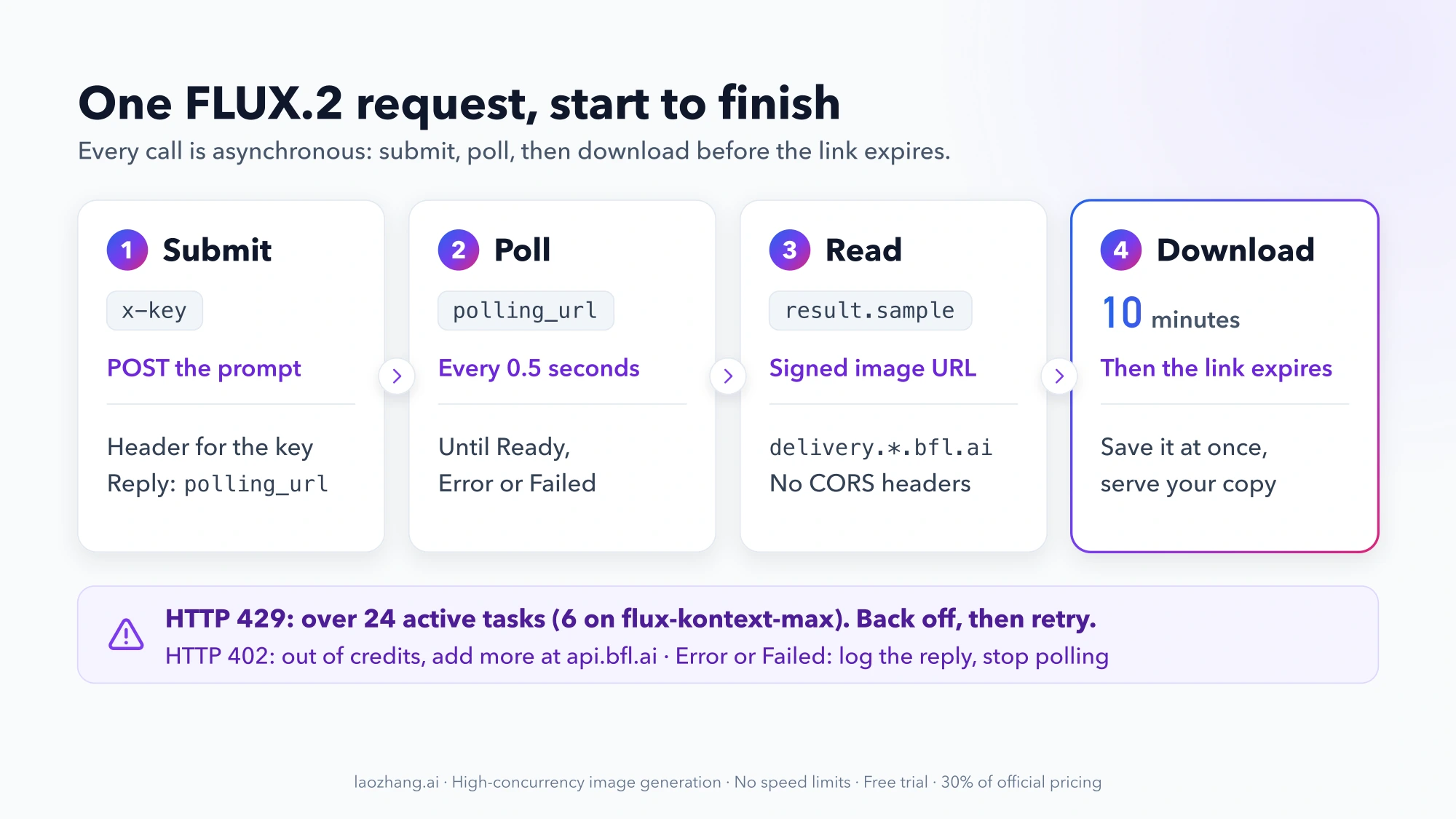
x-keyheader, poll thepolling_urlyou get back until the status isReady, then download the image. The result link expires after 10 minutes.
FLUX.1 models, including FLUX.1 Kontext, are still callable but BFL now lists them as the previous generation. Other products share the name: RunOnFlux's decentralized cloud, the Flux CD GitOps tool and the Flux type in Project Reactor have nothing to do with these image models. Sites that sell a "Flux API" under their own domain are third-party resellers, not BFL.
Which FLUX.2 model should you call?
The hosted FLUX.2 models share the same asynchronous request flow, so the choice comes down to price, reference-image capacity and a few special features. The positioning below is how BFL describes each model in its FLUX.2 overview, not an independent quality test.
| Model | Endpoint | Hosted price, from | Reference images (API) | Call it when |
|---|---|---|---|---|
| FLUX.2 [klein] 4B | flux-2-klein-4b | $0.014 | Up to 4 | You need sub-second, high-volume output, or you may self-host later (open weights, Apache 2.0) |
| FLUX.2 [klein] 9B | flux-2-klein-9b-preview, flux-2-klein-9b | $0.015 | Up to 4 | You want a better quality-to-speed balance than 4B at nearly the same price |
| FLUX.2 [pro] | flux-2-pro-preview, flux-2-pro | $0.03 generate, $0.045 edit | Up to 8 | You're shipping a production feature and want one default for most requests |
| FLUX.2 [flex] | flux-2-flex | about $0.05–0.06 | Up to 8 | Typography, UI mockups or small details matter, or you want to adjust steps and guidance |
| FLUX.2 [max] | flux-2-max | $0.07 | Up to 8 | You want BFL's highest-quality tier, or the image depends on current events, products or weather |
| FLUX.2 [dev] | No hosted API | Free weights, non-commercial | Recommended max 6 | You're experimenting locally and don't need commercial rights |
A few details in that table change real decisions:
- [flex] has two published prices. BFL's pricing table says from $0.05, while the model comparison on the FLUX.2 overview says $0.06 per megapixel. Budget with the higher figure until the pricing calculator settles it for your resolution.
- Grounding search is [max] only. When a prompt asks for something like yesterday's match score or the weather in a city right now, [max] can search the web before it draws. The other models only know what you put in the prompt and reference images.
- [klein] has no prompt upsampling. Short prompts get less help, so write out the scene in detail.
- Family-wide features. BFL lists multi-reference editing, exact colors given as hex codes (for example
#02eb3c), structured JSON prompts and text rendering as FLUX.2 features, with outputs up to 4 MP.
Preview endpoints or pinned snapshots
[pro] and [klein] 9B each come in two versions. The -preview endpoint always runs BFL's latest weights for that model. The plain endpoint, flux-2-pro or flux-2-klein-9b, is a fixed snapshot that won't change. Both accept the same request and return the same response format.
Use the preview endpoint by default, since that's where improvements land first. Switch to the pinned snapshot when you need identical behavior across runs: regression tests, reproducible client deliverables, or compliance rules about model changes.
If your code still calls FLUX.1
FLUX.1 endpoints remain available, and they're priced per image rather than per megapixel:
| FLUX.1 model | Endpoint | Price per image |
|---|---|---|
| FLUX.1 Kontext [pro] | flux-kontext-pro | $0.04 |
| FLUX.1 Kontext [max] | flux-kontext-max | $0.08 |
| FLUX1.1 [pro] | flux-pro-1.1 | $0.04 |
| FLUX1.1 [pro] Ultra | flux-pro-1.1-ultra | $0.06 |
| FLUX1.1 [pro] Raw | Not in the quick-start endpoint list | $0.06 |
| FLUX.1 Fill [pro] (inpainting) | Not in the quick-start endpoint list | $0.05 |
The quick start also still lists /flux-pro and /flux-dev, which have no price on the current pricing page. If you're moving an existing FLUX.1 Kontext editing flow to FLUX.2, [pro] costs from $0.045 per edit compared with $0.04 for Kontext [pro], and it accepts up to 8 reference images. Kontext [max] also has a tighter concurrency cap (6 active tasks instead of 24), covered in the limits section below.
How much FLUX API calls cost
BFL bills in credits: 1 credit = $0.01. There are no subscriptions or seat fees, and the Playground charges the same as the API. FLUX.2 prices depend on output size. The "from" price covers the first megapixel, and each additional megapixel adds to it.
BFL publishes the per-megapixel step only for [klein]:
- [klein] 4B: $0.014 for the first megapixel plus $0.001 per additional megapixel. BFL's own example: a 2 MP image costs $0.014 + $0.001 = $0.015.
- [klein] 9B: $0.015 plus $0.002 per additional megapixel, so the same 2 MP image works out to $0.017 by that rule.
For [pro], [flex] and [max], the extra cost per megapixel isn't published as a formula, so larger outputs cost more than the "from" price by an amount you have to check in the pricing calculator.
To budget, multiply the "from" price by volume. For 1,000 images at about 1 MP each:
| Model and task | Math | Budget floor |
|---|---|---|
| [klein] 4B, generate or edit | 1,000 × $0.014 | $14 |
| [pro], text-to-image | 1,000 × $0.03 | $30 |
| [pro], editing | 1,000 × $0.045 | $45 |
| [max], generate or edit | 1,000 × $0.07 | $70 |
Treat these as floors. Higher resolutions raise every line, and [flex] would land between $50 and $60 depending on which of BFL's two figures holds. Batch requests don't add a discount: a batch of four [pro] images costs from $0.12, four times the single price. Fine-tuned FLUX.2 endpoints, which are in public beta, bill at the same rate as their base model, though BFL notes that may change after the beta.
Get an API key and make your first FLUX.2 request
The API is asynchronous. You submit a job, get back an id and a polling_url, and check that URL until the job finishes. BFL's quick start walks through it in curl and Python.
Before you send anything:
- Create a BFL account, add credits and create an API key. The BFL docs link to the dashboard from the "Get API Key" button.
- Store the key in an environment variable, for example
export BFL_API_KEY="your_key_here". - Install
requests(pip install requests) for the Python script below.
Complete Python script
This script combines BFL's documented submit and poll examples and adds the download step that the 10-minute expiry makes necessary. It uses the flux-2-pro-preview endpoint and the documented body fields prompt, width and height.
import os
import time

import requests

API_KEY = os.environ["BFL_API_KEY"]
HEADERS = {"accept": "application/json", "x-key": API_KEY}

# 1. Submit the job
submit = requests.post(
    "https://api.bfl.ai/v1/flux-2-pro-preview",
    headers={**HEADERS, "Content-Type": "application/json"},
    json={
        "prompt": "A ceramic coffee mug on a walnut desk, soft morning light",
        "width": 1440,
        "height": 810,
    },
)
submit.raise_for_status()
polling_url = submit.json()["polling_url"]  # always poll the URL you get back

# 2. Poll until the job is Ready, Error or Failed (gives up after 5 minutes)
deadline = time.time() + 300
while True:
    if time.time() > deadline:
        raise TimeoutError("No result after 5 minutes")
    time.sleep(0.5)
    result = requests.get(polling_url, headers=HEADERS).json()
    status = result["status"]
    if status == "Ready":
        image_url = result["result"]["sample"]
        break
    if status in ("Error", "Failed"):
        raise RuntimeError(f"Generation failed: {result}")

# 3. Download right away: the signed URL expires after 10 minutes
image = requests.get(image_url)
image.raise_for_status()
with open("flux-output.jpg", "wb") as f:
    f.write(image.content)
print("Saved flux-output.jpg")
The job succeeded when status is Ready and result.sample holds a signed URL. The file name uses .jpg, matching BFL's own download example. The same request in curl, if you want to check your key first:
curl -X POST 'https://api.bfl.ai/v1/flux-2-pro-preview' \
  -H 'accept: application/json' \
  -H "x-key: ${BFL_API_KEY}" \
  -H 'Content-Type: application/json' \
  -d '{"prompt": "A ceramic coffee mug on a walnut desk", "width": 1440, "height": 810}'
A successful response is JSON containing id and polling_url. To change models, swap the endpoint path, for example /v1/flux-2-klein-4b or /v1/flux-2-max.
Editing with reference images
Editing uses the same FLUX.2 endpoints. According to BFL's FLUX.2 image editing guide, you add input_image for the image to edit, then input_image_2, input_image_3 and so on for extra references. Each one can be a public URL or a base64 string:
{
  "prompt": "Put the mug from the first image on the desk in the second image",
  "input_image": "https://example.com/mug.jpg",
  "input_image_2": "https://example.com/desk.jpg"
}
[pro], [flex] and [max] accept up to 8 references over the API, and [klein] accepts up to 4. Remember that [pro] charges from $0.045 for an edit, not the $0.03 text-to-image rate.
Endpoints, regions and delivery
- Base URL:
api.bfl.airoutes jobs across BFL's clusters with automatic failover. Because the job may run anywhere, always poll thepolling_urlfrom the response rather than building a status URL yourself. - Regional options:
api.eu.bfl.aikeeps routing inside EU regions (BFL describes it as GDPR compliant), andapi.us.bfl.aidoes the same within the US. - Result links: images come from
delivery.*.bfl.aihosts, have no CORS headers and aren't meant to be shown to users directly. Download each image and serve it from your own storage or CDN. - Webhooks: BFL also supports webhooks if you'd rather receive results than poll. The
polling_urlrule applies only to polling. See BFL's integration guide for details.
Limits and errors that break FLUX integrations
Most failures in production come from a handful of documented limits. The integration guide and the quick start list them:
| What you see | Why it happens | What to do |
|---|---|---|
HTTP 429 | More than 24 active tasks, or more than 6 on flux-kontext-max | Wait for a running task to finish, retry with exponential backoff and cap concurrency in your queue |
HTTP 402 | The account is out of credits | Sign in at api.bfl.ai, add credits, then retry |
status is Error or Failed | The job itself failed | Log the full response and stop polling that job |
| The image link stops working | The signed URL expired 10 minutes after the result was ready | Download as soon as status is Ready, not when a user opens the page |
Browser fetch on the result link fails | Delivery URLs don't send CORS headers | Download server-side and re-serve the file |
| Downloads blocked behind a firewall | Delivery hostnames change as BFL adds or removes regions | Allowlist delivery.*.bfl.ai, not individual regional hosts |
The 24-task cap counts active jobs, so a queue that allows at most 24 jobs in flight, or 6 for Kontext [max], avoids most 429 responses. For higher volumes, BFL asks you to contact flux@blackforestlabs.ai.
Is the FLUX API free?
No. The BFL API is pay-as-you-go, and BFL's pricing pages don't list a free API tier. The Playground costs the same as the API, so it isn't a free workaround either.
The free route for FLUX.2 is to run open weights on your own hardware:
- FLUX.2 [klein] 4B is fully open under Apache 2.0 and runs on consumer GPUs with about 13 GB of VRAM.
- FLUX.2 [klein] 9B and FLUX.2 [dev] are free to download under BFL's non-commercial license. Commercial self-hosting of those needs a paid license. BFL's Builder plan covers [klein] at 10,000 images a month, and the Platform plan covers [klein] 9B plus [dev] at 100,000 a month.
Self-hosting trades the per-image fee for GPU cost and setup work. For a local workflow, see ComfyUI FLUX: Complete Guide to Setup, Workflows, and Optimization, or Flux Kontext Local Deployment for running Kontext on a smaller GPU.
Other FLUX API questions
Is FLUX 3 an image model, and will it be open source?
FLUX 3 is BFL's video model. It generates video with synchronized audio and is billed per second, starting at $0.17 per second for full renders at hd resolution and $0.06 per second for drafts. BFL's open-weights licensing plans currently cover FLUX.2 [klein] and [dev], and its public pricing doesn't list FLUX 3 weights. For images, BFL's docs say FLUX.2 remains fully supported for production generation and editing.
Is FLUX better than DALL·E or GPT Image?
That depends on the job, and BFL's own model descriptions aren't a head-to-head test. For side-by-side comparisons, see The Best AI Image Model in 2026 Depends on the Job and Nano Banana Pro vs FLUX.2.
Can I use FLUX through fal.ai, Replicate or a reseller instead?
Yes. Third-party platforms and resellers offer FLUX models through their own endpoints, request formats and prices, so the code above only works against api.bfl.ai. Before you pick one, check which model it actually serves (some still sell only FLUX.1), what it charges per image at your resolution, and whether its terms cover commercial use.