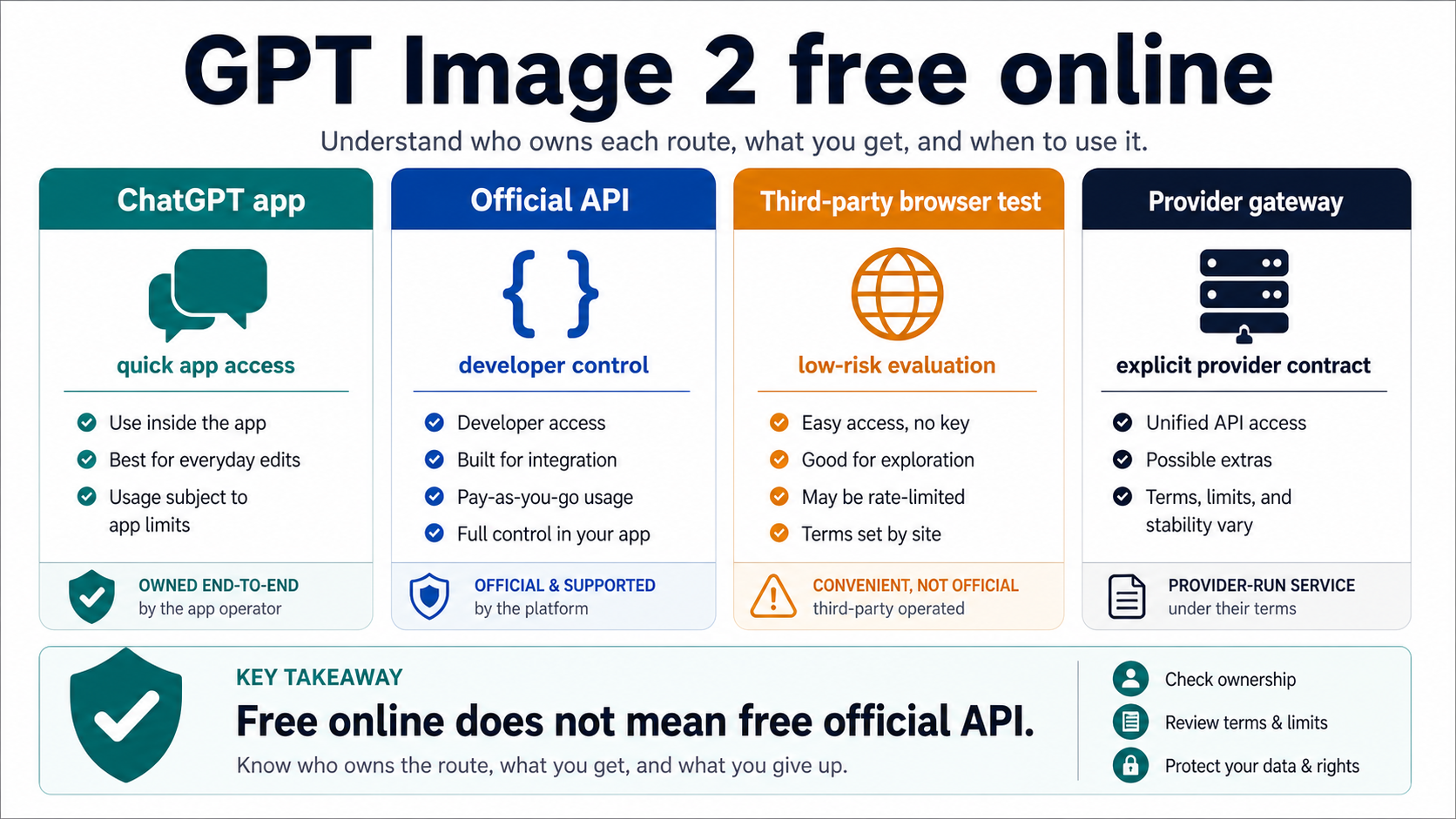
GPT Image 2 can be tested online, but a free browser page is not the same thing as a free official OpenAI API. Use ChatGPT or a low-risk browser route for public prompt experiments; use the official API, or a provider contract with explicit terms, when private uploads, commercial output, billing, logs, retries, storage, or support matter.
| Route | Use it for | Do not assume |
|---|---|---|
| ChatGPT app | fast product-surface testing and prompt exploration | API-key billing, backend control, or production automation |
| Official API | repeatable generation, logs, retries, billing control, and app integration | a free online editor experience |
| Third-party browser tool | low-risk evaluation when the terms are acceptable | first-party OpenAI access or private-upload safety |
| Provider gateway | explicit commercial routing when its limits and terms are documented | OpenAI official pricing, support, or guarantees |
Start with public prompts and disposable images. Before you upload a source image, check who runs the route, which model it claims to use, who pays for the work, where uploads are stored, what output rights you get, what quota applies, and whether support or deletion exists.
Stop treating a free browser route as enough once the work becomes repeated, private, client-facing, commercial, or automated. At that point the route needs documented limits and a named billing owner, not just "free online" wording.
Start with the route owner, not the word free
The useful answer to "GPT Image 2 free online" is not a ranked list of every page that says free. It is a route-ownership decision. A reader trying a public prompt in a browser has a different risk profile from a developer wiring image generation into a product, and those two jobs should not share the same standard.
On the May 14, 2026 check, OpenAI's developer docs identify gpt-image-2 as an official image model with the gpt-image-2-2026-04-21 snapshot. The same official route should be treated as an API product surface, not as a no-account browser toy. The model-page tier signal observed for this run marked the Free tier as not supported for gpt-image-2, so do not plan a production workflow around a free official API route without rechecking the current OpenAI docs.
That boundary still leaves room for useful free testing. ChatGPT Images 2.0 is an official product surface for trying image generation interactively. Third-party pages may also offer browser-based tests, credits, no-key prompts, or uploads. Those routes can help you evaluate prompt style and output expectations, but they do not prove API access, billing ownership, output rights, storage behavior, or support.
The safest mental model is simple: use free online routes for evaluation and use a contract route for work that matters. The broader GPT Image 2 API guide covers Images API, Responses, Codex, and provider gateways in more implementation depth. The page here stays narrower: it helps you decide whether a free online route is safe enough for the next action.
Use ChatGPT when the goal is prompt exploration
ChatGPT is the cleanest official online route when the job is prompt exploration. It keeps the reader inside an OpenAI product surface and removes the need to trust an unknown upload wrapper for the first test.
That does not make ChatGPT a substitute for API planning. A prompt that works in ChatGPT is useful evidence about image direction, wording, composition, or user expectations. It does not prove that your backend can call gpt-image-2, that your project has the needed organization verification, that your size request is valid, or that your production cost model is correct.
Use ChatGPT for low-risk questions:
- Does this prompt describe the visual clearly enough?
- Does GPT Image 2 understand the subject, style, and composition?
- Should the workflow start from text-to-image, image edit, or a reference image?
- Is the concept worth moving into a logged API or provider route?
Keep the inputs disposable at this stage. Public prompts, generic brand-free examples, and synthetic source images are appropriate. Private customer assets, unreleased product shots, legal documents, medical images, and campaign material should wait until the route owner, data handling, output rights, and deletion path are clear.
Audit a browser tool before you upload an image
A free online editor can be a good evaluation surface when the terms are visible and the inputs are low risk. The failure mode is assuming that "no API key" means "OpenAI is directly handling this for me." It usually means the page, provider, or wrapper owns the access route.
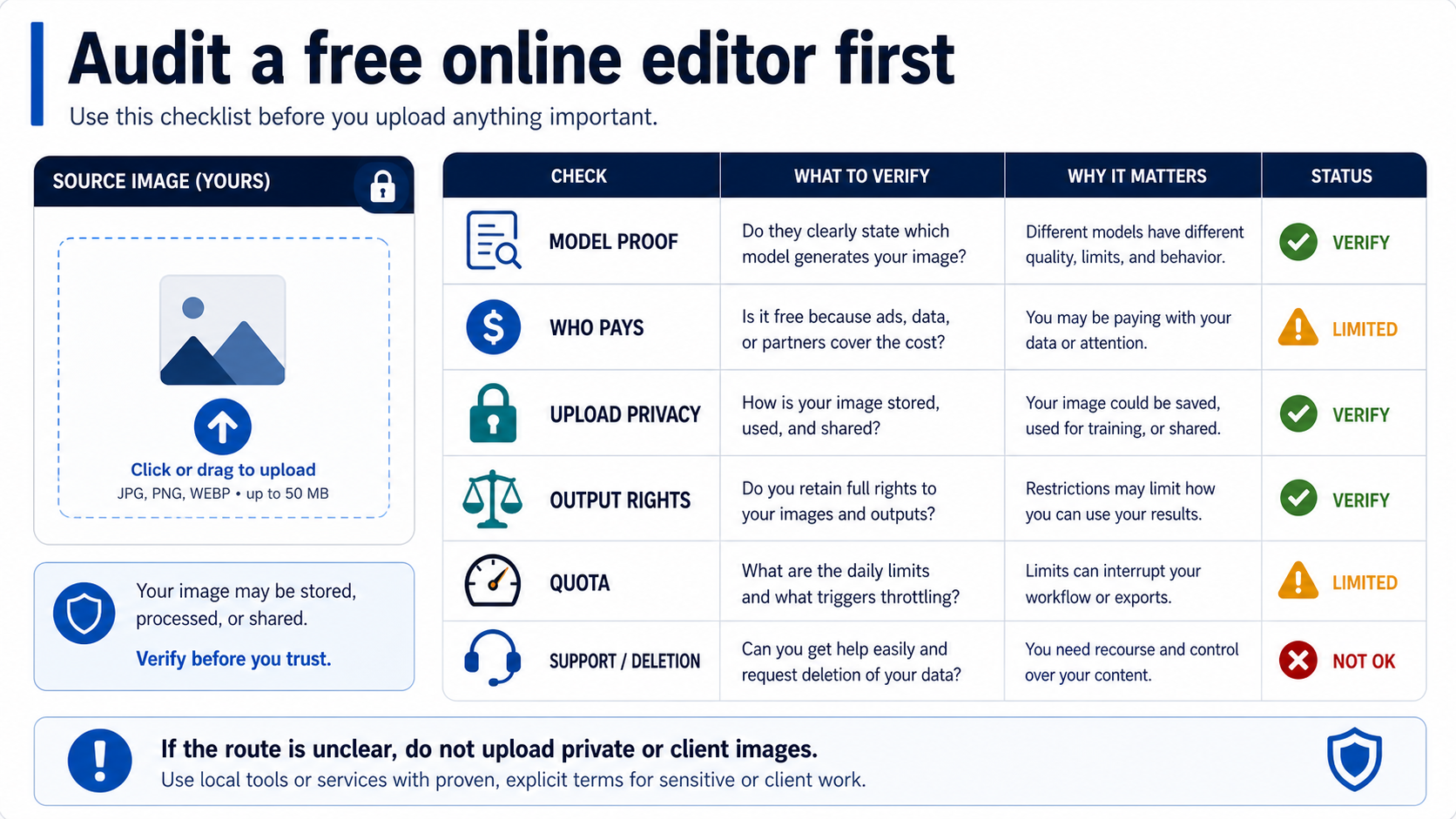
Run this audit before uploading anything important:
| Check | Why it matters | Safe answer |
|---|---|---|
| Model proof | A page can claim GPT Image 2 without proving the exact model route | the route names the model and explains the provider path clearly enough |
| Who pays | Free access is funded by ads, credits, partners, subscriptions, or later billing | the commercial model is visible before meaningful work starts |
| Upload privacy | Source images can contain people, products, locations, documents, or client context | storage, sharing, training, and deletion rules are acceptable for the input |
| Output rights | You need to know whether the result can be reused, modified, or sold | the terms fit your intended use, especially for client or commercial work |
| Quota and throttling | Free routes often stop, watermark, compress, or slow down without warning | the limit is clear enough for the test you plan |
| Support and deletion | A failed or sensitive upload needs recourse | support, status, or deletion contact exists and is credible |
This checklist is not anti-provider. A provider-owned route can be a practical choice when it solves account access, local payment, integration friction, or multi-model routing. It just has to stay described as a provider contract. Provider claims about free credits, no sign-up, no watermark, 4K, unlimited use, or commercial rights are current only for that provider and only after the terms are checked.
If any audit answer is unclear, keep the test disposable. Use a generic prompt, a synthetic image, or a public sample. Do not upload private or client images just to save a few minutes of setup.
Move to the API when the workflow becomes a product feature
The official API becomes the better route when image generation needs reliability, repeatability, logs, retries, billing control, or integration with real users. At that point the issue is no longer whether a browser page can produce a nice image once. The issue is whether you can explain every generated file after the fact.
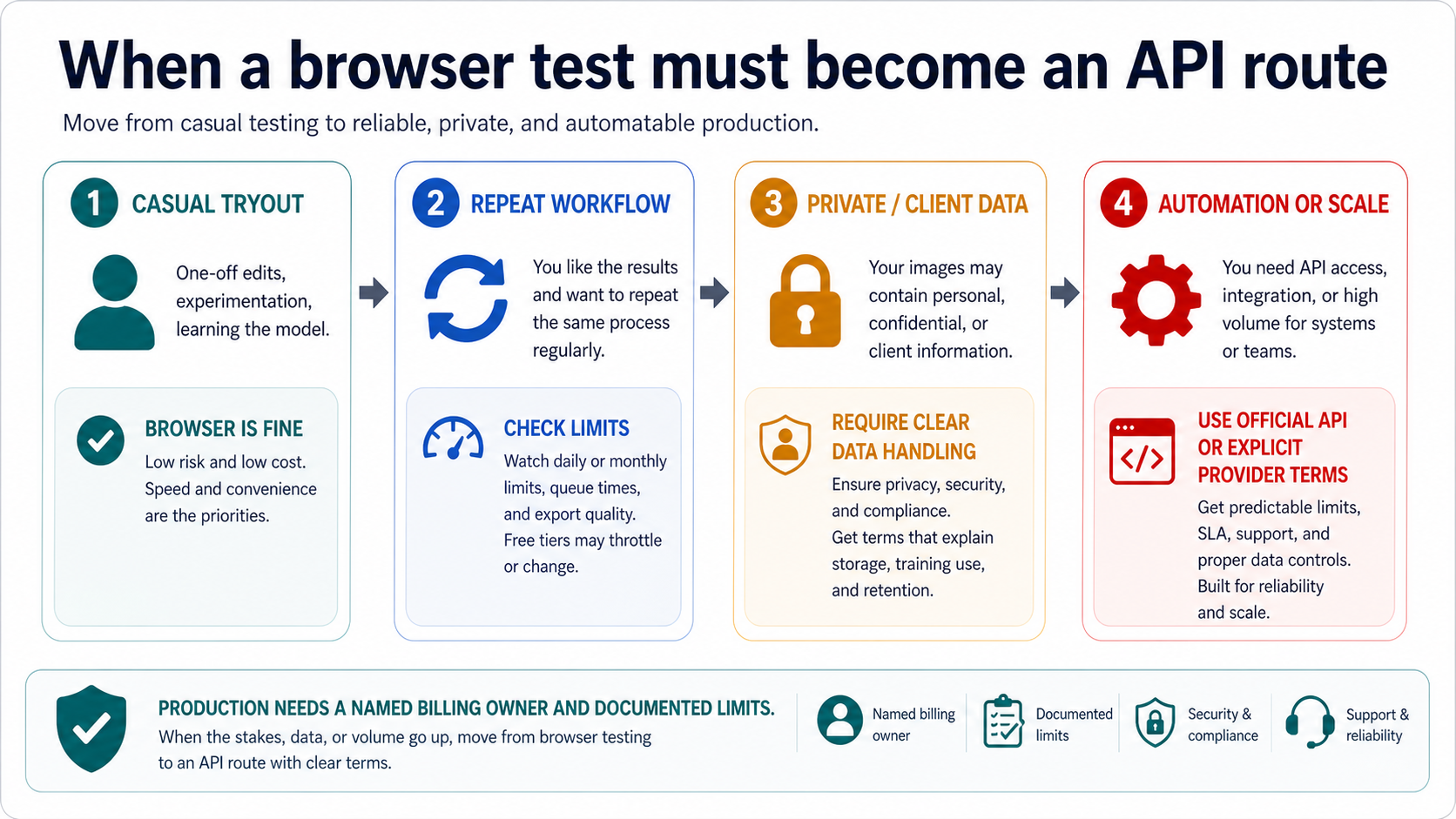
Use a contract route when any of these are true:
- the same prompt pattern must run repeatedly
- users, teams, or clients depend on the output
- requests need response IDs, retry reasons, or incident review
- cost needs to be forecast before volume grows
- generated assets need a controlled storage path
- uploaded images contain private, customer, or regulated content
- output rights or commercial use must be defensible
For direct image generation or editing, the Images API is the simplest official route. For a conversational or multi-step product where a reasoning model decides when to create an image, Responses with the hosted image_generation tool is the more natural route. Keep that distinction intact: direct image jobs do not need an assistant wrapper just because the wrapper is available, and assistant flows should not pretend that the image model is the top-level text model.
Two caveats belong near the route decision. First, GPT Image model access can require organization verification, so a free browser success does not prove that your API project is ready. Second, current OpenAI tool-option guidance says gpt-image-2 does not support transparent backgrounds. If a browser product advertises transparent export, treat that as provider-side processing unless the route proves otherwise.
Treat vague free claims as separate promises
The phrase free online collapses too many promises into one click. A page can be free to open, free for a small number of generations, free without an API key, free after sign-in, free with a watermark, or free only for low-resolution output. Those promises do not carry the same production meaning.
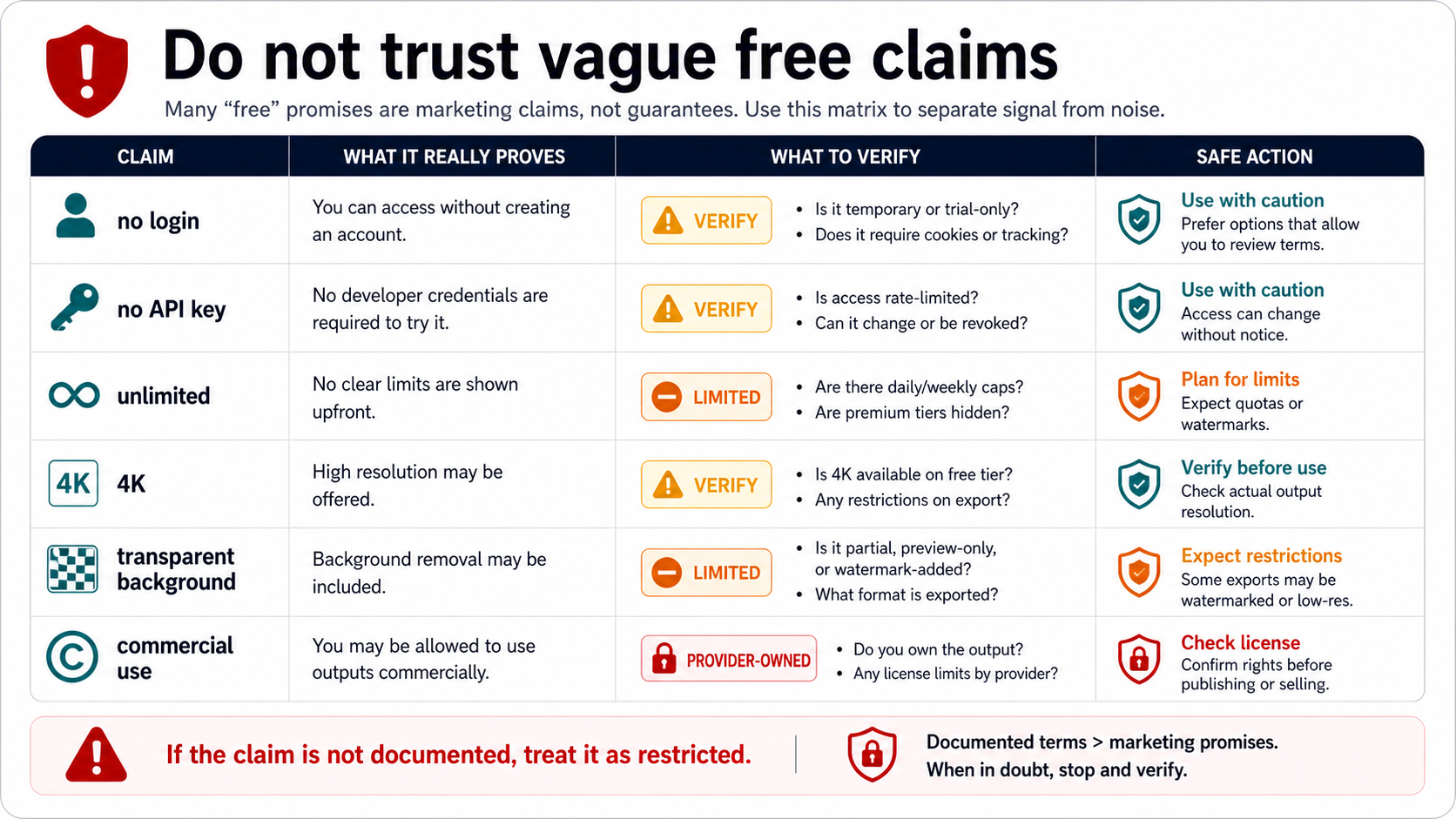
Use this boundary when reading any free tool page:
| Claim | What it really proves | What to verify before relying on it |
|---|---|---|
| No login | You can reach the interface without an account | cookies, tracking, upload storage, and whether export is limited |
| No API key | The provider handles the model route | quota, model mapping, provider billing, and fallback behavior |
| Unlimited | Marketing language or a generous preview | daily caps, throttling, queue limits, hidden paid tiers, and fair-use terms |
| 4K | high-resolution output may be offered | saved file dimensions, upscale behavior, compression, and paid-tier limits |
| Transparent background | background removal or export may be offered | whether it is first-party model support or provider post-processing |
| Commercial use | output may be usable beyond personal testing | license terms, attribution, restrictions, and who owns disputes |
The 4K and transparent-background rows are especially easy to overread. OpenAI's image generation docs support flexible GPT Image 2 sizes under documented constraints, but provider 4K labels may mean native size, export size, upscale, or a plan feature. For a deeper size and official-free-tier discussion, use the free GPT Image 2 4K API guide. The online-testing decision should stay lighter: verify the saved output before you call a provider route production-ready.
Transparent output needs the same caution. If the first-party gpt-image-2 route does not support transparent backgrounds at the current check, a third-party transparent export is a separate platform feature. It may be useful, but it should not be described as official GPT Image 2 transparent-background support.
Pick the route by risk, not by setup time
The right route is the one whose owner matches the risk of the job. Setup speed matters for exploration, but it should not override privacy, rights, support, or billing when the output becomes part of real work.
| Situation | Best first route | Why |
|---|---|---|
| You want to see whether the prompt idea works | ChatGPT or a low-risk browser test | fastest feedback with disposable inputs |
| You want to edit a public sample image | ChatGPT or a browser editor after audit | low-risk upload if terms are acceptable |
| You want to upload private or client images | official API or explicit provider terms | data handling and deletion need a contract |
| You need a feature inside your app | official Images API or Responses | logging, retries, billing, and storage belong in your system |
| You need alternate payment or routing support | provider gateway after terms review | provider ownership is acceptable only when explicit |
| You only need prompts or inspiration | resource pages and prompt examples | no upload or generation contract is needed |
This table also explains why a named free generator is rarely the strongest answer. A tool can be useful today and unsuitable tomorrow if its model route, quota, watermark, export quality, or terms change. Route criteria age better than a static tool ranking.
If you decide to use a provider route, document the same facts you would log for an API route: route owner, claimed model, account used, quota, output format, saved file path, rights language, support path, and billing trigger. That turns a browser experiment into an accountable workflow instead of a one-off click.
FAQ
Can I test GPT Image 2 in a browser?
You can find online routes for trying GPT Image 2-style image generation, including official product-surface testing and third-party browser tools. That does not mean the official OpenAI API is free. Treat free online testing as evaluation unless the route owner, quota, data handling, rights, and billing are clear.
Is there a free official GPT Image 2 API?
Do not assume one. At the May 14, 2026 check, the official model-page tier signal marked the Free tier as not supported for gpt-image-2. Recheck OpenAI's current model and pricing docs before making any production claim.
Can I use GPT Image 2 without an API key?
Only through a product or provider route that owns the access for you, such as ChatGPT or a third-party browser tool. No API key usually means the page is handling the model route, not that your app has official API access.
Is a no-sign-up tool safe for uploads?
Not automatically. No sign-up can reduce friction, but it does not answer who runs the route, where uploads are stored, whether images are used for training, what rights apply, or how deletion works. Use disposable images until those answers are acceptable.
Can I use free online output commercially?
Only if the route's terms allow it. Commercial-use claims are provider-owned and volatile. For client, paid, or public campaign work, keep a copy of the terms, the route used, the output file, and any quota or license language that applies.
Does GPT Image 2 support 4K online?
The official model supports flexible sizes under documented constraints, and provider pages may offer high-resolution exports. Verify saved file dimensions and export rules before treating a 4K label as production proof.
Does GPT Image 2 support transparent backgrounds?
Current OpenAI tool-option guidance says gpt-image-2 does not support transparent backgrounds. A browser tool may still offer background removal or transparent export through provider-side processing, but that is a separate feature.
When should I stop using a free browser route?
Stop when the workflow becomes repeated, private, client-facing, commercial, automated, or support-sensitive. At that point you need official API control or an explicit provider contract with documented limits, billing, data handling, rights, and support.


