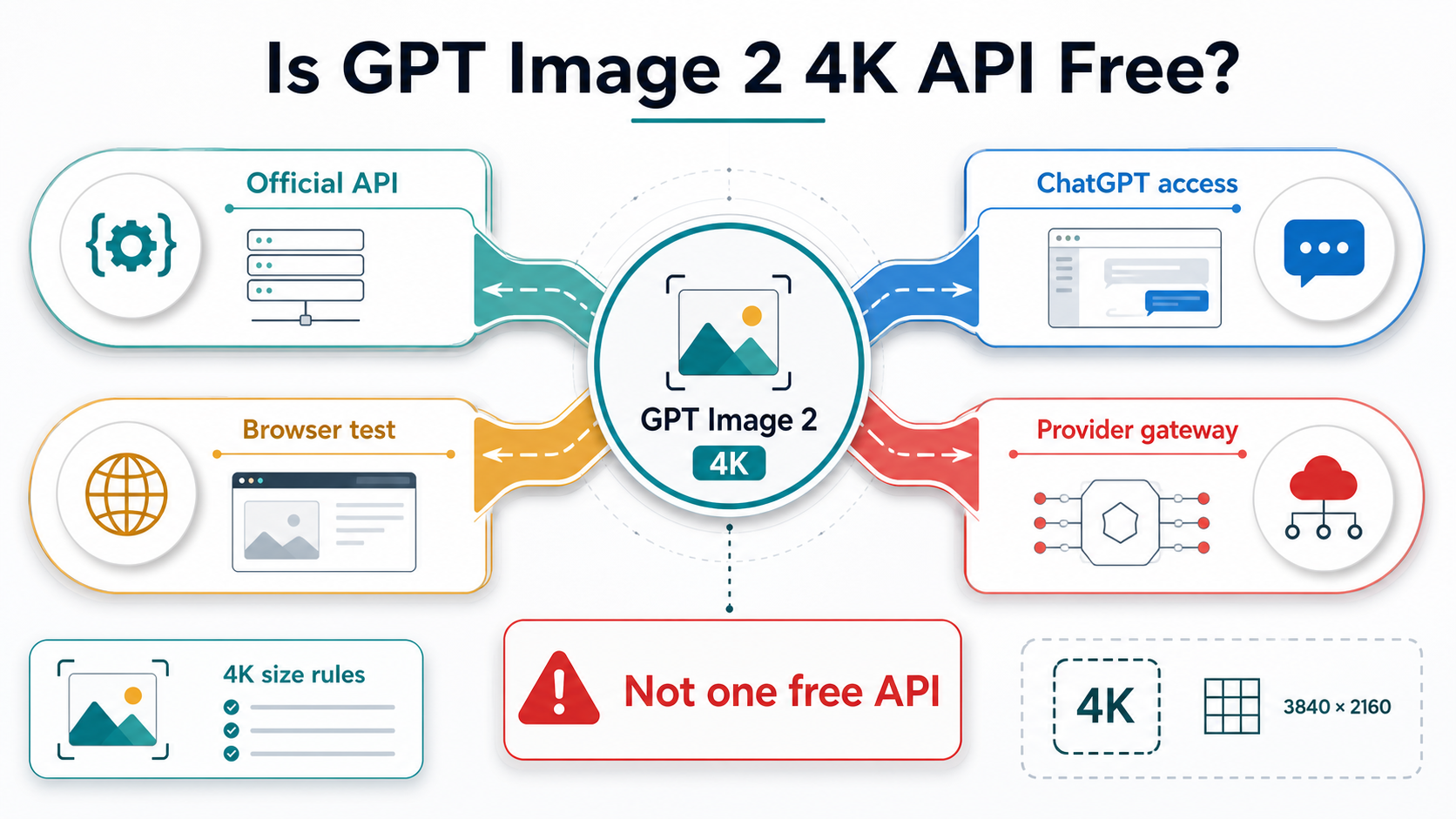
GPT Image 2 can handle 4K-sized image work, but the official API is not a free route at the May 13, 2026 check. Keep four contracts separate before you test: OpenAI API billing, ChatGPT product access, free browser tools, and provider gateways.
The 4K part is real only when the request fits OpenAI's size rules. Values such as 3840x2160 and 2160x3840 still need the multiple-of-16, ratio, edge, and total-pixel checks, and the saved output should be measured before you call it production-ready.
| Route | Use it for | Do not assume |
|---|---|---|
| Official OpenAI API | production control, direct API billing, repeatable requests | a free tier |
| ChatGPT access | product-surface testing and prompt exploration | API-key billing or production automation |
| Browser or no-key tool | quick evaluation when limits and data handling are acceptable | first-party OpenAI API access |
| Provider gateway | explicit paid or credit-based access route | OpenAI official pricing |
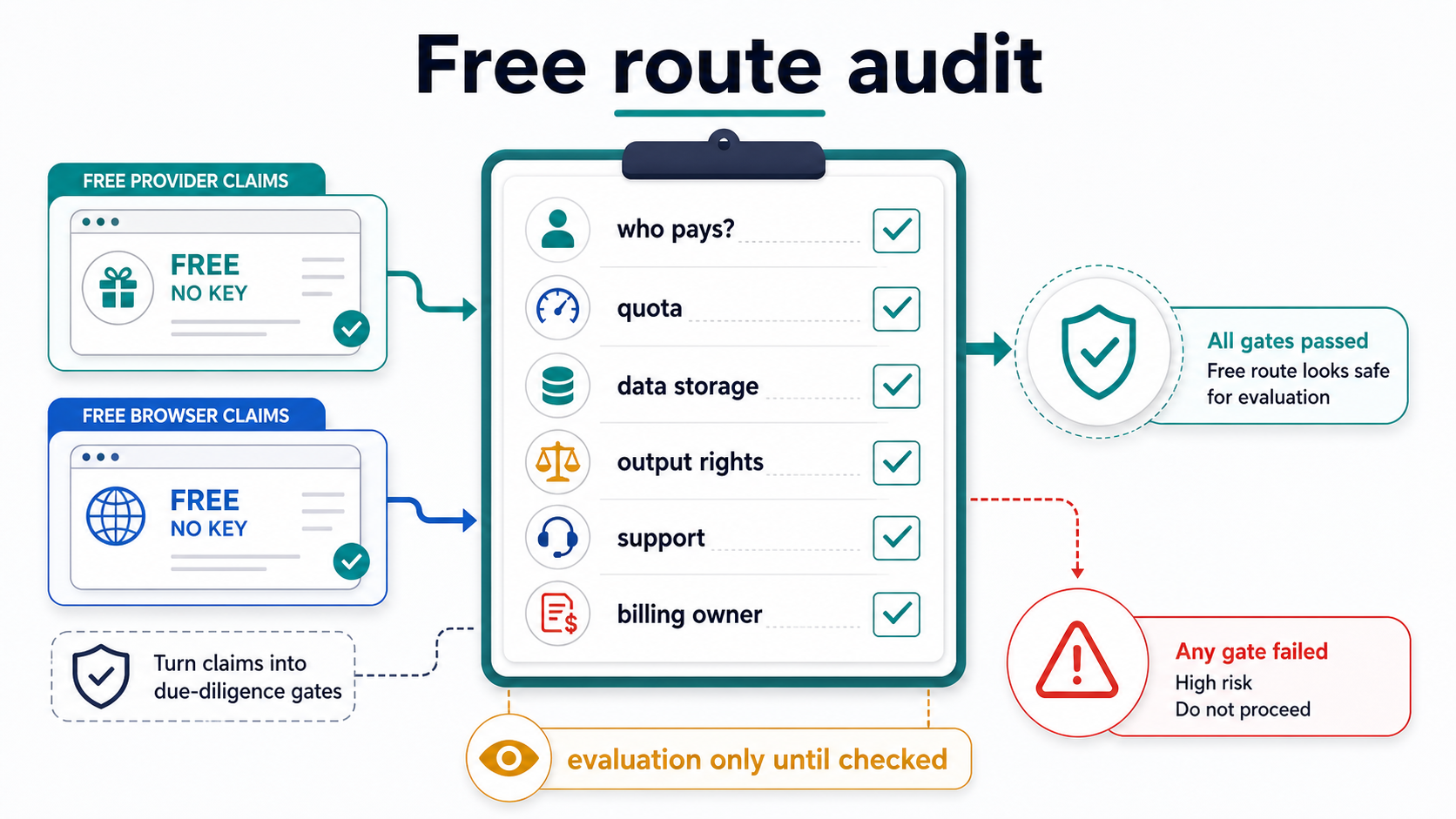
Use free routes for evaluation only when quota, data storage, output rights, support, and billing owner are clear. For production, move to official API billing or a provider contract that names those responsibilities plainly.
The official API answer: not a free tier
The official API route is the safest answer for production because OpenAI owns the model contract, request fields, account controls, and billing surface. That does not make it free. The current OpenAI model page identifies gpt-image-2 with the gpt-image-2-2026-04-21 snapshot and API support, but its tier table does not make the Free tier a supported route for this model.
That distinction is the core decision. A free image tool can still be useful, but it is not the same thing as receiving a free OpenAI API key for GPT Image 2. A ChatGPT image experience can also be useful, but it is a product surface, not a backend API billing contract for your application.
Use the official API when the work has any of these traits:
- user requests must be logged, metered, retried, or billed by your system
- prompts or reference images are sensitive enough that the route owner matters
- output rights, storage, and support need a clear contract
- generated files will enter a production workflow rather than a quick experiment
Use a free or no-key route only when the goal is evaluation: prompt exploration, visual expectation setting, or checking whether GPT Image 2-style output fits the task. The route may still be valuable, but its limits are owned by the product or provider running it.
If you need the broader GPT Image 2 API route map across Images API, Responses, Codex, and gateway branches, use the dedicated GPT Image 2 API guide. The article here is narrower on purpose: it answers the free plus 4K access decision before you pick a deeper implementation path.
4K support means exact size rules, not a marketing word
OpenAI's image generation guide lists flexible GPT Image 2 sizes and gives examples such as 3840x2160 and 2160x3840. Those are the useful 4K anchors, but they are not permission to send any large number that sounds high resolution.
For a GPT Image 2 size to be valid, the request needs to respect the size contract:
- the largest edge must be no more than 3840 pixels
- both edges should be multiples of 16
- the aspect ratio must stay within the documented limit
- total pixels must stay inside the allowed range
- high-pixel output should be treated as experimental, so the saved file should be checked after generation
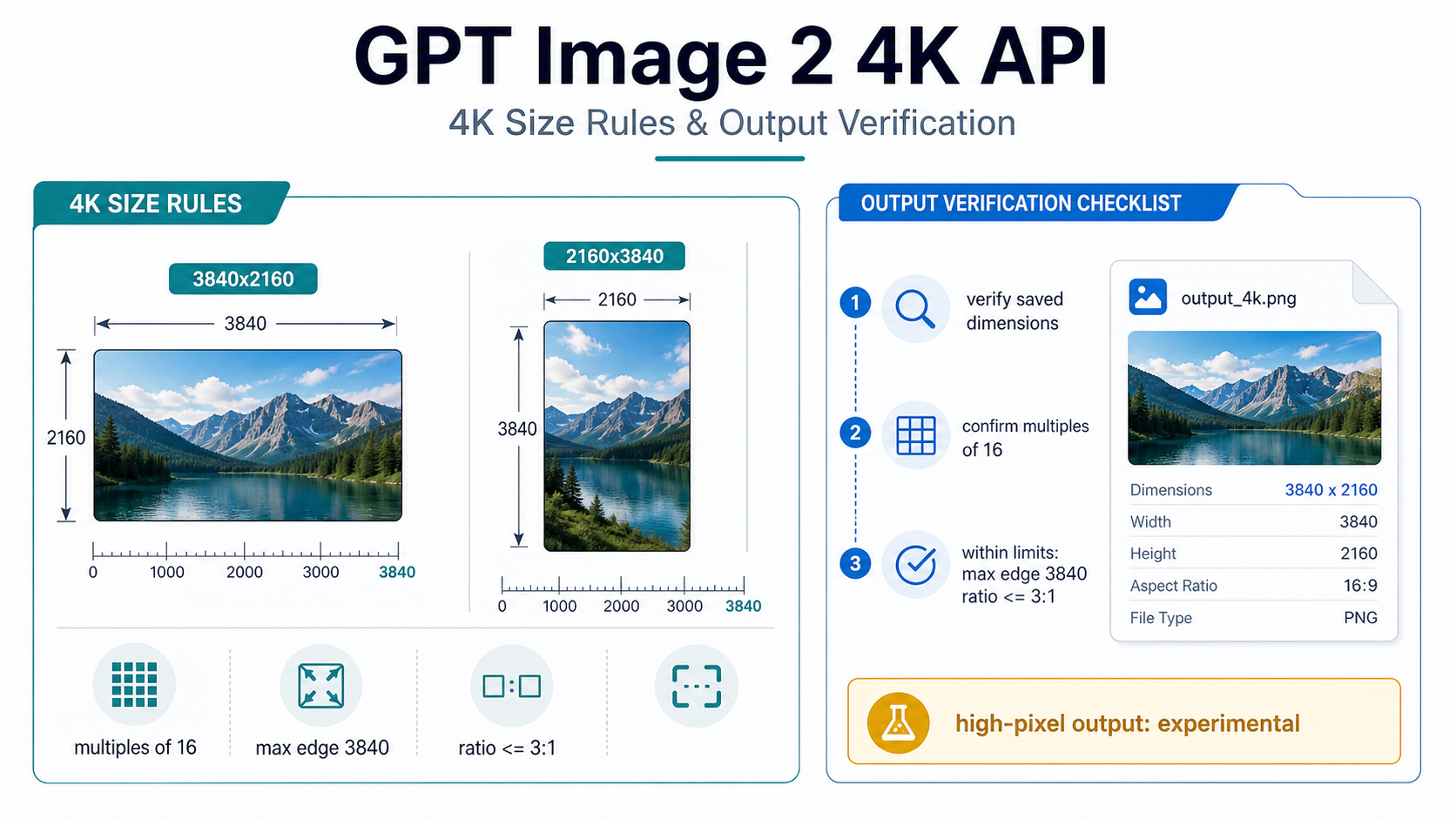
That last step is easy to skip and expensive to regret. A tool may describe output as 4K while actually delivering a scaled, compressed, cropped, or upsampled file. A production workflow should inspect the saved image dimensions after generation, not just trust the route label.
The same rule applies to provider claims. If a provider advertises 4K output, ask whether that means a first-party GPT Image 2 size value, a platform-specific upscale, a post-processing export size, or a marketing label for a high-resolution tier. Those are not interchangeable in an API integration.
Use Images API for direct 4K generation
Use the Images API when the task is direct: one prompt or a controlled set of inputs should return one generated or edited image. This is the shortest production route when the application itself owns the prompt, request, output storage, and billing records.
A direct generation request should keep the model and size decision visible:
import OpenAI from "openai";

const client = new OpenAI({ apiKey: process.env.OPENAI_API_KEY });

const result = await client.images.generate({
  model: "gpt-image-2",
  prompt: "A clean technical product diagram on a white background",
  size: "3840x2160",
  quality: "medium"
});
Keep the first 4K test simple. Confirm that the account can use gpt-image-2, the requested size is accepted, the response can be saved, and the saved file has the expected dimensions. Only after that should you layer in references, edits, streaming partial images, or provider routing.
The direct route is also the better default when you are editing images. If the job is "change this source image" or "adapt this asset," stay with the Images API edit path unless the application also needs a reasoning model to orchestrate multiple steps. The OpenAI image editing API guide covers that branch in more detail.
One practical limitation belongs here rather than in a late footnote: GPT Image 2 does not currently support transparent backgrounds. If a workflow depends on a transparent PNG, plan a separate design or compositing step instead of assuming the model option exists.
Use Responses only when the image is part of a larger flow
Responses is a strong route when image generation is one step inside a broader assistant or agent interaction. It is not automatically the best route for every 4K image request.
The field placement is the important rule. In a Responses request, the top-level model should be a text-capable model available to your project. The image work sits inside the hosted image_generation tool.
import OpenAI from "openai";

const client = new OpenAI({ apiKey: process.env.OPENAI_API_KEY });

const response = await client.responses.create({
  model: "gpt-5.5",
  input: "Create a launch concept and generate a 16:9 product graphic.",
  tools: [
    {
      type: "image_generation",
      model: "gpt-image-2",
      size: "3840x2160",
      quality: "medium"
    }
  ]
});
Use that shape when the product needs language reasoning around the image step: choosing whether an image is needed, using prior user context, calling other tools, or returning image and text together. If the job is just one image from one prompt, the direct Images API keeps debugging simpler.
The 4K checklist does not disappear in Responses. The generated output still needs to be saved, measured, and logged. Route choice changes how the request is orchestrated; it does not turn a 4K label into proof that the final file meets your production requirement.
Audit every free or no-key route before uploading work
Free browser tools and no-key routes are useful when the goal is quick evaluation. They can help a designer or developer see whether a prompt style, aspect ratio, or image concept is worth taking further. They are weaker when the goal is production control.
Run the same audit before you rely on any free route:
| Check | Why it matters | Acceptable answer |
|---|---|---|
| Who pays the model bill? | "No key" usually means someone else owns the API or model route | the product names the route owner or commercial model |
| What is the quota? | a free demo may stop at a small daily, weekly, or credit cap | the quota is visible enough for the test you plan |
| Where are prompts and images stored? | image prompts often include product, people, brand, or campaign context | storage and deletion rules are acceptable for the data |
| What rights apply to output? | production assets need usage rights that survive export | terms are clear enough for the intended use |
| What support exists? | failed 4K jobs need a real escalation path | support, status, or provider accountability is visible |
| What happens after the trial? | free access can become credit billing, subscription billing, or throttled access | the paid path is explicit before important work begins |
That audit is not anti-provider. It is how provider routes become useful. A gateway can be a reasonable choice when it solves payment, access, routing, or operational friction. It just needs to be described as a provider-owned contract rather than as OpenAI official pricing or free API access.
For sensitive prompts, unreleased product images, customer data, legal content, or recurring production jobs, the audit bar should be higher. If a route cannot name storage, rights, support, and billing owner, keep it out of production.
Know when a test route becomes the wrong route
The transition from evaluation to production is not only about cost. It is about accountability. The moment generated images affect a customer workflow, a paid campaign, an app feature, or a repeatable business process, the route needs clearer controls than a casual browser test.
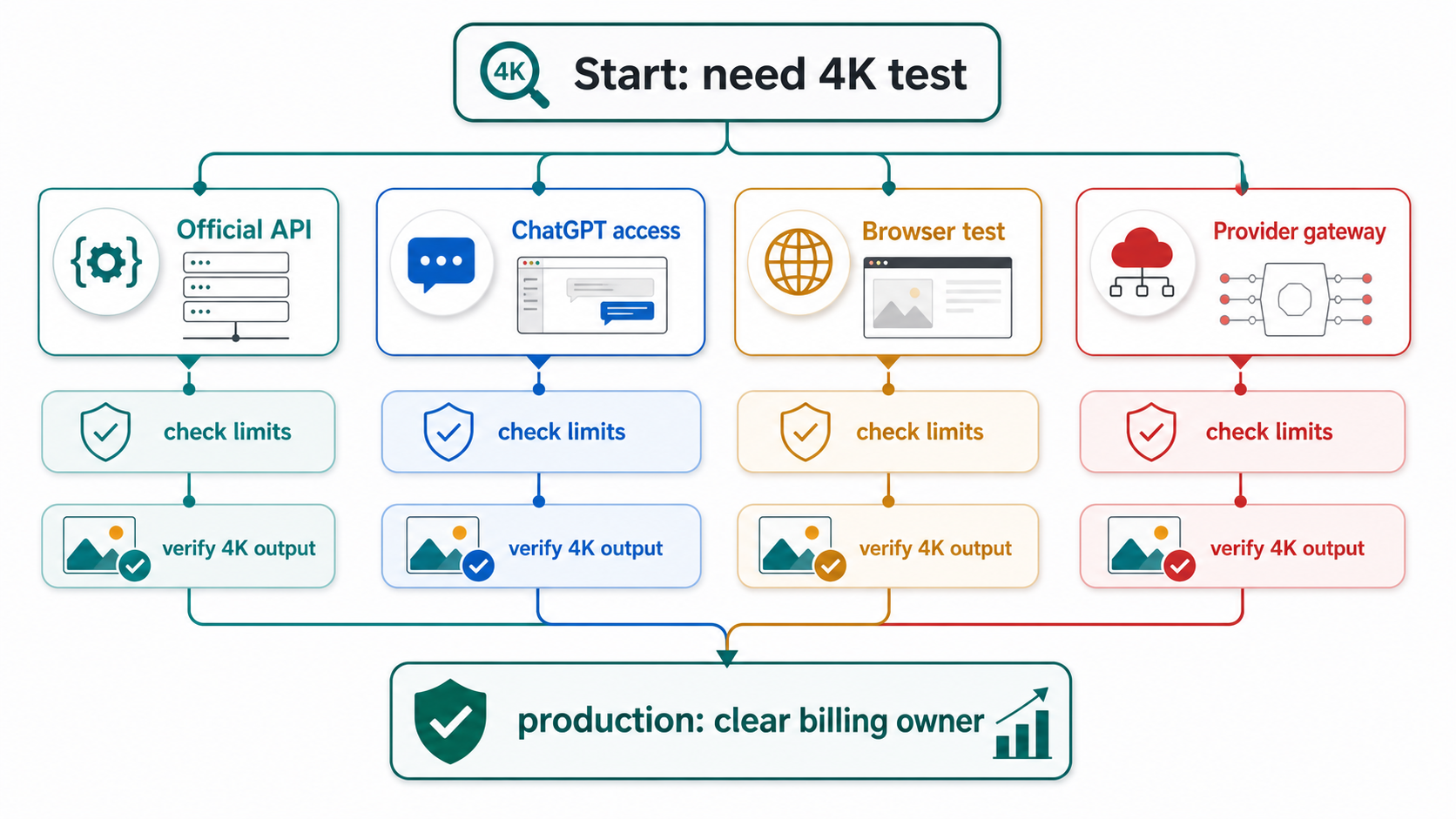
Move away from a free route when any of these become true:
- the same prompt pattern needs to run repeatedly
- failed jobs need retry logic or incident review
- image dimensions, format, storage path, and rights must be logged
- a customer, team, or client depends on the output
- costs need to be forecast before volume grows
- the prompt or reference image cannot safely pass through an unclear third-party route
Production logging should capture the route owner, model ID, endpoint or tool route, requested size, quality, response ID where available, output storage path, saved image dimensions, partial-image handling, and retry reason. That log makes a 4K workflow debuggable after the first successful demo.
Cost belongs in the same operational record. Official API usage follows OpenAI's token-based image pricing, and the Batch API can reduce asynchronous workload cost when the job can wait. Provider gateways and browser products use their own plans, credits, or subscriptions. Do not estimate on one route and deploy on another without recalculating.
The safest route by use case
The cleanest decision is usually a route table, not a single universal recommendation.
| Use case | Start here | Why |
|---|---|---|
| You need one production 4K image from a backend | Official Images API | simplest direct request and billing owner |
| You need image generation inside a chat or agent product | Responses with image_generation | reasoning and image output live in one interaction |
| You only want to test prompt quality | ChatGPT or a browser tool | faster evaluation with lower setup |
| You need a no-key demo for non-sensitive work | browser or provider route after audit | useful when terms and limits are clear |
| You need predictable app integration | official API or explicit provider contract | production needs route owner, support, and logging |
| You need many asynchronous images | official API with Batch, if the workload can wait | lower-cost batch processing is better than a fragile free loop |
That table also explains why a "free 4K API" answer has to be careful. The useful reader outcome is not finding a magic zero-cost production API. It is choosing the cheapest safe route for the current job without losing track of who owns access, billing, data, rights, and support.
FAQ
Is the official GPT Image 2 API free?
No. At the May 13, 2026 check, the official model page did not make the Free tier a supported route for gpt-image-2. Free browser tools, product trials, or provider demos can exist, but they are separate routes.
Can GPT Image 2 really generate 4K images?
It can use 4K-sized values such as 3840x2160 and 2160x3840 when the request satisfies OpenAI's size constraints. High-pixel output should still be treated as experimental, and the saved file should be measured before production use.
Is ChatGPT access the same as API access?
No. ChatGPT is a product surface for interactive use. API access is a developer billing and integration route. A prompt that works in ChatGPT is useful signal, but it does not prove your backend can call gpt-image-2 at the size and quality you need.
Do no-key tools mean I can skip API setup?
Only for limited testing. A no-key route means the tool or provider owns the access path. Before using it for work that matters, check quota, storage, output rights, support, billing owner, and export dimensions.
Which endpoint should I use for a 4K app feature?
Use Images API for direct generation or editing. Use Responses when image generation is part of a larger assistant or agent flow. For broader endpoint sequencing, see the OpenAI image generation API endpoint guide.
Does GPT Image 2 support transparent background output?
No, not at the current check. If transparent output is required, plan a separate image-editing, design, or compositing step rather than relying on a GPT Image 2 transparent background option.
When should a free test become paid production?
Switch when the output affects customers, campaigns, app features, repeatable workflows, sensitive prompts, or budget forecasts. At that point, route ownership matters more than avoiding initial setup cost.


