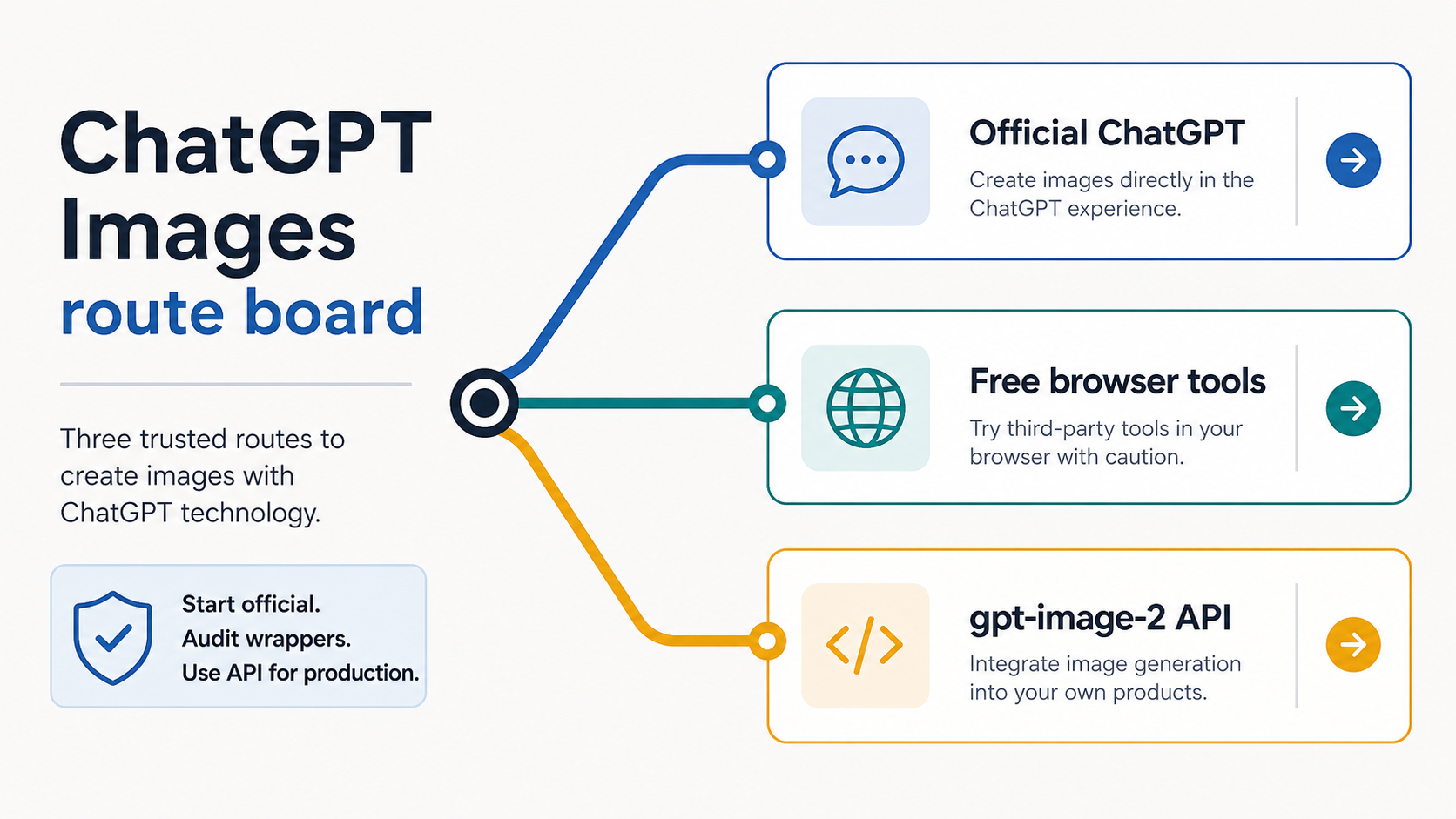
Use ChatGPT Images when you want the official ChatGPT route to create or edit images. A free browser generator can be useful for low-risk public prompts, but it is a separate provider route; check upload privacy, output rights, watermarks, export quality, support, and billing before you trust it with private or commercial work.
Here is the first-screen split: start in ChatGPT Images for normal prompting and editing, use third-party tools only after their terms are clear, and move to the gpt-image-2 API when the workflow needs automation, logs, storage, retries, user billing, or production support. Free access can change by plan, region, account state, and provider credit policy; fixed caps are the wrong thing to anchor unless current first-party or provider terms prove them.
If you only need a safe first test, start with a public prompt: describe the subject, style, composition, text needs, and constraints. Upload a face, client product image, copyrighted reference, or private asset only when the route owner and terms are clear. If the image tool is missing or generation fails, switch to a recovery path instead of treating route choice as diagnosis.
Start with the official route, then decide what risk you can accept
The fastest safe answer is not "try the first free generator." It is to separate the route owner from the image task. If you want normal ChatGPT image creation or editing, start with ChatGPT Images. If you want no-login browser testing, treat that page as a separate provider. If you are building a product feature, treat the work as API or provider-contract work from the beginning.
| Route | Best first use | Do not assume |
|---|---|---|
| ChatGPT Images | official ChatGPT creation, editing, prompt exploration, and low-risk upload tests | backend API access, fixed quotas, or production logging |
| Third-party browser tool | disposable public prompts, quick visual tests, or low-risk reference edits after terms are clear | OpenAI ownership, private-upload safety, commercial rights, or no-watermark export |
| gpt-image-2 API | repeatable app workflows, logs, retries, storage, billing control, and user-facing generation | a free browser editor or ChatGPT account behavior |
| Troubleshooting path | missing image button, failed generation, upload failure, or stuck requests | normal route selection or provider comparison |
OpenAI Help described ChatGPT Images as the ChatGPT product surface for creating and editing images at the May 18, 2026 check. The same help material also warned that generation can take time. That matters because a slow generation is not automatically a broken tool, and a free plan mention is not a promise of a fixed daily cap. Use dated official sources for product availability and use in-product messages for account-specific limits.
The route split also protects private inputs. A public prompt about a coffee mug can safely test style, composition, and text handling. A client's unreleased product shot, a person's face, a contract image, or a copyrighted reference needs a stronger route: visible owner, upload handling, deletion path, output rights, support, and billing rules.
Know what each image name actually means
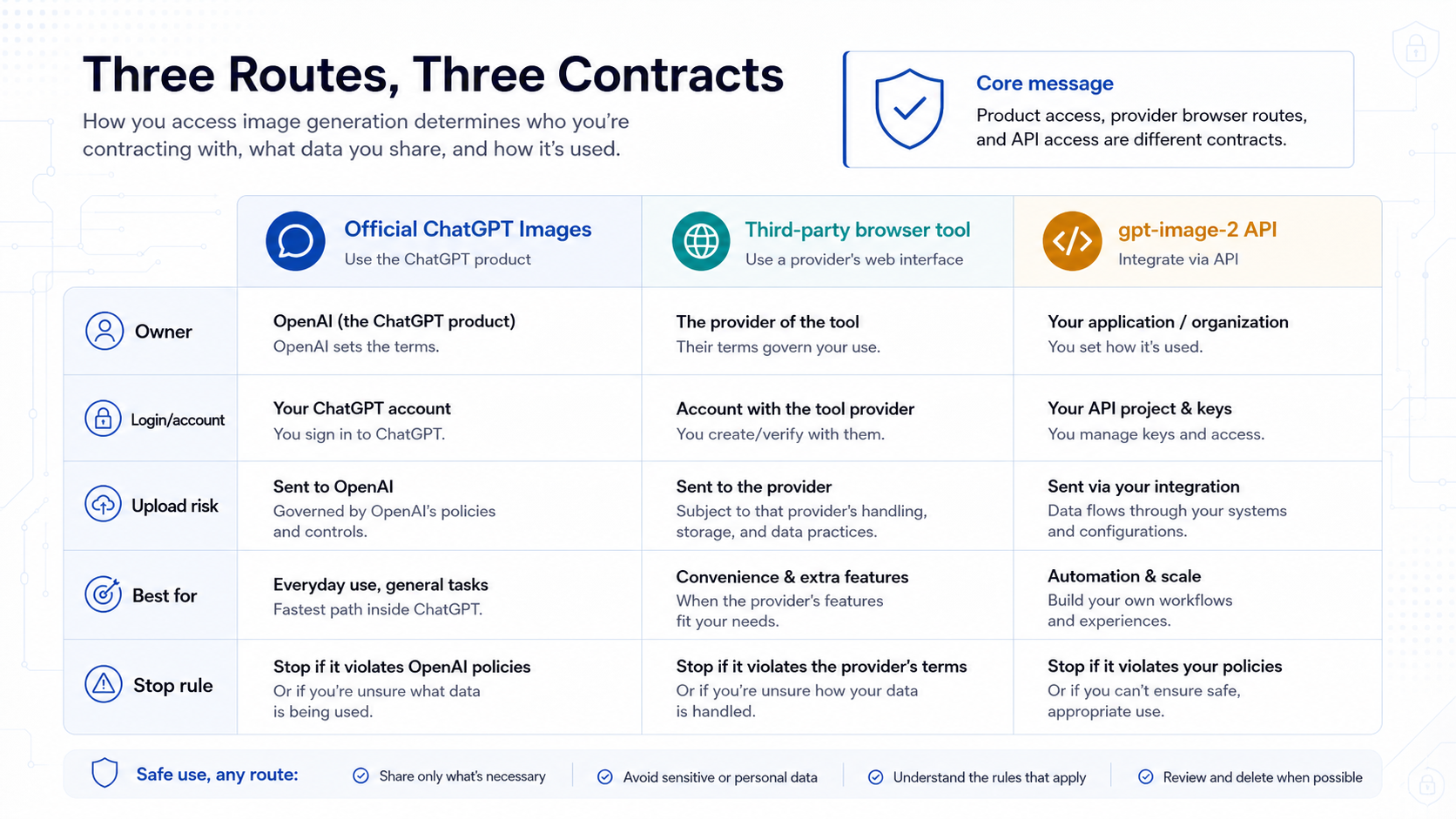
The names around ChatGPT image generation are easy to collapse, but they do not point to the same contract.
ChatGPT Images is the consumer product route inside ChatGPT. It is the right noun when an ordinary user wants to create an image, upload a reference, make an edit, or manage image results in a ChatGPT session.
ChatGPT Images 2.0 is the current official product generation surface OpenAI announced and described in 2026. Use it when the article needs to talk about the new product generation experience, not when it is explaining an API request shape.
GPT Image 2 is the broader reader-facing model family name. It is useful when comparing current image generation to older DALL-E or GPT-4o-era wording, but it should not blur product access with API access.
gpt-image-2 is the API model ID. Use this exact code-style form only when the reader is choosing an OpenAI API route, reading model docs, or debugging developer access. A ChatGPT account that can create images does not prove that an API organization can call gpt-image-2, and an API model row does not describe the exact ChatGPT app quota for a user account.
DALL-E GPT is an official fallback branch for some ChatGPT users, not the current main answer for normal ChatGPT Images use. If a tutorial still treats DALL-E as the whole answer, read it as older route language unless current OpenAI product surfaces still support that branch for the exact task.
Third-party "ChatGPT image generator" pages are provider-owned routes. They may use OpenAI models, provider gateways, or other routing layers, but their free credits, upload rules, watermark policies, 4K labels, and commercial-use terms belong to that provider unless proved otherwise.
Build the first prompt before you upload anything sensitive
A good first prompt should test the image system without risking private data. Start with a public prompt that includes subject, style, composition, text needs, and constraints. Then add reference images, edits, and production requirements only when the route is trusted.
Use a control prompt like this:
Create a clean editorial image of a blue ceramic coffee mug on a white desk. Use soft daylight, a minimal background, no logo, no people, and leave space on the right for a short headline.That prompt tests whether the route can follow subject, style, composition, negative constraints, and layout direction without exposing a private file. If the result is close, refine one variable at a time:
- subject: what should be in the image and what must not appear
- style: photo, editorial illustration, product render, storyboard, or diagram
- composition: close-up, wide shot, centered object, split view, route board, or workflow
- text needs: exact words, no text, or text area only
- constraints: no logo, no personal likeness, no copyrighted character, no private document
- edit instruction: what should change and what must stay unchanged
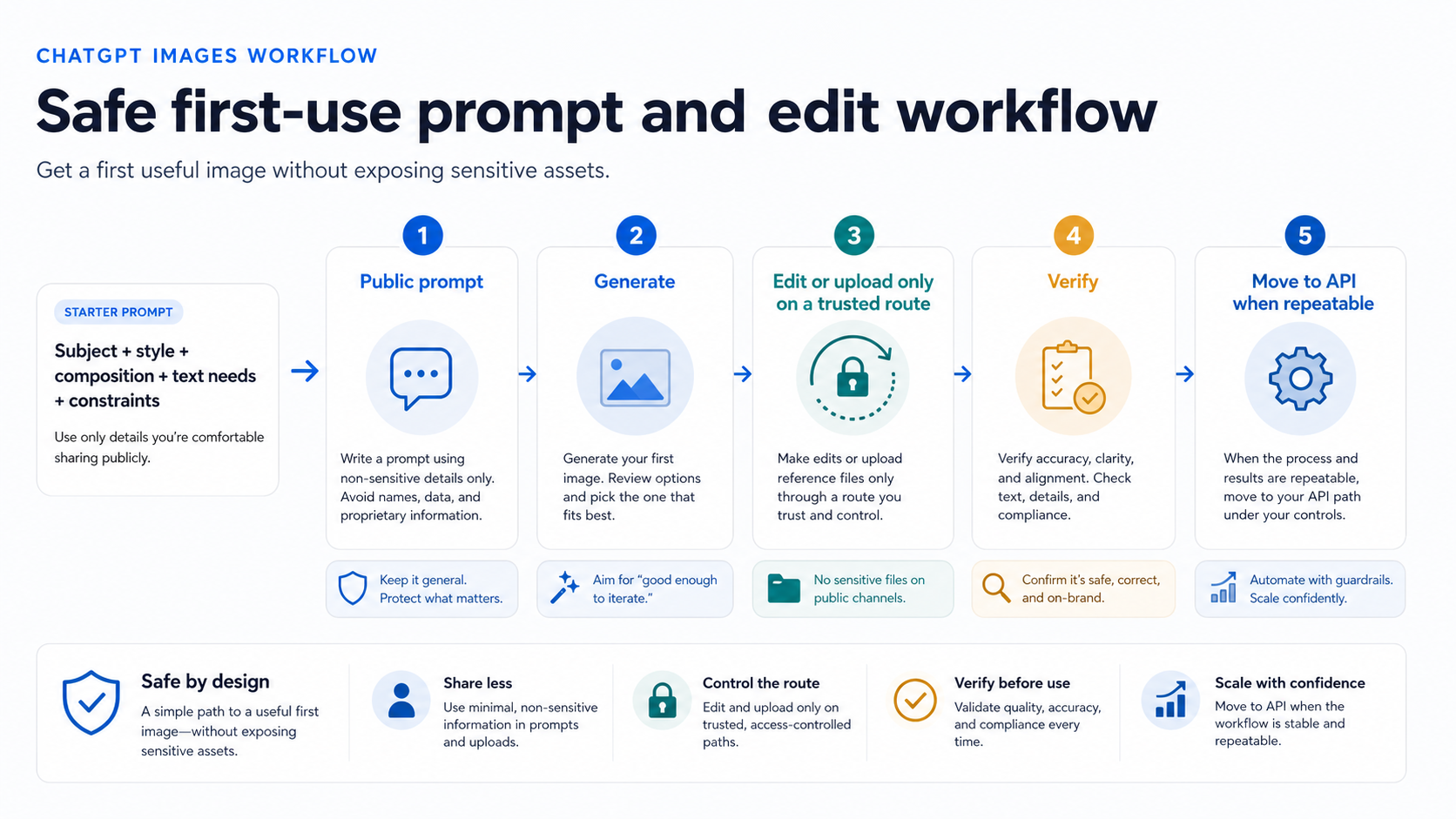
When the first result is useful, decide whether the next step still belongs in ChatGPT. For a creator making one thumbnail, poster, mood board, or product concept, the ChatGPT product route may be enough. For a team that needs repeatable prompts, logs, moderation review, storage, or user billing, the experiment has crossed into API or provider-contract territory.
Upload only after the route matches the file. A public stock-like sample image is fine for learning the edit flow. A real face, client product photo, unreleased campaign asset, medical image, legal document, or source file with location metadata needs visible route terms. The tool may generate a nice image, but a nice output does not answer whether the upload path was appropriate.
Audit free browser tools before you trust their promises
Free browser tools rank because they solve friction. They may avoid sign-up, hide API setup, offer credits, or promise high-resolution exports. Those are useful conveniences when the input is low risk. They are not proof of official OpenAI ownership.
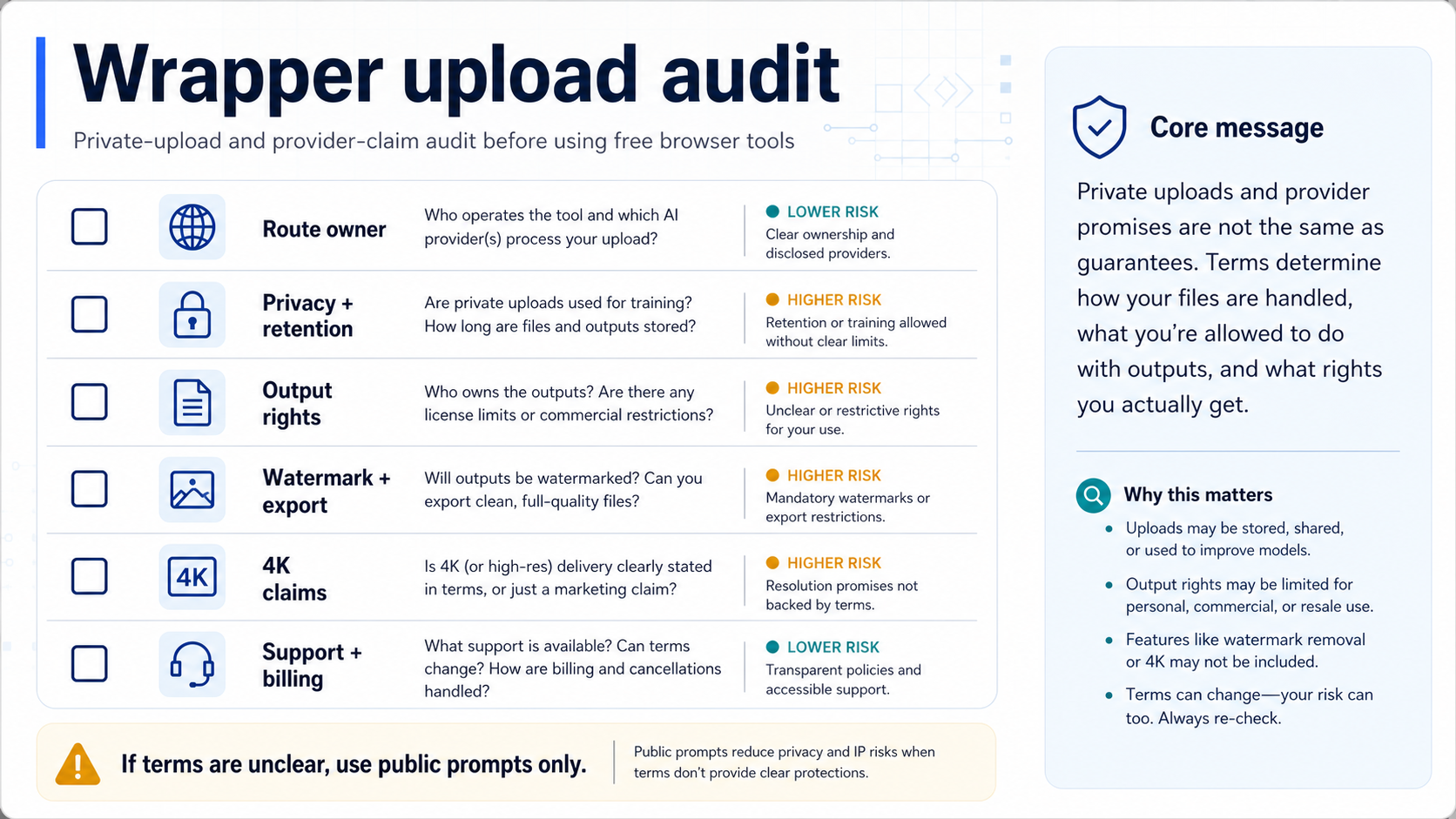
Run this audit before uploading anything important:
| Check | What to verify | Why it changes the decision |
|---|---|---|
| Route owner | Who operates the page, model route, account, or gateway | Determines who is responsible for the access and support |
| Model claim | Whether the page proves the model or only uses a marketing label | Prevents treating a label as official access |
| Upload privacy | Storage, sharing, training, deletion, and retention language | Protects faces, client assets, documents, and product images |
| Output rights | Commercial-use language, restrictions, attribution, and disputes | Determines whether the result can leave experimentation |
| Watermark and export | Saved dimensions, compression, watermark, background, and file type | Separates preview quality from usable assets |
| Credits and caps | Free-credit reset, queue, throttle, paid tier, and fair-use terms | Prevents a one-off test from becoming a false workflow plan |
| Support and billing | Contact path, status page, refund route, and billing owner | Makes failures and charges accountable |
If any answer is unclear, keep the input disposable. Use a public prompt, a synthetic sample image, or a screenshot that contains no customer, legal, medical, or unreleased material. A provider route can still be useful, but only after it is described as a provider route.
Be especially careful with "no watermark," "4K," "transparent background," and "commercial use." Those claims may be true for a provider, a tier, an export mode, or a post-processing step. They should not be restated as OpenAI facts without first-party support. For deeper 4K and free-API boundary work, use the free GPT Image 2 4K API guide.
Move to the API when the workflow becomes repeatable
The API becomes the better route when the image is part of a system rather than a one-time ChatGPT session. The trigger is not that the prompt is more technical. The trigger is that the workflow needs control.
Move toward API or provider-contract work when any of these are true:
- the same prompt pattern must run repeatedly
- users or customers trigger generation
- logs, retries, moderation review, or incident review matter
- generated assets need controlled storage
- cost and billing need to be forecast
- uploads include private, client, or regulated files
- support needs a route owner and evidence trail
- output rights need to be defensible for public or commercial use
For direct image generation or editing, the OpenAI Images API is the natural route. For a conversational or multi-step product where the assistant decides when to generate an image, the Responses API with the hosted image generation tool may fit better. Do not make an assistant wrapper mandatory for a simple image request, and do not use a direct image endpoint when the product really needs a multi-step agent flow.
The API route also has its own access and pricing facts. The public gpt-image-2 model page at the May 18, 2026 check showed API-specific identity, endpoints, snapshot, and limits. That API contract is not the same as a ChatGPT plan. Recheck model docs and pricing before publishing cost estimates or plan-level claims.
Provider gateways can be reasonable when they solve a real developer route problem, such as multi-model access, local payment, switching models, or integration friction. No named provider should be inserted into the core route answer unless its current model coverage, price, limits, availability, support, and terms have been verified for the reader job. Official OpenAI routes remain the default reference point when the reader simply wants the first-party contract.
Use the right sibling path when the job changes
Not every ChatGPT image question belongs in the same page. Switching to the right branch keeps the reader from mixing normal route choice with recovery, upload debugging, or API implementation.
| If the reader problem is... | Use this path |
|---|---|
| The image tool is missing, stuck, slow, refusing prompts, or not working | ChatGPT image generation not working |
| A specific upload or image-edit input fails | ChatGPT unable to upload image |
| No-key browser testing and provider-owned free routes | GPT Image 2 free online |
| Developer route choice, endpoint behavior, and model access | GPT Image 2 API |
| Endpoint-level OpenAI image generation implementation | OpenAI image generation API endpoint |
| 4K or free API claims | Free GPT Image 2 4K API |
This route map is also a quality control rule. A normal-use page should not become a troubleshooting page just because image generation can fail. A free-tool page should not become the official product owner just because wrappers rank. An API page should not be the first answer for an ordinary user trying to create one image in ChatGPT.
FAQ
What is the official ChatGPT image generator?
The official ChatGPT route is ChatGPT Images. Use it when you want to create or edit images inside the ChatGPT product. The phrase "ChatGPT image generator" is useful reader language, but the product route should be named as ChatGPT Images when precision matters.
Can ChatGPT generate images for free?
OpenAI Help and release material checked on May 18, 2026 described ChatGPT Images 2.0 as available across ChatGPT tiers, but exact generation caps can vary and change. Do not build a claim around a fixed number unless the current first-party UI or docs prove it.
Do I need to log in?
For the official ChatGPT product route, expect a ChatGPT account and a logged-in session for creation and upload work. Some third-party pages may offer no-sign-up tests, but those are provider-owned routes and need their own privacy, quota, rights, and billing checks.
Is ChatGPT Images 2.0 the same as gpt-image-2?
No. ChatGPT Images 2.0 is the consumer product surface. gpt-image-2 is the API model ID. They are related, but product access and API access are different contracts.
Can I upload a photo of myself or a client product?
Use the official product route or a route with clear terms. For third-party tools, check upload storage, deletion, training, output rights, support, and billing before using faces, client assets, unreleased products, or private documents.
Are no-sign-up ChatGPT image tools safe?
They can be safe enough for public prompts, but no-sign-up does not answer route ownership or data handling. Keep tests disposable until the provider's terms are acceptable for the input and output.
Can I use the output commercially?
Commercial use depends on the route terms, the source inputs, and the output rights. Provider pages sometimes make commercial-use claims, but those claims are provider-owned and volatile. Keep evidence of the route and terms for paid or client work.
When should I use the API instead of ChatGPT?
Use the API when the workflow needs repeatability, logs, retries, storage, user billing, cost forecasting, support, or private production inputs. Use ChatGPT when the job is interactive creation, prompt exploration, or low-risk editing.


