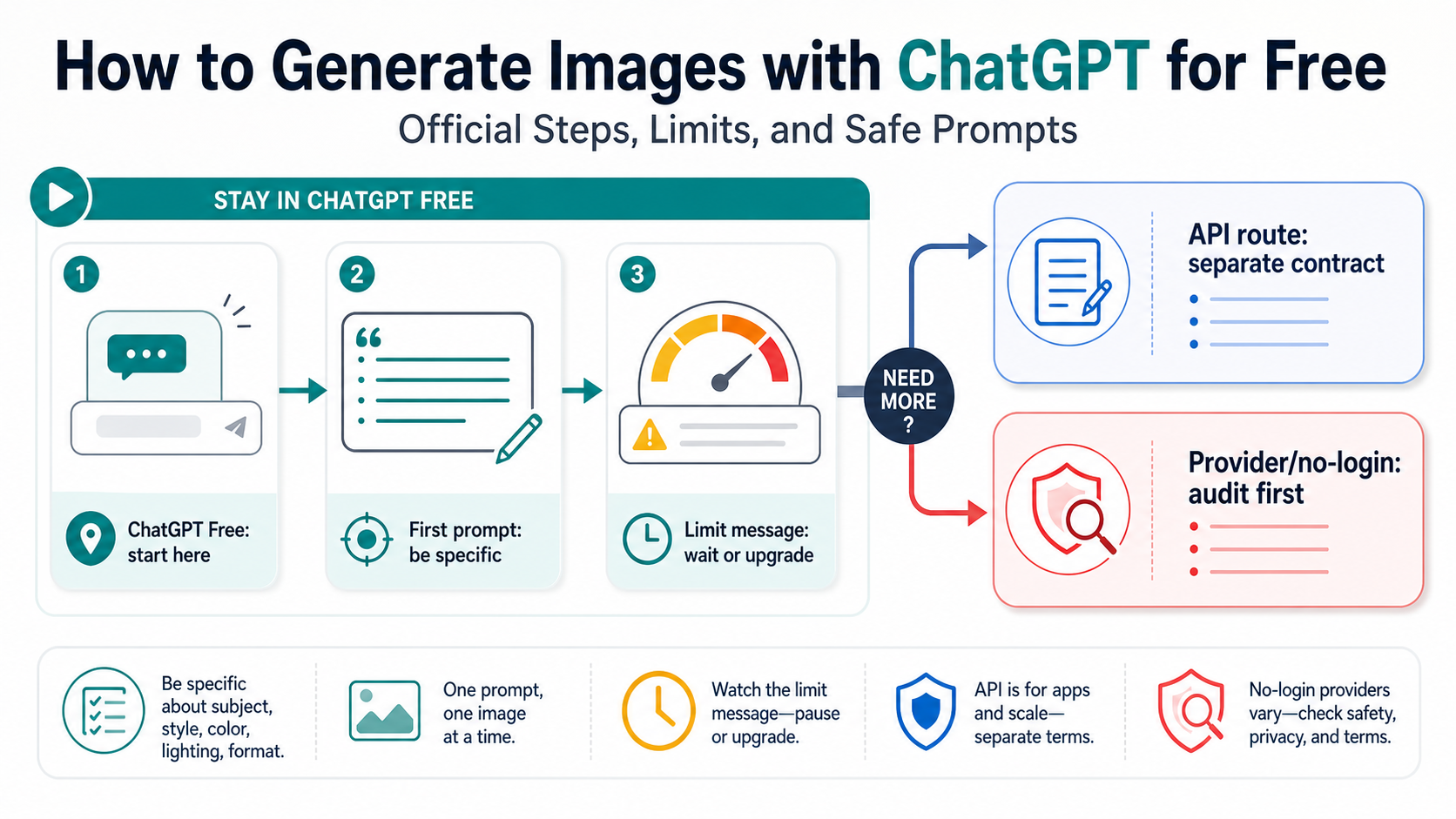
Yes, you can generate images in ChatGPT on a Free account, but treat it as a limited ChatGPT product workflow, not a free OpenAI image API. Start in ChatGPT or the Images page, use one specific low-risk prompt, and let the in-product limit message decide whether you wait, upgrade, or move to a separate API or provider route.
| What you need | Start here | Stop rule |
|---|---|---|
| A first image without paying | ChatGPT Free or the Images entry point | Stop after one vague result; improve the prompt before retrying |
| A change to an existing image | Upload only a safe source image, then ask for one clear edit | Do not upload personal, client, product, or private files until the terms and risk are acceptable |
| More generations after the limit appears | Wait for the reset shown by ChatGPT or upgrade | Do not keep retrying blindly; the limit is a route decision |
| Repeatable app, backend, or billing control | OpenAI API with gpt-image-2 or another documented contract | ChatGPT Free does not provide free API access |
| No-login testing | Treat third-party generators as provider-owned tools | Audit uploads, rights, storage, quotas, and support before trusting the route |
Use the first attempt as a control prompt: name the subject, style, composition, and one constraint before you ask for refinements. For example, ask for a simple public, non-personal image first; save personal photos, client assets, unreleased product shots, or private references until you know the upload and output terms for the route you are using.
As checked on May 18, 2026, OpenAI's Help pages say Free users can create images in ChatGPT and that image creation has separate, stricter tool limits. OpenAI's developer docs also keep the API contract separate: gpt-image-2 is an API model, and ChatGPT Free access should not be read as a free API tier.
Start in ChatGPT, not a tool roundup
The fastest free route is the official ChatGPT product route. Open ChatGPT or the ChatGPT Images entry point, sign in or create a Free account if asked, and write one image request in ordinary language. OpenAI's Images in ChatGPT FAQ says users can ask ChatGPT to create an image or use the Images area, and that ChatGPT Images works across web, iOS, and Android.
That official route is different from a third-party generator page. A no-login page may still be useful for low-risk testing, but it owns its own quota, upload policy, model mapping, output rights, billing trigger, and support path. If your real question is whether a free online provider is safe enough, use the separate GPT Image 2 free online route guide. For ordinary ChatGPT use, keep the job narrower: create a usable image in ChatGPT Free without wasting attempts or confusing the route.
Use this first official sequence:
- Open ChatGPT or the Images entry point.
- Start a new chat or image flow, so the request is not buried inside an unrelated conversation.
- Ask for one image with a clear subject, style, composition, and constraint.
- Wait for the generation to finish; OpenAI says complex image prompts can take up to two minutes.
- Save or download the result, or ask for one focused edit.
If your first prompt is vague, do not spend several attempts asking ChatGPT to "make it better." Fix the prompt. Free image access is useful because it lets you test the workflow without paying, but it is not useful if every retry burns the same unclear request.
Use a prompt ladder so the Free limit lasts longer
Free image creation should start with a controlled prompt, then move through only the refinements that change the output in a meaningful way. The goal is not to write a giant cinematic prompt on the first try. The goal is to make each generation teach you something.
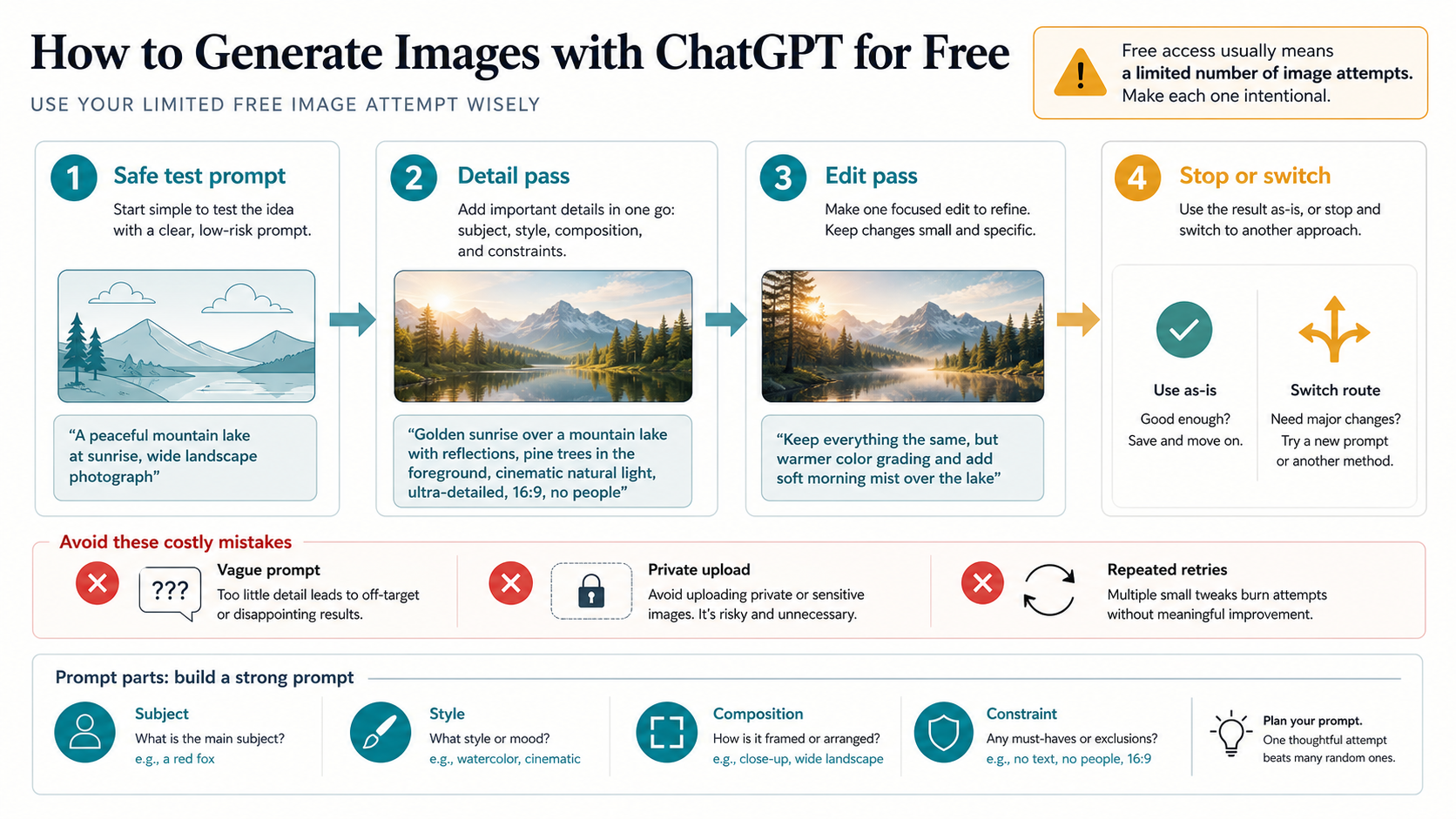
Use this ladder:
| Step | Prompt job | Example |
|---|---|---|
| Safe test | Prove the route works with public, non-personal content | Create a square image of a ceramic blue coffee mug on a clean white desk, soft daylight, minimal background. |
| Detailed generation | Add the real visual requirements | Create a 16:9 editorial image of a person planning an AI image prompt on a laptop. Clean desk, warm side light, no logos, no readable private text. |
| Focused revision | Change one thing at a time | Keep the same composition, but make the background less busy and use a brighter morning light. |
| Stop or switch | Decide whether the next attempt is worth the limit | If this still needs repeated variants, switch to paid ChatGPT, API, or a provider route instead of blind retries. |
A strong ChatGPT image prompt usually names four things: subject, visual style, composition, and constraint. The constraint matters because it prevents common waste. "No logos," "no private documents," "plain background," "one object only," or "keep the face out of frame" can be more valuable than adding five style adjectives.
For a first free attempt, use this pattern:
Create a [size or shape] image of [subject] in [style].
Composition: [camera angle, foreground/background, spacing].
Lighting and mood: [simple direction].
Constraints: no logos, no readable private text, no real person likeness, and keep the background uncluttered.
Then revise only the part that failed. If the subject is wrong, fix the subject. If the composition is cluttered, ask for a cleaner composition. If the style is close enough, do not spend another attempt chasing tiny differences unless the image is for a real deliverable.
Edit or upload an image only after the source is safe
ChatGPT Images can edit generated images and uploaded images, but upload risk is not the same as text-to-image risk. A text prompt about a fictional coffee mug is disposable. A client product shot, a private family photo, a contract screenshot, or an unreleased design file is not.
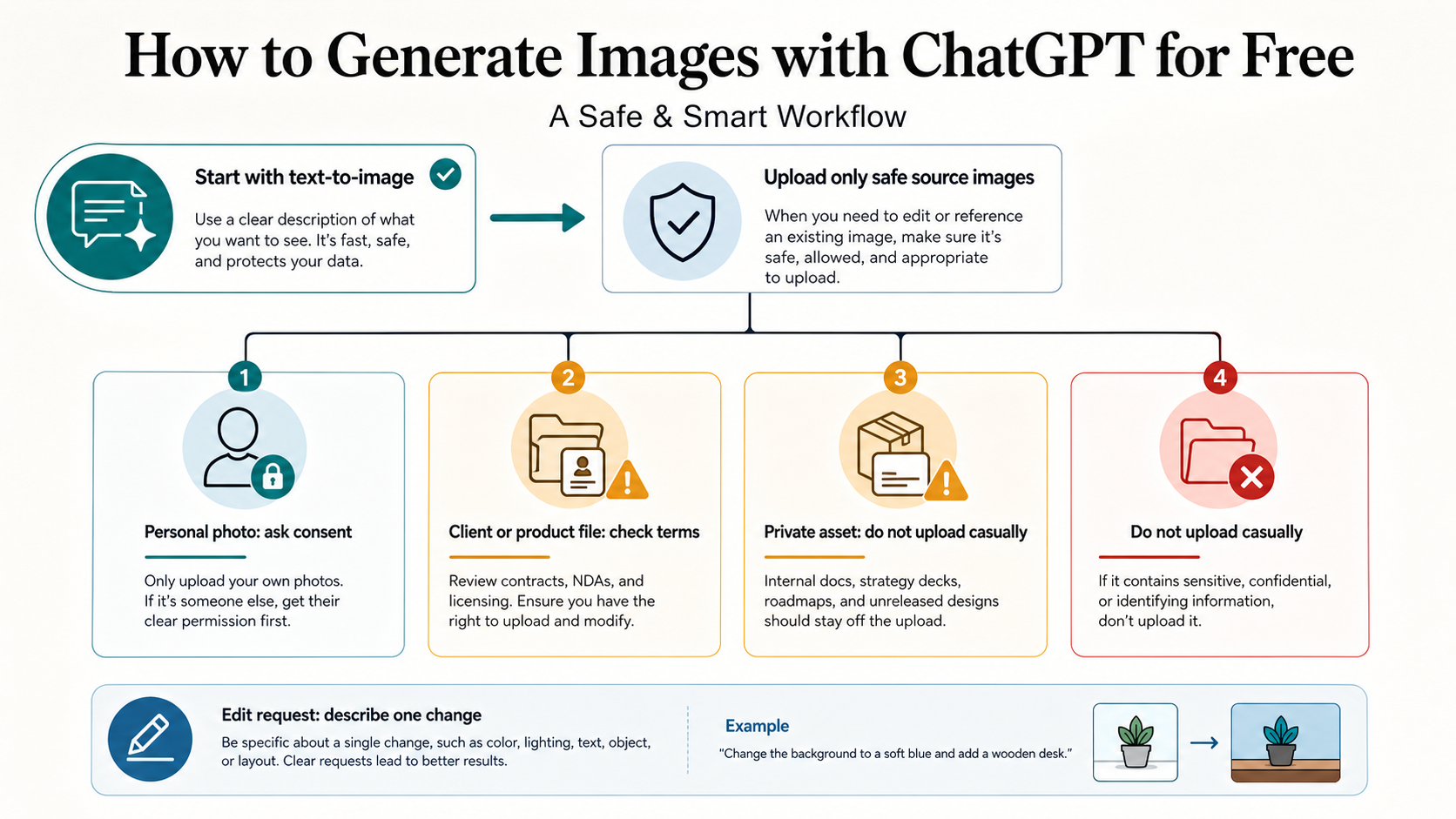
Use this upload rule before editing:
| Source image | Free-route decision |
|---|---|
| Public sample, synthetic image, or image you can replace | Reasonable for a low-risk ChatGPT edit |
| Personal photo | Upload only if you accept the product terms and the image does not expose sensitive context |
| Client, customer, product, legal, medical, financial, or unreleased asset | Do not upload casually; use an approved route with clear data handling, rights, deletion, and support |
| Unknown third-party image | Check rights before asking for edits or reuse |
For a safe edit, keep the instruction narrow:
Use this uploaded image as the reference. Change only the background to a clean light-gray studio wall. Keep the main subject, crop, and lighting close to the original. Do not add logos or readable text.That kind of prompt is easier to evaluate than "make this professional." It also reduces the chance that you spend limited attempts on broad edits that do not preserve the parts you cared about. If the source file is sensitive, the right move may be to describe the desired result in text instead of uploading the file.
The same caution applies to fallback tools. Do not upload private images to a random no-login generator because ChatGPT reached a limit. A provider route may be acceptable after an audit, but the audit has to happen before the upload, not after the image is already on someone else's system.
Handle the image limit as a route decision
OpenAI's ChatGPT Free Tier FAQ says Free users can create images in ChatGPT and that image creation has separate, stricter tool limits. It does not give a universal public number that every article can safely quote. That means the practical answer is to trust the in-product message for your account, plan, region, workspace, and day.
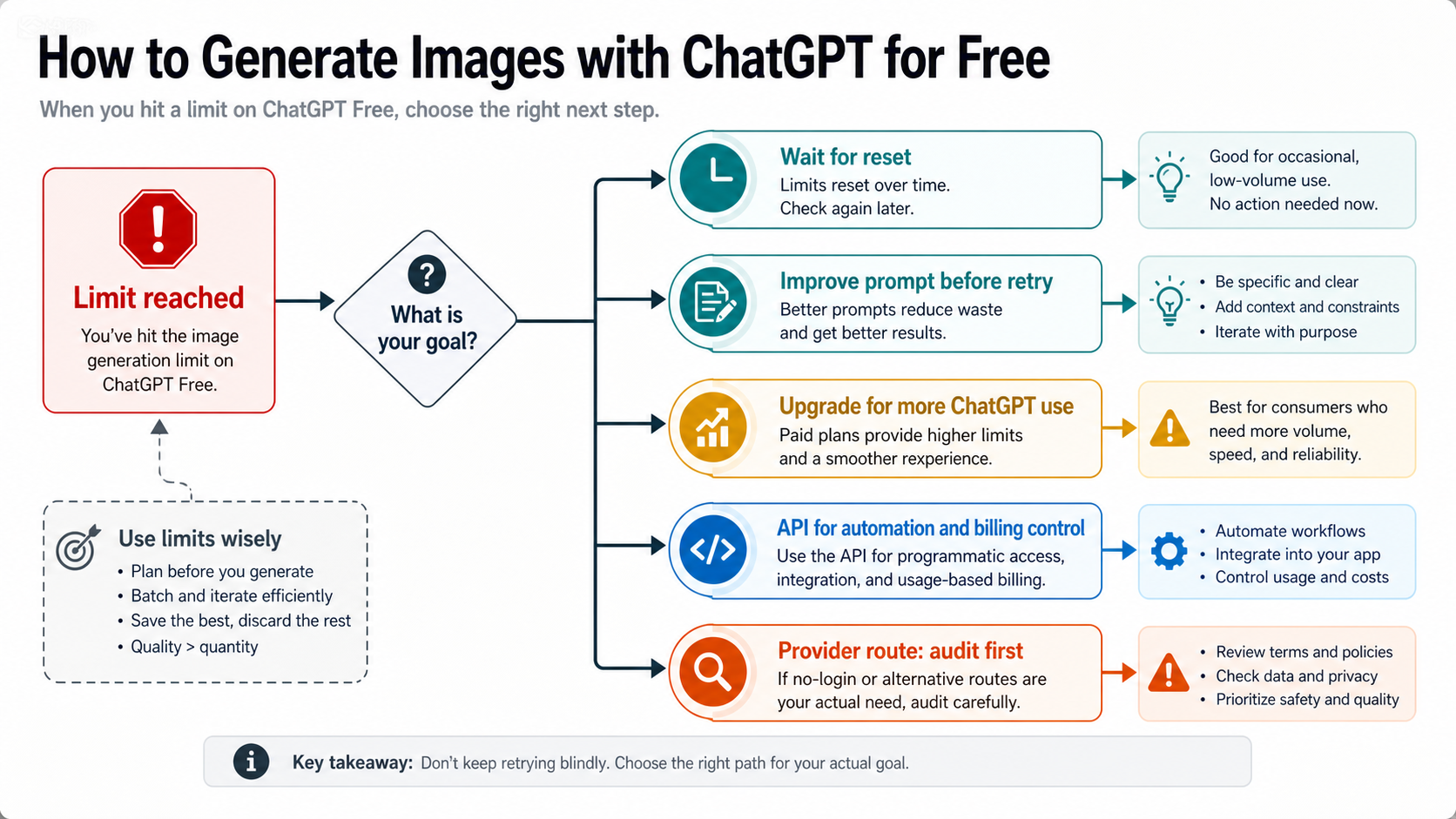
When the image limit appears, use this order:
| Situation | Next move | Why |
|---|---|---|
| You only need one more casual variant | Wait for the reset shown by ChatGPT | It preserves the official free route |
| Your prompts are vague | Rewrite the prompt before retrying later | Better prompts stretch limited attempts |
| You need many variations today | Consider a paid ChatGPT plan | Paid product access is the cleanest consumer upgrade |
| You need automation, logs, retries, or billing control | Move to the OpenAI API or another documented contract | ChatGPT Free is not a backend integration route |
| You need no-login testing | Audit a provider-owned route | Provider claims about free access, uploads, rights, and quotas are separate promises |
Avoid the two common limit mistakes. First, do not keep sending the same prompt during a limit state; that rarely creates useful evidence. Second, do not treat a community-reported number as an official daily quota. Limits can change, and account-level messages are a stronger guide than copied numbers from an old post.
If ChatGPT fails before a limit message appears, that is a different branch. Use the ChatGPT image generation not working guide for status checks, session resets, access checks, prompt-policy isolation, and upload troubleshooting. Normal free image generation should stay focused on the product workflow and the route boundary after ChatGPT tells you to stop.
Know when Free ChatGPT is enough, and when it is the wrong route
ChatGPT Free is enough when the job is exploratory, low-risk, and small. It is a good fit for learning how prompts behave, producing a quick concept, testing a public visual idea, or making a simple disposable image. It is not the right route for every image task just because it starts without payment.
Use this route split:
| Job | Better route |
|---|---|
| First image, public prompt, light experimentation | ChatGPT Free |
| More daily attempts, consumer workflow, faster iteration | Paid ChatGPT plan |
| App feature, backend workflow, logging, retries, billing control | OpenAI API with the documented image model route |
| Multi-step assistant that decides when to create an image | Responses API with hosted image generation |
| Browser-only no-login experiment | Provider route after upload, rights, quota, and support audit |
OpenAI's image generation developer guide describes API image generation and editing as developer routes. OpenAI's GPT Image 2 model page identifies gpt-image-2 as the API model and, at the May 18, 2026 check, shows that the Free API tier is not supported for that model. The consumer takeaway is simple: ChatGPT Free image access is not free API access.
If you are building a product, do not use a successful ChatGPT prompt as proof that your API project is ready. You still need model access, request shape, billing, storage, error handling, moderation, retry behavior, and output rights. The GPT Image 2 API guide is the deeper branch for that implementation work. If your question is specifically about official-free claims and high-resolution API output, use the free GPT Image 2 4K API guide instead.
Prompt patterns you can copy
Use these as starting shapes, not magic phrases.
Simple product-style image
Create a square product-style image of a matte black insulated water bottle on a light stone surface. Soft studio lighting, clean shadow, minimal background, no logos, no readable text.This is a good first test because the subject is public and the expected output is easy to judge. If it fails, the route or prompt needs work before you use private references.
Blog cover or editorial image
Create a 16:9 editorial illustration for an article about using ChatGPT to generate images for free. Show a clean workspace with a prompt notebook, a laptop showing abstract image thumbnails, and a small caution marker for limits. No brand logos, no fake UI text, no real person likeness.This keeps the concept specific without asking ChatGPT to recreate an exact product interface. Avoid fake screenshots if the article does not need them.
Uploaded image edit
Use the uploaded image as the source. Keep the main subject and crop. Replace the background with a simple light-gray studio wall, remove clutter, and keep the lighting natural. Do not change the subject's identity or add readable text.This edit is narrow enough to evaluate. If the source image is private or client-owned, do not use this prompt until the route is approved for that file.
Variant request after a decent result
Keep the same subject and composition. Make the background cleaner, increase contrast slightly, and make the image feel more like a modern editorial cover. Do not add new objects.This kind of revision is cheaper than starting from scratch mentally. It tells ChatGPT which parts to preserve and which parts to change.
FAQ
Can I generate images with ChatGPT for free?
Yes. OpenAI's Free Tier FAQ says Free users can create images in ChatGPT, while also saying image creation has separate, stricter tool limits. Treat it as limited product access, not unlimited generation.
How many free ChatGPT images do I get?
Do not rely on a fixed public number unless OpenAI shows it in the current product or docs for your account. Use the limit or reset message shown by ChatGPT. Third-party posts and user reports can drift by plan, account, region, and rollout.
Do I need ChatGPT Plus to make images?
Not for a first free workflow. Free users can create images, but paid plans have higher limits and may expose additional capabilities. Upgrade only when the limit, speed, or workflow value justifies it.
Can I generate images without logging in?
The official ChatGPT image workflow may ask you to log in or sign up. No-login generator pages are provider-owned tools, not the same as ChatGPT. Audit uploads, rights, storage, quotas, support, and model claims before trusting them.
Can I upload a personal photo to ChatGPT Free?
Technically, ChatGPT Images supports uploaded-image editing where available, but the safer question is whether the source image is appropriate for that route. Avoid private, client, product, legal, medical, financial, or unreleased files unless the terms and risk are acceptable.
Is ChatGPT Free the same as the OpenAI image API?
No. ChatGPT is the consumer product route. The OpenAI API is a developer contract with models, endpoints, billing, access controls, and logs. The gpt-image-2 API model is separate from ChatGPT Free image access.
Why does ChatGPT say I reached the image limit?
It means your current account or route has hit the product boundary for image creation. Wait for the reset shown by ChatGPT, improve your prompts before retrying, upgrade if the consumer workflow is valuable, or switch to an API/provider route when the job needs volume or control.
Are ChatGPT images saved automatically?
OpenAI's Images in ChatGPT FAQ says generated images are saved under Images, and that deleting an image from My images is tied to deleting the conversation where it was created. Save or download files you need, and keep sensitive work in an approved route.
Can I use ChatGPT images commercially?
Check the current terms for the route and the rights attached to your inputs. The more commercial, client-facing, private, or rights-sensitive the work becomes, the more important it is to use a route with clear terms, ownership, storage, and support.
![Three tile stacks on a white plinth comparing price per 1 MP image: [klein] LoRA $0.015, [pro] with one reference $0.045, [dev] LoRA $0.021](/posts/en/flux-2-pro-lora-product-photography-n8n/img/cover.webp)
