If you searched chatgpt api generate image, the clean current answer on March 23, 2026 is this: start with the OpenAI Images API and gpt-image-1.5. For a direct one-shot request, that means client.images.generate() or POST /v1/images/generations, not a separate ChatGPT-only endpoint.
The reason this keyword feels more confusing than it should is that OpenAI's current image stack is split across several official surfaces. The image generation guide centers the direct Images API and says gpt-image-1.5 is the latest and best default GPT Image model. The Responses image_generation tool guide shows the broader tool route. The chatgpt-image-latest model page explains the alias that points to the image snapshot currently used in ChatGPT. If you only read one of those pages, it is easy to build the wrong mental model.
The safest sequence is simple. Get one direct Images API request working first, save the returned base64 image to disk, confirm your account actually has access, and only then add the Responses tool or alias choices if your product really needs them. That sequence removes most of the wasted work page one still creates.
TL;DR
- There is not a separate first-stop "ChatGPT image API" you need to learn before everything else.
- For a direct image request, use the OpenAI Images API with
gpt-image-1.5. - Use the Responses
image_generationtool only when image output is part of a larger multimodal or assistant flow. - Treat
chatgpt-image-latestas the alias for the image snapshot currently used in ChatGPT, not as proof of a separate platform. - If the sample fails, check tier access, organization verification, and which organization your API key belongs to before rewriting the code.
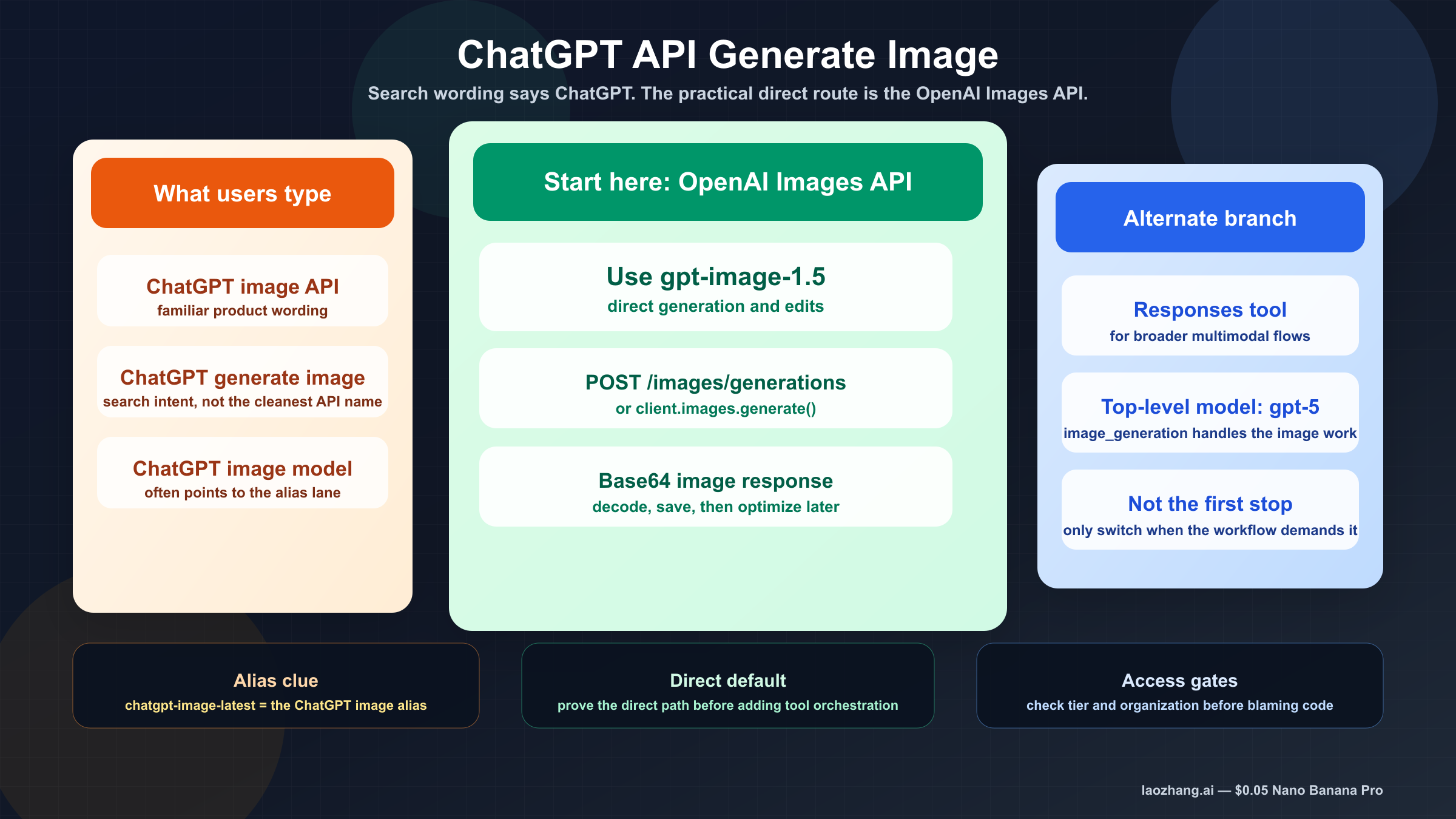
Is there a ChatGPT image API, or are you really using the OpenAI Images API?
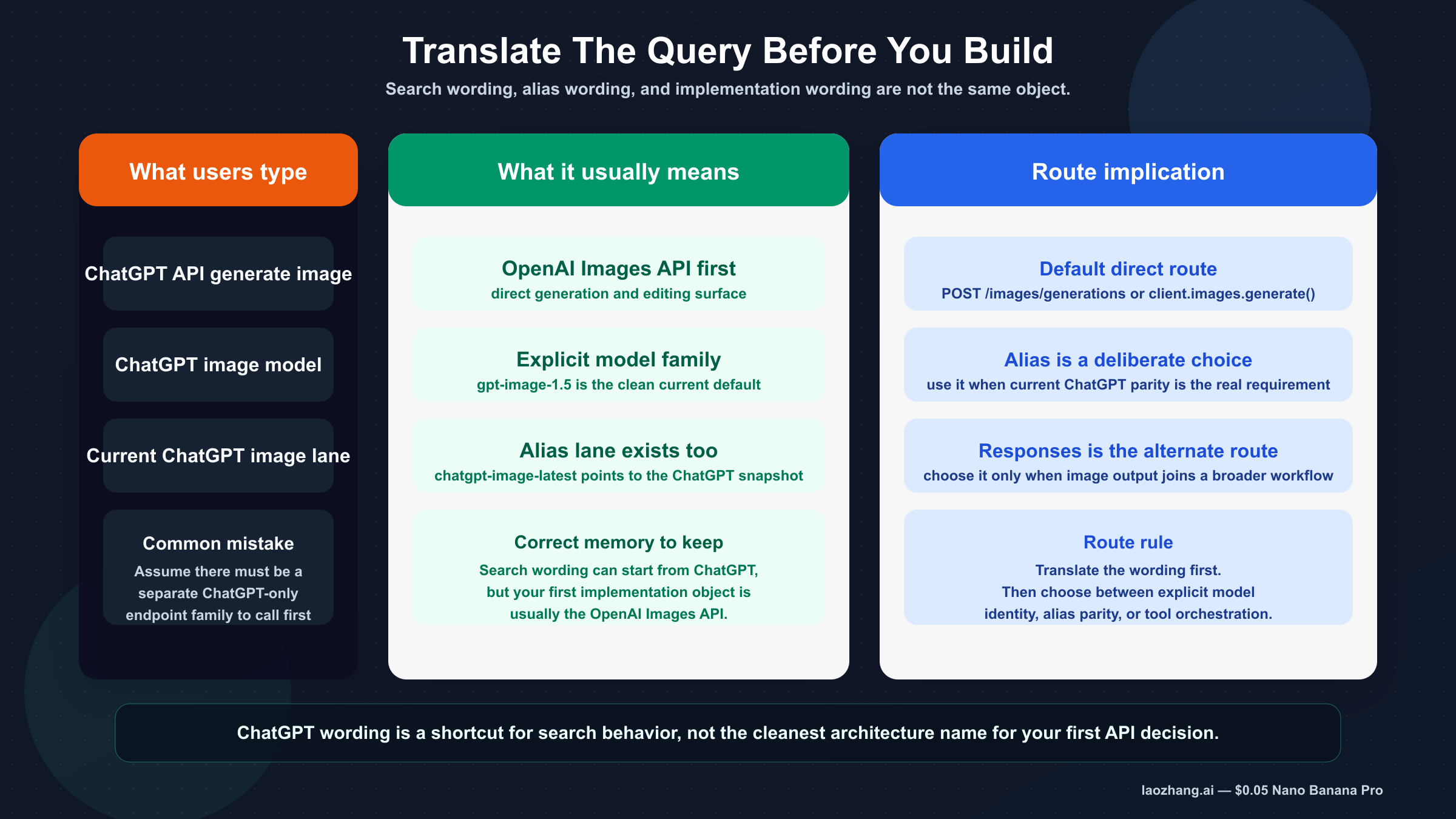
In practice, you are usually using the OpenAI image API, even when your search starts with ChatGPT wording. That is the first thing weak pages still fail to say clearly enough.
OpenAI's current chatgpt-image-latest model page says the alias points to the image snapshot currently used in ChatGPT. That matters because it explains why the keyword exists. Users know the ChatGPT experience, so they search for a ChatGPT API. But the implementation surfaces are still the OpenAI API surfaces: v1/images/generations, v1/images/edits, and the Responses API when image generation is one tool among others.
That distinction is more than branding. It changes how you debug and how you document your code. If you tell yourself "I need the ChatGPT image API," you can end up on thin pages that pitch stale gpt-4o examples, proxy base URLs, or hand-wavy advice about "global access." If you tell yourself "I need the current OpenAI image API route that matches the ChatGPT image experience when appropriate," the documentation gets much clearer.
This is also why the keyword is beatable. Official OpenAI pages have the facts, but they do not all solve the same reader problem. One page gives you model facts. Another page gives you tool syntax. Another gives you the raw endpoint. Another explains verification. The real reader problem is not "what is image generation?" It is "what should I call first so I can ship the feature without learning the wrong abstraction?"
For that question, the answer is narrow and operational:
- Use the direct Images API first.
- Use
gpt-image-1.5as the default current model. - Treat
chatgpt-image-latestas an alias decision, not as your first architecture decision.
If your team is still sorting out the broader surface map, the next wider read is our OpenAI Image API tutorial. This article is narrower on purpose. Its job is to translate the ChatGPT-worded keyword into the right first implementation move.
The fastest current way to generate an image from the API
For a simple "generate one image" request, the shortest clean path is the direct Images API. The official Images reference shows the raw route as POST /images/generations, and the current image generation guide recommends gpt-image-1.5 for the best experience.
The first request should be boring on purpose:
- one prompt
- one square image
- no unnecessary orchestration
- decode the base64 payload
- save the file locally
That proves the full integration path, not just the HTTP request.
Here is the shortest useful JavaScript example:
jsimport fs from "fs";
import OpenAI from "openai";

const client = new OpenAI({
  apiKey: process.env.OPENAI_API_KEY,
});

const result = await client.images.generate({
  model: "gpt-image-1.5",
  prompt: "Create a clean editorial illustration of a robot camera operator in a bright studio",
  size: "1024x1024",
  quality: "medium",
});

const imageBase64 = result.data[0].b64_json;
const imageBuffer = Buffer.from(imageBase64, "base64");
fs.writeFileSync("chatgpt-api-generate-image.png", imageBuffer);
The matching Python version is just as direct:
pythonfrom openai import OpenAI
import base64

client = OpenAI()

result = client.images.generate(
    model="gpt-image-1.5",
    prompt="Create a clean editorial illustration of a robot camera operator in a bright studio",
    size="1024x1024",
    quality="medium",
)

image_base64 = result.data[0].b64_json
image_bytes = base64.b64decode(image_base64)

with open("chatgpt-api-generate-image.png", "wb") as f:
    f.write(image_bytes)
And this is the raw curl shape:
bashcurl https://api.openai.com/v1/images/generations \
  -H "Authorization: Bearer $OPENAI_API_KEY" \
  -H "Content-Type: application/json" \
  -d '{
    "model": "gpt-image-1.5",
    "prompt": "Create a clean editorial illustration of a robot camera operator in a bright studio",
    "size": "1024x1024",
    "quality": "medium"
  }' \
  | jq -r '.data[0].b64_json' \
  | base64 --decode > chatgpt-api-generate-image.png
This is the right first example for three reasons. First, it matches the current official default model guidance. Second, it keeps the route direct enough that failures are easier to diagnose. Third, it teaches the output contract many weak tutorials still gloss over: the current Image API returns base64-encoded image data by default, with PNG as the default output format, while JPEG and WebP plus output_compression are optional tuning knobs.
If your real need is a broader example page with more variants, follow this with our OpenAI image generation API example. For this keyword, the important thing is to get the first route correct before you widen the tutorial.
Images API vs Responses image_generation tool
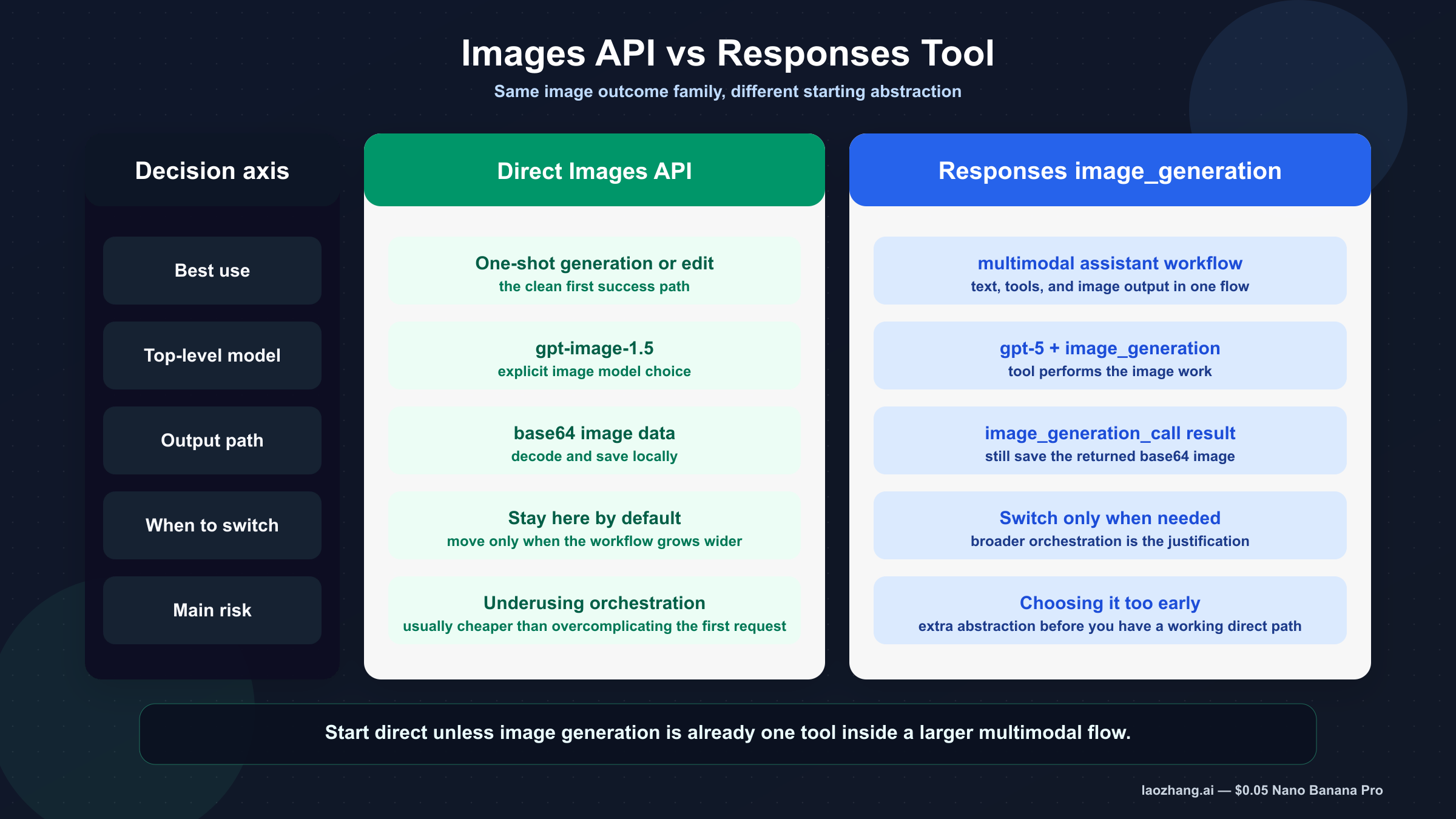
The direct Images API is the better default when image generation itself is the feature. The Responses tool is the better default when image output is one part of a larger reasoning or multimodal workflow.
| Situation | Better default | Why |
|---|---|---|
| You need one prompt in, one image out | Images API | Fewest moving parts and the cleanest first success path |
| You want a backend endpoint that generates or edits images | Images API | Easier request contract and easier debugging |
| You need image editing on one or more source images | Images API | Direct edit route is documented here and keeps the flow explicit |
| You are building a larger assistant that sometimes returns images | Responses image_generation | Image output fits naturally inside the broader tool flow |
| You need multi-turn conversation state plus image output in one workflow | Responses image_generation | The tool keeps image generation inside the same orchestration surface |
The Responses tool guide makes the key detail explicit with code: the top-level responses.create() example uses model: "gpt-5" and attaches tools: [{ type: "image_generation" }]. The image tool itself leverages GPT Image models behind the scenes. That is why forcing gpt-image-1.5 into the top-level Responses model field is usually the wrong reading of the docs.
If you do need the tool route, the smallest useful pattern looks like this:
jsimport fs from "fs";
import OpenAI from "openai";

const client = new OpenAI({
  apiKey: process.env.OPENAI_API_KEY,
});

const response = await client.responses.create({
  model: "gpt-5",
  input: "Generate a transparent sticker-style icon of a paper airplane",
  tools: [{ type: "image_generation", background: "transparent" }],
});

const imageBase64 = response.output
  .filter((item) => item.type === "image_generation_call")
  .map((item) => item.result)[0];

fs.writeFileSync("paper-airplane.png", Buffer.from(imageBase64, "base64"));
That code is helpful here for one reason only: it shows the branching rule in concrete form. The direct Images API example uses an explicit image model. The Responses example uses a mainline reasoning model plus the image-generation tool. Once you see both side by side, the route choice becomes much harder to misunderstand.
In other words, the direct Images API is not "older thinking." It is the right abstraction when image generation is the product surface. The Responses tool is not "more correct." It is more correct only when your workflow is broader.
That difference affects how you should teach or document the feature internally:
- If a junior developer needs the fastest first success, use the direct Images API.
- If your team is building a multimodal assistant with text, tools, and image generation in one request, use Responses.
- If you are still unsure which route to take, that uncertainty is itself a signal to start direct first and add orchestration later.
This keyword does not need a philosophical answer. It needs a rule that survives future turnover: start direct unless your product clearly needs tool orchestration now.
The current model names that matter
The current names matter because the SERP still leaks older launches and misleading tutorials into the click path.
| Model or label | What it means now | Best use |
|---|---|---|
gpt-image-1.5 | Current latest GPT Image model and the best official default | Most direct production image generation and editing work |
gpt-image-1.5-2025-12-16 | Dated snapshot exposed on the model page | Controlled benchmarking or reproducible rollout |
chatgpt-image-latest | Alias that points to the image snapshot currently used in ChatGPT | Use only when matching the current ChatGPT image lane is itself the goal |
gpt-image-1 | Older GPT Image lane still present in docs and history | Migration or compatibility only |
| DALL-E 2 / DALL-E 3 | Deprecated specialized image models | Do not use as the fresh default for this keyword |
The current image guide says gpt-image-1.5 is the latest and most advanced model in the GPT Image family and recommends it for the best experience. The same page says DALL-E 2 and DALL-E 3 are deprecated and will stop being supported on 05/12, 2026. That is enough to reject most stale "GPT-4o image API" or DALL-E-first guides as the wrong starting point for a fresh build.
The gpt-image-1.5 model page also gives you two operationally useful facts:
- Free is not supported
- Tier 1 starts at 100,000 TPM and 5 IPM
It also exposes the snapshot gpt-image-1.5-2025-12-16, which is useful if you care about reproducibility and staged rollout. If alias drift is the part you want to understand better, the natural follow-up is chatgpt-image-latest vs gpt-image-1.5.
Pricing is not the center of this keyword, but it is still worth knowing the visible current price ladder on March 23, 2026. The chatgpt-image-latest page lists $0.009 for low-quality 1024x1024 image generation, $0.034 for medium, and $0.133 for high. Those visible per-image prices are one more reason not to trust older articles that still describe this lane as GPT-4o image generation with legacy-style pricing assumptions. If your actual next decision is budget, go straight to OpenAI image generation API pricing.
Troubleshooting: clear the access checks before you blame the sample
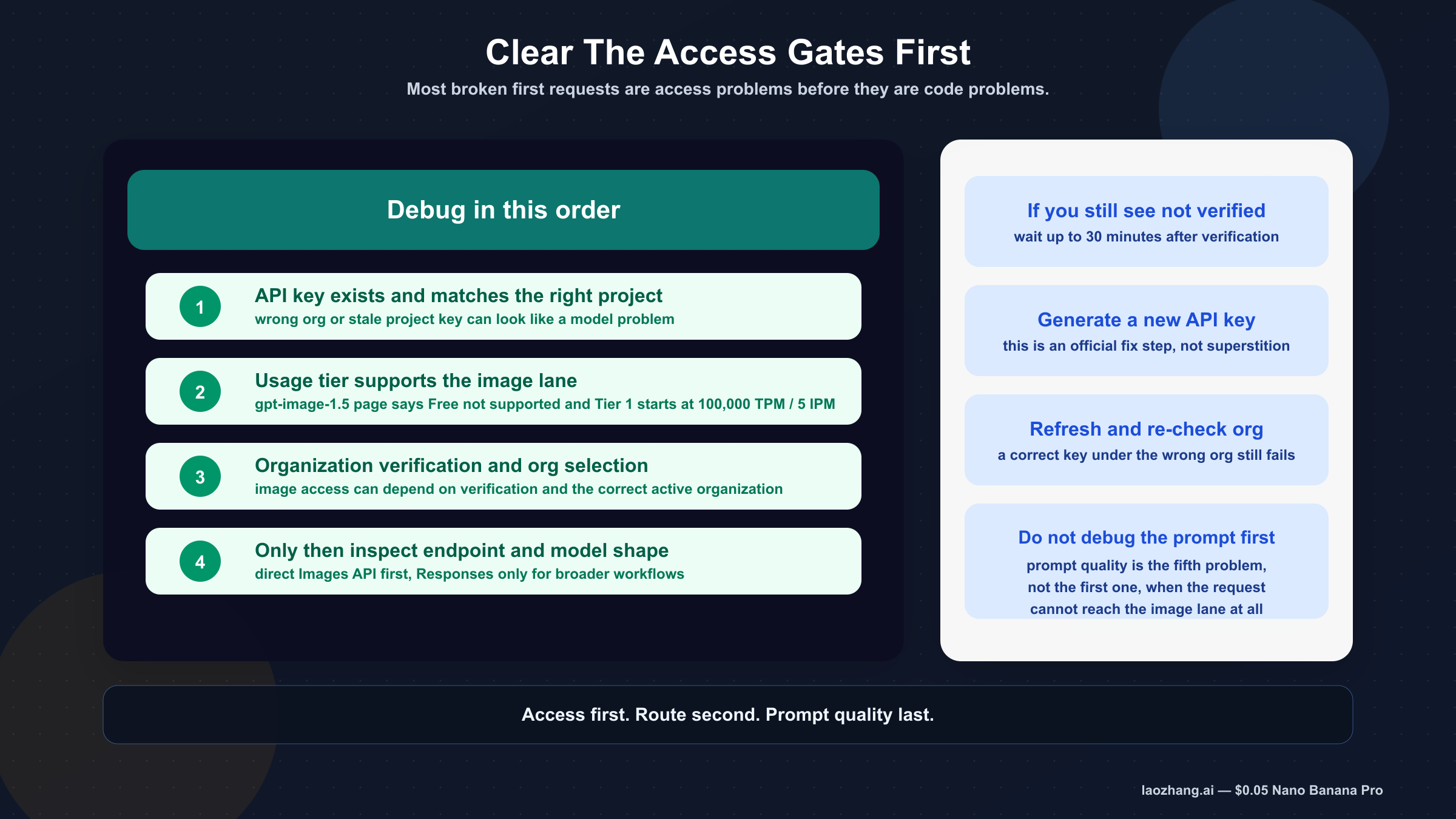
Most first-run failures on this keyword are not caused by the code sample itself. They are caused by account state, organization selection, or stale assumptions about which OpenAI surface you actually have access to.
The first access check is usage tier. The API model availability page says GPT-image-1 and GPT-image-1-mini are available to API users on tiers 1 through 5, with some access subject to organization verification. The gpt-image-1.5 model page separately says Free not supported. Put those together and the practical rule is straightforward: if you are treating this like a free ChatGPT feature, you are already on the wrong mental path for API access.
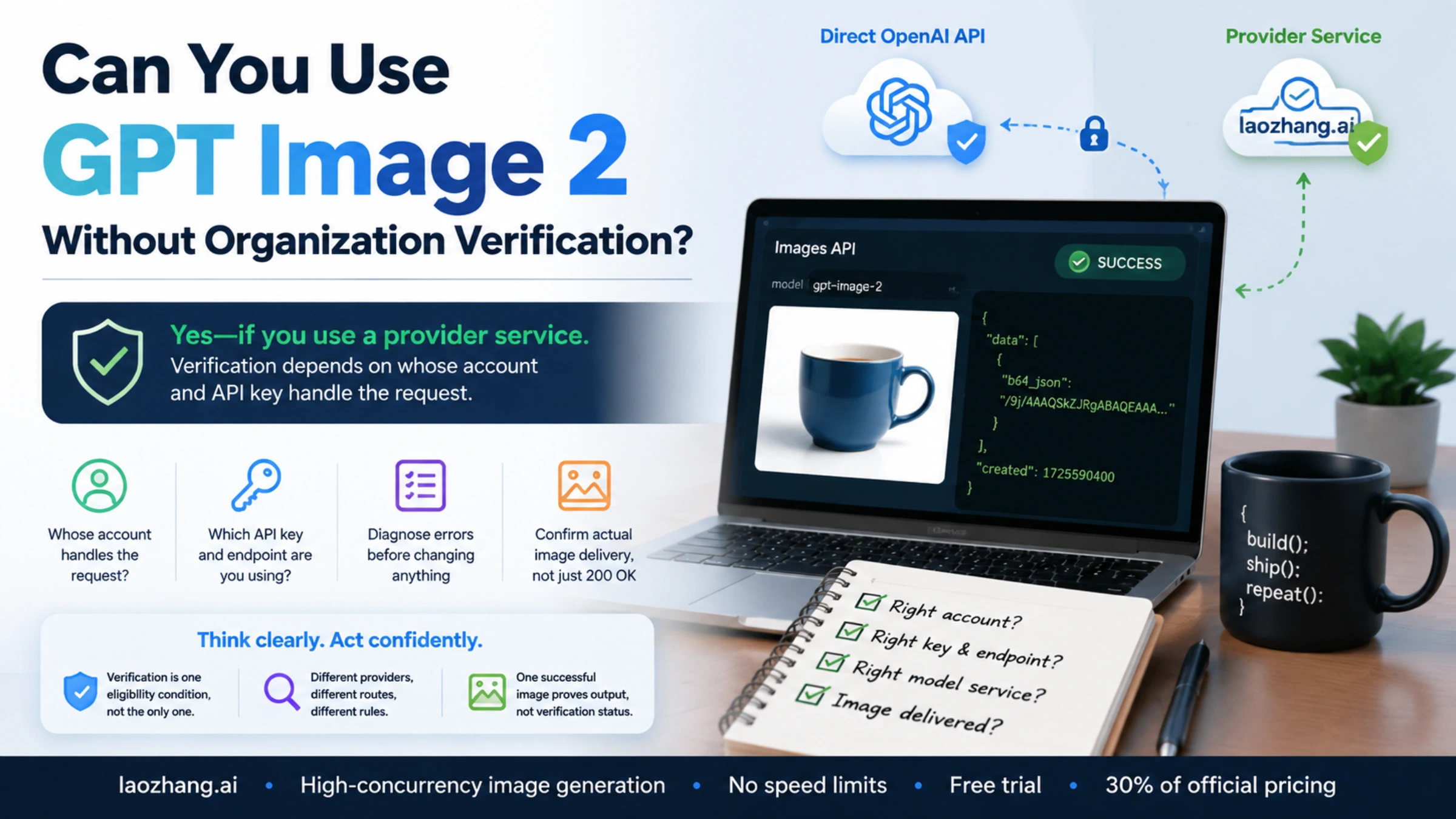
The second access check is organization verification. The API Organization Verification article says verification can unlock image generation capabilities in the API. It also gives concrete remediation steps if you still see a "not verified" error after verification:
- wait up to 30 minutes
- generate a new API key
- refresh or log out and back in
- confirm you are viewing the correct organization
Those steps are worth surfacing because developers often do the opposite. They reinstall the SDK, change prompts, or rewrite the whole sample before they verify whether the account can actually call the model.
The third access check is route choice. If you copied a Responses example when all you needed was one direct image request, you may spend time debugging a tool workflow you never needed. If you copied a stale article that uses gpt-4o for the image request or assumes hosted image URLs instead of base64 output, you can waste even more time blaming OpenAI for a problem that started with the tutorial.
The clean debugging order is:
- access and organization
- current model name
- endpoint and request shape
- output decoding
- prompt quality
If your main blocker is still access after this article, the right next read is OpenAI image generation API verification, because that page goes deeper on the org-verification branch instead of repeating the general API tutorial.
The weak tutorial mistakes to avoid
The first weak pattern is the stale proxy-first guide. If a page frames the whole problem as "use this proxy to unlock the ChatGPT image API," it is already dragging you away from the current official route. Even when those pages look complete, they often teach the wrong defaults, the wrong model names, or a route that only makes sense inside that vendor's own product.
The second weak pattern is the stale gpt-4o image default. That still shows up in ranking content because it sounds recent enough to pass a quick skim. But the current OpenAI image guide recommends gpt-image-1.5, and the current model pages expose the GPT Image family directly. A fresh article on March 23, 2026 should not center gpt-4o as the default answer for this query.
The third weak pattern is the wrong Responses mental model. Some pages correctly say the Responses API can generate images, but then fail to explain that the top-level Responses model is a mainline model and the image work is happening through the image_generation tool. Readers then copy a code shape they do not fully understand and end up debugging the wrong field.
The fourth weak pattern is treating ChatGPT plan behavior and API behavior as the same gate. They are not. The ChatGPT product experience may be the reason the query exists, but API usage tier, organization verification, and explicit model availability are separate operational questions.
The better habit is to ask four short questions every time you open a tutorial:
- Does it use the current GPT Image naming?
- Does it distinguish direct Images API from Responses tool usage?
- Does it explain output handling instead of only sending the request?
- Does it mention tier or verification gates before blaming the SDK?
If the answer is no to most of those, move on. The page may still rank, but it is not your safest implementation guide.
Final recommendation
If your goal is simply to generate an image from the API, the safest current answer is to use the OpenAI Images API with gpt-image-1.5. That is the route most people mean when they search chatgpt api generate image, even if they do not know the OpenAI surface names yet.
Use chatgpt-image-latest only when following the current ChatGPT image alias is itself the point. Use the Responses image_generation tool only when image output is one step inside a broader multimodal workflow. Keep those as deliberate choices, not as your first guess.
The practical sequence that will waste the least time is:
- run one direct Images API example
- confirm the account has access
- save the base64 image successfully
- only then add alias decisions, edits, or the Responses tool
That sequence is less glamorous than a giant "complete guide," but it is a better way to ship the feature. And for this keyword, a better sequence is exactly what page one still lacks.