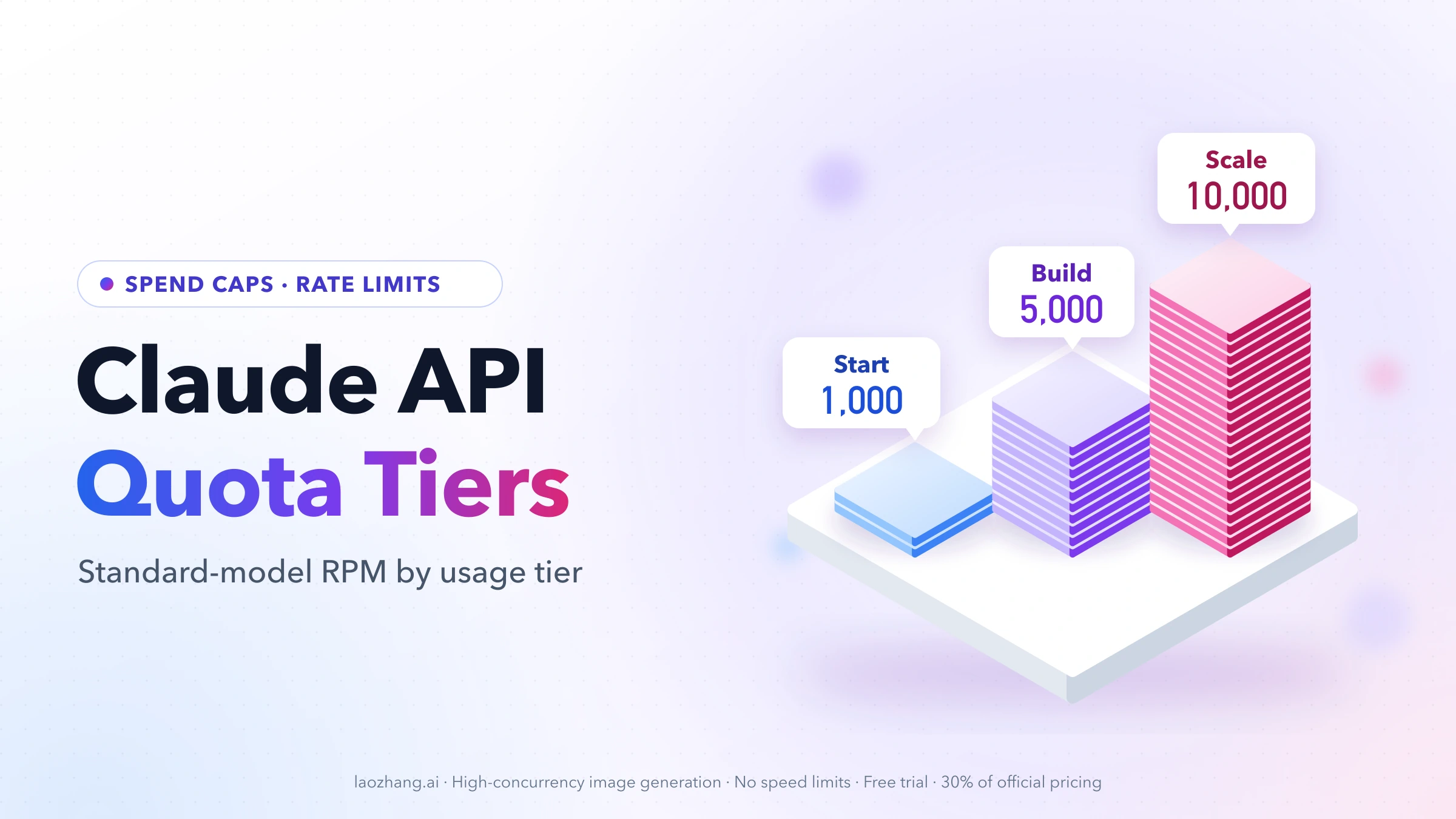
As of October 8, 2026, the Claude API has three standard usage tiers (Start, Build and Scale) plus a Custom tier arranged with Anthropic's account team. You don't buy a tier with a deposit. Anthropic places your organization on one automatically based on usage history and account standing, and moves it up over time. New organizations may begin in a lower Evaluation tier first. Each tier has a monthly spend cap ($500 for Start, $1,000 for Build, $200,000 for Scale, none for Custom) and per-model rate limits measured in RPM, ITPM and OTPM. Your current tier is on the Rate limits page of the Claude Console. Source: Anthropic's rate limits documentation.
Tier 1, Tier 2, Tier 3 and Tier 4 are the old names. Anthropic replaced them on June 26, 2026 and said most organizations moved to a higher tier and none got lower limits, but it hasn't published a tier-by-tier mapping. Third-party reports suggest one, covered in the section on the old names.
What Are Claude API Quotas and Limits? Spend Caps and Rate Limits
Two kinds of limits stop Claude API requests, and they fail differently:
- Spend limits cap what your organization can spend on the API in a calendar month. Every tier except Custom has one, and you can also set your own lower limit.
- Rate limits cap how fast you can send work: requests per minute (RPM), input tokens per minute (ITPM) and output tokens per minute (OTPM), counted separately for each model class.
Both are enforced at the organization level, not per API key. Every key, teammate and app in one organization draws from the same pool. Inside an organization, you can give individual workspaces lower limits so one project can't starve the others (more on that below).
The published numbers are maximums, not guarantees. Anthropic notes that limits can be enforced over shorter intervals than a minute. A 60 RPM limit, for example, may behave like 1 request per second, so a tight burst can trigger a 429 even when your per-minute total looks fine.
Claude API Usage Tiers: Start, Build, Scale and Custom
| Usage tier | How you get there | Monthly spend cap | Standard-model RPM / ITPM / OTPM |
|---|---|---|---|
| Evaluation | Possible starting point for new or low-history organizations | Not published | Below the Start limits, not published |
| Start | Automatic placement | $500 | 1,000 / 2,000,000 / 400,000 |
| Build | Automatic, as usage history grows | $1,000 | 5,000 / 5,000,000 / 1,000,000 |
| Scale | Automatic, as usage history grows | $200,000 | 10,000 / 10,000,000 / 2,000,000 |
| Custom | Arranged with the account team | No cap | Negotiated |
"Standard model" here means every current model class except Fable 5.x, which has lower limits (see the per-model table). Figures are from Anthropic's rate limits documentation as of October 8, 2026.
Monthly spend caps: $500, $1,000 and $200,000
The spend cap is the most your organization can spend on the API in one calendar month. When you reach it, usage pauses until 00:00 UTC on the first day of the next month, unless Anthropic grants a higher limit sooner. Moving to a higher tier restores access.
Separately, you can set your own spend limit under Settings > Billing > Spend limits in the Console. It can be lower than your tier's cap but never higher. It's the right tool if you want a budget alarm that stops traffic at, say, $200 on a Start-tier account.
Evaluation tier: lower starting limits for new organizations
Anthropic says new organizations and organizations with limited usage history may start in an Evaluation tier whose limits sit below the standard Start numbers. The limits rise automatically as the organization builds history. Anthropic doesn't publish the Evaluation numbers, and no third-party source found for this guide lists them either. The practical tell, as OfoxAI's 429 guide puts it: if the Rate limits page in the Console shows numbers below the Start row (1,000 RPM and 2,000,000 ITPM on standard models), your organization is still in Evaluation. Check that page before debugging your code when a brand-new account hits 429s early.
Where to see your current tier: Console and Rate Limits API
- The Rate limits page in the Claude Console shows your tier and current limits per model.
- The Billing page shows your monthly spend cap and any spend limit you set.
- The Rate Limits API returns organization and workspace limits programmatically, which helps if you want to size worker pools from real values instead of hard-coded ones.
Anthropic doesn't publish the exact criteria or thresholds for moving from Start to Build or from Build to Scale. The documented rule is automatic movement based on usage history and account standing, plus the option to request an increase. Anthropic's Help Center adds that you can request higher limits in the Console once you're using at least 50% of your current limits. A ClaudeDevs post on X (July 2, 2026, as quoted by AI Catchup) put it more bluntly: tiers are "no longer based on API spend." Topping up credits won't move you up the way the old $40/$200/$400 thresholds did.
What Happened to Claude API Tier 1, Tier 2, Tier 3 and Tier 4?
Earlier versions of Anthropic's documentation described four numbered tiers that you unlocked by buying credits:
| Old tier (no longer documented) | Cumulative credit purchase | Monthly spend limit |
|---|---|---|
| Tier 1 | $5 | $100 |
| Tier 2 | $40 | $500 |
| Tier 3 | $200 | $1,000 |
| Tier 4 | $400 | $5,000 |
As of October 8, 2026, that table and its deposit thresholds are gone from the rate limits documentation. Tiers are now named Start, Build, Scale and Custom, and placement is based on usage history and account standing rather than on how much you prepaid.
What this means in practice:
- "Claude Tier 4" isn't a current tier. If a library, forum post or old guide says "you need Tier 4," read it as "you need higher limits." Then check what your organization actually has on the Rate limits page.
- There is no official old-to-new mapping, only the reports below. Anthropic hasn't said whether a former Tier 2 organization became Start or Build, or whether Tier 4 became Scale. Your Console shows the result for your account.
- Old Tier 1–4 rate limit numbers are obsolete. The current Start tier alone allows 1,000 RPM and 2,000,000 ITPM on standard models. Plan against the current per-model tables, not old screenshots.
- The old "1M context only on Tier 4" rule no longer applies. See the long-context section.
What reports say about how old tiers became Start, Build and Scale
The only first-party statement is Anthropic's release note of June 26, 2026: rate limits were raised, Sonnet and Haiku limits now match Opus at every tier, usage tiers were consolidated into Start, Build and Scale, "most organizations move to a higher tier," no organization received lower limits, and no action is required.
Two third-party reports fill in more detail. Treat them as reports, not Anthropic policy:
- A May 2026 limit increase on the old tiers. MindStudio reported on May 8, 2026 that Opus input limits jumped to 500,000 ITPM on Tier 1 (from 30,000), 2,000,000 on Tier 2, 5,000,000 on Tier 3 and 10,000,000 on Tier 4, with Tier 1 output going from 8,000 to 80,000 OTPM.
- "No longer based on spend" and "5x at the highest tier." AI Catchup quoted a ClaudeDevs post on X (July 2, 2026) saying tiers are no longer based on API spend and that the latest Sonnet and Haiku models got 5x higher limits at the highest tier. AI Catchup later noted that Anthropic's docs describe the change as parity with Opus and don't state a 5x figure.
Put the May numbers next to today's table and a pattern appears. This is an inference, not a published mapping:
| Old tier | Opus ITPM reported in May 2026 | Current tier with the same ITPM | Likely outcome (unconfirmed) |
|---|---|---|---|
| Tier 1 | 500,000 | None (below Start's 2,000,000) | Moved up to Start, or held in Evaluation if usage history was thin |
| Tier 2 | 2,000,000 | Start | Start or higher |
| Tier 3 | 5,000,000 | Build | Build or higher |
| Tier 4 | 10,000,000 | Scale | Scale |
Read it this way: if your organization was on Tier 4 before June, Scale-level limits are the likely result. If you were on Tier 1, the release note's "no organization receives lower limits" means you should see at least the old Tier 1 numbers, and most likely Start. The Console is still the only authoritative answer for your account.
Rate Limits Explained: RPM, ITPM, and OTPM per Model
Each model class has its own RPM, ITPM and OTPM limit. Exceeding any one of the three returns HTTP 429 with a retry-after header that tells you how long to wait. Because limits are per model, you can run Sonnet 5.5 and Haiku 5.5 at their full limits at the same time.
Start, Build and Scale rate limits by model
| Model class | Start (RPM / ITPM / OTPM) | Build (RPM / ITPM / OTPM) | Scale (RPM / ITPM / OTPM) |
|---|---|---|---|
| Opus 5.5, Opus 5, Opus 4.x | 1,000 / 2,000,000 / 400,000 | 5,000 / 5,000,000 / 1,000,000 | 10,000 / 10,000,000 / 2,000,000 |
| Sonnet 5.5, Sonnet 5, Sonnet 4.x | 1,000 / 2,000,000 / 400,000 | 5,000 / 5,000,000 / 1,000,000 | 10,000 / 10,000,000 / 2,000,000 |
| Haiku 5.5, Haiku 4.5 | 1,000 / 2,000,000 / 400,000 | 5,000 / 5,000,000 / 1,000,000 | 10,000 / 10,000,000 / 2,000,000 |
| Fable 5.x | 1,000 / 500,000 / 100,000 | 2,000 / 1,500,000 / 300,000 | 4,000 / 4,000,000 / 800,000 |
| Haiku 3.5 (retired except on Google Cloud) | 1,000 / 100,000 / 20,000 | 2,000 / 200,000 / 40,000 | 4,000 / 400,000 / 80,000 |
Each row lists model classes that have the same numbers. They don't share one limit, though: each model class gets its own bucket at those values, as the next section explains. Custom-tier limits aren't published; you request them from sales through the Rate limits page. Source: Anthropic rate limits documentation, Messages API tables, as of October 8, 2026.
Which Claude models share a rate limit bucket
A few model families are grouped into one combined limit, so traffic to any member draws from the same bucket:
- Fable 5.x: Fable 5.1 and Fable 5 share one limit. Mythos 5.1 and Mythos 5 share a separate combined limit on the same terms.
- Opus 4.x: Opus 4.8, 4.7, 4.6 and 4.5 share one limit. Opus 5.5 and Opus 5 each have their own.
- Sonnet 4.x: Sonnet 4.6 and 4.5 share one limit. Sonnet 5.5 and Sonnet 5 each have their own.
Limits are also shared across inference_geo values, so "us" and "global" requests draw from the same pool. If you can't decide which model to run in the first place, Claude Sonnet vs Opus vs Haiku vs Fable: Which Model to Use compares them by task.
Cache-aware ITPM: cache reads don't count toward input limits
For every current model except Haiku 3.5, only two usage fields count toward ITPM:
input_tokens: tokens after your last cache breakpointcache_creation_input_tokens: tokens being written to the cache
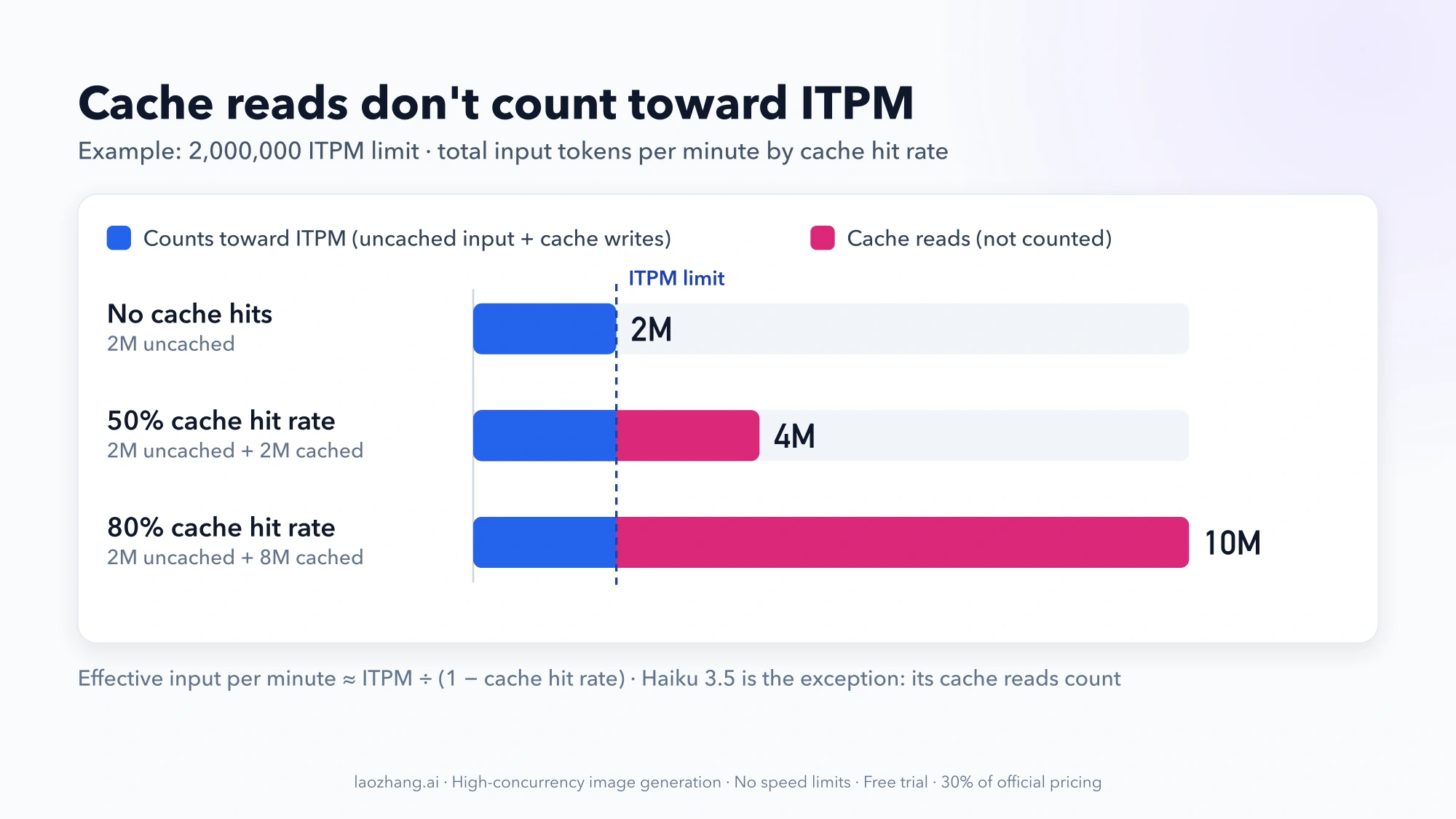
cache_read_input_tokens don't count. Anthropic's own example: with a 2,000,000 ITPM limit and an 80% cache hit rate, you can push about 10,000,000 total input tokens per minute (2M uncached + 8M read from cache). The general form is effective input per minute ≈ ITPM ÷ (1 − cache hit rate). At a 50% hit rate the same limit stretches to about 4,000,000.
Haiku 3.5 is the exception: its cache reads do count toward ITPM.
OTPM counts generated tokens, not max_tokens
OTPM is evaluated as output is produced and counts only tokens actually generated. The max_tokens value you send doesn't reserve OTPM capacity, so setting it high has no rate-limit cost. There's no need to shrink it to save OTPM. Keep it as a guard against runaway responses and cost, not as a rate-limit tactic.
Token bucket replenishment and acceleration limits
Anthropic uses a token bucket: capacity refills continuously up to your maximum instead of resetting at the top of each minute. After a 429 you don't wait for a fixed window; retry-after tells you when enough capacity is back.
There's one more source of 429s: acceleration limits. A sharp jump in usage can trigger them even when you're under your per-minute limits. Anthropic's advice is to ramp traffic up gradually and keep usage patterns consistent, which matters for launches, backfills and load tests.
Choosing the Right Tier for Your Use Case: Spend Cap vs Throughput
You can't pick a tier the way you could buy into Tier 4. What you can do is figure out which limit you'll hit first and plan around it. A quick calculation at Anthropic's list prices (no caching, standard global pricing) shows how fast saturated traffic reaches each monthly cap:
| Tier and model | Cost per minute at full ITPM + OTPM | Minutes of saturated traffic until the monthly cap |
|---|---|---|
| Start, Sonnet 5.5 ($2 / $10 per 1M tokens) | 2M × $2 + 0.4M × $10 = $8.00 | $500 ÷ $8 ≈ 62 minutes |
| Start, Haiku 5.5 ($0.10 / $0.50, prompts ≤100K) | 2M × $0.10 + 0.4M × $0.50 = $0.40 | $500 ÷ $0.40 = 1,250 minutes (≈21 hours) |
| Build, Sonnet 5.5 | 5M × $2 + 1M × $10 = $20.00 | $1,000 ÷ $20 = 50 minutes |
| Scale, Sonnet 5.5 | 10M × $2 + 2M × $10 = $40.00 | $200,000 ÷ $40 = 5,000 minutes (≈83 hours) |
How to read it:
- On Start and Build, the monthly spend cap usually stops you before the rate limits do. That holds for any sustained workload. The per-minute limits are generous; the dollar ceiling is not. If you expect more than $500 or $1,000 of usage in a month, request a higher limit before launch rather than after the cap pauses production.
- Rate limits matter most for bursts. A batch job that fires thousands of requests at once, or one huge prompt per call, hits RPM or ITPM long before the monthly bill becomes a problem.
- Scale is for real production volume. The $200,000 cap leaves room for days of saturated traffic. If you need more than that, or limits above Scale, you're in Custom territory.
Prices are for illustration and come from Anthropic's pricing page as of October 8, 2026. For the full per-model price list, cache and Batch rates, see Claude API Pricing Per Million Tokens.
How to Get Higher Claude API Limits: Request Tier Increase
- Open the Rate limits page in the Claude Console and use Request tier increase. The same flow covers higher rate limits and a higher monthly spend cap.
- Show sustained usage. Anthropic's Help Center article on rate limits says you can request higher limits once you're using at least 50% of your current limits. The Usage page charts (hourly peak uncached input tokens per minute, output tokens per minute and cache rate) are the evidence to look at before asking.
- For urgent needs, contact Anthropic support. Support can raise limits too.
- For limits above Scale, contact sales through the Rate limits page. That's the Custom tier.
Claude Platform on AWS is different. Organizations there start on the Start tier and move up as they build a history of paid AWS Marketplace invoices. The Request tier increase button isn't available; contact your Anthropic account representative or support instead.
Workspace limits: give one project less, not more
You can set custom spend and rate limits per workspace to protect the rest of the organization. For example, you can cap a staging workspace so a runaway test can't eat the production budget. Three rules apply. You can't set limits on the default workspace. A workspace without its own limits inherits the organization's. And organization-wide limits always apply, even if workspace limits add up to more. Workspace limits can only divide what your tier gives you; they never raise it.
Handling Claude API 429 Errors: Rate Limit vs Spend Cap
Not every 429 from the Claude API means "slow down." The spend-cap error uses the same HTTP status and error type as a rate limit, but retrying it is useless until access resumes.
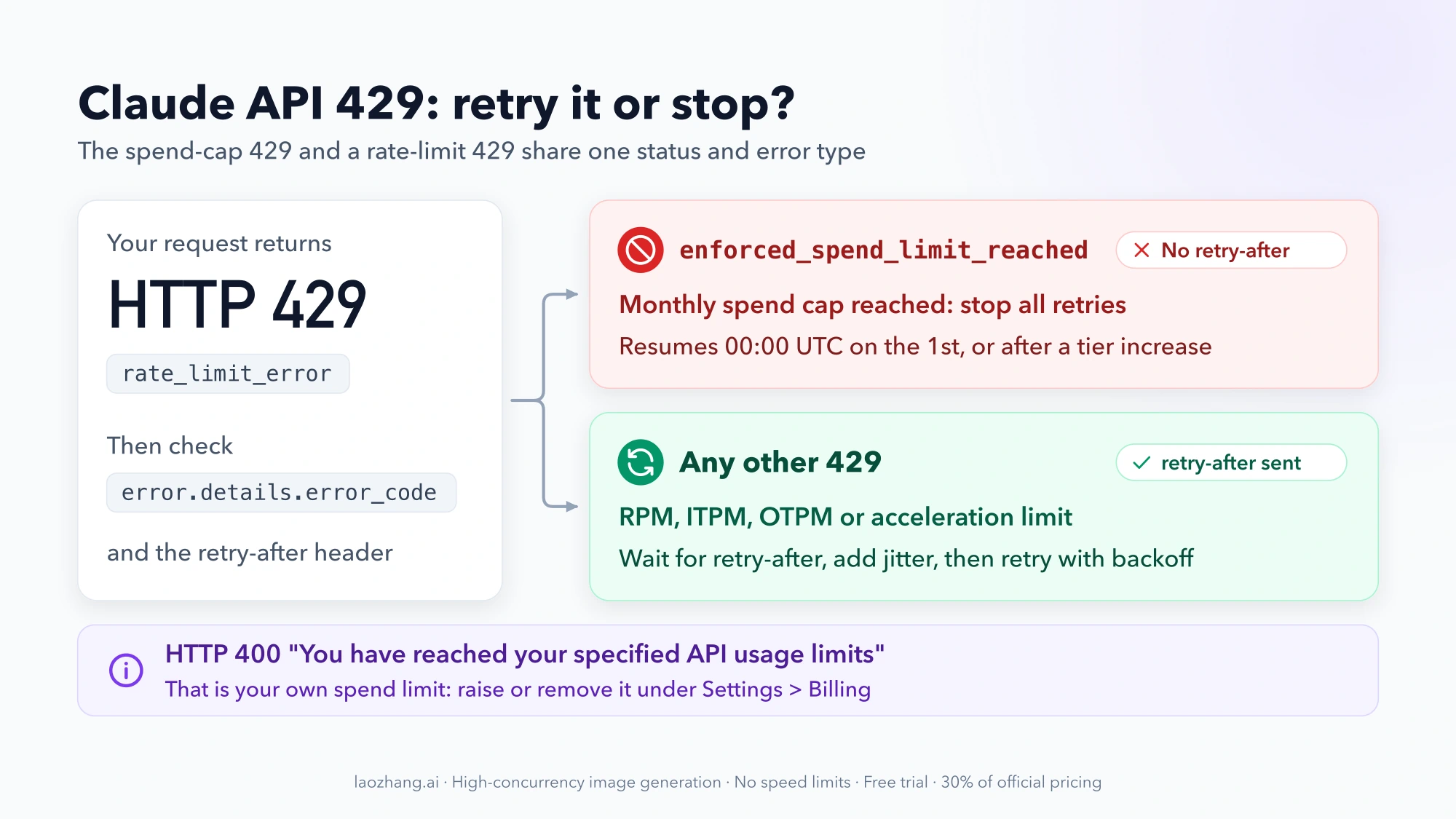
| What you hit | HTTP status and error | retry-after header? | What to do |
|---|---|---|---|
| RPM, ITPM, OTPM or acceleration limit | 429 rate_limit_error | Yes | Wait for retry-after, then retry with backoff and jitter |
| Tier's monthly spend cap | 429 rate_limit_error with error.details.error_code = enforced_spend_limit_reached | No | Stop retrying. Access returns at 00:00 UTC on the 1st, or after a tier increase |
| Spend limit you set yourself | 400 invalid_request_error, message starts "You have reached your specified API usage limits" | No | Raise or remove the limit under Settings > Billing |
| Claude Code workspace limit | 429 | Yes | Wait; this limit is checked separately from the organization cap |
Fast mode on Opus 5.5, Opus 5 and Opus 4.8 has its own dedicated limits. Exceeding them also returns a 429 with retry-after. For the full diagnosis path, including how 429 differs from 529, see How to Fix Claude API 429 Rate Limit Error.
Retry with exponential backoff and jitter in Python
The official SDKs retry some errors automatically, but automatic retries can't fix a spend-cap 429. The pattern below turns off the SDK's own retries so one loop controls them. It honors retry-after when present, otherwise uses exponential backoff with full jitter, and stops immediately on enforced_spend_limit_reached.
import random
import time

import anthropic

client = anthropic.Anthropic(max_retries=0)  # this loop owns the retries


class SpendCapReached(Exception):
    """Monthly spend cap hit: retrying will fail until access resumes."""


def create_with_backoff(max_attempts=6, base=1.0, cap=60.0, **params):
    for attempt in range(max_attempts):
        try:
            return client.messages.create(**params)
        except anthropic.RateLimitError as err:
            body = err.body if isinstance(err.body, dict) else {}
            error = body.get("error", body)
            code = (error.get("details") or {}).get("error_code")
            if code == "enforced_spend_limit_reached":
                raise SpendCapReached(error.get("message", "spend cap reached")) from err
            if attempt == max_attempts - 1:
                raise

            retry_after = err.response.headers.get("retry-after")
            if retry_after is not None:
                delay = float(retry_after) + random.uniform(0, 1)  # small jitter
            else:
                delay = random.uniform(0, min(cap, base * 2 ** attempt))  # full jitter
            time.sleep(delay)


# Usage: pass the same arguments you would give client.messages.create()
# reply = create_with_backoff(model=MODEL_ID, max_tokens=1024,
#                             messages=[{"role": "user", "content": "Hello"}])
MODEL_ID is whichever model ID you already use. Jitter matters when many workers share one organization: without it, they all wake up at the same moment and trigger the next 429 together. Catch SpendCapReached at the job level. Alert someone, pause the queue and don't requeue the request.
Rate limit response headers to monitor
Every response carries headers that show your remaining capacity, so you can slow down before you hit a 429:
| Header | What it tells you |
|---|---|
retry-after | Seconds to wait before retrying (absent on the spend-cap 429) |
anthropic-ratelimit-requests-limit / -remaining / -reset | RPM limit, requests left, full-refill time (RFC 3339) |
anthropic-ratelimit-input-tokens-limit / -remaining / -reset | ITPM limit, input tokens left (rounded to the nearest thousand), refill time |
anthropic-ratelimit-output-tokens-limit / -remaining / -reset | OTPM limit, output tokens left, refill time |
anthropic-ratelimit-tokens-limit / -remaining / -reset | The most restrictive token limit currently in effect, including a workspace limit |
anthropic-priority-* | Priority Tier capacity (Priority Tier customers only) |
In the Python SDK, read them through the raw-response wrapper:
raw = client.messages.with_raw_response.create(**params)
left = raw.headers.get("anthropic-ratelimit-input-tokens-remaining")
message = raw.parse()  # the normal Message object
Optimizing Your Rate Limits with Prompt Caching and Batch
Once you know which limit binds, two features buy the most headroom without a tier change.
Prompt caching: stretch ITPM and cut input cost
Because cache reads don't count toward ITPM on current models, caching the repeated part of every request multiplies usable input throughput. Good candidates are system instructions, long reference documents, tool definitions and earlier conversation turns. With an 80% hit rate, a Build-tier 5,000,000 ITPM limit covers about 25,000,000 total input tokens per minute (5M ÷ 0.2). Cache reads are also billed at a fraction of the base input price, so the same change lowers your spend against the monthly cap.
Check your actual hit rate in the Rate Limit - Input Tokens chart on the Console Usage page, which plots it next to your ITPM limit. For cache_control placement, cache lifetimes and code, see How to Use Prompt Caching in Claude API.
Message Batches API limits per tier
The Message Batches API has its own limits, shared across all models and separate from the per-model Messages limits. Batch processing is billed at 50% of standard input and output prices, which also makes the monthly spend cap go twice as far for work that can wait.
| Tier | Batch API RPM (all endpoints) | Max batch requests in processing queue | Max requests per batch |
|---|---|---|---|
| Start | 1,000 | 200,000 | 100,000 |
| Build | 2,000 | 300,000 | 100,000 |
| Scale | 4,000 | 500,000 | 100,000 |
| Custom | Contact sales | Contact sales | Contact sales |
A "batch request" is one item inside a Message Batch. A single batch of 100,000 items uses half of the Start tier's 200,000-item queue until those items are processed. Batch suits classification, moderation, bulk summarization, evaluations and nightly reports: anything without a user waiting on the answer.
Other Claude API Limits: Managed Agents, Fast Mode, Files and 1M Context
Managed Agents, Fast mode and Files API limits
- Claude Managed Agents: create endpoints (agents, sessions, environments) allow 300 requests per minute per organization, and read endpoints (retrieve, list, stream) allow 1,200 per minute. Both are separate from Messages API limits.
- Fast mode (research preview,
speed: "fast"on Opus 5.5, Opus 5 and Opus 4.8) has dedicated limits separate from standard Opus limits. Its status comes back inanthropic-fast-*headers. - Files API requests have their own per-organization limit, shared across upload, list, retrieve, download and delete.
1M token context window: no longer a Tier 4 feature
Under the old numbered tiers, the 1M-token context window was a beta limited to Tier 4 organizations and enabled with a beta header. That restriction is gone. Anthropic's pricing documentation now states that Claude 4.6 and later models (except Haiku 5.5) include the full 1M-token context window at standard pricing, with no tier requirement. A 900K-token request is billed at the same per-token rate as a 9K-token one.
Two things still apply. Huge prompts consume ITPM quickly, so a few 900K-token requests can use up a Start-tier minute unless most of the prompt is a cache read. And Haiku 5.5 prices by prompt length: prompts over 100,000 tokens cost $0.50 instead of $0.10 per million input tokens. Source: Anthropic pricing documentation.
FAQ: Common Questions About Claude API Limits
What are the different tiers for the Claude API?
Start, Build and Scale are the standard usage tiers, with monthly spend caps of $500, $1,000 and $200,000. Custom is for organizations whose limits are arranged with Anthropic's account team and has no spend cap. New organizations may begin in an Evaluation tier with lower, unpublished limits.
What is Claude API Tier 4 now?
Tier 4 was the top self-serve tier in Anthropic's older scheme (a $400 cumulative credit purchase, $5,000 monthly spend limit). The current documentation no longer uses it, and Anthropic hasn't published a mapping. Reported May 2026 limits put old Tier 4 at 10,000,000 Opus ITPM, the same as today's Scale tier, so former Tier 4 organizations most likely landed on Scale. That's an inference from third-party reports; check the Rate limits page in the Console for your organization's actual tier.
Is there a free tier for the Claude API?
No. There's no free usage tier. Anthropic's pricing page says new users get a small amount of free credits to test the API, without stating the amount. Limits for the consumer Claude apps and Claude Code subscriptions are a separate system; for Claude Code, see Claude Code /usage: Read Limits, Resets, and Usage Monitors.
How quickly do Claude API rate limits reset?
Continuously. The token bucket refills capacity at a steady rate up to your maximum rather than resetting on the minute. The anthropic-ratelimit-*-reset headers give the time of a full refill, and retry-after on a 429 says how long to wait. The monthly spend cap is different: it resets at 00:00 UTC on the first day of the next month.
Can I have different limits for different API keys?
Not per key. Limits apply to the whole organization. The closest tool is workspaces: put keys in separate workspaces and give a workspace lower spend or rate limits. You can't raise a workspace above the organization's limits.
Do cached tokens count toward Claude API rate limits?
Cache reads (cache_read_input_tokens) don't count toward ITPM on current models; Haiku 3.5 is the exception. Uncached input and cache writes do count. Output tokens always count toward OTPM.
What happens when I hit my monthly spend limit?
If it's your tier's cap, requests return HTTP 429 with error_code enforced_spend_limit_reached and no retry-after. Usage stays paused until 00:00 UTC on the 1st, unless you get a higher limit through Request tier increase. If it's a limit you set yourself, requests return HTTP 400 and you can raise or remove the limit under Settings > Billing.
How do I contact sales for custom Claude API limits?
Go to the Rate limits page in the Claude Console and use the contact-sales option for limits above the Scale tier. Anthropic's pricing page also lists sales@anthropic.com for enterprise pricing and custom rate limits.
Are Claude API rate limits shared across models?
No. Each model class has its own limits, so different models can run at full limits simultaneously. The exceptions are the combined buckets: Fable 5.1 + Fable 5, Mythos 5.1 + Mythos 5, Opus 4.8/4.7/4.6/4.5, and Sonnet 4.6 + 4.5.
What's the difference between Priority Tier and usage tiers?
They're different things. Usage tiers (Start, Build, Scale, Custom) set your organization's limits and spend cap. Service tiers (Priority, Standard and Batch) describe how a request is served. Priority Tier customers also get their own anthropic-priority-* rate limit headers.
Summary and Quick Reference: Claude API Tiers at a Glance
| Limit | Start | Build | Scale | Custom |
|---|---|---|---|---|
| Monthly spend cap | $500 | $1,000 | $200,000 | None |
| Opus / Sonnet / Haiku 5.x and 4.x RPM | 1,000 | 5,000 | 10,000 | Negotiated |
| ITPM (uncached input) | 2,000,000 | 5,000,000 | 10,000,000 | Negotiated |
| OTPM | 400,000 | 1,000,000 | 2,000,000 | Negotiated |
| Fable 5.x RPM / ITPM / OTPM | 1,000 / 500K / 100K | 2,000 / 1.5M / 300K | 4,000 / 4M / 800K | Negotiated |
| Batch queue (requests) | 200,000 | 300,000 | 500,000 | Contact sales |
Key rules as of October 8, 2026:
- Tiers are assigned automatically from usage history and account standing. There are no deposit thresholds, and Tier 1–4 are legacy names with no published mapping.
- Cached reads don't count toward ITPM (except Haiku 3.5), and
max_tokensdoesn't count toward OTPM. - A 429 with
enforced_spend_limit_reachedand noretry-afteris the monthly cap. Don't retry it. - Every other 429: honor
retry-after, add jitter and ramp traffic gradually. - Need more? Use Request tier increase once you're using at least 50% of your current limits, or contact sales for Custom.
Limits change, so treat the official rate limits page and your Console as the final word for your organization.