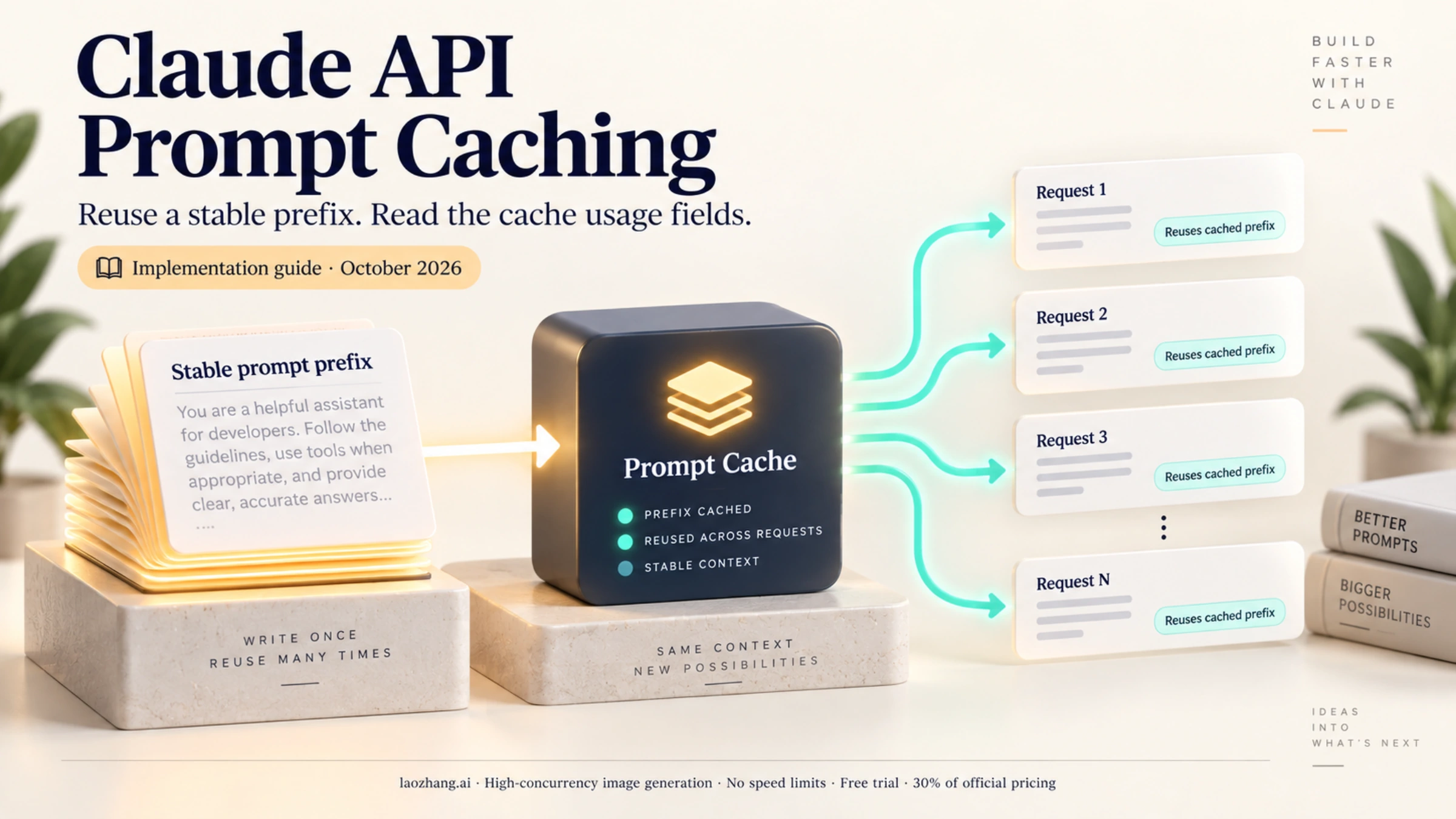
Prompt caching is one of the most impactful features Anthropic has added to the Claude API. Since its general availability in late 2024, developers have reported cost reductions of up to 90% and latency improvements of up to 85% for their applications. Yet many developers either don't know about this feature or struggle to implement it correctly.
In production environments, the difference between using prompt caching and not using it can mean the difference between a profitable AI product and one that bleeds money on API costs. A customer support bot processing thousands of queries daily against a 50,000-token product manual can save thousands of dollars per month with proper caching implementation (about $2,850 a month on Claude Sonnet 5.5 in the example below).
This guide walks you through everything you need to know about Claude API prompt caching—from basic concepts to production-ready implementations in both Python and TypeScript. You'll learn exactly when caching makes sense, how to calculate your potential savings, and how to troubleshoot common issues that can silently kill your cache hit rates.
What Is Claude API Prompt Caching?
Prompt caching is an optimization feature that allows you to store and reuse processed prompt prefixes across multiple API requests. Instead of Claude processing your entire prompt from scratch every time, the system can reuse previously computed context, dramatically reducing both processing time and costs.
To understand why this matters, consider what happens during a typical Claude API request. When Claude receives your prompt, it processes each token through its neural network, building up an internal representation of the context. For a 100,000-token document, this processing takes significant computational resources. Without caching, this same expensive computation happens for every single request, even if 99% of the prompt is identical.
Think of it like this: if you're building a customer support bot with a 50-page product manual in the system prompt, without caching, Claude processes that entire manual for every single user message. The manual doesn't change between requests, but Claude doesn't know that—it treats each request as completely independent. With caching, Claude processes the manual once, stores the computed representation, and reuses it for subsequent requests—paying only a fraction of the original cost.
The feature was announced in August 2024 as a beta and became generally available in December 2024. Today, it's a core part of the Claude API with no beta flags required. As of October 2026, prompt caching (both automatic and explicit) is supported on all active Claude models, from Claude Haiku 5.5 to Claude Fable 5.1. Besides placing cache_control on individual blocks, you can add a single top-level cache_control field and let the API manage breakpoints automatically.
How Prompt Caching Reduces Costs
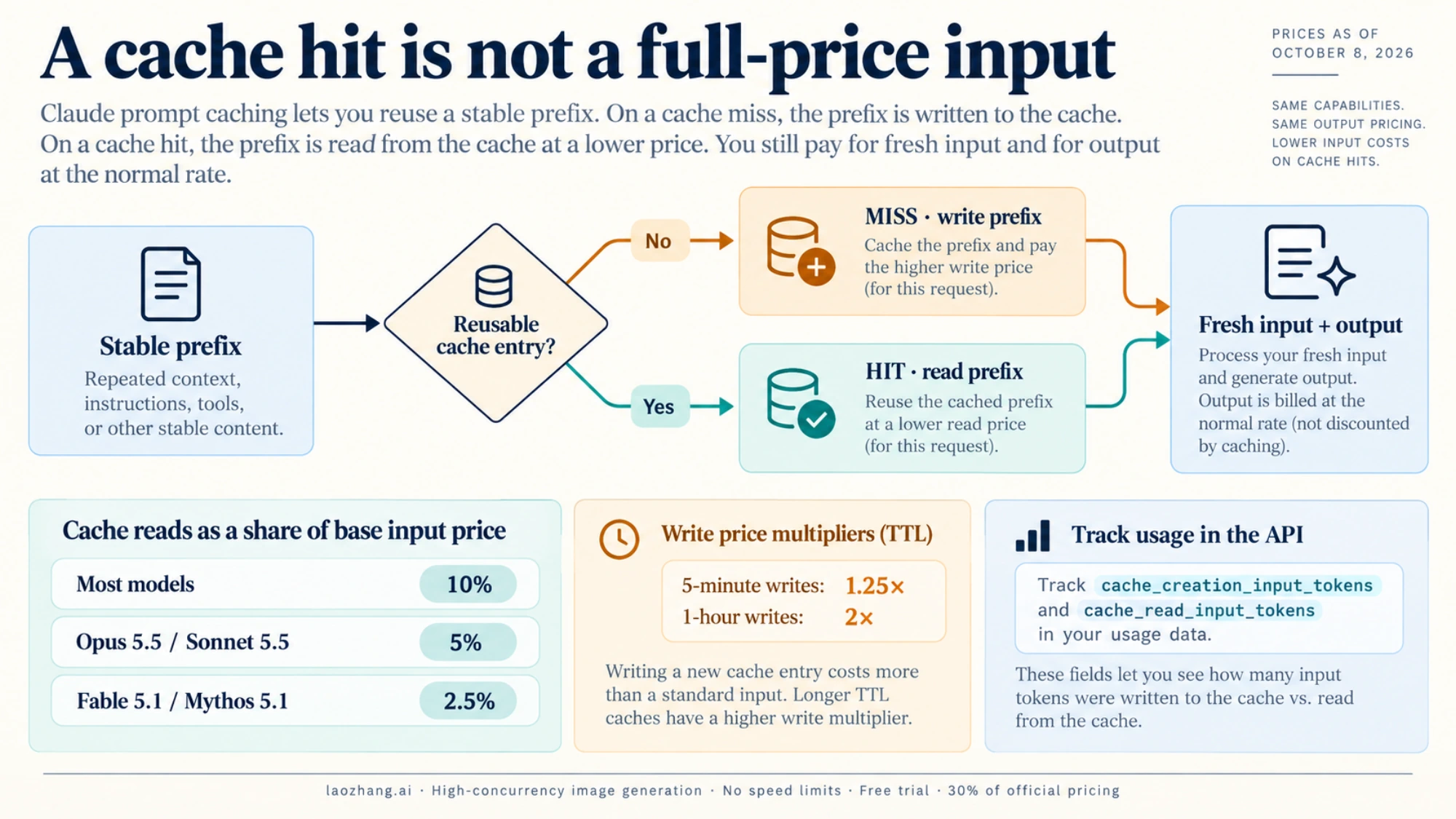
The economics of prompt caching are compelling and straightforward. Anthropic charges different rates depending on whether tokens are being cached for the first time or being read from an existing cache:
- Cache writes (first request): 125% of base input token price (25% premium)
- Cache reads (subsequent requests): 10% of base input token price (90% discount); 5% on Claude Opus 5.5 and Sonnet 5.5, and 2.5% on Claude Fable 5.1 and Mythos 5.1
- Regular tokens (after cache breakpoint): Standard input pricing
The math works strongly in your favor for any repeated content. For a prompt with 100,000 cached tokens, the first request costs slightly more than normal (25% extra for the cache write), but every subsequent request costs only 10% of what you'd normally pay for those tokens. If you make just 2 requests with the same cached prefix, you've already broken even. Any requests beyond that are pure savings.
Let's look at real-world performance data from Anthropic's benchmarks:
| Use Case | Latency Reduction | Cost Savings | Context Size |
|---|---|---|---|
| Chat with book (100K tokens) | 79% | 90% | 100,000 tokens |
| Many-shot prompting (10K tokens) | 31% | 86% | 10,000 tokens |
| Multi-turn conversations | 75% | 53% | Variable |
| Document Q&A | 82% | 91% | 50,000 tokens |
| Code analysis | 68% | 87% | 30,000 tokens |
Notice that cost savings scale with context size. The larger your cached content, the more dramatic your savings. For applications processing large documents or maintaining consistent system prompts, prompt caching is essentially a requirement for cost-effective operation. For more details on Claude API pricing tiers, check out our Claude API pricing guide.
Key Concepts and Terminology
Before diving deeper, let's establish the core terminology you'll encounter:
Cache breakpoint: The point in your prompt where caching ends. Content before this point can be cached; content after is processed normally with each request.
Cache hit: When the system finds an existing cache entry that matches your prompt prefix, avoiding reprocessing.
Cache miss: When no matching cache is found, requiring full processing and creation of a new cache entry.
TTL (Time to Live): How long a cache entry remains valid. Default is 5 minutes, with an optional 1-hour extended TTL.
Cache prefix: The portion of your prompt that gets cached, including everything up to your cache breakpoint.
How Prompt Caching Works Technically
Understanding the technical mechanics helps you implement caching correctly and debug issues when they arise. The caching system is more sophisticated than simple key-value storage—it uses cryptographic hashing and hierarchical invalidation.
When you send a request with prompt caching enabled, the system follows this process:
- Hash generation: The system generates a cryptographic hash of your prompt content up to each cache breakpoint
- Cache lookup: This hash is used to check if a matching cache entry exists in your organization's cache storage
- Cache hit path: If found and not expired, the cached computation is reused, and processing continues from the cache endpoint
- Cache miss path: If not found, the full prompt is processed normally, and a new cache entry is created for future requests
The key implementation detail is the cache_control parameter. You add this to content blocks that should be cached:
{
  "type": "text",
  "text": "Your long context to cache...",
  "cache_control": {"type": "ephemeral"}
}
Currently, ephemeral is the only supported cache type. The name reflects that caches are temporary and will eventually expire. You can place cache_control on various content blocks including text in system prompts, text in messages, tool definitions, and even images.
The Cache Hierarchy
One of the most important concepts to understand is the cache hierarchy. Caches are created and invalidated in a specific order:
tools → system → messages
This hierarchy has critical implications for how you structure your requests:
| Changed Element | Tools Cache | System Cache | Messages Cache | Impact |
|---|---|---|---|---|
| Tool definitions | Invalidated | Invalidated | Invalidated | Full rebuild |
| System prompt | Valid | Invalidated | Invalidated | System + messages rebuild |
| Messages | Valid | Valid | Invalidated | Messages only rebuild |
| Images added/removed | Valid | Invalidated | Invalidated | System + messages rebuild |
| tool_choice changed | Valid | Valid | Invalidated | Messages rebuild |
Understanding this hierarchy is crucial for optimizing your caching strategy. If you frequently update tool definitions, you'll constantly invalidate all caches and lose the benefits. Structure your application so that tools are stable, system prompts change rarely, and only messages vary between requests.
Here's a practical example of what not to do:
# BAD: Regenerating tools list on each request invalidates all caches
def get_response(user_message: str):
    tools = generate_dynamic_tools()  # This kills your cache!
    return client.messages.create(
        tools=tools,
        system=system_prompt,
        messages=[{"role": "user", "content": user_message}]
    )

# GOOD: Use stable tool definitions
STATIC_TOOLS = [...]  # Define once, never change

def get_response(user_message: str):
    return client.messages.create(
        tools=STATIC_TOOLS,  # Same every time = cache preserved
        system=system_prompt,
        messages=[{"role": "user", "content": user_message}]
    )
Cache TTL and Refresh Behavior
The default cache lifetime (TTL) is 5 minutes. This might seem short, but there's an important detail that makes it work well in practice: the TTL refreshes on every cache hit. So if your application makes requests every few minutes, the cache stays alive indefinitely.
Here's how the TTL refresh works in practice:
Request 1 (t=0min): Cache created, TTL set to 5 minutes
Request 2 (t=2min): Cache hit, TTL reset to 5 minutes from now
Request 3 (t=6min): Cache hit, TTL reset to 5 minutes from now
Request 4 (t=10min): Cache hit, TTL reset to 5 minutes from now
...
As long as you keep hitting the cache within the 5-minute window, it never expires. The cache only expires when there's a 5-minute gap with no hits.
For applications with longer intervals between requests, Anthropic offers a 1-hour TTL option at additional cost:
"cache_control": {
  "type": "ephemeral",
  "ttl": "1h"
}| TTL Option | Write Cost | Read Cost | Best For |
|---|---|---|---|
| 5 minutes (default) | 125% of base | 10% of base* | Frequent requests (interactive apps) |
| 1 hour | 200% of base | 10% of base* | Infrequent requests (async workflows) |
*5% on Claude Opus 5.5 and Sonnet 5.5; 2.5% on Claude Fable 5.1 and Mythos 5.1.
The 1-hour TTL costs twice as much for cache writes but provides the same 90% discount on reads. Choose it when you know requests will be spaced more than 5 minutes apart but less than 1 hour—for example, long-running agent workflows or batch processing pipelines.
Automatic Prefix Matching
A powerful but often overlooked feature is automatic prefix matching. You don't need to place cache breakpoints at every possible reuse point. The system automatically checks for cache hits at all previous content block boundaries, up to 20 blocks before your explicit breakpoint.
This means you can use a single cache breakpoint at the end of your static content, and the system will find the longest matching cached sequence automatically. For example:
# With a single breakpoint, the system automatically finds matches
system=[
    {"type": "text", "text": "Instructions..."},  # Could match here
    {"type": "text", "text": "Context part 1..."},  # Or here
    {"type": "text", "text": "Context part 2...", "cache_control": {"type": "ephemeral"}}  # Explicit breakpoint
]
If you've previously cached content up to "Context part 1", the system will recognize that match even though you only have an explicit breakpoint after "Context part 2". This is called the 20-block lookback window.
However, if you have more than 20 content blocks before your breakpoint, you'll need additional explicit breakpoints to ensure caching works correctly. This is a common source of cache misses in complex applications.
Pricing Breakdown and Cost Savings
Let's get specific about the numbers. Understanding exact costs helps you make informed decisions about when caching is worth implementing and how much you can expect to save.
Model-by-Model Pricing
Here are the cache prices for the current Claude models and the older models that are still active, from Anthropic's pricing page as of October 8, 2026:
| Model | Base Input | 5m Cache Write | 1h Cache Write | Cache Read | Output | Min Tokens |
|---|---|---|---|---|---|---|
| Claude Fable 5.1 | $10/MTok | $12.50/MTok | $20/MTok | $0.25/MTok | $50/MTok | 512 |
| Claude Opus 5.5 | $4/MTok | $5/MTok | $8/MTok | $0.20/MTok | $20/MTok | 512 |
| Claude Sonnet 5.5 | $2/MTok | $2.50/MTok | $4/MTok | $0.10/MTok | $10/MTok | 512 |
| Claude Haiku 5.5 (prompt ≤100K tokens) | $0.10/MTok | $0.125/MTok | $0.20/MTok | $0.01/MTok | $0.50/MTok | 512 |
| Claude Haiku 5.5 (prompt >100K tokens) | $0.50/MTok | $0.625/MTok | $1/MTok | $0.05/MTok | $2.50/MTok | 512 |
| Claude Opus 4.5–4.8, Opus 5 | $5/MTok | $6.25/MTok | $10/MTok | $0.50/MTok | $25/MTok | 512–4,096 |
| Claude Sonnet 4.6 / 4.5 | $3/MTok | $3.75/MTok | $6/MTok | $0.30/MTok | $15/MTok | 1,024 |
| Claude Haiku 4.5 | $1/MTok | $1.25/MTok | $2/MTok | $0.10/MTok | $5/MTok | 4,096 |
MTok = million tokens. Min Tokens = minimum cacheable prompt length (Opus 5: 512; Opus 4.8: 1,024; Opus 4.7: 2,048; Opus 4.6 and 4.5: 4,096). Claude Sonnet 4.5 is deprecated and retires on November 30, 2026; Opus 4.1, Opus 4, Sonnet 4, Haiku 3.5 and Haiku 3 are retired on the Claude API. Batch API discounts (50%) stack with these cache prices.
Real-World Cost Savings Examples
Let's calculate savings for a realistic scenario: a RAG-based customer support bot.
Scenario Setup:
- System prompt with product documentation: 50,000 tokens
- User query and response context: 500 tokens per request
- 1,000 queries per day
- Using Claude Sonnet 5.5
Without Caching:
Cost per request = 50,500 tokens × $2/MTok = $0.101
Daily cost = 1,000 × $0.101 = $101/day
Monthly cost = 30 × $101 = $3,030/month
With Caching:
First request (cache write):
  50,000 × $2.50/MTok + 500 × $2/MTok = $0.125 + $0.001 = $0.126

Subsequent 999 requests (cache read):
  50,000 × $0.10/MTok + 500 × $2/MTok = $0.005 + $0.001 = $0.006 each
  Total: 999 × $0.006 = $5.99

Daily total = $0.126 + $5.99 = $6.12/day
Monthly total = 30 × $6.12 = $184/month
Monthly Savings: about $2,850 (94% reduction), assuming requests keep the 5-minute cache warm all day. Sonnet 5.5's cache read is 5% of input rather than 10%, which is why the percentage is higher than on older models.
That's real money that goes straight to your bottom line. For a startup running multiple AI features, these savings can be the difference between burning runway and reaching profitability.
Let's look at another common scenario: a coding assistant that analyzes a codebase.
Scenario: Codebase Q&A Assistant
- Codebase context: 100,000 tokens
- Daily queries: 500
- Model: Claude Sonnet 5.5
| Metric | Without Caching | With Caching | Savings |
|---|---|---|---|
| Per-request cost | $0.20 | $0.0105 (avg) | 95% |
| Daily cost | $100 | $5.24 | $94.76 |
| Monthly cost | $3,000 | $157 | $2,843 |
| Annual cost | $36,000 | $1,887 | $34,113 |
Implementation Guide: Step-by-Step
Now let's implement prompt caching in both Python and TypeScript. These examples are production-ready and include proper error handling, type safety, and monitoring.
Python Implementation
First, install the Anthropic SDK:
pip install anthropicHere's a complete implementation with caching:
import anthropic
from typing import Optional, Dict, Any
import logging

# Configure logging for cache monitoring
logging.basicConfig(level=logging.INFO)
logger = logging.getLogger(__name__)

def create_cached_message(
    client: anthropic.Anthropic,
    system_content: str,
    user_message: str,
    model: str = "claude-sonnet-5-5",
    max_tokens: int = 1024
) -> Dict[str, Any]:
    """
    Send a message with prompt caching enabled.

    Args:
        client: Anthropic client instance
        system_content: Long system prompt to cache (should be > min tokens)
        user_message: User's current message
        model: Model to use
        max_tokens: Maximum tokens in response

    Returns:
        Dict with content and detailed usage statistics
    """
    try:
        response = client.messages.create(
            model=model,
            max_tokens=max_tokens,
            system=[
                {
                    "type": "text",
                    "text": "You are a helpful assistant specialized in answering questions.",
                },
                {
                    "type": "text",
                    "text": system_content,
                    "cache_control": {"type": "ephemeral"}
                }
            ],
            messages=[
                {"role": "user", "content": user_message}
            ]
        )

        # Extract usage metrics
        usage = response.usage
        cache_read = getattr(usage, 'cache_read_input_tokens', 0) or 0
        cache_write = getattr(usage, 'cache_creation_input_tokens', 0) or 0

        # Log cache performance
        if cache_read > 0:
            logger.info(f"Cache HIT: {cache_read} tokens read from cache")
        elif cache_write > 0:
            logger.info(f"Cache MISS: {cache_write} tokens written to cache")
        else:
            logger.warning("No caching occurred - check token count")

        return {
            "content": response.content[0].text if response.content else "",
            "usage": {
                "cache_read": cache_read,
                "cache_write": cache_write,
                "input": usage.input_tokens,
                "output": usage.output_tokens
            },
            "model": response.model,
            "stop_reason": response.stop_reason
        }

    except anthropic.APIError as e:
        logger.error(f"API error: {e}")
        raise

# Production usage example
if __name__ == "__main__":
    client = anthropic.Anthropic()  # Uses ANTHROPIC_API_KEY env var

    # Simulated large document (in production, load from file/database)
    product_documentation = """
    # Product Manual - Version 3.2

    ## Chapter 1: Getting Started
    This comprehensive guide covers all aspects of the product...
    [Imagine 50,000 tokens of documentation here]

    ## Chapter 2: Installation
    Follow these steps to install the product correctly...

    ## Chapter 3: Configuration
    Configuration options and best practices...

    ## Chapter 4: Troubleshooting
    Common issues and their solutions...
    """ * 100  # Repeat to simulate large document

    # First request - creates cache
    print("Making first request (cache write expected)...")
    result1 = create_cached_message(
        client,
        product_documentation,
        "What are the main features of this product?"
    )
    print(f"Usage: {result1['usage']}")

    # Second request - should hit cache
    print("\nMaking second request (cache hit expected)...")
    result2 = create_cached_message(
        client,
        product_documentation,
        "How do I install the product on Windows?"
    )
    print(f"Usage: {result2['usage']}")

    # Third request - should still hit cache
    print("\nMaking third request (cache hit expected)...")
    result3 = create_cached_message(
        client,
        product_documentation,
        "What are the system requirements?"
    )
    print(f"Usage: {result3['usage']}")
TypeScript Implementation
Install the SDK:
npm install @anthropic-ai/sdkTypeScript implementation with full typing and error handling:
import Anthropic from '@anthropic-ai/sdk';

// Type definitions for cache usage
interface CacheUsage {
  cacheRead: number;
  cacheWrite: number;
  input: number;
  output: number;
}

interface CachedResponse {
  content: string;
  usage: CacheUsage;
  model: string;
  stopReason: string | null;
}

// Configuration type
interface CacheConfig {
  model?: string;
  maxTokens?: number;
  ttl?: '5m' | '1h';
}

async function createCachedMessage(
  client: Anthropic,
  systemContent: string,
  userMessage: string,
  config: CacheConfig = {}
): Promise<CachedResponse> {
  const {
    model = 'claude-sonnet-5-5',
    maxTokens = 1024,
    ttl = '5m'
  } = config;

  const cacheControl = ttl === '1h'
    ? { type: 'ephemeral' as const, ttl: '1h' as const }
    : { type: 'ephemeral' as const };

  try {
    const response = await client.messages.create({
      model,
      max_tokens: maxTokens,
      system: [
        {
          type: 'text',
          text: 'You are a helpful assistant.',
        },
        {
          type: 'text',
          text: systemContent,
          cache_control: cacheControl
        }
      ],
      messages: [
        { role: 'user', content: userMessage }
      ]
    });

    const usage = response.usage;
    const cacheRead = (usage as any).cache_read_input_tokens || 0;
    const cacheWrite = (usage as any).cache_creation_input_tokens || 0;

    // Log cache status
    if (cacheRead > 0) {
      console.log(`[CACHE HIT] ${cacheRead} tokens read from cache`);
    } else if (cacheWrite > 0) {
      console.log(`[CACHE MISS] ${cacheWrite} tokens written to cache`);
    } else {
      console.warn('[WARNING] No caching occurred');
    }

    return {
      content: response.content[0].type === 'text'
        ? response.content[0].text
        : '',
      usage: {
        cacheRead,
        cacheWrite,
        input: usage.input_tokens,
        output: usage.output_tokens
      },
      model: response.model,
      stopReason: response.stop_reason
    };
  } catch (error) {
    if (error instanceof Anthropic.APIError) {
      console.error(`API Error: ${error.message}`);
    }
    throw error;
  }
}

// Cache monitoring class for production use
class CachePerformanceMonitor {
  private metrics: {
    requests: number;
    cacheHits: number;
    cacheMisses: number;
    totalCacheRead: number;
    totalCacheWrite: number;
    totalRegularTokens: number;
  };

  constructor() {
    this.metrics = {
      requests: 0,
      cacheHits: 0,
      cacheMisses: 0,
      totalCacheRead: 0,
      totalCacheWrite: 0,
      totalRegularTokens: 0
    };
  }

  recordRequest(usage: CacheUsage): void {
    this.metrics.requests++;
    this.metrics.totalCacheRead += usage.cacheRead;
    this.metrics.totalCacheWrite += usage.cacheWrite;
    this.metrics.totalRegularTokens += usage.input;

    if (usage.cacheRead > 0) {
      this.metrics.cacheHits++;
    } else if (usage.cacheWrite > 0) {
      this.metrics.cacheMisses++;
    }
  }

  getReport(): object {
    const hitRate = this.metrics.requests > 0
      ? (this.metrics.cacheHits / this.metrics.requests * 100).toFixed(1)
      : 0;

    // Calculate cost savings (using Sonnet 5.5 pricing as example)
    const baseRate = 2; // $2 per MTok
    const writeRate = 2.5;
    const readRate = 0.10;

    const withoutCaching =
      (this.metrics.totalCacheRead + this.metrics.totalCacheWrite) * baseRate / 1_000_000;
    const withCaching =
      (this.metrics.totalCacheWrite * writeRate + this.metrics.totalCacheRead * readRate) / 1_000_000;
    const savings = withoutCaching - withCaching;

    return {
      totalRequests: this.metrics.requests,
      cacheHits: this.metrics.cacheHits,
      cacheMisses: this.metrics.cacheMisses,
      hitRate: `${hitRate}%`,
      tokensReadFromCache: this.metrics.totalCacheRead,
      tokensWrittenToCache: this.metrics.totalCacheWrite,
      estimatedSavings: `$${savings.toFixed(4)}`
    };
  }

  reset(): void {
    this.metrics = {
      requests: 0,
      cacheHits: 0,
      cacheMisses: 0,
      totalCacheRead: 0,
      totalCacheWrite: 0,
      totalRegularTokens: 0
    };
  }
}

// Example usage
async function main() {
  const client = new Anthropic();
  const monitor = new CachePerformanceMonitor();

  const largeDocument = `
    [Your large document content here - needs to be at least 1024 tokens]
    This content will be cached after the first request.
    Include all your static context, documentation, or examples here.
  `.repeat(50);

  console.log('Testing prompt caching...\n');

  // Make several requests
  for (let i = 1; i <= 5; i++) {
    console.log(`Request ${i}:`);
    const result = await createCachedMessage(
      client,
      largeDocument,
      `Question ${i}: What can you help me with?`
    );
    monitor.recordRequest(result.usage);
    console.log(`Response length: ${result.content.length} chars\n`);
  }

  console.log('Performance Report:');
  console.log(monitor.getReport());
}

main().catch(console.error);
Monitoring Cache Performance
Always monitor your cache performance in production. Here's a comprehensive Python monitoring solution:
import time
from dataclasses import dataclass, field
from typing import List, Dict
from datetime import datetime

@dataclass
class CacheMetrics:
    """Tracks cache performance over time."""
    timestamp: datetime = field(default_factory=datetime.now)
    cache_read: int = 0
    cache_write: int = 0
    regular_tokens: int = 0
    latency_ms: float = 0

class CacheMonitor:
    """Production-grade cache monitoring."""

    def __init__(self, model: str = "claude-sonnet-5-5"):
        self.model = model
        self.history: List[CacheMetrics] = []
        self._pricing = self._get_pricing(model)

    def _get_pricing(self, model: str) -> Dict[str, float]:
        """Get pricing for the model (per million tokens)."""
        pricing_map = {
            "claude-sonnet-5-5": {"base": 2.0, "write": 2.5, "read": 0.10},
            "claude-opus-5-5": {"base": 4.0, "write": 5.0, "read": 0.20},
            "claude-haiku-5-5": {"base": 0.10, "write": 0.125, "read": 0.01},  # prompts up to 100K tokens
        }
        return pricing_map.get(model, pricing_map["claude-sonnet-5-5"])

    def record(self, usage: dict, latency_ms: float):
        """Record a request's cache metrics."""
        self.history.append(CacheMetrics(
            timestamp=datetime.now(),
            cache_read=usage.get("cache_read", 0),
            cache_write=usage.get("cache_write", 0),
            regular_tokens=usage.get("input", 0),
            latency_ms=latency_ms
        ))

    def get_summary(self) -> Dict:
        """Generate comprehensive performance summary."""
        if not self.history:
            return {"error": "No data recorded"}

        total_requests = len(self.history)
        cache_hits = sum(1 for m in self.history if m.cache_read > 0)
        cache_misses = sum(1 for m in self.history if m.cache_write > 0)

        total_read = sum(m.cache_read for m in self.history)
        total_write = sum(m.cache_write for m in self.history)

        # Calculate costs
        cost_without_cache = (total_read + total_write) * self._pricing["base"] / 1_000_000
        cost_with_cache = (
            total_write * self._pricing["write"] +
            total_read * self._pricing["read"]
        ) / 1_000_000

        avg_latency = sum(m.latency_ms for m in self.history) / total_requests

        return {
            "total_requests": total_requests,
            "cache_hits": cache_hits,
            "cache_misses": cache_misses,
            "hit_rate": f"{cache_hits/total_requests*100:.1f}%",
            "total_tokens_cached": total_read + total_write,
            "cost_without_caching": f"${cost_without_cache:.4f}",
            "cost_with_caching": f"${cost_with_cache:.4f}",
            "savings": f"${cost_without_cache - cost_with_cache:.4f}",
            "avg_latency_ms": f"{avg_latency:.0f}ms"
        }
If you're managing your Claude API key, consider setting up separate keys for development and production to track caching performance independently and catch issues before they affect live traffic.
Advanced Caching Patterns
Once you've mastered basic caching, these advanced patterns help you optimize for specific use cases and maximize your savings.
Multi-Turn Conversation Pattern
For chatbots and conversational applications, you want to cache both the system prompt and the growing conversation history. The key insight is to place cache breakpoints strategically to capture reusable prefixes:
from typing import List, Dict

def create_conversation_message(
    client: anthropic.Anthropic,
    system_prompt: str,
    conversation_history: List[Dict],
    new_message: str
) -> Dict:
    """
    Handle multi-turn conversations with optimal caching.

    Strategy:
    1. Cache the system prompt (rarely changes)
    2. Cache up to the second-to-last turn (conversation history)
    3. Let the final turn be processed fresh (new user message)
    """

    # Build messages with strategic cache control
    messages = []

    for i, msg in enumerate(conversation_history):
        content = msg["content"]

        # Add cache control to the second-to-last message
        # This allows the conversation prefix to be reused
        if i == len(conversation_history) - 2 and isinstance(content, str):
            content = [{
                "type": "text",
                "text": content,
                "cache_control": {"type": "ephemeral"}
            }]

        messages.append({
            "role": msg["role"],
            "content": content
        })

    # Add the new user message with cache control for future turns
    messages.append({
        "role": "user",
        "content": [{
            "type": "text",
            "text": new_message,
            "cache_control": {"type": "ephemeral"}
        }]
    })

    response = client.messages.create(
        model="claude-sonnet-5-5",
        max_tokens=1024,
        system=[{
            "type": "text",
            "text": system_prompt,
            "cache_control": {"type": "ephemeral"}  # System always cached
        }],
        messages=messages
    )

    return {
        "response": response.content[0].text,
        "usage": {
            "cache_read": getattr(response.usage, 'cache_read_input_tokens', 0),
            "cache_write": getattr(response.usage, 'cache_creation_input_tokens', 0),
        }
    }

# Usage example
conversation = [
    {"role": "user", "content": "Hi, I need help with my order"},
    {"role": "assistant", "content": "Hello! I'd be happy to help..."},
    {"role": "user", "content": "It hasn't arrived yet"},
    {"role": "assistant", "content": "I understand that's frustrating..."},
]

result = create_conversation_message(
    client,
    "You are a helpful customer support agent...",
    conversation,
    "Can you check the tracking?"
)
Caching Tool Definitions
When using Claude's tool use feature, cache your tool definitions to avoid reprocessing them with every request. Place the cache_control on the last tool in your array:
# Define your tools once and reuse
TOOLS = [
    {
        "name": "search_products",
        "description": "Search the product catalog by keyword, category, or price range",
        "input_schema": {
            "type": "object",
            "properties": {
                "query": {
                    "type": "string",
                    "description": "Search keywords"
                },
                "category": {
                    "type": "string",
                    "enum": ["electronics", "clothing", "home", "sports"]
                },
                "max_price": {
                    "type": "number",
                    "description": "Maximum price filter"
                }
            },
            "required": ["query"]
        }
    },
    {
        "name": "get_order_status",
        "description": "Look up the status of a customer order",
        "input_schema": {
            "type": "object",
            "properties": {
                "order_id": {
                    "type": "string",
                    "description": "The order ID to look up"
                }
            },
            "required": ["order_id"]
        }
    },
    {
        "name": "process_return",
        "description": "Initiate a return for an order",
        "input_schema": {
            "type": "object",
            "properties": {
                "order_id": {"type": "string"},
                "reason": {"type": "string"},
                "items": {
                    "type": "array",
                    "items": {"type": "string"}
                }
            },
            "required": ["order_id", "reason"]
        },
        # Add cache_control to the LAST tool only
        "cache_control": {"type": "ephemeral"}
    }
]

def tool_use_request(user_message: str):
    """Make a tool-use request with cached tools."""
    return client.messages.create(
        model="claude-sonnet-5-5",
        max_tokens=1024,
        tools=TOOLS,  # Tools are now cached
        messages=[{"role": "user", "content": user_message}]
    )
Document and RAG Caching
For RAG applications, structure your caching with multiple breakpoints to maximize reuse:
def rag_query_with_tiered_cache(
    client: anthropic.Anthropic,
    base_instructions: str,
    retrieved_documents: str,
    user_query: str
) -> str:
    """
    RAG query with two-level caching:

    Level 1: Base instructions (rarely change, shared across all users)
    Level 2: Retrieved documents (change per session/topic)

    This allows:
    - Instructions to be cached long-term
    - Documents to be cached per-session
    - User queries to vary freely
    """

    response = client.messages.create(
        model="claude-sonnet-5-5",
        max_tokens=2048,
        system=[
            {
                "type": "text",
                "text": base_instructions,
                "cache_control": {"type": "ephemeral"}  # Cache breakpoint 1
            },
            {
                "type": "text",
                "text": f"""
                ## Retrieved Documents

                The following documents are relevant to the user's question:

                {retrieved_documents}

                Use these documents to provide accurate, well-sourced answers.
                """,
                "cache_control": {"type": "ephemeral"}  # Cache breakpoint 2
            }
        ],
        messages=[
            {"role": "user", "content": user_query}
        ]
    )

    return response.content[0].text

# Example with stable instructions and variable documents
BASE_INSTRUCTIONS = """
You are an expert research assistant. Your role is to:
1. Answer questions using ONLY the provided documents
2. Cite specific documents when making claims
3. Acknowledge when information is not available
4. Never make up information

Format your responses clearly with headers and bullet points.
"""

# Different sessions can share the base instructions cache
# but have their own document caches
session_1_docs = "Document 1: ...\nDocument 2: ..."
session_2_docs = "Document A: ...\nDocument B: ..."

answer_1 = rag_query_with_tiered_cache(client, BASE_INSTRUCTIONS, session_1_docs, "Question about doc 1")
answer_2 = rag_query_with_tiered_cache(client, BASE_INSTRUCTIONS, session_2_docs, "Question about doc A")
This pattern uses two of the available four cache breakpoints. The base instructions cache is shared across all queries that use the same instructions, while the document cache is specific to each retrieval set.
When to Use Prompt Caching (Decision Framework)
Not every application benefits from prompt caching. Here's a systematic approach to deciding if it's right for your use case.
Calculating Your Breakeven Point
The fundamental question: How many requests with the same prefix do you need for caching to save money?
Let's derive the breakeven formula. With caching:
- First request: 125% of normal cost (for cache write)
- Subsequent requests: 10% of normal cost (for cache read)
Without caching:
- Every request: 100% of normal cost
Breakeven occurs when:
N × 100% = 125% + (N-1) × 10%
100N = 125 + 10N - 10
90N = 115
N = 1.28
This means caching pays off after just 2 requests with the same cached prefix. The 25% write premium is recovered almost immediately.
But there are practical considerations:
Minimum Token Requirements by Model
Your cacheable content must meet model-specific minimum token thresholds:
| Model | Minimum Tokens | Approx. Characters | Typical Content |
|---|---|---|---|
| Claude Fable 5.1, Opus 5.5, Sonnet 5.5, Haiku 5.5, Opus 5 | 512 | ~2,000 | Short system prompts |
| Claude Opus 4.8, Sonnet 4.6, Sonnet 4.5 | 1,024 | ~4,000 | Short documents |
| Claude Opus 4.7 | 2,048 | ~8,000 | Short-medium docs |
| Claude Opus 4.6, Opus 4.5, Haiku 4.5 | 4,096 | ~16,000 | Medium documents |
Character estimates use the rough 4-characters-per-token rule; Claude 4.7 and later models use a newer tokenizer that produces about 30% more tokens for the same text, so count tokens with the target model.
If your cached content is below these thresholds, the request will succeed but no caching will occur. You'll pay normal prices without getting any cache benefit.
Use Cases That Benefit Most
High benefit (implement immediately):
- Document Q&A with large contexts (manuals, contracts, codebases)
- Chatbots with detailed system instructions (>5,000 tokens)
- RAG applications with stable retrieval sets
- Multi-turn agents making repeated tool calls
- Few-shot learning with 20+ examples
- Code analysis across entire repositories
Moderate benefit (evaluate ROI):
- APIs with medium-sized system prompts (2K-5K tokens)
- Applications with 3-10 requests per cached context
- Batch processing with consistent prompts
Low benefit (consider skipping):
- Highly dynamic prompts that change with every request
- One-off requests with no repetition
- Very short prompts below minimum thresholds
- Applications where content changes > 50% of the time
Troubleshooting Cache Issues
When caching doesn't work as expected, use this systematic approach to identify the problem.
Common Cache Miss Causes
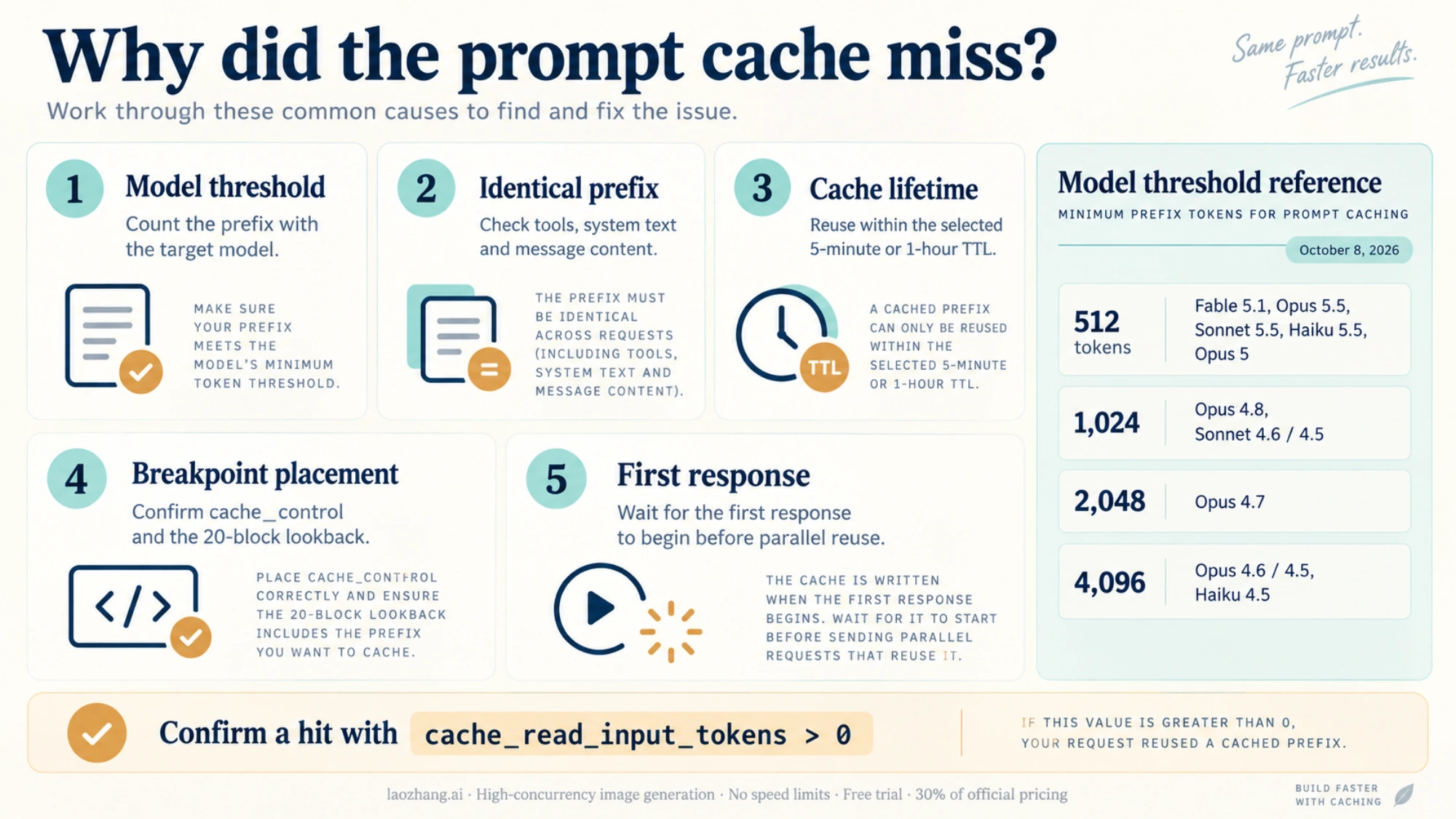
Here are the most frequent reasons for unexpected cache misses, ranked by frequency:
-
Below minimum tokens (Very Common): Your cached content doesn't meet the model's minimum threshold. The request succeeds but without caching.
-
Content not identical (Very Common): Any difference—including whitespace, line breaks, or unicode characters—breaks the cache.
-
TTL expired (Common): More than 5 minutes (or 1 hour with extended TTL) passed since the last cache hit.
-
Tools changed (Common): Modifying any tool definition invalidates the entire cache hierarchy.
-
Images added/removed (Moderate): Changing image presence anywhere in the prompt breaks system and message caches.
-
tool_choice changed (Moderate): Changing the tool selection strategy breaks message caches.
-
JSON key order (Rare but Tricky): Some languages (Go, Swift) randomize key order when serializing JSON, causing cache misses.
-
Extended thinking toggled (Rare): Enabling or disabling extended thinking changes the message structure.
-
Concurrent first requests (Rare): Cache entries aren't available until the first response begins. Parallel first requests all create separate caches.
-
>20 blocks before breakpoint (Rare): The automatic lookback only checks 20 blocks; earlier content needs explicit breakpoints.
Debug Checklist
Follow this systematic checklist when debugging cache issues:
Step 1: Verify token count
import anthropic

client = anthropic.Anthropic()

def check_token_count(content: str, model: str = "claude-sonnet-5-5") -> dict:
    """Check if content meets minimum cache threshold."""
    # Note: This is a simplified check. Use the actual tokenizer for precision.
    estimated_tokens = len(content) / 4  # Rough estimate

    thresholds = {
        "claude-sonnet-5-5": 512,
        "claude-opus-5-5": 512,
        "claude-haiku-5-5": 512,
        "claude-haiku-4-5": 4096,
    }

    min_tokens = thresholds.get(model, 1024)

    return {
        "estimated_tokens": int(estimated_tokens),
        "min_required": min_tokens,
        "can_cache": estimated_tokens >= min_tokens
    }

# Usage
result = check_token_count(your_system_prompt)
print(f"Token check: {result}")
Step 2: Verify response cache metrics
def analyze_cache_response(response) -> dict:
    """Analyze cache behavior from response."""
    usage = response.usage
    cache_read = getattr(usage, 'cache_read_input_tokens', 0) or 0
    cache_write = getattr(usage, 'cache_creation_input_tokens', 0) or 0

    status = "UNKNOWN"
    if cache_read > 0:
        status = "CACHE_HIT"
    elif cache_write > 0:
        status = "CACHE_MISS_NEW_ENTRY"
    else:
        status = "NO_CACHING_OCCURRED"

    return {
        "status": status,
        "cache_read_tokens": cache_read,
        "cache_write_tokens": cache_write,
        "regular_input_tokens": usage.input_tokens,
        "output_tokens": usage.output_tokens
    }
Step 3: Verify content identity with hashing
import hashlib
import json

def content_fingerprint(content: str) -> str:
    """Generate a fingerprint to verify content identity."""
    # Normalize whitespace and encoding
    normalized = ' '.join(content.split())
    return hashlib.sha256(normalized.encode('utf-8')).hexdigest()[:16]

# Log fingerprint with each request
def cached_request_with_fingerprint(client, system_prompt, user_message):
    fingerprint = content_fingerprint(system_prompt)
    print(f"System prompt fingerprint: {fingerprint}")

    response = client.messages.create(...)
    cache_info = analyze_cache_response(response)
    print(f"Cache status: {cache_info['status']}")

    return response
Step 4: Check request timing
from datetime import datetime
import threading

class RequestTimer:
    """Track time between requests to detect TTL issues."""

    def __init__(self):
        self._last_request = None
        self._lock = threading.Lock()

    def check_and_update(self) -> dict:
        with self._lock:
            now = datetime.now()
            result = {
                "current_time": now.isoformat(),
                "warning": None
            }

            if self._last_request:
                delta = (now - self._last_request).total_seconds()
                result["seconds_since_last"] = delta

                if delta > 300:
                    result["warning"] = "TTL likely expired (>5 min since last request)"
                elif delta > 270:
                    result["warning"] = "Approaching TTL limit (>4.5 min)"

            self._last_request = now
            return result

timer = RequestTimer()

# Use before each request
timing_info = timer.check_and_update()
if timing_info.get("warning"):
    print(f"WARNING: {timing_info['warning']}")
For comprehensive API monitoring, the Claude API console provides detailed usage statistics that can help identify caching issues across your entire application.
Best Practices and FAQ
Let's wrap up with consolidated best practices and answers to the most common questions developers have.
Best Practices Checklist
Prompt Structure:
- Place stable, cacheable content at the beginning of your prompts
- Put dynamic, user-specific content after cache breakpoints
- Use the cache hierarchy (tools → system → messages) strategically
- Avoid unnecessary changes to tools or system prompts
Cache Breakpoint Strategy:
- Use at least one breakpoint at the end of your static content
- Add multiple breakpoints (up to 4) for content that changes at different rates
- Place breakpoints before editable content for maximum hit rates
- For prompts >20 blocks, add explicit breakpoints every 20 blocks
Monitoring and Alerting:
- Log
cache_read_input_tokensandcache_creation_input_tokensfor every request - Track cache hit rates over time and alert on drops below expected thresholds
- Set up dashboards to visualize cache performance by endpoint/feature
- Monitor for unexpected cache misses, which often indicate bugs
Production Hardening:
- Implement retry logic for transient API failures
- Wait for first response before sending parallel requests with the same cache
- Consider 1-hour TTL for async workflows or batch processing
- Test caching behavior in staging before deploying to production
Provider Comparison
If you're choosing between platforms for Claude access, here's how caching compares:
| Feature | Anthropic API | AWS Bedrock | Google Vertex AI |
|---|---|---|---|
| Syntax | cache_control | cachePoint | Same as Anthropic |
| Max breakpoints | 4 | 4 | 4 |
| 5-min TTL | Yes | Yes | Yes |
| 1-hour TTL | Yes | Limited | Limited |
| Minimum tokens | 1024-4096 | 1024-4096 | Same as Anthropic |
| Cache scope | Workspace | Organization | Organization |
AWS Bedrock uses a slightly different syntax (cachePoint instead of cache_control) but the concepts are identical. Google Vertex AI uses the same syntax as the direct Anthropic API.
Frequently Asked Questions
Q: Can I use caching with streaming responses?
A: Yes, prompt caching works seamlessly with streaming. The cache metrics appear in the message_start event rather than waiting for the full response.
Q: Does caching affect response quality or determinism? A: No. Cached prompts produce identical outputs to non-cached prompts. The optimization is purely computational—Claude doesn't know or care whether the prompt was cached.
Q: Can I manually clear the cache? A: No, there's no manual cache invalidation API. Caches expire automatically after the TTL period. If you need to force a cache refresh, change the cached content slightly.
Q: Does caching work with images and vision features? A: Yes, images can be cached and count toward your cached tokens. However, adding or removing images anywhere in the prompt will invalidate the cache hierarchy from that point.
Q: What about extended thinking mode?
A: Thinking blocks cannot be explicitly marked with cache_control, but they are automatically cached when passed back in tool use workflows. Cache behavior is preserved when only tool results are provided as user messages.
Q: Can different users/sessions share the same cache? A: Within one workspace, yes. On the Claude API, caches are isolated per workspace, so API keys in the same workspace can hit the same cache when they send identical prompt prefixes, while other workspaces in the organization cannot. Bedrock and Google Cloud keep organization-level isolation. Caches are never shared across organizations.
Q: Is there a way to pre-warm the cache? A: Not directly. The first request always creates the cache. For parallel requests, wait for the first response to begin before sending others, otherwise each parallel request will create its own cache entry.
Q: How do I know if caching is actually working?
A: Check the cache_read_input_tokens field in every response. If it's greater than 0, you got a cache hit. If cache_creation_input_tokens is greater than 0 and cache_read_input_tokens is 0, you got a cache miss and created a new entry.
Q: Can I mix 5-minute and 1-hour TTL in the same request? A: Yes, but with constraints. Longer TTL breakpoints must come before shorter ones. You'll be billed appropriately for each tier.
Conclusion
Prompt caching transforms the economics of Claude API usage. For applications with substantial context—whether that's documents, conversation history, or detailed instructions—the savings are substantial: up to 90% cost reduction and 85% latency improvement.
The implementation is straightforward: add cache_control to your content blocks, monitor your cache metrics, and watch your costs drop. The most common mistake is not implementing caching at all, leaving significant savings on the table.
Key takeaways:
- Start simple: Add caching to your system prompts first
- Monitor constantly: Track cache hit rates and alert on drops
- Structure strategically: Put stable content first, dynamic content last
- Mind the thresholds: Ensure content meets minimum token requirements
- Test thoroughly: Verify caching works in staging before production
Start with basic caching on your system prompts. Once that's working, explore advanced patterns like multi-turn conversation caching and tool definition caching. Your production costs (and your finance team) will thank you.
For the latest updates on Claude API features including prompt caching, check out Anthropic's official documentation and our other Claude API guides.