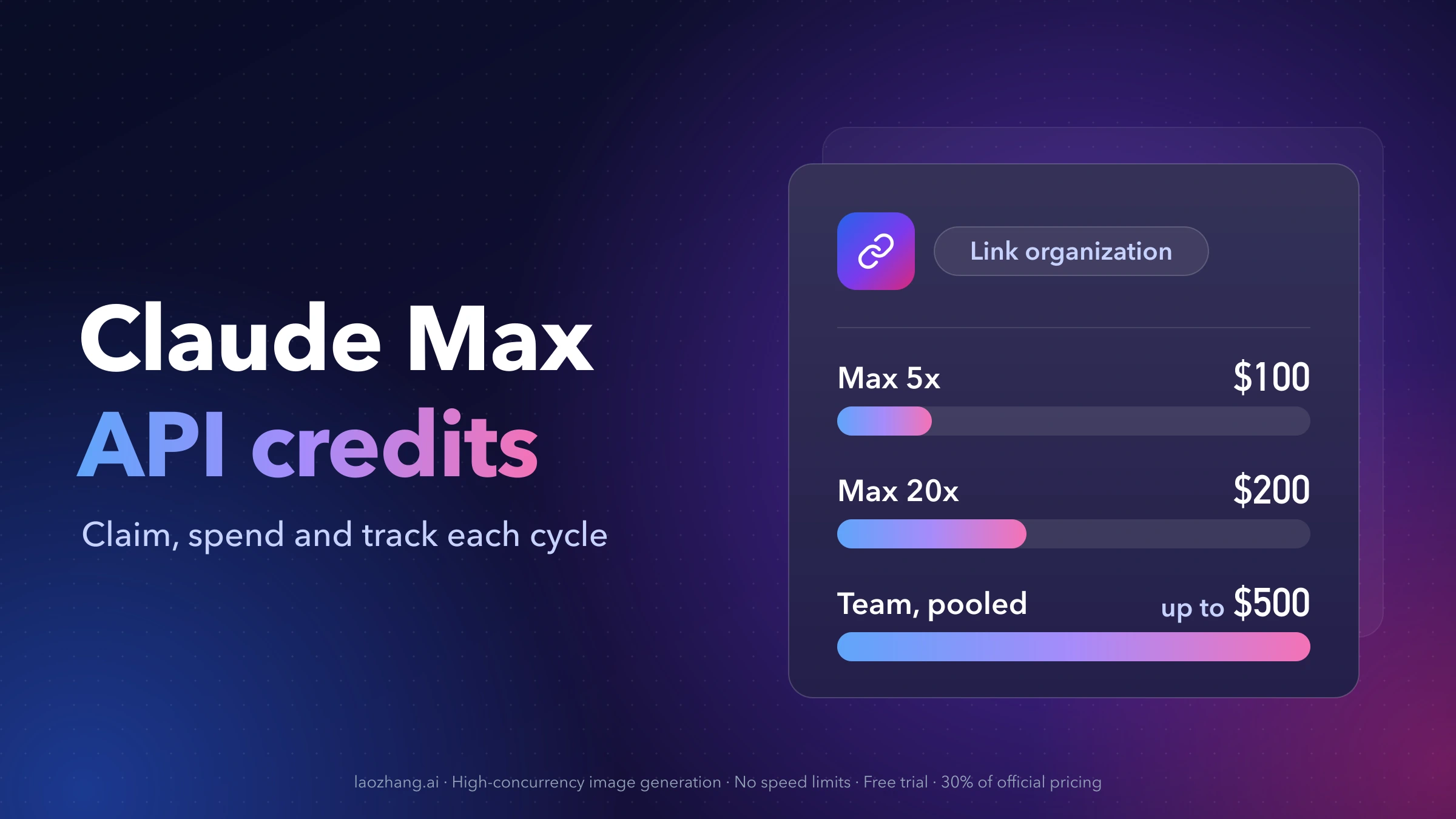
Claude Max and Team plans now include a monthly balance for the Claude API: $100 on Max 5x, $200 on Max 20x, and up to $500 pooled on Team. To get it, open Settings > Billing on claude.ai (on Team, Organization settings > Billing), find the API credits section, and link a Claude Console organization. You don't need to add a card on the Console side. Anthropic launched the program on October 7, 2026, and is rolling it out over a few days. Everything below is as of October 9, 2026, and follows the API credits doc and the Help Center article.
The credit pays for what you build on the Claude Platform: Messages API and Message Batches calls, the Console Playground, Claude Managed Agents and the Claude Agent SDK, on any available Claude model. It doesn't pay for interactive Claude Code, extra usage in the Claude apps, or Claude on Amazon Bedrock, Google Cloud Vertex AI or Microsoft Foundry. claude -p sits in between: it's covered only when you run it yourself with an API key from the linked organization.
Three rules prevent most surprises:
- Unused credit expires at the end of each billing cycle. Nothing rolls over.
- At zero, API requests stop. Nothing is charged to your Claude plan. If the organization also holds purchased credits or has auto-reload on, requests keep going on that paid balance.
- The link is permanent from your side. Only support can move the credits to a different Console organization, so link the one you'll actually build in.
Who gets the credits: Max 5x $100, Max 20x $200, Team up to $500
| Plan | Monthly API credit |
|---|---|
| Max 5x | $100 |
| Max 20x | $200 |
| Team, Standard seat | $20 per seat, pooled |
| Team, Premium seat | $100 per seat, pooled |
| Discounted Team plans (Nonprofit, Scientists) | Same per-seat amounts, pooled |
On Team, every seat's credit goes into one balance, capped at $500 a month. The amount is based on the seats on the plan at the start of each billing month, including the first. Three Standard seats and two Premium seats give 3 × $20 + 2 × $100 = $260. Adding one more Premium seat raises the next month's credit to $360. Five Premium seats already reach the $500 cap.
You qualify when all of these are true:
- Your Max or Team plan is active and in good standing.
- You've been on an eligible plan for at least 7 days.
- If you subscribed in the Claude iOS or Android app, you claim on claude.ai in a web browser, not in the app.
Free, Pro and Enterprise plans aren't eligible, and their settings pages don't show the section at all.
For scale, the Max credits equal the web price of each plan ($100 and $200 a month), and the Team per-seat credits equal the annual seat prices ($20 Standard, $100 Premium). That doesn't make the plan free: the credit only works on the Claude API, and whatever you don't spend expires with the cycle.
How to claim Claude API credits: link a Console organization
You need two roles before you start. On the Claude plan, you must be the Max subscriber, or a Primary Owner or Owner on Team. In the Console organization, you need the Owner, Admin or Billing role.
- Sign in to the Claude Console with the same email you use on claude.ai. If you don't have an organization yet, create one now or during step 4.
- On claude.ai in a web browser, open Settings > Billing (Max) or Organization settings > Billing (Team).
- In the API credits section, select Link organization.
- Choose the Console organization that should receive the credits, or create a new one.
- Review the Supplemental Credit Terms, then select Link organization.
- In the Console, open Settings > Billing. The credit appears under Promotional credits with its amount and expiry date. Create an API key in that organization (how to get your own Claude API key safely) and make a first request.
If the linking flow shows an error, the Help Center's advice is to try again in a few hours.
Pick the organization before you click Link
Each plan links to one Console organization, and each organization can receive credits from only one plan. You can't split the credit across organizations or change the link yourself; a change goes through Anthropic support. Three things decide which organization to pick:
- Who else has keys there. Every API key and workspace in the linked organization spends from the same balance. If you link a company organization that colleagues use, their keys spend your Max credit too.
- Whether it holds purchased credits. Included credits are spent first, but auto-reload on a purchased balance behaves in a way that can cost you money (see running out).
- Where your code will run. Your apps, Agent SDK scripts and Managed Agents need keys from this organization to use the credit. A throwaway test organization is hard to undo later.
On Team, one owner claims for the whole team, and the pooled credit lands in the organization that owner links.
No API credits section in Settings? Check these in order
- Days on the plan. Under 7 days on Max or Team, the section doesn't appear yet. If you upgraded from Pro, the 7 days count from the upgrade, since Pro isn't an eligible plan.
- Plan type. Max 5x, Max 20x and Team qualify. Pro, Free and Enterprise never show it.
- Your role. On Team, only the Primary Owner or an Owner can claim. If you're a member, ask one of them.
- Where you're looking. Mobile subscribers claim on claude.ai in a browser, not in the app.
- Rollout. Anthropic is turning the offer on over a few days after October 7, 2026, so it may simply not have reached your account.
- Still missing after 7 days on the right plan with the right role: contact support.
If the section shows but linking fails, check that your Console login uses the same email as claude.ai and that you're Owner, Admin or Billing in the organization you picked.
What Claude Max API credits pay for, workload by workload
The table goes from what you run to whether the credit pays for it and what makes the charge land there. "Linked-org key" means an API key created in the Console organization you linked.
| What you run | Paid from the monthly credit? | What decides it |
|---|---|---|
| Your app calling the Messages API | Yes | Requests use a linked-org key |
| Message Batches API jobs | Yes, at half the token price | Linked-org key |
| Console Playground | Yes | You're working in the linked organization |
| Claude Managed Agents | Yes | Runs in the linked organization; billed on tokens plus $0.08 per running session-hour |
| Agent SDK script you run | Yes, with a linked-org key | Signed in with your Claude plan instead, it uses plan limits |
claude -p in your terminal or your own script | Yes, with a linked-org key | Signed in with your Claude plan instead, it uses plan limits |
| Interactive Claude Code (terminal, IDE, desktop, web) | No | Not covered, even with a linked-org key |
Claude Code GitHub Action, IDE extension or desktop app runs, even with -p | No | Counts as Claude Code usage |
| Extra usage (usage credits) in Claude, Claude Code or Cowork | No | A separate balance on claude.ai |
| Claude on Bedrock, Vertex AI, Foundry or Claude Platform on AWS | No | Billed by that platform |
The credit doesn't change your usage limits in Claude, Claude Code or Cowork either. The official doc's summary table lists Claude Code as "No" without detail; the Help Center FAQ adds the claude -p and Agent SDK rule shown in the table, because that usage is billed as Agent SDK usage.
Running claude -p on the credits without billing interactive Claude Code
Claude Code picks a credential in a fixed order, and ANTHROPIC_API_KEY ranks above the subscription login from /login (authentication docs). Two details matter here:
- In non-interactive mode (
-p), the key is always used when it's set. - In interactive mode, Claude Code asks once whether to use the key and remembers your answer.
So the risky setup is exporting the linked-org key in ~/.zshrc or ~/.bashrc. Every claude -p then bills the credit, which is what you want. But if you once said yes to the key in an interactive session, your everyday Claude Code work moves onto the organization too, and the monthly credit doesn't cover interactive sessions. When the organization holds only these credits, Claude Code stops with:
Credit balance too low · Add funds: https://platform.claude.com/settings/billingThe documentation doesn't spell out the other case. If the organization also holds purchased credits, an interactive session there would most likely draw on that paid balance.
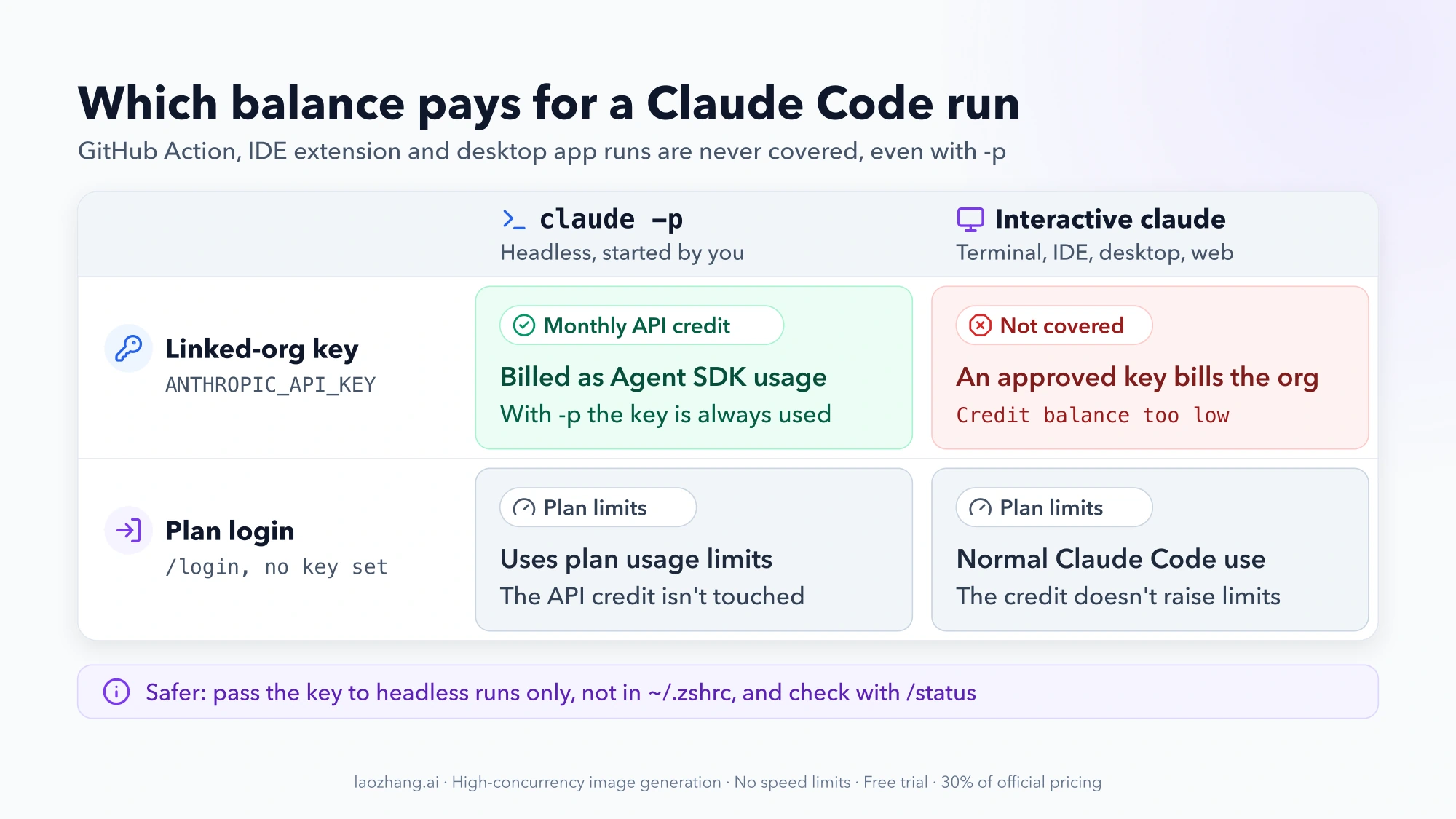
The safer pattern keeps the key out of your shell profile and hands it only to headless commands:
# Keep the linked-org key in a file only you can read
mkdir -p ~/.config/anthropic && chmod 700 ~/.config/anthropic
# Paste the key into ~/.config/anthropic/credits-key, then:
chmod 600 ~/.config/anthropic/credits-key

# One headless run billed to the monthly API credit
ANTHROPIC_API_KEY="$(cat ~/.config/anthropic/credits-key)" claude -p "List the failing tests and the likely cause"
The variable applies to that single command, and plain claude keeps using your plan. To check a session, run /status inside Claude Code; it shows which credential is active. If you already approved the key interactively, turn off Use custom API key in /config (the toggle only appears while the variable is set) or run unset ANTHROPIC_API_KEY before starting claude.
For Agent SDK programs, set ANTHROPIC_API_KEY to the linked-org key in the environment of the process that runs them, such as your service's secret store. A script that falls back to your Claude login runs on plan limits instead. CI jobs that call the API with a linked-org key are ordinary API usage, while the Claude Code GitHub Action isn't covered even with -p.
Can I use my Claude usage credits for the API? No, they're separate
Usage credits (the API credits doc calls them extra usage in the Claude apps) are the pay-as-you-go balance you turn on in claude.ai under Settings > Usage. They let you keep working in Claude, Claude Code or Cowork after a plan limit, at standard API rates, billed on top of your subscription. The usage credits article says they're separate from the monthly API credits, and that the monthly API credits don't apply to usage credits.
It works both ways. Usage credits don't pay for Console API calls, and the monthly API credit doesn't extend your Claude Code session once you hit a plan limit. The two balances can't be pooled.
How to check your Claude API credit balance and expiry date
Open the Console at Settings > Billing in the linked organization and look at Promotional credits. It shows the credit amount and the date it expires. Spend over time is on the Cost page.
The timing follows your Claude plan, not the calendar:
- New credit arrives each billing cycle, shortly after your plan payment goes through.
- On annual plans, it arrives monthly.
- Whatever is left expires at the end of that cycle (or month, on annual plans) and doesn't roll over.
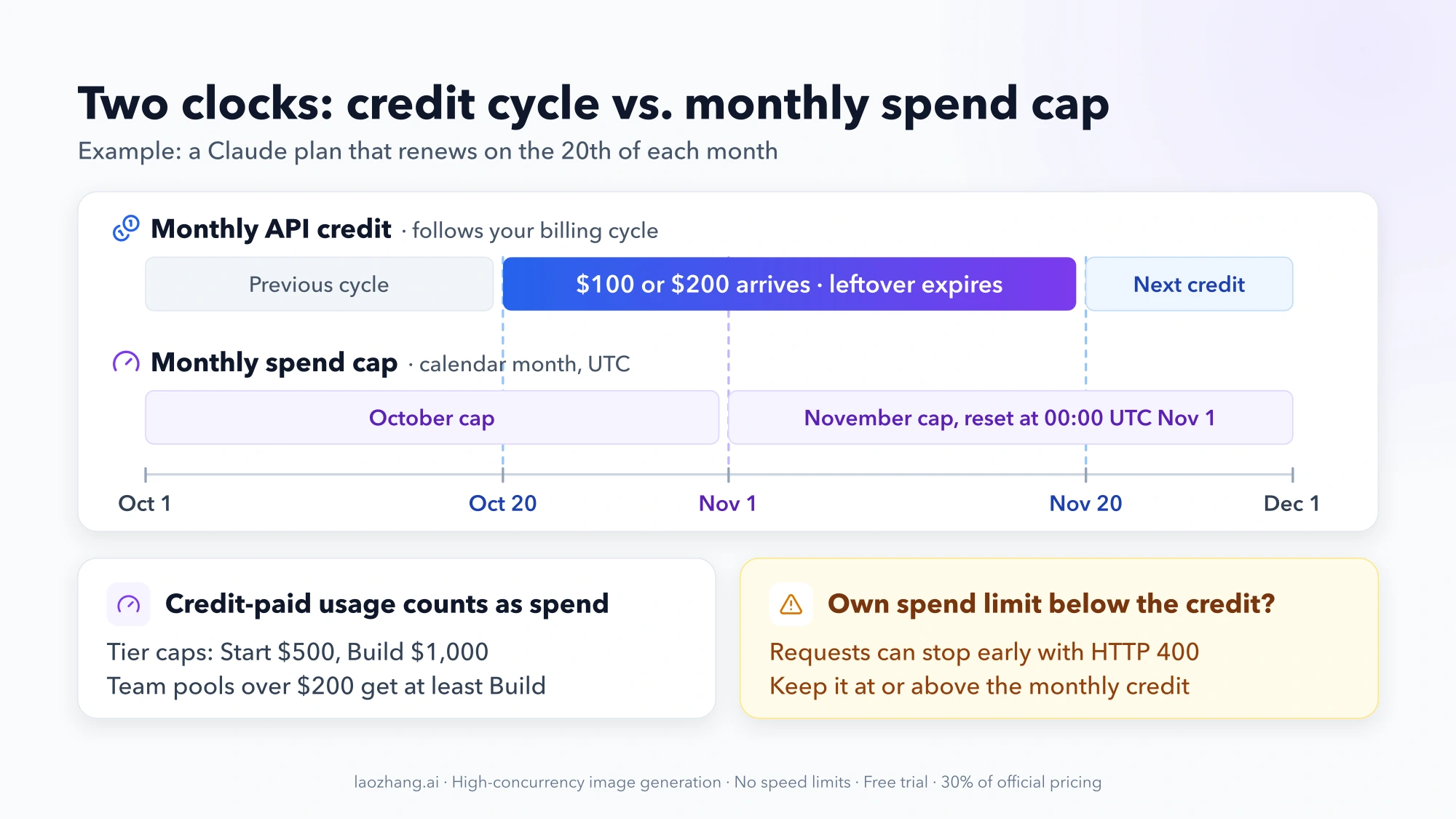
If your plan renews on the 20th, the credit lands around the 20th and the leftover expires before the next one. The expiry date on the billing page is the one to plan Batch runs and experiments around.
What happens when Claude API credits run out
The included credit is spent first, then any credits you bought. What happens at zero depends on what else the organization holds:
| Organization holds | When the monthly credit hits zero |
|---|---|
| Nothing else | API requests stop until the next credit arrives. Nothing is charged to your Claude plan. |
| Purchased credits | Requests continue on the purchased balance, which costs you money. |
| Auto-reload turned on | Requests continue, and auto-reload tops up the purchased balance. |
| Invoiced through Anthropic sales | Usage beyond the credit is billed as usual. |
With nothing else in the balance, requests return:
Your credit balance is too low to access the Anthropic API. Please go to Plans & Billing to upgrade or purchase credits.Auto-reload has one catch. It watches only the purchased balance and reloads when that balance reaches your threshold, even if included credit is still there. An organization with a small purchased balance and auto-reload on can be charged for a reload while the monthly credit is still being spent.
The choice comes down to two setups:
- Hard stop at the credit: keep no purchased balance in the linked organization and leave auto-reload off. Your app gets the error above when the month's credit is gone.
- No interruption: keep purchased credits or auto-reload, and cap each project with a workspace spend limit so one runaway job can't drain the paid balance.
Workspace spend limits, the calendar-month cap and your rate-limit tier
Because every key in the organization shares one balance, the way to cap a single project is to give it its own workspace and set that workspace's spend limit. When the workspace hits it, requests return HTTP 400 with a message that begins "You have reached your specified workspace API usage limits".
Credit-paid usage still counts as spend. It counts toward the organization's monthly spend cap, and that cap resets on the 1st of each calendar month at 00:00 UTC, while the credit follows your billing cycle. If you set your own organization spend limit on the Billing page, keep it at or above your monthly credit, or requests can stop with credit left over.
| Tier | Monthly spend cap |
|---|---|
| Start | $500 |
| Build | $1,000 |
| Scale | $200,000 |
Linking moves the organization up to at least the Start tier. If the monthly credit is over $200, it moves up to at least Build. Read literally, Max 20x's credit is exactly $200, so a Max organization is guaranteed only Start, while a Team pool above $200 gets at least Build. The credits don't count toward moving to a higher tier. Hitting the tier cap pauses the API with HTTP 429 until the next calendar month. Your actual tier and limits are on the Console's Rate limits page; Claude API Quota Tiers and Limits Explained: Start, Build, Scale covers the per-minute limits and 429 handling.
How far $100 or $200 goes: cost per request by model
Here's one example workload: a request with 3,000 input tokens and 500 output tokens, no prompt caching, standard (not Batch) prices as of October 9, 2026, from the pricing page. Cost per request = (input tokens × input price + output tokens × output price) ÷ 1,000,000.
| Model | Input / output per million tokens | Cost per request | Requests per $100 | Requests per $200 |
|---|---|---|---|---|
| Claude Haiku 5.5 | $0.10 / $0.50 | $0.00055 | about 181,800 | about 363,600 |
| Claude Sonnet 5.5 | $2 / $10 | $0.011 | about 9,090 | about 18,180 |
| Claude Opus 5.5 | $4 / $20 | $0.022 | about 4,545 | about 9,090 |
| Claude Fable 5.1 | $10 / $50 | $0.055 | about 1,818 | about 3,636 |
For Opus 5.5: (3,000 × $4 + 500 × $20) ÷ 1,000,000 = $0.022, and $100 ÷ $0.022 ≈ 4,545 requests. These are counts for this workload, not a usage allowance. Several things move them:
- Message Batches cost 50% less on input and output, so the counts roughly double for work that can wait.
- Prompt caching bills cache hits on Opus 5.5 and Sonnet 5.5 at 0.05x the base input price, which matters when the same long context repeats (prompt caching guide).
- Haiku 5.5 prompts over 100,000 tokens move to $0.50 / $2.50 per million.
- US-only inference (
inference_geoset tous) costs 1.1x. - Agent loops send many requests per task, often with growing context, so budget per finished task rather than per call.
- Managed Agents add $0.08 per session-hour while a session is running, on top of tokens. Ten running hours add $0.80.
Every model's prices, including cache writes and Batch, are in Claude API Pricing Per Million Tokens (October 2026): $0.10–$50.
If your plan changes: upgrades, Team seats and cancellation
| Change | What happens to the credit |
|---|---|
| Cancel, downgrade to an ineligible plan, or refund | New credits stop when the plan ends. Credit you already have stays usable until it expires. |
| Upgrade Max 5x to Max 20x | You get prorated credit right away, then $200 each cycle. Through Google Play, the $200 arrives by your next renewal at the latest. |
| Move from Max to Team | The Max link ends. A Team owner can claim the team's credit once the Team plan has been active for 7 days. |
| Add Team seats | They count from the next billing month's credit. |
| Remove Team seats | They stay on the plan until it renews, so the credit may drop after that. The pool stays capped at $500. |
Claude Max API credits FAQ
Is this the same as the Agent SDK credit announced in June?
No. The Agent SDK credit announced in June never became available; Anthropic paused those June 15, 2026 changes. Since the October 7 update, the monthly API credit is what covers Agent SDK and claude -p runs with a linked-org key. You can still run the Agent SDK and claude -p on your plan limits by signing in with your Claude plan.
Do the monthly API credits raise my Claude Code limits?
No. Your session and weekly limits in Claude and Claude Code stay the same. The credit only pays for usage on the Claude Platform, as listed in the table above.
Can I move my credits to a different Console organization?
Not yourself. The link is one plan to one organization, the credit can't be split, and a change needs support.
Do I need a credit card in the Claude Console to use the credits?
No. You can claim and spend the credit without adding a payment method. You only need one if you want to buy credits or turn on auto-reload.
Does a free Claude for Startups Team year get the monthly API credits?
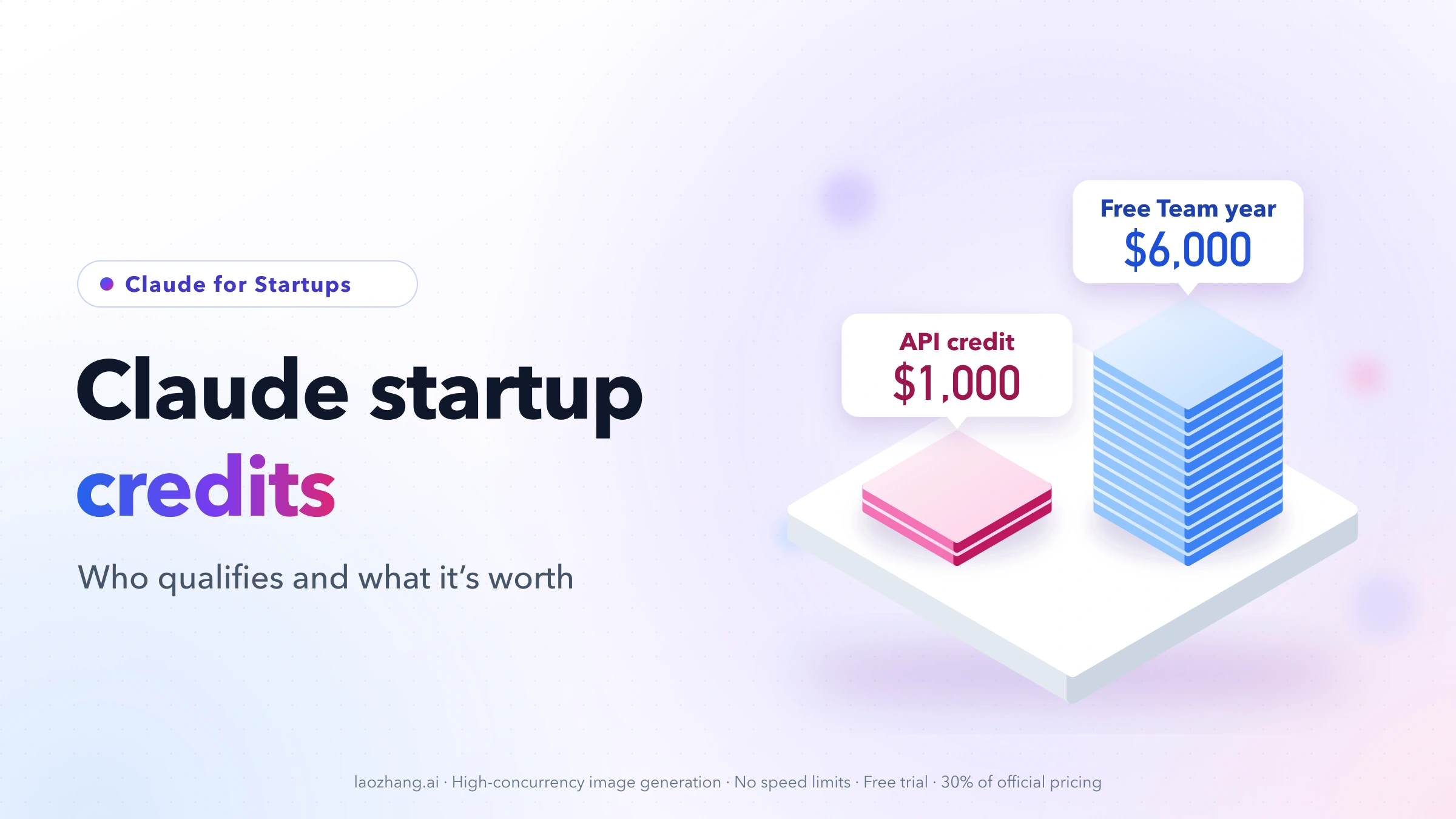
Anthropic's doc lists discounted Team plans as eligible and names the Nonprofit and Scientists discounts, but doesn't mention the free Team year from the startup program. Claude Startup Credits: Who Qualifies and What $1,000 Buys covers that program's $1,000 API credit and how it interacts with Team.