A Claude restriction is urgent, but it is not one problem with one support button. A personal account can be suspended or terminated. An otherwise healthy account can belong to an organization placed on hold. Claude Code can be pointed at a disabled Console organization while Claude.ai still works. A usage-limit or login incident can also look like lost access without being enforcement at all.
Start by saving the exact notice, timestamp and timezone, account email, product surface, plan, payment channel, and any receipt or Organization ID you can still reach. Do not create another account, rotate through networks, or open a bank dispute before you know which branch you are in. Those moves do not restore the original account and can make a clean review harder.
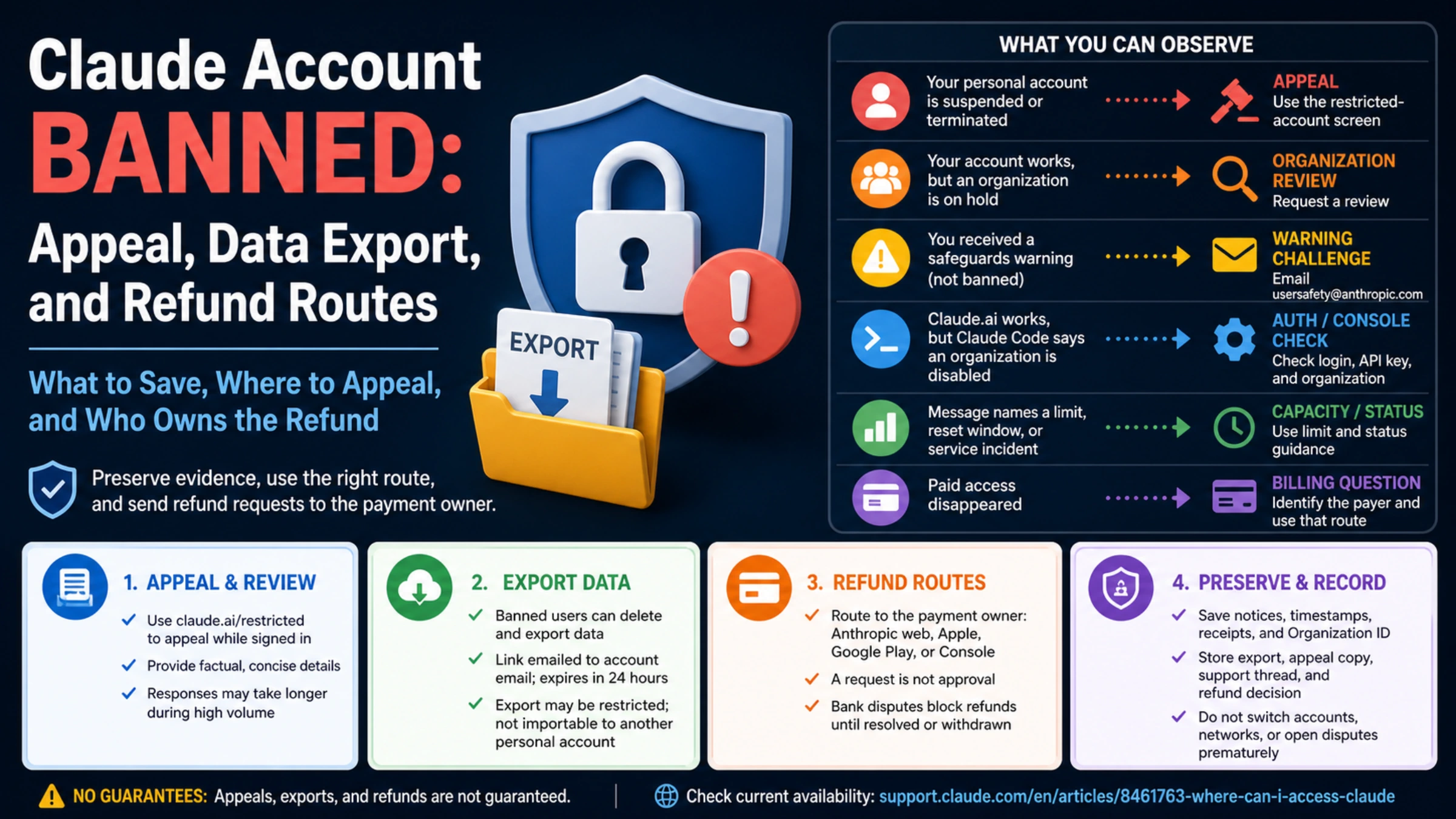
| What you can observe | What it points to | Legitimate next route |
|---|---|---|
| The restricted-account screen says the personal account is suspended or terminated | Account-level safeguards decision | Sign in with that account and use the official appeal form |
| Your account works, but one organization is listed as on hold | Organization review | Choose Request a review for that organization |
| You received a safeguards warning but the account is not banned | Warning challenge | Email the details and account information to usersafety@anthropic.com |
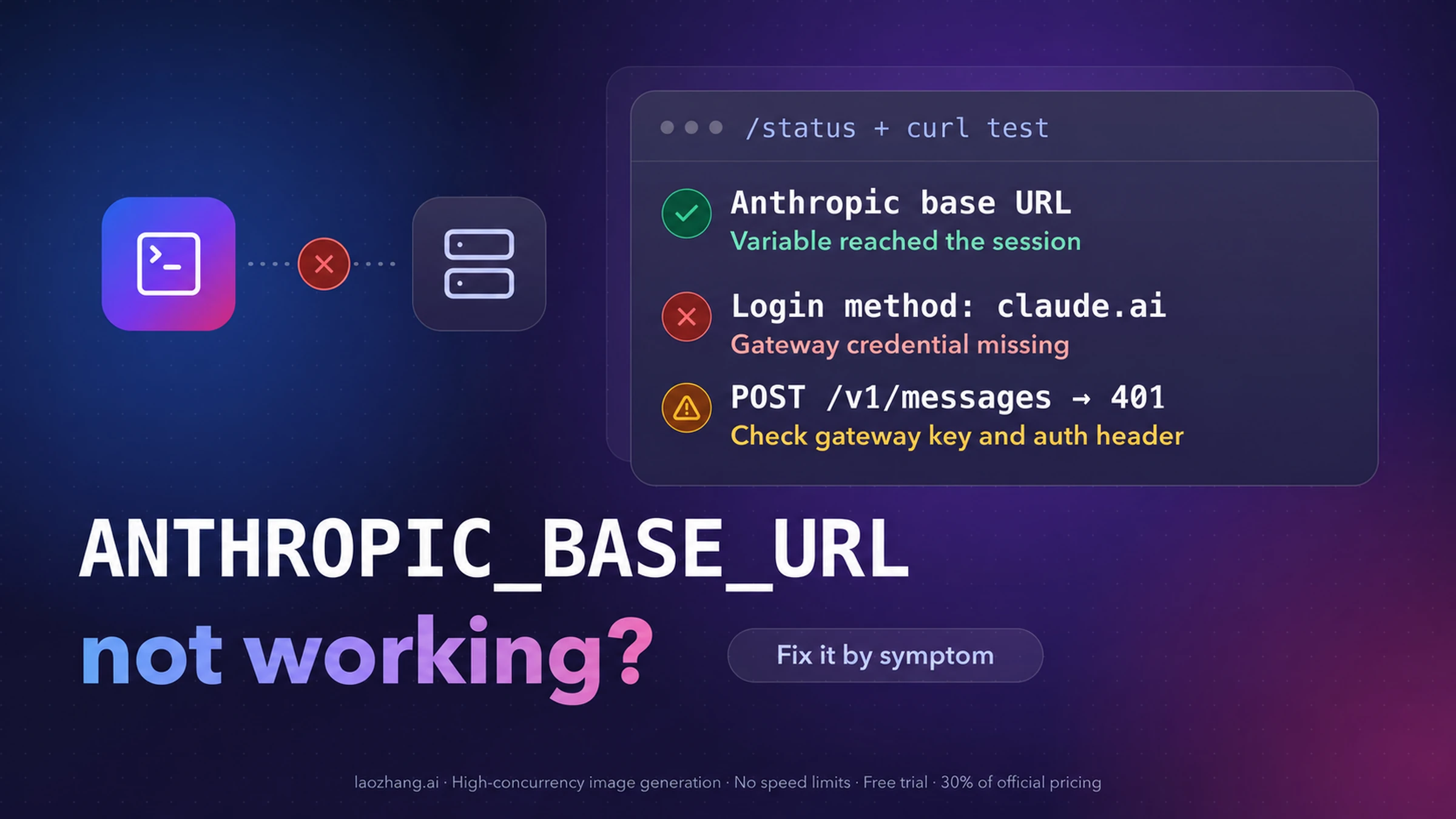
| Claude.ai works, but Claude Code says an organization is disabled | Authentication or Console organization branch may be active | Check /status, login route, ANTHROPIC_API_KEY, and organization ownership |
| The message names a limit, reset window, rate limit, or broad login incident | Capacity or service branch | Use limit/status guidance rather than an appeal |
| Paid access disappeared | Billing question, but not yet proof of refund eligibility | Identify the payer—Anthropic web, Apple, Google Play, or Console—then use its route |
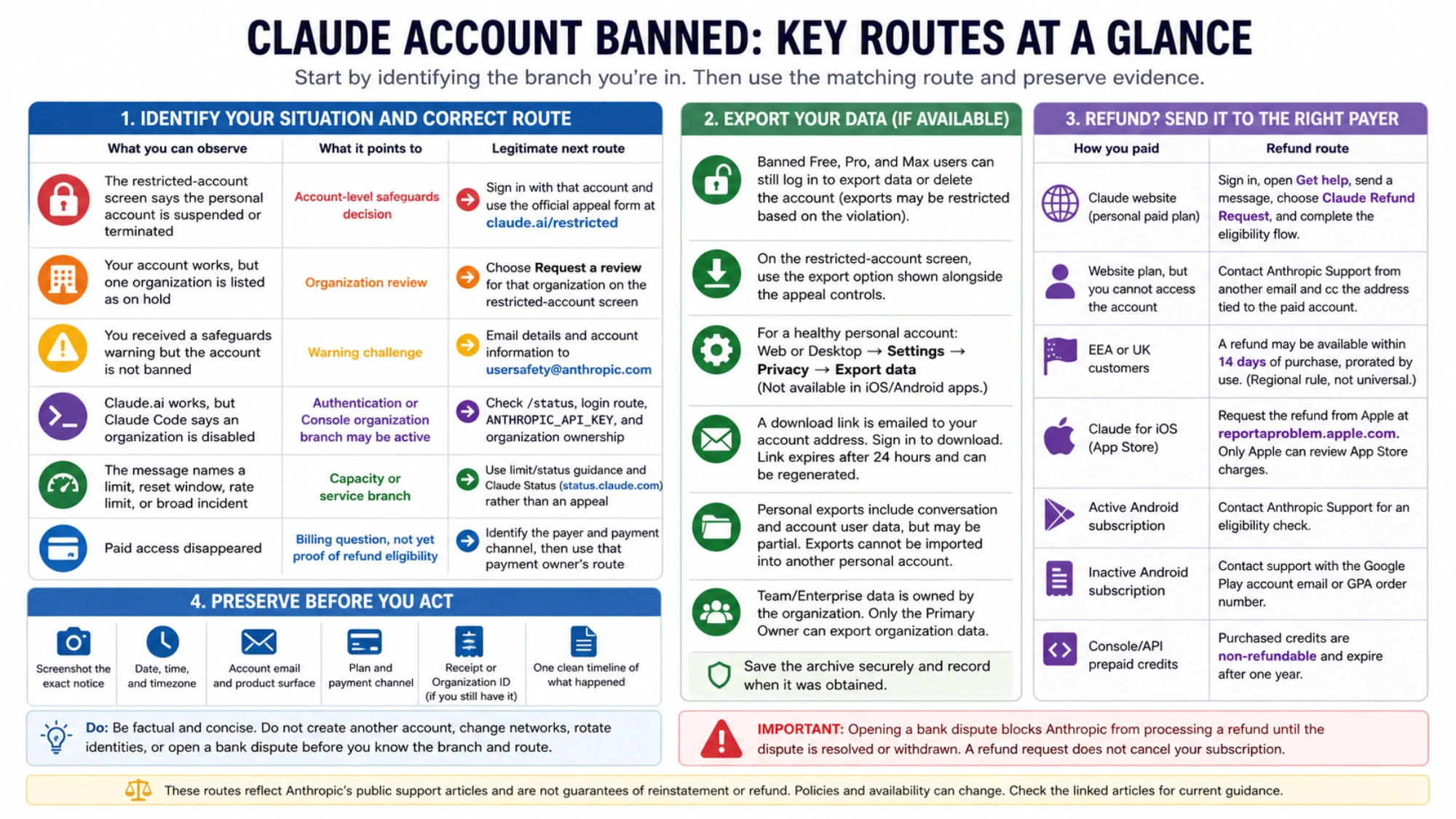
Use the restricted-account screen before a generic ticket
Anthropic's current Safeguards warnings and appeals guidance says it may ban an account for repeated Usage Policy violations, account creation from an unsupported location, or Terms violations. Those are public categories, not a complete list of private enforcement signals and not proof of what happened to your account.
If you believe the decision is wrong, go to Claude's restricted-account screen and sign in with the affected account. The appeal form is only available while logged in. The same screen is important for two other reasons: it exposes the self-service data controls available to a banned personal account, and it separately lists organizations that are on hold.
An appeal should be factual enough to investigate and short enough to route. Include:
- the account email and the exact visible message;
- when it began, with timezone;
- whether the restriction appears in Claude.ai, Claude Code, Console/API, or more than one surface;
- the legitimate use case involved immediately before the restriction;
- your plan and payment channel, without full card details;
- why you believe the decision is mistaken;
- an Organization ID only if you can still access it safely.
Redact API keys, authentication tokens, full invoices, payment identifiers, private conversation content, and unrelated personal data from screenshots. Do not fill the case with theories about device fingerprints, IP reputation, or other mechanisms Anthropic has not confirmed. The safeguards page warns that responses can take longer than normal during periods of high volume, but it gives no reliable countdown. Waiting several days is not evidence that an appeal was rejected.
If the account itself is healthy but an organization is on hold, select Request a review for that organization instead of submitting a personal-account-ban story. If the issue is only a warning, the published challenge route is usersafety@anthropic.com. These are three different review surfaces.
Export data while the option is still available
Anthropic now states explicitly that banned Free, Pro, and Max users can still log in to export data or delete the account. All banned users can delete their own account. Self-service exports are also available to banned users, although the data included can be restricted according to the Usage Policy violation associated with the account. Treat “export available” as a route, not a promise that every conversation and file will be present.
On the restricted-account screen, use the export option shown alongside the appeal controls. For a personal account that is not restricted, Anthropic's data-export instructions use Settings → Privacy → Export data in the web app or Claude Desktop. You cannot start the export from Claude for iOS or Android.
Once Anthropic processes the request, it emails a download link to the address attached to the account. You must be signed in to download the archive, and the link expires 24 hours after delivery. If it expires, request a new export. Save the archive in a controlled location and record when it was obtained; do not upload it to an untrusted “migration” service.
There are two important boundaries:
- A personal export includes conversation data and account user data, but a ban-related export may contain less.
- Anthropic does not support importing that archive into another personal Claude account or migrating data between personal accounts.
Team and Enterprise data has different ownership. A regular member cannot export the organization's data; Anthropic says only the Primary Owner can do that. If company data is involved, contact the organization owner rather than presenting the issue as an individual export failure.
Do not send every disabled-looking message to appeals
Claude Code can authenticate through a Pro or Max subscription or through a Console/API organization. If Claude.ai works but the terminal says This organization has been disabled, first determine which route the CLI is actually using.
Check Claude Code's /status or login state, then inspect whether ANTHROPIC_API_KEY is set in the shell, dotfiles, IDE, or CI environment. An environment key can route the CLI into an old employer, project, or disabled Console organization even when the personal subscription is healthy. Remove a stale key only when you intend to use subscription authentication; do not remove a valid API credential blindly.
Messages about a usage limit, reset time, quota, or rate limit belong to the capacity branch. The Claude Code usage-limit guide is more useful there. When Claude.ai and Claude Code fail at the same time without an enforcement notice, check Claude Status and preserve timestamps. A green status page cannot prove that your account is healthy, but an active incident changes the first action from appeal to incident handling.
This diagnosis is not a way around enforcement. It prevents a local authentication or service problem from being mislabeled as an account ban.
Route a refund to whoever processed the payment
An appeal decides whether an enforcement action should be reconsidered. A refund request asks a payment owner to review a charge. One does not automatically produce the other.
Anthropic's current paid-plan refund guidance says payments are generally non-refundable except where the Consumer Terms or law provide. It then separates the operational routes:
| How you paid | Refund route | Boundary to keep |
|---|---|---|
| Claude website, personal paid plan | Sign in, open Get help, send a message, choose Claude Refund Request, and complete the eligibility flow | A request is not approval; preserve the charge and access timeline |
| Website plan, but you cannot access the account | Contact Anthropic Support from another email and cc the address tied to the paid account | Explain that you need cancellation and refund review; do not send full payment credentials |
| European Economic Area or United Kingdom | The official guide says a refund may be available within 14 days of purchase and is prorated by use | This is a regional rule, not a universal 14-day policy |
| Claude for iOS | Request the refund from Apple at reportaproblem.apple.com | Only Apple can review App Store charges; asking for a refund does not cancel the subscription |
| Active Claude for Android subscription | Contact Anthropic Support for an eligibility check | Provide relevant order context without exposing unnecessary financial data |
| Inactive Android subscription | Contact support with the Google Play account email or GPA order number | The receipt owner and order number matter |
| Console/API prepaid credits | No consumer-plan refund route applies | Anthropic's Console billing guidance says purchased credits are non-refundable and expire after one year |
If you already opened a bank dispute, tell support. Anthropic says it cannot process a refund while disputed funds have been pulled back; you must either continue with the bank process or withdraw the dispute before Anthropic can handle a refund. Do not open parallel claims in the hope that one will move faster.
Cancellation is separate too. Apple explicitly requires a separate subscription cancellation even after a refund request. For any paid route, confirm future billing status rather than assuming the ban, appeal, or refund request ended renewal.
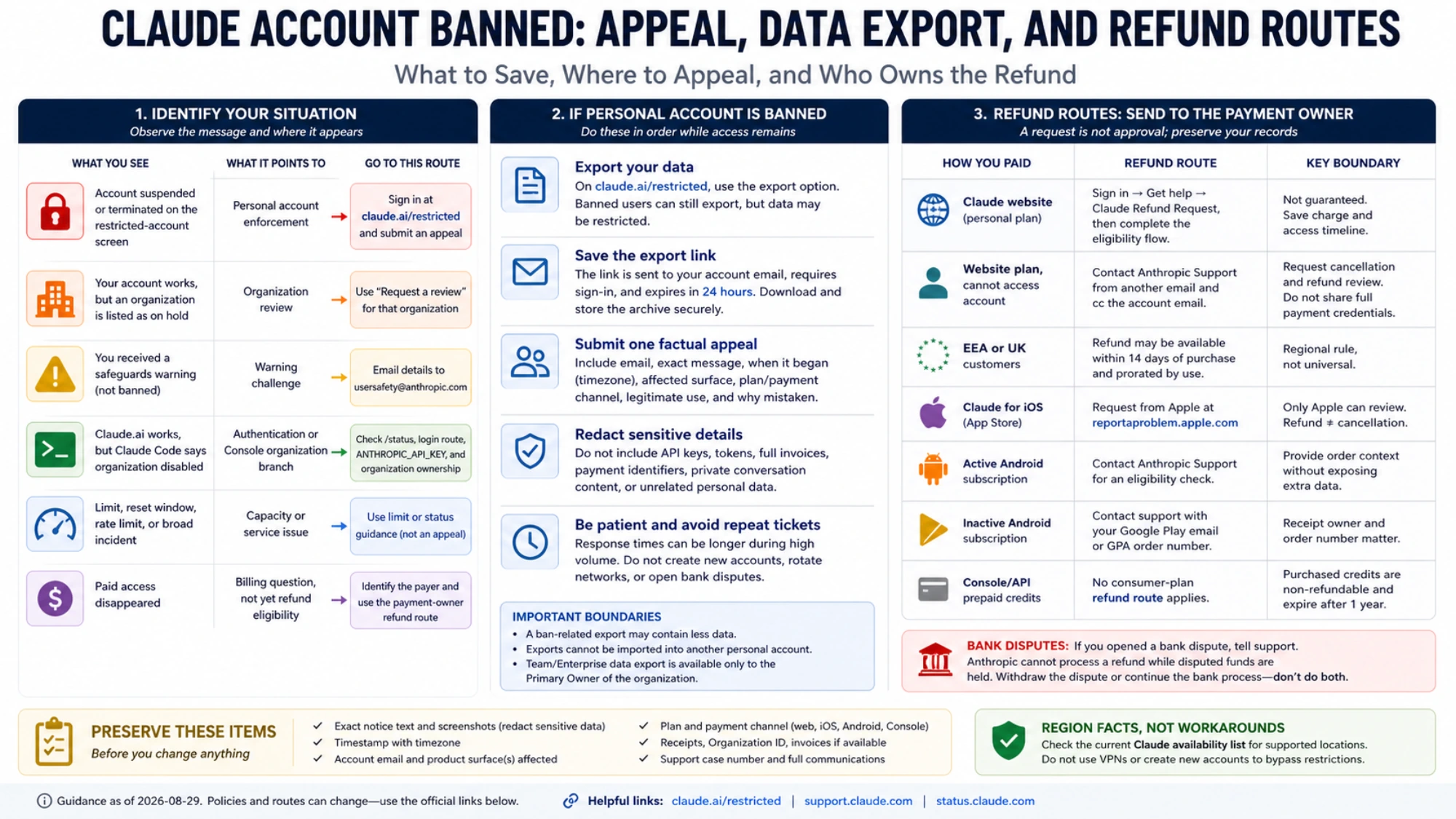
Region facts belong in the record, not in a workaround
The safeguards page names account creation from an unsupported location as one possible ban category, and Anthropic maintains a current Claude availability list. Check the live list when location may be relevant. Do not “fix” a restriction by changing VPNs, payment cards, browser profiles, or account identities. Those steps neither correct the original record nor create an honest appeal.
If the affected location is not supported, state the facts accurately in the case and preserve proof of the actual purchase and access history. Location can be relevant to the review, but it does not let a third-party guide predict the appeal or refund outcome.
A safe recovery sequence
Before you change anything, preserve the notice and payment record. Then use this order:
- Confirm whether the restriction affects the personal Claude account, one organization, Claude Code only, or a payment surface.
- If it is personal enforcement, sign in at the restricted-account screen, request the available data export, and submit one factual appeal.
- If it is an organization hold, use Request a review on that organization. If it is a warning, use the warning challenge route.
- If it is Claude Code only, verify authentication and Console organization ownership before calling it a ban.
- Identify the payment processor, cancel future renewal separately where required, and request refund review through that owner.
- Store the export, appeal copy, support thread, cancellation confirmation, and refund decision together.
The adjacent Claude Code ban-prevention guide is useful after access is restored or for a different healthy account. It is not a substitute for the review process on the account already restricted.
The safest plan is deliberately unexciting: preserve evidence, use the account's official review screen, export what is actually offered, and send the billing request to the company that processed the charge. Anything promising a guaranteed unban, complete migration, or instant refund is offering more certainty than Anthropic's own routes support.