Claude Code developers paying $100 or even $200 per month have watched their 5-hour session allowances evaporate in under two hours since late March 2026. The problem isn't just heavy usage — a combination of confirmed cache bugs, deliberate peak-hour adjustments, and the invisible mechanics of token compounding have created a perfect storm of unexpectedly fast quota drain. This guide walks through exactly what happened, how to diagnose whether you're affected, and the practical strategies that actually reduce your token consumption.
TL;DR
The Claude Code usage limit situation in March 2026 involves three overlapping problems. First, Anthropic confirmed on March 26 that 5-hour session limits now burn faster during weekday peak hours (5 AM–11 AM PT), affecting roughly 7% of users. Second, prompt caching bugs have been identified that can silently inflate token consumption by 10 to 20 times normal levels — Anthropic is actively investigating these as of March 31, 2026. Third, the fundamental architecture of CLI sessions means every message resends your entire conversation history, creating exponential cost growth that catches even experienced developers off guard.
The good news: most of this is diagnosable and fixable. Starting fresh conversations frequently, scheduling heavy work during off-peak hours, and monitoring your token consumption with built-in commands like /context and /compact can reduce your effective spend by 30–50%. For developers hitting limits consistently, switching to direct API access eliminates session-based restrictions entirely.
Here is a timeline of the key events that led to the current situation, followed by detailed solutions for each root cause.
The Complete Timeline — What Happened to Claude Code Quotas
Understanding the current usage limit crisis requires looking at the full sequence of events, because what many users experience as a single "quota drain bug" is actually several distinct issues overlapping across February and March 2026.
Late January 2026 marked the beginning of widespread complaints. GitHub issue #17016 documented early reports of Claude Code hitting usage limits far faster than expected. At this point, most users attributed it to increased Opus 4.6 adoption, which consumes roughly 5x more tokens per interaction than Haiku. The complaints were real, but the underlying cause was not yet clear.
February 27, 2026 brought the first confirmed technical problem. Anthropic acknowledged a prompt caching bug that was causing usage to drain significantly faster than intended. The company took the unusual step of resetting rate limits for affected users — an implicit admission that something had gone wrong on the infrastructure side. GitHub issue #26404 captured the technical details, noting that Opus 4.6 token consumption was "significantly higher than expected" even for simple tasks.
March 13–28, 2026 saw Anthropic launch a temporary promotion doubling off-peak usage limits for all paid plans. While publicly framed as a promotional gesture, the timing suggested it also served as a goodwill measure while underlying issues were being addressed. During this window, many users reported improved experiences, masking the continuing problems.
March 23, 2026 triggered the current wave of complaints. Multiple Max plan subscribers reported their 5-hour session windows being exhausted within one to two hours using identical workloads that had previously lasted the full session. The reports flooded GitHub and Reddit simultaneously. One Max 20x subscriber ($200/month) documented their usage jumping from 21% to 100% on a single prompt — a mathematically impossible outcome under normal token accounting. GitHub issue #38335 became the primary tracking thread, accumulating hundreds of confirmations within days.
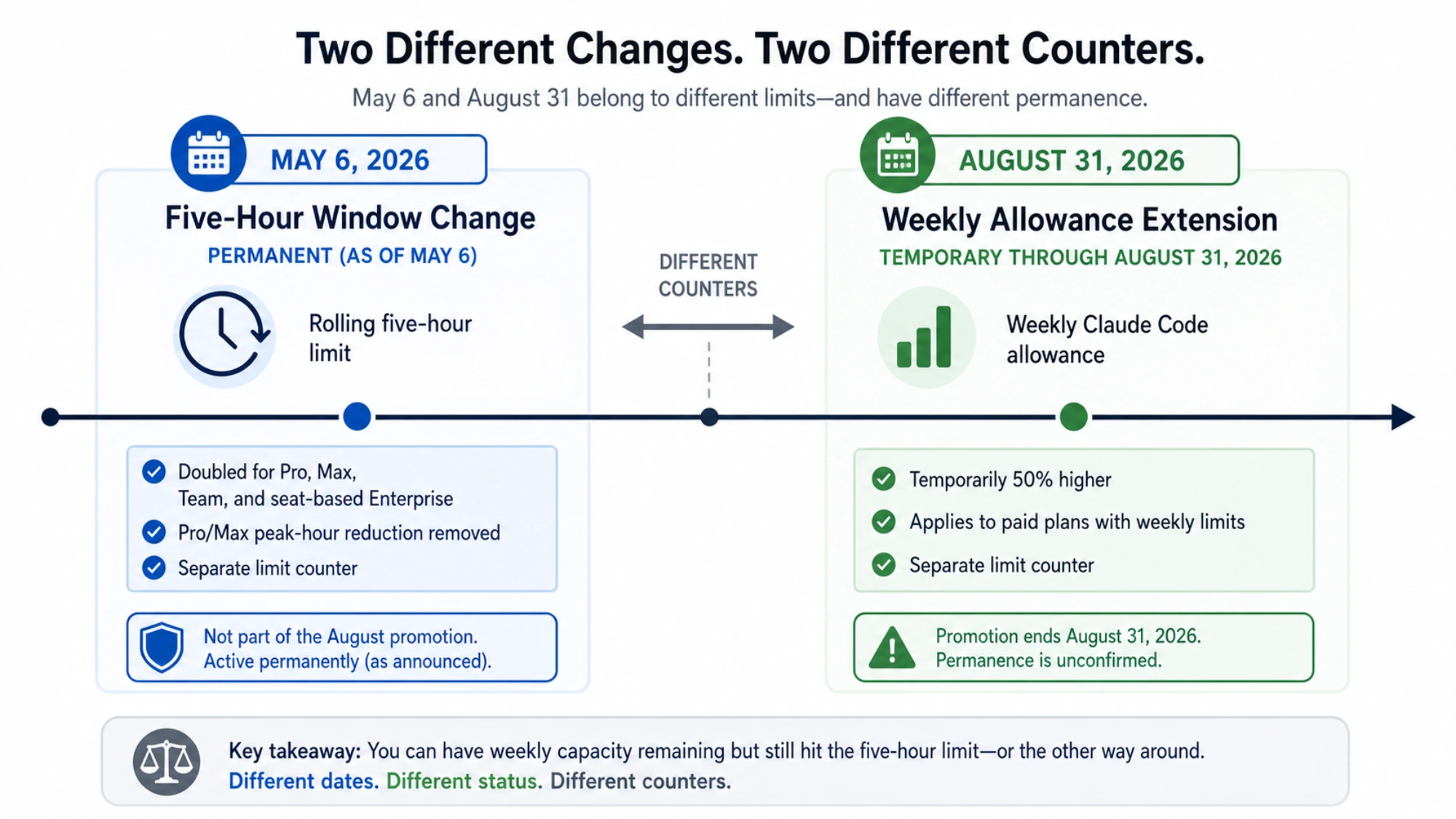
March 26, 2026 produced Anthropic's official response. CEO Thariq Shihipar stated: "To manage growing demand for Claude we're adjusting our 5 hour session limits for free/Pro/Max subs during peak hours. Your weekly limits remain unchanged." The key detail was that weekday usage between 5 AM and 11 AM Pacific Time now burns through session allowances faster than before, with roughly 7% of users expected to notice the change. This explanation accounted for some complaints, but not the extreme cases of single-prompt drain.
March 29, 2026 brought the rollout of "extra usage" — a pay-as-you-go overflow feature allowing paid subscribers to continue using Claude at standard API rates after hitting their included limits. This addressed the immediate pain of being locked out, though it also meant some users were now paying subscription fees plus API overage charges.
March 31, 2026 revealed what may be the deeper technical cause. According to reporting from PiunikaWeb, a developer reverse-engineered Claude Code's standalone binary and traced two cache-related bugs that can quietly multiply token consumption by 10 to 20 times normal levels. Anthropic has not confirmed these specific bugs but is reportedly gathering data and investigating. The flaws appear to involve massive hidden spikes in cache-read tokens upon session resumption — meaning simply picking up where you left off could silently consume your entire session allowance.
This timeline matters because different users are experiencing different problems. Some are genuinely affected by the peak-hours policy change, some are hitting the cache bugs, and many are experiencing the natural but poorly understood effects of context window compounding. Effective solutions depend on correctly identifying which category you fall into.
The broader context also matters. According to multiple reports, Anthropic saw a massive surge in new users during early 2026 — partly driven by Claude's rise to the top of the US App Store, and partly by developers migrating from competing tools. This demand surge strained GPU capacity, which Anthropic acknowledged when explaining the peak-hours adjustments. The tension between growing demand and fixed infrastructure capacity is the underlying dynamic driving all three causes simultaneously, and it is unlikely to resolve quickly. Developers should plan their workflows around these constraints rather than waiting for a silver bullet fix.
Why Your Claude Code Quota Drains Faster Than Expected

The abnormal quota drain has three distinct root causes, each requiring different mitigation strategies. Understanding which ones apply to your situation is the first step toward fixing it.
Root Cause 1: Context Window Compounding
Every message you send through Claude Code includes your entire conversation history. This is not a bug — it is fundamental to how large language models maintain coherent multi-turn conversations. However, it creates exponential cost growth that most developers significantly underestimate.
Consider a practical example. Your first prompt sends 2,000 tokens and receives a 2,000-token response. Your second prompt now sends 6,000 tokens (the original prompt + response + your new prompt) and receives another 2,000 tokens. By the tenth exchange, you are sending approximately 22,000 tokens with every single message, even if your actual question is only 200 tokens long. The cumulative cost of a 10-turn conversation is roughly 110,000 input tokens — compared to just 20,000 if those same 10 tasks had been separate conversations. That is a 5.5x cost multiplier from conversation length alone.
For Claude Code specifically, the compounding effect is even worse because tool outputs (file reads, terminal commands, search results) are often thousands of tokens each, and they accumulate in the conversation context with every turn. A single large file read can add 10,000+ tokens to every subsequent message in that session. This is why developers working with codebases — the primary Claude Code use case — hit limits faster than users of the Claude web interface who typically have shorter, lighter conversations.
Root Cause 2: Prompt Caching Bugs
The February and March 2026 cache bugs represent a genuine technical failure. Under normal operation, Claude's prompt caching system stores frequently used context so it does not need to be reprocessed with each request. Cache reads cost approximately 10% of the original input price, making cached conversations significantly cheaper. When caching fails or behaves incorrectly, however, the system falls back to full-price processing of the entire context on every turn — without any visible indication to the user.
The March 31 analysis suggests that the current bugs involve session resumption triggering massive cache-read spikes. When a developer picks up an existing Claude Code session, the system appears to re-read the entire cached context at a rate that does not match normal cache-read pricing. The practical impact is that resuming a session can consume as much quota as starting an entirely new conversation from scratch, negating the expected savings from caching.
This explanation aligns with user reports of usage meters jumping dramatically on a single prompt. If the system suddenly reprocesses 100,000+ cached tokens at full price rather than cache-read price, a 10x consumption spike on that single interaction is mathematically expected.
Root Cause 3: Peak Hours Throttling
Anthropic's acknowledged peak-hours policy is the most straightforward of the three causes. During weekdays between 5 AM and 11 AM Pacific Time (1 PM to 7 PM GMT / 8 AM to 2 PM Eastern), your 5-hour session allowance depletes faster. Anthropic states that weekly limits remain unchanged — the distribution across the week simply shifts to discourage peak-time heavy usage.
The practical impact varies by plan. Pro subscribers ($20/month) feel it most acutely because their baseline allocation is smallest. Max 5x ($100/month) and Max 20x ($200/month) subscribers have more headroom but still report noticeable changes during peak windows. Anthropic estimates approximately 7% of users will encounter session limits they would not have hit previously.
How to Check and Monitor Your Claude Code Token Usage

Before applying any optimization, you need visibility into what your actual token consumption looks like. Claude Code provides several built-in tools for this, supplemented by a growing ecosystem of community-built monitoring solutions.
Built-in Claude Code Commands
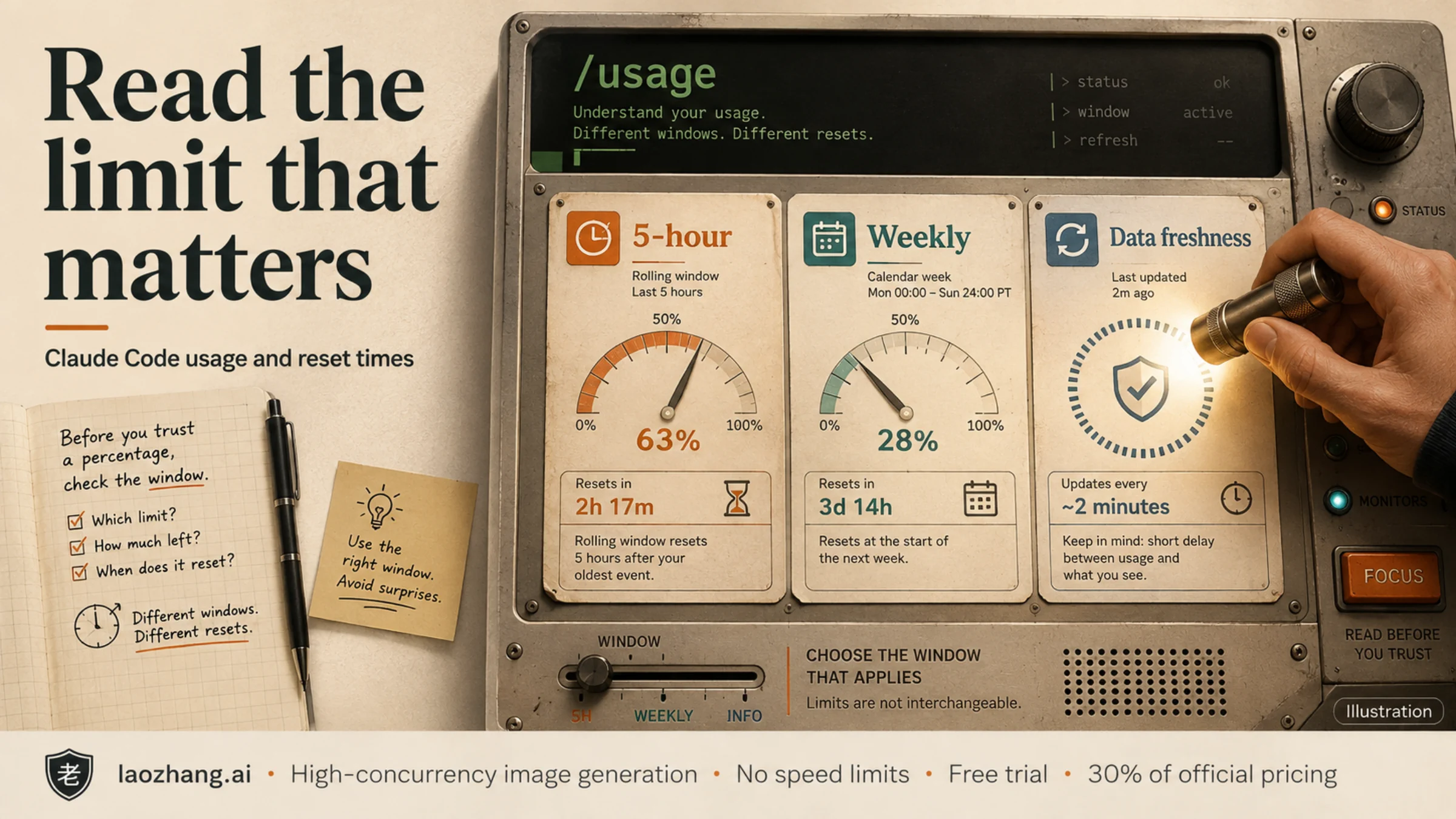
The most immediate diagnostic tool is the /context command, which you can run at any point during a Claude Code session. It displays your current context window size, the number of tokens consumed in the active session, and a breakdown by category (user messages, assistant responses, tool outputs, system prompts). Running /context before and after each major task gives you a practical understanding of what operations consume the most tokens in your specific workflow.
The /stats command provides a broader view of your usage patterns across sessions. It shows historical consumption data that helps identify whether your drain is consistent (suggesting normal heavy usage or context compounding) or sporadic (suggesting cache bugs or peak-hours impact). If you see dramatic spikes on specific sessions without corresponding increases in your actual work volume, cache-related issues are likely involved.
The /compact command is both a diagnostic and a fix. When executed, it compresses your current conversation context by summarizing earlier exchanges, typically reducing context size by 60–80%. If running /compact dramatically reduces your context window, you have been carrying substantial accumulated context that was inflating every subsequent message.
Community Monitoring Tools
For deeper analysis, several community tools have emerged in response to the transparency gap. The ccusage CLI tool analyzes Claude Code's local JSONL log files, providing detailed per-session and per-project usage breakdowns with date filtering. It works entirely locally and does not require any API access, making it the most privacy-friendly option. Another option is the Claude-Code-Usage-Monitor, which offers real-time charts of token consumption, cost estimates, and predictions about when you will hit your limits. For users who prefer browser-based monitoring, the Claude Usage Tracker Chrome extension tracks remaining quota directly in your browser. For organization and team accounts, Anthropic's Claude Console provides administrative usage analytics, though individual developers on personal plans may find the community tools more granular.
Monitoring Tools Comparison Table
Choosing the right monitoring approach depends on your workflow and how much granularity you need. Here is a quick comparison of the available options:
| Tool | Type | Best For | Granularity | Setup Effort |
|---|---|---|---|---|
/context command | Built-in CLI | Quick session check | Per-session tokens | None |
/stats command | Built-in CLI | Usage pattern trends | Historical sessions | None |
/compact command | Built-in CLI | Context reduction + diagnosis | Context size before/after | None |
| ccusage | CLI tool (npm) | Deep per-project analysis | Per-session, per-project, per-day | Install via npm |
| Claude-Code-Usage-Monitor | CLI tool (GitHub) | Real-time consumption chart | Live token count + cost estimate | Clone and run |
| Claude Usage Tracker | Chrome extension | Passive background monitoring | Remaining quota percentage | Install from Chrome Web Store |
| Claude Console | Web dashboard | Team/org usage analytics | Per-user, per-team rollup | None (built-in) |
For most individual developers, the combination of built-in commands for quick checks and ccusage for periodic deep analysis provides the best balance of convenience and insight. If you manage a team, the Claude Console adds the organizational visibility layer that individual tools lack.
Diagnostic Decision Framework
Once you have visibility into your token consumption, the next step is identifying which root cause applies to your situation. The diagnosis is straightforward when you know what patterns to look for.
If your monitoring reveals consistent high usage that scales proportionally with your work volume, context compounding is your primary issue — skip to the optimization strategies in the next section. The telltale sign is that your token count grows steadily across a session even when your individual prompts are short and simple.
If you see dramatic unexplained spikes — particularly usage jumping 30%+ on a single prompt or sessions depleting to 100% without proportional work — you are likely hitting cache bugs. Document your experience with timestamps and screenshots, report it on the GitHub tracking issues, and implement the session management workarounds while Anthropic investigates.
If your drain specifically correlates with weekday mornings in Pacific Time (your local equivalent of 5–11 AM PT), peak-hours throttling is your main factor, and scheduling changes will help most. Test this by running comparable workloads during off-peak hours and comparing your consumption rates.
Proven Strategies to Reduce Claude Code Token Consumption
These strategies are ordered by impact — the first two provide the largest immediate improvements, while later ones offer incremental gains.
Strategy 1: Start Fresh Conversations Frequently (Impact: 30–50% reduction)
This is the single highest-impact change you can make. Instead of running one long Claude Code session across an entire work day, start new sessions at natural breakpoints — when switching tasks, after completing a feature, or when your context has accumulated significant tool output. Before ending a session, ask Claude to summarize the current state in 500–1,500 tokens, then paste that summary as the opening context of your new session. This "checkpoint and restart" approach replaces 5,000–15,000 tokens of accumulated history with a compressed summary, dramatically reducing the cost of every subsequent message. The /compact command achieves a similar effect without requiring a full restart, and should be used every 15–20 exchanges in long-running sessions.
Strategy 2: Schedule Heavy Work During Off-Peak Hours (Impact: 20–40% reduction)
Anthropic's peak-hours policy means your session allowance stretches further outside the weekday 5 AM–11 AM Pacific window. The following table converts this to common time zones worldwide so you can plan your heaviest Claude Code work accordingly:
| Time Zone | Peak Hours (Avoid) | Best Work Window |
|---|---|---|
| PT (San Francisco) | 5:00 AM – 11:00 AM | 11:00 AM – 5:00 AM |
| ET (New York) | 8:00 AM – 2:00 PM | 2:00 PM – 8:00 AM |
| GMT (London) | 1:00 PM – 7:00 PM | 7:00 PM – 1:00 PM |
| CET (Berlin) | 2:00 PM – 8:00 PM | 8:00 PM – 2:00 PM |
| IST (Mumbai) | 6:30 PM – 12:30 AM | 12:30 AM – 6:30 PM |
| CST (Beijing) | 9:00 PM – 3:00 AM | 3:00 AM – 9:00 PM |
| JST (Tokyo) | 10:00 PM – 4:00 AM | 4:00 AM – 10:00 PM |
| AEST (Sydney) | 11:00 PM – 5:00 AM | 5:00 AM – 11:00 PM |
For developers in Asia-Pacific time zones, peak hours coincide with late evening and night hours, meaning your normal workday largely falls in the off-peak window — a significant advantage. For European developers, peak hours overlap with afternoon work hours, making morning sessions the better choice for heavy Claude Code tasks.
Strategy 3: Choose the Right Model for Each Task (Impact: 15–25% reduction)
Claude Code defaults to Sonnet 4.6, but all models draw from the same usage pool at different rates. Using Opus 4.6 costs approximately 1.7x more per token than Sonnet and roughly 5x more than Haiku. Use the /model command to switch strategically: Haiku for simple file reads, search queries, and formatting tasks; Sonnet for standard development work including code generation and debugging; and reserve Opus only for complex architectural decisions, multi-file refactoring, or tasks where Sonnet's output quality is demonstrably insufficient. Many developers default to the most powerful model out of habit — switching to Sonnet for routine work typically reduces consumption by 15–25% with negligible quality impact.
Strategy 4: Minimize Context File Size (Impact: 10–20% reduction)
Your CLAUDE.md project instructions file loads into the context with every session interaction. A bloated CLAUDE.md containing extensive architecture patterns, coding standards, and conventions can add 5,000–10,000 tokens to every single message. Audit your project instruction files ruthlessly — keep only the information that Claude Code genuinely needs for every interaction, and move reference material to separate files that are loaded on demand. One developer reported a 30% reduction in token consumption simply by trimming their instructions file. Additionally, use .claudeignore to exclude large directories (node_modules, build artifacts, test fixtures) from Claude Code's context scanning.
Strategy 5: Batch Your Requests (Impact: 10–15% reduction)
Combine related questions into a single message instead of sending them separately. Three follow-up questions sent individually require the system to re-transmit your entire conversation history three times. Sending all three in one message transmits the history once. For code reviews, provide the complete diff in one message rather than asking about individual files sequentially. Front-load all relevant context (requirements, constraints, examples) into your opening message to minimize clarification rounds.
Strategy 6: Use Plan Mode Before Implementation (Impact: Variable)
Running /plan before jumping into implementation lets Claude Code map out the approach without actually executing changes. This often prevents expensive trial-and-error cycles where the model generates code, encounters issues, and requires multiple correction rounds. Each correction round adds both the failed code and the error output to your context, compounding costs rapidly. A five-minute planning phase can save fifteen minutes of expensive debugging loops.
Strategy 7: Leverage Projects for Recurring Context (Impact: 5–15% reduction)
Content stored in a Claude Project's knowledge base is cached and reprocessed more efficiently across conversations. If you frequently reference the same documentation, coding standards, or API specifications, move them into a Project rather than re-pasting them into each session. This leverages prompt caching at its most efficient — the content is stored once and read cheaply on subsequent accesses.
Strategy 8: Structure Your Prompts to Minimize Tokens (Impact: 5–10% reduction)
Unstructured, conversational prompts force Claude to parse ambiguity, which often leads to clarification requests that add rounds of expensive back-and-forth. Instead, use structured markup with clear sections. Provide your requirements, constraints, and examples in a single well-organized message rather than spreading them across multiple exchanges. Specify output format explicitly — "respond with just the code, no commentary" or "answer in three bullet points" — to reduce response token volume by up to 50%. A well-structured prompt costs perhaps 50 extra tokens upfront but can save thousands in eliminated clarification rounds.
Additionally, when working with files, paste specific relevant sections rather than asking Claude Code to read entire files. A targeted 200-line code excerpt is far cheaper to process than having Claude Code scan and include a 5,000-line file in context. Use the file line range specification when possible to limit what gets loaded.
Claude Code Pro vs Max vs API — A Cost Comparison

Choosing the right Claude Code access method depends entirely on your usage volume and pattern. The subscription plans offer simplicity, while direct API access offers unlimited scale but requires more setup. Here is how they compare for three common developer profiles.
Light User (5–15 prompts/day, simple tasks)
The Pro plan at $20/month is the clear choice. At this usage level, you are unlikely to hit session limits regularly, and the shared pool between Claude web and Claude Code provides flexibility. Even with peak-hours throttling, light users rarely exhaust their 5-hour sessions. The monthly cost per interaction works out to roughly $0.05–0.15 per prompt, which is competitive with direct API access. Upgrading to Max would be overpaying.
Moderate User (30–80 prompts/day, mixed complexity)
This is the decision boundary where the math gets interesting. Max 5x at $100/month gives you 5x Pro's limits, which translates to roughly 50–200 prompts per 5-hour session depending on complexity. If you are consistently hitting Pro limits, the upgrade eliminates interruptions and adds Opus 4.6 access. However, if you regularly exceed even Max 5x limits, you face a choice: upgrade to Max 20x at $200/month, or switch to API access where you pay only for what you use.
A moderate Sonnet 4.6 user averaging 50 prompts/day with ~2,000 input tokens and ~1,000 output tokens per exchange would consume approximately 3M input tokens and 1.5M output tokens monthly. At API rates ($3/MTok input, $15/MTok output), that is roughly $9 + $22.50 = $31.50/month — substantially less than the $100 Max 5x plan. The catch is that API access requires more setup and does not include the Claude web interface or Cowork features.
Heavy User (100+ prompts/day, complex agentic tasks)
For heavy users, subscription plans almost always lose to API on pure economics. At 150 prompts/day with heavier context (5,000 input, 2,000 output tokens), monthly API cost with Sonnet 4.6 would be approximately $67.50 + $90 = $157.50/month — still less than Max 20x at $200/month and without session limits. Switching to Opus 4.6 for all tasks would cost approximately $112.50 + $225 = $337.50/month, but mixing models (Opus for 20% of tasks, Sonnet for 80%) brings it to roughly $193/month.
For developers who want the reliability of API access combined with multi-model flexibility, services like laozhang.ai provide API access to Claude and other models at standard rates without the session-based throttling of subscription plans. This is particularly relevant for developers who need predictable, uninterrupted access for production workloads or who want to avoid the rate limit issues that subscription users currently face.
Quick Cost Reference Table
To make the comparison concrete, here is what each plan costs per effective prompt assuming average token usage for a typical Claude Code development session:
| Plan | Monthly Cost | Avg Cost/Prompt* | Session Limits | Best For |
|---|---|---|---|---|
| Pro | $20 | $0.10–0.50 | Tight, shared pool | Occasional use |
| Max 5x | $100 | $0.05–0.25 | 5x Pro, Opus access | Daily development |
| Max 20x | $200 | $0.02–0.10 | 20x Pro, priority | Full-time coding |
| API (Sonnet) | Pay-per-use | ~$0.05/prompt | No session limits | Heavy/predictable use |
| API (via laozhang.ai) | Pay-per-use | ~$0.05/prompt | No limits, multi-model | Flexible production use |
*Assumes average 2,000 input + 1,000 output tokens per prompt for Sonnet 4.6
The extra usage feature introduced in March 2026 does offer a middle ground — you maintain your subscription for the included usage and pay API rates for overflow. This can be a reasonable approach for users whose needs fluctuate, though it adds billing complexity. For developers who want to try API access alongside their subscription, laozhang.ai offers documentation and a straightforward setup process that works with existing Claude Code configurations.
Frequently Asked Questions About Claude Code Usage Limits
Is the Claude Code quota drain a confirmed bug?
Partially. Anthropic officially confirmed peak-hours session limit adjustments on March 26, 2026, which account for some of the increased drain. Additionally, prompt caching bugs were confirmed and resolved in February 2026 with rate limit resets. As of March 31, 2026, separate cache-related bugs potentially inflating tokens by 10-20x are under investigation but not yet confirmed by Anthropic. The situation involves both intentional policy changes and probable technical issues.
Do Claude Code and Claude web share the same usage limits?
Yes. All Claude surfaces — the web interface, mobile apps, desktop apps, and Claude Code — draw from a single shared usage pool tied to your subscription plan. Heavy Claude Code usage directly reduces your available limits for the web interface, and vice versa. This shared pool is one reason many developers find their limits more constrained than expected.
How do I check my remaining Claude Code quota?
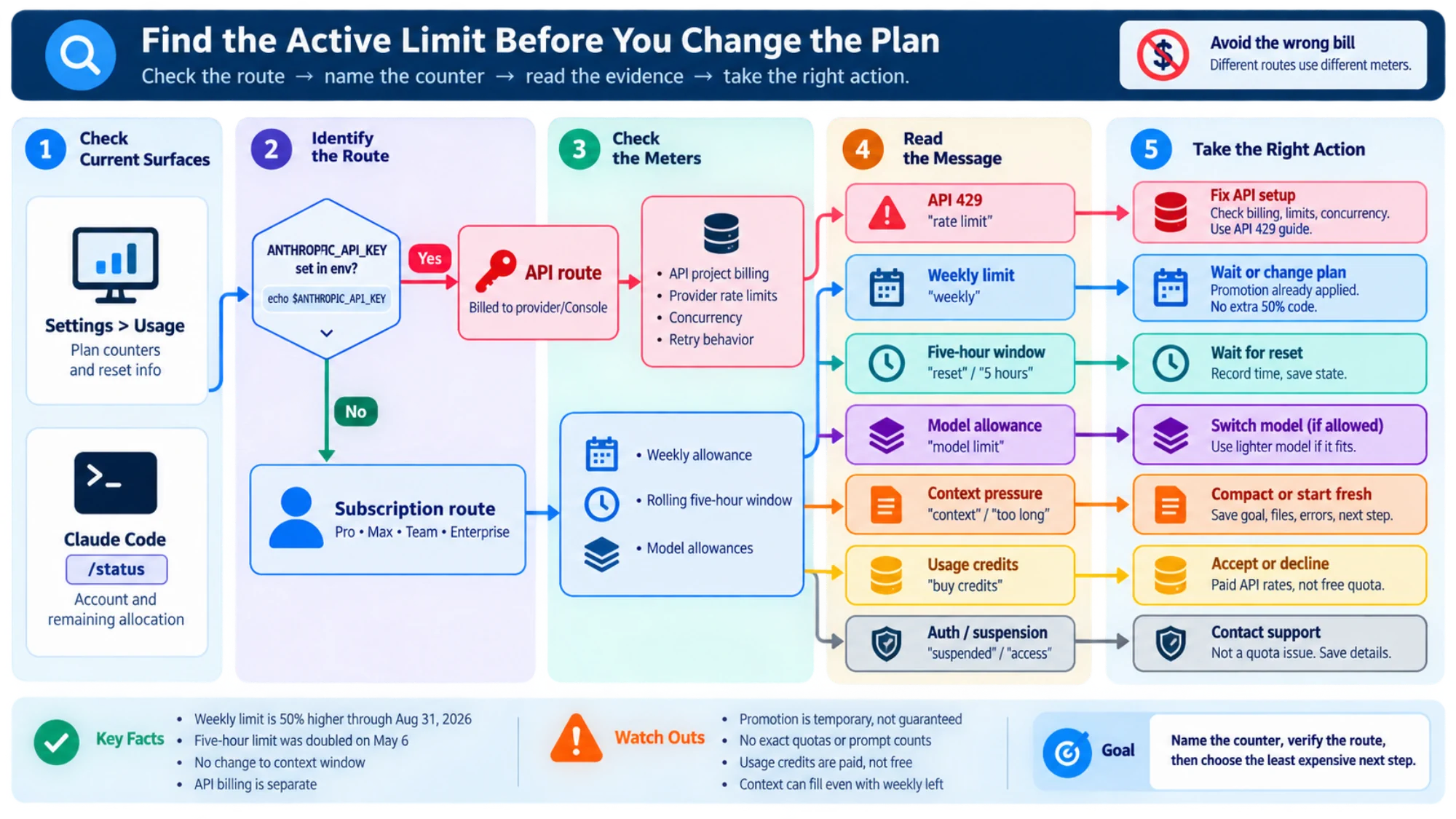
Run /context within any Claude Code session to see current token consumption. For overall usage status, visit claude.ai/settings/usage. The /stats command shows historical patterns. For more granular analysis, third-party tools like ccusage and the Claude Usage Tracker Chrome extension provide detailed breakdowns.
What happens when I hit the Claude Code usage limit?
You will see a message indicating your limit has been reached, along with a reset time. If you have enabled extra usage in your account settings, you can continue using Claude at standard API rates ($3/$15 per MTok for Sonnet 4.6). Otherwise, you must wait for the 5-hour session window to reset or the weekly quota to refresh. You can explore free alternatives while waiting for your quota to reset.
Will switching to Claude Max fix the quota drain issue?
Not necessarily. While Max 5x ($100/month) and Max 20x ($200/month) provide significantly larger allowances, they are subject to the same peak-hours throttling and cache bugs as Pro plans. If your drain is caused by context compounding or caching issues, the same patterns will simply take longer to exhaust your larger allocation. Address the root causes first, then upgrade only if your optimized usage still exceeds Pro limits.
Can I get a refund for quota lost to the bug?
Anthropic has not announced a blanket refund policy. However, individual users have reported success requesting billing adjustments through the support channel at support.anthropic.com. If you can document specific instances of abnormal drain (screenshots of usage meters, timestamps, GitHub issue references), you strengthen your case. If you are considering cancellation due to the issues, review the refund process and options available.
How does the 5-hour session window actually work?
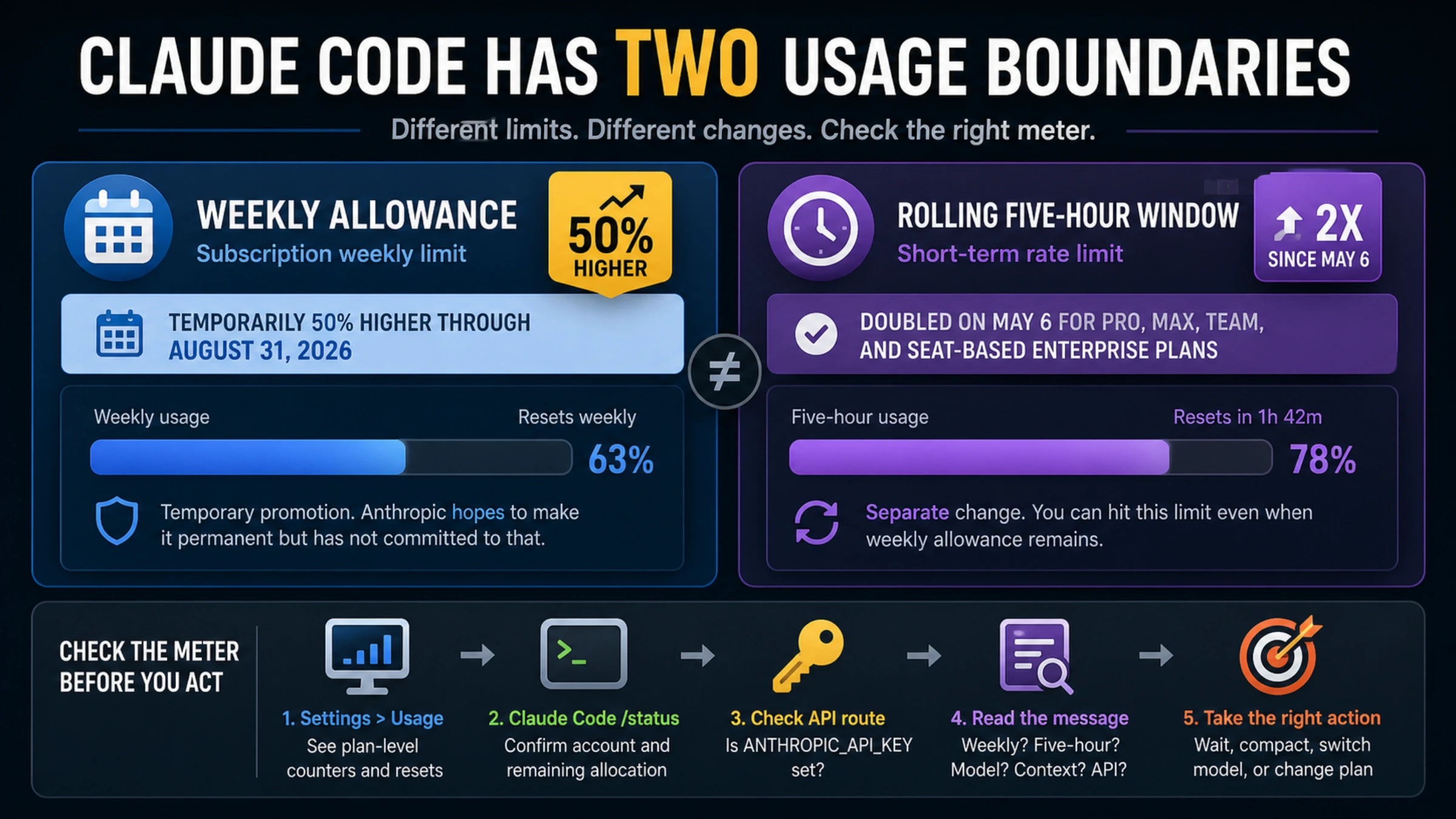
The 5-hour session window is a rolling limit that begins with your first prompt and resets only after the full 5 hours have elapsed and you send a new message. During that window, your usage is tracked against your plan's allocation. Importantly, the clock does not pause when you are idle — if you send a prompt at 9 AM and another at 1 PM, those 4 hours of idle time still count toward your session window. The session resets when the window expires and you actively begin a new interaction. Weekly quotas, introduced in August 2025, provide an additional cap on cumulative usage across all sessions within a 7-day period, affecting fewer than 5% of subscribers according to Anthropic.
Does using extended thinking or ultrathink mode affect my quota?
Yes, significantly. Extended thinking modes generate additional internal reasoning tokens that count toward your usage. A task that normally consumes 2,000 output tokens might generate 10,000-20,000 reasoning tokens in ultrathink mode — all of which count against your session and weekly limits. Use extended thinking selectively for genuinely complex tasks (multi-file refactoring, architectural planning) rather than defaulting to it for every interaction. For routine tasks, standard mode with Sonnet 4.6 provides a much better cost-to-quality ratio.
What is the "extra usage" feature and should I enable it?
Extra usage is Anthropic's pay-as-you-go overflow mechanism, available on all paid plans since March 2026. When you hit your included session or weekly limit, extra usage allows you to continue using Claude at standard API rates — $3/MTok input and $15/MTok output for Sonnet 4.6, or $5/$25 for Opus 4.6. You can set spending caps to prevent unexpected bills. Whether to enable it depends on your tolerance for interruptions: if being locked out during a critical coding session costs you more in lost productivity than the overage charges, enabling extra usage with a reasonable cap (say $20-50/month) provides a valuable safety net.
What to Do Next — Your Action Plan
Depending on your situation, here is exactly what to do right now.
If you are currently experiencing abnormal drain, start by running /context to check your session's token usage. Compare your actual work volume against the token count — if the numbers seem wildly disproportionate, you are likely hitting cache bugs. Report your experience on GitHub issue #38335 and start using /compact after every 10–15 exchanges. Consider enabling extra usage as a safety net so you are not locked out during critical work.
If you want to optimize proactively, implement the top three strategies from this guide: start fresh conversations at natural breakpoints, schedule heavy work outside peak hours (5–11 AM PT weekdays), and switch to Haiku or Sonnet for routine tasks. These three changes alone typically reduce token consumption by 40–60%.
If you are evaluating whether to keep your subscription, calculate your actual monthly API cost using the formulas in the cost comparison section above. For many moderate-to-heavy users, direct API access through providers like laozhang.ai is both cheaper and more predictable than subscription-based plans with opaque usage metering.
The Claude Code usage limit situation in March 2026 has been genuinely frustrating for developers who depend on the tool. The combination of policy changes, technical bugs, and insufficient transparency has eroded trust. However, the underlying product remains capable, and with the monitoring tools and optimization strategies outlined in this guide, most developers can achieve a productive and cost-effective workflow while Anthropic works to resolve the remaining technical issues.