To install Claude Code, open a terminal and run the official installer for your system. On macOS, Linux and WSL that is curl -fsSL https://claude.ai/install.sh | bash. In Windows PowerShell it is irm https://claude.ai/install.ps1 | iex. Then open a new terminal, run claude --version, and start a session with claude. These commands come from Anthropic's setup page, checked on October 9, 2026.
You do not need Node.js for the recommended installer. You do need a Claude Pro, Max, Team or Enterprise plan, or an Anthropic Console account, because the free claude.ai plan does not include Claude Code.
Install Claude Code: the command for each system
| System and shell | Command | Updates |
|---|---|---|
| macOS, Linux, WSL | curl -fsSL https://claude.ai/install.sh | bash | Automatic |
| Windows PowerShell | irm https://claude.ai/install.ps1 | iex | Automatic |
| Windows CMD | curl -fsSL https://claude.ai/install.cmd -o install.cmd && install.cmd && del install.cmd | Automatic |
| macOS or Linux with Homebrew | brew install --cask claude-code | Run brew upgrade claude-code |
| Windows with WinGet | winget install Anthropic.ClaudeCode | Run winget upgrade Anthropic.ClaudeCode |
| Any system with Node.js 22+ | npm install -g @anthropic-ai/claude-code | Run npm install -g @anthropic-ai/claude-code@latest |
The first three rows are the native installer, which Anthropic recommends. It shows no progress bar while it downloads, so wait for it to finish. The Homebrew cask claude-code follows the stable channel, which is usually about a week behind; claude-code@latest follows every release.
Debian, Ubuntu, Fedora, RHEL and Alpine can also install from Anthropic's signed apt, dnf and apk repositories. The repository setup lines are on the setup page.
Check your system first
The setup page lists these requirements:
- macOS 13.0 or later, Windows 10 1809 or later (or Windows Server 2019+), Ubuntu 20.04+, Debian 10+, or Alpine Linux 3.19+
- 4 GB of RAM or more and an x64 or ARM64 processor; 32-bit Windows is not supported
- An internet connection, and a location in one of Anthropic's supported countries
- Bash, Zsh, PowerShell or CMD
Install Claude Code on Mac
Open Terminal and run:
curl -fsSL https://claude.ai/install.sh | bashThe installer puts the claude launcher at ~/.local/bin/claude. If you already use Homebrew and prefer it, run brew install --cask claude-code instead, and remember that Homebrew installs do not update themselves.
Install Claude Code on Linux and Ubuntu
The same command works on Ubuntu, Debian and other Linux distributions:
curl -fsSL https://claude.ai/install.sh | bashOn a fresh Ubuntu or Debian server, install curl first with sudo apt install curl. On Alpine, install bash, curl, libgcc, libstdc++ and ripgrep, then set USE_BUILTIN_RIPGREP to 0 as the setup page describes. If the install stops with Killed on a small server, the machine ran out of memory: add swap or memory and run it again.
Install Claude Code on Windows
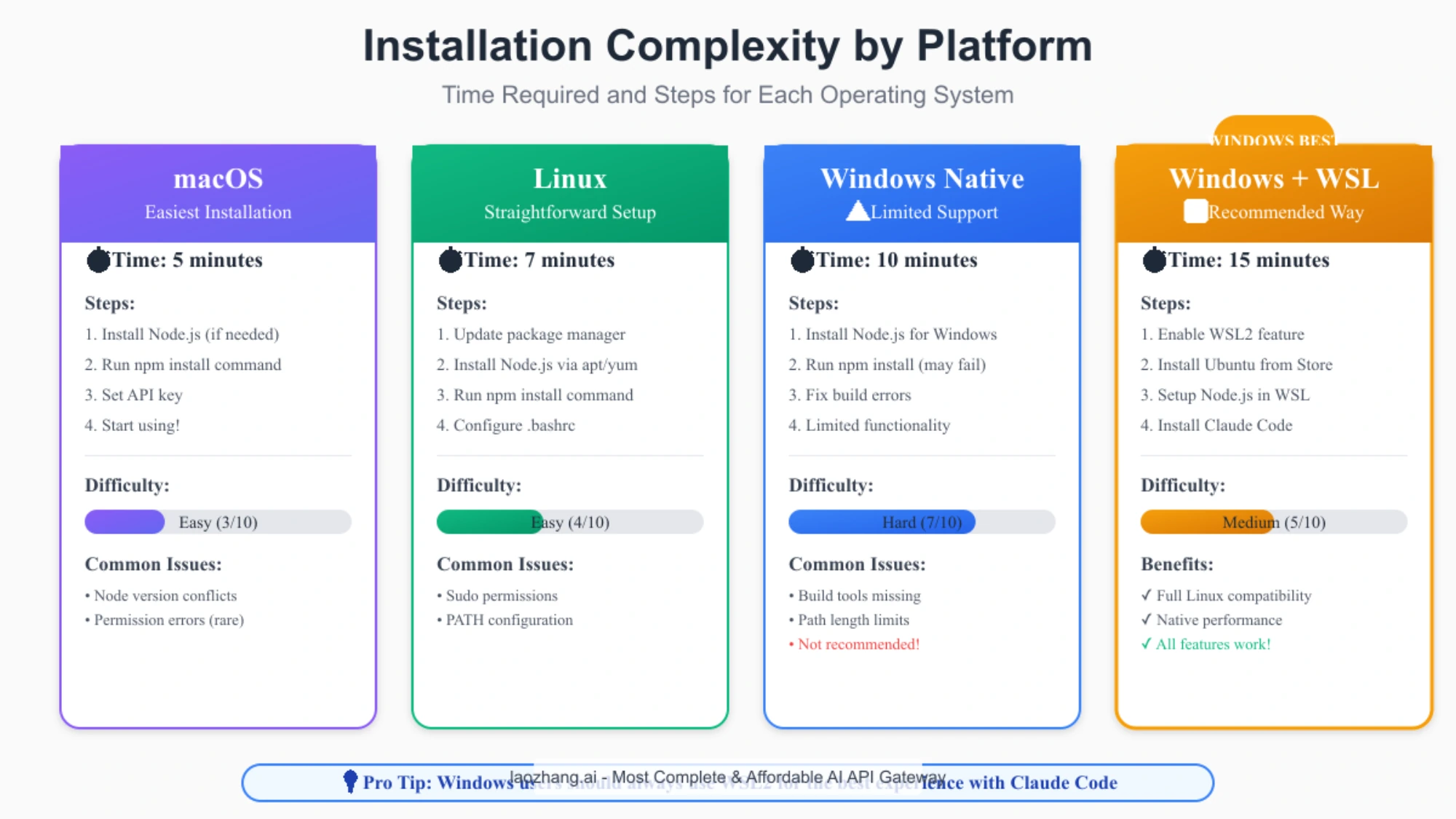
You can run Claude Code natively on Windows or inside WSL. You do not need to run the installer as Administrator.
Native Windows, PowerShell. Your prompt starts with PS C:\. Run:
irm https://claude.ai/install.ps1 | iexNative Windows, CMD. Your prompt starts with C:\ without PS. Run:
curl -fsSL https://claude.ai/install.cmd -o install.cmd && install.cmd && del install.cmdIf you see 'irm' is not recognized, you are in CMD, so use the CMD command or open PowerShell. If you see The token '&&' is not a valid statement separator, you are in PowerShell, so use the irm command.
Git for Windows is optional. With it, Claude Code runs shell commands through Git Bash; without it, Claude Code uses PowerShell. If Claude Code cannot find Git Bash, set CLAUDE_CODE_GIT_BASH_PATH (for example C:\Program Files\Git\bin\bash.exe) in the env block of your settings.json.
WSL. Open your WSL distribution and run the Linux command inside it:
curl -fsSL https://claude.ai/install.sh | bashInstall and launch claude from the WSL terminal, not from PowerShell. WSL 2 supports Claude Code's sandboxing; native Windows and WSL 1 do not. Keep your project on the Linux filesystem (/home/...) rather than /mnt/c/ for faster search.
Install Claude Code with npm
Use npm only if you want Node to manage the install. The package needs Node.js 22 or later:
npm install -g @anthropic-ai/claude-codenpm installs the same native binary as the standalone installer. Do not use sudo npm install -g; Anthropic warns that it causes permission problems and security risks. To upgrade, run npm install -g @anthropic-ai/claude-code@latest, because npm update -g may not move you to the newest release.
In WSL, npm problems usually mean WSL is using the Windows copy of Node. If which node or which npm prints a path starting with /mnt/c/, install Node inside Linux (with your package manager or nvm). If npm reports a platform mismatch, run npm config set os linux, then npm install -g @anthropic-ai/claude-code --force.
Verify the install and log in
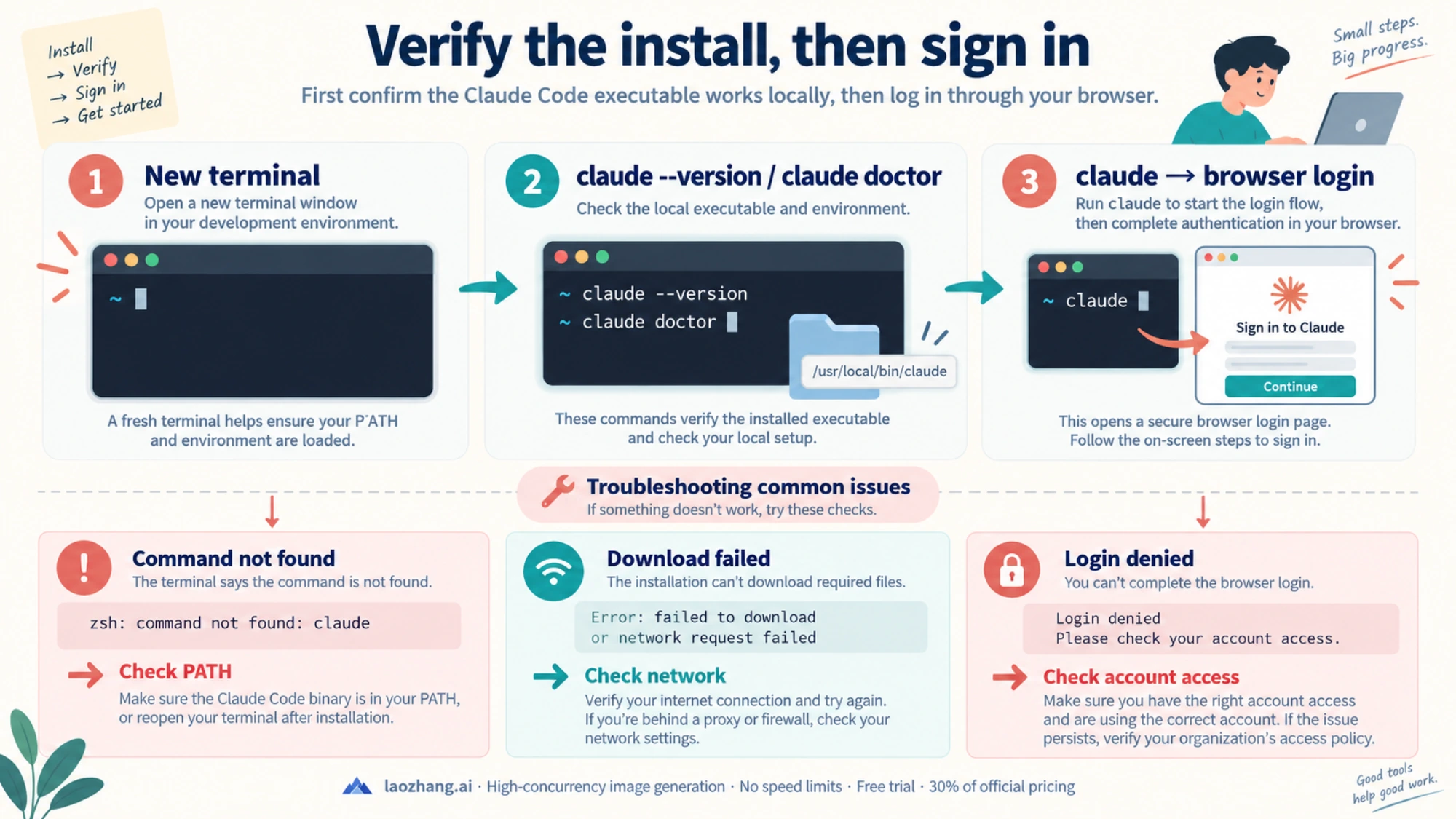
Open a new terminal window and run:
claude --version
claude doctor
claude --version prints a version number such as 2.1.211 (Claude Code). claude doctor checks the installation, settings files and the last update attempt without starting a session.
Then go to a project folder and start Claude Code:
cd your-project
claude
The first run opens a browser to log in. Claude Code works with a Pro, Max, Team or Enterprise plan, or with an Anthropic Console account billed per token. You can also point it at Amazon Bedrock, Google Cloud or Microsoft Foundry. If ANTHROPIC_API_KEY is set and you approve it when asked, Claude Code uses the key and skips the browser login.
Which plan to pay for is covered in Claude Code Pricing: Pro vs Max and When the Upgrade Pays Off. Whether any free access exists is covered in Claude Code Free Trial in 2026.
Fix common Claude Code install errors
command not found: claude or 'claude' is not recognized
The install worked, but its folder is not on your PATH. On macOS with Zsh, add it and reload:
echo 'export PATH="$HOME/.local/bin:$PATH"' >> ~/.zshrc
source ~/.zshrc
On Linux with Bash, use ~/.bashrc in both lines instead. On Windows PowerShell, add the folder to your user PATH, then restart the terminal:
$currentPath = [Environment]::GetEnvironmentVariable('PATH', 'User')
[Environment]::SetEnvironmentVariable('PATH', "$currentPath;$env:USERPROFILE\.local\bin", 'User')
If claude still runs an old version, you may have two installs, for example an old npm one and a native one. Run which -a claude on macOS and Linux, or where.exe claude on Windows, and remove the one you no longer want.
syntax error near unexpected token '<' or a 403
The install URL returned a web page instead of the script. This usually means a proxy, captive portal or regional block on your network. Check whether you can reach Anthropic's download server:
curl -sI https://downloads.claude.ai/claude-code-releases/latestBehind a corporate proxy, set HTTPS_PROXY and HTTP_PROXY to your proxy address before installing. For TLS errors on a network with its own certificate authority, update your CA certificates, and set NODE_EXTRA_CA_CERTS to the CA file so Claude Code trusts it after install.
Checking the API host with curl -i https://api.anthropic.com
Some guides suggest curl -i https://api.anthropic.com to test the network. Any HTTP response, even an error page, shows your machine can reach the API host. A timeout or TLS error points to the proxy and certificate settings above. The download check against downloads.claude.ai is the one Anthropic documents for installation.
API Error: 403 after you log in
Check that your Pro or Max subscription is active at claude.ai settings. Console users need the "Claude Code" or "Developer" role in their organization. Login loops and invalid-code messages are covered in Fix Claude Code OAuth Errors: 500, 403, and Invalid Code.
EACCES: permission denied
With the native installer, the target folder is not writable; fix its permissions. With npm, switch to the native installer rather than adding sudo.
Install Claude, the desktop app, or Claude Code?
"Install Claude" can mean three things. The Claude chat app for Mac, Windows, iOS and Android is at claude.com/download. The Claude desktop app also runs Claude Code with a graphical interface, so you can use it without a terminal. Claude Code in the terminal is what the commands on this page install, and it also powers the VS Code and JetBrains extensions.
Update or uninstall Claude Code
Native installs update in the background; run claude update to update right away. Homebrew, WinGet and Linux package installs need their package manager's upgrade command.
To uninstall a native install on macOS, Linux or WSL:
rm -f ~/.local/bin/claude
rm -rf ~/.local/share/claude
For other methods, use brew uninstall --cask claude-code, winget uninstall Anthropic.ClaudeCode or npm uninstall -g @anthropic-ai/claude-code. Your settings stay in ~/.claude until you delete that folder.
FAQ
Do I need Node.js to install Claude Code?
No. The native installer, Homebrew and WinGet do not need Node.js. Only the npm route needs it, and then it must be Node.js 22 or later.
Is Claude Code free to install?
Installing is free, but using it needs a paid Claude plan (Pro, Max, Team or Enterprise) or a Console account with API billing. The free claude.ai plan does not include Claude Code.
What does irm https://claude.ai/install.ps1 | iex do?
It downloads Anthropic's PowerShell install script and runs it. Run it in PowerShell, not CMD. In CMD, use the install.cmd command from the table above.
Can I install Claude Code on Ubuntu without sudo?
Yes. The native installer writes to your home folder (~/.local/bin and ~/.local/share/claude), so it does not need sudo. You only need sudo to install system packages such as curl.