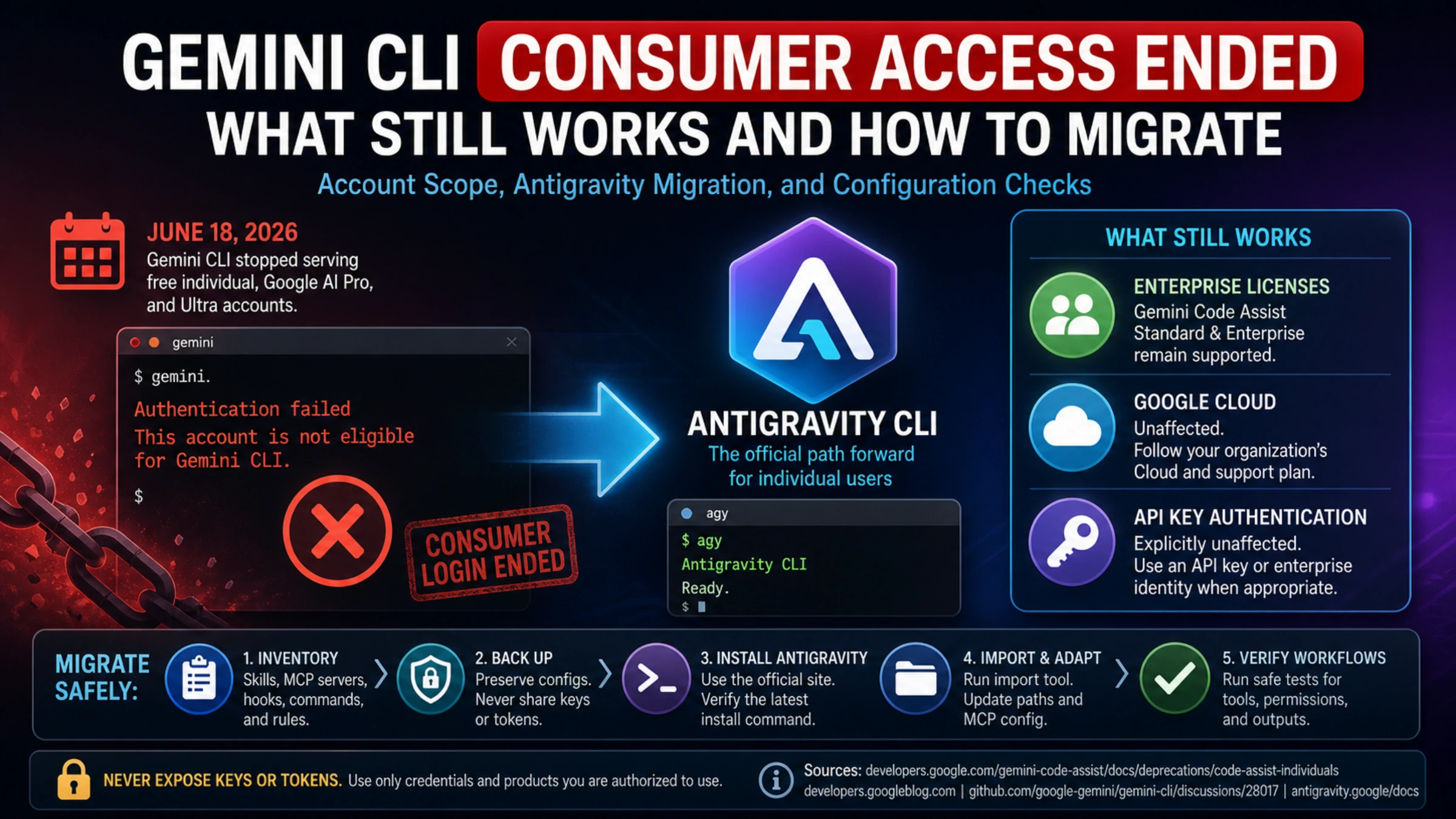
Gemini CLI did lose its consumer service path, but the precise answer matters. On June 18, 2026, Google stopped serving requests from free individual accounts and individual Google AI Pro and Ultra accounts through Gemini CLI. The Login with Google option no longer gives those consumer accounts access. Google moved that audience to Antigravity CLI.
That is not the same as deleting the open-source project or disabling every authentication method. Google says Gemini Code Assist Standard and Enterprise licenses, Google Cloud access, and API-key authentication remain supported. The repository and installable package can therefore still exist while a personal Google login fails.
Before uninstalling anything, classify the route you actually use.
The account decision that controls everything else
| Your current route | Current status in Google's transition notices | Sensible next action |
|---|---|---|
| Free individual account with Google login | Gemini CLI stopped serving requests | Move the terminal workflow to Antigravity CLI |
| Individual Google AI Pro or Ultra account | Gemini CLI stopped serving requests | Move to Antigravity CLI rather than repeatedly updating Gemini CLI |
| Gemini Code Assist Standard or Enterprise | Access is explicitly described as unchanged | Keep the supported organizational setup unless your administrator plans a migration |
| Google Cloud project | Outside the consumer cutoff | Follow the organization's Cloud and support plan |
| Gemini or enterprise platform API key | API-key authentication is explicitly unaffected | Keep the authenticated route if it meets the workload's requirements |
| An npm package or GitHub checkout with no working request | Software presence does not establish service access | Inspect authentication and perform a harmless request test |
Google's consumer account deprecation page is the clearest source for this boundary. It names the affected consumer tiers, says Google login can no longer access Gemini CLI, and separately confirms that Standard and Enterprise access remains unchanged.
This explains a result that otherwise looks contradictory: the same gemini binary can fail for an individual account and continue to work in a licensed enterprise environment. The command is local; entitlement is enforced by the service route behind it.
Installable is not the same as usable
Three questions are often collapsed into one:
- Does the open-source repository still exist?
- Can the program still be installed and launched?
- Will this account and authentication method receive a model response?
The answer can be yes, yes, and no.
Google's May transition announcement says the Apache-2.0 project remains available and will continue receiving model, bug, and security updates for enterprise customers. It also says the consumer tiers would stop being served on June 18. Both statements are part of the same policy.
There is also a documentation trap. The current Gemini CLI README still advertises a personal-account free tier and Google sign-in. That general page conflicts with the later, narrowly scoped deprecation page. For an availability decision, the dated and specific deprecation notice is the stronger source. An old quota promise in a README is not evidence that consumer OAuth was restored.
If a local CLI still opens, verify all of the following before calling it operational:
- which authentication method it selected;
- which Google Cloud project or billing identity is attached;
- whether a real, non-destructive request succeeds;
- whether headless jobs set credentials explicitly or inherit an old cached session;
- whether success is coming from the account you intended to use.
The supported consumer successor is Antigravity CLI
Google's path for affected individual users is Antigravity CLI, a new terminal surface that shares an agent harness with Antigravity 2.0. Google describes it as retaining core concepts such as Agent Skills, Hooks, Subagents, and extensions converted to plugins. The announcement also acknowledges that the products did not start with one-to-one feature parity.
Treat the migration as a workload transition, not a binary rename. A successful install proves very little about custom commands, permissions, MCP servers, headless output, or the exact flow your automation depends on.
The current official download page publishes these macOS and Linux installation instructions:
curl -fsSL https://antigravity.google/cli/install.sh | bashThe Windows page provides separate PowerShell and Command Prompt commands. Because these commands download and execute remote code, open the official page first, check that the command is still current, and follow your organization's software policy. Avoid copying a permanently cached installer command from an undated tutorial.
After installation, the entry command is:
agyOn first launch, Antigravity CLI can detect legacy Gemini CLI profiles and present migration choices. Automatic discovery is useful, but it is not a backup and it is not a parity test.
Preserve the workflow before converting it
Make an inventory before changing directories or uninstalling the old CLI. The useful inventory is not a blind archive of a home folder; it identifies the components that make a real workflow function:
- workspace and global
GEMINI.mdrules; - project and global skills;
- MCP server definitions and the names of required environment variables;
- custom commands, extensions, hooks, and agent profiles;
- headless command flags, output formats, exit-code handling, and timeouts;
- project conversations or checkpoints that contain needed context;
- proxy, certificate, permission, and audit requirements in managed environments.
Keep secret values out of screenshots, migration notes, tickets, and repositories. Back up configuration structure, but leave API keys and access tokens in an approved secret store.
It helps to define a tiny, harmless acceptance set before migration. For example: the agent sees the expected workspace rule; a known MCP server appears without exposing credentials; a read-only prompt returns; a file edit asks for the expected permission; structured output still parses. Run the same checks after migration.
Configuration paths and schemas do change
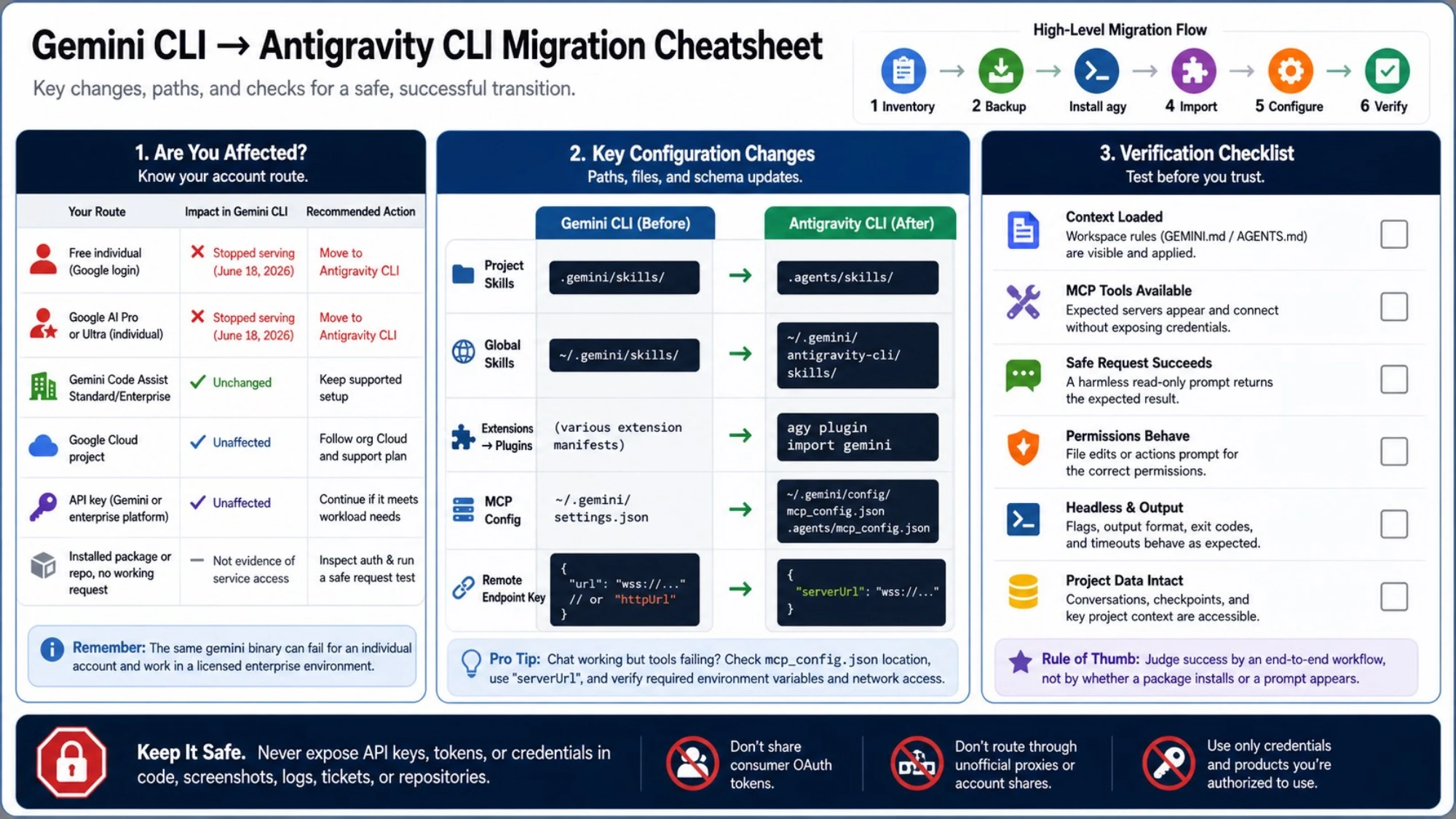
Google's current Gemini CLI migration guide documents several changes that can make a new install look incomplete.
Project skills move to a new directory
Gemini CLI used this workspace path:
.gemini/skills/Antigravity CLI expects project-local skills here:
.agents/skills/Global skills move from ~/.gemini/skills/ to ~/.gemini/antigravity-cli/skills/. If an old slash command disappears after migration, check the directory before rewriting the skill.
Extensions become plugins
The migration utility can convert legacy Gemini extensions:
agy plugin import geminiRead the itemized result. The utility reports processed skills, agents, commands, and MCP servers, and it can mark categories as skipped. A top-level success message does not mean every customization was found.
MCP configuration becomes a dedicated file
Gemini CLI commonly stored MCP definitions inside ~/.gemini/settings.json. Antigravity CLI uses dedicated files:
~/.gemini/config/mcp_config.json
.agents/mcp_config.json
The documented key for remote WebSocket or SSE endpoints is now serverUrl, replacing legacy url or httpUrl keys. When ordinary chat works but every remote tool fails, inspect the config location, endpoint key, environment variables, and network policy before blaming the model.
Context files are compatible, but scope still matters
The official guide says Antigravity CLI continues to read workspace GEMINI.md and AGENTS.md files and the global ~/.gemini/GEMINI.md. That compatibility does not guarantee that every theme, visual overlay, extension, or permission behavior is identical. The migration guide specifically warns that some custom terminal themes and experimental overlays are not supported.
A migration sequence with a rollback path
Use small, observable steps:
- Identify the account route. Separate consumer Google login from enterprise, Cloud, and API-key authentication.
- Record a working baseline. Note the current version, essential commands, MCP inventory, and a few safe acceptance tasks.
- Back up non-secret configuration. Preserve rules, skill sources, extension manifests, MCP structure, and required project context.
- Install from the current official page. Do not use a third-party binary or a proxy that reuses consumer OAuth.
- Run first-launch migration. Review each selected and skipped asset.
- Resolve explicit path changes. Check
.agents/skills/,mcp_config.json, andserverUrl. - Test without side effects. Validate context, tools, permissions, and output handling before allowing repository writes or deployment commands.
- Keep the backup until production workflows pass. Do not remove the old configuration just because the new prompt opens.
Do not try to preserve an old consumer quota by lending OAuth tokens to a third-party agent, routing requests through an unofficial account proxy, or bypassing service controls. A legitimate API key or Google Cloud identity is a different authentication contract. Use only credentials and products you are authorized to use.
Diagnose the symptom instead of guessing
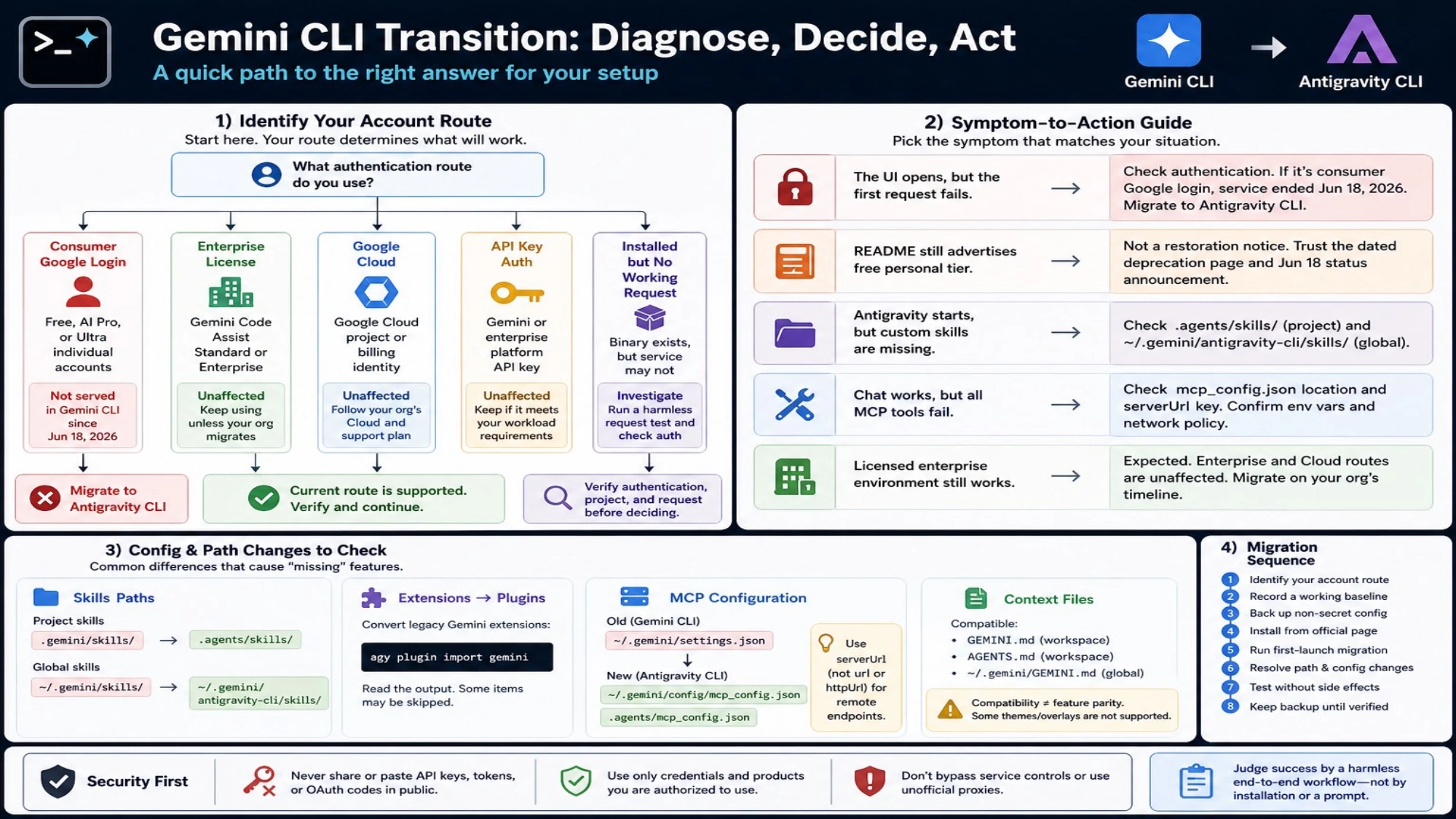
The UI opens, but the first request fails
Inspect authentication. If the session uses individual Login with Google, a June cutoff is the expected explanation; installing a newer Gemini CLI build will not reactivate that service path. Migrate to Antigravity CLI, or use an API-key/enterprise route only if you genuinely have that entitlement.
The README still advertises a free personal tier
Do not treat that as a restoration notice. The more specific deprecation page and the Gemini CLI team's June 18 status announcement explicitly say individual accounts stopped being served.
Antigravity starts, but custom skills are missing
Check whether project skills remain under .gemini/skills/ instead of .agents/skills/, and whether global skills were imported to the new Antigravity-specific location.
Chat works, but all MCP tools fail
Check the standalone mcp_config.json, convert remote endpoint fields to serverUrl, and confirm the process receives the required environment variables. Redact tokens before sharing logs.
A licensed enterprise environment still works
That matches Google's published exception. The organization can migrate on its own support, compliance, and feature timeline rather than the individual-account deadline.
The accurate conclusion
Gemini CLI was deprecated for a major audience, but “Gemini CLI is completely gone” is too broad. Free individual, Google AI Pro, and Google AI Ultra request service ended in Gemini CLI; Google directs those users to Antigravity CLI. Enterprise licenses, Google Cloud, and API-key authentication were not closed by the same announcement.
For an affected individual account, repeated reinstalls cannot restore a retired backend entitlement. Preserve the configuration and move the workload. For an enterprise or API-key setup, verify the current support contract before changing a working environment. In either case, judge success by a harmless end-to-end workflow—not by whether a package installs or a prompt appears.