Update (October 5, 2026): ChatGPT agent is no longer available. OpenAI removed it in August 2026 and now points users to ChatGPT Work, launched on July 9, 2026, for long multi-step tasks; the ChatGPT pricing page lists ChatGPT Work on desktop, web and mobile depending on plan. The file-routing rules below (upload a copy, connect an app, use a repository, or switch to a local agent) still apply, but check what ChatGPT Work can access in its own documentation before relying on this page.
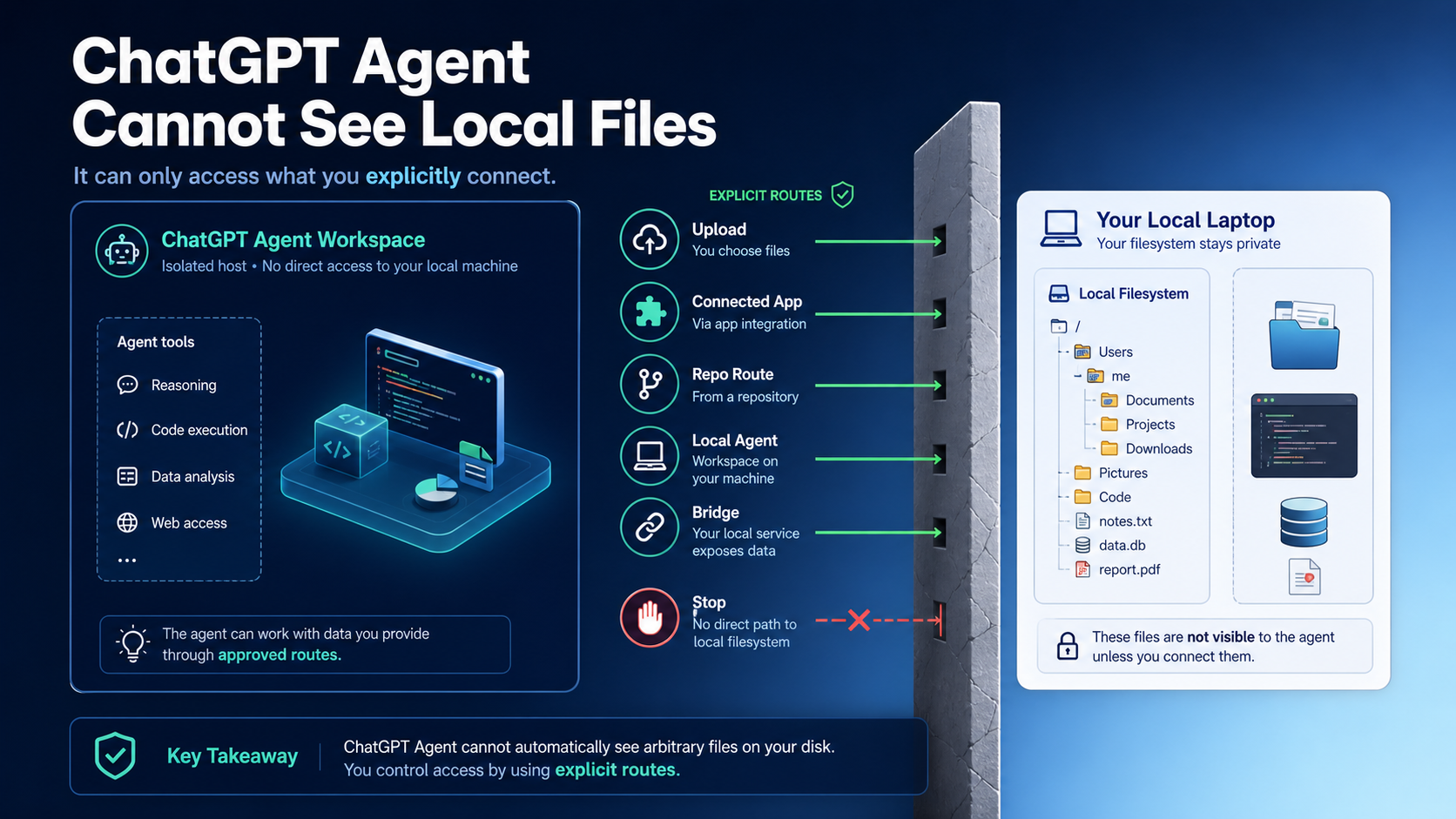
ChatGPT Agent can work with files you upload, connect, or route through an approved workspace, but it does not automatically read a path like ~/Downloads/report.pdf or a project folder on your laptop. If the file is only on your live disk, the first decision is not which prompt to use; it is whether the task needs an uploaded copy, a connected app, a repo route, a local coding agent, a deliberate bridge, or no access.
Use this quick split before you expose anything: uploaded or connected files are good for reading and light edits; repo routes are better for versioned code; local coding agents are for live files, commands, and tests; bridges are separate software and should be scoped tightly.
Stop before upload or bridge if the folder contains credentials, .env files, SSH keys, local databases, customer exports, regulated records, unreleased source, or a logged-in browser session you cannot safely delegate. Redact, copy a fixture, or switch to a controlled local workspace instead.
Quick Route Board
The fastest way to fix the problem is to name where the file lives. ChatGPT Agent is a product surface with explicit data routes, not a silent mount of every path on your computer. OpenAI describes ChatGPT Agent as using tools such as browsers, a terminal, direct API access, and connectors in its own environment, while ChatGPT apps and connectors expose approved service data through their own permission paths. That is different from letting a model wander through a local laptop filesystem.
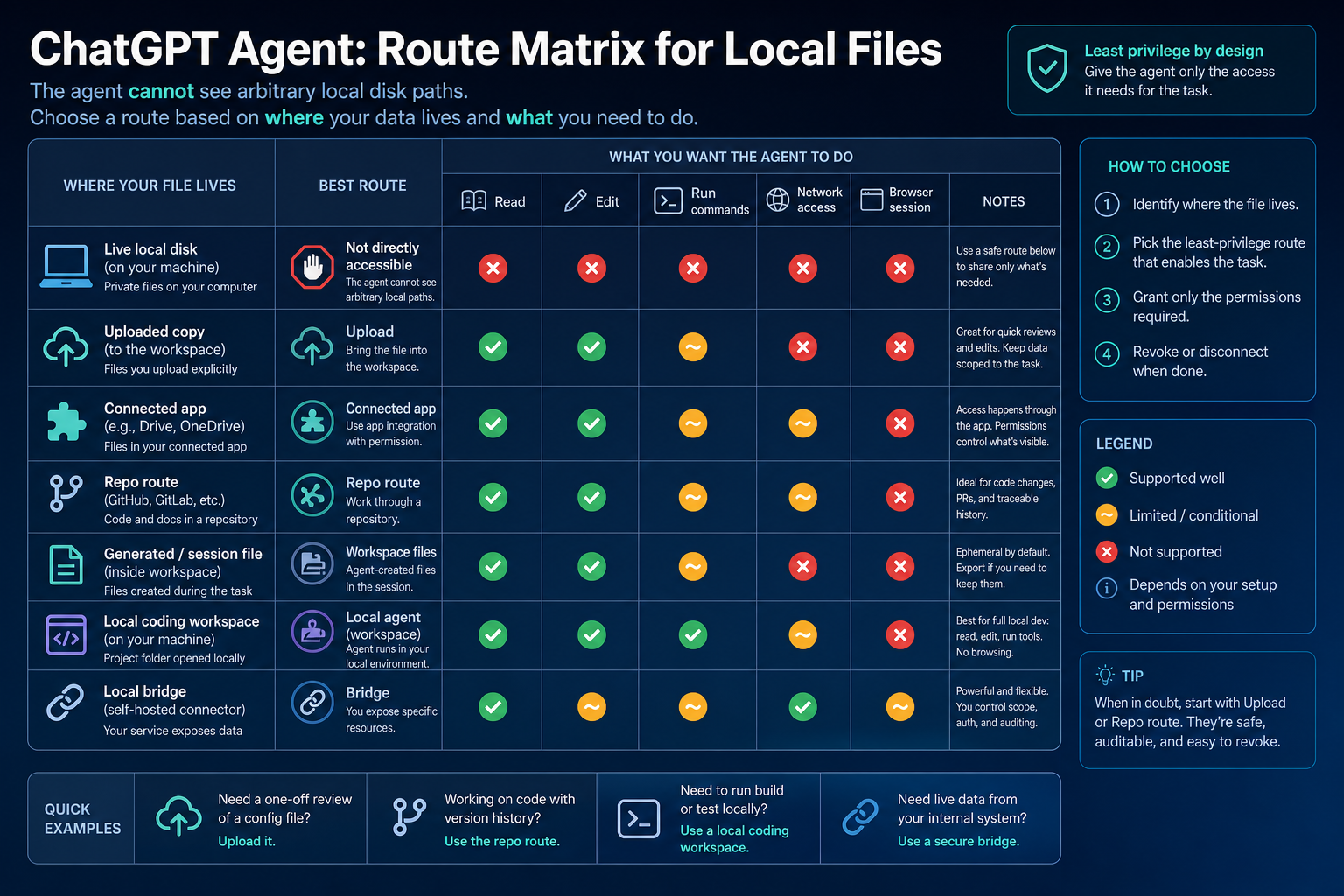
| File or task shape | Safer first route | What it does not mean |
|---|---|---|
| One PDF, CSV, contract, screenshot, or export | Upload a copy after removing sensitive data | The agent is not watching the original file on disk |
| File already lives in an approved app or service | Use the connected app route if the account and workspace allow it | The connector is not a full local filesystem permission |
| Code, docs, or config in version control | Use a repo or workspace route | A repo clone is not the same as every folder on the machine |
| Live local project folder that needs edits or tests | Use a local coding agent with scoped permissions | Local execution needs sandbox and approval choices |
| Internal system or private local data source | Build or use a deliberate bridge only with tight scope | A bridge is separate software and a separate trust decision |
| Secrets, private databases, regulated records, or unreleased code | Redact, fixture, ask for a safer route, or stop | Convenience is not a reason to expose the whole folder |
The practical rule is simple: if the agent only needs context, provide the smallest copy that completes the job. If the agent must mutate live files, run commands, or work inside a project, use a tool designed to operate inside a controlled workspace.
What Kind of File Are You Really Giving the Agent?
"File access" is too broad to be useful. An uploaded copy, a Google Drive document exposed through an approved connector, a GitHub repository, a file produced inside an agent session, and a path on your laptop are separate contracts.
An uploaded copy is the simplest route. ChatGPT can read the file you intentionally attach, reason over it, summarize it, and in some workflows produce a changed version. The original local file does not become live, and later edits on disk are not automatically reflected in the conversation. That is usually good for one-off analysis, document cleanup, contract review, spreadsheet interpretation, or summarizing a report that does not contain secrets.
A connected app is an account or service permission route. OpenAI's Apps in ChatGPT documentation describes apps as connections to external tools and data, with workspace-level controls, role-based access, and confirmation controls for some actions. That means the trust question is about the app, account, admin policy, and action confirmation. It still does not prove that ChatGPT Agent can see ~/Desktop or /Users/you/Projects.
A repo route is better when the files need version history, review, and reproducible context. For code, documentation, or configuration work, a repository gives the agent a deliberate working set and leaves an audit trail. If the work needs local secrets, local services, or uncommitted machine state, the repo route may still be insufficient; that is when the decision moves to a local coding workspace.
A generated or session file is a file inside the agent's own environment. Security research and sandbox documentation often show that an agent can list or create files in its container or workspace. That does not mean it can see the files on your computer. OpenAI's Agents sandbox documentation describes isolated environments with filesystems, shells, mounted data, ports, snapshots, and controlled external access. The important word is isolated.
Choose by Authority, Not by Tool Name
The safe route depends less on the brand name and more on the authority the task requires. Ask what the agent must actually do.
If the task is read-only, start with an uploaded copy, a connected document, a redacted excerpt, or a repo branch. A read-only route should not get write authority just because the interface has an agent label. For example, a contract summary does not need permission to modify your Downloads folder, and a CSV explanation does not need a local terminal.
If the task requires edits, decide whether the edited output can come back as a new file. Many document and spreadsheet tasks can use upload-in, edited-copy-out. That avoids making the agent responsible for the original local file. For code, the answer changes: edits usually need a repo, branch, tests, and a review path.
If the task requires commands, tests, package installs, or local services, ChatGPT Agent is usually the wrong first surface. A local coding agent can operate where the project lives, but it must do so through explicit sandbox and approval settings. OpenAI's Codex documentation separates permission profiles such as read-only, workspace, and full-access modes, and its safety guidance explains sandboxing and approvals as separate controls. A command-capable agent is useful because it can run near the code; that is exactly why it needs boundaries.
If the task requires network access, browser action, or a logged-in session, treat that as its own permission. A browser agent can act in a site, but browser authority is not filesystem authority. OpenAI's Atlas Agent help currently says Atlas Agent can act in the browser, but cannot access other apps on the computer or the file system. That is the right mental model: each surface has a host and a boundary.
Least-Privilege Stop Rule
Before any local-file workaround, ask five questions: read only, write files, run commands, use the network, or act in a browser session. Every "yes" expands risk. Every "no" is a permission you should not grant.
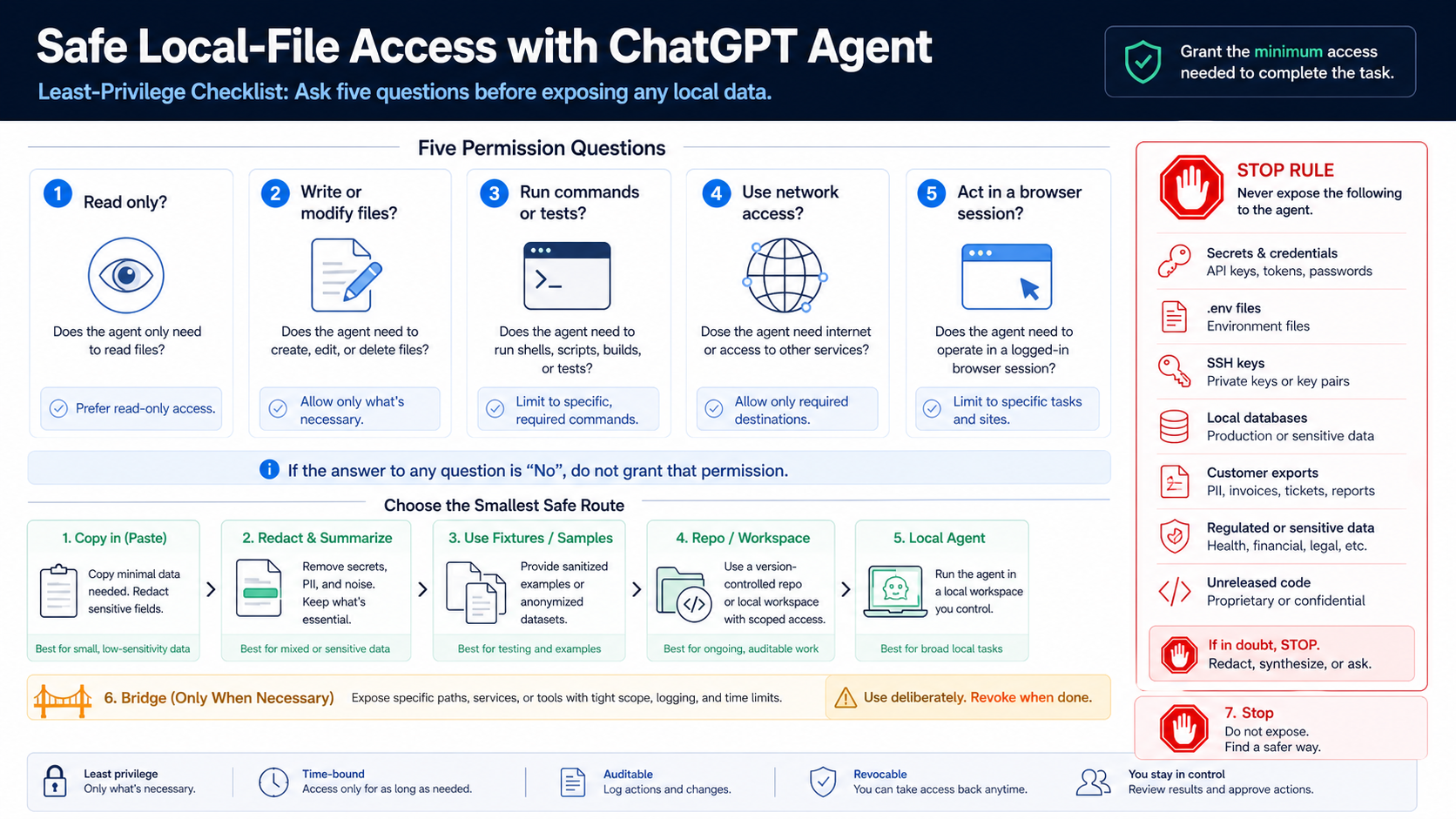
Do not expose a whole folder when one redacted file is enough. Do not expose a real customer export when a fixture can prove the logic. Do not expose .env, SSH keys, API tokens, keychains, local databases, medical records, legal files, financial records, unreleased code, or browser session data to solve a formatting or summarization task.
The right pattern is usually narrower than the first workaround that comes to mind:
- copy only the needed file, not the containing folder;
- redact secrets and personal fields before upload;
- replace real data with a fixture when the task is structural;
- use a repository branch when edits need review;
- deny secret paths even when a workspace is writable;
- revoke connector or bridge access when the task is done.
Least privilege is not theoretical caution here. The moment you move from "read this uploaded copy" to "edit files in this folder" or "run this command," the agent can affect state you may not have meant to delegate.
When ChatGPT Agent Is Enough
Stay in ChatGPT Agent when the work is document reasoning, web task execution, app-mediated data access, or small file transformation that does not need live local disk state. That covers many real jobs: summarize a PDF, compare two uploaded contracts, extract action items from a document, reason over a spreadsheet export, use a connector to retrieve approved service data, or produce a new file that you download and review.
This route works best when the file can be detached from its original location. If the local path is just where the file happens to sit, upload a copy. If the file already lives in a business app, use the app route if the workspace policy allows it. If the job is web action plus a supporting attachment, keep the browser work and file copy separate in your own mind.
The limitation is live state. ChatGPT Agent should not be expected to notice that a local file changed after upload, to scan sibling folders, to run your local build, or to edit the original file in place. If those are required outcomes, the job is no longer just "give the agent a file." It is local workspace delegation.
When to Switch to Codex, Claude Code, or a Local Agent
Switch surfaces when the work needs live project files, file edits in place, commands, tests, package scripts, local services, or a reviewable code workflow. That is the boundary where a local coding agent can be the correct tool instead of a risky workaround.
Codex local is useful when the project should stay in a workspace with explicit sandbox, approval, network, and filesystem settings. OpenAI's Codex config and permissions documentation describe user and project configuration, trusted projects, sandbox modes, workspace roots, deny rules, and built-in profiles. The existence of a :danger-full-access style profile should not make it the default. Start with read-only or workspace-scoped access, then widen only when the task proves it needs more.
Claude Code is also a local coding-agent route, with its own permission rules. Anthropic's Claude Code permissions documentation says read-only file reads and grep do not require approval, while Bash and file modifications require approval, and additional directories can extend file access. That makes Claude Code different from ChatGPT Agent because the tool is deliberately operating in a local project context. It does not make broad machine access safe by default.
For a deeper coding-agent choice, the broader workflow comparison belongs in Claude Code vs Codex. For this local-file decision, the split is simpler: use ChatGPT Agent when an explicit file route is enough; use a local coding agent when the task depends on live files and local execution.
When a Local Bridge Is Worth the Risk
A local bridge can make files visible by running software on your machine and exposing selected resources to an agent. That can be powerful for internal tools, private datasets, or custom workflows. It is also the easiest route to misunderstand, because once the bridge exists, the boundary is no longer the ChatGPT product boundary. It is your bridge's boundary.
Use a bridge only when four conditions are true. First, the task cannot be solved by upload, connector, repo, or a local coding agent. Second, the bridge exposes only the paths, services, or actions needed for the task. Third, write, command, and network authority are separately controlled. Fourth, the access is auditable, revocable, and time-bounded.
Treat bridge design like internal infrastructure, not like a prompt trick. Log what is exposed. Use a disposable workspace when possible. Deny secret directories. Keep credentials outside the exposed tree. Prefer read-only access until write authority is essential. If the bridge reaches internal services, define outbound destinations rather than giving open network access.
The safer conclusion is often to stop. If the only way to complete the job is to expose a personal machine, private database, or logged-in browser session with unclear scope, the problem is not that ChatGPT Agent needs a better prompt. The problem is that the access model is wrong for the data.
Troubleshooting: Agent Cannot Access the File
When the agent says it cannot access a file, do not start by changing tools. Start by identifying which route you thought you had given it.
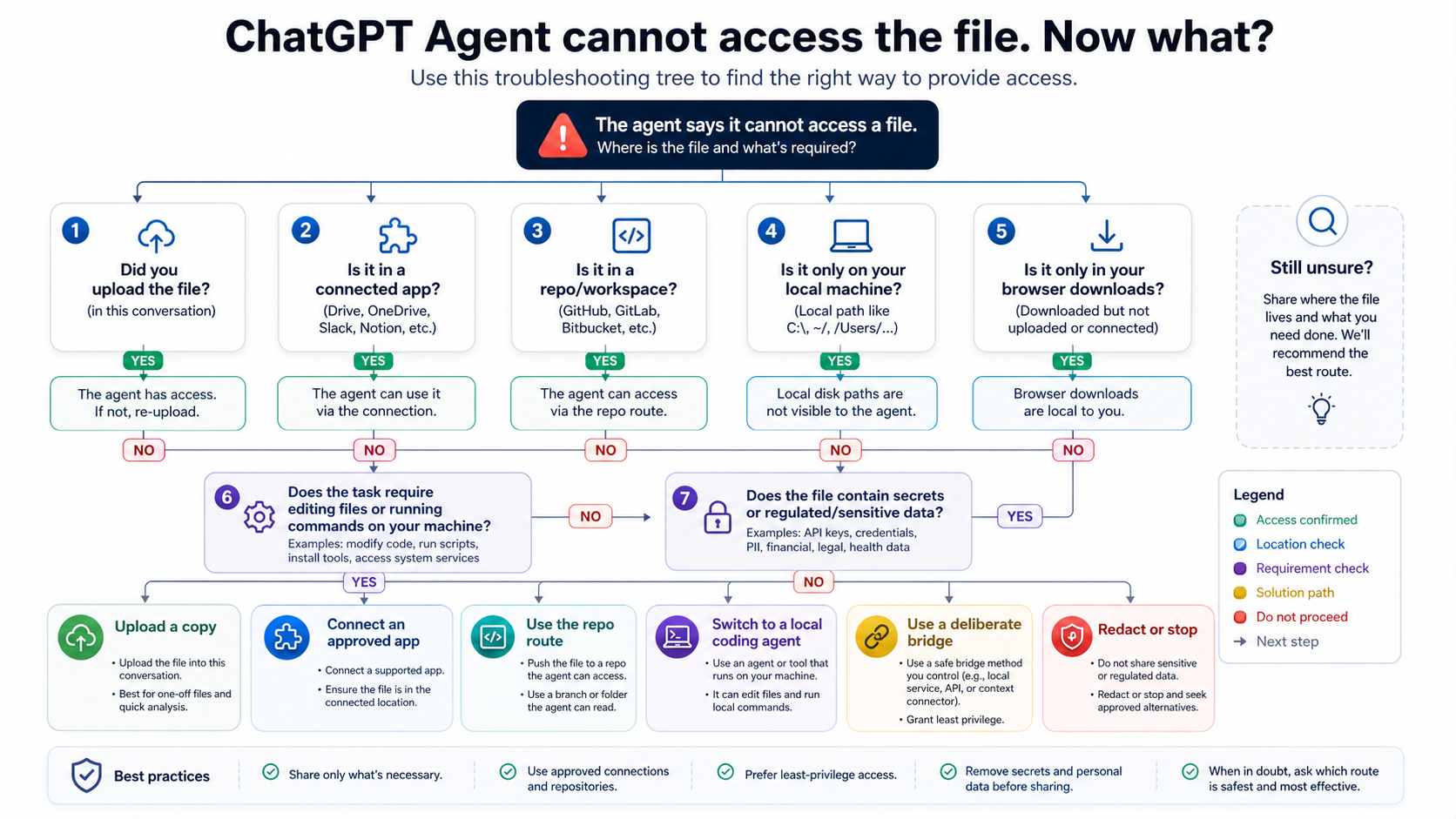
If you pasted a local path, upload the file or move the task to a local agent. A path like C:\Users\me\Downloads\report.pdf is meaningful to your computer, not to a cloud or browser-hosted agent environment.
If you uploaded a file and the agent still cannot use it, check whether the upload finished, whether the conversation still contains the attachment, and whether the task is asking for something beyond reading the uploaded copy. "Rewrite this document" and "edit the original file in my folder" are different tasks.
If the file is in a connected app, check the app connection, workspace policy, account permissions, and whether the action requires confirmation. A connector can expose account data through an approved route; it does not automatically include every file on the device.
If the file is in a repository, check whether the repo, branch, or workspace is the one the agent can actually see. A local uncommitted file may be invisible to a repo-based workflow until you commit, push, attach, or copy it into the accessible workspace.
If the file came from a browser download, remember that a download shown in your browser is local to you unless it is uploaded or saved into a connected location. Browser action and local file access are different boundaries.
If the task requires editing live files or running commands, switch to a local coding agent with scoped permissions. Keep a review step in place: inspect diffs, run tests yourself when needed, and avoid broad write access until the route proves safe.
FAQ
Can ChatGPT Agent read a file on my Desktop or Downloads folder?
Not by local path alone. Upload a copy, connect the approved app where the file lives, use a repo/workspace route, or switch to a local agent if the task truly depends on live local files.
Is uploading a file the same as giving ChatGPT Agent local file access?
No. Uploading gives the agent a copy inside the conversation or workspace. It does not grant ongoing access to the original path, sibling folders, hidden files, or future changes on disk.
Can a connected app expose local files?
A connected app exposes data through the app or service account that was approved. It is a service permission route, not a general local filesystem permission. Workspace admins may also control which apps are available and which actions require confirmation.
What if I need the agent to edit files in my repo?
Use a repo or local coding-agent route. For code work, the safer pattern is branch, diff, review, and test. If the repo is local-only, choose a local coding agent with workspace-scoped permissions rather than trying to make ChatGPT Agent see your whole disk.
Should I use danger-full-access or an equivalent full-access mode?
Only when you deliberately accept the risk and have no narrower route. Full access is a trust decision, not a normal fix for a missing local file. Prefer read-only, workspace-scoped, denied secret paths, disposable copies, and approval prompts.
Does ChatGPT Agent having a browser or terminal mean it can use my terminal?
No. Tool names describe capabilities inside the product or agent environment. They do not automatically mean the agent is operating in your local shell, your filesystem, or your logged-in desktop apps.
When is a local bridge the right answer?
Use a bridge when the job needs a custom local resource that cannot be safely handled by upload, connector, repo, or local coding-agent workflow. Scope it to specific paths and actions, keep logs, make access revocable, and avoid secrets by default.
What should I do with sensitive local files?
Do not upload or bridge them by default. Redact, summarize manually, create a fixture, use a controlled local workspace, or ask for a safer process. The useful question is not whether an agent can be made to see the file; it is whether exposing that file is the right access decision.