
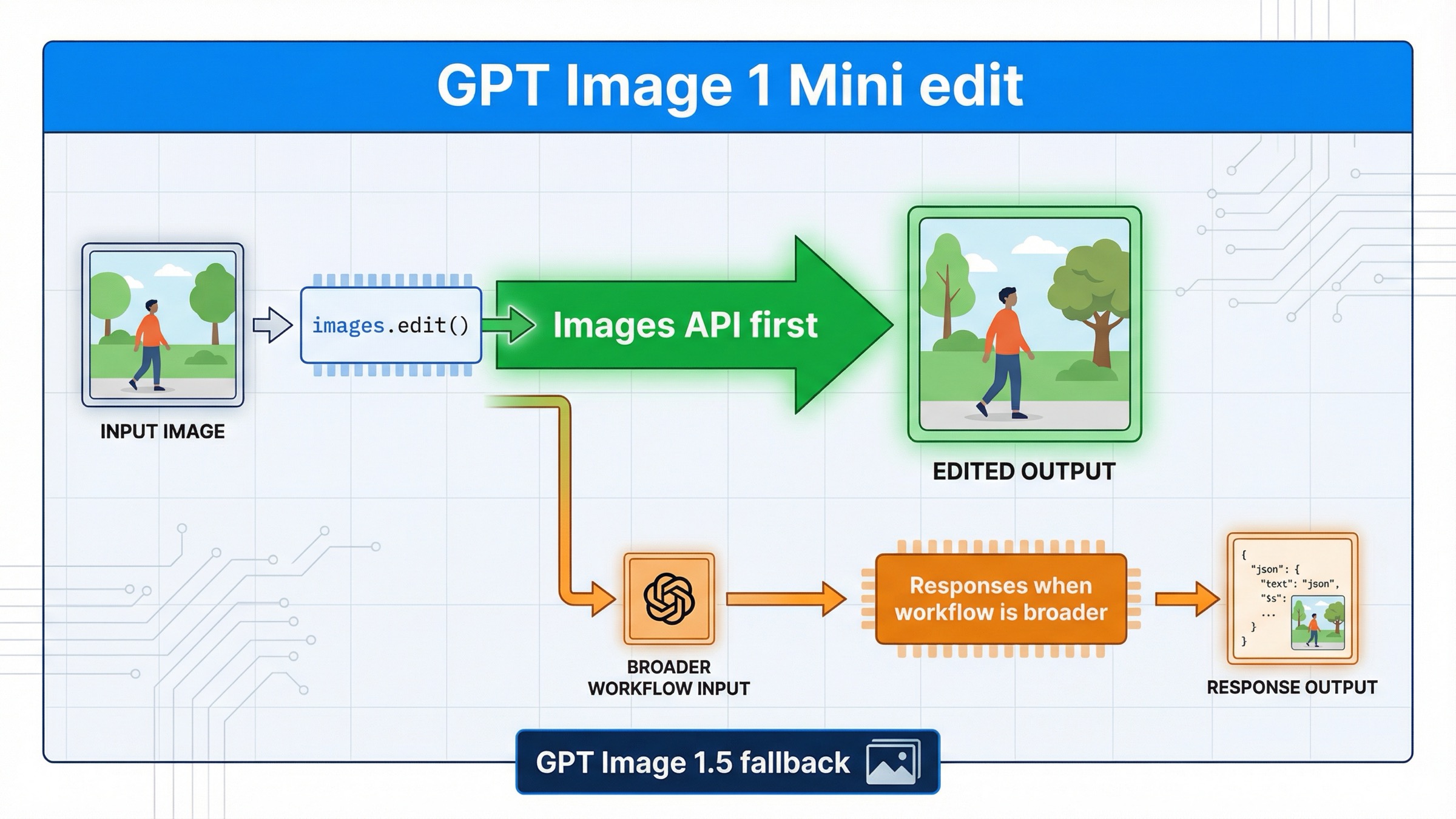
If you want to edit an image with gpt-image-1-mini on March 29, 2026, the safest default is the direct Images API: client.images.edit() in the SDK or POST /v1/images/edits over raw HTTP. Use the Responses API only when the edit belongs inside a broader assistant, conversation, or multi-tool workflow.
That answer is more specific than the current page-one results make it sound. OpenAI's current gpt-image-1-mini model page lists v1/images/edits as a supported endpoint. The current image generation guide says the Image API is the best choice when you only need to generate or edit a single image from one prompt. And the current image generation tool guide documents the Responses-side action control for gpt-image-1.5 and chatgpt-image-latest, not for mini. Put together, those three facts create a cleaner current rule than the SERP usually gives you: for direct mini edit work, start on /v1/images/edits first.
That route also keeps you out of the most common failure loop. A lot of developers search this keyword after seeing a Responses example, then assume the newer-looking abstraction must be the better edit surface. For gpt-image-1-mini, that is usually backwards. The direct edit endpoint is easier to debug, easier to reason about, and better aligned with what OpenAI explicitly documents for mini today.
TL;DR
- Start with
client.images.edit()orPOST /v1/images/editsfor directgpt-image-1-miniedits. - Use Responses when the edit is one step inside a larger multimodal workflow, not when the edit itself is the whole job.
- If you need stronger multi-image preservation, richer edit quality, or the safest quality-first default, move up to GPT Image 1.5.
- Before rewriting code, confirm tier access and, if needed, organization verification.
| Situation | Better default | Why |
|---|---|---|
| Edit one or more images and save the result | images.edit() | It is the direct mini endpoint and keeps the failure surface small |
| Use a mask or reference images in one edit request | images.edit() | File upload, mask handling, and output decoding are clearer on the direct route |
| Continue refining an image across multiple turns or tool calls | Responses | Conversation state is the real requirement, not the edit itself |
| Preserve several important inputs with the highest current headroom | GPT Image 1.5 via images.edit() | OpenAI recommends 1.5 for the best experience and gives it stronger multi-image fidelity behavior |
Use /v1/images/edits first for direct mini edit work
The current official docs do not force you to guess here. The mini model page lists v1/images/edits, and the image guide says the Image API is the best route when you only need one image generation or edit request from one prompt. That is the exact shape of most "gpt-image-1-mini edit" jobs.
This means your first success target should be boring on purpose:
jsimport fs from "fs";
import OpenAI from "openai";

const client = new OpenAI({
  apiKey: process.env.OPENAI_API_KEY,
});

const result = await client.images.edit({
  model: "gpt-image-1-mini",
  image: [fs.createReadStream("room.png")],
  prompt:
    "Replace the blank wall art with a framed abstract poster. Preserve the room layout, lighting, furniture, and camera angle. Do not change anything else.",
  input_fidelity: "high",
  size: "1024x1024",
  quality: "medium",
  output_format: "jpeg",
  output_compression: 80,
});

const imageBase64 = result.data[0].b64_json;
fs.writeFileSync("room-edited.jpg", Buffer.from(imageBase64, "base64"));
If you are debugging with raw HTTP, remember the direct edit endpoint is multipart form data, not JSON:
bashcurl https://api.openai.com/v1/images/edits \
  -H "Authorization: Bearer $OPENAI_API_KEY" \
  -F "model=gpt-image-1-mini" \
  -F "image[]=@room.png" \
  -F 'prompt=Replace the blank wall art with a framed abstract poster. Preserve the room layout, lighting, furniture, and camera angle. Do not change anything else.' \
  -F "input_fidelity=high" \
  -F "size=1024x1024" \
  -F "quality=medium"
That direct route is the right default because it avoids three kinds of confusion at once.
First, it keeps the model choice and the API surface aligned. You are calling the endpoint that mini explicitly supports today instead of asking a broader orchestration layer to decide how the edit should happen.
Second, it makes debugging cleaner. If the request fails, you can usually sort the problem into one of four buckets quickly: access, file format, prompt wording, or output handling. You are not also wondering whether the top-level Responses model, tool configuration, or conversation state caused the issue.
Third, it keeps this article distinct from the repo's broader OpenAI image editing API guide. That page is the right follow-up if you want the wider family-level explanation. This page is narrower: what to do when you already know you want mini.
When Responses helps and why mini changes the rule
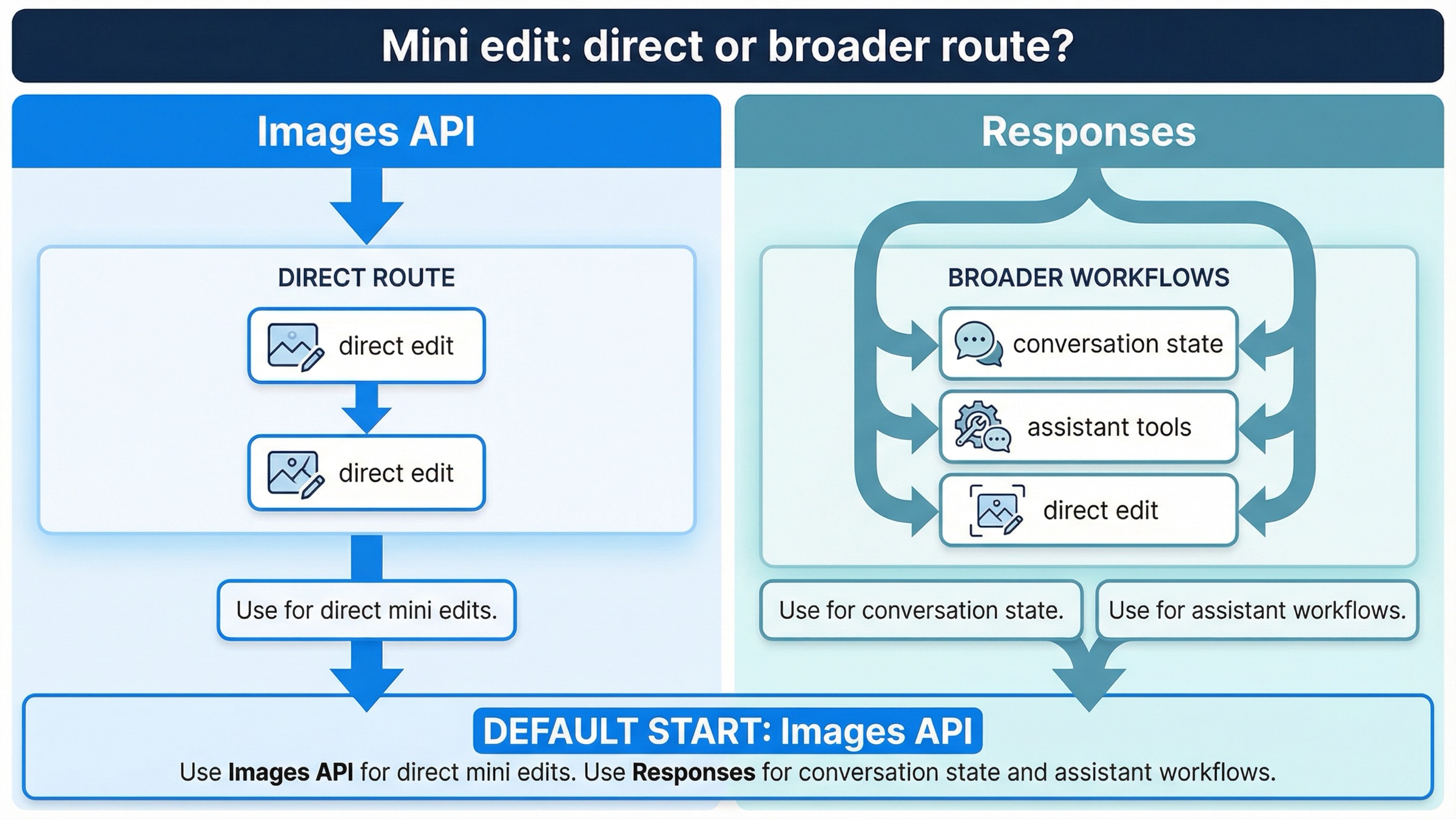
Responses is still useful. It is just not the first route you should reach for when the whole requirement is "edit this image with gpt-image-1-mini."
The current image generation tool guide explains why. In Responses, the top-level model must be a text-capable model such as gpt-4.1 or gpt-5; GPT Image models are not valid top-level model values there. The image generation tool can still use GPT Image models underneath, but now you are choosing a broader workflow abstraction rather than a direct edit endpoint.
That distinction matters more for mini than for generic "OpenAI image" advice because the same tool guide currently documents the Responses-side action parameter for gpt-image-1.5 and chatgpt-image-latest. It does not make the same explicit statement for mini. I am not inferring that mini can never work through Responses. I am inferring something narrower and safer from the docs: if you need a predictable, explicitly documented mini edit path today, the direct Images API is the clearer contract.
Responses becomes the better route when the surrounding product needs it for reasons bigger than one edit request:
- you want multi-turn editing with previous response IDs or image-generation call IDs
- you are building an assistant that mixes reasoning, tools, and image edits
- you want image generation or editing to happen inside a longer conversation
- you need a single request that may decide between tool calls, not just an edit
That is why the clean mental model is:
- Image edit is the feature: start with
images.edit() - Image edit is one tool inside a larger feature: consider Responses
If your real question is broader than editing and you need the full route map, the better next read is gpt-image-1-mini API. This article stays deliberately narrower on the exact edit decision.
Masks, reference images, and input_fidelity on mini
This is the most useful mini-specific section in the whole article because page one still hides the operational details across several different docs.
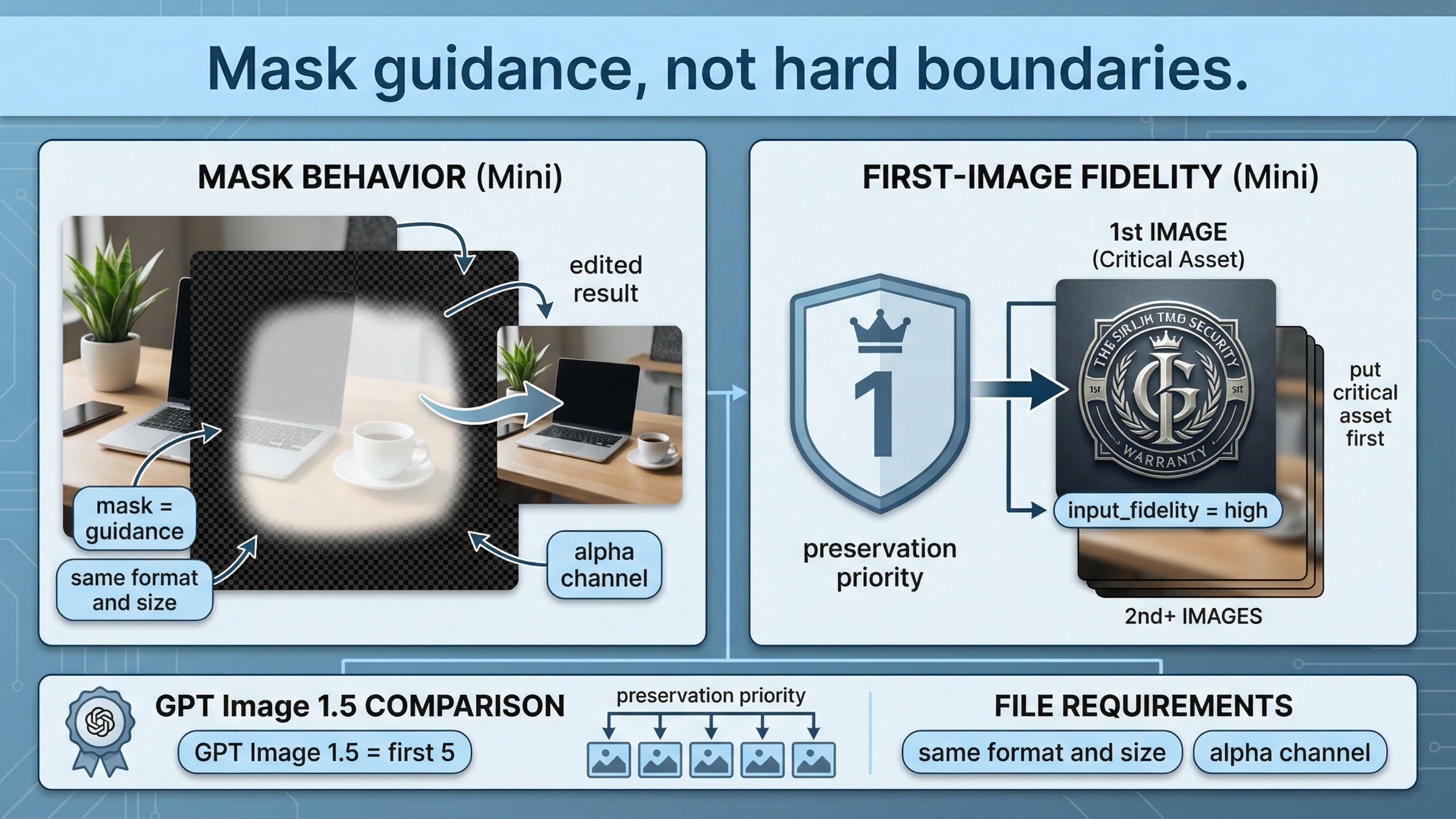
OpenAI's current image generation guide says the image and mask must be the same format and size, must stay under 50 MB, and the mask must contain an alpha channel. It also makes the most important behavioral point: with GPT Image, mask editing is still prompt-based. The mask guides the edit, but the model may not follow the exact shape with perfect precision.
That means you should treat masks as steering, not as Photoshop-style hard boundaries.
The other important mini-specific rule shows up in the current input_fidelity docs. OpenAI says that when you use gpt-image-1 or gpt-image-1-mini with high input fidelity, the first image is preserved with richer textures and finer details. If your workflow includes a face, logo, product, or other critical visual anchor, put that asset in the first input position. GPT Image 1.5 is stronger here because it preserves the first five input images with higher fidelity.
That is not a tiny implementation note. It changes how you should build mini edit requests.
Use mini edits confidently when the job looks like this:
- one main source image plus one small reference image
- one face or one branded object that clearly deserves the first slot
- one specific scene change with limited collateral movement
- one low-to-medium-stakes product mockup or creative variant
Be more cautious when the job looks like this:
- several equally important reference images
- multiple branded elements that all need to survive intact
- typography-heavy layouts where small shifts are expensive
- high-value commercial edits where retries cost real time
The direct implementation pattern is still simple:
jsconst result = await client.images.edit({
  model: "gpt-image-1-mini",
  image: [
    fs.createReadStream("base-scene.jpg"),
    fs.createReadStream("logo.png"),
  ],
  prompt:
    "Place the logo from image 2 onto the tote bag in image 1. Preserve the model, pose, bag shape, camera framing, and lighting.",
  input_fidelity: "high",
});
The important detail is not the code. The important detail is input order. On mini, the first image carries the strongest preservation role.
Pricing, limits, and verification before debugging
This is where too many exact-match pages waste the reader's time.
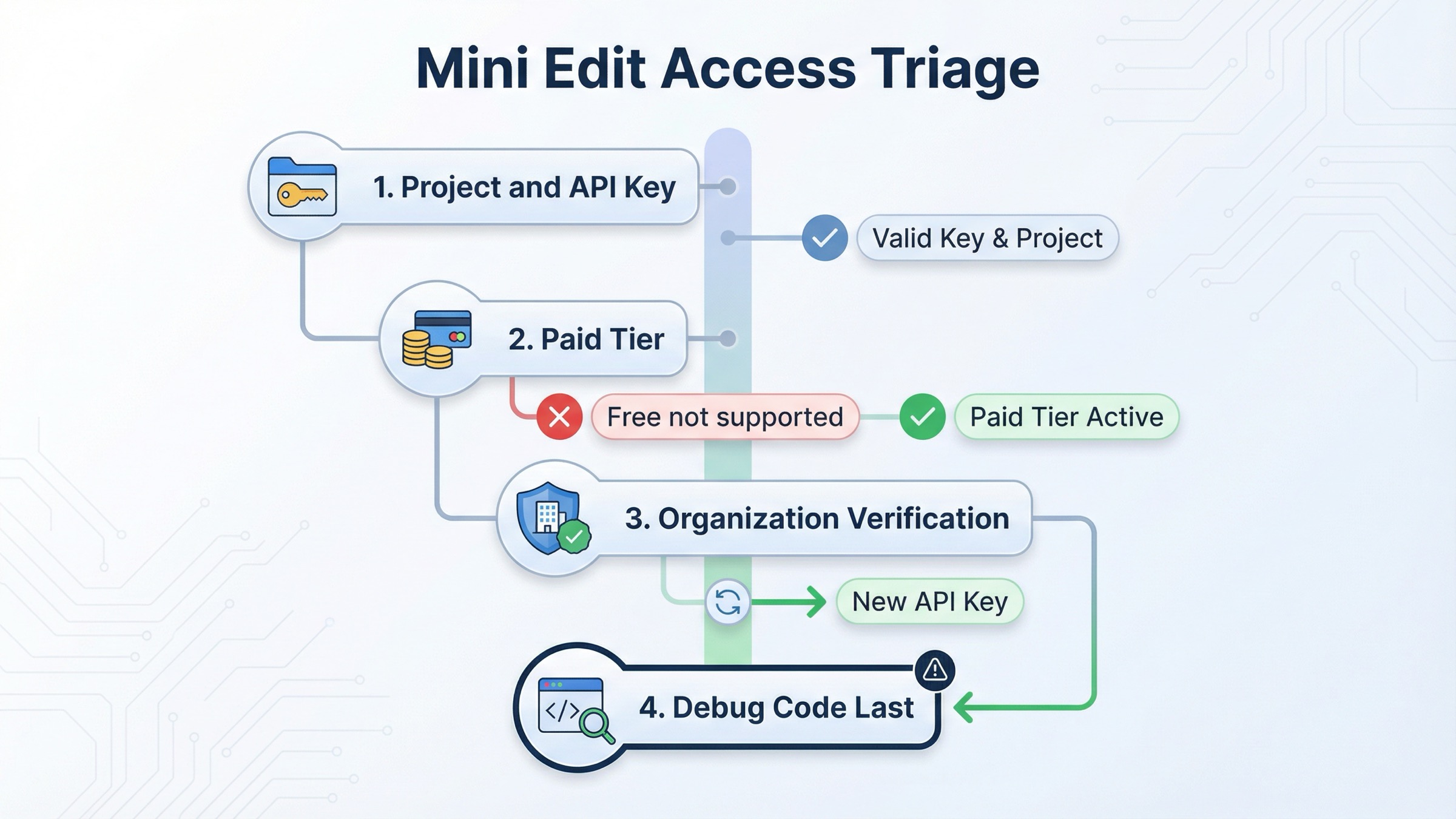
As checked on March 29, 2026, OpenAI's current gpt-image-1-mini model page lists 1024x1024 image generation prices of $0.005 low, $0.011 medium, and $0.036 high. The same page shows Free not supported and a Tier 1 starting point of 100,000 TPM and 5 IPM for mini.
OpenAI's current model availability article says GPT-image-1 and GPT-image-1-mini are available to API users on tiers 1 through 5, with some access subject to organization verification. OpenAI's current API Organization Verification article says verification can unlock image generation capabilities in the API, that status updates may take up to 30 minutes, and that generating a new API key often resolves lingering "not verified" errors.
So the right troubleshooting order is:
- confirm the API key belongs to the right project and organization
- confirm the account is on a paid tier that supports mini image access
- if needed, confirm organization verification and wait the full 30-minute propagation window
- create a fresh API key if the org is verified but access still looks stale
- only then rewrite code
That order matters because direct mini edit requests can fail even when your syntax is valid. If the account state is wrong, a prettier prompt or a broader Responses rewrite will not fix it.
If your real blocker is access rather than editing logic, the better next read is OpenAI image generation API verification. If your blocker is pure budget math, go to GPT Image 1 Mini pricing.
Troubleshooting the failures page one keeps hiding
The first common failure is starting on the wrong API surface. If the task is one direct edit, do not start with a Responses workflow just because the example looks newer. The current docs already give you permission to stay smaller.
The second common failure is using the wrong model mental model in Responses. GPT Image models are not valid top-level model values in the Responses API. If you go that route, the top-level model is a text-capable model such as gpt-4.1 or gpt-5, and the image work happens inside the hosted tool.
The third common failure is treating mask edits like precise pixel surgery. OpenAI's current guide is explicit that GPT Image masking is prompt-based and may not follow the exact mask shape with full precision. If your workflow requires tiny local edits with zero collateral movement, test that assumption early.
The fourth common failure is putting the wrong asset first in a mini multi-image edit. If the face, logo, or hero product is not in the first image slot, you are giving away the strongest preservation position mini offers.
The fifth common failure is debugging prompts before debugging access. If mini image access is not ready on the account, a cleaner prompt will not save the request. Check tier, verification, and project context before you keep changing the integration.
The sixth common failure is asking too much of one low-cost edit request. OpenAI's current limitations section says complex prompts may take up to 2 minutes, and the model family can still struggle with precise text placement, consistency, and structured composition control. If your edit requires typography, brand lockup accuracy, and multiple preserved references all at once, that is exactly where the "cheap lane" can become the wrong lane.
The better operational habit is simple:
- start with one direct edit
- preserve the most important input in slot one
- add
input_fidelity="high"only when preservation really matters - split compound changes into two smaller edit passes if the first result is close
That sequence saves more time than adding one more paragraph to the prompt.
When mini edits are good enough and when GPT Image 1.5 is safer
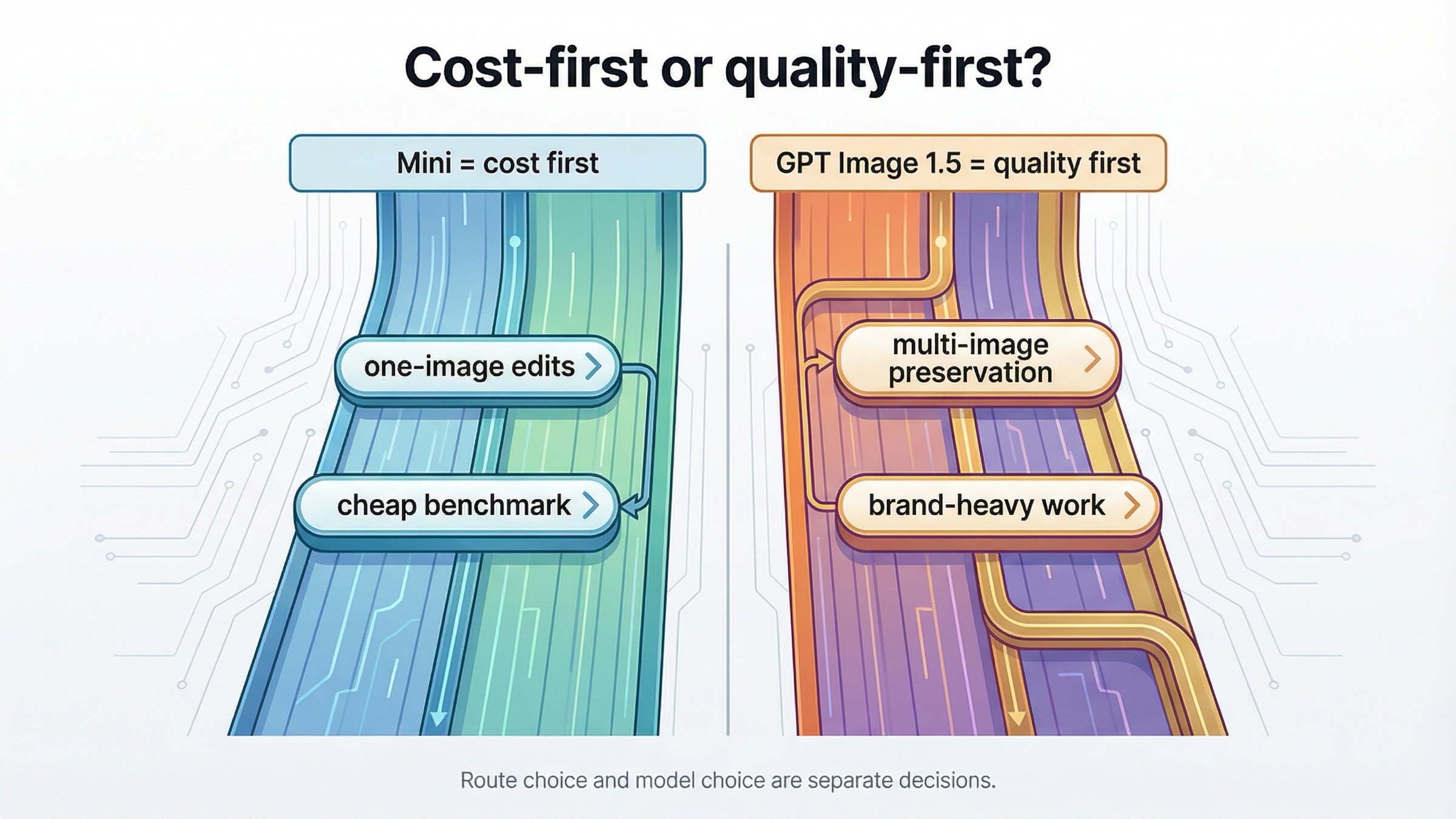
This is the real decision hiding behind the keyword.
OpenAI's current model comparison section says gpt-image-1.5 offers the best overall quality and recommends it for the best experience, while gpt-image-1-mini is the more cost-effective option when image quality is not the priority. That is the family-level answer. Your job is to translate it into edit-workflow terms.
Mini is usually good enough for:
- internal creative variants
- low-stakes ecommerce mockups
- one-image product or room edits
- cheap benchmark passes before you decide whether flagship quality is necessary
- edit flows where cost matters more than perfect preservation
GPT Image 1.5 is usually safer for:
- several important reference images in one request
- heavier brand-preservation work
- typography-sensitive or layout-sensitive edits
- high-value marketing assets where retries are expensive
- any workflow where you want the strongest current OpenAI image default
That is why the honest recommendation is not "mini or Responses." It is mini direct edits first, then 1.5 if the workload proves mini is the wrong model.
If you want the broader quality-versus-cost judgment after this, read GPT Image 1 Mini review. If you need a wider OpenAI image family walkthrough, the right follow-up is OpenAI Image API tutorial.
FAQ
Can gpt-image-1-mini edit images directly today?
Yes. OpenAI's current gpt-image-1-mini model page lists v1/images/edits as a supported endpoint, so the direct Images API is a valid current route for mini edit work.
Why not start with Responses if I only need one edit?
Because OpenAI's current image guide says the Image API is the best choice when you only need one prompt and one image job. Responses is stronger when the edit belongs inside a larger conversation or tool workflow.
Does a mask force the model to change only the masked pixels?
No. OpenAI's current docs say GPT Image masking is prompt-based and may not follow the exact mask shape with complete precision. Treat masks as guidance, not as hard-boundary pixel surgery.
When should I switch from mini to GPT Image 1.5 for edits?
Switch when the edit needs stronger multi-image preservation, tighter brand control, better performance on layout-sensitive assets, or the safest current quality-first OpenAI default.
Final recommendation
If your exact job on March 29, 2026 is to edit an image with gpt-image-1-mini, start with images.edit() or POST /v1/images/edits. That is the clearest documented route, the easiest route to debug, and the safest route to keep mini-specific behavior understandable.
Move to Responses only when the surrounding workflow actually needs conversation state, tool orchestration, or multi-turn follow-up editing. Move to GPT Image 1.5 when the edit workload is valuable enough that stronger quality and stronger multi-image preservation matter more than mini's lower price.