
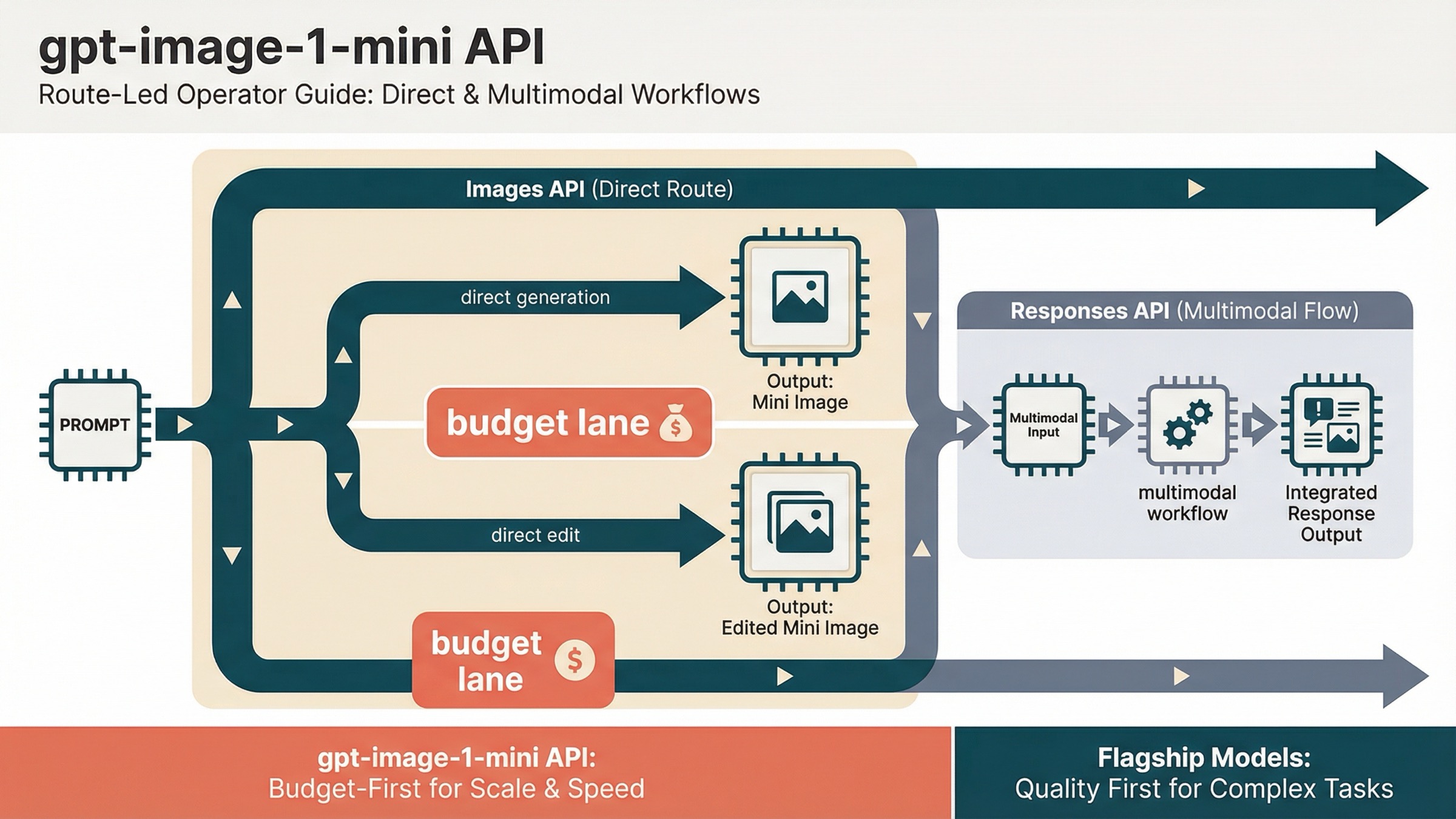
As of March 27, 2026, the safest current default for the gpt-image-1-mini API is simple: use the OpenAI Images API for direct generation or edits, and use the Responses API only when image generation is one tool inside a broader multimodal workflow. That is the one route decision most exact-query pages still fail to make clearly enough.
The reason this keyword feels more confusing than it should is that OpenAI splits the answer across several official pages. The gpt-image-1-mini model page owns the live facts for pricing, endpoints, and rate limits. The current image-generation guide owns the best route rule: the Image API is the best choice when you only need to generate or edit a single image from one prompt, while Responses fits conversational or editable image experiences. The images and vision guide shows the Responses-side tool pattern. If you read only one page, it is easy to choose the wrong abstraction first.
That is also why thin wrapper pages keep winning clicks for the exact keyword. They match gpt-image-1-mini api, but they usually stop at "this is the cheap OpenAI image model" and leave the workflow judgment to you. This article is narrower than our broader OpenAI Image API tutorial: it is only about what to do when you already know you want gpt-image-1-mini.
TL;DR
- For direct image generation or direct edits, start with the Images API.
- For a larger assistant or multimodal workflow that happens to generate images, use the Responses API with the image tool.
gpt-image-1-miniis the budget lane, not the flagship lane. Use it when cost matters more than top-end output quality.- Before you debug code, confirm tier access and, if necessary, organization verification.
Start here: the current direct gpt-image-1-mini API path
The cleanest first success target is a direct Images API request. OpenAI's current guide explicitly says the Image API is the best choice when you only need to generate or edit a single image from one prompt. That matters because many developers now see Responses examples first and assume the broader abstraction is automatically the right starting point. For this exact model, it usually is not.
If the job is "take a prompt and give me an image," the direct path is still the safest path:
jsimport fs from "fs";
import OpenAI from "openai";

const client = new OpenAI({
  apiKey: process.env.OPENAI_API_KEY,
});

const result = await client.images.generate({
  model: "gpt-image-1-mini",
  prompt: "Create a clean editorial illustration of a robot photographer in a bright studio",
  size: "1024x1024",
  quality: "medium",
  output_format: "jpeg",
  output_compression: 80,
});

const imageBase64 = result.data[0].b64_json;
fs.writeFileSync(
  "gpt-image-1-mini-demo.jpg",
  Buffer.from(imageBase64, "base64")
);
The matching Python version is equally direct:
pythonfrom openai import OpenAI
import base64

client = OpenAI()

result = client.images.generate(
    model="gpt-image-1-mini",
    prompt="Create a clean editorial illustration of a robot photographer in a bright studio",
    size="1024x1024",
    quality="medium",
    output_format="jpeg",
    output_compression=80,
)

image_base64 = result.data[0].b64_json

with open("gpt-image-1-mini-demo.jpg", "wb") as f:
    f.write(base64.b64decode(image_base64))
That is the right first request because it keeps the debugging surface small. You are testing one current model, one current API path, one known image size, and one clear output format. If that request fails, the next question is usually account access or project configuration, not "should I rewrite this whole thing around Responses?"
Keep the first request boring on purpose. The OpenAI docs already show the larger universe of quality, size, edit, and transparency options. Your first goal is not to showcase every parameter. Your first goal is to confirm that the account, project, model access, and output handling all work on the most direct route.
Images API vs Responses for gpt-image-1-mini
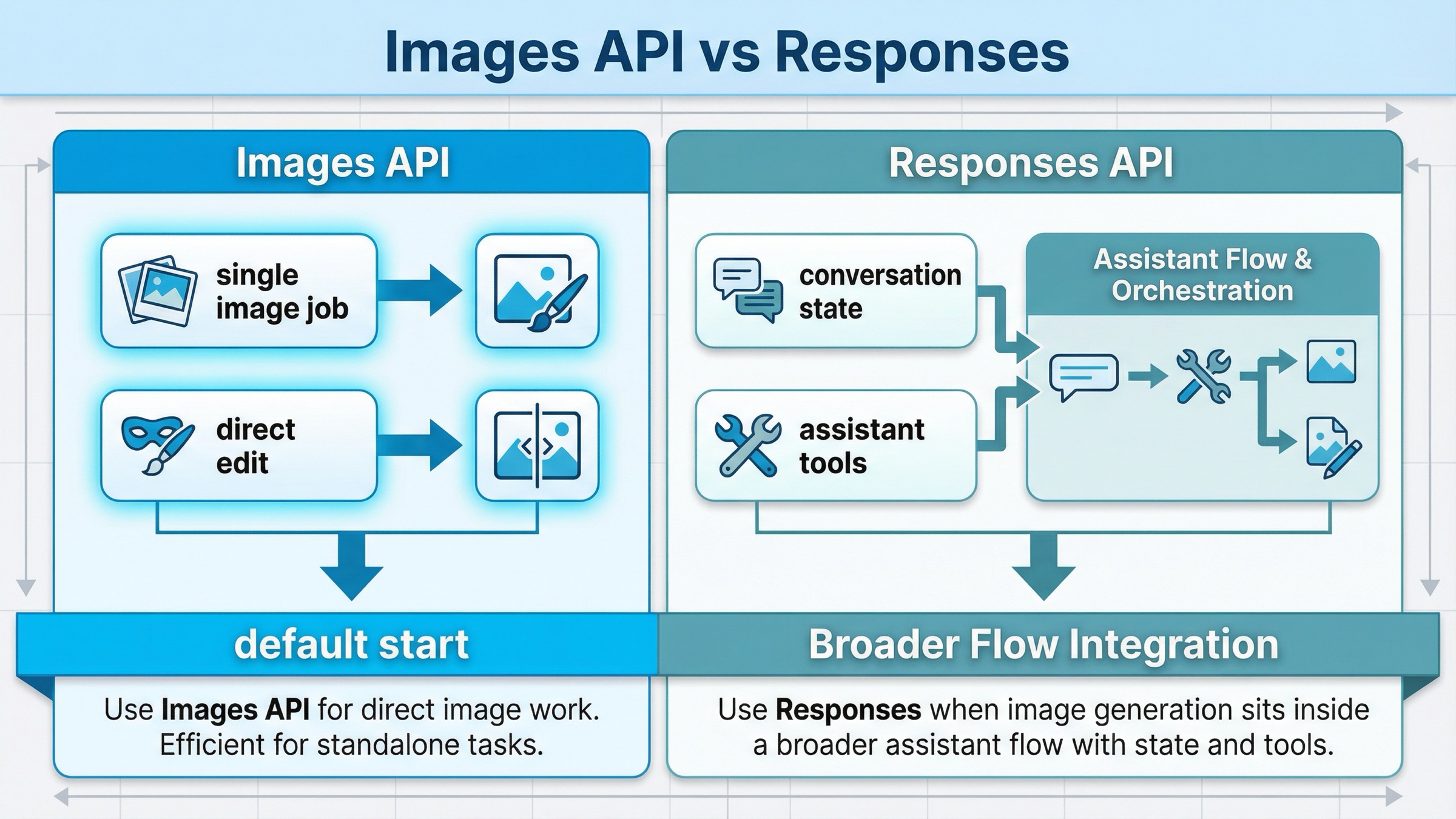
This is the only comparison table you really need for this keyword:
| Situation | Better default | Why |
|---|---|---|
| You want one request that generates an image from a prompt | Images API | Shortest path, clearest model choice, easiest first success |
| You want one request that edits one or more input images | Images API | Same direct route, less orchestration, less confusion |
| You are building a multimodal assistant that sometimes returns images | Responses API | Image generation is one tool inside a broader flow |
| You need image generation plus conversation state, other tools, or reasoning steps in one request | Responses API | The surrounding workflow, not the image job itself, is the main abstraction |
| You are onboarding a junior developer or testing an exact model quickly | Images API | Fewer moving parts and fewer ways to debug the wrong layer |
The practical rule is simple. If image generation itself is the feature, start with the Images API. If image generation is one step in a bigger agent or assistant workflow, use Responses.
This is also the easiest way to interpret the current official docs without over-reading them. The image-generation guide gives the route rule directly. The broader images-and-vision guide then shows how the Responses image tool fits into a multimodal system. That means Responses is not "more correct because it is newer." It is more correct when the surrounding product really needs a broader workflow.
If you want to see the broader OpenAI route choice across the full image family, read OpenAI Image API tutorial after this page. The point here is narrower: if your search already contains gpt-image-1-mini, do not let a generic Responses example distract you from the simpler direct route.
What the Responses route looks like when you really need it
The easiest way to avoid Responses confusion is to see it in the right context. The current OpenAI docs show image generation in Responses as a tool inside a broader request, not as the default replacement for images.generate().
That means the mental model changes:
- the top-level request is a multimodal or assistant-style request
- image generation is one tool in that request
- you choose Responses because of the surrounding workflow, not because
gpt-image-1-minisomehow demands a different endpoint for ordinary image work
A minimal pattern looks like this:
jsimport fs from "fs";
import OpenAI from "openai";

const client = new OpenAI({
  apiKey: process.env.OPENAI_API_KEY,
});

const response = await client.responses.create({
  model: "gpt-4.1-mini",
  input: "Generate a transparent sticker-style icon of a paper airplane",
  tools: [{ type: "image_generation", quality: "medium" }],
});

const imageBase64 = response.output
  .filter((item) => item.type === "image_generation_call")
  .map((item) => item.result)[0];

fs.writeFileSync("paper-airplane.png", Buffer.from(imageBase64, "base64"));
This is a good route when the product already needs a larger Responses workflow. It is a bad route when your real job is just "send a prompt, get an image, save the bytes." In that simpler case, the direct Images API gives you a smaller failure surface and a clearer debugging path.
That distinction is what the SERP still leaves too implicit. Developers searching this exact keyword are often not choosing between two equally good abstractions. They are choosing whether to make their first implementation smaller or more complicated than it needs to be.
Confirm access before you troubleshoot code
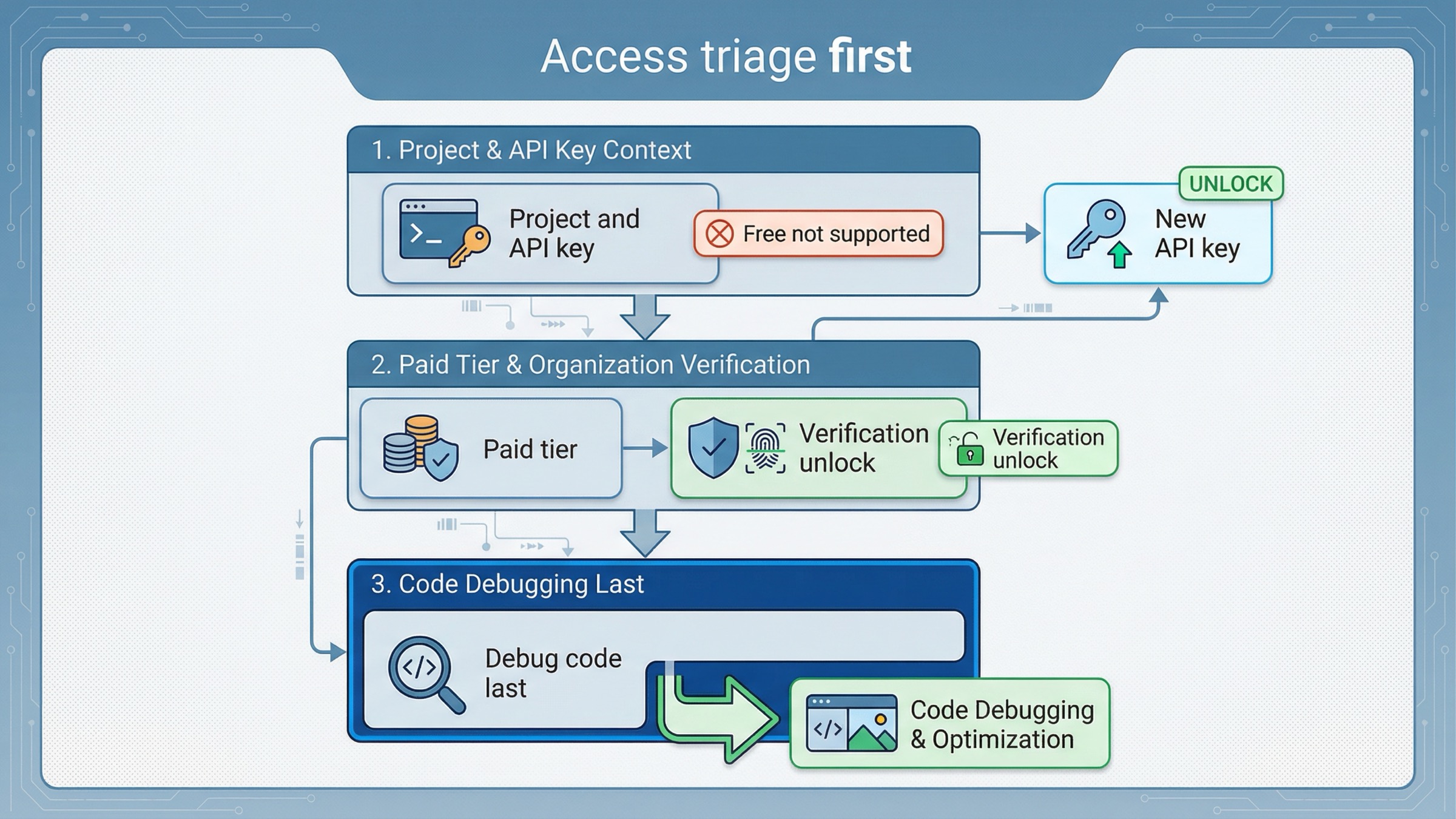
This is the second place exact-query pages often waste the reader's time. They show a code sample first and only later admit that the account may not actually be ready.
OpenAI's current API model availability article says GPT-image-1 and GPT-image-1-mini are available to API users on tiers 1 through 5, with some access subject to organization verification. The current gpt-image-1-mini model page also shows Free not supported, with Tier 1 starting at 100,000 TPM and 5 IPM.
That means your troubleshooting order should be:
- Confirm the API key belongs to the right project and organization.
- Confirm the account is on a paid usage tier that supports the model.
- If access still looks blocked, check whether organization verification is the real blocker.
- Only then start blaming prompt format, SDK code, or output parsing.
OpenAI's current organization verification help page says verification can unlock image-generation capabilities in the API, that status propagation can take up to 30 minutes, and that generating a new API key often resolves lingering "not verified" errors. That is an account-state branch, not a model-selection branch.
This matters because a lot of exact-match pages give the impression that if you know the model ID and endpoint, the rest is routine. In practice, image access is one of the places where valid code can still fail because the account state is not ready. If your direct images.generate() call fails immediately, do not jump straight into a route rewrite.
If verification and access are your real problem, the better next step is our OpenAI image generation API verification guide, not another sample with the same credentials.
When gpt-image-1-mini is the right default and when it is not
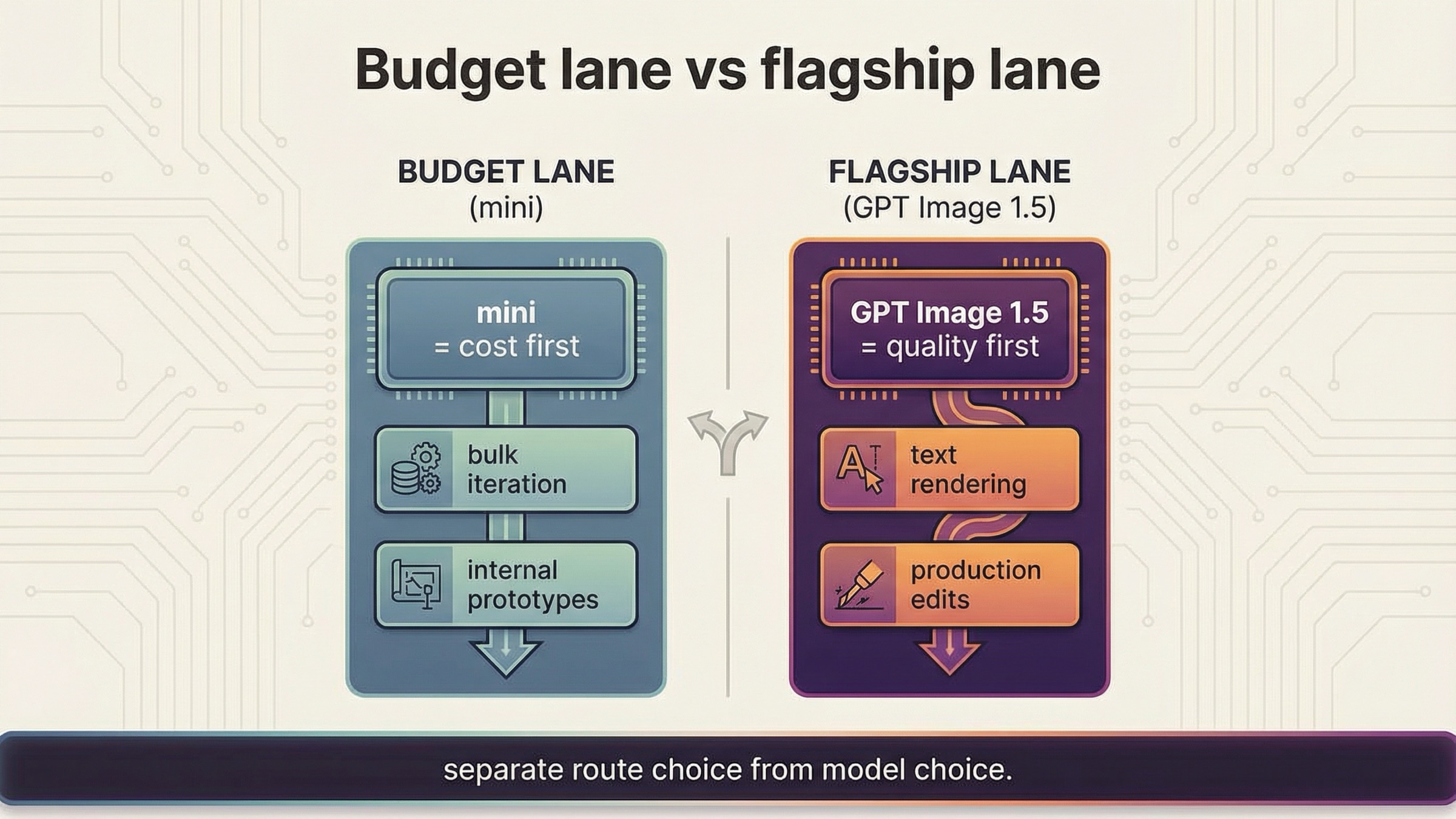
This is where the article has to be honest. gpt-image-1-mini is the budget lane, not the universal lane. OpenAI's current image-generation guide recommends GPT Image 1.5 for the best experience and points to mini when cost matters more than image quality. The current mini model page makes the pricing difference obvious: as checked on March 27, 2026, 1024x1024 low / medium / high outputs are $0.005, $0.011, and $0.036.
That is a real advantage when the workload looks like this:
- bulk prompt iteration
- internal prototypes
- rough draft image generation
- low-stakes variations
- features where cost sensitivity matters more than premium output quality
The wrong way to read those numbers is "mini should now be the default for every new image product." The right way is: mini is the first benchmark when cost is the first constraint.
If your workload depends on the strongest text rendering, the cleanest production-quality outputs, or edit-heavy brand preservation, the direct comparison you actually need may be mini versus GPT Image 1.5, not mini versus Responses. In those cases the broader OpenAI image generation API pricing guide or our GPT Image 1.5 API pricing breakdown is the better next read, because the decision is no longer only about route. It is about whether the cheaper model is still the cheaper workflow after retries and weaker outputs.
That is the most important caveat to keep in your head while reading exact-query pages. Many of them are correct that mini is cheaper. Fewer of them explain when the lower per-image sticker price produces the wrong product decision.
Direct edit flow without route confusion
The good news is that you do not need a second conceptual model for edits. The current mini model page lists both v1/images/generations and v1/images/edits. So if your generation flow is already on the Images API, your edit flow usually stays there too.
That means a direct edit request can stay as simple as this:
jsimport fs from "fs";
import OpenAI from "openai";

const client = new OpenAI({
  apiKey: process.env.OPENAI_API_KEY,
});

const result = await client.images.edit({
  model: "gpt-image-1-mini",
  image: fs.createReadStream("room.png"),
  prompt: "Turn this room into a bright Nordic living room with pale oak shelves and soft morning light.",
  size: "1024x1024"
});

const imageBase64 = result.data[0].b64_json;
fs.writeFileSync("room-nordic.png", Buffer.from(imageBase64, "base64"));
The same route rule still applies. If the job is a direct edit, stay on the Images API first. Move to Responses only when the edit belongs inside a larger conversational or multi-tool system.
This is also where exact-match wrappers under-explain the real choice. They often market gpt-image-1-mini as if choosing the model resolves the whole integration question. It does not. You still need to decide whether the feature is a direct image feature or a broader assistant feature. The model name and the API surface are not the same decision.
Troubleshooting: the failures thin wrapper pages do not solve
The most useful thing a good exact-match article can do is help the reader avoid the mistakes that survive after the first successful request.
The first mistake is starting on Responses too early. If your feature is just "generate an image" or "edit an image," the larger abstraction gives you more ways to debug the wrong thing. OpenAI's current docs already give you permission to start smaller.
The second mistake is treating mini as the right answer for every workload. The official docs do not position it that way. They position mini as the cost-efficient branch and GPT Image 1.5 as the best-experience branch. If you flatten that distinction, you will eventually run the wrong benchmark.
The third mistake is debugging code before checking access state. The help-center docs are clear that tier access and organization verification can still gate image capabilities. If the account is not ready, a second code sample will not save you.
The fourth mistake is assuming the exact keyword implies one best article shape. It does not. Some readers really want a quick model card. Others need a full OpenAI image route overview. This page is strongest when you already know the model name and just need the correct path to ship it. If you need the wider model landscape, our OpenAI image generation API models guide is the better follow-up.
There are three very common "it does not work" branches worth naming directly.
If you get an access-style failure on the first request, the most likely explanation is not that the sample code is obsolete. It is usually a tier, organization, or verification problem. Recheck access before you rewrite the integration.
If the request succeeds but the output quality feels wrong, the problem may not be the endpoint. It may be that mini is the wrong lane for this production job. That is exactly when you should benchmark GPT Image 1.5 instead of hunting for a different API surface.
If your team insists on using Responses because the docs or SDK examples look more modern, ask a simpler product question: do we actually need conversation state, tool orchestration, or mixed outputs in the same request? If the honest answer is no, then the "modern" route is just extra complexity.
That is why this article refuses to become a generic tutorial. The broader tutorial already exists. The exact-query gap is simpler and more specific: which route to start with, what to check before debugging, and when mini is or is not the correct default.
FAQ
Can gpt-image-1-mini handle direct edits as well as direct generation?
Yes. The current official model page lists both v1/images/generations and v1/images/edits, so a direct edit workflow can stay on the Images API instead of forcing a shift to Responses.
Is there a free tier for the gpt-image-1-mini API?
Not on the current official model page as checked on March 27, 2026. The page shows Free not supported, with paid access starting from Tier 1.
When should I use GPT Image 1.5 instead of gpt-image-1-mini?
Use GPT Image 1.5 when output quality, stronger text rendering, or more demanding production edits matter more than the lower per-image price. Use mini when cost is the first constraint and the workload can tolerate the budget lane tradeoff.
Final recommendation
If you are integrating gpt-image-1-mini on March 27, 2026, start with the Images API. Use it for the first generation request, use it for the first edit request, and keep the request small enough that account access and output handling are easy to debug. Use Responses only when image generation is one step in a larger multimodal workflow.
Then make the second decision separately: is mini really the right model for this workload? If cost is the first constraint, mini is the right first benchmark. If quality, text rendering, or heavier production editing matter more, do not let the lower price make the decision for you. Route choice and model choice are separate decisions, and this exact keyword gets much easier once you keep them separate.


