
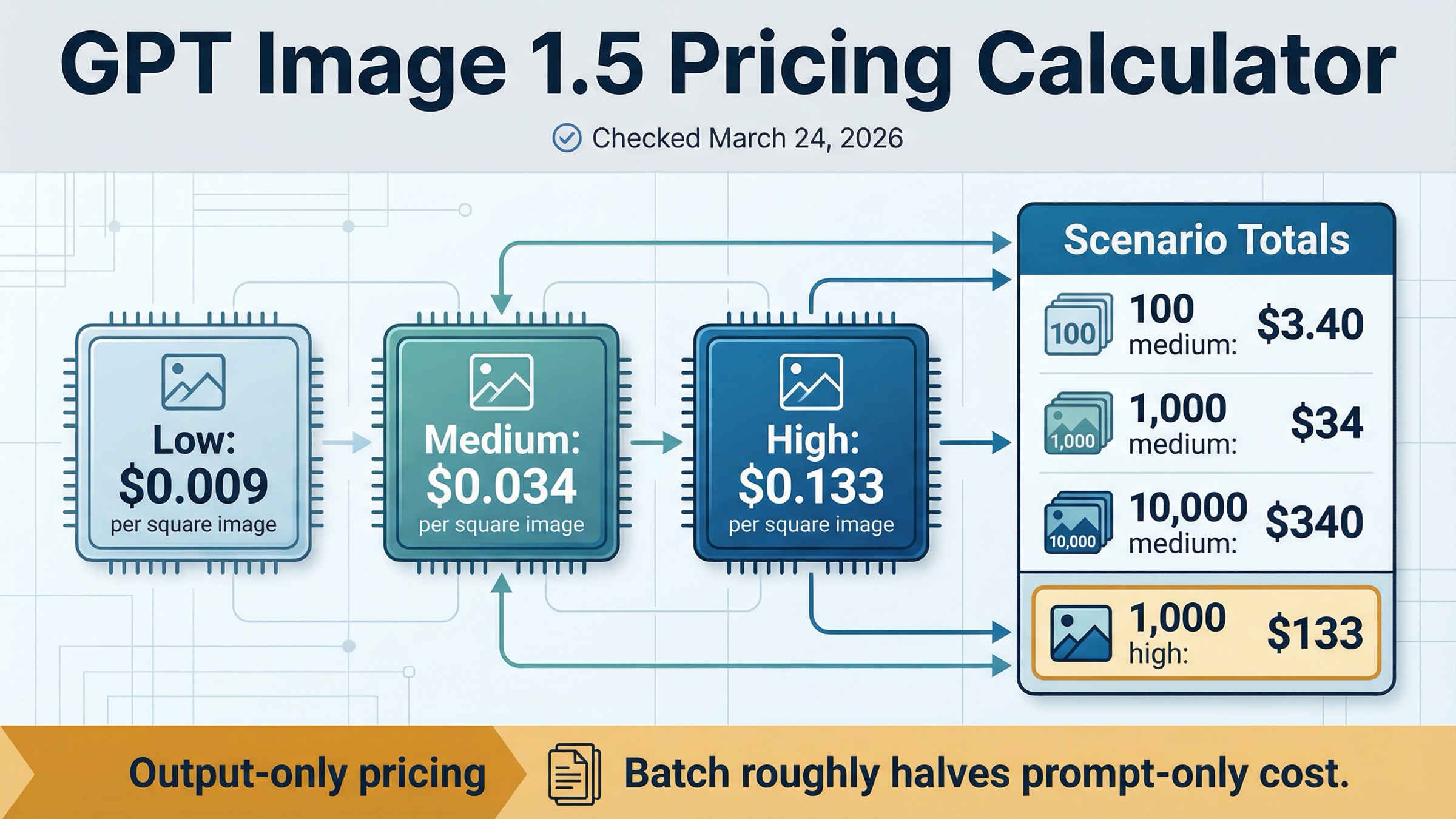
As checked on March 24, 2026, OpenAI lists GPT Image 1.5 at $0.009, $0.034, and $0.133 for 1024x1024 low, medium, and high outputs. If you only need a fast budget shortcut, that means 100 square medium images cost about $3.40, 1,000 cost about $34, and 10,000 cost about $340. At high quality, the same volumes become $13.30, $133, and $1,330.
The second answer matters just as much: those numbers are output-only image prices, not a universal full-request invoice. OpenAI's current image-generation guide says total cost can also include text input tokens and image input tokens when you use edits or reference-heavy workflows. So this page is a calculator first, but it is not pretending one per-image number explains every GPT Image 1.5 request shape.
One more split is worth making before the article goes deeper. Some exact-match pages ranking for this keyword are selling subscription credits or gateway access rather than direct OpenAI API pricing. This page is only about the current official OpenAI API surface.
TL;DR
Use the table below if you want the shortest useful answer before the caveats.
| GPT Image 1.5 row | Per image | 100 images | 1,000 images | 10,000 images |
|---|---|---|---|---|
| 1024x1024 low | $0.009 | $0.90 | $9 | $90 |
| 1024x1024 medium | $0.034 | $3.40 | $34 | $340 |
| 1024x1024 high | $0.133 | $13.30 | $133 | $1,330 |
| 1024x1536 or 1536x1024 medium | $0.05 | $5 | $50 | $500 |
| 1024x1536 or 1536x1024 high | $0.20 | $20 | $200 | $2,000 |
The shortest budgeting rule is simple:
estimated output cost = image count × matching official per-image row
If your workload is prompt-only generation, that shortcut is usually good enough for planning. If your workflow includes edits, reference images, or Batch, keep reading before you lock the budget.
Official GPT Image 1.5 Pricing Calculator
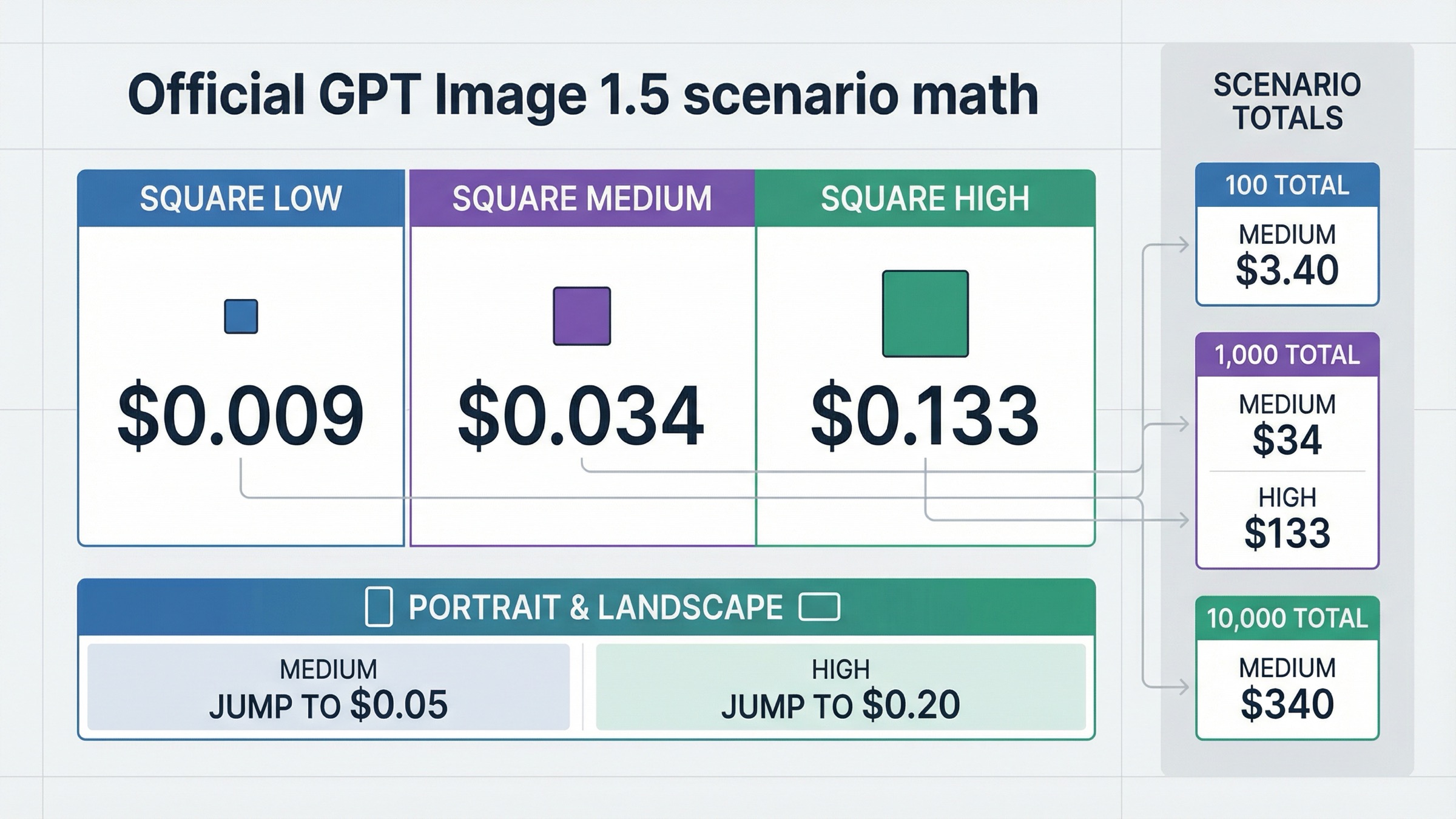
OpenAI's current GPT Image 1.5 model page and image-generation guide now line up cleanly on the core numbers. That is the strongest starting point for a calculator page because the exact query does not really need another generic "pricing guide." It needs one page that translates the current official rows into useful scenario math without losing the billing caveat.
The official output-only pricing ladder currently looks like this:
| Quality | 1024x1024 | 1024x1536 | 1536x1024 |
|---|---|---|---|
| Low | $0.009 | $0.013 | $0.013 |
| Medium | $0.034 | $0.05 | $0.05 |
| High | $0.133 | $0.20 | $0.20 |
That table already answers most direct pricing questions. The main reason readers keep searching is that OpenAI does not publish the next layer in a calculator shape. You still have to do the workload math yourself:
- 500 square medium images: about $17
- 2,500 square medium images: about $85
- 5,000 square high images: about $665
- 1,000 portrait or landscape medium images: about $50
The most practical way to use those rows is to think in workload buckets instead of in one-off prompts. A prototype feature generating 100 medium square images per day is roughly $3.40 per day and about $102 across a 30-day month before input-token overhead. A weekly campaign pipeline generating 1,000 medium square images is about $34 per week. A premium workflow generating 10,000 high square images is already about $1,330 in output-only cost before edits, reference images, or retries. That is why a calculator page is more useful than a plain price table for this query family.
That is also why this page stays narrower than the broader GPT Image 1.5 pricing and GPT Image 1.5 API pricing articles already in the repo. Those pages explain the whole pricing surface. This one exists to make workload math instant.
There are three calculator habits worth keeping explicit.
First, square medium is the most useful default planning row for many teams. It is the clean middle ground between rough ideation and premium final-output spend, and the current official rate of $0.034 is easy to model at almost any volume.
Second, high quality becomes expensive fast. The jump from medium to high at 1024x1024 is not incremental. It moves from $0.034 to $0.133 per image. That means a project that looks inexpensive at 100 medium images can become a real line item once the same workflow starts generating thousands of high-quality outputs.
Third, portrait and landscape matter more than many thin calculators admit. Moving from a square medium image to portrait or landscape medium shifts the price from $0.034 to $0.05. That is not dramatic for a one-off request, but it is material once the workload scales.
The same planning habit matters when a product has more than one image lane. If customer-facing output truly needs GPT Image 1.5 quality, budget that lane honestly. If the same product also has a cheaper ideation or background-generation layer, keep that second lane separate instead of averaging the two together and losing the real decision.
If your question is not only "what does GPT Image 1.5 cost?" but "what are all the current OpenAI image lanes I could be paying for?" the better companion page is OpenAI image generation API pricing. This calculator page stays tight on GPT Image 1.5 itself.
What the Calculator Leaves Out
This is the part most ranking pages flatten too aggressively.
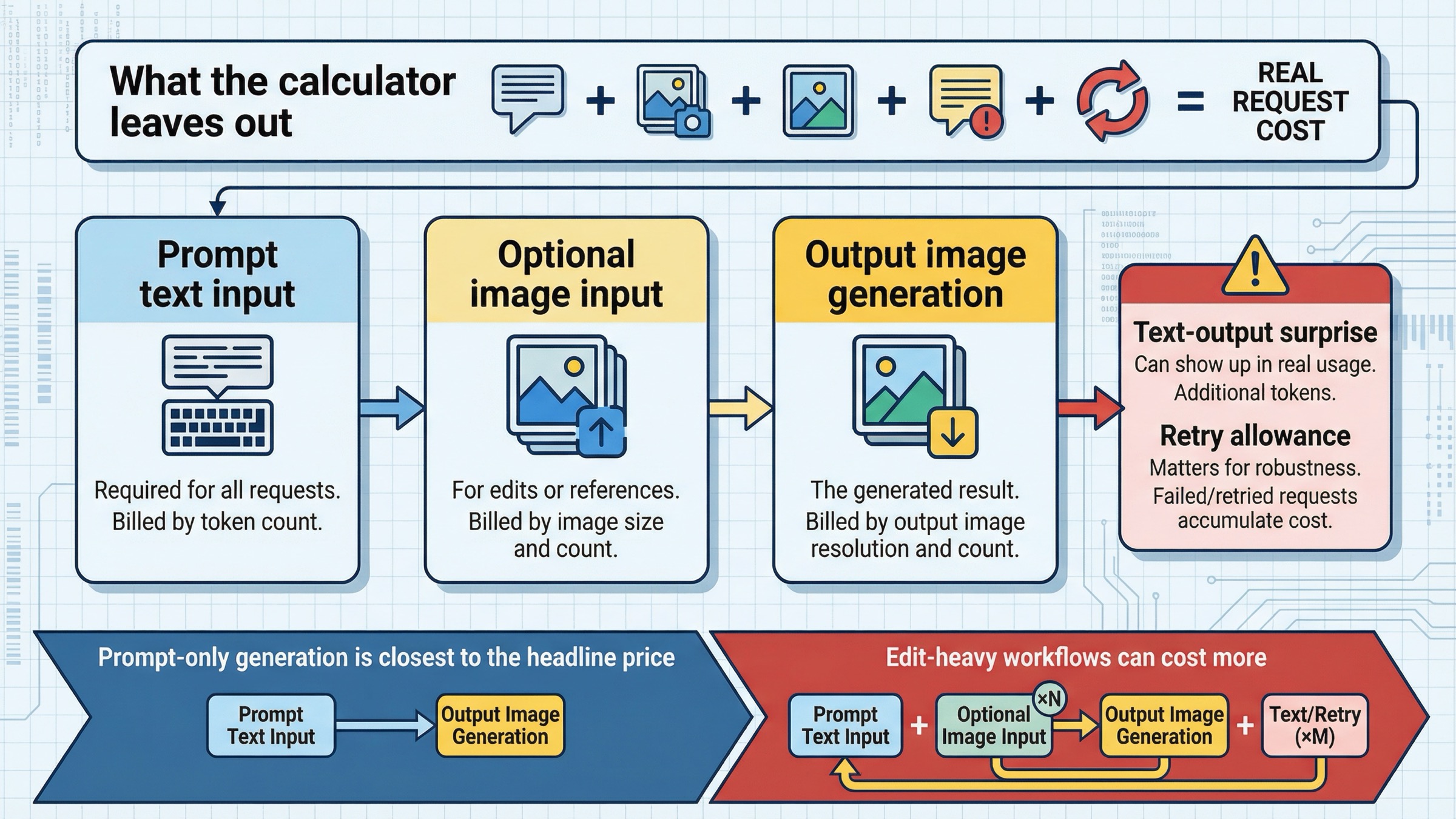
OpenAI's current image-generation guide says total cost is the sum of input text tokens, input image tokens if you are using the edits endpoint, and image output tokens. It also says the per-image tables cover output image generation only. That means the calculator above is an honest shortcut, but not a complete invoice model for every request shape.
For a simple text-to-image request, the output-image number usually dominates. If you are sending a short prompt and generating one fresh image, the per-image table is often close enough for planning.
That shortcut gets weaker in three situations.
The first is edit-heavy work. GPT Image 1.5 supports both v1/images/edits and the Responses tool path, and the same guide says the first five input images can be preserved with higher fidelity on GPT Image 1.5. That is excellent when brand assets, product photos, or reference compositions are expensive to get wrong. It also means image input cost becomes more relevant than it is in a plain prompt-only generation flow.
The second is reference-heavy workflows. If you are giving the model multiple source images, the request is no longer just "one prompt becomes one image." The model is processing more multimodal input, and the simple per-image table stops being the full cost story.
The third is billed text behavior. OpenAI's own pricing pages already expose text-token pricing for GPT Image 1.5, and developer-community threads show why that surprises people in practice. In one thread, a developer reported seeing text output tokens on ordinary GPT Image 1.5 image requests and could not find a way to disable them. In another, a developer testing edits stopped the evaluation because the dashboard view did not make per-edit cost easy to inspect. Those threads do not change the official pricing. They do explain why calculator pages that only repeat the per-image rows still leave users confused.
The safest budgeting rule is this:
- use the per-image rows for prompt-only output estimates
- treat those rows as the floor for edit-heavy or reference-heavy workflows
- validate real request cost against your own usage once the workflow moves beyond one-shot generation
If you need one internal planning formula, use this:
total workflow estimate = output-only image estimate + expected input-token overhead + retry allowance
The retry allowance matters because the real cost of an image workflow is not the list price alone. It is the cost of getting to a usable output. The stronger the business case for GPT Image 1.5 quality, the more important it is to budget against useful output rather than only against one nominal per-image row.
If your next problem is not pricing math but access or verification errors around the image API itself, the better follow-up is OpenAI image generation API verification.
How Batch Changes GPT Image 1.5 Cost
Batch is the cleanest official cost lever, but it is also the easiest place to oversimplify the calculator.
On the current OpenAI pricing page, GPT Image 1.5 image-token rates drop from $8.00 / $2.00 / $32.00 in standard processing to $4.00 / $1.00 / $16.00 in Batch. Text-token rates also drop from $5.00 / $1.25 / $10.00 to $2.50 / $0.63 / $5.00. In plain English, OpenAI halves the token rates for Batch.
What that means for calculator readers is narrower than many pricing pages imply.
If your workload is mostly prompt-only generation, a reasonable shortcut is to treat Batch as roughly half the standard output-only estimate. So:
- 1,000 square medium images move from about $34 standard to about $17 as an output-only Batch estimate
- 10,000 square medium images move from about $340 to about $170
- 1,000 square high images move from about $133 to about $66.50
That is useful math, but it is still estimate math. OpenAI does not publish a separate full per-image Batch table for GPT Image 1.5. It publishes token rates plus the standard per-image output table. So the honest way to explain Batch is:
- the official token rates are lower
- prompt-only output math is usually close to half
- full request totals still depend on the same input-token caveats as standard processing
The other rule is operational rather than mathematical: Batch is the wrong answer for interactive UX. If a human is waiting on the image, cheaper asynchronous processing may still be the wrong product decision. The value of Batch is highest when you are rendering background jobs, campaign assets, overnight queues, or other work that can tolerate delayed completion.
So the right sequence is not "always use Batch because it is cheaper." It is:
- Decide whether the workflow is interactive or asynchronous.
- If it is asynchronous, use Batch as the first official cost lever.
- If it is interactive, optimize quality or model choice before assuming Batch will help.
When GPT Image 1.5 Is Worth Paying For and When Mini Is Smarter
The calculator page still needs one model-routing answer, because the real budgeting decision is rarely about GPT Image 1.5 in isolation.
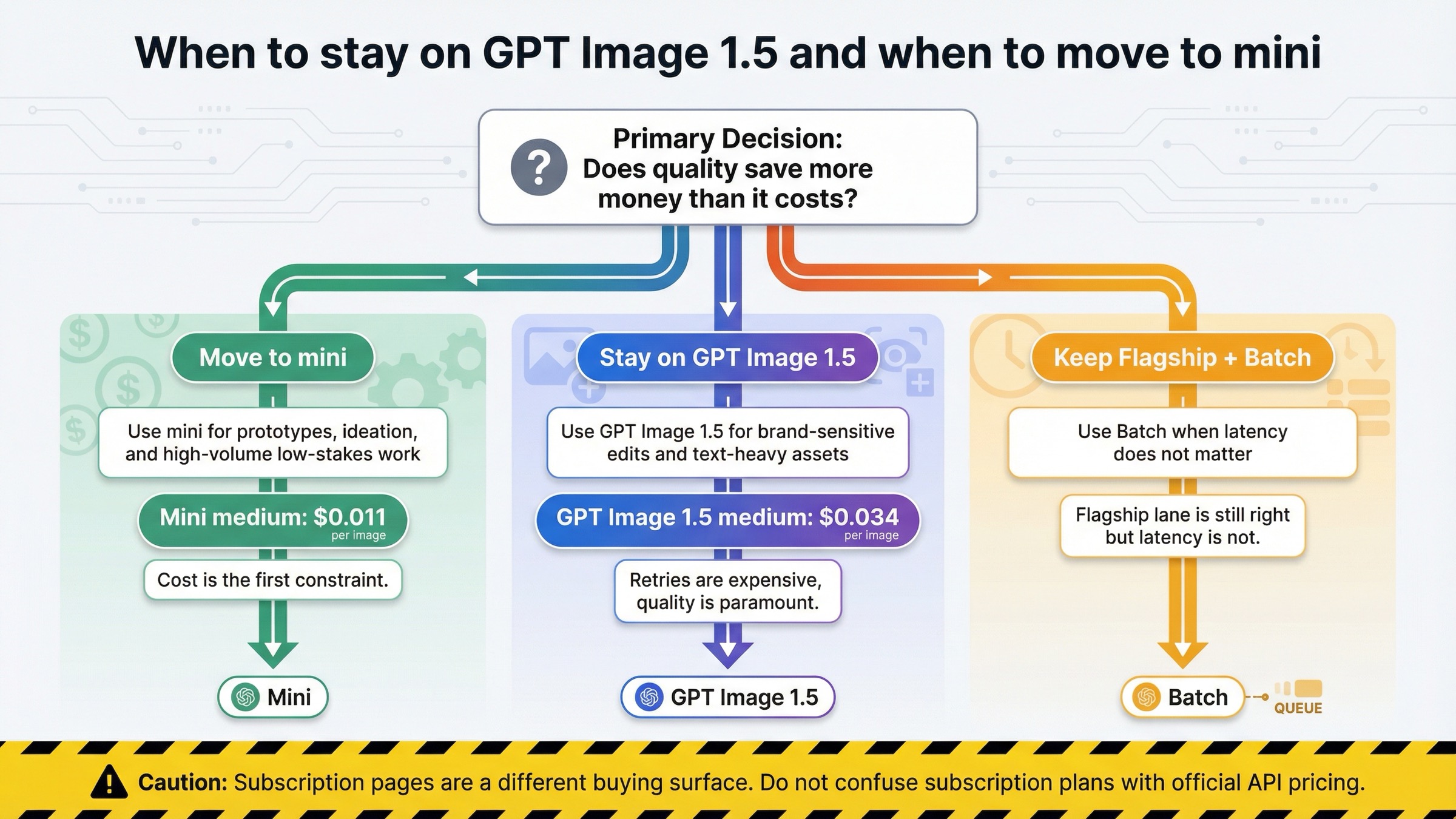
OpenAI's current image-generation guide says GPT Image 1.5 is the best experience overall and recommends gpt-image-1-mini when cost matters more than image quality. That is the right split to preserve here. The calculator becomes more useful when it helps the reader decide whether GPT Image 1.5 is the correct lane at all.
The mini decision is easier once you map its price to the same workload math. OpenAI's current pricing surfaces put gpt-image-1-mini at $0.005, $0.011, and $0.036 for square low, medium, and high outputs. That means the difference is not cosmetic:
- 1,000 square medium images: about $34 on GPT Image 1.5 versus about $11 on mini
- 10,000 square medium images: about $340 on GPT Image 1.5 versus about $110 on mini
That gap is big enough that teams should benchmark mini first whenever the output is cheap to retry or cheap to discard.
| Situation | Better default | Why |
|---|---|---|
| Brand-sensitive edits, product images, packaging comps, or text-heavy assets | GPT Image 1.5 | The cost of retries and cleanup is often higher than the price premium |
| High-volume ideation, internal prototypes, low-stakes variants | gpt-image-1-mini | Lower list price matters more than flagship adherence |
| Overnight or queue-based rendering where speed is not the first constraint | GPT Image 1.5 + Batch | You keep the flagship lane and use the official cost discount |
| Early uncertainty about whether quality really matters | Benchmark mini first | The cheapest mistake is to prove the flagship was unnecessary before paying for it at scale |
This is where a lot of thin calculator pages miss the real decision. They assume the job is already committed to GPT Image 1.5, then stop at the price table. A better budgeting article should still tell the reader when not to keep paying for the flagship.
The practical rule is simple:
- keep GPT Image 1.5 when image quality, editing reliability, or brand preservation save enough downstream work to justify the spend
- move to mini when the workflow is volume-heavy, disposable, or still in cheap-experiment mode
- keep Batch in play when the job is asynchronous and the flagship is still the right model
If the problem is model routing more broadly rather than price math for one lane, use OpenAI image generation API models or the narrower ChatGPT Image Latest vs GPT Image 1.5 comparison next.
Official API Pricing vs Subscription and Gateway Pages
This clarification is part of the keyword's real value because the page-one field is noisier than the model card makes it look.
Some pages ranking for GPT Image 1.5 pricing are not quoting direct OpenAI API billing at all. They are selling:
- annual credit bundles
- monthly subscription plans
- gateway pricing on top of OpenAI-compatible access
- reseller token ladders
Those pages are not automatically useless. They are just answering a different buying question.
The simplest way to tell the surfaces apart is to ask what the page is actually selling. If the page talks about monthly plans, annual credits, free trials, or a branded OpenAI-compatible endpoint, you are no longer looking at direct OpenAI API pricing. If the page talks about per-image rows, token rates, usage tiers, and the official model card, you are much closer to the source of truth.
That distinction matters because a reader can easily see one exact-match plan page and assume OpenAI itself charges in monthly buckets. That is false. OpenAI's current official surface is token-based pricing plus the published per-image output shortcuts on the model page and image-generation guide.
The clean operator rule is:
- if you want official OpenAI API pricing, trust the model page, pricing page, and image-generation guide together
- if you want alternative access pricing, treat subscription and gateway pages as separate products, not as contradictory evidence about OpenAI's own billing
There is one more practical caveat near the same surface. The GPT Image 1.5 model page currently lists Free not supported, and the public tier table shows 5 IPM at Tier 1, rising through 20, 50, 150, and 250 IPM at higher tiers. OpenAI's guide also says image-generation access may require organization verification. So even when the price is clear, the right buyer question is still "can this account and workflow actually use the lane I am pricing?"
That is another reason the calculator should stop at the right scope. It should solve the official cost math and name the access caveat, not pretend pricing alone is the whole operational answer.
FAQ
How much do 1,000 GPT Image 1.5 images cost?
For 1024x1024 outputs, about $9 at low, $34 at medium, and $133 at high quality. Those are output-only estimates based on the current official per-image rows checked on March 24, 2026.
How much do 10,000 GPT Image 1.5 images cost?
For 1024x1024 outputs, about $90 at low, $340 at medium, and $1,330 at high quality. Portrait and landscape medium outputs are about $500 for 10,000 images, and high portrait or landscape outputs are about $2,000.
Does this calculator include edits and reference images?
Not completely. The official per-image tables cover output image generation only. OpenAI's guide says total request cost can also include text input and image input tokens, so edit-heavy workflows need fuller cost modeling.
Does Batch cut GPT Image 1.5 cost in half?
OpenAI's current pricing page halves GPT Image 1.5 token rates in Batch. For prompt-only output estimates, it is usually reasonable to model Batch as roughly half the standard output-only cost. For edit-heavy workflows, you still need to consider the full request shape.
Is there a free tier for GPT Image 1.5 API usage?
No public free API lane is shown on the current GPT Image 1.5 model page. As checked on March 24, 2026, the page lists Free not supported.
When should I use gpt-image-1-mini instead?
Use mini when cost is the first constraint and the workflow is volume-heavy, low-stakes, or still experimental. Stay on GPT Image 1.5 when the image is expensive to get wrong.


