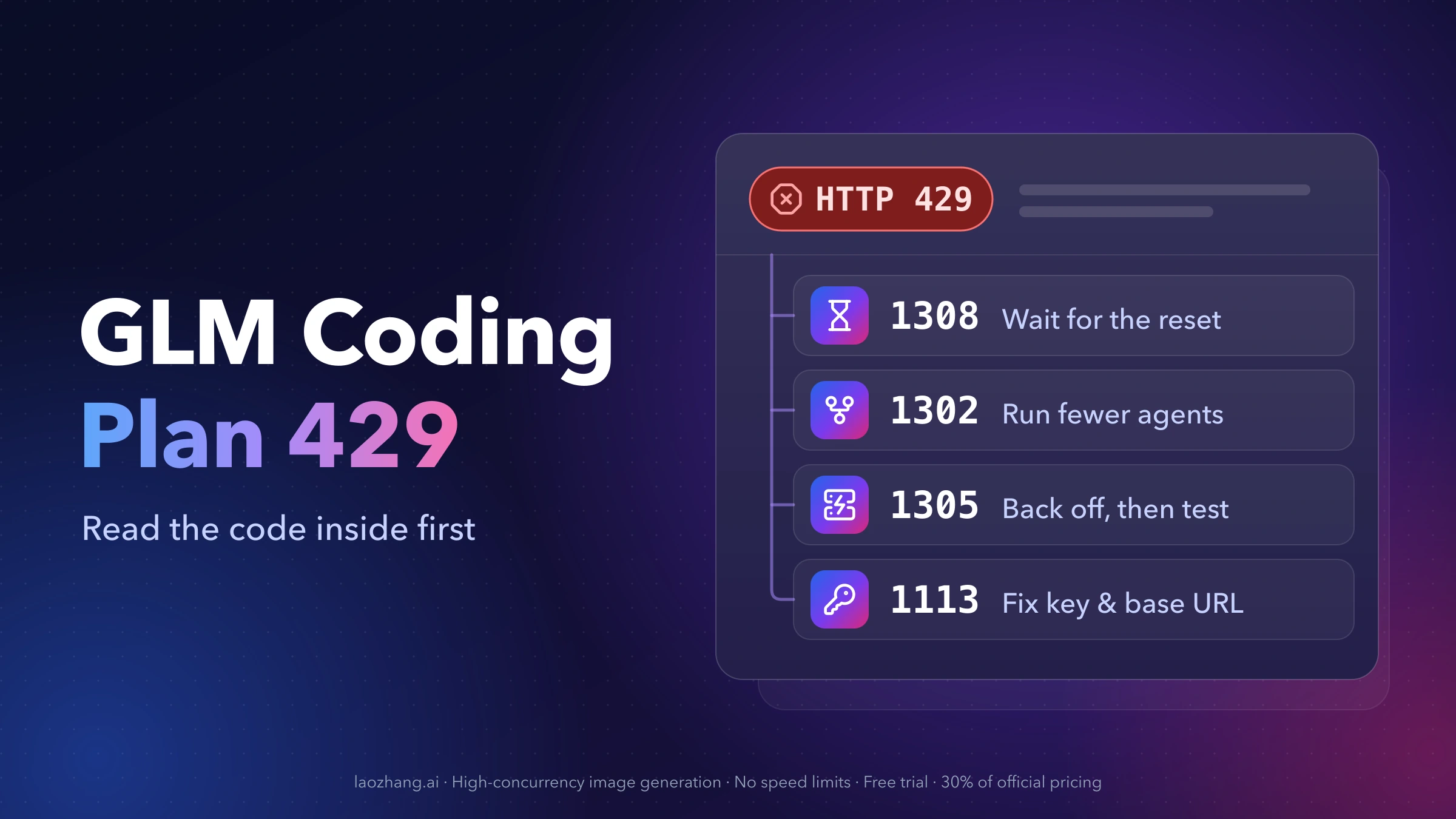
An HTTP 429 from the GLM Coding Plan is not one error. Z.ai sends almost every plan refusal (spent quota, too many parallel requests, server overload, an expired plan, a key that bills outside the plan, a fair-use restriction) with the same 429 status, and puts the real reason in a four-digit error.code in the response body. Find that code first; it decides whether you should wait, slow down, or change your configuration.
The short version, as of October 22, 2026:
- 1308 or 1310 ("Usage limit reached… Your limit will reset at …"): your 5-hour or weekly quota is spent. Retrying does nothing until the time printed in the message.
- 1302 ("Rate limit reached for requests"): too many requests at once. Run fewer agents or subagents in parallel.
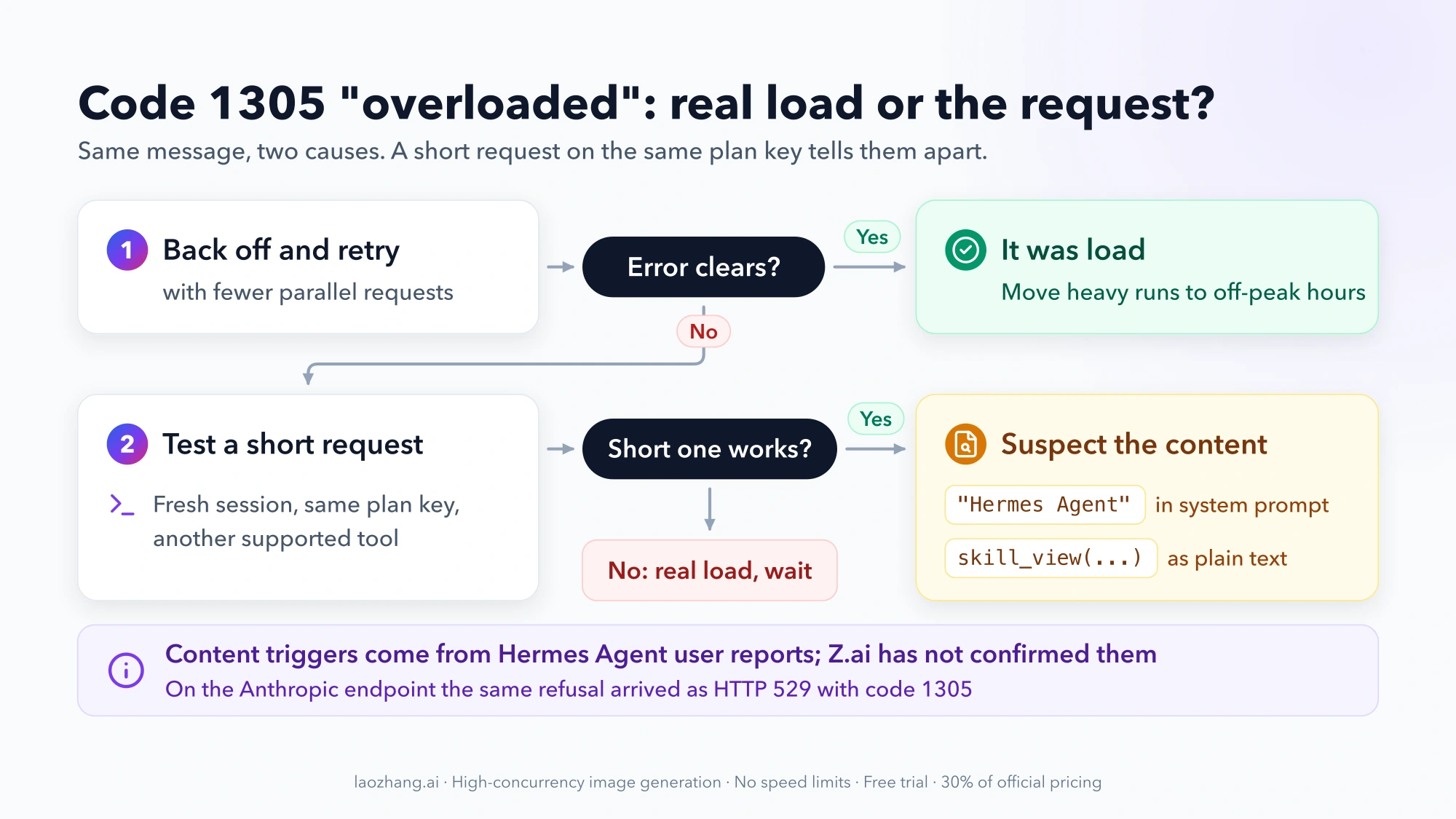
- 1305 ("The service may be temporarily overloaded"): usually load, so back off and retry. If it never clears while other requests on the same key work, suspect the request content.
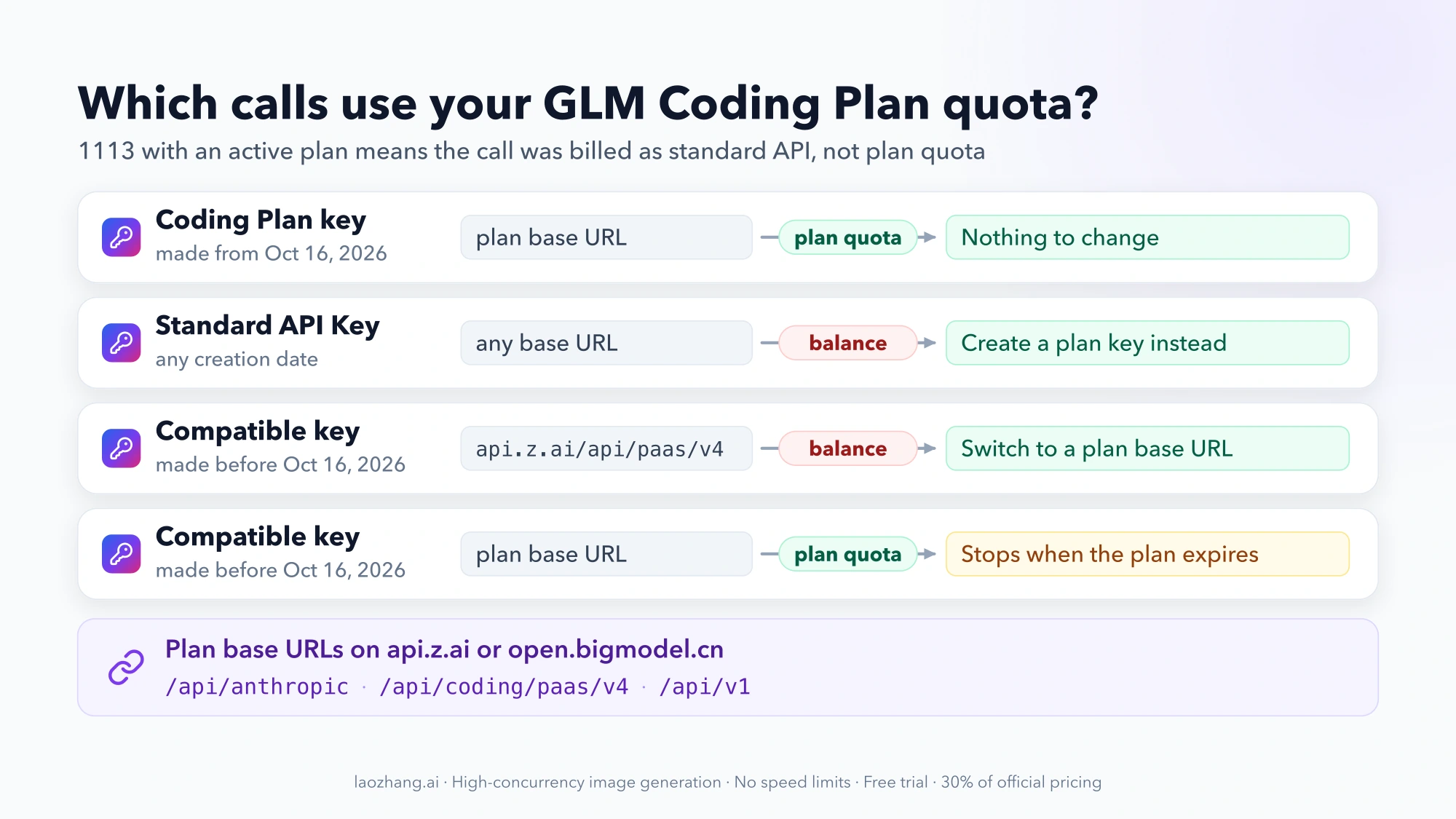
- 1113 ("Insufficient balance or no resource package") while your plan is active: the wrong key type, base URL or model is billing you outside the plan.
- 1309 means the plan expired, 1313 means a fair-use restriction you have to appeal, and 1314–1321 are enterprise, team and extra-usage limits.
The same codes apply on Zhipu's China platform, BigModel (open.bigmodel.cn), with Chinese messages. Where URLs or rules differ, both are listed below.
Find the inner code: where GLM puts the real reason for a 429
Z.ai's error reference describes every response as two layers: the outer HTTP status, and an inner business code with a message in a JSON body like this:
{"error":{"code":"1302","message":"Rate limit reached for requests"}}Most coding agents print that body next to the status when a call fails, so search your terminal output or log for "code". When the tool only says "rate limited", keeps retrying, or quietly switches to a backup model, the body is still in its logs:
- Turn on the tool's debug or verbose logging and reproduce one failure.
- Hermes Agent can write request dumps to
<home>/sessions/request_dump_*.json, which show exactly what was sent and what came back. - If you stream responses (SSE) and generation stops partway through, the code table does not apply. Z.ai reports mid-inference aborts in the
finish_reasonfield of the response instead.
Two quick checks are worth doing before you read the code:
- Open your quota page. Z.ai shows 5-hour and weekly consumption on the subscription page. A bar at or near 100% makes 1308 or 1310 the likely answer.
- Try a fresh, short session in a second supported tool with the same plan key, for example a new Claude Code session that just asks for "OK". If that succeeds while your main agent keeps failing, the account is not out of quota and the platform is not down. The problem sits in what the failing tool sends or where it sends it.
A 429 from GLM on NVIDIA's hosted endpoints (build.nvidia.com) is a different product with its own limits. Nothing in this guide applies to it.
GLM Coding Plan 429 codes at a glance: cause, fix, and whether to retry
All of these arrive as HTTP 429. Messages are Z.ai's English wording; BigModel returns the same codes in Chinese.
| Code | Message starts with | What it means | What to do | Retry helps? |
|---|---|---|---|---|
| 1308 | "Usage limit reached for {number} {unit}. Your limit will reset at {next_flush_time}" | 5-hour quota spent | Wait until next_flush_time, or move work to off-peak hours | No, not before the reset |
| 1310 | "Weekly/Monthly Limit Exhausted. Your limit will reset at {next_flush_time}" | Weekly quota spent | Wait until next_flush_time; consider a higher tier | No |
| 1302 | "Rate limit reached for requests" | Too many concurrent requests for your tier | Cut parallel agents and subagents; retry with backoff | Yes, after slowing down |
| 1305 | "The service may be temporarily overloaded, please try again later" | Server load, or (reported) a request the endpoint refuses | Back off and retry; if it persists, test a short request elsewhere | Sometimes |
| 1113 | "Insufficient balance or no resource package. Please recharge." | The call is billed as standard API, not plan quota | Check key type, base URL, model and tool | No, until config is fixed |
| 1311 | "Your current subscription plan does not yet include access to ${model_name}" | Model outside the plan | Use glm-5.3 or glm-5.3-flash | No |
| 1309 | "Your GLM Coding Plan package has expired…" | Plan expired | Renew, or switch to a Standard key and pay per token | No |
| 1313 | "Your account's current usage pattern does not comply with the Fair Usage Policy…" | Fair-use restriction on the account | Stop the flagged usage and submit an appeal | No |
| 1314 | "Your enterprise package has expired…" | Enterprise package expired | Contact your enterprise admin | No |
| 1315 | "This API Key is limited to enterprise coding package scenarios…" | Enterprise key used in the wrong product | Use a key of the matching product type | No |
| 1316 / 1317 | "Usage limit reached for the past 5 hours / 7 days. Insufficient balance for extra usage…" | Quota spent and the balance can't cover overage | Top up the balance or wait for the reset | No |
| 1318–1321 | "Usage limit reached… Extra usage is not available due to monthly spend limit…" | Quota spent and a monthly overage cap is hit | Ask the admin to raise the cap, or wait | No |
1308 and 1310 "Usage limit reached": read next_flush_time, then wait
These two are the plain quota codes. The message contains the time your limit comes back. That timestamp is the answer: no amount of retrying or restarting the tool brings quota back earlier.
The two windows work differently, according to the plan overview:
- The 5-hour limit is rolling. Credits come back 5 hours after they were consumed, not at a fixed clock time. If you burned most of your quota in a burst at 10:00, it returns around 15:00.
- The weekly limit runs on your subscription cycle. It starts when you subscribe and resets every 7 days from then.
When the quota is gone, calls do not spill over to your account balance. The Coding Plan FAQ says GLM calls in supported tools use only plan quota, so you wait for the refresh. Z.ai occasionally hands out Quota Reset Cards in campaigns. Using one restores the quota and restarts that reset cycle from the moment you use it, and each card expires.
How fast GLM-5.3 uses up the 5-hour quota
On the credits-based plans sold since July 30, 2026, each tier has two allowances:
| Plan | Credits per 5 hours | Credits per week |
|---|---|---|
| Lite | 2,000 | 10,000 |
| Pro | 12,000 | 60,000 |
| Max | 28,000 | 140,000 |
A model call costs credits = (input tokens × input multiplier + cached input tokens × cached multiplier + output tokens × output multiplier) / 10,000. The multipliers are 6.9 / 1.7 / 24 for GLM-5.3 and 2.3 / 0.56 / 8 for GLM-5.3-Flash. Off-peak usage is charged at 50% of that rate. Peak hours are Monday to Friday, 14:00–18:00 Singapore time (UTC+8), which is 06:00–10:00 UTC. For US users that window falls overnight, so most US working hours are already off-peak.
A worked example with assumed numbers: one agent call with 20,000 fresh input tokens, 180,000 cached input tokens and 4,000 output tokens.
- GLM-5.3: (20,000 × 6.9 + 180,000 × 1.7 + 4,000 × 24) / 10,000 = 54 credits at peak, 27 off-peak.
- GLM-5.3-Flash: (20,000 × 2.3 + 180,000 × 0.56 + 4,000 × 8) / 10,000 ≈ 17.9 credits at peak, about 8.9 off-peak.
At that size, a Lite plan's 2,000 credits cover about 37 GLM-5.3 calls at peak. A single agent task often makes many calls, so a long session can drain a Lite window quickly. Your real token counts per pricing type are on the Charge Type page. Routing light work to GLM-5.3-Flash is the main lever you control.
If My plan shows "Legacy Plan V2", you still have the older prompt-based limits until your current cycle ends: roughly 80 prompts per 5 hours and 400 per week on Lite, 400 and 2,000 on Pro, 1,600 and 8,000 on Max. GLM-5.3 counts 3× at peak and 1× off-peak, and weekend usage on active legacy plans is charged at the off-peak rate all day. The plan update notice has the details.
Within the plan, upgrading is the only way to get more quota right away. On Z.ai, a move to a higher tier takes effect immediately, and the unused value of the old plan is converted to balance. BigModel states that an upgrade refreshes credits at the new tier at once and that a renewal does not reset them. Subscriptions are non-refundable, so upgrade because your normal workload needs it, not to clear one afternoon's limit.
Extra usage codes 1316–1321: overage that could not be charged
These codes mean the quota window is spent and an overage path ("extra usage") also failed:
- 1316 / 1317 (5-hour / 7-day): extra usage would apply, but the balance cannot pay for it. Top up, or wait for
next_flush_time. - 1318 / 1319: a monthly spend limit blocks extra usage. BigModel's Chinese error table says this is a sub-account's monthly limit.
- 1320 / 1321: same English message, but BigModel's table says this one is the enterprise-level monthly limit.
Because the English messages for 1318–1321 are identical, use the code number to tell who controls the cap. On a Team Plan, the administrator can enable on-demand overage and set per-member spending limits, as described on the Team Plan page. Z.ai has no public page explaining how an individual subscriber turns on extra usage, so if you see these codes on a personal plan, ask Z.ai support what your account has enabled.
1302 "Rate limit reached for requests": too many parallel agents
1302 is a concurrency limit, not a quota limit. You can hit it with most of your 5-hour credits unused. It usually appears when a tool fans out subagents, or when several sessions run on the same plan at once.
Z.ai does not publish a number. The usage policy says concurrency is tied to the plan tier (Max > Pro > Lite), changes dynamically with available resources, and is higher during off-peak hours. Its guidance on how many projects to run at the same time:
- Lite: one project at a time
- Pro: one or two projects
- Max: two or more projects
What to do:
- Count everything running on the plan: every terminal, IDE extension, background agent and subagent. All supported tools share the same plan quota.
- Lower parallelism in the tool (fewer subagents, one session instead of three) and retry with exponential backoff. 1302 is the code where a delayed retry does work.
- If you need more parallel work during peak hours, move batch jobs off-peak or move up a tier. Some users report that the concurrency they get has dropped over time. Because the limit is dynamic, what worked last month is not guaranteed today.
Do not try to multiply concurrency with extra accounts, shared keys or a relay pool in front of several keys. Those break the plan's usage rules and lead to the 1313 restriction described below.
1305 "temporarily overloaded": real load, or a request the endpoint refuses
The official meaning of 1305 is server overload, not a limit on your account. The normal response is to wait a short while, retry with backoff, run fewer parallel requests, and prefer off-peak hours.
There is a second, reported cause. Hermes Agent users on the Z.ai Coding Plan found that some 1305 errors were caused by what the request contained, not by load, and confirmed it by bisecting their requests:
- In hermes-agent issue #89278 (opened August 18, 2026, still open as of October 22), the exact phrase "Hermes Agent" in the system prompt returned 1305 every time. Changing it to "Hermes" returned HTTP 200 with the same key and endpoint.
- In issue #56816 (July 2026), the plain-text call syntax
skill_view(name='hermes-agent')in the system prompt triggered the same error. Rewording that one string fixed it. - Through the OpenAI-compatible endpoint the refusal arrived as HTTP 429 with code 1305. Through the Anthropic endpoint it arrived as HTTP 529 with code 1305.
Z.ai has not confirmed any such filter, and whether it is still active is not public. Hermes Agent itself is on Z.ai's list of supported tools, so this is not a ban on the tool. The useful lesson is a test: if 1305 never clears, the status is normal, and a short fresh request on the same key succeeds, stop treating it as load. Look at what your tool puts in the system prompt. For Hermes, check the issues above and update to a version that rewrites the phrase on the transport you use.
1113 "Insufficient balance" with an active plan: key type, base URL, model
1113 says your account balance cannot pay. If you have an active plan, that means the call was billed as standard pay-as-you-go API instead of plan quota. The Coding Plan FAQ lists three causes: an unsupported tool, a wrong base URL, or a model the plan does not include. Since October 16, 2026, the key type is a fourth.
Check the key: plan key, Standard key, or Compatible key
From October 16, 2026, Z.ai manages Coding Plan keys and Standard API keys separately, according to the API key management guide:
- Keys created on or after October 16: the key type decides billing, whatever the endpoint. A Standard API Key in Claude Code never touches plan quota and may charge your balance, even with a subscription. Create plan keys under API Keys → Personal Coding Plan (individual plans) or under Team Coding Plan → My Plan (team members).
- Keys created before October 16 on an account that has ever had a Coding Plan are labeled "Compatible". For these, the endpoint decides billing:
https://api.z.ai/api/paas/v4is standard billing even while plan quota remains, while the plan endpoints below use plan quota.
If you made a new key recently and 1113 started at the same time, check which tab it came from first. If the Personal Coding Plan tab is missing, you are probably signed in to a different account from the one holding the subscription.
Check the base URL your tool actually calls
| Platform | Tool type | Plan base URL |
|---|---|---|
| Z.ai | Claude Code, Goose (Anthropic Messages) | https://api.z.ai/api/anthropic |
| Z.ai | OpenCode, Cline, Roo Code, Kilo Code and other OpenAI-compatible tools | https://api.z.ai/api/coding/paas/v4 |
| Z.ai | Codex (OpenAI Responses) | https://api.z.ai/api/v1 |
| BigModel | Claude Code | https://open.bigmodel.cn/api/anthropic |
| BigModel | OpenAI-compatible tools | https://open.bigmodel.cn/api/coding/paas/v4 |
| BigModel | OpenAI Responses | https://open.bigmodel.cn/api/v1 |
The URL to look out for is the standard one without /coding: https://api.z.ai/api/paas/v4 or https://open.bigmodel.cn/api/paas/v4. With a Compatible key it bills your balance, and Z.ai's FAQ requires the plan URLs above for plan usage in any case. The two platforms are separate accounts, so a Z.ai key does not work on open.bigmodel.cn and vice versa.
For Claude Code on Z.ai, the documented ~/.claude/settings.json looks like this:
{
  "env": {
    "ANTHROPIC_AUTH_TOKEN": "your_zai_api_key",
    "ANTHROPIC_BASE_URL": "https://api.z.ai/api/anthropic",
    "ANTHROPIC_DEFAULT_HAIKU_MODEL": "glm-5.3-flash[1m]",
    "ANTHROPIC_DEFAULT_SONNET_MODEL": "glm-5.3[1m]",
    "ANTHROPIC_DEFAULT_OPUS_MODEL": "glm-5.3[1m]",
    "API_TIMEOUT_MS": "3000000"
  }
}
Open a new terminal after editing and run /status inside Claude Code to confirm the settings source and model. If the custom URL still seems to be ignored, Claude Code ANTHROPIC_BASE_URL Not Working? Fix It by Symptom covers environment variable precedence and the other usual causes.
What you typed into the config is not always what the tool sends. One Hermes Agent user got 429 with 1113 on BigModel with a valid plan because the tool used /api/paas/v4. After fixing the main setting, side features such as title generation and compression still called the hard-coded standard URL (issue #18302). If 1113 survives a config fix, read the URL in the tool's request log.
Check the model name (1311)
All plans include GLM-5.3 and GLM-5.3-Flash. Requests for GLM-5.2 or GLM-5.1 are routed to GLM-5.3, and GLM-4.7 to GLM-5.3-Flash. A model outside that set returns 1311, or bills as standard API. In OpenAI-compatible tools, set the custom model to glm-5.3 or glm-5.3-flash.
1309, 1313, 1314 and 1315: expired plans, fair-use flags, enterprise keys
1309: the plan expired. Renew on the subscription page; BigModel users renew at bigmodel.cn/claude-code. An older Compatible key on a plan endpoint does not fall back to pay-as-you-go after expiry. To keep working without renewing, create a Standard API Key, fund the balance, and replace the key in your tool. You can keep the same endpoint.
1313: "Your account's current usage pattern does not comply with the Fair Usage Policy". The account's request frequency has been limited by risk control. Plan quota may only be used inside officially supported tools, and the usage policy and subscription terms forbid account sharing, reselling, proxying, aggregating, and calls from your own apps, SDK scripts or bots. Z.ai does not publish what triggers the flag. Violations can lead to rate limiting or a freeze, and more than three violations can get the account banned.
To recover, stop the usage that may have caused it (relay pools such as NewAPI or one-api, shared keys, scripts calling the plan endpoint directly), then open the risk notice and submit an appeal on the Plan Overview page. On BigModel, the appeal button is at the top of the personal Coding Plan overview at bigmodel.cn/coding-plan/personal/overview. The message itself says access is restored after you submit a request, so retries and new keys are not the way back.
1314 and 1315: enterprise packages. 1314 means your company's enterprise package expired; only the enterprise administrator can fix it. 1315 means an enterprise coding key is being used in another product, so replace it with a key of the matching product type.
Can't wait for the reset? Pay-as-you-go GLM options
When a 1308 or 1310 reset is hours or days away and the work cannot wait, the official route is a Z.ai Standard API Key billed per token. As of October 22, 2026, Z.ai's pricing per 1 million tokens is:
| Model | Input | Cached input | Output |
|---|---|---|---|
| GLM-5.3 | $1.40 | $0.26 | $4.40 |
| GLM-5.3-Flash | $0.15 | $0.03 | $0.50 |
Point a separate profile or tool at the Standard key so it does not replace your plan key, and switch back when the plan window resets. In Claude Code, that means a Standard key with https://api.z.ai/api/anthropic; it bills your balance, not the plan. GLM-5.3-Flash: Migrate from Ox Alpha, Price the API, and Preflight Local Deployment goes deeper into Flash API pricing.
A third-party gateway is another pay-per-token option. laozhang.ai lists glm-5.2 at $1.142 per million input tokens and $3.997 per million output tokens and documents Claude Code setup with ANTHROPIC_BASE_URL=https://api.laozhang.ai. Note the limits before you choose it: it serves GLM-5.2, not GLM-5.3, it has its own billing and rate limits, and it does not use or restore your Coding Plan quota. It does nothing about a plan 429. It only gives you somewhere else to run the session while you wait.
If repeated limits have you reconsidering the model itself, GLM-5.3 or DeepSeek V4 Pro? Choose by Access, Cost, and Agent Fit compares the two on access routes, cost and agent use.
GLM Coding Plan 429 FAQ
Does the GLM Coding Plan 5-hour limit reset at a fixed time?
No. It is a rolling window: credits come back 5 hours after they were used. The weekly limit resets every 7 days, counted from your subscription time. The exact time for your account is the next_flush_time printed in a 1308 or 1310 message.
Why do I get 429 with plenty of quota left?
Because 429 also covers 1302 (concurrency), 1305 (overload or a refused request), 1113 (billing outside the plan) and 1313 (fair-use restriction). None of those depend on remaining credits. Read the inner code. 1302 means fewer parallel agents, and 1113 means a key, base URL or model problem.
Will Z.ai charge my account balance when the Coding Plan runs out?
Not for GLM calls made with a plan key in supported tools. They stop until the quota refreshes. Your balance is charged when you use a Standard API Key, or an older Compatible key on https://api.z.ai/api/paas/v4, which can happen even while plan quota remains.
Is the GLM 429 on NVIDIA's API the same problem?
No. GLM models hosted by NVIDIA (build.nvidia.com) have NVIDIA's own request limits and accounts. Z.ai's codes and plan rules don't apply there.
Why do I see 529 instead of 429 from GLM?
In reported cases, Z.ai's Anthropic-compatible endpoint returned HTTP 529 with code 1305 for the same refusal that came back as 429 on the OpenAI-compatible endpoint. Treat a 529 with 1305 the same way as the 1305 section above.