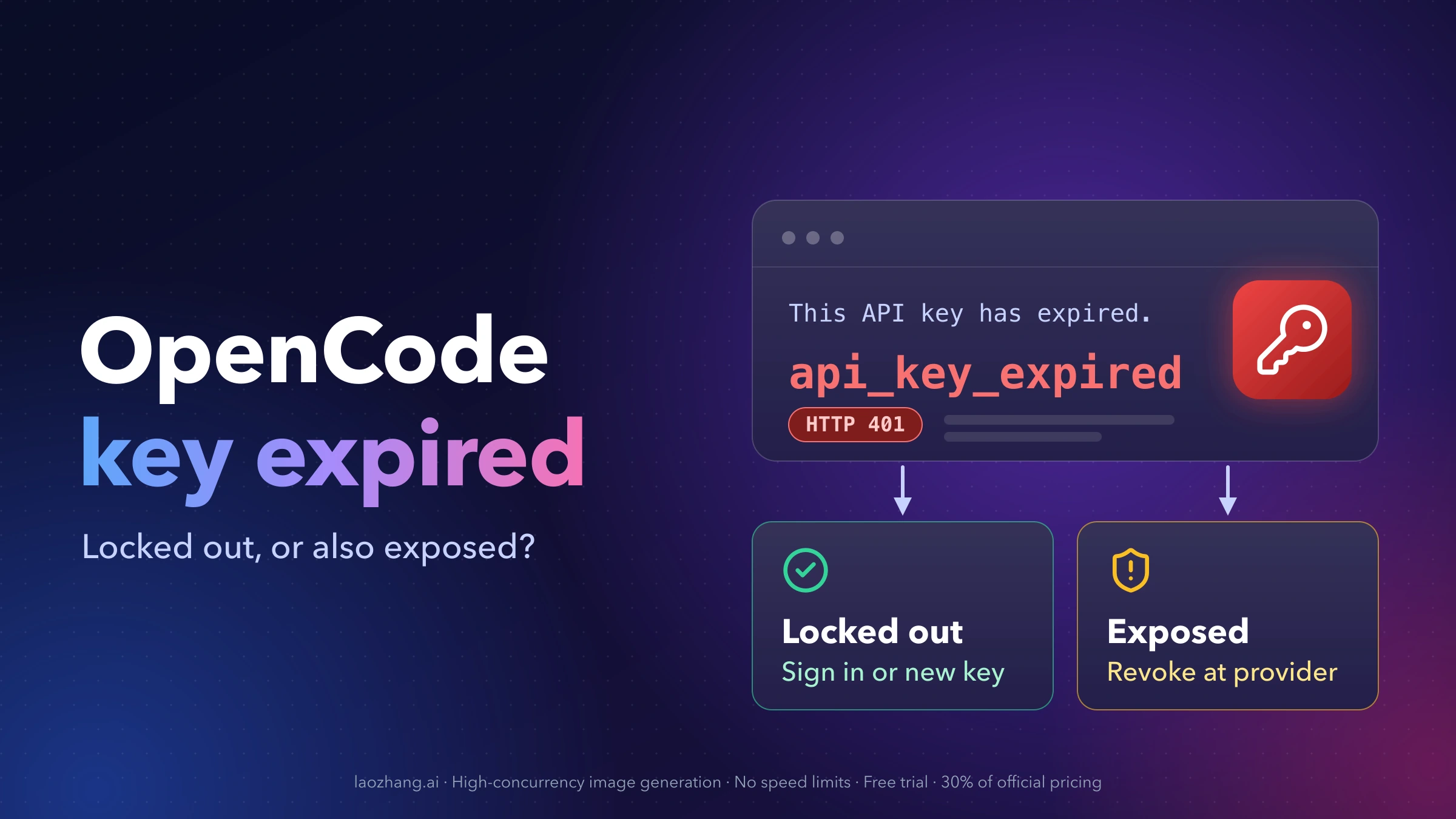
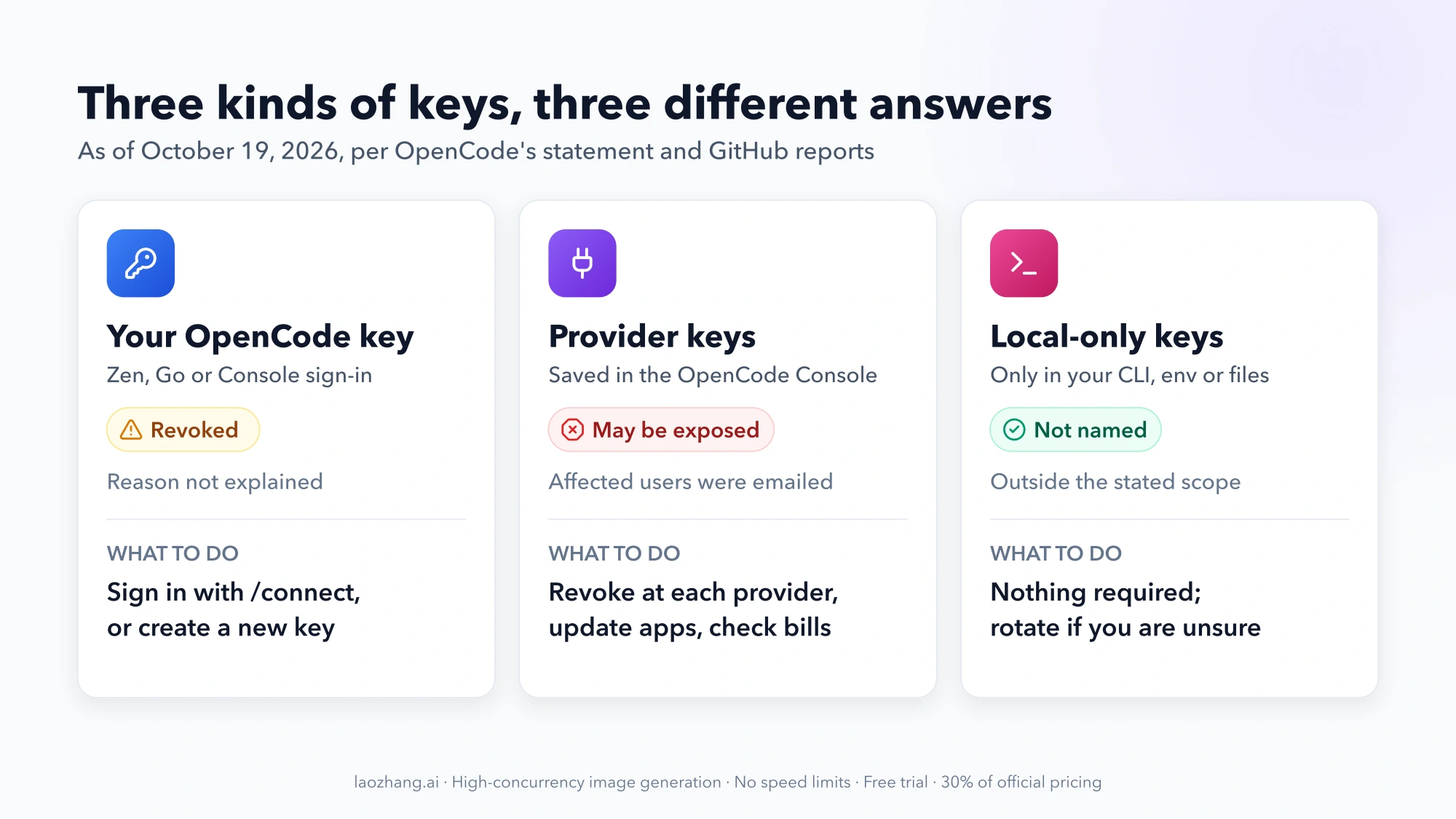
If OpenCode started failing with "This API key has expired" on or after October 17, 2026, your OpenCode credential was invalidated on OpenCode's side. Nothing you changed caused it, and waiting usually does not bring that key back. There are two separate questions, and most people only have the first one:
- Locked out: your own OpenCode Zen, Go or Console credential stopped working. Fix it by signing in again with
/connect→ OpenCode, or by creating a new key and replacing the stored one. This takes a few minutes. - Exposed: you had linked your own OpenAI, Anthropic, Google or other provider keys in the OpenCode Console, and OpenCode emailed you about the breach. Revoke those keys at each provider, create new ones and check your bills. Fixing the OpenCode error does not fix this.
As of October 19, 2026, the incident is still ongoing and OpenCode has not explained why its own keys were revoked. The steps below are the ones that have worked for users so far, with the source for each.
Locked out or exposed: which OpenCode situation are you in
| What you see | What it means | What to do |
|---|---|---|
api_key_expired in the TUI, desktop app or VS Code, and no email from OpenCode | Your OpenCode credential is dead; no provider keys of yours were in the breach scope OpenCode described | Sign in again or replace the key |
| The same error, and an email saying your third-party provider keys "may have been exposed" | Locked out and exposed | Do the fix above, then rotate every provider key you saved in the Console |
A freshly created key still returns api_key_expired | An old key is still being sent from somewhere, or the new key is being rejected | Find the stale key |
| "Unable to start social login" or "Too many registration attempts" in the Console | Console sign-in is struggling, not your account settings | Wait, check status, then email support |
LiteLLM or another client calling OpenCode returns authentication_error | The old key is still in that client's own config | Update the client's secret store |
| You want to keep coding while the Console is unreliable | You can skip OpenCode Zen/Go and the Console for now | Add your own provider to opencode.json |
| Your own Anthropic/OpenAI keys work fine in the local CLI and you never used the Console | Not covered by OpenCode's breach statement | Nothing to fix; see the FAQ if you want to rotate anyway |
The "This API key has expired" error in OpenCode
The full message, as it appears in logs posted to GitHub, is:
This API key has expired. Create a new API key in OpenCode Console and replace it in your client or secret store. Signing in again will not renew this key.It comes back as HTTP 401 with "type": "authentication_error" and "code": "api_key_expired" (#56560). In the TUI it can also show as Internal error: This API key has expired (#56442), and one Windows user saw a variant pointing to a settings URL instead of the Console (#56782).
The error is generated by the OpenCode Console/Zen backend, not by your machine. That is why every OpenCode Zen and OpenCode Go model fails at once while other providers you configured directly, such as OpenRouter, keep working (#56806). The first reports landed at 21:52 UTC on October 17, 2026 (#56586) and kept coming through October 18. Affected users include keys that had no expiry date set and accounts that never linked an external provider (#56556, #56833).
What OpenCode has confirmed about the Console breach
As of October 19, 2026, this is everything on the record:
| Item | Detail | Source |
|---|---|---|
| What happened | A "security breach last night related to a large scale distillation attack" | OpenCode on X, October 17, 2026, about 18:08 UTC |
| Who was affected | 1.4% of OpenCode Console users, "a subset of users who had external providers linked"; all were emailed, and "if you did not get an email you were not impacted" | Same post |
| What was accessed | "a legacy system that we were in the process of decommissioning"; "Third party provider keys (eg OpenAI, Anthropic) saved in your workspace may have been exposed" | Breach email as quoted on Hacker News and by Notebookcheck |
| What OpenCode asks | Revoke and replace those keys through each provider's dashboard, update apps using them, review recent usage | Same email |
| Status | Ongoing; OpenCode says it is working with Anthropic, OpenAI and Google | X post |
| Status page | Lists "Elevated error rates · Console API" on October 18, 04:04–07:21 UTC, but no security incident | status.opencode.ai |
Two things are not confirmed. OpenCode has not said why users' own OpenCode keys were revoked, including keys from accounts with no provider linked, and it has not said how many were. Treat the expired key as an unexplained side effect of the incident, not as proof that your OpenCode key leaked. OpenCode's Dax (@thdxr) wrote on X on October 18 that attackers had been "non stop trying to attack our systems for the past 48 hours" and that "everything is getting hardened" (post).
Fix 1: run /connect and sign in again, even though the error says it won't work
This is the quickest recovery reported so far. In the OpenCode TUI:
- Type
/connect. - Pick OpenCode (the Console sign-in), not "OpenCode Go".
- Complete the device sign-in that opens in your browser and choose the workspace you use.
- Send a short prompt.
Several users got working access back this way (#56586, #56442). Outside the TUI, opencode auth login with the OpenCode provider runs the same browser sign-in; one user on Windows recovered with it once the Console stopped rate-limiting sign-in attempts (#56782).
Why this works when the message says it won't. The message is literally true: signing in does not bring the old API key back. Signing in through OpenCode gives you a fresh set of sign-in tokens instead. In a reply on X on October 18, Dax put it this way: "if you logged in through opencode it defaults to oauth tokens not long lived api keys." Pull requests to make the error text say this are open (#56670, #56791).
Go subscribers: "Insufficient account funds" after signing in. If the next error is Upstream request failed: Insufficient account funds, your request is being billed to empty Console credit instead of your Go plan. Select a model whose ID starts with opencode-go/ (for example through /models) and send it again (#56586). You do not need to top up.
Desktop app and VS Code. Both use the same stored credentials as the CLI (#56560). After signing in from a terminal, fully quit the desktop app, including from the system tray, or reload VS Code.
If the browser sign-in itself fails, skip to the Console sign-in section.
Fix 2: create a new OpenCode key and replace the stored one
Use this path if you connect with a pasted key rather than a sign-in, if you are on OpenCode Go and connect with a Go key, or if Fix 1 did not stick.
Where to create the key in the OpenCode Console
The v2 Console has two kinds of keys, and picking the wrong one is a common dead end:
| Key | Where it is, as of October 19, 2026 | Use it for |
|---|---|---|
| Personal Zen/Go key | Your account name (top right) → Account → Create | OpenCode itself, Go subscriptions |
Service account key (oc_sk_...) | Keys → Add Service Account → open it → Add API Key | Integrations, CI, scripts calling the Console API or inference |
The personal key location comes from OpenCode's issue-triage replies and users who found it (#56806, #52227); finding a Go key in the v2 Console is a known, open problem. Service account keys are documented in the Console API docs: you choose a name, permissions and an optional expiry date, and the key is shown only once. Copy whichever key you create into a password manager right away. Never paste it into a GitHub issue.
Replace the key OpenCode is using
OpenCode does not switch to a new key on its own (#56806). Replace it:
# 1. Remove the old entry. Pick OpenCode Zen and/or OpenCode Go when asked.
opencode auth logout

# 2. Add the new key under the same provider.
opencode auth login
# Go subscribers can skip the picker:
opencode auth login opencode-go --method key

# 3. Confirm what is stored.
opencode auth list
Choose OpenCode Zen for Zen models and OpenCode Go for Go models. /connect in the TUI does the same as step 2. The --method key route for Go is the one users confirmed works once a key exists (#56498).
Then fully restart the desktop app or VS Code so no running OpenCode process holds the old credential. You are done when a prompt to a Zen or Go model returns an answer instead of a 401.
New key still says "This API key has expired": find the old key
If a brand-new key fails with the exact same message, the usual cause is that OpenCode is still sending the old key from somewhere that takes priority over what auth login stored (#56560). OpenCode loads credentials from its credentials file, from environment variables and from a project .env file (CLI docs). Check these places in order.
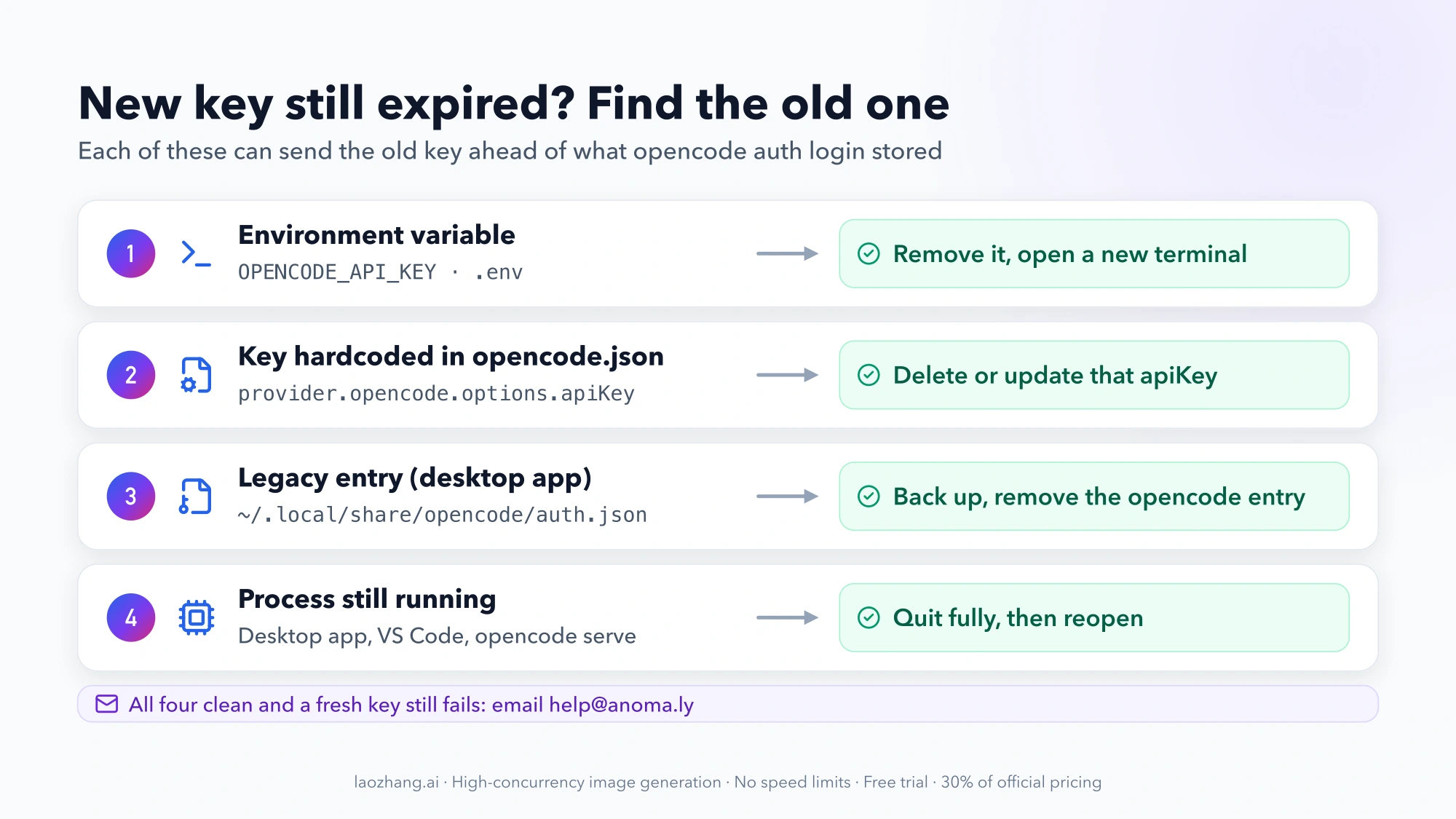
1. An environment variable. Look for OPENCODE_API_KEY in your shell and in project .env files:
echo "$OPENCODE_API_KEY"
grep -n "OPENCODE_API_KEY" ~/.zshrc ~/.bashrc ~/.profile .env 2>/dev/null
Remove or update it, then open a new terminal.
2. A key hardcoded in config. An apiKey under provider.opencode.options overrides the stored login. Check the global config at ~/.config/opencode/opencode.json (or opencode.jsonc) and the opencode.json in your project:
grep -n "apiKey" ~/.config/opencode/opencode.json* ./opencode.json* 2>/dev/null3. A legacy entry in auth.json (desktop app). One user found that the v2 login and logout commands never touch an older opencode entry in auth.json, and the background service kept preferring that expired key. Deleting the entry and restarting the service fixed the desktop app immediately (#56556). This is a community fix, not an official procedure, so back the file up first:
cd ~/.local/share/opencode
cp auth.json auth.json.bak
jq 'del(.["opencode"])' auth.json.bak > auth.json
pkill -f "opencode-cli serve --service"
On Windows the file is at %USERPROFILE%\.local\share\opencode\auth.json; edit a copy by hand if you do not have jq. After restarting, run opencode auth list and sign in again if the OpenCode entry is gone.
4. A running process. Quit the desktop app from the tray, close VS Code's integrated terminal or reload the window, and kill any long-running opencode serve you started yourself.
If none of these is the problem and a key created minutes ago is still rejected, the issue is on the account side. Email help@anoma.ly, say that a newly created key also returns api_key_expired and roughly when you created it (#56560).
LiteLLM and other clients that call OpenCode Zen or Go
Anything that calls OpenCode's hosted models directly keeps its own copy of the key. One report shows the error arriving through LiteLLM as litellm.AuthenticationError: AnthropicException ... api_key_expired (#56560). Fixing the OpenCode CLI does nothing for those clients.
For each one, put the new key wherever it reads secrets: the proxy's environment, a .env, a CI secret, a vault entry. Then restart it. For integrations and CI, OpenCode's docs point to a service account key (oc_sk_...), which is tied to one workspace and sent as a bearer token. To check a service account key without spending tokens, call the documented config endpoint; a revoked or expired key gets HTTP 401 immediately (Console API docs):
curl --fail-with-body "https://opencode.ai/console/api/v2/config" \
  --header "Authorization: Bearer $SERVICE_API_KEY"
A JSON list of providers and models means the key works. A 403 means the key is valid but its permission level is "Inference only" or it belongs to another workspace.
Got the breach email? Rotate your provider keys at each provider
This part applies if you linked provider accounts in the OpenCode Console (often called BYOK, bring your own key), and especially if OpenCode emailed you. In the Console, the Providers page stores the keys you entered for Anthropic, OpenAI, Google, xAI, DeepSeek, Mistral, Groq, OpenRouter and others, plus cloud credentials such as Azure keys, AWS Bedrock keys and Google Vertex AI service account JSON (Console providers docs). Those stored credentials are what the breach email says "may have been exposed."
For every credential you saved there:
- Revoke it at the provider, not in OpenCode. Removing it from the Console does not stop someone who already copied it. Use the provider's own dashboard, for example the OpenAI API keys page, the Anthropic Console's API keys page, or Google AI Studio for Gemini keys. For a Vertex AI service account, delete that service account key in Google Cloud.
- Create a replacement. If you need a refresher, see OpenAI API Key: How to Get One, Use It, and What It Costs or the Gemini API Key Guide.
- Update the Console if you keep using it: on the provider page, click the credential and enter the new key. Then update every other app that used the old key.
- Check usage and billing. Look at each provider's usage page for requests you did not make since mid-October, and set spending limits or usage alerts if you have not.
The reported damage varies widely and comes from individual users, not from OpenCode: one had $20 of Anthropic credit used up the same morning (Hacker News); others described about $400 in Anthropic charges, and about €200 on Google with the project then suspended for abuse (Notebookcheck). Some people got usage alerts from OpenAI and Anthropic before OpenCode's notice arrived. If a drained OpenAI balance now gives you 429 errors, see OpenAI API Quota Exceeded? How to Fix the 429 insufficient_quota Error. Raise unauthorized charges with the provider that billed you as well as with OpenCode.
Can't sign in to the OpenCode Console
On October 17 and 18, many users trying to fix the expired key could not reach the Console at all. The reported messages were:
Unable to start social loginwhen signing in with GitHub or GoogleToo many registration attempts. Please wait an hour, then try again.- Device sign-in from the CLI retrying with no explanation, which logs showed as HTTP 429 from the Console (#56782)
These came from the hosted Console, not from your OpenCode install (#56445). Some users got in after several attempts; one found everything working again later without doing anything, though the old key was gone (#56442). What to do:
- Check status.opencode.ai for Console incidents.
- Wait at least the hour the message asks for. Retrying immediately keeps you rate-limited.
- If you are still locked out, or your workspace shows as restricted, email help@anoma.ly. OpenCode handles account and billing questions only by email, not in GitHub issues (#56703). Include when it started and the exact error text. Keep keys, emails and payment details out of public issues.
Keep coding without the Console: a provider in opencode.json
If the Console keeps rejecting sign-ins, or you would rather not depend on it while the incident is open, you can point OpenCode at a provider you configure yourself. The provider goes in ~/.config/opencode/opencode.json (or an opencode.json in the project root), and the key is read from an environment variable with {env:...}. The key then sits neither in the OpenCode Console nor in the config file, and if it ever leaks you revoke it in one place. This is a workaround for getting work done, not a fix for the expired OpenCode key, and it means paying that provider directly instead of using your Zen credit or Go plan.
A hands-on example is the laozhang.ai OpenCode setup guide, last verified on October 5, 2026 with OpenCode 1.18.34. The incident reports involve 1.19.x and 2.0.x, so check the result on your version. laozhang.ai is an API gateway, which means it is still a third party holding a key for you; it is not inherently safer than the Console. The benefit is only that the key lives in your own environment.
First set the key in your shell profile (use ~/.bashrc for bash):
echo 'export LAOZHANG_API_KEY="YOUR_KEY"' >> ~/.zshrc
source ~/.zshrc
Then add the provider. OpenAI's GPT-6 models need the @ai-sdk/openai package. Under @ai-sdk/openai-compatible the request carries max_tokens, which GPT-6 rejects with Unsupported parameter: 'max_tokens' is not supported with this model. Use 'max_completion_tokens' instead. DeepSeek, Gemini and Qwen models work under @ai-sdk/openai-compatible, so the tested config uses two provider entries with the same baseURL:
{
  "$schema": "https://opencode.ai/config.json",
  "provider": {
    "laozhang": {
      "npm": "@ai-sdk/openai",
      "name": "LaoZhang API",
      "options": {
        "baseURL": "https://api.laozhang.ai/v1",
        "apiKey": "{env:LAOZHANG_API_KEY}"
      },
      "models": {
        "gpt-6-sol": { "name": "GPT-6 Sol" }
      }
    },
    "laozhang-compat": {
      "npm": "@ai-sdk/openai-compatible",
      "name": "LaoZhang API (compatible)",
      "options": {
        "baseURL": "https://api.laozhang.ai/v1",
        "apiKey": "{env:LAOZHANG_API_KEY}"
      },
      "models": {
        "deepseek-v4-pro": { "name": "DeepSeek V4 Pro" }
      }
    }
  },
  "model": "laozhang/gpt-6-sol"
}
Keys under models must be the full model IDs; name is only a display label. model takes the form provider/model-id. Test it from a terminal:
opencode run "Reply with exactly one word: connected"A one-word reply means the provider works. A 401 usually means the variable is not set in that terminal; test -n "$LAOZHANG_API_KEY" && echo set tells you. If this file also has an apiKey under provider.opencode.options, that is the stale-key trap from earlier, so leave the opencode provider alone or remove that line.
The same pattern works with a provider's official API: put your OpenAI, Anthropic or Google key in an environment variable, reference it with {env:...}, and use the provider's own endpoint. OpenCode's providers documentation describes the config format. If you take this route with keys that were ever stored in the Console, create fresh ones first.
What is still unknown as of October 19, 2026
OpenCode says it cannot share more while the incident is ongoing. These questions have no public answer yet:
- How the attacker got into the legacy system, and for how long.
- Why OpenCode's own Console, Zen and Go keys were revoked, including on accounts with no provider linked, and how many.
- Whether newly created keys will keep working, or whether another round of revocations is coming.
- Whether Go subscribers get credit for time they could not use, or whether anyone gets reimbursed for provider charges. The only comment on compensation so far was on a personal X account, not a published policy (#56833).
- When a post-mortem will be published.
Other questions about the OpenCode key revocation
Is the local OpenCode CLI affected if I never used the Console?
OpenCode's statement only names Console users who had external providers linked. It does not say anything about keys you put directly into the local CLI or desktop app, such as your own Anthropic key in auth.json. If you never saved provider keys in the Console, nothing in the disclosure says they were exposed. If you are not sure whether you ever linked one, rotating takes a few minutes and is cheaper than finding out from a bill.
Why did my OpenCode key expire if it had no expiry date?
OpenCode has not explained this. Keys with no expiry date and keys from accounts with no linked providers were invalidated too, and some disappeared from the Console entirely (#56556, #56833). It is not a normal key lifetime, so creating a key with a longer expiry would not have prevented it.
Will my new OpenCode key keep working?
Probably, but nobody can promise it while the incident is open. If it stops again with the same error, sign in again with /connect and email help@anoma.ly with the time it failed.
Do I need to do anything if OpenCode never emailed me?
Get OpenCode working again with Fix 1 or Fix 2. According to OpenCode, no email means your stored provider keys were not in the affected set. Rotating any provider key you once saved in the Console is still a reasonable precaution.