You create an OpenAI API key on the API keys page of the OpenAI platform with Create new secret key. The full key appears only once, at creation, so copy it right away. If you lose it, there is no way to reveal it again: create a new key and update your app (OpenAI Help).
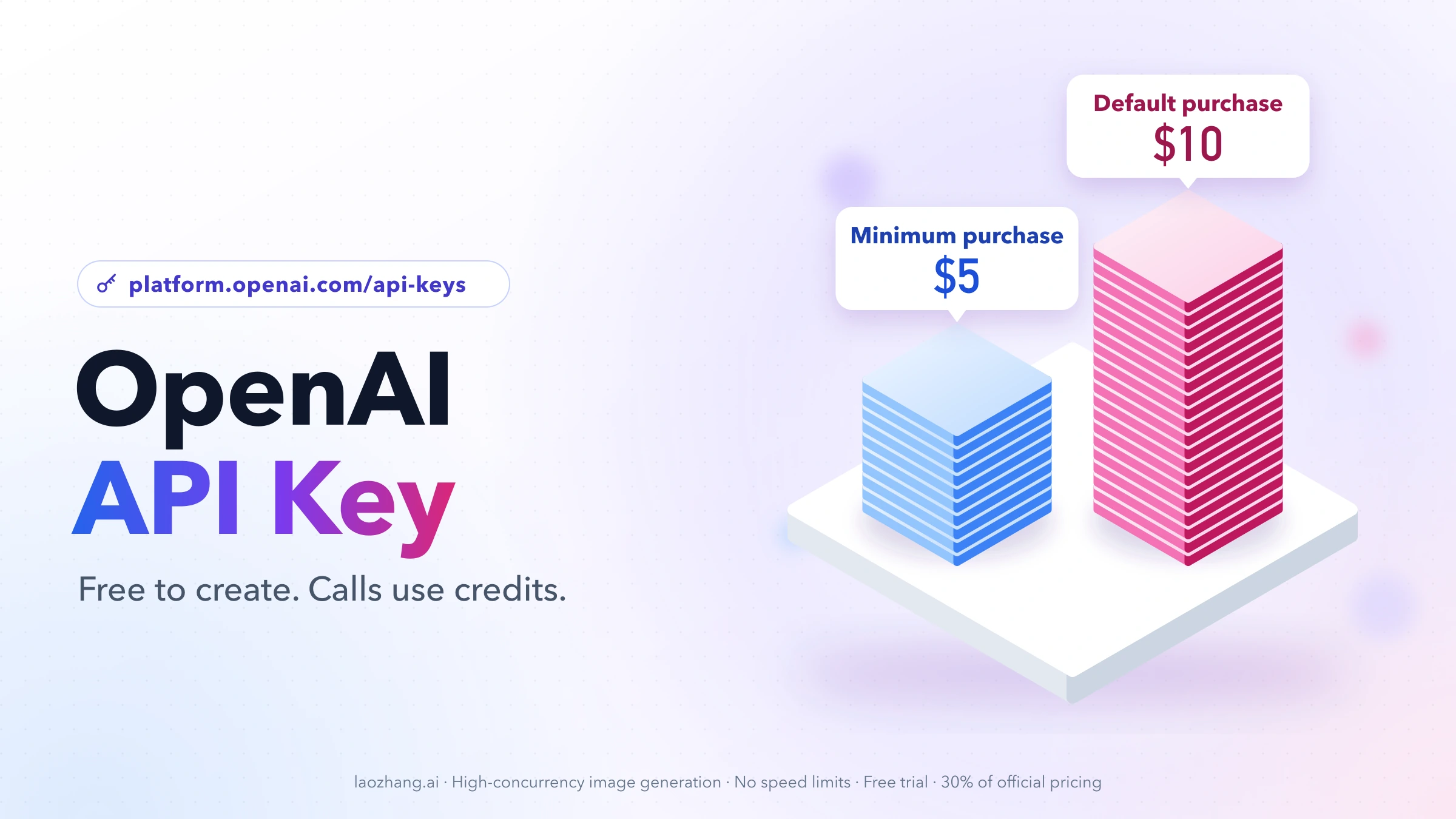
Creating a key costs nothing, but using it does. New API accounts are prepaid, so a request only succeeds after you have bought API credits (minimum $5). A ChatGPT Plus or Pro subscription does not pay for API calls, because ChatGPT and the API platform are billed separately. With a zero credit balance, a correct key still fails with HTTP 429 and the code credit_balance_exhausted.
The shortest working path:
- Sign in at platform.openai.com and open the API keys page.
- Create a secret key in the project your app belongs to (the Default project is fine for a first test).
- Copy the key and store it in the
OPENAI_API_KEYenvironment variable. - Add payment details in API billing and buy at least $5 of credits.
- Run the first call below and check that you get text back instead of an error.
How to get an OpenAI API key: create the key in the right project
Every OpenAI organization contains a Default project that can't be deleted, and every API key belongs to one project. A project is a container for keys, usage, limits, and resources; a personal key created inside a project can only reach that project and its resources (managing projects).
To create a key for a specific project, go to Settings, select the project, open API Keys, and click + Create new secret key. Organization owners, organization readers, and project members can all create keys in the projects they have access to. Only organization owners can create new projects.
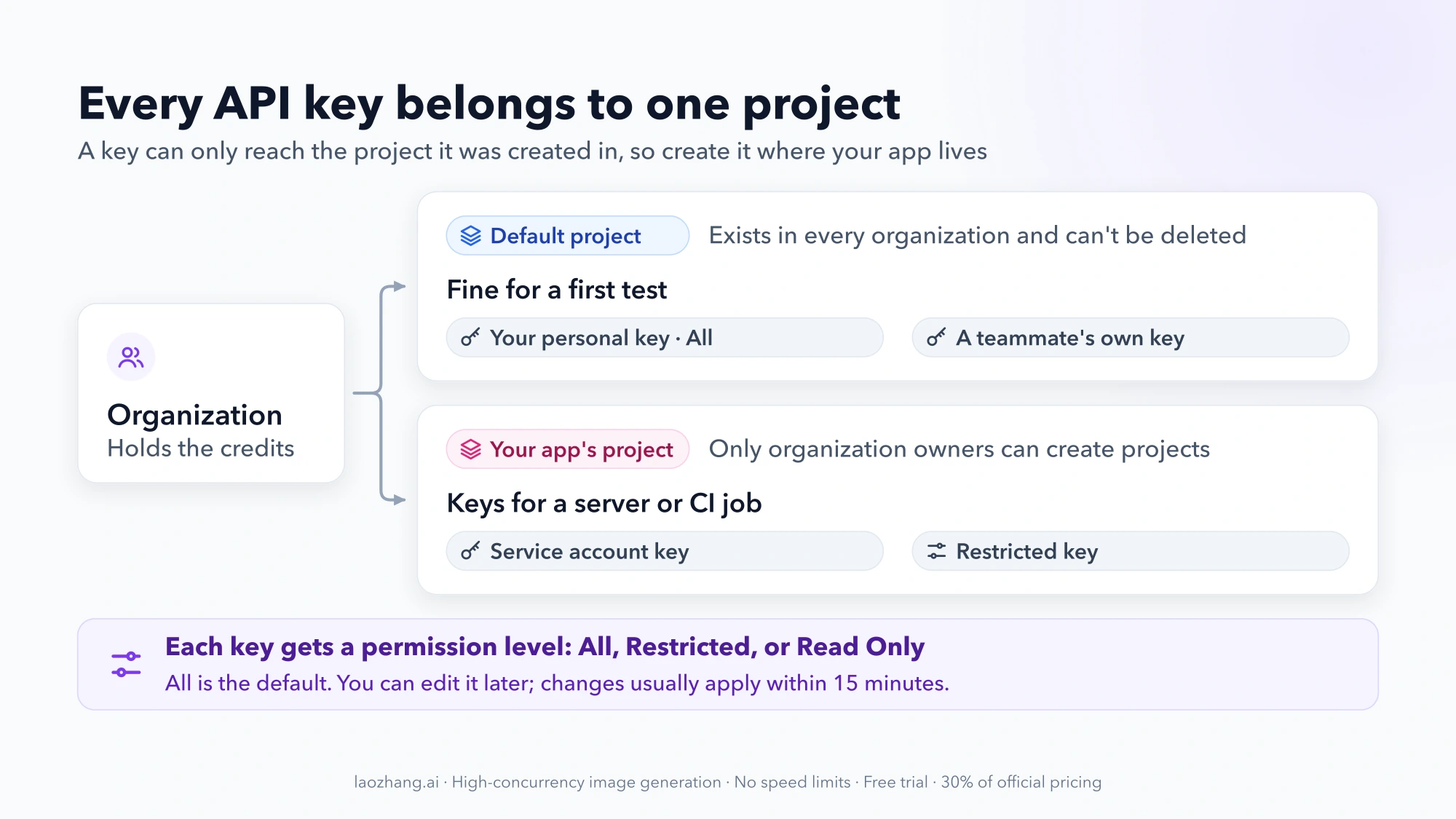
If someone invited you into their organization, create your own key in the project you were given rather than asking for theirs. OpenAI's safety guidance says each team member should use their own key, and sharing keys is against the Terms of Use.
Choose the permission level
When you create a key, you pick one of three permission levels, and you can change it later with the edit icon:
| Permission | What the key can do | Good fit |
|---|---|---|
| All (default) | Full access to the project's API resources | Personal experiments, a single app you control |
| Restricted | None, Read, or Write set per endpoint | Production apps that only need a few endpoints |
| Read Only | Read access only | Dashboards, monitoring, reporting scripts |
A Restricted key that lacks permission for the endpoint you call is rejected with a 401 error, so if you tighten permissions, test every call your app makes. Permission changes usually take effect within 15 minutes, while a revoked key stops working within seconds (API authentication reference).
Personal key or service account
A personal key is tied to you. If you leave the organization or are removed from the project, requests made with it fail with "You must be a member of an organization to use the API".
For a server, CI job, or anything that should keep running regardless of who is on the team, an organization or project owner can create a service account in the project. A service account is a non-human user scoped to one project. Its key is generated the moment the account is created, shown once like any other key, and by default can read and write all of the project's API resources.
Project keys can also be given an expiration date, after which OpenAI rejects every request made with them. Administrators can enforce a maximum key lifetime for the organization or a project. An expiring key is a good default for anything long-lived, as long as you plan the rotation described below.
Store it as OPENAI_API_KEY and make a first call
An environment variable is a named value your operating system passes to programs. All official OpenAI SDKs look for a variable called OPENAI_API_KEY and use it automatically, so your code never has to contain the key (developer quickstart).
On macOS with zsh, add the variable to your shell profile so it survives new terminal windows:
echo "export OPENAI_API_KEY='paste-your-key-here'" >> ~/.zshrc
source ~/.zshrc
echo $OPENAI_API_KEY
On Linux or macOS with bash, append the same export line to ~/.bash_profile instead. For the current terminal session only, export OPENAI_API_KEY="paste-your-key-here" is enough.
On Windows, run this in PowerShell or Command Prompt:
setx OPENAI_API_KEY "paste-your-key-here"setx only affects windows opened afterward. Close the window, open a new Command Prompt, and run echo %OPENAI_API_KEY% to confirm the value. Forgetting this step is a common reason a freshly created key "doesn't work": the old window, or an editor launched from it, still has no key or an old one.
First call with Python
This is the Responses API example from OpenAI's quickstart. It needs Python and the SDK (pip install openai):
from openai import OpenAI

client = OpenAI()  # reads OPENAI_API_KEY from the environment

response = client.responses.create(
    model="gpt-6-astra",
    input="Write a one-sentence bedtime story about a unicorn.",
)

print(response.output_text)
Save it as example.py and run python example.py. Success is a one-sentence story printed in your terminal. An exception that mentions 401 points to the key, and one that mentions 429 points to credits or limits; both are covered in the troubleshooting table further down. The same pattern works in Node.js with npm install openai and client.responses.create(...).
If you are unsure whether to start with the Responses API or the older Chat Completions endpoint, see Chat Completions vs Responses API: which one should you use.
First call with curl
Without an SDK, send the key yourself in the Authorization header as a Bearer token:
curl https://api.openai.com/v1/responses \
  -H "Content-Type: application/json" \
  -H "Authorization: Bearer $OPENAI_API_KEY" \
  -d '{
    "model": "gpt-6-astra",
    "input": "Say this is a test"
  }'
A JSON response describing the model's output means the key, project, and billing are all working. A JSON body with an error object tells you which part failed.
If your account belongs to more than one organization, or you use an older user-level key, you can add -H "OpenAI-Organization: $ORGANIZATION_ID" and -H "OpenAI-Project: $PROJECT_ID". Usage is then counted against that organization and project. Both IDs are shown in your dashboard settings.
How much an OpenAI API key costs
The key itself is free. What you pay for is usage: the tokens the model reads and writes, plus any tools or storage you use. Tokens are the small chunks of text that pricing is counted in, not a kind of key. As of September 30, 2026, these are the billing rules for new accounts (prepaid billing):
- Prepaid credits. You buy credits before using the API. The minimum purchase is $5 and the default amount is $10.
- Auto-reload is on by default. During setup, automatic top-ups are switched on. Turn them off if you don't want your card charged automatically.
- Credits expire. Purchased credits expire after one year and are generally non-refundable.
- Balance updates are not instant. After a purchase it can take a few minutes for the new balance to show up.
- ChatGPT is separate. API usage is billed separately from any ChatGPT subscription, whether Free, Go, Plus, Pro, or Business (billing for ChatGPT and the API).
If your account has any free credits, OpenAI uses them before purchased credits. OpenAI's billing help doesn't promise a free credit grant for new accounts, so plan on buying the first $5 yourself.
Estimate your bill
Prices are per 1 million tokens, with separate rates for input (your prompt) and output (the model's answer). Standard, short-context prices as of September 30, 2026 (OpenAI pricing):
| Model | Input per 1M tokens | Output per 1M tokens |
|---|---|---|
| gpt-6-astra | $10.00 | $50.00 |
| gpt-6.1-sol | $2.00 | $10.00 |
| gpt-6-luna | $0.10 | $0.50 |
Cost = (input tokens ÷ 1,000,000 × input price) + (output tokens ÷ 1,000,000 × output price).
Example: 1,000 requests, each with 1,000 input tokens and 500 output tokens, is 1 million input tokens and 0.5 million output tokens in total.
- gpt-6-luna: 1 × $0.10 + 0.5 × $0.50 = $0.35
- gpt-6.1-sol: 1 × $2 + 0.5 × $10 = $7
- gpt-6-astra: 1 × $10 + 0.5 × $50 = $35
A single test call of that size on gpt-6-astra costs about $0.035, so the $5 minimum covers a lot of experimentation. Batch and Flex processing cost half the Standard rate, and Fast mode costs double. Long-context requests are billed at higher rates. If the billed output tokens look higher than the visible answer, Are Reasoning Tokens Billed? explains where the difference comes from. For a workload-by-workload comparison of the cheaper models, see GPT-6 Luna vs. Sol pricing: calculate the cost of your workload.
Usage tiers are limits, not free usage
Your organization also has a usage tier. It sets an approved monthly usage cap and your rate limits, and it rises automatically as your total credit purchases grow (rate limits):
| Tier | How you qualify | Approved monthly usage |
|---|---|---|
| Free | Be in an allowed geography | $100 |
| Build | $5 in total credit purchases | $500 |
| Launch | $100 in total credit purchases | $5,000 |
| Grow | $500 in total credit purchases | $200,000 |
"Free" is only the name of the starting tier. It doesn't make requests free of charge: with no prepaid balance, requests still fail. Buying the $5 minimum moves you to Build, which also raises your requests-per-minute and tokens-per-minute limits. Rate limits apply per organization and project, not per user, so teammates share them.
If you can't pay OpenAI directly
Credit purchases need a payment method that OpenAI's billing accepts. If your card is declined, OpenAI API Key Purchase: Complete Payment Guide walks through the payment options.
Another route is an API gateway such as laozhang.ai. It is a separate service with its own account (registration needs a Gmail address), its own prepaid balance, and its own tokens. It works with the OpenAI SDKs through the base URL https://api.laozhang.ai/v1. A laozhang.ai token is not an OpenAI API key and does not use OpenAI's billing, projects, or permission controls. The service also states that it is not the official operator of the models it routes to.
What an OpenAI API key looks like: no documented format
An OpenAI API key is a long secret string that you paste exactly as shown. OpenAI's API documentation doesn't publish a fixed prefix or length for keys, so treat the key as an opaque value. Don't validate it with a pattern, and don't assume that a key which "looks right" is valid. The only real test is a request that doesn't return 401.
Because the full key is never shown again, you identify keys by where they live, not by their characters. Keys are listed per project on the API keys page. Naming each key after the app or machine that uses it makes it obvious which one to rotate or delete later.
When your OpenAI API key doesn't work
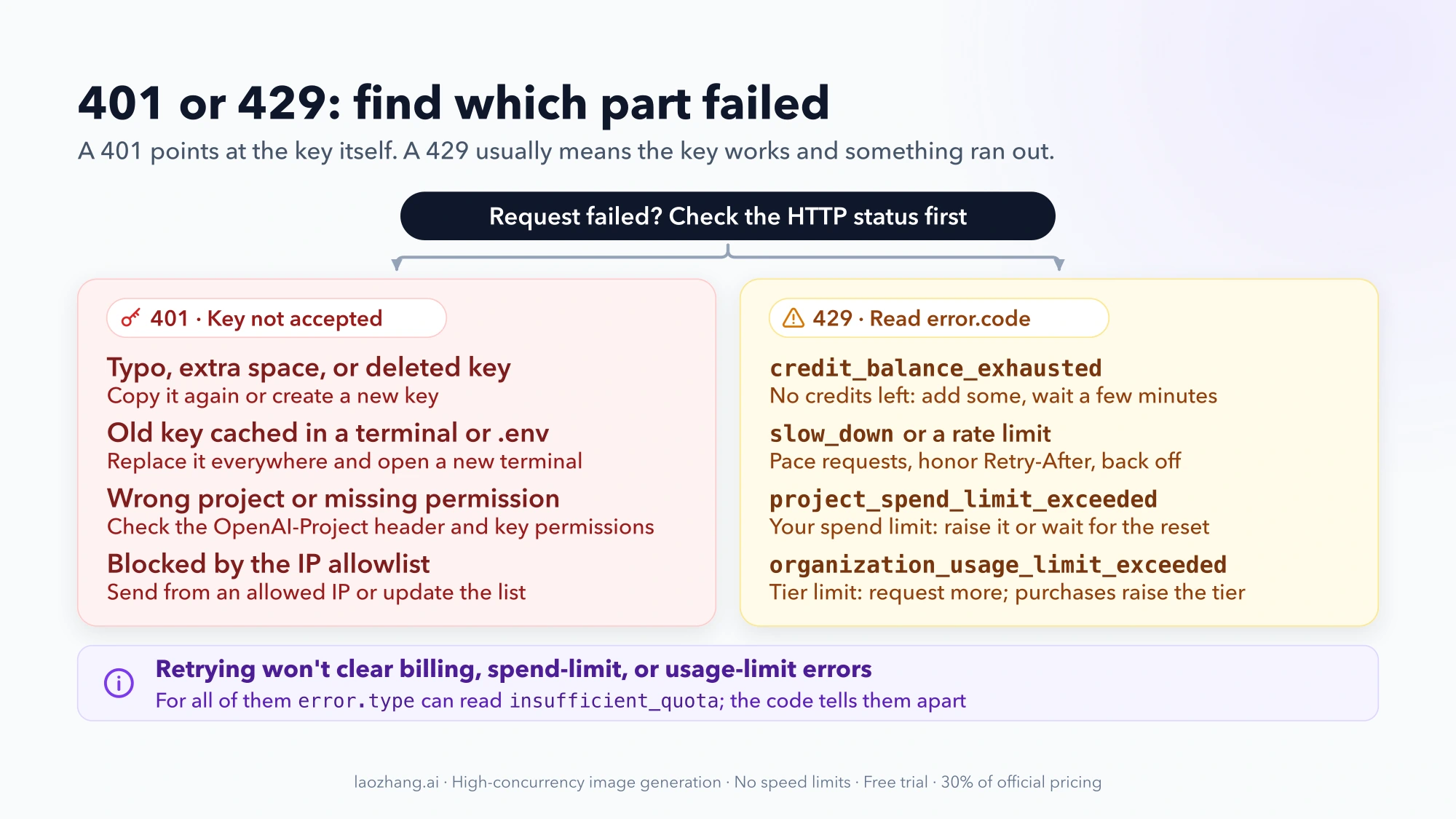
Start with the HTTP status. A 401 means OpenAI didn't accept the credentials, so the problem is the key, its project, or where the request comes from. A 429 usually means the key is fine and something else ran out: credits, rate limits, or a spending cap. The error.code field tells you which. For billing errors, the broader error.type may still read insufficient_quota, so check the code, not just the type (error codes).
| Error you see | Common causes | What to do |
|---|---|---|
| 401 Incorrect API key provided | Typo or extra space; key from another organization or project; key deleted or deactivated; old key still cached in a terminal, .env file, or app setting | Copy the key again or create a new one, replace it everywhere, and open a new terminal |
| 401 Invalid Authentication | Revoked key; key doesn't match the organization or project in the request headers; Restricted key without permission for this endpoint | Check the OpenAI-Organization and OpenAI-Project headers and the key's permissions; permission edits can take up to 15 minutes |
| 401 You must be a member of an organization to use the API | You left or were removed from the organization or project | Ask an owner to invite you back or add you to the project |
| 401 IP not authorized | The project or organization uses an IP allowlist | Send the request from an allowed IP or update the allowlist |
| 403 Country, region, or territory not supported | The request comes from an unsupported location | Check OpenAI's supported countries page |
429 credit_balance_exhausted | No prepaid credits left | Add credits, wait a few minutes for the balance to update, then retry |
429 Rate limit reached / slow_down | Too many requests or tokens in a short time, or traffic ramping up too fast | Slow down, honor the Retry-After header, and use exponential backoff |
429 organization_spend_limit_exceeded or project_spend_limit_exceeded | A spend limit you set with hard enforcement was reached | Raise or remove the limit, or wait for the monthly reset |
429 organization_usage_limit_exceeded | The OpenAI-assigned monthly usage limit for your tier was reached | Request a higher limit; your tier also rises with credit purchases |
Retrying does not fix billing, spend-limit, or usage-limit errors; only adding credits or changing the limit does. A positive credit balance also doesn't guarantee a request passes, because rate limits and spend limits are checked separately. For a deeper walk-through of 429 errors, see OpenAI API quota exceeded? Complete troubleshooting guide.
Best practices: keep the key safe and handle a leak
Anyone who has your key can spend your credits. OpenAI's key safety guidance comes down to a few habits:
- Keep it on the server. Never put the key in browser JavaScript or a mobile app. Route requests through your own backend, where the key stays private.
- Keep it out of your code. Load it from an environment variable or a key management service, and never commit it to a repository.
- One key per person, one key per app. That way you can revoke one without breaking everything else.
- Cap the damage. Set monthly spend limits for the organization or project and turn on hard enforcement. Spend alerts alone don't stop traffic, and enforcement isn't instantaneous, so spend can slightly exceed the limit.
- Restrict where it works. An IP allowlist rejects requests from other addresses even when they carry a valid key.
- Prefer short-lived credentials where you can. For supported workloads, workload identity federation exchanges your cloud identity for a short-lived OpenAI access token instead of storing a long-lived key.
Rotate a key without downtime
Rotation means replacing a key with a new one before retiring the old one:
- Create a replacement key in the same project with the same permissions.
- Deploy it everywhere the old key was used, including servers, CI secrets,
.envfiles, and shell profiles. - Confirm that requests succeed with the new key.
- Revoke the old key. Revocation takes effect within seconds.
If you think a key has leaked, for example it was pushed to a public repository, pasted into a chat, or shipped in a client app, rotate it immediately from the API keys page. Then check your usage for requests you don't recognize, and make sure a spend limit with hard enforcement is in place. Deleting a key without deploying a replacement first stops every app that depends on it.
FAQ
Is there a free OpenAI API key?
No. Every key is created for free, but calls are paid from prepaid credits, and a ChatGPT subscription doesn't include API access. The Free usage tier is a limit level, not free usage. For the routes people use to lower or avoid that cost, see how to get an OpenAI API key for free.
Can I see my OpenAI API key again after creating it?
No. The full secret is shown only once. If you didn't save it, create a new key, update your app, and delete the old key when nothing uses it anymore.
Does ChatGPT Plus or Pro include the API?
No. ChatGPT and the API platform have separate billing. To use the API, add a payment method and buy credits in the API platform's billing settings.
How many OpenAI API keys should I create?
Create one per person and one per app or environment, such as development and production. Separate keys let you set different permissions and revoke one without breaking the rest.
Can I use my OpenAI API key in a no-code tool or browser extension?
You can paste it into tools that run on your behalf, but the tool then holds a key that can spend your credits. Give each tool its own key with the narrowest permissions it needs. Spend limits apply to a whole project, so putting a tool in its own project with a hard spend limit keeps a misbehaving tool from draining your balance.